










Conversational AI is software that holds a natural-language dialogue with people, understands what they mean, and responds or takes action across several turns.
But if an assistant can explain your refund policy yet can't issue a refund or reach someone who can, how much of the customer's problem has it solved? That gap matters more than how human its replies sound.
For an operations leader, the useful way to understand conversational AI is as a loop of understanding, acting, and handing off. Before choosing a model or designing a chat window, decide where that loop should stop and a person should take over.
Table of Contents
- What Conversational AI Is and How It Differs From a Chatbot
- How a Conversation Moves Through the System
- Core Technologies and What Each One Does
- Where Enterprises Use It for Customers and Employees
- Why Escalation and Data Access Decide Success
- Pilot Scope Checklist Before You Build
What Conversational AI Is and How It Differs From a Chatbot
Conversational AI is software that holds a natural-language dialogue with people, understands what they mean, and responds or acts across several turns.
Think of a rule-based chatbot as a vending machine. It works well when you press the expected button, but it can't help much when your request falls outside the available choices.
Conversational AI aims to behave more like a hotel concierge. You ask for dinner recommendations, mention a reservation, then request a taxi. A capable system connects the taxi request to the restaurant you discussed instead of asking you to start again.
Chatbot describes an interface, usually a window where someone types. Conversational AI describes the capabilities behind the interface, which can also support phone calls or messaging. A chatbot can use conversational AI, so these aren't mutually exclusive categories.
Rule-Based Chatbot Versus Conversational AI
The comparison below describes a basic scripted bot and a conversational AI system configured for business tasks. These capabilities still need deliberate design, integrations, and testing.
| Aspect | Rule-based chatbot | Conversational AI |
|---|---|---|
| How input is read | Matches keywords and menu choices | Interprets intent and context in free language |
| Unexpected phrasing | Fails or repeats the menu | Recovers and asks a clarifying question |
| Memory across turns | Usually none beyond the current step | Tracks dialogue state across the conversation |
| Actions taken | Fixed scripted replies | Calls tools and updates business systems |
| Handoff to a person | Fixed rule or dead end | Applies transfer policies when uncertainty or frustration requires help |
Say a customer requests a delivery-address change, then adds that only the pending order should change. A capable assistant distinguishes the order's shipping address from the account's saved address. It doesn't treat the latest sentence as an unrelated question.
Ordinary conversation provides a useful reference for following a thread.

From Scripted Conversation to Context
The history reaches from Alan Turing's 1950 imitation game, later called the Turing Test, to Joseph Weizenbaum's 1966 ELIZA, described in his Communications of the ACM paper. ELIZA used pattern matching and a therapist-style DOCTOR script, not a broad world model or reliable conversational memory.
Today's neural networks and large language models, models trained to process and generate language, make exchanges more fluent. They don't remove the underlying task: interpret an utterance, choose an appropriate response, and continue coherently.
Try changing your mind halfway through a request. If the assistant preserves relevant details and updates the plan, it demonstrates conversational capability; if it restarts its menu, you're probably dealing with a scripted flow. That's a useful practical test, not proof that the system will handle every situation reliably.
How a Conversation Moves Through the System
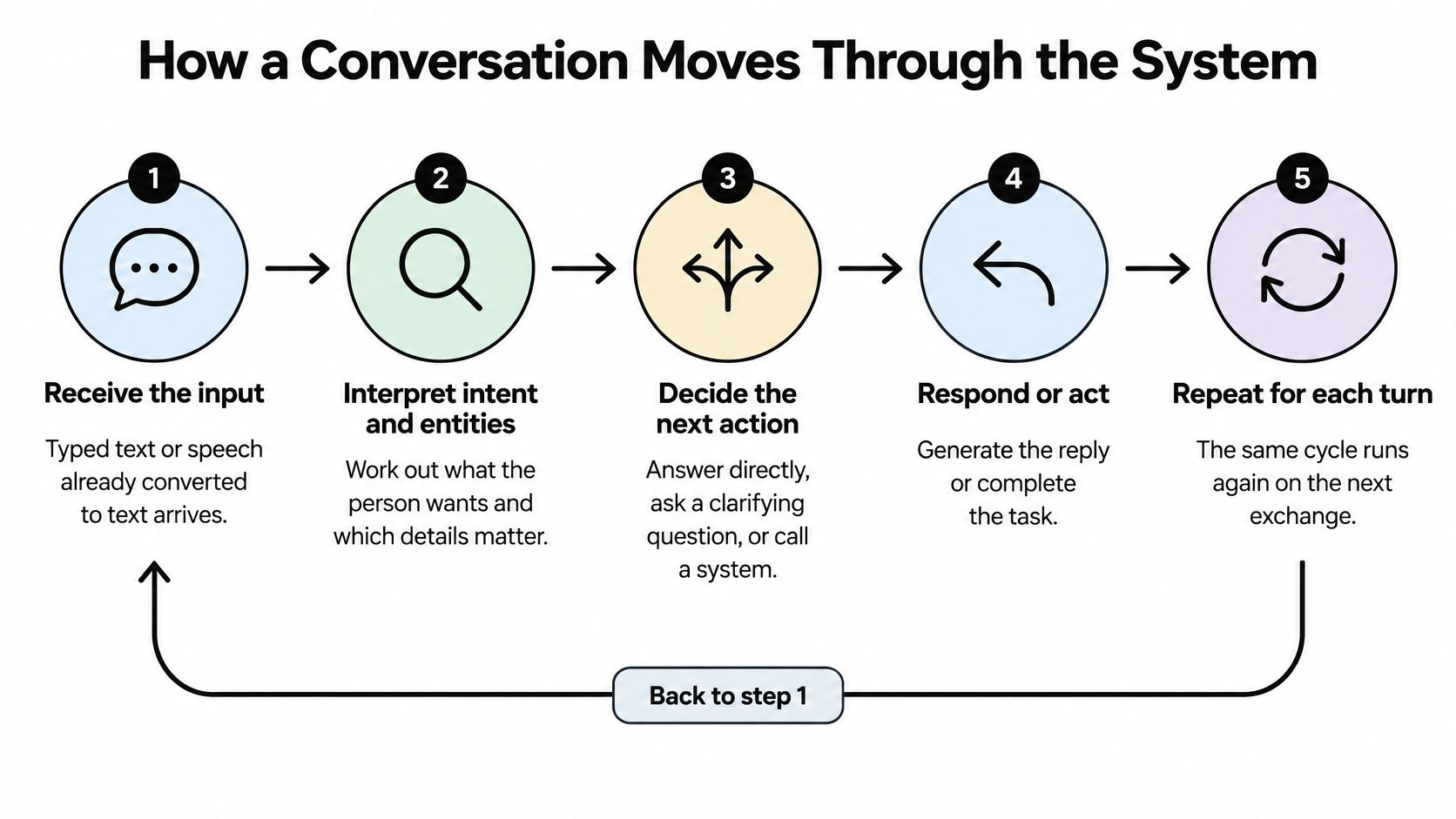
A conversation isn't one long instruction sent to a language model. Each exchange updates a working record of what the person wants, what the system knows, and what should happen next.
Consider a customer asking to move a Thursday appointment. The loop below separates hearing the request from completing it.
Receive the input. Typed text arrives directly; spoken input first needs transcription into text. Getting the appointment date right at this stage prevents the customer from having to correct the entire exchange.
Interpret intent and entities. The intent is the requested task, such as rescheduling. Entities are the relevant details, such as Thursday or a booking reference, so the customer can express a straightforward request without using a menu.
Update dialogue state. This is the working record of confirmed details, missing information, and changes to the request. If the customer switches from morning to afternoon, the assistant should replace the earlier preference rather than retain conflicting instructions.
Retrieve information or call a tool. The assistant checks the booking system for eligible appointments and available slots. The customer receives options that can be booked, not plausible suggestions invented by the model.
Generate a grounded reply. Grounded means based on retrieved information or confirmed system results. The assistant should announce a successful change only after the booking system confirms it, so the customer can trust the confirmation.
Continue or hand off. The assistant asks for missing information, completes the next permitted action, or transfers the case. The customer shouldn't be trapped in repeated clarification when the system can't progress.
The visual groups those mechanics into a simpler recurring loop.
Measure the Outcome, Not the Performance
Dialogue-system benchmarking work pairs goal completion with normalized turn count, the average conversational turns between starting and completing a task. That distinction matters because eventual success can still involve an exhausting exchange.
Record the requested goal, state changes, tool calls, completion status, transfers, and end-to-end response time. If a booking fails because the scheduling service rejects a request, rewriting the assistant's greeting won't fix it.
A successful conversation leaves evidence in the business system, not just a convincing confirmation in the transcript.
For the appointment example, a healthy result is a correctly updated booking, an efficient exchange, and no unnecessary repetition. Polite language helps, but it isn't the completion criterion.
Core Technologies and What Each One Does
Use this table as a lookup: each technology has a distinct job, and each can fail even when the final reply sounds polished.
Core Technologies in a Conversational AI System
| Technology | Job in the conversation | Example from a service call |
|---|---|---|
| Speech recognition | Converts spoken audio into text | Transcribes a caller asking to reschedule a Tuesday visit |
| Natural-language understanding | Identifies intent and entities | Recognizes a rescheduling request with Tuesday as the date |
| Dialogue management | Tracks state and decides the next move | Remembers an order number supplied earlier |
| Retrieval-augmented generation | Fetches approved policy or product text to support an answer | Pulls the current refund policy before answering |
| Tool and API integration | Reads or changes business systems | Checks available slots and books the new time |
| Language generation | Writes the reply | Confirms the new appointment in plain sentences |
| Text-to-speech | Turns the reply into voice | Speaks the confirmation to a phone caller |
Natural-language understanding, often shortened to NLU, is about extracting meaning rather than matching a particular phrase. “Push my visit back” and “reschedule my appointment” may express the same intent. This distinction is central to natural-language understanding in service workflows.
Retrieval-augmented generation, or RAG, gives the model relevant reference material before it answers. An API, or application programming interface, is a defined way for software systems to exchange information or request actions. Retrieval helps establish what the policy says; an API connection can make the permitted change.
Diagnose the First Incorrect Step
A fluent reply based on stale policy is still wrong. An accurate policy explanation followed by a failed account update is still an incomplete service request.
For voice deployments, inspect transcription when errors cluster around accents, background noise, or fast speech. For policy mistakes, inspect which document was retrieved, its effective version, and whether the answer stayed within that document.
For failed actions, examine tool inputs, permissions, error responses, and confirmation handling. Don't assume a better language model will repair an expired credential or a missing account identifier.
Start with the earliest incorrect step in the conversation record. If the transcript captured the right words but the assistant chose the wrong task, inspect understanding and dialogue management before changing the voice or rewriting the final response.
Where Enterprises Use It for Customers and Employees
In 2025, 85% of customer-service leaders planned to explore or pilot conversational generative AI, according to Gartner research reported by MakeBot. That was a measure of intent, not evidence that those deployments reached production or delivered results.
For an operations team, the practical question is where a conversational interface can remove work without introducing unacceptable risk. Start with the conversations employees already handle repeatedly.
Customer-facing automation still needs coordination with the people responsible for service.

Enterprise Conversational AI Use Cases and Their Success Measures
| Team | Typical conversation | Success measure |
|---|---|---|
| Customer support | Order status, refunds, and booking changes | Resolution rate and handoff quality |
| Customer sales | Product questions and appointment booking | Completed bookings per conversation |
| Employee HR | Leave balances, benefits, and policy questions | Share of cases closed without a ticket |
| Employee IT | Password resets and access requests | Time to resolution |
| Field operations | Quick procedure lookups during a task | Time to answer during the task |
The same interface can serve very different operating needs. An employee asking about parental leave needs an answer grounded in the applicable policy; a technician needs the approved procedure for the equipment in front of them. Neither benefits from a confident answer drawn from an unrelated document.
These conversational AI examples are useful starting points for mapping a workflow, but choose the pilot around your own systems and constraints. A popular use case isn't automatically a suitable first deployment.
Choose a Task With a Clear Finish
The strongest initial candidates combine frequent requests, explicit rules, and safely accessible information. Order status is attractive when shipment records are current and customer verification is established. It's less attractive when staff must reconcile conflicting carrier updates manually.
Choose agent assist, where AI supports a staff member, when the task requires judgment that policy can't describe clearly. An assistant can assemble relevant records and draft a response while a person remains responsible for the decision.
Use the video alongside a concrete workflow discussion, rather than as a substitute for defining the task.
Ask the process owner: Which routine conversation consumes the most staff time, and which system holds the answer? If nobody can identify the authoritative record or define a completed request, resolve that process ambiguity before automating the conversation.
Why Escalation and Data Access Decide Success
The best conversational AI strategy doesn't necessarily remove the most human involvement. It makes human involvement available at the right moment, with enough context to be useful.
Five9's consumer research announcement reports the escalation findings below, including the separate U.S. survey results.
| Finding | Share of respondents |
|---|---|
| Open to AI-powered interactions only if they can escalate to a human when needed | 72% |
| U.S. consumers who had escalated an AI-handled issue to a human | 55% |
| U.S. consumers who said the AI failed to understand their problem | 45% |
Design the Transfer Before Autonomy
Say a banking customer challenges a transaction after the assistant has exhausted the permitted checks. A useful transfer includes the disputed transaction, verified identity status, completed checks, and unresolved question. The human should continue the investigation, not restart the interview.
Detect uncertainty and negative sentiment, but don't make emotion detection the only route out. A direct request for a person should be recognized without requiring the customer to become angry. This is a practical application of human-in-the-loop automation.
Measure resolution quality, not containment alone. Containment means keeping the interaction within automation; a contained exchange that produces a repeat call hasn't necessarily saved work.
Data access sets another boundary. An assistant may understand a request perfectly while lacking current account information or permission to act. In banking or healthcare, an early transfer can be preferable to an unsupported autonomous answer.
Transcripts also need governance beyond the immediate handoff. If your organization is considering secondary commercial use, SourceX's discussion of licensing AI support agent transcripts offers context for reviewing that proposal separately from ordinary service delivery.
Handoff rule: Transfer when the user asks for a person, required evidence or permission is missing, or the request exceeds the approved risk boundary.
Make those conditions explicit before building. The transfer should preserve relevant context while disclosing only what the receiving person is authorized to see.
Pilot Scope Checklist Before You Build
- Define system access. List the records the agent may read and change. Test freshness against the source system, not just a cached demonstration.
- Specify disclosure rules. Establish identity verification and which information each user may receive. Access to a record doesn't imply permission to reveal it.
- Set transcript controls. Define consent, retention, deletion, and permitted reuse. Assign an owner for enforcing those decisions.
- Configure escalation. Specify transfer triggers, receiving teams, and the context included. Test what happens when nobody is available.
- Choose verifiable outcomes. Use completed requests, correctly changed records, and resolved cases. Keep an audit trail that connects actions to the conversation.
- Plan correction. Show uncertainty plainly and establish how incorrect answers are detected, reviewed, and fixed.
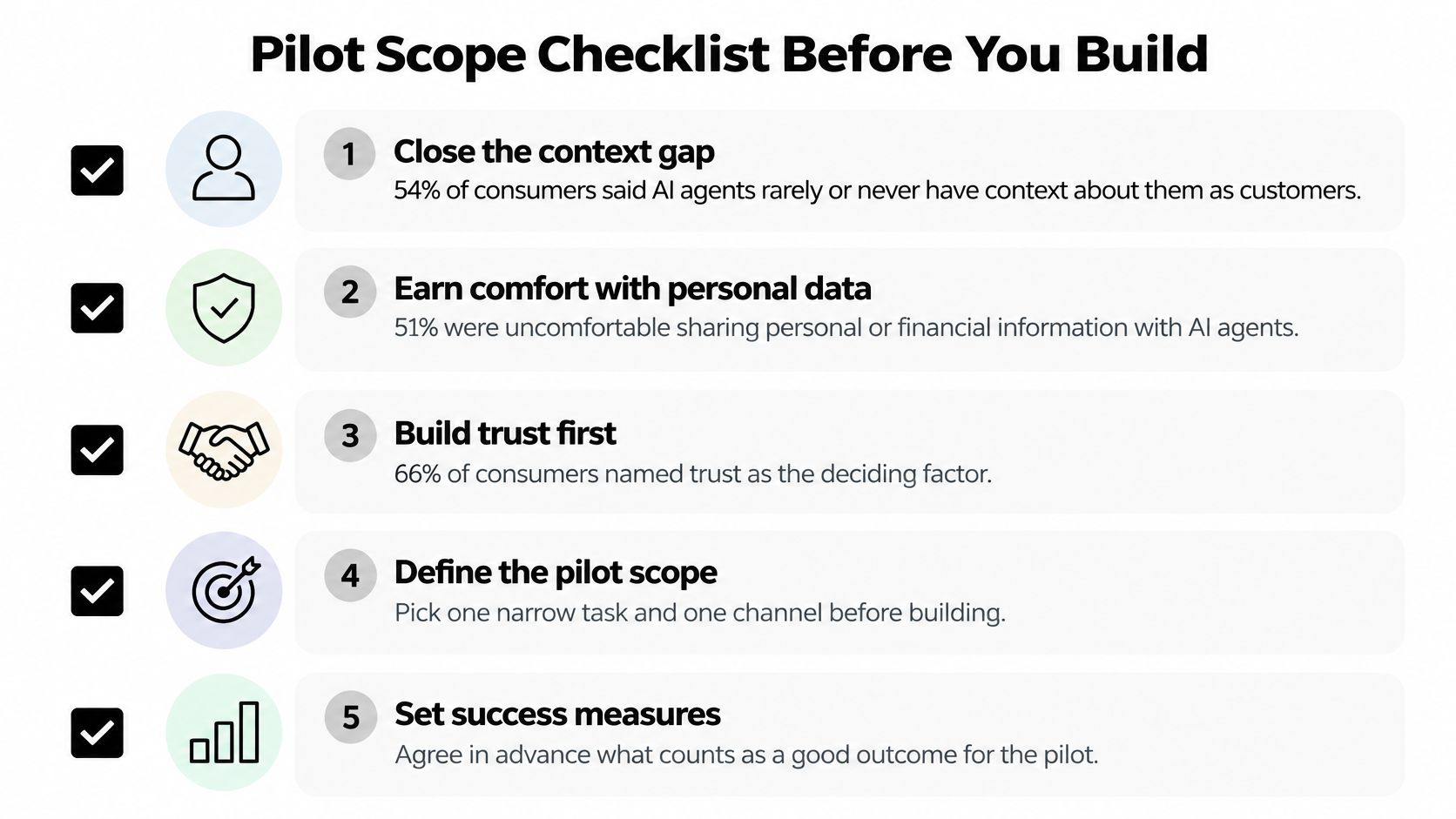
These controls address a real trust gap: 54% of consumers said AI agents rarely or never have context about them as customers, and 51% were uncomfortable sharing personal or financial information with AI agents, according to the findings discussed by Slack. Adding more customer history isn't a substitute for defining appropriate access.
Use the visual checklist as a discussion aid, with the operational controls above guiding approval.
Keep the First Release Narrow
Start with a single channel and a routine task such as order status. Evaluate real conversation records, failed actions, and transfers before expanding the scope.
At Yellow.ai, our analytics track real-time conversational AI metrics, and our Agent Assist automatically transfers conversations when negative user sentiment is detected. Test those capabilities against your written acceptance criteria rather than treating a feature demonstration as pilot approval.
Before any build starts, write the escalation conditions and the outcome measure on a single page. Have the service owner and system owner approve it together.
Yellow.ai offers conversational AI across voice, chat, and email, with agents that can complete workflows such as purchases and booking changes. Visit Yellow.ai to explore how your chosen workflow could combine automated action, measurable outcomes, and contextual human handoff.