














A useful conversational interface isn't defined by how friendly it sounds. It's defined by whether it completes real work across customer experience and employee experience without creating new friction. That's the shift many teams miss when they look for conversational AI examples. The hard part isn't generating a decent response. It's resolving the issue, updating the right system, handling exceptions, and handing off cleanly when automation shouldn't continue.
That change is happening at enterprise scale. A 2026 survey of 1,840 organizations across 12 industries found that 72% of enterprises with more than 500 employees had deployed at least one AI chatbot or conversational AI system, up from 53% in 2024, according to LLM Research Lab's chatbot adoption analysis. That matters because conversational AI is no longer a pilot sitting beside the stack. In many enterprises, it's becoming part of the operating stack itself.
The most useful conversational AI examples also split along two lines that buyers should treat separately. First, chat and voice are not the same problem. Second, reactive support and proactive outreach create different governance, latency, and measurement requirements. A return request in web chat, a benefits question in Microsoft Teams, an appointment reminder by phone, and a lead-qualification flow on a pricing page might all look similar from a distance. Underneath, they need different architecture choices.
The ten examples below are organized by both industry and operating use case. For each one, the practical lens stays the same: business objective, user flow, integrations, measurable outcomes, multi-LLM and RAG design, voice fit, governance, and scaling tactics. Where it fits naturally, I'll also reference platform capabilities that support these patterns in production, including Yellow.ai's multi-LLM setup, agentic RAG, omnichannel orchestration, Nexus Vox, automated testing, analytics, and pre-built integrations.
Table of Contents
- 1. Customer Service and Support Automation
- 2. Employee Experience and HR Service Automation
- 3. Voice AI and Telephony Integration
- 4. Sales and Lead Qualification
- 5. Knowledge Base and FAQ Automation
- 6. Banking and Financial Services Automation
- 7. Healthcare and Patient Support Services
- 8. E-Commerce and Retail Customer Experience
- 9. Outbound Communication and Campaign Management
- 10. Process Automation and Workflow Optimization
- 10 Conversational AI Use Cases Compared
- Turn Examples Into an Operating Blueprint
1. Customer Service and Support Automation
Support automation succeeds or fails on backend execution. A polished chat flow that cannot verify identity, read account state, or complete the next step adds friction instead of removing it.
This category covers a wide range of operating models: Sephora-style product and order questions, Bank of America's Erica for account guidance, Shopify merchant returns, and telecom billing support. The surface experience looks similar. The deployment choices do not. A password reset bot, a returns assistant, and a billing dispute flow each need different system access, escalation rules, and risk controls.
The business objective is straightforward. Reduce routine contact volume and agent effort while keeping resolution quality high. The useful way to organize the use case is by task type: informational requests, account-specific questions, policy explanation, and transactional support actions. That operating split matters more than the channel.

A practical deployment lens
Start with narrow, high-volume flows such as order tracking, password reset, return eligibility, billing explanation, or appointment rescheduling. Then map the user flow from entry point to resolution. The assistant should identify the intent, authenticate where needed, retrieve policy or account context, complete the action if rules allow it, and transfer with a summary if confidence drops or approval is required.
That usually leads to a three-layer architecture. One layer handles retrieval for help-center and policy content. One layer handles actions through CRM, order management, identity, payment, and ticketing systems. One layer supports the human handoff. In blended environments, agent assist workflows help by giving agents a conversation summary, suggested next steps, and relevant knowledge during escalation.
A practical rule applies here. If the assistant can explain the next step but cannot execute it or hand off cleanly, keep the scope narrow until the backend path is ready.
A useful adjacent pattern is AI-powered in-product guidance, especially for teams that discover a large share of support demand comes from product confusion rather than service failure.
Architecture choices that hold up in production
For this use case, a single model is rarely the best operating design. Teams often use a cheaper classifier or routing model for intent detection, a stronger generation model for response drafting, and retrieval over approved content for policy-heavy answers. RAG should be constrained by source type and recency. Billing policy, refund rules, and warranty terms need different freshness rules than evergreen troubleshooting articles.
Voice changes the design again. Phone support needs faster turn-taking, stricter interruption handling, and shorter answer lengths than chat. It also needs stronger fallbacks because ASR errors can compound quickly during authentication or payment-related tasks.
Governance should be explicit. Define which intents are safe for full automation, which require identity verification, which can be suggested but not completed, and which must route to a human. Logging needs to capture source documents used, backend actions attempted, escalation triggers, and failure reasons. That audit trail becomes important when support leaders review complaints, refunds, and policy exceptions.
How to measure it
Use KPIs at the flow level, not only at the program level. Generic support dashboards hide whether the automation is working.
A telecom billing assistant is a good example. For authenticated balance checks, track containment rate, average resolution time, and repeat contact within seven days. For disputed charges, track escalation rate, transfer reason, and first-contact resolution after handoff. Those are different jobs. They should not share the same success threshold.
The broader scorecard should still include average handle time, cost per interaction, CSAT, first-contact resolution, repeat contact rate, and total support cost. The point is to attach each metric to a concrete workflow and customer state. Otherwise, teams report high automation volume while disputed, high-friction contacts continue to consume agent time.
What scales, and what breaks
Patterns that scale:
- Tight escalation rules: Route on failed authentication, low retrieval confidence, emotional language, fraud signals, or policy exceptions.
- Persistent context: Carry conversation history and account state across web, app, messaging, and the support desk.
- Weekly failure review: Inspect conversations that escalated, stalled, or produced low CSAT. Then fix the content gap, tool failure, or workflow branch that caused it.
- Intent-by-intent rollout: Expand only after the current flows show stable containment and clean handoff quality.
Patterns that fail:
- Too many intents at launch: Coverage expands before backend actions and exception paths are stable.
- Uncontrolled content sources: Conflicting help-center articles and outdated macros produce inconsistent answers.
- Weak transfer design: Agents receive no summary, no retrieved context, and no record of failed steps, so the customer repeats the issue.
- No separation between low-risk and high-risk flows: A return-status bot and a payment-dispute bot should not share the same governance model.
The scaling lesson is simple. Start where the task is common, rules are clear, and the backend action is available. Then expand by intent family, not by channel count. That is how support automation moves from a demo to an operating system.
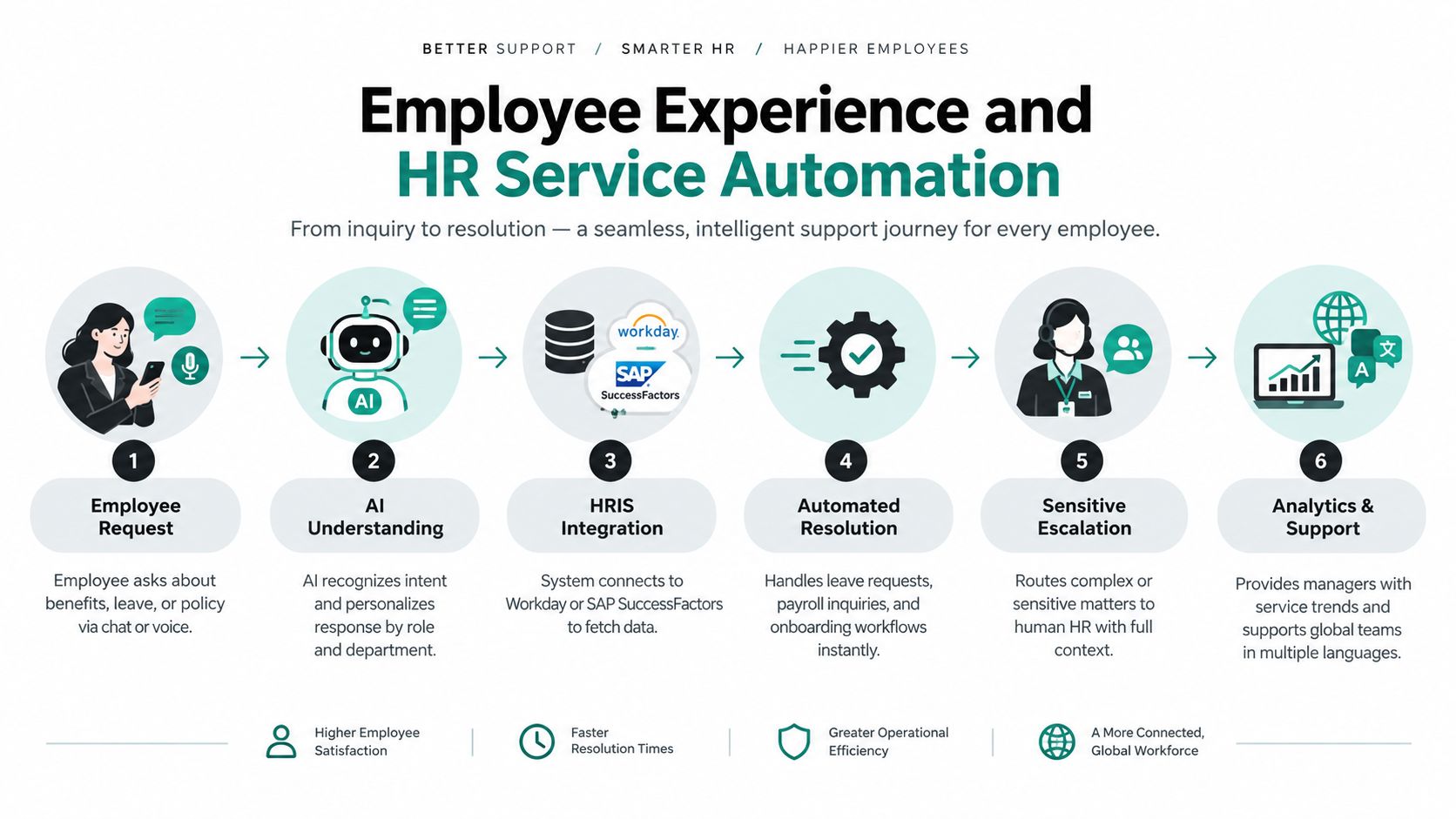
2. Employee Experience and HR Service Automation
Internal HR automation is usually won or lost on access control, not copy quality. An assistant that answers a benefits question for the wrong employment type, region, or manager level creates risk faster than it saves time.
A strong employee-service deployment starts with a narrow operating goal: reduce wait time for common requests while keeping approvals, exceptions, and sensitive cases under human control. The best early examples are predictable internal tasks. New-hire onboarding steps, leave-policy questions, payroll timing, benefits enrollment, equipment requests, and manager policy lookups all fit because the business objective is clear and the workflow can be bounded.
The user flow should stay simple. An employee asks a question in Teams or Slack, the assistant checks identity and role, retrieves the relevant policy or form, and either answers directly or starts a workflow in the HRIS, ITSM, or ticketing system. If the topic involves accommodations, harassment, pay disputes, or policy exceptions, the assistant should route to the right human queue with context attached. That routing logic matters more than conversational polish.
Architecture follows the same pattern across industries. Use retrieval for policy explanation. Use orchestration for actions such as leave requests, access provisioning, onboarding checklists, and document collection. A conversational knowledge base for internal policy and procedure retrieval works only when content ownership is explicit. HR owns policy text. IT owns system-access flows. Legal owns exception language and review rules.
This is also where multi-LLM design becomes practical rather than theoretical. A smaller model can handle intent classification, language detection, and structured summaries. A stronger model can answer grounded policy questions, but only against approved content. For high-risk topics, retrieval-first responses are safer than broad generation. If confidence is low, the system should stop, cite the source policy, and hand off.
Benely on AI in HR makes the right point. HR AI creates value when it is attached to real service operations, approval paths, and employee support metrics.
Voice is a secondary channel here, not the starting point. It helps in environments with deskless workers, shared devices, or multilingual frontline teams, but only for tasks with short turns and clear outcomes. Shift-policy questions, absence reporting, and onboarding reminders can work well. Benefits comparisons and sensitive case intake usually belong in chat or human-assisted channels where employees can review exact wording.
Governance has to be specific. Role-based retrieval should separate employees, managers, contractors, union groups, and regions. Logging should capture which source document was used, what action was triggered, and why a case escalated. Retention rules should limit how long sensitive conversations remain available. Teams that skip these controls often discover the problem during a policy dispute, not during testing.
Measure more than deflection. Track first-response time, task completion for onboarding or leave workflows, repeat questions on the same policy, escalation reasons, and cases where employees abandon the flow before submission. Those signals show whether the issue is model quality, bad content, weak permissions, or a broken backend step.
The scaling lesson is consistent. Start with one employee journey, such as onboarding or leave support. Prove that identity, retrieval, approvals, and audit logs work under real policy complexity. Then expand by service family, not by adding every HR question at once.
3. Voice AI and Telephony Integration
Voice exposes every weak link in a conversational system. Airlines handling flight changes, banks answering account questions, insurers checking claim status, and clinics sending reminder calls all run into the same constraint first. The caller notices latency, interruption errors, and bad transfers before they notice model fluency.
That makes telephony a different operating problem from web chat. The target is not just a correct answer. The target is a call flow that survives background noise, partial utterances, identity checks, and handoff rules without breaking service levels.
Bluejay's stress-testing analysis found that production voice systems still operate with a noticeable gap between system response time and natural human turn-taking, which helps explain why many voice bots feel awkward even when their answers are acceptable Bluejay's 2026 stress-testing analysis.
The implementation pattern that holds up in production is straightforward. Keep the telephony layer inside the contact-center system of record. Inherit routing, queue priority, transfer destinations, and wrap-up codes from the platform already running operations. Teams using a Genesys voice AI integration pattern usually get better adoption because supervisors can keep existing reporting, SLA logic, and escalation controls instead of rebuilding them in a separate orchestration layer.
A strong deployment starts by narrowing the objective. Pick one call type with short turns and a bounded decision tree, such as appointment reminders, claim status, card activation, payment confirmation, or store-hours lookup. Open-ended support lines fail early because the system has to solve speech recognition, policy retrieval, authentication, sentiment shifts, and routing all at once.
The user flow should reflect how callers behave:
- Identify intent in the first few turns.
- Confirm one high-risk field, such as account number, date of birth, or appointment ID.
- Resolve the task if the backend state is clear.
- Escalate with transcript, intent label, and collected entities if confidence drops.
For teams evaluating platforms, this product demo is useful as a reference point for how voice orchestration is packaged:
The architecture usually works best as a pipeline, not a single model call. Use one layer for ASR and turn detection, another for classification and policy checks, and a response layer that can switch between retrieval-grounded answers and fixed prompts. In regulated environments, I prefer keeping transactional intents on deterministic flows and reserving generative responses for explanation, clarification, and low-risk FAQ turns.
RAG matters here, but only if retrieval is disciplined. Voice agents should pull from approved policy snippets, call-disposition rules, and account-state APIs, then cite the source internally for audit review. Multi-LLM setups also help. A smaller model can classify intent and detect escalation triggers quickly, while a stronger model handles explanation turns after the workflow has enough context.
Voice design choices affect business outcomes more than teams expect. Barge-in handling reduces caller frustration. Short prompts reduce recognition drift. Explicit confirmations cut downstream errors on dates, amounts, names, and addresses. A synthetic voice that sounds pleasant but speaks too slowly will increase average handle time.
Convozen's benchmarking write-up makes the right measurement point. End-to-end latency is what users experience because it includes preprocessing, normalization, acoustic modeling, vocoding, and output transfer Convozen's benchmarking write-up on conversational TTS latency.
Measure the operation like a contact-center program, not like a chatbot launch. Track containment rate by intent, median mouth-to-ear latency, transfer rate, authentication drop-off, repeat-call rate within 24 hours, agent handle time after transfer, and QA failures tied to wrong backend actions. Those metrics separate speech problems from retrieval issues, policy gaps, and poor routing logic.
Governance also changes in voice. Consent language, recording rules, PCI redaction, identity verification thresholds, and transcript retention need channel-specific controls. If the agent can trigger account actions, every automation path should log the prompt, retrieved source, API response, and transfer reason.
The scaling lesson is narrow and operational. Start with a high-volume, low-variance call type. Prove latency, routing inheritance, auditability, and fallback behavior under real traffic. Then expand by queue family, not by turning the main support line into a general voice assistant overnight.
4. Sales and Lead Qualification
Sales qualification is a routing problem with revenue consequences. If the assistant sends enterprise buyers into an SMB queue, misses buying signals, or books meetings without enough context, pipeline quality drops and reps stop trusting the channel.
The strongest conversational AI examples in this category sit close to a conversion point. Typical deployments include pricing-page assistants, demo request triage, B2B SaaS fit screening, partner inquiry routing, and high-consideration services intake. The business objective is specific: capture intent while it is live, answer enough product questions to keep the conversation moving, and hand sales a meeting or lead record they will accept.
Design the user flow around qualification quality
A good flow starts with the visitor's immediate job, not the company's form fields. If someone asks about integrations, implementation time, procurement requirements, or pricing structure, the assistant should answer within approved bounds before asking for contact details. Qualification works better after the buyer sees that the system can handle basic product and process questions.
The operating choice is how much to ask before routing. Too few questions produce low-context meetings. Too many questions reduce conversion. In practice, the minimum useful set is usually role, company size or segment, primary use case, region, and timeline. For some teams, existing stack or required integrations belong in the first interaction because they determine rep assignment or solution engineer involvement.
Behavioral triggers can help, but they need restraint. A return visit to pricing, repeat engagement with integration docs, or time spent on security content can justify a prompt. The prompt should stay assistive. “Need help evaluating fit?” performs better than pushing for a meeting on the first message.
Architecture: routing, retrieval, and CRM writeback
This use case benefits from a split architecture. Use a lightweight model for intent classification, entity capture, and next-step orchestration. Use a stronger model for product Q&A and transcript summarization. Add retrieval over approved product, pricing, implementation, and security content so the assistant does not improvise claims.
Integrations define whether the workflow holds up in production. The common stack includes Salesforce or HubSpot for lead creation and field updates, calendar tooling for booking, enrichment or firmographic services where policy allows, marketing automation for source tracking, and product analytics to pass page context into the conversation. If a rep takes over, the handoff needs the transcript, extracted fields, page history, and unresolved questions.
Memory matters here more than teams expect. Returning buyers should not have to repeat company size, use case, or prior technical questions. Session memory can handle short gaps. CRM-backed memory is better for repeat visits across devices and longer sales cycles, provided consent and retention rules are clear.
Governance is stricter than the chat widget suggests
Sales assistants routinely drift into risky territory. They summarize pricing, discuss security posture, mention integrations, and answer roadmap-adjacent questions. Those responses need approved source boundaries and response templates for sensitive topics.
Human escalation should also be explicit. High-intent visitors need an option to request a rep at any point. The workflow should route differently for named accounts, partner referrals, existing customers with expansion interest, and inbound candidates who are support requests. Qualification logic that treats every conversation as net-new pipeline creates avoidable friction.
What tends to work:
- Short qualification paths tied to routing decisions
- Product-answering before meeting pressure
- CRM writeback with transcript summary, fields, source, and next action
- Segment-specific paths for SMB, mid-market, enterprise, and partners
What fails in deployment:
- One script for every buyer type
- Booking meetings without enough context for rep acceptance
- No memory for returning visitors
- Loose answers about pricing, security, or roadmap
Measure lead quality, not just chat conversion
Booked meetings are only the first signal. The better measurement plan follows the lead into sales operations. Track routing accuracy, meeting attendance, rep acceptance of AI-qualified leads, pipeline creation by source, disqualification reasons, and categories of unanswered product questions. Review where reps edit summaries or re-ask questions the assistant should have captured.
Those operational metrics expose the actual failure mode. Low booking volume points to prompt timing or friction. High bookings with low acceptance usually mean weak qualification logic. Strong acceptance with poor attendance often points to calendar friction or low buyer commitment, not model quality.
The scaling lesson is narrow and practical. Start where routing rules are already explicit and sales leadership agrees on qualification criteria. Prove that the assistant can answer bounded product questions, capture the few fields that change assignment, and create CRM records reps trust. Expand to more segments only after the summaries, retrieval boundaries, and handoff logic hold up under live traffic.
5. Knowledge Base and FAQ Automation
A knowledge bot earns trust faster than almost any other conversational AI use case, and loses it just as fast. The pattern shows up across software support, internal IT help desks, patient education, and policy-heavy operations. Users ask a plain question and expect one thing in return: an answer tied to the right source, written for their role, and current enough to act on.

The business objective is straightforward. Reduce repetitive FAQ volume, shorten search time, and improve answer consistency without pushing bad documentation into more channels. That last point matters. A conversational layer spreads weak content faster if retrieval, approvals, and audience controls are loose.
The user flow should reflect that reality. A customer asks a product question, an employee asks for a policy, or a patient asks for preparation steps before a visit. The assistant identifies the audience, checks permissions, retrieves from the approved corpus, and returns a grounded answer with source references. If the query is ambiguous, the system should ask a clarifying question before retrieval, not after it has already produced a shaky answer.
Architecture decisions decide whether this works at scale. Agentic RAG is useful when the system has to choose among help-center articles, release notes, internal SOPs, policy manuals, and product documentation stored in different systems. In practice, I would separate retrieval into stages: query rewriting, source selection, document ranking, grounded answer synthesis, and confidence checks. A multi-LLM setup can help if one model handles retrieval reformulation better while another is better at concise summarization, but the larger win usually comes from cleaner content boundaries and stricter indexing rules.
Voice adds another layer of difficulty. FAQ automation in chat can get away with citations and longer answers. Voice cannot. For telephony or voice assistant deployments, answers need shorter phrasing, confirmation prompts for multi-step instructions, and clear transfer rules when the source material is too dense to read aloud safely.
Governance belongs in the design, not in a later review. Customer content and employee content should live in separate indexes. Draft documents should never sit beside approved content in the same retrieval path. Every answer should log the source used, retrieval metadata, and whether the user accepted, rephrased, or abandoned the response. Those records make it possible to audit errors and fix the content layer instead of endlessly rewriting prompts.
Measurement should go past answer rate. A better plan tracks grounded-answer accuracy, citation correctness, clarification rate, deflection on approved intents, escalation rate on high-risk intents, time to documentation fix, and repeat-question volume after an answer is shown. Human review still matters here. For example, one enterprise program reviewed 400 knowledge-base answers across 12 dimensions, including contextual understanding, follow-up quality, domain accuracy, and conversational flow, and the average human score rose from 6.0 to 7.5 over eight weeks. The useful lesson is the method, not the headline result. A defined review rubric makes weak retrieval and weak source content visible much faster than generic satisfaction metrics. See LangSmith's RAG evaluation guidance for a practical framework: https://docs.smith.langchain.com/evaluation/concepts
Scaling usually breaks in four places:
- Content ownership is unclear, so outdated articles stay live.
- Permissions are handled at the app layer instead of the retrieval layer.
- Regression testing is skipped when source docs change.
- Failed queries are logged, but no team turns them into content repairs.
The teams that get this right treat retrieval as an operating system for knowledge, not a chat feature. Start with a narrow domain that already has named content owners and stable source material. Prove source traceability, access controls, and review quality there first. Then expand to more repositories, more user groups, and more channels.
6. Banking and Financial Services Automation
Conversational AI in financial services succeeds or fails on control design. The useful examples are not the flashy ones. They are the assistants that verify identity correctly, stay inside policy, complete narrow tasks reliably, and leave an audit trail that operations and compliance teams can review later.
The strongest BFSI use cases usually cluster into two operating lanes. The first is service automation for known customers: balance and transaction questions, card controls, payment due dates, application status, branch and ATM support, and document collection progress. The second is guided process support: dispute intake, fraud reporting, onboarding, lending workflows, and insurance claims updates. Each lane needs a different architecture, risk model, and escalation path.
A practical deployment lens keeps the scope honest:
- Business objective: reduce contact-center volume on repetitive requests, shorten handling time on structured service flows, and improve containment without increasing compliance risk.
- User flow: identify the customer, confirm the request, gather only the fields required for that task, execute the action or return the status, then hand off with context if confidence or authorization is weak.
- Integrations: core banking systems, card processors, CRM, fraud tools, identity and authentication services, document systems, and case-management platforms.
- Measurement plan: task completion by intent, authentication pass and failure reasons, containment on approved low-risk flows, transfer quality, repeat contact rate after AI interactions, policy violation rate, and exception-routing accuracy.
Architecture choices matter more here than channel coverage. Use deterministic workflows for money-adjacent actions such as card freezes, payment arrangements, dispute intake, beneficiary changes, and claim-status checks. Use retrieval only for product explanations, fee policies, eligibility rules, and disclosure-backed informational answers. For regulated topics, generated language should be constrained by templates, cited policy content, or both.
A multi-LLM setup often makes sense in BFSI because the workload is mixed. One model can handle intent classification and routing, where speed and consistency matter most. Another can generate tightly bounded responses over approved policy content. A retrieval layer should filter by customer entitlements, product line, geography, and current account state before anything reaches the model. That design reduces the chance of a polished answer built on the wrong source or the wrong customer context.
Voice adds another layer of trade-offs. Voice bots work well for card activation, payment reminders, branch hours, and status checks because the flows are short and the user intent is usually explicit. They break down faster on disclosures, dispute narratives, and fraud scenarios where customers speak in fragments, background noise is common, and one missed entity can change the case outcome. In those cases, confirm critical details aloud, repeat them back, and route to an agent early rather than forcing containment.
Governance is part of the product, not a separate review step. Every sensitive workflow should log identity state, retrieved sources, model output, executed actions, policy version, and escalation reason. Compliance teams need to inspect what was shown, what was said, and what changed in the account or case record. Rasa's State of Conversational AI report notes that black-box behavior and compliance remain top concerns for enterprise buyers. Financial institutions feel that pressure early because a good customer experience is irrelevant if the system cannot be audited.
The scaling lesson is straightforward. Expand by control tier, not by surface area. Prove that low-risk, high-volume intents work with strong authentication, clean action boundaries, and stable transfer logic. Then add more complex journeys such as disputes, fraud intake, loan servicing, or claims support only after the review process, policy controls, and exception handling hold up under production load.
7. Healthcare and Patient Support Services
Healthcare assistants create value fastest in access and follow-through. The strongest deployments reduce friction around booking, intake, preparation, education, and post-visit support, while keeping clinical decision-making with licensed staff and approved protocols.
That boundary shapes the whole design.
A patient support assistant has a clear business objective: lower administrative load without creating clinical risk. In practice, that usually means handling appointment scheduling, referral status, pre-visit forms, prescription refill requests, care navigation, discharge instructions, and benefit or location questions. Symptom collection can fit, but only inside a tightly controlled workflow with explicit escalation rules, fixed prompts, and documented review by clinical operations.
The user flow should reflect acuity, not just intent classification. A low-risk path might identify the patient, confirm the task, retrieve scheduling or visit context, complete the action, and send a confirmation through the patient messaging system. A higher-risk path such as chest pain, suicidal language, or medication reaction should skip conversational exploration and route immediately to nurse triage, emergency guidance, or crisis resources based on policy. Teams get into trouble when they treat these as one design problem.
The integration layer matters more here than in many other categories. Useful healthcare assistants connect to the EHR or practice management system for scheduling and demographics, the patient portal for messaging, the contact center platform for transfers, and a reviewed content library for education. If the assistant cannot read appointment types, provider availability, prep instructions, and escalation destinations, it produces polite dead ends instead of operational value.
Architecture should separate administrative generation from clinically sensitive guidance. A common pattern is a smaller task model for intake, routing, and form completion, plus a retrieval layer that only pulls from approved after-visit summaries, prep documents, policy content, and patient education materials. For sensitive conversations, use deterministic flows, narrow prompts, and hard stops around diagnosis, treatment recommendations, and medication changes. Multi-LLM setups can help here. Use one model for classification and extraction, another for grounded response generation, and keep a rules layer above both for emergency triggers and restricted topics.
Voice deserves special scrutiny. Healthcare calls often happen when patients are stressed, sick, elderly, or multitasking. Speech recognition errors on drug names, dates, symptoms, or dosage instructions can create obvious safety issues. Voice bots work well for reminders, confirmations, directions, and simple rescheduling. They need confirmation loops for names, birth dates, appointment times, and medication-related details. For anything ambiguous, transfer early and pass the transcript and captured entities to staff.
Scope should be explicit.
Good early use cases:
- Appointment scheduling, cancellation, and rescheduling
- Pre-visit intake and insurance or referral collection
- Procedure preparation and medication reminders
- Post-discharge follow-up grounded in approved instructions
- Patient education based on reviewed materials
Use heavier controls for:
- Symptom interpretation
- Medication safety questions tied to patient-specific context
- Mental health crisis indicators
- Any response that could alter treatment behavior
Measurement should cover both service performance and patient safety. Track containment for administrative intents, scheduling completion, intake completion quality, transfer rate by reason, time to staff handoff, repeat contact rate, and cases where staff corrected captured information. Review clinically sensitive failures with compliance, nursing, and operations together. A digital team alone will miss the operational consequences of a bad answer.
Governance has to be built into the workflow. Log identity state, retrieved source documents, prompts, model outputs, actions taken, handoff points, and policy version. Redact what should not persist in analytics systems. Restrict model behavior by intent tier, not by a generic prompt alone. If a health system cannot explain what the assistant saw, what it said, and why it escalated, expansion will stall the first time an unsafe interaction reaches clinical leadership.
The scaling lesson is simple. Start with high-volume administrative work, prove safe escalation under real patient behavior, then extend into adjacent support journeys one control layer at a time. In healthcare, trust is not branding. It is a production requirement.
8. E-Commerce and Retail Customer Experience
Retail assistants fail for a simple reason. Teams treat shopping, service, and account support as one conversation system, even though each one depends on different data, actions, and risk controls.
The business objective should be defined by operating use case first, then by industry context. In retail, the two highest-value use cases are pre-purchase conversion and post-purchase service cost reduction. A style advisor helps customers narrow options, compare products, and reach checkout faster. An order support assistant handles tracking, delivery exceptions, return eligibility, and exchange steps without sending the customer through policy pages or support queues.

The user flow should reflect that split. In discovery, the conversation usually starts with intent capture such as gift shopping, size uncertainty, budget range, or compatibility needs. The assistant then filters the catalog, explains trade-offs, compares options, and hands off to product detail or cart. In service, the flow starts with identity or order lookup, then moves into deterministic actions such as shipment status, return window check, replacement request, or refund policy explanation.
Combining these journeys into one general-purpose bot often creates bad behavior. The assistant shifts from recommendation language to policy enforcement in the same thread, loses context, and gives answers that feel inconsistent. A better approach is one shared interface with separate orchestration paths under it.
Architecture matters more here than brand tone. Use deterministic APIs for product availability, pricing, promotions, loyalty status, shipping events, and return creation. Use RAG for fit guides, care instructions, policy explanations, and brand knowledge that changes less frequently. A multi-LLM pattern can work well if one model handles conversational ranking and response drafting while another is reserved for policy-sensitive summaries or fallback evaluation. That separation helps control cost and makes testing easier.
Voice is usually secondary in retail, but not irrelevant. For mobile shoppers, voice can reduce friction in reorder flows, curbside pickup checks, or store location support. It is less effective for dense comparison tasks unless the assistant can confirm key attributes clearly and keep turns short. If the brand wants voice commerce, prompt design has to account for interruption, confirmation, and recovery from ambiguous requests.
Measurement should be split by use case. For discovery, track product-view progression, add-to-cart assist rate, conversion influence, comparison completion, and abandonment after recommendation. For service, track containment by intent, return initiation completion, order-status resolution, transfer rate for damaged or split shipments, repeat contact rate, and cases where agents had to correct the assistant's order interpretation. A retail team that rolls these into one success metric will miss where the system is creating margin or support load.
Governance in retail is less about clinical or financial risk, but policy drift and inventory inaccuracy still create direct operational cost. Log which catalog fields, policy documents, and account data the assistant used. Set hard rules for claims about stock, delivery timing, discounts, and return eligibility. If the model is allowed to improvise on any of those, customer trust drops fast and contact volume rises with it.
The scaling lesson is practical. Start with post-purchase service, where workflows are narrower and outcomes are easier to measure. Then extend into guided selling once catalog data, merchandising rules, and recommendation feedback loops are reliable. Retail conversational AI works best when the assistant is treated as a transaction layer connected to live systems, not as a branded chat experience with product copy attached.
9. Outbound Communication and Campaign Management
Outbound conversational AI earns its keep when it prevents a missed step before it turns into revenue loss, no-show volume, late payment, or avoidable support demand. The strongest examples are industry-specific and operational. A patient reminder aims to fill the schedule. A renewal prompt aims to complete a policy action. A utility notice aims to resolve a payment or outage update without pushing the customer into the call queue.
Execution usually fails in orchestration, not copy. Teams that launch outbound with only message templates often trigger opt-outs, duplicate sends, and support callbacks because segmentation, consent records, suppression rules, and frequency caps were never wired into the workflow.
That changes the build pattern.
A useful outbound system starts with an event from a source system, not a marketing calendar. The trigger might come from an EHR for an upcoming appointment, a billing platform for an overdue invoice, a CRM for contract renewal, or an HRIS for open enrollment. The assistant then selects channel, checks permissions, applies timing rules, sends the message, and manages replies as structured paths such as confirm, reschedule, dispute, ask a question, or request a person.
Channel choice should follow user behavior and risk. SMS handles short, time-bound actions well. Email works for richer context and records. Voice earns its place for urgent outreach, low digital engagement, accessibility needs, or cases where a live transfer may be required. In voice flows, interruption handling matters more than script polish because recipients answer with partial context, side questions, and background noise.
Here is the deployment lens I use for this category:
- Objective: Define one operational outcome per campaign, such as fewer no-shows, higher renewal completion, lower delinquency, or reduced inbound status calls.
- User flow: Design for reply variance. "Yes" is the easy path. Real traffic includes "not now," "wrong number," "I have a question," and "call me later."
- Integrations: Connect scheduling, billing, CRM, policy, or HR systems so the assistant can act on the response instead of logging it for manual follow-up.
- Architecture: Use deterministic orchestration for triggers, consent checks, and action routing. Use LLMs for reply interpretation and response generation where open text is expected. Add RAG only when users are likely to ask policy, coverage, billing, or program questions that require grounded answers.
- Governance: Store consent state, quiet hours, channel preferences, and audit logs. Put hard limits on what the model can say about payments, policy terms, medical instructions, or account changes.
- Measurement: Track completion rate, reply classification accuracy, opt-out rate, support contacts generated by the campaign, escalation reasons, and time-to-resolution after response.
The scaling lesson is straightforward. Start with narrow, high-frequency notifications where the next action is clear and the backend action is easy to verify. Then expand into two-way campaigns that need policy retrieval, exception handling, and cross-channel continuity. Outbound works best when it is run as an operating channel with service-grade controls, not as a messaging layer attached to campaign software.
10. Process Automation and Workflow Optimization
The highest-value conversational AI examples often don't look like chatbots at all. Insurance claims intake, loan applications, expense workflows, shipment exception capture, requisition support, and document collection are process systems with a conversational front end. Users answer questions, provide files, confirm details, and move a business workflow forward.
Conversational AI becomes operational infrastructure. The assistant isn't trying to “have a conversation.” It's trying to complete a task with fewer drop-offs and less manual follow-up.
Process design beats language design
Before automating anything, map the current process. Identify required fields, failure points, approvals, exception paths, and backend updates. If the process is broken, the assistant will automate the confusion. Insurance claims and loan applications are classic examples. Users abandon when requirements are unclear, documents are missing, or status is opaque.
Progressive profiling works well here. Ask only what's needed for the next step. Validate inputs immediately. Save state so the user can resume later across channels. And log every step for operations review.
A useful build pattern is to pair an orchestration layer with pre-built connectors so the assistant can move data into claims, HR, logistics, or finance systems without custom work for every action.
What scaling actually requires
This category benefits from reusable components more than flashy AI. Form capture, document prompting, eligibility checks, escalation, summarization, and status updates can be reused across many workflows. That's where platforms with broad integration libraries and automated testing support become practical.
What tends to scale:
- Stateful conversations: Users can stop and resume without losing progress.
- Input validation: Catch bad IDs, wrong file types, and missing fields early.
- Backend confirmation: Don't say “submitted” until the target system confirms it.
What doesn't:
- Long unbroken flows: Users drop when conversations feel like endless forms.
- No exception handling: Real processes always have missing info and edge cases.
- Testing only happy paths: The messiest production failures happen in partial completions.
10 Conversational AI Use Cases Compared
| Use case | 🔄 Implementation complexity | ⚡ Resource requirements | 📊 Expected outcomes | Ideal use cases | ⭐💡 Key advantages & tips |
|---|---|---|---|---|---|
| Customer Service and Support Automation | Medium, multi-channel routing & model training | Medium–High, training data, CRM/KB integrations | Reduced support costs (≈30–40%), faster responses, higher CSAT | High-volume customer inquiries (retail, telecom, e‑commerce) | Reduces ops cost & enables 24/7 support; set clear escalation rules and monitor analytics |
| Employee Experience & HR Service Automation | Medium, HRIS integration & security workflows | Medium, HRIS connectors, role-based personalization, compliance | HR ticket volume ↓ (≈40–50%), faster routine resolutions, consistent policy delivery | Large/distributed workforces, onboarding, benefits queries | Improves employee satisfaction; prioritize data security and integrate with Workday/SAP |
| Voice AI & Telephony Integration | High, telephony stack, low-latency NLU/TTS | High, real-time ASR/TTS compute, telephony carriers, compliance | Natural phone interactions, lower cost per call, scale peak volumes | Contact centers, phone-first services (airlines, banks) | Preserves brand voice via cloning; optimize latency (<200ms) and implement robust fallbacks |
| Sales & Lead Qualification | Low–Medium, conversation flows + CRM sync | Medium, lead-scoring models, CRM integration | More qualified leads 24/7, faster routing, improved conversion | B2B SaaS, long sales cycles, demo scheduling | Increases conversion and reduces SDR workload; use behavior triggers and A/B testing |
| Knowledge Base & FAQ Automation | Medium, RAG setup and KB versioning | Medium, quality source docs, retrieval infra, LLMs | Repetitive queries ↓ (≈60%+), consistent accurate answers, scalable self-service | Organizations with extensive documentation, IT helpdesks, internal KBs | Scales support reliably; regularly audit/update sources and provide citations |
| Banking & Financial Services Automation | High, strict compliance, legacy integration | High, secure infra, audit trails, MFA, AML tooling | 24/7 account access, fraud reduction, cost savings (≈35–45%) | Retail banks, fintechs, loan/transaction workflows | Enhances compliance and customer trust; enforce PCI‑DSS/SOC2 and keep human oversight for high-risk ops |
| Healthcare & Patient Support Services | High, HIPAA, clinical validation, liability controls | High, EHR integration, encryption, clinical oversight | Fewer no-shows, faster triage, improved access and adherence | Hospitals, telehealth, appointment scheduling, symptom triage | Improves access while reducing wait times; ensure HIPAA compliance and clinical validation, add clear disclaimers |
| E‑Commerce & Retail Customer Experience | Medium, catalog integration & personalization | Medium, inventory sync, recommendation engines, visual search | Higher AOV, lower cart abandonment, improved CX | Online retailers, fashion, omnichannel stores, in‑store assistants | Boosts conversions with personalized recommendations; sync product catalogs and use purchase history |
| Outbound Communication & Campaign Management | Medium, multi-channel sequencing & compliance | Medium, messaging platforms, segmentation data, analytics | Scalable personalized outreach, higher engagement, feedback at scale | Appointment reminders, marketing campaigns, large-scale notifications | Enables large-scale personalization; respect opt-outs, apply frequency caps and track compliance |
| Process Automation & Workflow Optimization | High, complex flows, back-end orchestration | High, integrations, automation tooling, testing frameworks | Manual entry ↓ (≈70%+), faster completions, fewer errors | Claims intake, loan applications, expense workflows, form automation | Streamlines processes and compliance; map processes first, use progressive profiling and automated testing |
Turn Examples Into an Operating Blueprint
The pattern across these conversational AI examples is consistent. Start with a bounded journey that has clear business value and clear authority boundaries. Then map the exact user flow, including authentication, clarifications, backend actions, escalation triggers, and what happens after the conversation ends. Teams that skip that operating design usually end up with polished interfaces sitting on top of weak process control.
The second pattern is system grounding. Connect the assistant to authoritative systems, not just content. CRM, HRIS, ticketing, telephony, order management, EHR, claims systems, and identity tools matter because enterprise conversational AI has to do more than answer. It has to complete, update, route, and record. Where the main need is explanation, use RAG against approved knowledge. Where the main need is execution, favor workflow orchestration and deterministic actions.
Model selection also needs to stay practical. Pick models based on accuracy, latency, cost, and control for the specific step in the flow. Many teams get better results with a multi-LLM pattern than with one model doing everything. A smaller model can classify and route. A stronger model can summarize or answer nuanced questions. A constrained retrieval layer can handle policy-heavy replies. Voice adds another filter. Use it when the channel improves completion, accessibility, or urgency. Don't assume a chat success pattern will translate to telephony.
Testing is where mature programs pull away from demos. Edge cases, ambiguous inputs, interrupt behavior, policy changes, noisy audio, and partial handoffs all need continuous evaluation. That's especially true because quality can degrade even when top-line containment looks fine. Human review frameworks, regression testing against core journeys, and analytics tied to real outcomes are what keep conversational systems usable over time.
If you're prioritizing where to start, use five questions:
- Risk: Can the journey tolerate constrained automation, or does it involve regulated or sensitive judgment?
- Volume: Is the interaction frequent enough to justify workflow design and integration work?
- Complexity: Can the journey be bounded, or does every path explode into exceptions?
- Data readiness: Are the knowledge sources current, structured, and owned?
- Handoff needs: When AI stops, can a human pick up with full context?
That checklist usually narrows the field quickly. High-volume, low-ambiguity, backend-connected flows are the best early candidates. Support automation, HR service, scheduling, order service, and process intake often win because they're repetitive and measurable. Advice-heavy, highly regulated, or emotionally sensitive journeys usually need a slower rollout with tighter controls.
For teams that need one platform to support several of these patterns, Yellow.ai is one relevant option to evaluate. Its capabilities line up with the operating requirements discussed here: multi-modal orchestration across chat and voice, multi-LLM flexibility, Nexus Vox for voice, agentic RAG for grounded answers, automated testing, analytics, and enterprise integrations. The point isn't to start with a broad platform and then hunt for a use case. It's to choose a use case with sharp boundaries, then pick tooling that helps you scale the same deployment discipline across the next ten.
If you're planning conversational AI across CX and EX, Yellow.ai gives teams a practical stack for building, testing, and running agents across chat and voice with enterprise integrations and governed knowledge access. It's worth a closer look if you need multi-LLM flexibility, agentic RAG, voice orchestration, and analytics in one operating environment. Visit Yellow.ai to see how the platform supports the kinds of conversational AI examples covered here.



