













Your support team can answer a refund question, but completing the refund still means opening the order system, checking a policy, updating a payment record, and writing a case note. You've automated ticket routing, yet employees still carry the work between systems.
Think of that operation as a kitchen. Rule-based automation is a conveyor belt moving tickets between stations. AI workflow automation is closer to a head chef who reads the ticket, checks the pantry, chooses the order of work, and calls a runner when something is missing. The important question isn't whether the chef can improvise. It's which decisions you'll permit, and how you'll know the meal was served correctly.
Table of Contents
- What AI Workflow Automation Is and Why It Differs
- The Architecture and Components Behind Automated Workflows
- Where Enterprises Use It in CX, EX and BPO
- KPIs That Show Real Workflow Value
- Governance, Oversight and Integration Rules by Risk Tier
- How to Roll Out AI Workflow Automation in Five Phases
- How to Choose an AI Workflow Automation Vendor
- Confirm One Workflow to Pilot Before You Buy
What AI Workflow Automation Is and Why It Differs
AI workflow automation is software that takes an input such as a customer message, email, or system event, plans the steps needed to finish a business task, uses tools to act across systems, and verifies the result or hands off the exception.
Say a customer requests a refund for a damaged delivery. A rule can route the message to the returns queue. A chatbot can explain the refund policy. A workflow agent can identify the order, request missing information, check eligibility, submit an authorized refund, and confirm the transaction.
Those are different responsibilities, even when the customer sees the same chat window.
Separate the interface from the execution
Rule-based automation, chatbots and AI workflow automation compared
| Attribute | Rule-based automation | Chatbot or copilot | AI workflow automation |
|---|---|---|---|
| Input handled | Structured fields only | Free text, one turn at a time | Free text, documents and system events |
| Decides next step | No, follows fixed branches | No, suggests or answers | Yes, within set permissions |
| Acts in other systems | Yes, but scripted | Rarely | Yes, through tools with logged arguments |
| Handles exceptions | Stops or raises an error | Hands to a person | Retries, checks policy, or escalates with context |
| Typical example | Copy invoice fields into an ERP | Answer a FAQ | Verify identity, check order, issue refund, update CRM |
These are useful operating categories, not rigid product boundaries. Some copilots invoke tools, and conventional automation can process free text after a separate extraction step. Judge a system by its execution responsibilities, not its label.
For a broader process-design perspective, Kagool's guide to streamlining enterprise workflows provides context for deciding what to standardize before introducing AI.
Adoption doesn't mean enterprise-wide autonomy
In McKinsey's 2025 global survey, 62% of surveyed organizations were at least experimenting with AI agents, while 23% were scaling an agentic AI system in at least one business function.
That distinction matters when you set expectations with executives. A successful deployment might own a clearly defined refund path while leaving disputed transactions to specialists.
Buy the ability to complete a bounded business task, not the promise of an autonomous enterprise.
The Architecture and Components Behind Automated Workflows
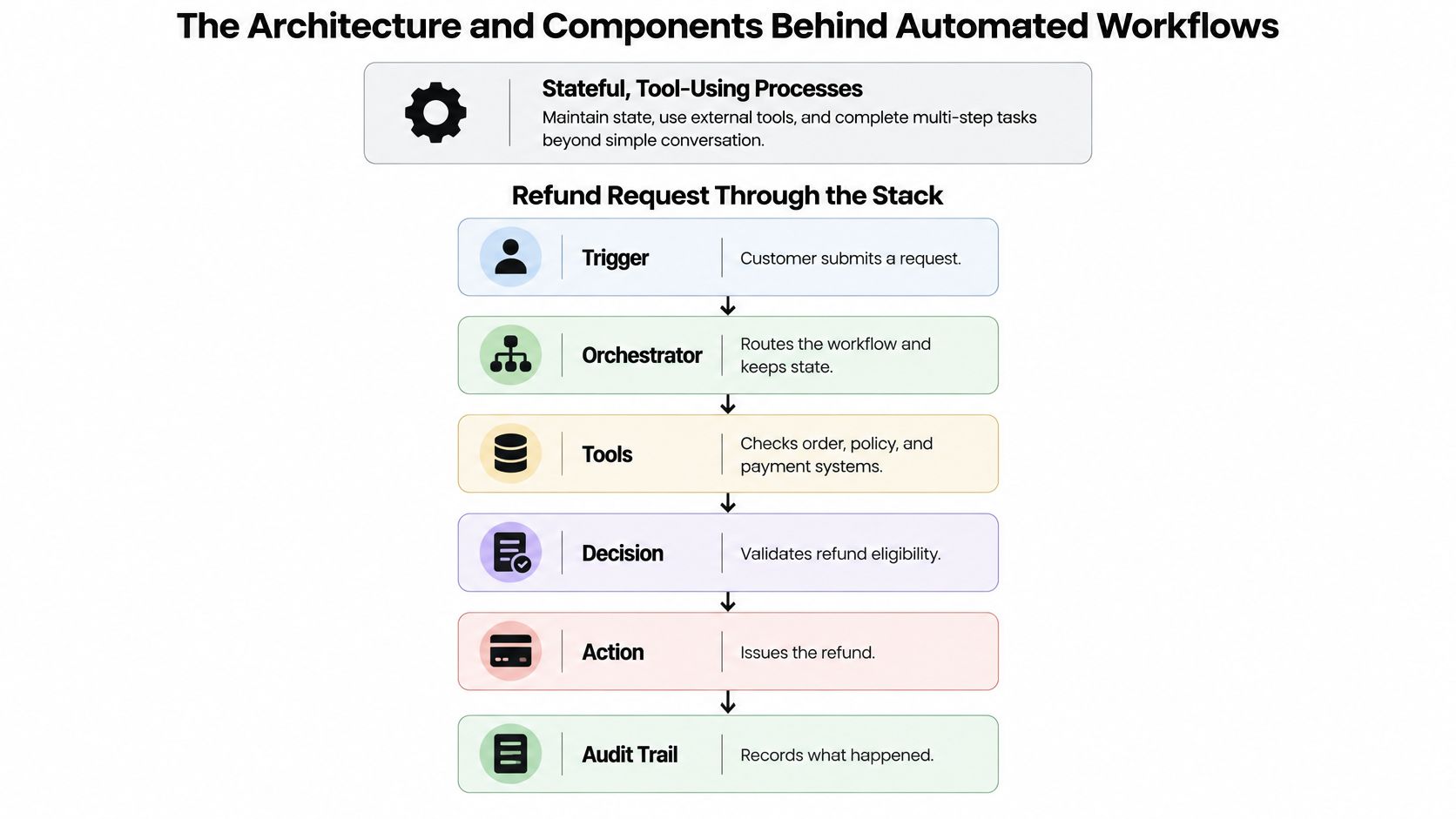
A production workflow runs as a stateful, tool-using process, not a single text reply. Stateful means the system records what has happened, what remains unfinished, and which actions it must not repeat.
Follow a refund request through the stack. Intake receives the message; reasoning identifies the intent; retrieval supplies the applicable policy. The tool layer reads the order and submits an authorized transaction, while state management records progress and guardrails enforce permissions.
The diagram shows the execution path from request to audit trail.
Give every layer an explicit responsibility
Core components of an AI workflow automation system
| Component | Job in the workflow | CX example | What breaks without it |
|---|---|---|---|
| Trigger and intake | Starts work from a channel or event | Customer asks where an order is | Work never starts, or starts on the wrong channel |
| Reasoning layer | Interprets intent and plans steps | Separates a refund from a return request | Wrong workflow runs for the right customer |
| Knowledge retrieval | Supplies approved, current content | Retrieves the applicable refund policy | Decisions use outdated rules |
| Tool and integration layer | Reads and writes systems of record | Looks up a case in Zendesk and calls the payment service | Agent describes an action it never completed |
| State and memory | Tracks checkpoints, arguments and retries | Records completed identity verification | Repeated questions or duplicate refunds |
| Policy and guardrails | Enforces permissions and limits | Blocks refunds above an authorized amount | Sensitive actions execute without approval |
| Human handoff | Transfers exceptions with context | Routes a disputed charge to a specialist | Employee restarts the investigation |
| Observability | Records outcomes, errors and overrides | Identifies failures in a payment connector | Teams discover problems through complaints |
An AI agent architecture diagram is useful when reviewing these boundaries with security, integration, and service-desk teams. Ask each team to identify the component it owns, including its failure behavior.
Design for interrupted execution
The EnterpriseOps-Gym evaluation models 1,115 workflow tasks across eight enterprise domains, with customer-service workflows averaging 12.10 steps. That's a benchmark environment, not a forecast for your operation, but it illustrates why a conversation transcript alone isn't an execution record.
Use explicit checkpoints: identity verification, retrieval, policy validation, transaction execution, and confirmation. At each checkpoint, record tool arguments, returned data, retry attempts, and human overrides, while redacting sensitive fields according to your retention rules.
A timeout needs particular care. If the payment service accepted a refund but its response never arrived, blindly retrying can duplicate the transaction. Use an idempotency key, which identifies the same business operation across retries, and query transaction status before resubmitting.
Completion also needs evidence. A model saying the refund succeeded isn't proof; a confirmed transaction identifier from the payment system is. Without checkpoint logs, operators can see that a conversation failed but can't establish whether the cause was interpretation, policy, permissions, or execution.
Where Enterprises Use It in CX, EX and BPO
A customer asks to move a delivery appointment. An employee requests software access. A back-office processor receives an incomplete claim. Each request involves gathering context, checking rules, and coordinating work, but the acceptable action differs.
Customer support is a useful starting point because leaders can inspect both the conversation and the resulting business record.

Match the workflow to the operating environment
In customer experience, order tracking, return initiation, policy-limited refunds, and appointment rescheduling offer concrete completion checks. For a delivery change, the agent should retrieve available slots, obtain the customer's choice, update the booking, and return a confirmation. Offering a slot without reserving it is assistance, not completed automation.
In employee experience, consider leave balances, leave requests, onboarding document collection, access resets, and benefits questions. An access request should check the employee's identity and entitlement, obtain the required approval, provision access, and verify that the provisioning system accepted the change. An agent shouldn't infer approval from a friendly message in a chat thread.
In BPO and back-office operations, suitable tasks include claims intake, document classification, collecting information for banking checks, invoice exception triage, and reconciliation handoffs. Keep collection separate from adjudication: assembling a complete claim file doesn't authorize a payout.
The following video offers another way to examine conversational service workflows.
Choose tasks by completion evidence
A customer-support field study summarized in Stanford University's 2025 AI Index reported a 14.2% increase in issues resolved per hour. That supports the case for assistance within service work, not a claim that every support process can run unattended.
Sector changes the design. Retail and logistics often offer accessible order and delivery records; banking, insurance, healthcare, and utilities may require stronger identity checks, authorization, and audit evidence before account changes.
Choose a candidate with high volume, structured steps, accessible data, a named owner, and a clear completion check. Prefer mistakes that are inexpensive to reverse. If the team can't agree on what finished means, resolve that disagreement before building an agent.
KPIs That Show Real Workflow Value
Time saved, ticket deflection, and automation percentage can reward the wrong behavior. A customer who abandons an unhelpful conversation may look contained, while an employee who repairs an incorrect transaction may disappear from the automation dashboard.
Define success using verified outcomes and the full cost of obtaining them.
Measure execution and downstream consequences
Workflow KPIs with formulas and watch-outs
| KPI | How to calculate it | Watch-out |
|---|---|---|
| Task completion rate | Verified completed tasks divided by tasks started | Partial completion can be counted as success |
| Escalation rate | Handoffs divided by total sessions | A low rate can hide unsafe containment |
| Safe-transfer rate | Correctly routed handoffs with complete context divided by all handoffs | Requires a reviewed sample |
| Tool-error rate | Failed tool calls divided by all tool calls | Segment by connected system |
| Override frequency | Human corrections divided by AI decisions | Changes may indicate drift or unfamiliar cases |
| Cost per resolved interaction | Total run cost, including inference, integration and review, divided by verified resolutions | Include downstream rework |
| Rework and complaint recurrence | Repeat contacts about the same issue within a defined follow-up window divided by resolved cases | Match contacts across channels |
| Latency | Elapsed time from request receipt to response or verified completion | Report response and completion time separately by channel |
Only 15% of executives using generative AI reported significant, measurable ROI, while 38% expected it within one year, according to Deloitte's analysis of AI returns. That gap is a reason to establish attribution before launch, rather than explain disappointing results afterward.
Maintain a benefits ledger
Use comparable baseline and pilot groups, segmented by intent and channel. Account for differences in case complexity, staffing, seasonal demand, and policy changes; report confidence intervals so decision-makers can distinguish a plausible improvement from ordinary variation.
An automation ROI calculation should connect service outcomes to expenditure. Maintain a ledger with these entries:
- Verified benefit: Released capacity reassigned, avoided outsourcing expenditure, or another documented operating benefit.
- Delivery cost: Model inference, platform charges, integration maintenance, monitoring, and human review.
- Failure cost: Escalations, corrections, repeat contacts, compensation, and incident handling.
- Evidence and owner: The business record supporting each entry and the person approving its valuation.
Calculate verified net value as documented benefit minus incremental delivery and failure costs. Keep hypothetical capacity separate from realized savings, and avoid counting the same benefit as both labor savings and additional output.
A rising completion rate alongside rising complaint recurrence is a warning, not a win.
Governance, Oversight and Integration Rules by Risk Tier
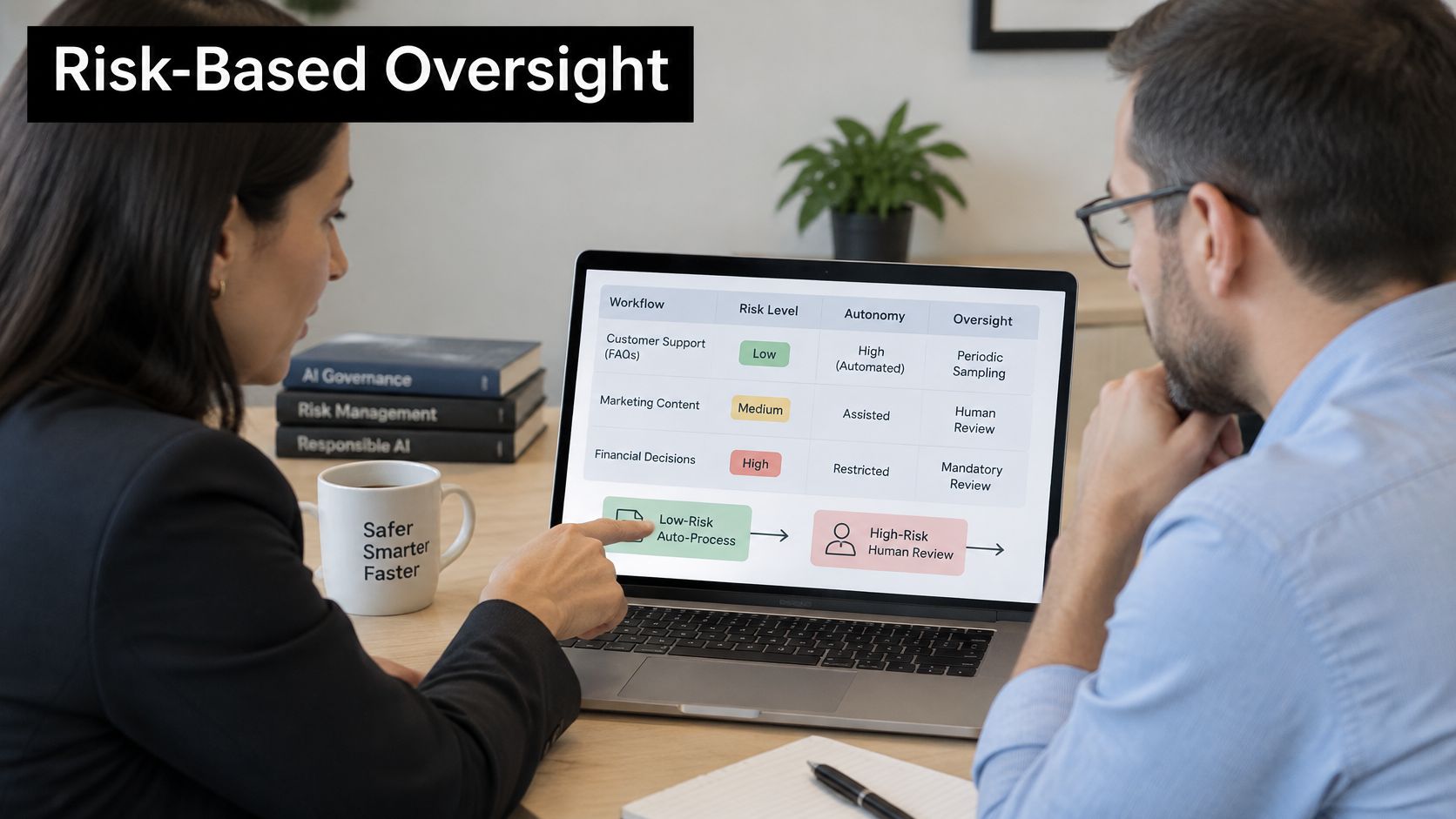
Having a human review everything isn't a sustainable safety model. It recreates manual processing while adding another interface for employees to inspect. Instead, assign oversight according to the consequences of an incorrect action.
The following tiers are a starting operating policy, not a legal classification. Treat the review cadences as proposed defaults that the accountable owner can tighten when conditions warrant.
Let consequences set the permission boundary
Autonomy and oversight by risk tier
| Risk tier | Example workflow | Autonomy allowed | Oversight required |
|---|---|---|---|
| Low | Order status lookup, FAQ answers | Full autonomy within access controls | Monthly sample review of transcripts |
| Medium | Address change, appointment reschedule | Autonomous after verification | Weekly review of overrides and failed checks |
| High | Refund above a set limit, insurance claim payout | Draft and approve | Human approves before execution |
| Irreversible or regulated | Account closure, medical or financial advice | No autonomous execution under this policy | Named human owner and full audit trail |
Even a seemingly simple address change can be high-risk when it redirects valuable goods or sensitive correspondence. Classify the actual transaction, not just the intent label.
This visual summarizes how review responsibilities follow the permitted action.
Turn oversight into enforceable controls
NIST's AI Risk Management Framework core recommends documented human-oversight processes, production monitoring, tracking operator overrides, and continual assurance because model and inference drift can degrade performance. Put those responsibilities into your enterprise AI governance operating model, with named owners rather than a shared expectation that someone will watch.
Use least-privilege service accounts for each agent role. Enforce transaction limits in the tool or API authorization layer, not only in prompts, and keep versioned records of prompts, retrieval content, tools, and routing rules so operators can roll back a release.
For organizational ownership, Ekipa's discussion of building accountability into AI adoption provides a useful companion to technical access controls.
Force escalation when identity checks fail, evidence is insufficient, retrieved policy conflicts with transaction data, or an action crosses the permitted risk boundary. Don't treat a model's self-reported confidence as an authorization signal. In consequential workflows, deferring to a qualified person can cost less than repairing a confident but incorrect action.
How to Roll Out AI Workflow Automation in Five Phases
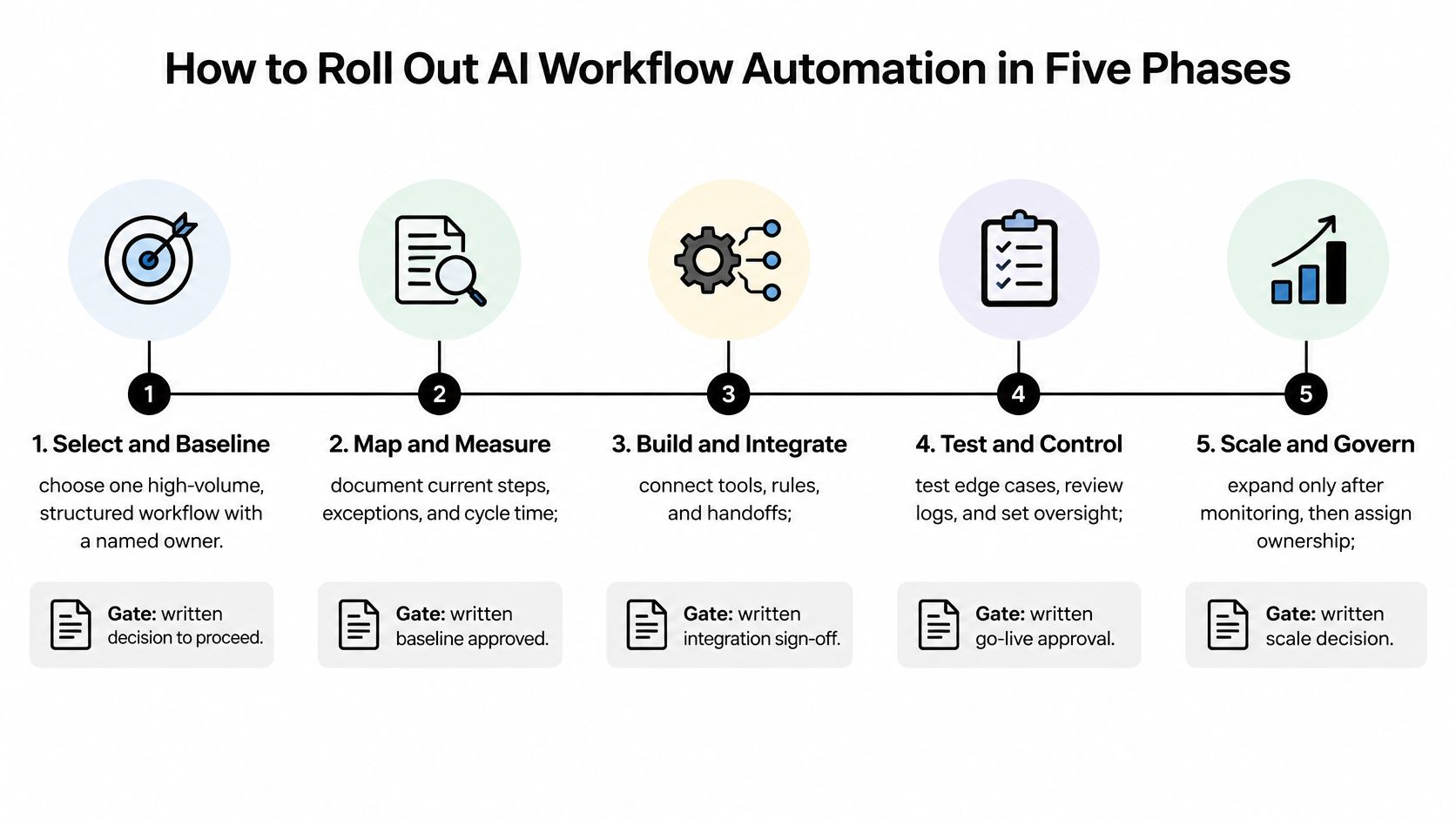
Rollout should follow progressive autonomy: a workflow earns broader permissions through demonstrated reliability. Permission changes should be written decisions with an owner, evidence, and a rollback condition.
The roadmap provides a practical sequence from selection to governed operation.
Make every phase end in a decision
Select and baseline. Choose a structured workflow and confirm that its owner can obtain reliable records from the relevant systems. Record volume, handling time, errors, and cost per case; the written gate is approval of the candidate and its baseline.
Map, measure, and design. Document steps, exceptions, policies, system dependencies, and the assigned risk tier, then define checkpoint evidence and handoff conditions. The gate is an approved process map and testable acceptance criteria, including cases where the agent must refuse to act.
Build and pilot under review. Connect the tools and run in shadow mode or require approval before execution, covering normal operations and known exception patterns. The gate is integration sign-off supported by reviewed outcomes, an explainable override trend, and transfers that meet the agreed quality target.
Test controls and expand permissions. Exercise missing data, expired credentials, conflicting policies, duplicate requests, and unavailable systems before authorizing independent execution. The gate is written go-live approval for specific intent, segment, channel, and risk combinations, not blanket approval for the agent.
Scale and govern. Assign operational ownership, inspect exceptions, and release changes through controlled testing. The gate for expansion is a written decision supported by maintained service quality and net value; suspend or narrow a workflow when it no longer qualifies.
Set thresholds before reviewing results
In Capgemini's 2025 survey, 71% of large organizations said they couldn't fully trust autonomous AI agents for enterprise use, while only 46% had governance policies in place. Trust needs operating evidence, not a persuasive demonstration.
Write gates relative to your approved baseline and risk tolerance. For example, require completion quality to be no worse than the human-assisted process, safe-transfer quality to meet the service standard, and verified net value to remain positive. Any unauthorized execution should block expansion until the cause is understood and the control is retested.
Release discipline: An overall average must never authorize a poorly performing customer segment or exception path.
How to Choose an AI Workflow Automation Vendor
Vendor selection criteria for AI workflow automation
| Criterion | Question to ask the vendor | Yellow.ai reference point |
|---|---|---|
| Workflow depth | Can it run multi-step tasks with state, retries and handoffs? | Test backend workflows, API actions, persistence, and exception recovery |
| Model flexibility | Can we change models without rebuilding flows? | Verify model substitution within its multi-LLM architecture |
| Integrations | Are there native connectors to our systems of record? | Check connector coverage, supported actions, and authentication against your stack |
| Knowledge grounding | How is retrieval governed and kept current? | Conversational Knowledge Base with agentic RAG |
| Testing and debugging | How are changes tested before release? | Automated Testing and AI Copilot for previewing and debugging |
| Analytics | Can we segment outcomes by intent, channel and risk tier? | Validate segmentation and export using advanced analytics |
| Compliance | Which certifications cover our data? | Request current assurance documents and confirm service scope |
| Channels | Does one platform cover voice, chat and email? | Verify orchestration across voice, chat, email, images and video |
| Time to value | How long to the first live workflow in our environment? | Test build-speed claims against integration and approval requirements |
Read every reference point as something to verify, not a procurement verdict. A platform can support a connector without supporting the exact write operation, approval pattern, or deployment region your workflow requires.
Run the same test across shortlisted platforms
Compare specialist agent platforms, service-suite automation, and orchestration tools against the same business tasks. Give each vendor identical policy documents, sandbox permissions, test cases, and completion criteria so polished interfaces don't outweigh execution evidence.
Include a straightforward case, an exception requiring judgment, and a dependency failure. Ask the vendor to demonstrate what happens when a transaction succeeds but confirmation fails, when the customer changes the request midway, and when an employee rejects the proposed action.
Inspect the resulting records yourself. A convincing demonstration should show the business-system change, the authorization check, the handoff package, and the recoverable execution history.
Price the operating model, not just the license
Ask who maintains connectors, updates knowledge sources, reviews failures, and supports incidents. Establish whether your team can export operational records and move models or workflows without rebuilding the entire service.
Request compliance evidence for the particular service and deployment you'll use. A certification logo doesn't establish which data flows, subprocessors, retention settings, or contractual responsibilities are covered.
Treat build speed as a hypothesis. A quickly assembled agent may still require substantial identity integration, exception design, and security approval before it can safely complete real work.
Confirm One Workflow to Pilot Before You Buy
Choose a single workflow, and don't commit to a broad purchase until its baseline and risk tier are written down. You need a bounded decision that your operations, security, and finance teams can evaluate together.
Before speaking with vendors, complete these items:
- Workflow map: Identify the start event, systems involved, completion evidence, and exceptions, including the path your team finds hardest to resolve.
- Risk decision: Name the accountable owner and document which actions require verification, approval, or prohibition.
- Autonomy gate: State acceptable completion quality, transfer quality, operating cost, and suspension conditions in measurable terms.
Bring those documents to the shortlisted platforms. Ask each vendor to execute your cases in a sandbox, then inspect the records and review the operator experience rather than relying on the presentation.
For a demo, bring the baseline and your highest-risk exception path. Ask to see that exception handled live, including the point at which the system stops and the context the human receives.
Successful evidence isn't a busy dashboard or an impressive conversation. It's a verified net benefit on the selected workflow, a documented oversight process employees can follow, and a defensible decision about whether to expand. If you can't establish those conditions, keep the workflow assisted or pause it rather than buying more autonomy.
Yellow.ai offers tools for building conversational agents, connecting enterprise systems, and testing service workflows across channels. Visit Yellow.ai to request a demo, and bring your workflow map, baseline, and hardest exception so the discussion focuses on execution evidence rather than promises.



