










Most AI agent diagrams fail before the agent does. They show an LLM, a few tools, maybe a memory box, then stop. That sketch is fine for a demo. It is dangerous for an enterprise system.
The evidence is blunt. A 2023 MIT survey of over 1,200 AI agent implementations found that architectures with a defined planning phase and a reasoning-execution-evaluation loop improved success rates by an average of 34%, and diagrams that visually represented those loops correlated with a 3.4x higher probability of task completion in autonomous environments, according to MIT's 2023 landscape findings on agent architecture. The point is not aesthetic. The diagram is often the earliest and most accurate predictor of whether the system will survive real production conditions.
An enterprise-ready AI agent architecture diagram has to show how the system plans, where it gets grounded data, how it executes actions safely, who governs it at runtime, and how multimodal data moves through the stack. If those layers are missing, the diagram is incomplete even if the model is excellent.
Table of Contents
- Why Your AI Agent Diagram Is Probably Wrong
- The Anatomy of a Production-Ready AI Agent
- Key Architectural Patterns and When to Use Them
- Customizing Diagrams for CX and EX Workflows
- Designing for Security Governance and Scale
- Conclusion From Blueprint to Business Impact
Why Your AI Agent Diagram Is Probably Wrong
Most public diagrams are still built for explaining agents, not deploying them. They collapse data, planning, action, policy, and observability into a single loop and imply that intelligence alone will solve execution. It won't.
For enterprise use, the diagram has to represent a closed operational system. The most practical high-level frame is the three-tier intelligence model: Foundation, Workflow, and Autonomous. In this model, the Foundation tier handles memory and knowledge, the Workflow tier turns understanding into structured plans, and the Autonomous tier executes those plans inside a closed Perceive → Plan → Act → Learn cycle, as outlined in Kore.ai's enterprise blueprint for agentic architecture. That same analysis notes that failing to unify structured and unstructured data in the Foundation tier leads to a 30% increase in hallucination rates in multi-LLM environments.
The missing layers are the real problem
A weak AI agent architecture diagram usually omits at least one of these:
- Shared context design that merges CRM records, policies, KB articles, and live system state.
- Planning boundaries that show when the agent is allowed to decompose work before acting.
- Runtime governance that sits outside the agent and can still intervene.
- Failure containment for tool misuse, bad handoffs, or invalid outputs.
- Multimodal pathways for voice, email, PDFs, images, and transcripts.
That omission matters because enterprise failure rarely starts with “the model gave a weird answer.” It starts with stale context, unsafe tool invocation, ambiguous ownership between sub-agents, or no approval gate before a consequential action.
Most architecture reviews still ask, “Which model are you using?” The better question is, “Where does the system fail safely?”
A strong diagram is not decorative documentation. It is the operational contract between architecture, security, support, compliance, and the business owner. If the drawing can't answer what happens when the agent is uncertain, interrupted, or wrong, the design isn't ready.
The Anatomy of a Production-Ready AI Agent
Production AI agents are integration systems first and model systems second. The diagram that survives security review and real traffic usually looks less impressive on a slide because it exposes control points, ownership boundaries, and failure paths instead of hiding them.
Why the simple loop breaks
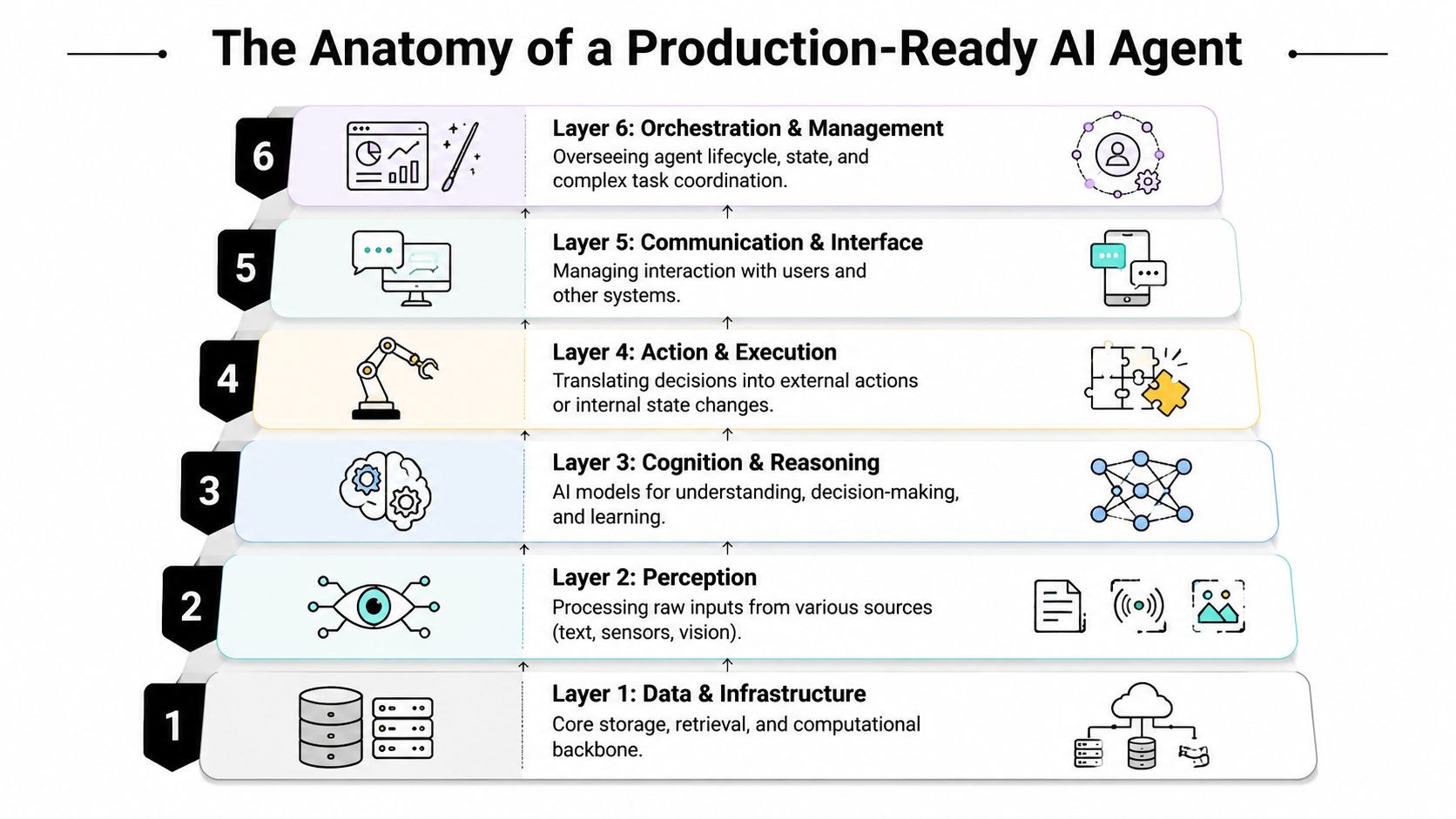
A production-ready agent needs a six-layer stack: input and context assembly, reasoning and planning, memory and retrieval, tool execution, orchestration, and middleware. That separation is not academic. It determines whether the agent can handle multimodal inputs, call enterprise systems safely, and produce an auditable trail when something goes wrong.
“LLM + tools + memory” is too coarse for production design. It leaves out where policies are applied, where state is persisted, how approvals interrupt execution, and which layer owns retries or rollback. Those gaps are exactly where enterprise programs fail. A refund fires twice. A policy answer uses stale content. A sub-agent acts outside its role. A voice interaction loses identity context before it reaches the planner.
Human operators do not work from a single mental loop. They gather evidence, check prior records, follow procedures, use approved systems, and stop when a step needs another owner. A production diagram should show the same discipline.
The six layers that belong in the diagram
Input and context assembly
This layer ingests text, voice transcripts, emails, PDFs, forms, screenshots, and system events, then converts them into a usable working context. It should also attach identity, tenant scope, locale, session history, and channel metadata before any reasoning starts. If multimodal normalization is missing here, downstream components inherit ambiguity they cannot fix later.Reasoning and planning
The planner classifies the request, decides whether the task is direct or multi-step, and sets execution bounds. Strong implementations include confidence thresholds, policy-aware decomposition, and explicit stop conditions. The goal is not unlimited autonomy. The goal is controlled autonomy.Memory and retrieval
This layer separates short-lived conversational state from governed enterprise knowledge. That distinction matters in production because retention rules, update frequency, and trust levels are different. A CRM note, a policy article, a prior case summary, and a user preference should not be treated as the same kind of memory.Tool execution
Every tool should expose typed inputs, clear permissions, predictable side effects, and result validation. Read-only search, payment actions, case updates, identity verification, and outbound communications belong to different risk classes. A good diagram makes those differences visible instead of drawing every integration as a generic API box.Orchestration
Orchestration manages sequence, branching, retries, handoffs, timeouts, and state transitions across services and specialist agents. It also decides when to pause for approval, when to escalate to a human, and when to terminate a path that no longer meets policy or confidence thresholds.Middleware
Middleware enforces the operating rules around every call path. That includes schema validation, redaction, policy checks, logging, tracing, rate limits, budget controls, and audit capture. In enterprise deployments, this layer often determines whether the architecture is deployable at all.
One rule holds across all six layers. Every handoff needs an owner, a contract, and a recovery path.
What strong teams specify up front
The useful version of an AI agent architecture diagram includes annotations, trust boundaries, and data classifications. Boxes and arrows alone do not tell security, platform, and business teams enough to approve a build.
A solid design review asks:
- For context assembly: Which channels are supported, which formats are normalized, and which attributes are redacted before prompts are built?
- For planning: Which tasks allow autonomous decomposition, and which require a deterministic workflow or human approval?
- For memory: Which stores are ephemeral, which are source-backed, which are editable, and what retention policy applies to each?
- For tools: Which calls are read-only, which mutate systems of record, and what validation happens before and after execution?
- For orchestration: What events trigger a specialist handoff, a fallback path, or a human transfer?
- For middleware: Where are audit logs, model policies, spend controls, and tenant isolation enforced?
Outbound communication belongs in the diagram too. If the agent drafts or sends messages, the architecture should show delivery controls, authentication checks, suppression logic, and failure handling. That is where tools such as email deliverability tools for AI agents fit into the design as an operational dependency, not a bolt-on utility.
Teams that want to turn this model into an implemented workflow can use platforms that expose these layers directly. Yellow.ai's AI Agent Builder is one example that lets architects define orchestration, multimodal interactions, and test paths inside the build process.
Key Architectural Patterns and When to Use Them
Components tell you what exists. Patterns tell you how the system behaves under load, uncertainty, and change. That's the difference between a plausible diagram and a deployable one.
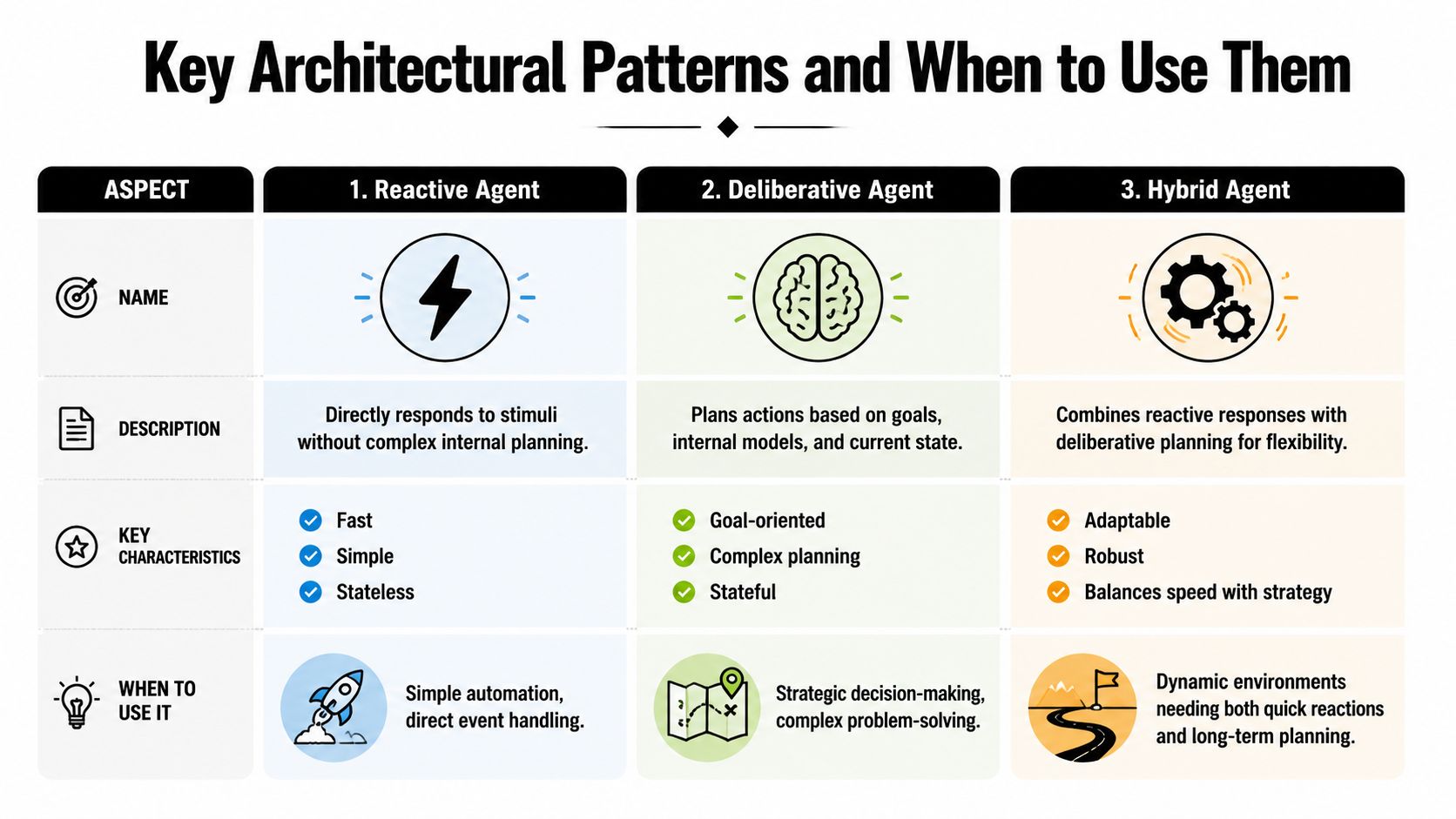
According to the Azure Architecture Center's 2024 report on orchestration patterns, 62% of large enterprises now standardize on Group Chat and Handoff patterns, and systems using the Orchestrator-Worker pattern reduced average task latency by 41% while improving resource utilization by 28%, based on Azure's 2024 report on AI agent orchestration patterns. That makes pattern choice a performance decision, not just a design preference.
Orchestrator-worker for controlled throughput
Use this pattern when the task can be decomposed into bounded jobs with clear ownership. A coordinator agent assigns work to specialist workers, aggregates outputs, and handles retries or substitutions.
It fits well for:
- Document-heavy service tasks where one worker retrieves policy, another summarizes a case, and another drafts a reply.
- Back-office operations where subtasks can run in parallel but still need centralized control.
- Latency-sensitive workflows where throughput and predictable routing matter more than agent creativity.
The trade-off is rigidity. Orchestrator-worker performs well because the routing is explicit. If your workflow changes frequently or the problem is exploratory, the pattern can become brittle.
Group chat and handoff for specialist collaboration
This pattern works when the problem spans domains and ownership changes during execution. One agent might diagnose an issue, another may handle policy interpretation, and a third may prepare the customer-facing response.
It works best when:
| Pattern fit | Good use case | Main caution |
|---|---|---|
| Group chat | Collaborative diagnosis across several specialist agents | More chatter can create noise and duplicated work |
| Handoff | Clear transfer of responsibility from one agent to another | Weak contracts between agents cause dropped context |
These patterns are attractive because they look intelligent. They are also easy to overuse. If all specialists can talk all the time, the architecture becomes hard to debug and expensive to govern.
The cleanest diagram often wins in production. Not because it is simplistic, but because every transfer has an owner.
Hybrid reactive-deliberative for production operations
For most enterprise workflows, the strongest pattern is a hybrid. A reactive loop handles immediate responses, validations, and interrupts. A deliberative loop handles planning, tool sequencing, and recovery when the path is unclear.
That combination is especially useful for customer operations, employee support, and omnichannel service because it balances speed with control. The agent can acknowledge a request immediately, then switch into a structured planning mode only when needed.
A simple selection rule helps:
- Choose reactive when the action is direct, low-risk, and short-lived.
- Choose deliberative when the task needs state, memory, or sequence planning.
- Choose hybrid when the workflow mixes urgency with complexity.
The wrong move is defaulting to a multi-agent design because it sounds more advanced. In real deployments, the best architecture is usually the least autonomous pattern that still completes the workflow well.
Customizing Diagrams for CX and EX Workflows
A generic AI agent architecture diagram is only a starting point. Once it touches a real business workflow, the shape changes quickly. Customer experience and employee experience systems need different data paths, approval logic, and escalation triggers even when they share the same core stack.

CX workflow for support resolution
A customer support diagram usually starts with a multimodal intake layer. The same issue might arrive by voice, chat, email, or a web form. The architecture needs to normalize that input, resolve customer identity, and assemble fresh context from systems like Salesforce, a help center, and order history.
A practical CX flow often looks like this:
- Entry point: The agent receives the request and tags channel, language, customer ID, and urgency.
- Context build: It pulls order details, prior tickets, entitlements, and relevant policy content.
- Plan gate: The system decides whether the issue is answerable directly or needs a multi-step resolution plan.
- Action stage: The agent performs read operations first, then proposes or executes allowed actions.
- Resolution path: It replies, schedules follow-up, or escalates to a human queue with full context attached.
The diagram should also show outbound communication explicitly. If the flow ends in an email, the architecture needs generation, approval rules, and send-path controls. In CX, “responded” and “delivered” are not the same thing.
A support agent without source-backed context is not autonomous. It is improvising.
EX workflow for onboarding and internal service
Employee workflows are different because identity, entitlement, and policy enforcement are central from the first step. A new-hire onboarding agent may need to read from the HRIS, trigger IT provisioning, schedule meetings, and answer policy questions from the same conversation thread.
That changes the architecture in three ways.
First, the Foundation tier usually depends on a broader context set: HR records, role definitions, policy documents, directory systems, and access templates. Second, the Workflow tier becomes more procedural because tasks follow explicit approval and sequencing rules. Third, the Autonomous tier is often constrained to recommendations plus approved actions, not open-ended execution.
A clean EX diagram should include:
| Workflow element | What to show in the diagram |
|---|---|
| Identity and role | Employee type, manager, department, geography, and policy scope |
| System actions | HR ticket creation, app provisioning, meeting setup, and document collection |
| Approval gates | Manager approval, IT validation, HR sign-off |
| Fallbacks | Human escalation for exceptions, missing data, or conflicting policy |
For teams designing internal service flows, it helps to study how employee experience AI systems structure multi-step service requests across HR, IT, and operations rather than treating them like generic chatbots.
The practical lesson is simple. The base architecture stays consistent, but the diagram becomes useful only when it reflects the actual systems, roles, and approvals that define the workflow.
Designing for Security Governance and Scale
The most expensive mistake in agent architecture is drawing governance inside the agent itself. That puts policy in the same place as reasoning, which means the system is trying to supervise itself. Enterprises need a separate authority.
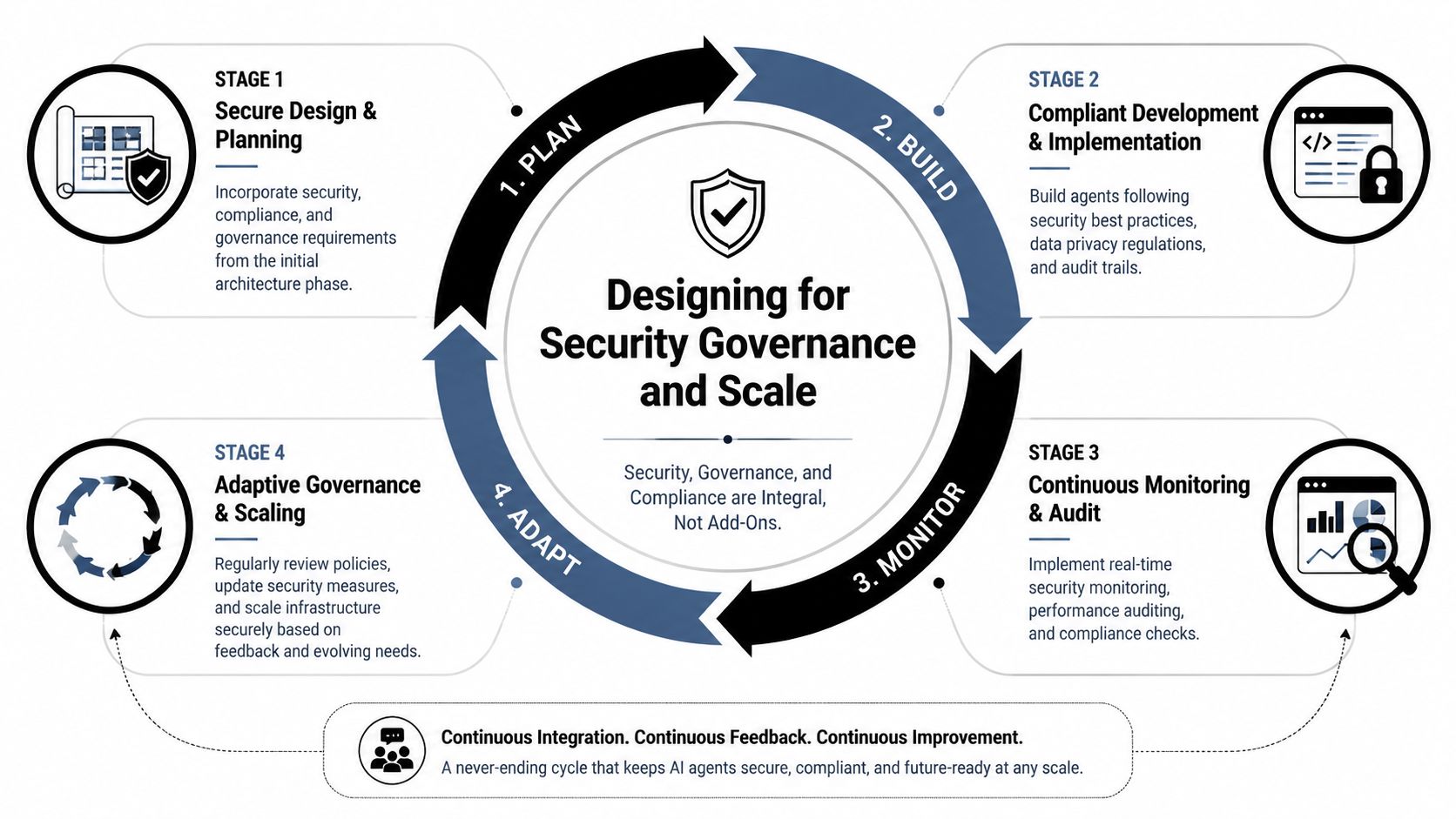
Production guidance increasingly favors an external control plane for governance and failure containment, with centralized governance replacing per-agent guardrails and runtime observability treated as essential, as described in Galileo's guide to AI agent architecture. The same guidance stresses that every additional tool or agent expands the risk surface, and that the best architecture is often the least autonomous one that still fits the workflow.
Draw the control plane outside the agent
In a production AI agent architecture diagram, the control plane should sit outside both build-time logic and runtime orchestration. It should be able to inspect, allow, deny, pause, route, and log agent actions without relying on the agent's own judgment.
That external plane usually governs:
- Policy enforcement for regulated actions, sensitive data access, and role-based permissions.
- Runtime protection for prompt injection, malformed tool calls, and suspicious execution paths.
- Observability across prompts, tool usage, latency, budgets, and user-visible outcomes.
- Human approvals before refunds, account changes, disclosures, or privileged actions.
This separation changes review conversations. Security leaders can inspect the control plane. Operations can inspect escalation logic. Architects can inspect reasoning and orchestration without pretending one layer handles everything.
What the diagram should expose to reviewers
A reviewable diagram should answer concrete questions. If it doesn't, reviewers will ask for spreadsheets, exception notes, and follow-up meetings because the architecture itself is not carrying enough information.
Include these elements directly on the diagram:
Data boundaries
Mark where PII enters, where it is masked, and where it may be exposed to downstream tools.Action classes
Distinguish read-only operations from state-changing operations. They should never share the same risk treatment.Approval points
Show exactly where the agent pauses for a human, manager, or policy engine decision.Rollback and recovery
Represent how the system handles a failed side effect, duplicate action, or partial completion.Telemetry path
Show where traces, logs, and performance events leave the runtime for monitoring and audit.
For regulated environments, a platform with documented controls matters because architecture and compliance reviews happen together. Enterprise-grade security capabilities for AI deployments are relevant here because teams need to map architectural controls to runtime enforcement, auditability, and access boundaries.
If your reviewers can't find the approval gate, the rollback path, and the telemetry export in one diagram, they will assume they do not exist.
Scale comes from containment not freedom
Teams often assume scale requires more autonomous agents. In practice, scale comes from containment. Bounded scopes, typed interfaces, narrow tool permissions, and explicit fallbacks make systems easier to replicate safely.
That is also why multimodal architecture matters. Once voice, email, PDFs, screenshots, transcripts, and shared state are involved, the diagram becomes a data-system design as much as a model-system design. Provenance, synchronization, and policy enforcement matter as much as reasoning quality.
The production question isn't “How smart is the agent?” It is “How many safe, governed workflows can this architecture support without becoming unmanageable?”
Conclusion From Blueprint to Business Impact
A production AI agent diagram is a control surface for the business, not a drawing for the architecture review deck.
The teams that get real value from agentic systems treat the diagram as the contract between model behavior, enterprise policy, and operational ownership. It shows who can approve actions, which systems the agent can touch, how multimodal inputs are normalized, where human intervention happens, and what evidence remains after each decision. Without that level of clarity, deployments slow down in security review, fail in handoff to operations, or create risk that no owner wants to accept.
Good diagrams also age well. Models change. Tools change. Channel mix changes. The underlying architecture should still make sense six months later because it captures boundaries, dependencies, and control points instead of overfitting to one prompt strategy or one vendor capability.
For CX and EX programs, that discipline has direct business impact. A support agent that can summarize a call, read a screenshot, check entitlements, draft a response, and request approval for a refund needs more than reasoning quality. It needs a diagram that makes the workflow governable at every step. The same is true for onboarding, service operations, claims intake, and internal help desk automation.
The practical standard is straightforward. Design diagrams that operations teams can run, security teams can approve, and product teams can extend without rewriting the system every quarter.
If you're evaluating how to turn these architectural principles into enterprise CX and EX deployments, Yellow.ai provides an agentic AI platform for designing multimodal agents, orchestrating workflows across enterprise systems, and applying security and governance controls in production.