









Most enterprise knowledge bases fail for a counterintuitive reason. They publish too much before they make the content usable. One practical implementation guide recommends starting with the 20 questions customers ask most often and writing only the first 10 to 15 core articles in the first two weeks, then expanding from there, because that staged approach surfaces reusable answers faster and creates a measurable foundation for improvement through search-success and helpfulness signals (Gleap's knowledge base guide).
That matters even more if your real goal isn't a document library. It's a conversational knowledge base that can serve human agents, customers, employees, and AI systems from the same source of truth. In enterprise CX and EX, the knowledge base isn't just where answers live. It's what powers retrieval, grounded responses, agent assist, self-service, and increasingly, autonomous resolution.
When teams ask how to build knowledge base systems for modern service operations, they're often asking the wrong question. The useful question is this: how do you build a knowledge system that a person can trust, an agent can search, and an AI model can retrieve without drifting into wrong answers?
Table of Contents
- The Strategic Blueprint for Your Knowledge Base
- Architecting Intelligence with Content Strategy
- Building a RAG-Enabled Conversational KB
- Creating a Unified Service Hub with Integrations
- Implementing Governance for a Living Knowledge Base
- Measuring Success and Proving Business Value
The Strategic Blueprint for Your Knowledge Base
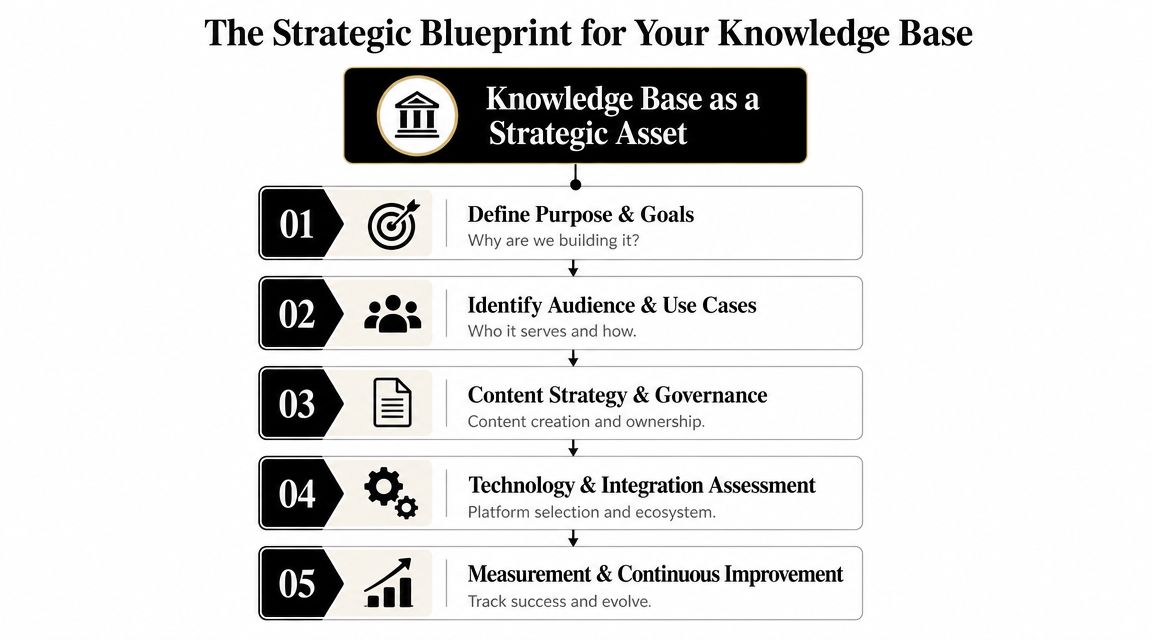
A knowledge base becomes valuable when leadership treats it as core service infrastructure, not as a side project owned by documentation. In large enterprises, it sits underneath self-service, agent assist, onboarding, policy lookup, workflow guidance, and AI orchestration. If that strategic role isn't defined early, the program usually turns into scattered publishing with no operating model.
Start with the business pain, not the platform
The strongest knowledge base programs begin with a narrow service problem that repeats often and costs teams time. In CX, that may be inconsistent answers across channels, long handle time because agents hunt through PDFs, or weak self-service because articles don't match customer language. In EX, it may be HR policy confusion, repetitive IT requests, or fragmented process guidance spread across SharePoint, Confluence, email threads, and tribal knowledge.
A practical charter usually answers four questions:
Which journeys break most often
Pick the service moments where answer quality matters. Billing disputes, claim status questions, account setup, password reset, leave policy, device provisioning, and compliance guidance are common starting points.Who needs the knowledge first
External customers, internal employees, live agents, supervisors, or AI assistants all query knowledge differently. A customer needs simple resolution steps. An agent may need edge-case rules and escalation criteria. An AI assistant needs structured, retrievable content with low ambiguity.What will count as success
Define observable outcomes up front. Examples include better self-service completion, fewer repeated questions in queues, faster agent ramp-up, improved answer consistency, or stronger adoption of internal support channels.What stays out of scope
Most projects preserve themselves here. Don't ingest every legacy file on day one. Don't promise a global source of truth before you've proven ownership and retrieval quality in one domain.
Practical rule: If you can't name the business process your knowledge base should improve, you aren't ready to choose the tool.
A useful reference point is Yellow.ai's own guidance on building and maintaining a knowledge base, especially for teams trying to connect knowledge design with AI-led service delivery.
Write a charter before you write articles
A short charter does more work than a long backlog. It aligns operations, support, IT, and content owners around one shared model.
| Charter element | What to define | Why it matters for AI-powered CX and EX |
|---|---|---|
| Business objective | The service problem to improve | Keeps retrieval and authoring tied to outcomes |
| Primary audience | Customer, employee, agent, or mixed | Shapes article depth, language, and access rules |
| Source systems | Which systems hold trusted content | Prevents duplication and answer conflicts |
| Ownership | Who approves, updates, and retires content | Protects accuracy after launch |
| Measurement | Which signals you'll review regularly | Makes the KB improvable, not static |
The trade-off is simple. If you start with technology, you get an index. If you start with service design, you get an enterprise brain.
Architecting Intelligence with Content Strategy
A conversational knowledge base fails or succeeds at the content layer. If the structure is vague, duplicated, or written for internal teams instead of real user language, your AI will retrieve the wrong passage, rank weak evidence, and answer with low confidence. That hurts both customer experience and employee experience, even if the underlying model is strong.
Content strategy for enterprise AI has one job: make approved knowledge easy to retrieve, interpret, and reuse across channels.
Design for retrieval, ranking, and reuse
Human readers can scan a page and infer meaning from context. Retrieval systems cannot. They depend on clean structure, consistent labels, and content units that answer a specific question without forcing the model to guess.
That is why shallow architecture usually performs better than deep folder trees. Deep trees satisfy internal preferences for organization, but they scatter related content across categories and weaken retrieval signals. A conversational KB works better when articles stay close to the question, and metadata carries the context.
Build the architecture around retrieval fields such as:
- Customer-language titles that mirror the phrasing customers, employees, and agents use
- Audience and access labels so the same topic can route correctly for customer, employee, or agent use
- Region, product, and policy version fields to prevent outdated or irrelevant answers from surfacing
- Synonyms and alternate terms for abbreviations, legacy naming, and common misspellings
- Canonical source rules so one answer owns each policy, process, or eligibility condition
- Relationship fields such as prerequisite, exception, escalation path, and related procedure
In practice, metadata does more than support search. It gives your AI stack the context needed for better retrieval, cleaner grounding, and safer answer generation. Teams evaluating enterprise LLM architecture should understand how retrieval and model orchestration work together in LLMs for enterprise AI.
Retrieval problems usually start with content design, not model choice.
Build the first content set from service demand
Early coverage should come from live interactions. Support tickets, agent notes, chat transcripts, help desk searches, and internal service requests show where knowledge has the highest operational value.
I usually group candidate topics into three buckets first:
| Bucket | What belongs there | Why it matters |
|---|---|---|
| High volume | Repeated task and troubleshooting questions | Creates immediate deflection and agent assist value |
| High friction | Questions that stall journeys or trigger handoffs | Reduces resolution time and service effort |
| High risk | Policy, compliance, finance, HR, and contractual guidance | Limits inconsistent answers across humans and AI |
This approach keeps the KB tied to business outcomes instead of publishing broad, low-utility pages that look complete but do not resolve anything. For AI-powered service, a narrow article that answers one intent clearly is more useful than a long category page with vague copy.
Write in answer units, not document blocks
Traditional documentation often groups many scenarios into one long article. That format works poorly for RAG and autonomous resolution because the retriever has to pull a chunk from a dense page, and the model has to infer which subsection applies.
A better pattern is the answer unit. Each article or section should resolve one clear user need, with enough context to be trusted and enough structure to be chunked cleanly. For example, "How to reset MFA after changing phones" should stand apart from a general account security page. "Who is eligible for travel reimbursement" should stand apart from a full expense policy manual.
That discipline improves three things at once. Agents find the answer faster. AI retrieves more precise evidence. Content teams can update one rule without creating conflicts across multiple articles.
For teams refining authoring standards, these essential tips for AI agent documentation are useful because they align writing style with retrieval quality and machine readability.
Use templates that enforce consistency
Templates turn content quality from an editorial preference into an operating model. Enterprise teams usually need several article types, each with required fields that support retrieval, governance, and answer generation.
A practical starter set includes:
How-to articles
Include prerequisites, ordered steps, expected result, failure points, and escalation guidance.Troubleshooting articles
Start with symptoms, then likely causes, then diagnostic checks, then fixes in sequence.Policy articles
State scope, rule, exceptions, effective date, jurisdiction, and approving owner.Reference articles
Capture definitions, limits, codes, fields, and factual details in a format that stays easy to scan.
Each template should force the author to answer retrieval-critical questions: Who is this for? What exact problem does it solve? Which terms might a user search? What system, product, or policy version does it apply to? What article should appear next if this does not resolve the issue?
That is how a knowledge base becomes a conversational knowledge base. It stops being a static library and starts operating like an enterprise brain, ready to support human agents, RAG pipelines, and autonomous service flows from the start.
Building a RAG-Enabled Conversational KB
Traditional knowledge bases assume a user will search, click, scan, compare, and interpret. A RAG-enabled conversational KB assumes the system will retrieve the right evidence first, then compose an answer around it. That shift changes what "good documentation" means.
What RAG changes in practical terms
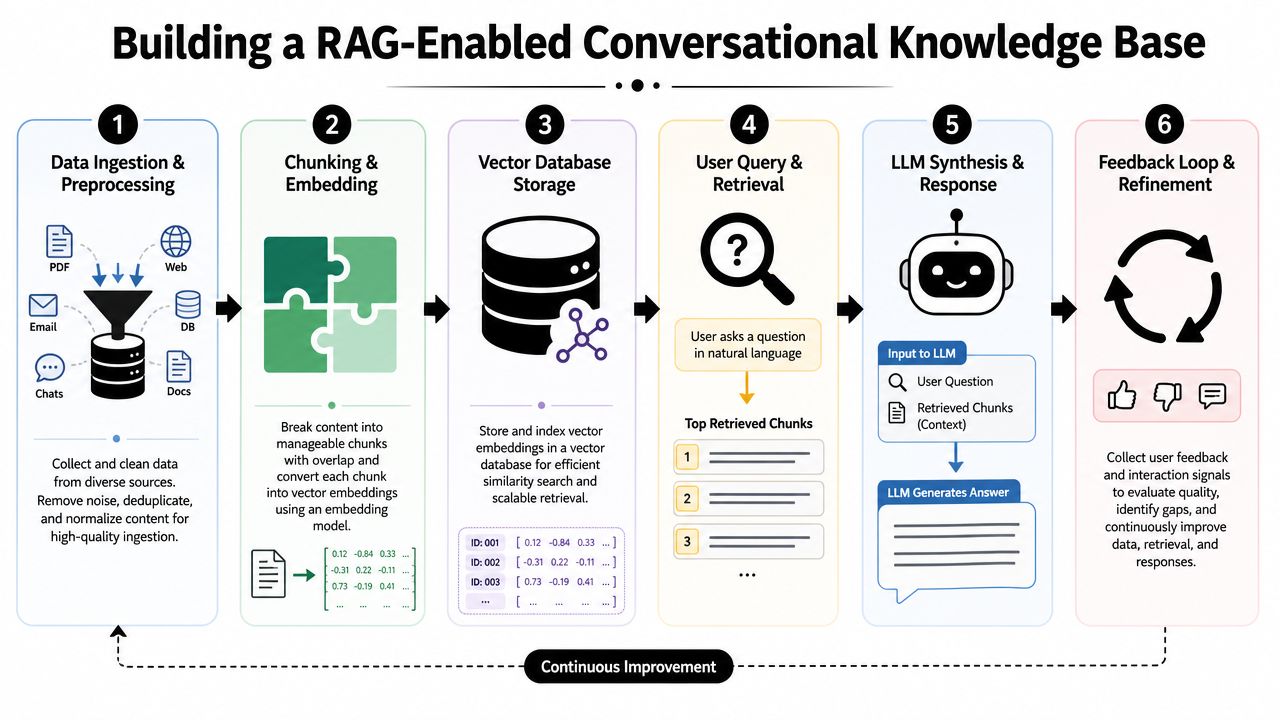
Retrieval-Augmented Generation, or RAG, gives a language model access to approved enterprise knowledge at answer time. Instead of relying only on model memory, the system retrieves relevant content from your knowledge layer and uses that as grounding context.
That matters in enterprise service because customers and employees don't ask clean FAQ questions. They ask blended, incomplete, context-heavy questions. An employee might ask about maternity leave while referencing manager approval and location policy in the same sentence. A customer might ask why a payment failed after changing card details and updating a billing address. Keyword search often misses the intent. RAG can retrieve semantically related knowledge and answer in a way that feels conversational, while still staying tied to approved source material.
For teams evaluating architecture choices, this overview of enterprise LLM adoption and deployment models is a useful companion to the knowledge design decisions discussed here.
A strong companion read is GitDocAI's guide to essential tips for AI agent documentation. It's helpful because it treats documentation as machine-operable input, not just human-readable reference.
Treat ingestion as an engineering pipeline
Many programs underestimate the work involved. Knowledge base construction isn't only writing and tagging articles. Stanford's DeepDive research describes knowledge base construction as an information-engineering process that includes data preprocessing, feature extraction, factor-graph generation, and statistical inference to turn raw content into machine-readable assertions for AI systems (Stanford DeepDive on knowledge base construction).
For enterprise teams, that translates into a practical ingestion pipeline:
- Collect trusted sources such as help center articles, SOPs, CRM notes, PDF manuals, policy docs, release notes, and resolved tickets.
- Normalize the content by removing duplicate headers, stale banners, broken formatting, and conflicting versions.
- Segment by meaning so each chunk represents a coherent unit like a task, rule, exception, or troubleshooting step.
- Attach metadata including source system, owner, jurisdiction, product line, version, and access level.
- Store for retrieval in infrastructure that supports vector search and, where needed, multimodal inputs.
Here's the trap to avoid. A bulk migration from SharePoint or Confluence into a vector database doesn't automatically produce a usable conversational KB. If the source content is noisy, contradictory, or full of procedural overlap, the model will retrieve confusion faster.
Later in the workflow, it's worth seeing the retrieval loop in action:
Chunking decides answer quality
Chunking is one of the most practical and most overlooked design choices in RAG. Too large, and retrieval returns bloated context with mixed intent. Too small, and the model loses the procedural sequence or policy meaning it needs to answer accurately.
I usually recommend chunking by user-resolvable unit, not arbitrary token size. That means:
- a single troubleshooting path
- a single policy rule with its exceptions
- one setup task with prerequisites
- one eligibility condition set
- one escalation decision tree
Small chunks improve retrieval precision. Meaningful chunks improve answer usefulness. You need both.
This is also where product choice matters. Platforms such as Adobe Experience Manager, Confluence-connected middleware, custom vector stacks on cloud infrastructure, and Yellow.ai's conversational knowledge capabilities can all support this pattern differently. The right choice depends on whether your bottleneck is authoring, ingestion, security, orchestration, or agent deployment.
Creating a Unified Service Hub with Integrations
A conversational knowledge base earns its keep when it sits inside the systems where service decisions happen. If agents, employees, or AI assistants have to leave the flow of work to search for answers, resolution slows down and adoption drops.
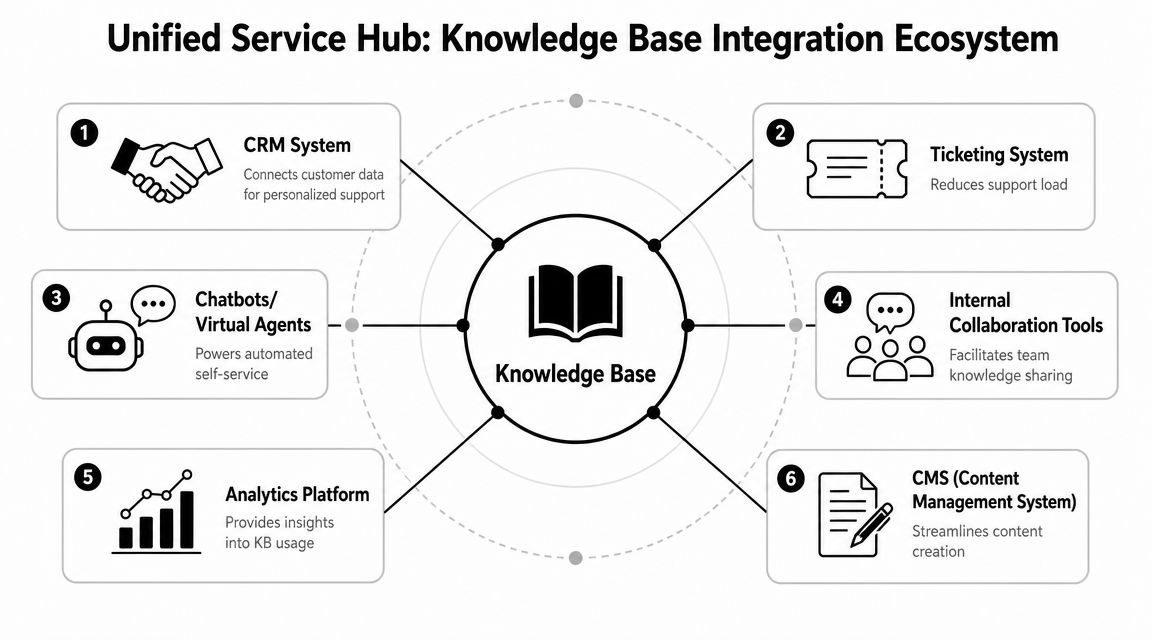
For enterprise teams, integration is not a delivery detail. It determines whether the KB supports retrieval only, or drives resolution.
The integration patterns that actually matter
The first pattern is agent assist inside service consoles. Agents working in Salesforce, Zendesk, NICE, or Genesys should see ranked guidance inside the case view, tied to intent, product, customer status, and live conversation context. That cuts tab switching, reduces inconsistent responses, and gives AI copilot experiences better grounding.
The second pattern is self-service with backend actionability. Retrieval alone answers a question. Resolution requires the system to do something next. A conversational KB should return the right policy or procedure, then trigger the allowed action in order management, identity, billing, HR, or IT systems. That is the difference between a bot that informs and an AI service layer that resolves.
The third pattern is knowledge inside employee workflows. HR teams need policy guidance in Teams. IT teams need troubleshooting steps in ITSM workflows. Operations teams need procedural answers in internal assistants and intranet surfaces. Role-aware retrieval matters here because the same topic often has different answers for managers, frontline staff, contractors, and admins.
Teams planning this architecture should evaluate the integration layer as carefully as the content model. Review available enterprise integrations across CRM, contact center, ticketing, and collaboration systems before committing to a KB design, because connector depth shapes what your AI can complete.
Build a two-way operating loop
A unified service hub should not only display knowledge. It should collect operational signals and feed them back into curation.
Here is the operating loop that works in practice:
| Operational signal | What it tells you | Knowledge action |
|---|---|---|
| Repeated escalations | Existing article is missing decision logic | Add exception handling or escalation criteria |
| Agent copy-paste behavior | A useful answer lives outside governed content | Convert it into an approved article or response block |
| Unsuccessful bot handoffs | Retrieval found content, but the user still could not finish the task | Add the transaction step or rewrite the answer around the actual intent |
| Search reformulations | User language does not match author language | Add synonyms, aliases, and clearer titles |
This loop matters even more in AI-led service environments. A static KB helps people search. A connected KB helps AI agents retrieve, reason, act, and learn where the content model still fails.
I usually advise platform owners to connect four data streams back into the knowledge workflow: contact center dispositions, ticket metadata, unresolved search terms, and agent-authored notes. Those signals expose where content is vague, where policy exceptions are missing, and where a retrieval answer should become an automated workflow.
The trade-off is complexity. Every new integration adds value, but also adds permission mapping, field normalization, monitoring, and failure handling. Start with the systems closest to resolution. CRM, ticketing, identity, and order data usually produce the fastest gains because they let both human agents and AI assistants move from answer delivery to task completion.
A siloed knowledge base can answer questions. An integrated conversational knowledge base changes outcomes across CX and EX.
Implementing Governance for a Living Knowledge Base
Launch is the easy part. Trust decay is a major threat. Once users find outdated steps, duplicate policies, or conflicting answers, they stop relying on the system. Then both human agents and AI agents start routing around it.
Ownership beats enthusiasm
Most knowledge bases don't drift because people don't care. They drift because nobody has explicit authority to decide which answer is canonical, when an article is stale, and what gets archived.
Governance sounds administrative, but in practice it's how you protect service quality. Stravito explicitly points to the missed challenge after launch: keeping the base current through tracking usage, archiving outdated content, and using usage data to retire content, which becomes harder as enterprise knowledge scales (Stravito's guide to creating a knowledge base).
The minimum ownership model should name four roles:
Business owner
Accountable for whether the content reflects policy or process reality.Knowledge manager
Owns taxonomy, standards, review workflow, duplication control, and lifecycle rules.Domain approver
Signs off on regulated, sensitive, or high-risk content.Operations feedback owner
Converts service signals into rewrite, merge, retire, and create actions.
What a workable governance model looks like
You don't need a large committee. You need a repeatable control loop.
A practical governance cadence includes:
Creation rules
New content must map to a real use case, source, owner, and audience. This prevents the KB from becoming a dumping ground.Review rhythm
High-risk content should be checked more aggressively than stable reference material. Product updates, policy shifts, and process changes should trigger review events automatically.Retirement policy
Old content shouldn't just sit hidden in search. Archive outdated material deliberately, redirect where appropriate, and preserve lineage for auditability.Conflict resolution
If two systems disagree, the KB team needs a published escalation path to decide which source wins.
Governance isn't bureaucracy. It's the mechanism that keeps your AI from retrieving last quarter's answer.
Use signals to prune, merge, and rewrite
The healthiest knowledge bases don't only grow. They get cleaner over time.
Watch for signals such as:
- Zero-result or weak-result searches that point to missing concepts, alternate terminology, or broken metadata
- Low-helpfulness articles that attract traffic but don't resolve the task
- Near-duplicate articles created by regional teams, product teams, or copied releases
- High-contact topics where users still open tickets after reading the article
- Manual agent workarounds that reveal the actual process differs from the documented one
A living knowledge base should have a clear lifecycle state for each article: draft, approved, published, under review, superseded, archived. Once that state model exists, AI retrieval also becomes safer because the system can prioritize approved and current content over stale drafts.
Measuring Success and Proving Business Value
A knowledge base earns budget when it proves operational impact, not when it publishes more pages. Leadership doesn't need another dashboard full of impressions. They need evidence that service got faster, more consistent, and easier to scale.
Build one scorecard for three audiences
The cleanest scorecard separates metrics by who cares about them.
| Audience | What they care about | Useful knowledge metrics |
|---|---|---|
| CX leaders | Resolution, containment, consistency | Self-service resolution, successful retrievals, assisted resolution quality |
| EX and operations leaders | Employee productivity and speed to competence | Time to find answers, internal assistant adoption, repeat-question reduction |
| Platform and AI owners | System quality and trust | Search success, grounded answer rate, stale-content exposure, source coverage |
This section is where many teams make a costly mistake. They report views and article counts because those are easy to pull. But a knowledge base with heavy traffic can still be failing if users bounce, reformulate queries, or escalate after reading.
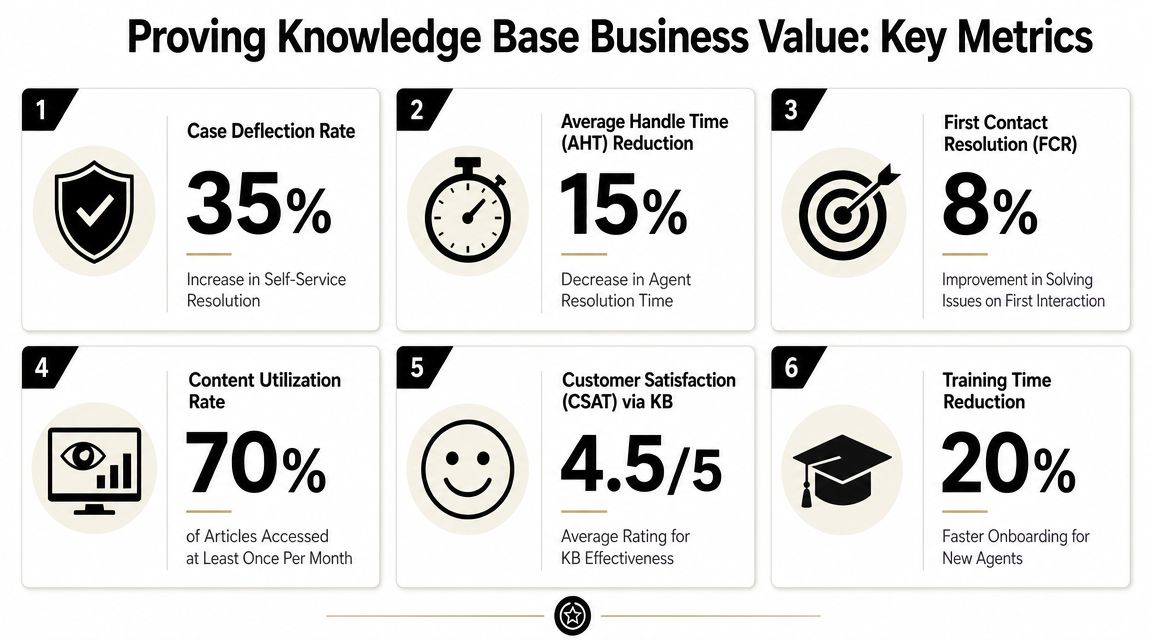
Focus on outcome metrics, not vanity metrics
A useful review set usually includes:
Search success
Are users finding something usable on the first attempt?Resolution contribution
Did the article or conversational answer help close the interaction without extra back-and-forth?Escalation after knowledge exposure
Which topics still require a human or a downstream transaction?Content freshness risk
Which high-traffic answers are old, unreviewed, or superseded?Coverage gaps
Which recurring service intents still have no governed answer path?Agent reuse
Which knowledge assets get surfaced repeatedly in assisted conversations?
For conversational AI programs, add one more lens. Measure whether the answer was not only retrieved, but grounded in the right source and delivered in the right workflow. An answer can be factually correct and still fail the user if it doesn't account for channel, customer state, or access permissions.
Review value the same way you review model quality
The strongest platform teams treat knowledge measurement as part of AI operations. They review failed queries, weak retrieval sets, stale-source exposures, and unresolved intents the same way they review prompt quality or test automation outcomes.
That approach closes the loop back to strategy. If your original business case was reducing repetitive support demand, measure repeated intents before and after knowledge rollout. If it was improving employee service, measure whether teams are still relying on informal channels for the same answers. If it was enabling autonomous resolution, track where retrieval succeeds but workflow completion still breaks.
When teams ask how to build knowledge base programs that survive leadership scrutiny, this is the answer. Tie every metric to a business promise, and tie every business promise to a governed source of knowledge.
A strong enterprise knowledge base should work as a conversational system from day one, not as a static archive that AI gets bolted onto later. If you're evaluating how to operationalize that across CX and EX, Yellow.ai provides agentic AI capabilities, conversational knowledge architecture, and enterprise integrations that can help platform owners connect governed knowledge with search, RAG, and autonomous service workflows.