














Most support leaders don't start looking at help desk automation because they want a new platform. They start because the queue stopped behaving. Ticket volume rises faster than staffing. Agents spend their day reclassifying requests, chasing missing details, and answering the same questions in five different channels. The backlog becomes the operating model.
That's the point where the manual help desk stops being a service function and becomes a bottleneck. Employees wait on access. Customers wait on status updates. Managers ask for faster response times while the team is still doing intake by hand. Burnout follows quickly because repetitive work fills the day, while the hard work still needs experienced people.
Help desk automation matters when the goal isn't just to respond faster, but to redesign how support work gets done. The shift is from reactive ticket handling to a system that can capture demand, route it correctly, resolve what's repeatable, and escalate what requires human judgment. Done well, that changes both the economics and the quality of service. Done badly, it just creates a shinier queue with more maintenance.
Table of Contents
- Beyond the Queue The End of the Manual Help Desk
- The Strategic Value of Autonomous Support
- Enterprise Use Cases for CX and EX
- Anatomy of a Modern Automation Platform
- Your Implementation and Integration Roadmap
- Measuring Success with the Right KPIs
- Common Pitfalls and How to Avoid Them
Beyond the Queue The End of the Manual Help Desk
A familiar pattern shows up in large support environments. Monday starts with a queue spike. By noon, agents are already rerouting tickets that should have gone elsewhere. A manager asks why first response is slipping, but the actual answer is problematic. Too much of the team's time is spent on intake, classification, and repetitive fulfillment rather than actual support.
That's what the manual help desk looks like at scale. It isn't just slower. It forces skilled people to behave like traffic controllers. Every request needs someone to read it, interpret it, decide where it belongs, and push it to the next step. When the environment gets more complex, the process gets more fragile.
The old model breaks in predictable ways
The failure modes are usually obvious once you look closely:
- Triage becomes a labor sink: Agents read and re-read vague requests just to figure out who owns them.
- Routing errors multiply: Tickets bounce between teams because categories don't map cleanly to how work is delivered.
- Knowledge stays trapped: Good resolutions live in inboxes, chat threads, and individual memory instead of reusable workflows.
- Urgency gets distorted: Loud requests move first, while structured prioritization breaks down under pressure.
In that environment, staffing alone rarely fixes the problem. More people can absorb some volume, but they also inherit the same manual process.
The core issue usually isn't ticket count. It's that the help desk still depends on people to perform the same deterministic steps over and over.
Help desk automation changes that design. Instead of asking agents to manually execute every stage, the system handles the repeatable parts first. It captures the request, classifies intent, checks policy, starts the workflow, and only pulls a person in when judgment is required.
That's a bigger shift than is commonly anticipated. It means the help desk is no longer organized around queue management. It's organized around autonomous resolution, guided exceptions, and continuously improved service flows.
The Strategic Value of Autonomous Support
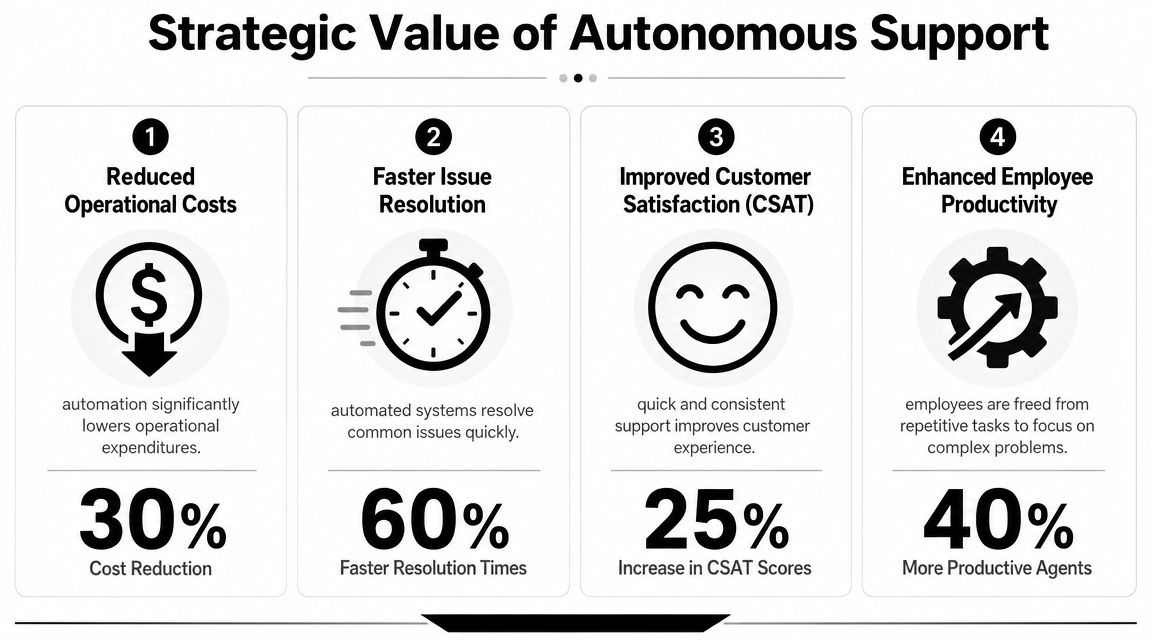
The business case for help desk automation is no longer theoretical. One market report values the global market at USD 5.7 billion in 2024 and projects it to reach USD 21.5 billion by 2030, a 24.8% CAGR. A separate report estimates USD 10.75 billion in 2026 and projects USD 28.06 billion by 2030 at a 27.1% CAGR, which shows how firmly automation has moved into mainstream IT service management investment according to Strategic Market Research's help desk automation market analysis.
Why leaders are treating automation as infrastructure
The important shift is conceptual. Help desk automation isn't a chatbot bolted onto a ticketing system. It's a coordinated service layer made up of conversational interfaces, routing logic, workflow execution, knowledge access, and escalation controls.
That matters because support quality depends on consistency. Manual teams can be excellent, but they can't be uniformly excellent across every hour, channel, and request type. Autonomous support can.
A useful way to think about it is this:
| Support model | What it optimizes | Where it breaks |
|---|---|---|
| Manual help desk | Flexibility through human effort | Volume, repetition, after-hours demand |
| Basic automation | Faster intake and routing | Fragmented workflows, poor handoffs |
| Autonomous support | End-to-end resolution for repeatable work | Requires strong governance and integrations |
Teams planning this shift usually benefit from documenting process ownership early. That's why architecture and workflow design matter as much as AI. Doczen's guide on workflow strategy is a useful reference if you need a practical lens on how process design drives automation outcomes.
What autonomy actually means in support
In practice, autonomous support means the system can recognize common requests, retrieve the right context, perform approved actions, and escalate intelligently. It doesn't mean every interaction should stay automated to the end. It means the machine should do the boring, reliable part first.
That's also where newer operating models become relevant. If your team is evaluating how orchestration differs from simpler bot deployments, this overview of agentic AI and how it differs from AI agents helps frame the distinction.
The strategic value shows up in several places at once:
- Lower service cost: Repetitive work stops consuming the same amount of agent time.
- Better availability: Common requests can be handled outside standard staffing windows.
- Cleaner specialization: Human agents spend more time on edge cases, escalations, and customer judgment.
- Stronger experience: Users get faster, more consistent answers without waiting for queue triage.
Practical rule: If a request follows a stable policy and a repeatable decision path, the default question should be why it is still manual.
That's the point where help desk automation stops being an efficiency initiative and starts becoming service infrastructure.
Enterprise Use Cases for CX and EX
The fastest wins come from work that is frequent, repetitive, and governed by clear rules. Sources on service desk operations specifically call out password resets, account access restoration, access changes, routine troubleshooting, and onboarding or offboarding workflows as the most impactful candidates for automation, along with automated remediation scripts and AI-driven self-service portals in Process Shepherd's write-up on help desk automation.

Customer experience use cases that remove friction
On the customer side, the best use cases are usually simple to describe but expensive to handle manually.
A customer asks for an order update. Another wants to start a return. A third reports a service interruption that your operations team already knows about. None of these should require a human to collect the same details, create a ticket, and respond one by one.
Good CX automation typically focuses on patterns like these:
- Status inquiries: The system checks order, shipment, or case data and returns a direct answer.
- Return or claims intake: Automation gathers structured details, validates policy conditions, and launches the next-step workflow.
- Proactive outage communication: Monitoring or incident updates trigger outbound notices before inbound volume explodes.
- Appointment and field-service coordination: Customers can confirm, reschedule, or request updates without agent intervention.
The point isn't only speed. It's reducing avoidable contact while giving agents more time for disputes, escalations, and relationship-sensitive interactions.
Employee experience workflows that should not stay manual
Internal support often has even cleaner automation opportunities because policies are known and user identity is easier to verify.
Password resets are the classic example, but they're only the start. Access provisioning, software requests, laptop onboarding, and policy-driven HR questions all follow structured paths. When those remain manual, employees feel the organization's inefficiency directly.
Common EX targets include:
- IT account recovery: Password resets and account reactivations through secure self-service.
- Access requests: Role-based approvals and fulfillment for apps, groups, or shared resources.
- Joiner and mover workflows: Triggered tasks for onboarding, department transfers, and exits.
- HR service requests: Benefits, leave, policy lookup, and document guidance routed through one service layer.
A short demo helps stakeholders understand what “good” looks like in practice before they debate tooling:
Automate where the answer should be the same every time. Escalate where empathy, negotiation, or judgment changes the outcome.
That split is what keeps automation useful instead of annoying. The wrong approach is to automate because a request is common. The right approach is to automate because the path is well-defined.
Anatomy of a Modern Automation Platform
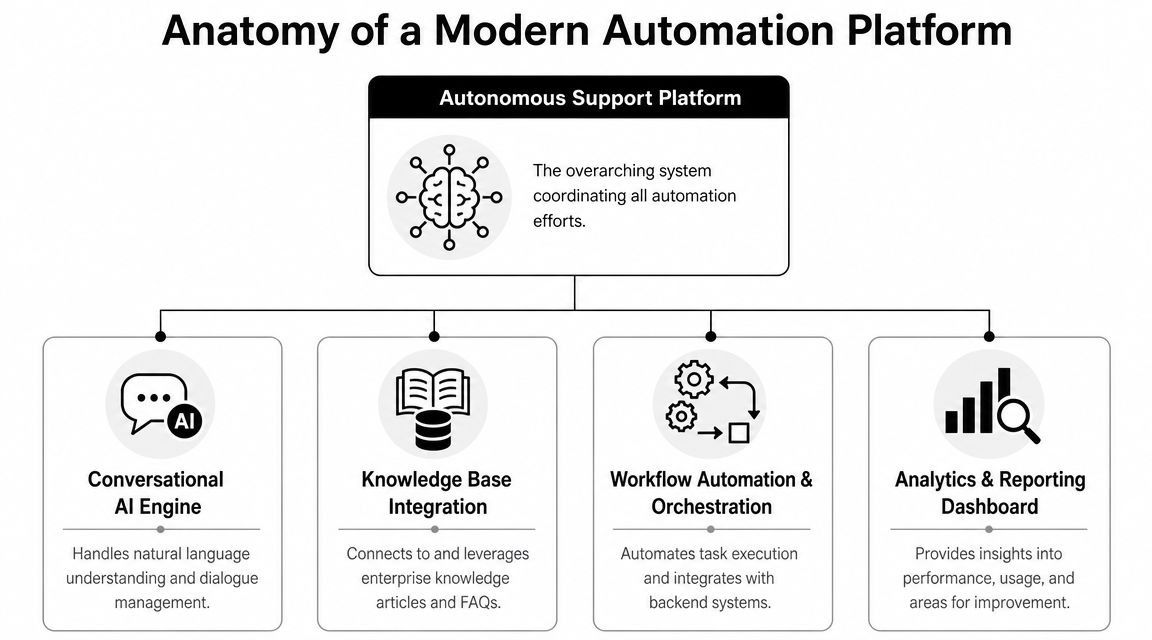
Most failed automation programs don't fail because the bot can't talk. They fail because the platform can't execute. The conversational layer gets attention, but the underlying architecture depends on how well intent recognition, workflow orchestration, knowledge retrieval, and system integration work together.
Modern help desk automation is most effective when it combines rule-based triggers, AI classification, and workflow orchestration so requests can be captured, categorized, routed, and escalated based on intent, priority, and agent availability. Guidance on current automation stacks also notes the role of knowledge bases and third-party integrations so incidents can generate tickets automatically in Unity Connect's overview of help desk automation.
The front door needs to understand intent
At the top of the stack sits the interaction layer. Users come in through chat, email, voice, portals, or collaboration tools. The platform has to normalize that demand into something operationally useful.
That layer usually needs four capabilities:
- Intent recognition: The system identifies what the user is trying to accomplish, not just the words they typed.
- Context handling: It uses identity, account history, device state, or prior interactions to avoid asking redundant questions.
- Knowledge grounding: It answers from approved enterprise content, not from generic model output.
- Handoff control: It knows when to route to a person and carries the conversation state forward.
If you're evaluating platform categories, some teams compare traditional ITSM front ends with broader conversational systems such as ticketing software and automation platforms built for support workflows.
The workflow layer does the real operational work
Below the front door sits the orchestration engine. It is the point where a lot of enterprise programs either become valuable or stall out.
A useful mental model is to treat the workflow layer as the service desk's control plane. It decides what action is allowed, what approvals are needed, which system of record to update, and when to escalate. Without that layer, “automation” is often just a scripted conversation that still leaves people doing the work manually.
A solid enterprise platform typically includes:
| Component | What it does | Why it matters |
|---|---|---|
| Workflow engine | Executes approvals, assignments, updates, and task chains | Removes swivel-chair work |
| Knowledge integration | Connects articles, runbooks, FAQs, and policy content | Improves answer quality |
| Integration hub | Connects CRM, ITSM, HRIS, telephony, and monitoring tools | Enables end-to-end resolution |
| Analytics layer | Tracks outcomes, exceptions, and bottlenecks | Supports tuning and governance |
For organizations already standardizing low-code and business process tooling, Microsoft Power Platform insights can help frame where workflow platforms fit alongside enterprise automation architecture.
The practical lesson is simple. Don't buy a conversational surface and call it a strategy. Buy or build a system that can decide, act, record, and escalate reliably.
Your Implementation and Integration Roadmap
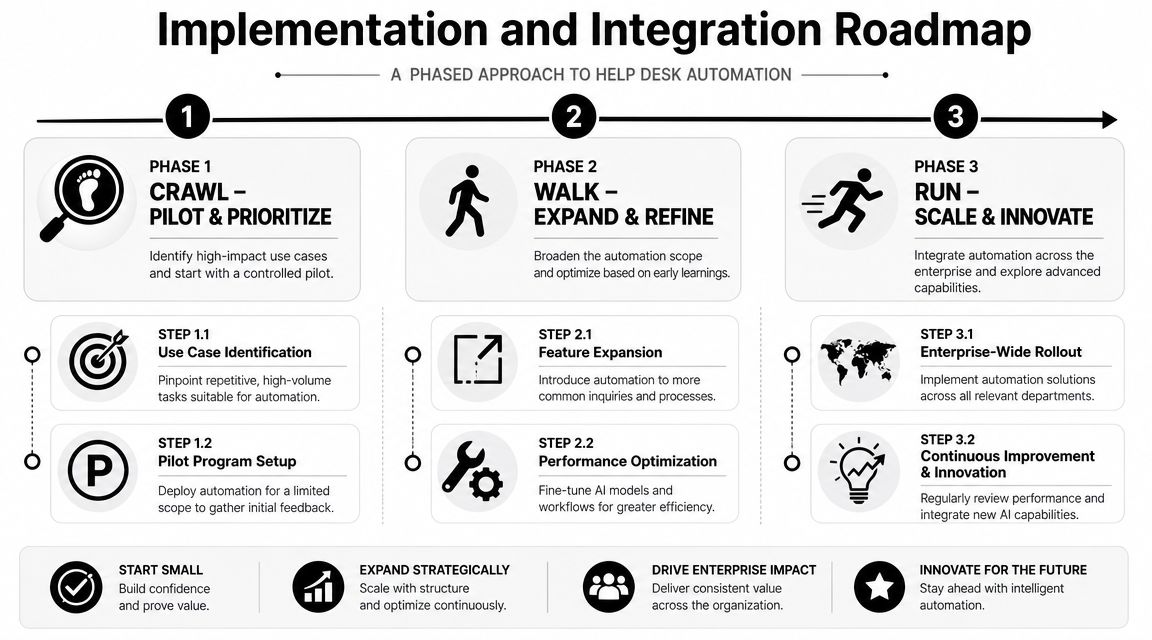
Enterprise teams get into trouble when they try to automate everything at once. The better path is narrower and more disciplined. Start with a small number of repeatable requests, prove that the workflow works, then expand only after the integrations, governance, and support model are stable.
Crawl with a narrow pilot
Pick use cases that have three traits. High volume. Clear policy. Low judgment.
Password resets, account re-enabling, common order-status requests, and standard access changes usually qualify. Avoid emotionally charged cases, policy gray zones, and anything that depends on undocumented tribal knowledge.
For the pilot, define:
- A single business owner: Someone owns policy, not just the technology.
- A contained channel set: One or two channels are enough to start.
- Explicit escalation paths: Users need a clean route to a human when the workflow fails or confidence is low.
- A knowledge source of record: If the content is messy, the automation will be messy.
Start where the process is already stable. Automation won't rescue a broken workflow. It will only expose it faster.
Walk by connecting systems and tightening governance
After the first use cases work, the next challenge is integration, a stage where many pilots stall because the bot can answer questions, but can't complete the job.
The automation layer has to connect to systems of record such as Salesforce, Zendesk, Genesys, HR systems, identity platforms, and internal knowledge repositories. The specific platforms vary, but the principle doesn't. Support automation only becomes operationally meaningful when it can read context and write outcomes back into core systems.
This stage needs a governance group with representation from support operations, enterprise architecture, security, and process owners. Their job is to approve changes to routing rules, escalation logic, access boundaries, and content controls.
A practical vendor review should test for:
- Scalability across channels and departments
- Security and compliance controls
- Integration depth, not just connector count
- Model flexibility to reduce lock-in risk
- Operational tooling for testing, monitoring, and rollback
One example in this category is Yellow.ai, which supports omnichannel automation, ticket workflows, and integrations with enterprise systems such as Salesforce, Zendesk, and Genesys. That matters less as a brand preference and more as an example of what an enterprise-capable platform should connect to out of the box.
Run with an operating model not a project plan
At scale, help desk automation is no longer an implementation program. It becomes a managed service capability.
That means creating recurring processes for content updates, workflow reviews, exception analysis, and change approval. It also means assigning ownership for how automations behave after launch, not just who deployed them.
The teams that scale cleanly usually do three things well:
- They review failure demand regularly. Escalations, abandoned sessions, and repeat contacts show where the automation design is weak.
- They version workflows. Changes to policy or routing don't go live informally.
- They treat support knowledge like production content. Articles, scripts, and fulfillment logic get maintained intentionally.
If you skip that operating model, scale will make the cracks visible very quickly.
Measuring Success with the Right KPIs
Most dashboards overvalue activity and undervalue outcome. Total conversations, session counts, and bot containment by themselves don't tell you whether help desk automation is reducing effort or just redirecting it.
Industry statistics cited by help desk research put the average cost of manually handling a help desk ticket at about $22, report that automation can resolve 22% of service desk tickets at practically no cost, say help desk software can save up to 670 working hours per year, and note that 68% of customers say automation improves their overall IT help desk experience in this roundup of IT help desk statistics. Those numbers are useful because they point to the right measurement model. Track cost, labor, and experience together.
Measure the economics not just the activity
A good KPI set starts with the service outcome and then works backward to the automation behavior that produced it.
Focus on a small set of measures:
- Cost per resolution: Compare automated outcomes, assisted outcomes, and fully manual outcomes.
- Deflection quality: Track which requests were resolved without human effort, not merely intercepted.
- First contact resolution: Measure whether users got closure in one interaction.
- Escalation accuracy: Look at whether handoffs reached the correct team with enough context.
Teams that need a practical benchmark set can use this guide to help desk metrics that matter for support performance.
Track where automation helps humans work better
A mature measurement model doesn't stop at the bot boundary. It also asks whether humans are working on better problems.
That means looking at changes in average handle time for escalated tickets, repeat contact patterns, and the amount of manual triage still required after automation captures the request. If agents are still rewriting summaries, fixing categories, and reassigning ownership, the automation isn't done. It has shifted the work downstream.
Good measurement exposes substitution effects. A lower ticket count means little if exception handling and rework increased at the same time.
The strongest KPI programs include both service metrics and maintenance metrics. You need to know what the automation resolved, but also what it created in terms of review, correction, and ongoing tuning.
Common Pitfalls and How to Avoid Them
The most misleading promise in help desk automation is that it “reduces workload.” Sometimes it does. Sometimes it redistributes the same effort into a less visible layer of exception handling, knowledge cleanup, workflow tuning, and governance.
That trade-off deserves more attention. Discussion of service desk automation often focuses on faster response and lower manual effort, but a more critical question is whether automation reduces total work or shifts it into maintenance. Capterra's discussion of help desk automation calls out the need for continuous process redesign and AI model governance, especially in large enterprises where teams must keep automations aligned with changing policies and systems in its analysis of automation trade-offs.
The hidden work is real
Support leaders usually discover this after launch. The automation is live, but now someone has to review failed intents, update stale articles, refine routing rules, and decide what should happen when policy exceptions collide with old workflow logic.
That work is not accidental. It is part of the operating cost.
Three categories create the most hidden labor:
| Hidden burden | What it looks like in practice | How to control it |
|---|---|---|
| Knowledge upkeep | Articles drift from actual policy and users get wrong answers | Assign content owners and review cycles |
| Workflow maintenance | Routing and approvals break when teams or systems change | Version flows and use change control |
| Exception management | Edge cases pile up and agents become cleanup crews | Design explicit fallback paths early |
Three failure patterns that show up repeatedly
The first is choosing the tool before defining the service model. Teams buy a capable platform and then discover they haven't agreed on which requests should be automated, where policy lives, or who owns escalations.
The second is designing a bad user experience. If the automated path is slower, more repetitive, or harder to escape than a human queue, people will bypass it. Once users lose trust, adoption becomes a political problem rather than a technical one.
The third is underfunding change management. Agents need to understand new handoff patterns. Supervisors need new QA criteria. Process owners need to respond when content, policy, or routing needs to change.
A better operating posture looks like this:
- Treat automation as a product: Give it owners, backlog management, release discipline, and performance reviews.
- Design for graceful failure: Every automated path should have a clear recovery route.
- Budget for maintenance: Include workflow tuning, knowledge operations, and governance in the business case from the start.
- Keep humans where judgment matters: The goal isn't to automate everything. It's to automate the work that shouldn't require a person in the first place.
If you approach help desk automation that way, the gains are real and sustainable. If you treat it like a one-time deployment, the queue usually comes back wearing a different costume.
Yellow.ai is one option for enterprises building autonomous support across CX and EX, especially when the requirement includes omnichannel conversations, ticket automation, workflow orchestration, and integration with systems such as CRM, ITSM, and contact center platforms. If you're evaluating how to move from manual intake to a more autonomous service model without losing human escalation paths, Yellow.ai is worth reviewing alongside your existing support stack and governance needs.



