














You're staring at a charged card, an empty inbox, and a show that's getting close. That's when you start hunting for Dice support, and that's exactly when a generic FAQ page wastes time. The problem usually isn't that Dice has no contact options, it's that the wrong channel gets used for the wrong issue, and by the time someone notices, the event window is closing.
For customer-service leaders, this is the same failure pattern that shows up everywhere: speed matters, but resolution quality matters just as much. Zendesk's 2026 customer-service statistics say 73% of consumers will switch to a competitor after multiple bad experiences, while Help Scout cites research showing 90% of customers rate an “immediate” response as essential or very important, and 60% define immediate as 10 minutes or less. That's the backdrop for Dice support, too, where a slow or sloppy first reply usually creates a second ticket, a second channel, and a second round of frustration. If you want a parallel on the employer side, the same expectation gap shows up in candidate communications, and how to attract top developer talent is a useful reminder that response quality shapes trust long before the final outcome.
Table of Contents
- Why Reaching Dice Support Feels Harder Than It Should
- Every Way to Contact Dice Customer Service
- What to Prepare Before You Reach Out
- Scripts That Get Your Issue Solved on the First Reply
- Realistic Response Times and What to Expect
- Escalating When the First Reply Is Not Enough
- Quick Self-Service Fixes and Where AI Fits Next
Why Reaching Dice Support Feels Harder Than It Should
The hardest Dice tickets are always the same ones. The ticket hasn't shown up, the payment cleared, the event starts tonight, and the customer is refreshing their inbox like it owes them money. At that point, a contact page that only lists routing details feels thin, because the actual problem is not “where is support,” it's “who can solve this fast enough to matter.”
Dice's public support setup makes that gap pretty obvious. The official support pages point users to email, a phone option that runs only Monday to Friday, 8am to 5pm CST, and a help-center style workflow instead of a true always-on service desk. That's workable for routine questions, but it leaves a coverage hole exactly when live-event issues spike, evenings, weekends, and the hours before showtime. The support model is available, just not aligned with the moment people usually panic.
Practical rule: if the issue can block entry within the next 24 hours, don't start with a form and hope for the best. Use the channel that gives you the shortest path to a human, then send the documentation in writing right after.
That expectation gap is the reason so many users feel like they're doing support's job for them. The public-facing content is built to list routes and keep operations tidy, while the customer is looking for scenario-based guidance and a clear next move. In live-event support, those are not the same thing.
Every Way to Contact Dice Customer Service
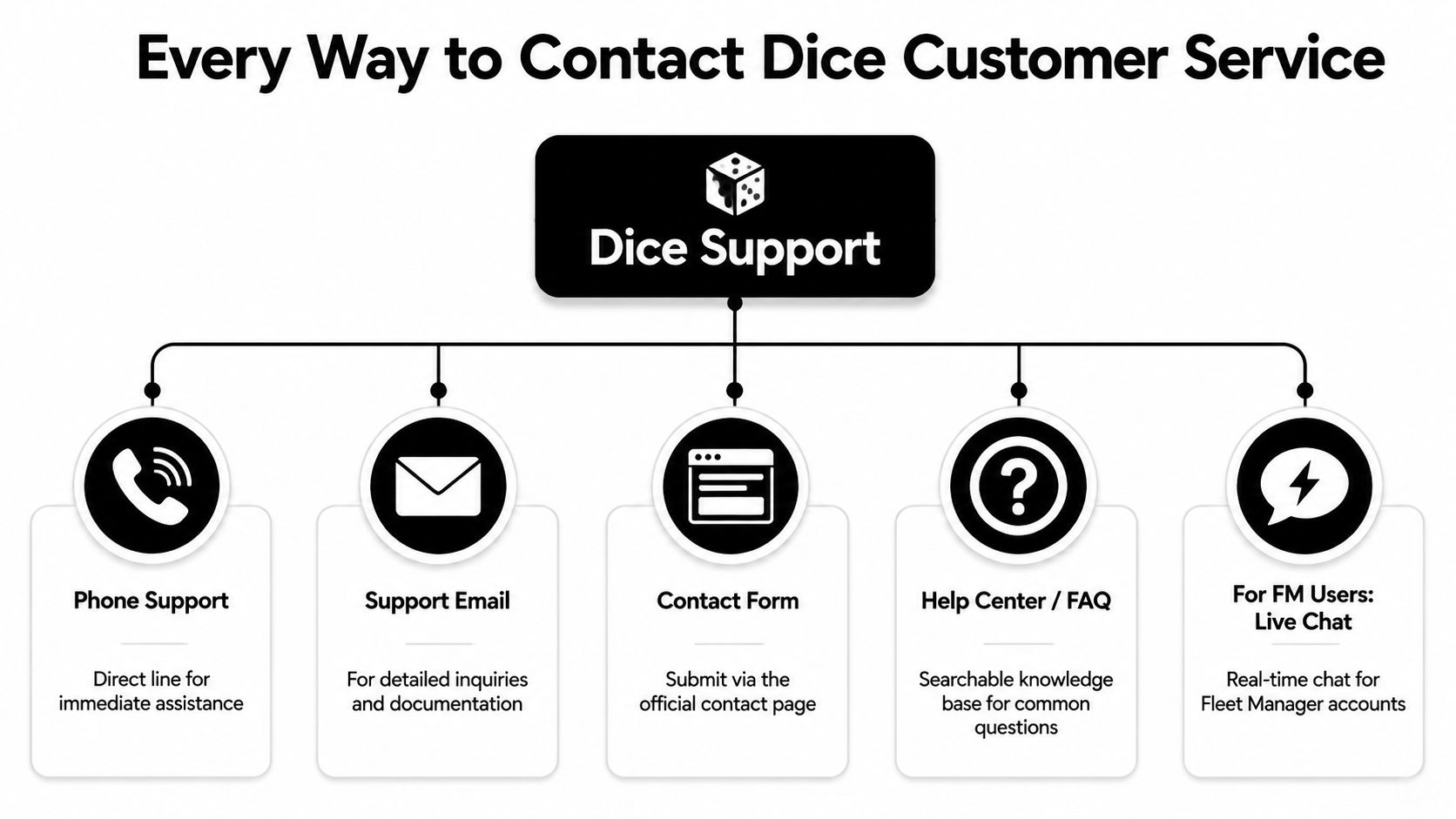
Start with the channel that matches urgency, not the one that looks easiest.
Use phone support for anything time-sensitive
Phone support is the right move when a ticket, login, or transaction issue is actively blocking you from the event. The catch is the window, because Dice's phone support is only available Monday through Friday, 8am to 5pm CST on the official support page. If you call outside that range, you're not being ignored, you're just outside coverage.
Use email or the contact form for documented cases
Email and the contact form are better for refunds, cancellation questions, payment disputes, and anything that needs a paper trail. You want those channels when the request may need review, because they preserve timestamps, order details, and your own wording. The email support workflow made simpler is a helpful model for why written channels work best when a case may need review or follow-up.
Use the help center for routine self-service
The help center is for the questions that don't need a back-and-forth, like order lookup, event information, and basic account guidance. It's fast because you're not waiting on anyone, but it only works when the issue is already documented well enough to search.
FM users get a separate route
Dice also maintains a dedicated FM help center, and the plan there is more structured. That makes sense for account-specific support, but it doesn't change the basic rule. If the issue is urgent, human, and time-bound, escalate through the live route first.
Decision rule: if the event is in the next 24 hours, call during business hours. If the issue is refund, cancellation, or payment proof, send a detailed email. If you're just looking for status, start with self-service.
One more thing. If your team cares about contact-center design, the agent assist approach is the right lens for reading a support journey like this, because good routing depends on context, not just a queue.
What to Prepare Before You Reach Out
Half of a bad support interaction is bad prep. The other half is an agent who doesn't ask the right follow-up question, but you can control the first part.
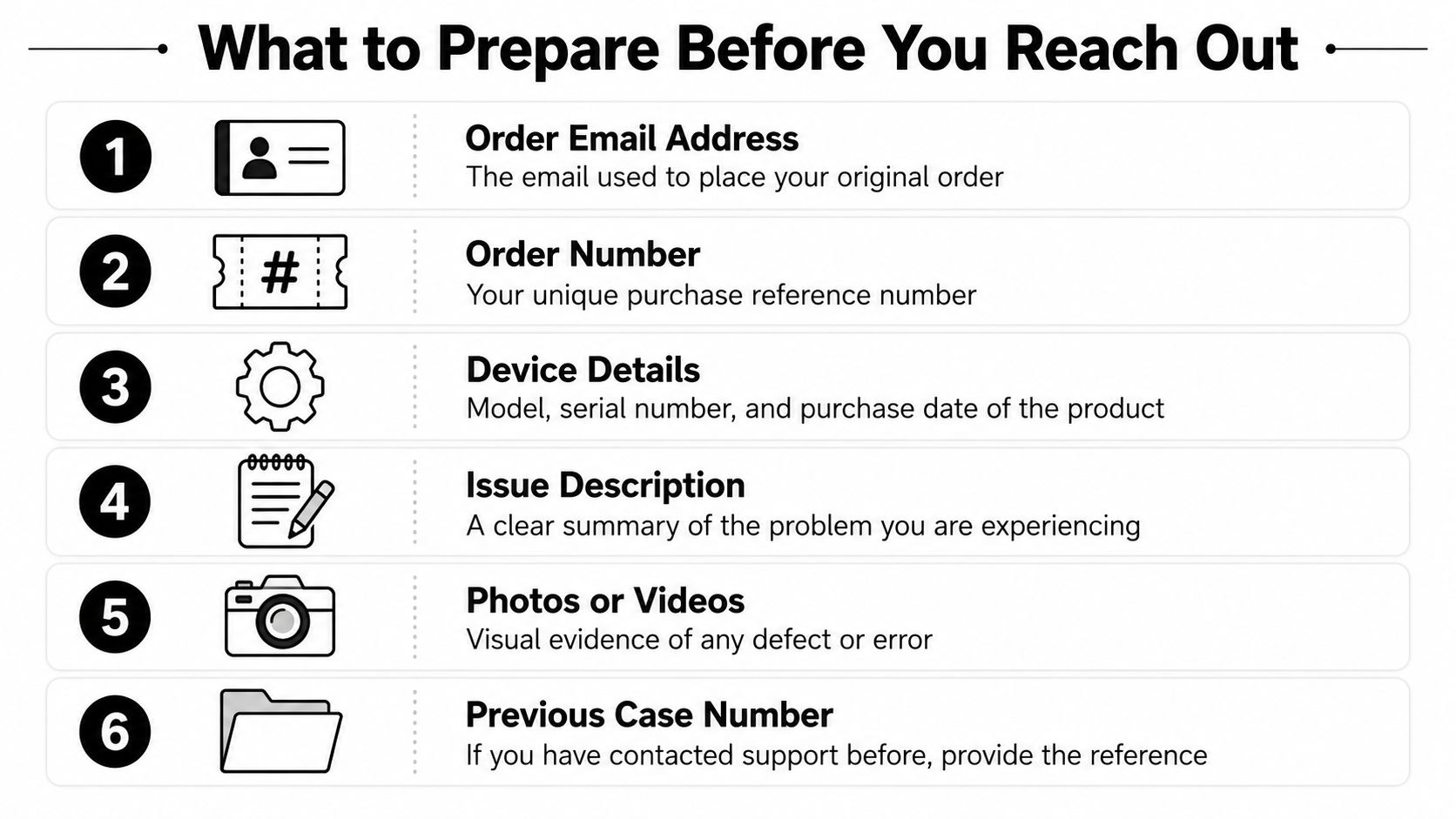
Gather the details that cut verification time
Before you call or email, have the order email address, order or booking ID, event name and date, payment method and last four digits, and any screenshots or error messages. If you've already contacted support, include the previous case number too. Those details let the agent skip identity back-and-forth and get straight to the actual fault.
Handle identity checks before they slow you down
If the name on the card doesn't match the account, expect a verification step. That's normal, and it's exactly why you should be ready with the email on the order and the payment trail. If you're locked out and can't see the confirmation at all, use the recovery path for the account first, then come back with the order reference once you're back in.
Keep a clean copy-paste note ready
Use this structure in your notes app:
- Account email: the address used on the order
- Order ID: the purchase reference
- Event details: artist, venue, and date
- Payment details: card type and last four digits
- Proof: screenshots, receipts, or error text
- Prior contact: case number if one exists
The point isn't to overwhelm support with paperwork. It's to remove every obvious blocker before the first reply lands.
Scripts That Get Your Issue Solved on the First Reply
A vague complaint forces support to ask questions you could've answered in the first message. A tight message gives the agent enough context to act. That difference matters in every channel, and it lines up with the first contact resolution guide because first-pass resolution usually comes from structure, not politeness alone.
Refund or cancellation near an event
Bad version. “I want my money back. This is ridiculous.”
Better version. “Hi, I'm requesting a refund or cancellation review for order [ID]. The event is on [date], and I'm contacting you before showtime because [short reason]. Please confirm the available option and let me know if you need anything else from me.”
Charged but no ticket received
Bad version. “You took my money and I got nothing.”
Better version. “My payment went through for order [ID], but I never received the ticket email. I checked spam and the inbox tied to the order. Please verify delivery status and resend the ticket to [email].”
Ticket never delivered to the inbox
Bad version. “Where is my ticket?”
Better version. “I bought ticket(s) for [event name] on [date], but the confirmation never arrived at [email]. The payment was made with [last four digits], and I've checked spam, promotions, and filters. Please confirm the order and resend the confirmation.”
Account lockout or recovery
Bad version. “I can't log in.”
Better version. “I'm locked out of the account tied to [email], and I need help regaining access. I can verify the order details for [event/order ID] once you confirm the recovery steps. Please tell me the fastest way to restore access.”
Keep the message short. A support agent can work with a clear five-line note. They can't work faster because you wrote two paragraphs about how angry you are.
If you're building support flows at scale, tools like agentic support automation can help agents surface the right context faster, but the human side still starts with a clean case summary.
Realistic Response Times and What to Expect
Phone is the fastest path when it's available, because you get immediate triage during business hours. Email is slower by design, since it has to pass through a queue and often a verification step. The help center is instant, but only if the answer is already in the knowledge base.
A good reply usually does three things fast. It names your exact issue, it references your order or account details, and it gives you the next action. A bad reply is generic, asks for information you already sent, or closes the loop without telling you what happens next.
The bigger benchmark is customer expectation. In broader service research, 89% of consumers are more likely to make another purchase after a positive customer service experience according to the Zendesk customer-service statistics page. That's why a timely, specific response matters more than a polite auto-reply, because the customer is deciding whether the brand is capable of fixing real problems, not just acknowledging them.
If a reply gives you a ticket number and a named next step, you're probably in motion. If it only repeats policy language, you're still in queue.
For Dice issues, the right expectation is simple. Call during business hours for urgent problems. Use email when the case needs records. Don't mistake silence for progress unless you've at least been given a case number and a concrete follow-up.
Escalating When the First Reply Is Not Enough
When the first response misses the point, don't open a second thread. That just fragments the case and makes the agent hunt for context. Reply in the same thread, keep the tone steady, and force the discussion back to the facts.
Escalate in the same thread first
Write back with a short summary of what's wrong with the reply and what you still need. Mention the order ID again, the event date, and the exact outcome you want. If the first agent asked for information you already sent, say that clearly and attach the earlier message.
Ask for a supervisor when the issue is account or refund related
If the reply denies a refund, fails to explain a cancellation boundary, or leaves an account access problem unresolved, ask for escalation to a supervisor. Don't over-explain. The point is not to win an argument, it's to get someone with authority to review the decision.
Use a calm escalation note
“Hi, I'm following up on case [number]. The issue is still unresolved because [one sentence]. I've already provided [list the facts], and I'm requesting a supervisor review or the next available escalation path. Please confirm receipt and next steps.”
Document everything. Save the thread, note timestamps, keep the names of anyone you spoke with, and preserve screenshots of what you submitted. If the issue has to go further, that record matters more than your memory.
Quick Self-Service Fixes and Where AI Fits Next
Some Dice problems don't need an agent at all. Check the order status in the help center, recheck the inbox tied to the purchase, search for the confirmation email in spam or promotions, and verify the event start time before you assume the ticket is missing. Those four steps clear a lot of ticket anxiety before it turns into a service case.
The key lesson for support leaders is broader. Email-first, business-hours-only service works poorly when the customer is stressed, the event is near, and the issue is time-bound. That's where automated self-service earns its keep, because it can answer routine questions, route urgent ones, and keep the human queue focused on cases that truly need judgment. For a useful framework on that shift, the self-service future of customer service explains why customers increasingly expect to solve simple issues without waiting on an inbox.
If you're evaluating platforms, Yellow.ai is one option for automating routine customer questions across voice, chat, and email while handing off complex cases with context. That matters most in support environments where the same simple request keeps arriving after hours and the business still expects a clean resolution.
If your support team is dealing with the same mix of urgent tickets, repeated questions, and channel confusion, Yellow.ai can help you automate the routine work without breaking the handoff to humans. Visit Yellow.ai to see how conversational AI can support faster resolutions, cleaner escalations, and a better experience for customers who can't afford to wait.



