














The popular advice is simple: choose a CTI connector, map a few fields, enable screen pops, and move on. That approach works for a demonstration. It often fails in production because call center integration with Salesforce is an operational architecture problem, not a software plug-in exercise. The difficult work starts when a transferred call has multiple participants, a customer has duplicate records, an agent skips a disposition, or a reporting dashboard needs trustworthy relationships between a call, a case, a contact, and an outcome.
Salesforce's own evolution shows why the decision deserves more scrutiny. In November 2019, Salesforce and AWS announced a partnership to bring Amazon Connect into Service Cloud Voice, combining phone, digital channels, and CRM data in one console, as described in the Salesforce and AWS partnership announcement. By 2025, AWS said the joint Salesforce Contact Center solution had more than 1,000 customers and was used by more than 100,000 contact center agents, evidence that Salesforce-connected contact centers had moved well beyond isolated pilots.
The core design question is not, “Can this dialer connect to Salesforce?” It's, “Can the integration preserve data integrity, support agent workflows, survive change, and leave the business with a viable exit path?”
Table of Contents
- Why Most Call Center Integrations Fail at Scale
- Choosing Your Integration Architecture
- Mapping Data Flows Without Breaking Salesforce
- Security and Compliance Requirements
- Testing and Deployment Strategy
- Avoiding Platform Lock-In and Migration Risk
- Building Your Operational Runbook
Why Most Call Center Integrations Fail at Scale
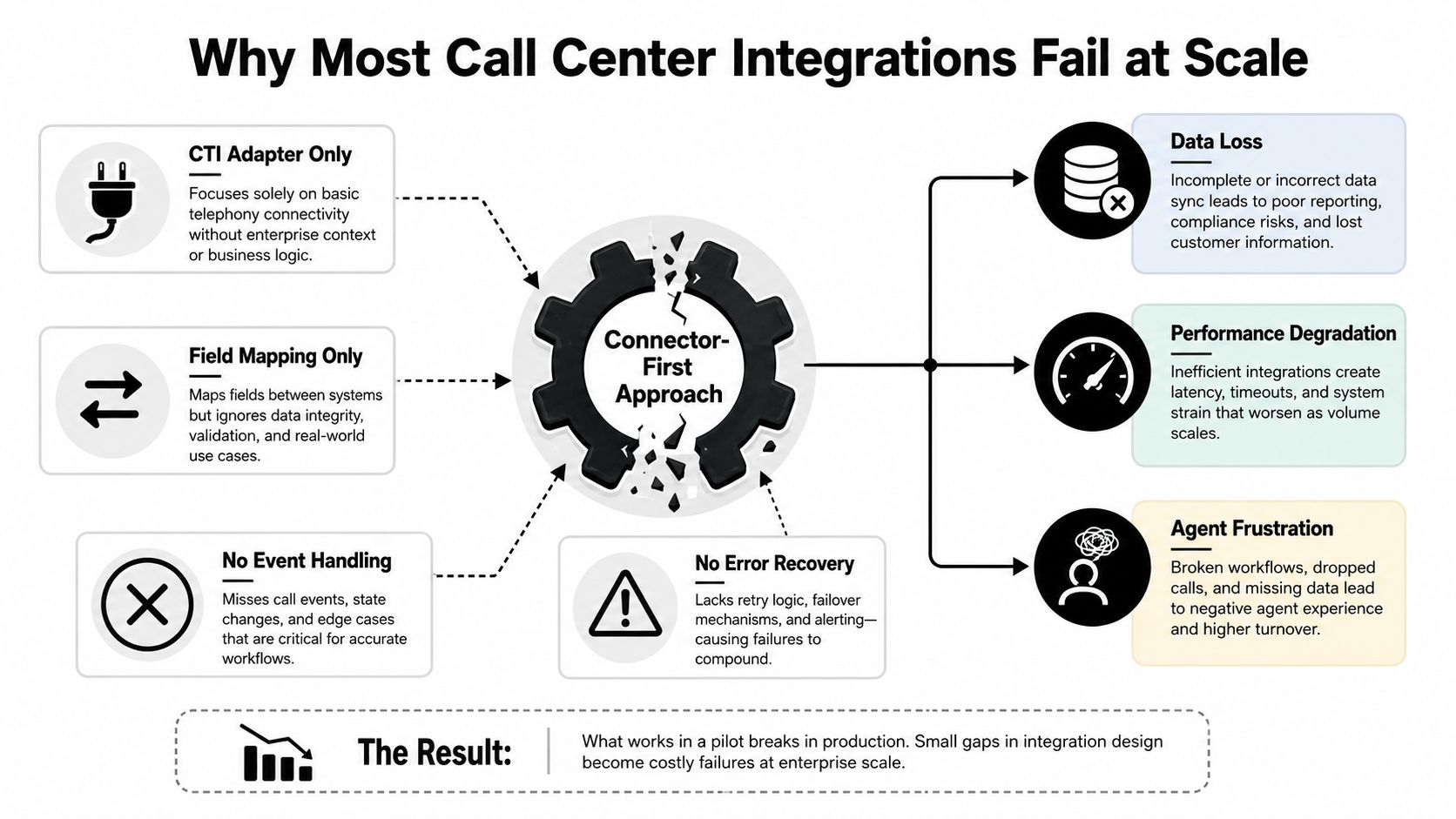
A CTI adapter can initiate a call, display a customer record, and write an activity. None of those capabilities proves that the integration is sound. At enterprise scale, every interaction generates a chain of events, including ringing, connection, hold, transfer, disconnect, wrap-up, disposition, recording availability, and possibly a case update. If the architecture treats only the completed call as important, it loses the operational context needed for accurate reporting and recovery.
The first failure pattern is treating Salesforce as a passive data sink. Teams send records into Tasks or custom objects without defining which system owns identity, routing, disposition values, timestamps, or corrections. That creates duplicate contacts, orphaned activities, and call records that can't be reliably connected to the right Case or Account. Reporting may still load, but the relationships underneath it become unreliable.
The three recurring design failures
Real-time events get confused with final records. A screen pop needs low latency, while a transcript or recording link may arrive later. These flows shouldn't share the same assumptions. If the integration blocks the agent workflow while waiting for asynchronous data, the console becomes slow. If it writes incomplete records as final, downstream automation can fire too early.
Error recovery is treated as an afterthought. Salesforce validation rules, changed picklist values, expired credentials, API limits, and telephony outages can all interrupt synchronization. Without an idempotency key, retry queue, and dead-letter process, a retry can create a second interaction instead of completing the first.
Agent friction creates shadow processes. If agents must leave the Service Console to enter wrap-up codes, manually search for a Case, or repair a failed screen pop, they'll develop workarounds. Some will log calls later. Others will use free-text notes. The integration then becomes technically active but operationally bypassed.
Practical rule: Design the integration around the interaction lifecycle, not around the connector's feature list.
Salesforce documentation and Trailhead materials describe metrics such as call volume, average handle time, speed to answer, first-call resolution, abandonment rate, and calls-to-cases for Service Cloud Voice and related analytics. Those measures are only useful when event timing and object relationships are consistent. A connector can transport data, but it can't decide whether a transferred call is one interaction, several linked legs, or a parent interaction with child events. That decision belongs in the operating model and data design.
Choosing Your Integration Architecture
Three architectural paths cover most Salesforce contact center programs: Service Cloud Voice, a third-party CTI adapter, and a custom API integration. The right choice depends less on which option has the shortest setup and more on how much control the business needs over telephony, data ownership, routing, and future migration.
Service Cloud Voice offers the closest Salesforce experience. The agent works within a unified console, and telephony, digital channels, routing, and CRM context can operate as one platform model. The trade-off is dependency. The architecture is closely tied to Salesforce and its supported telephony ecosystem, including Amazon Connect in the original Service Cloud Voice partnership. That can simplify administration, but it narrows the range of independent choices available later.
A third-party CTI adapter preserves more telephony flexibility. It can be appropriate when an enterprise has an established CCaaS platform, specialized recording controls, or regional requirements that a native option doesn't meet. The hidden work sits in the adapter layer, where browser behavior, Salesforce releases, vendor APIs, identity flows, and event semantics must remain compatible. Salesforce's call center integration and partner architecture materials also reflect a broader ecosystem that includes BYOCCaaS patterns and multiple providers.
Custom REST API or Platform Event integration gives architects the most control. It supports a canonical interaction model, explicit retry behavior, and integration with more than one downstream system. It also makes the enterprise responsible for versioning, observability, security, testing, and long-term Salesforce development capacity.
| Architecture Type | Setup Complexity | Ongoing Maintenance | Vendor Lock-In Risk | Best Use Case |
|---|---|---|---|---|
| Service Cloud Voice | Medium to high, depending on routing and channel scope | Shared between Salesforce, telephony provider, and internal admins | High, because the operating model is tightly platform-centered | Organizations prioritizing a unified Salesforce workspace and native routing |
| Third-party CTI adapter | Medium | Adapter updates, vendor coordination, and Salesforce compatibility management | Medium, with dependency on both the CTI provider and Salesforce | Enterprises keeping an existing CCaaS platform while improving CRM workflows |
| Custom API or Platform Events | High | Internal ownership of mappings, events, retries, monitoring, and releases | Lower at the telephony layer, but higher internal engineering responsibility | Complex environments requiring control, multi-system distribution, or a canonical data model |
A vendor marketplace can help with discovery, but it shouldn't replace architecture review. Compare integration capabilities and platform options against your identity model, data residency obligations, reporting needs, and internal support capacity.
The buying decision should include exit costs from the beginning. A solution that appears flexible may still create proprietary objects, opaque middleware mappings, or contract dependencies that become expensive to unwind.
Mapping Data Flows Without Breaking Salesforce
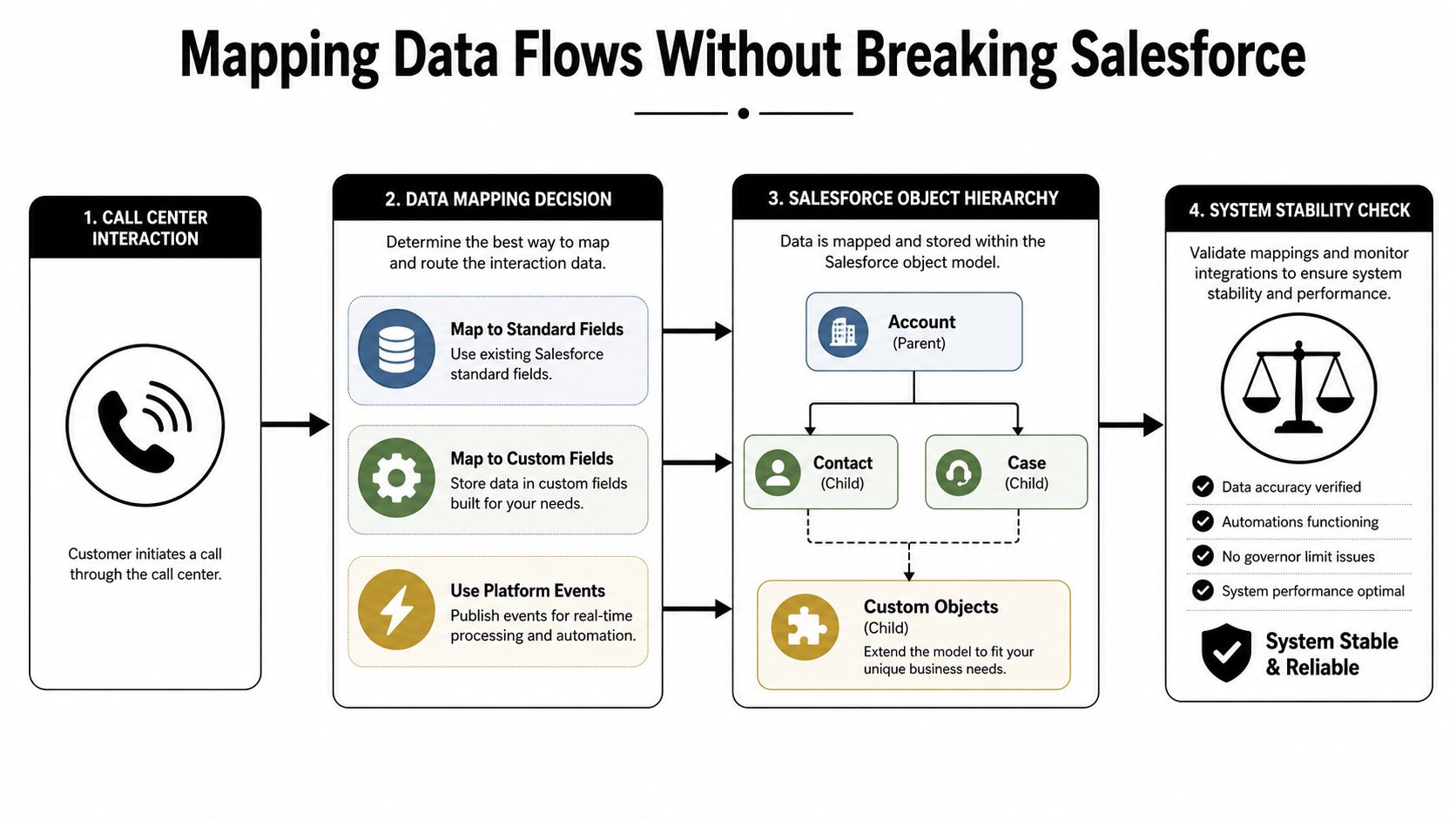
Start with the business meaning of an interaction, then choose the Salesforce object. Reversing that order leads teams to force every event into Task because it's familiar, or to create custom objects for every telephony concept because custom objects feel flexible. Neither approach preserves clarity by itself.
A practical model separates the interaction, the customer context, the service outcome, and the operational events. Accounts, Contacts, and Cases should retain their roles as customer and service records. Tasks or Events can represent lightweight follow-up activity when that matches the reporting requirement. A native or purpose-built interaction object should carry call-specific identifiers, channel, direction, queue, agent, timestamps, disposition, and links to related records.
Establish identity before activity
The integration needs a deterministic method for matching a caller to an existing Contact. Phone number alone is often insufficient because customers share numbers, use extensions, change numbers, or call from an unrecognized channel. Define matching precedence, confidence handling, and an exception queue before enabling automatic record creation.
Store the external interaction ID as a unique, indexed reference. Every event for the same call should use that identifier, while a separate leg identifier distinguishes transfers, consults, and conference segments. This prevents a retry or transfer from creating a second “new” call.
Preserve relationships explicitly
A transferred call shouldn't overwrite the original agent or queue. Keep the parent interaction, child legs, participants, and final outcome distinct enough for supervisors to reconstruct what happened. Link the interaction to a Case through a controlled lookup, and avoid circular automation where a call creates a Case, the Case update creates another call, and both records trigger each other repeatedly.
Call recordings and transcripts usually belong outside the core CRM payload. Salesforce can store metadata, permissions, retention status, and a controlled reference, while the media remains in a system designed for large files and retention management. That separation reduces object and storage pressure and lets security teams apply different access rules to content and metadata.
Design for two speeds
The agent needs immediate context, routing status, and a usable disposition experience. Analytics can tolerate a later enrichment step for transcript processing, recording indexing, or quality classification. Platform Events or an integration queue can separate these paths, but the event contract must define ordering, replay behavior, and what happens when an enrichment step fails.
Before production, test duplicate matching, abandoned calls, transfer chains, missing Cases, invalid dispositions, delayed recordings, and time-zone conversion. A successful mapping isn't the one that stores the most fields. It's the one that keeps the relationships understandable when the interaction doesn't follow the happy path.
The following walkthrough illustrates the kind of object and event decisions architects should validate with their own Salesforce team.
Security and Compliance Requirements
Security failures in a Salesforce contact center integration rarely come from one missing checkbox. They emerge at the boundaries between telephony, Salesforce, middleware, agent browsers, recordings, transcripts, and analytics exports. Each boundary needs an owner, a permitted data set, an authentication method, and an audit trail.
Start by classifying the data before mapping it. A disposition such as “payment issue” may be harmless in one environment but could become sensitive when agents enter account details or health information into free text. Free-form notes and transcripts deserve the same scrutiny as structured fields because downstream dashboards, exports, and AI workflows may expose them to a wider audience.
Control access at the object and interaction level
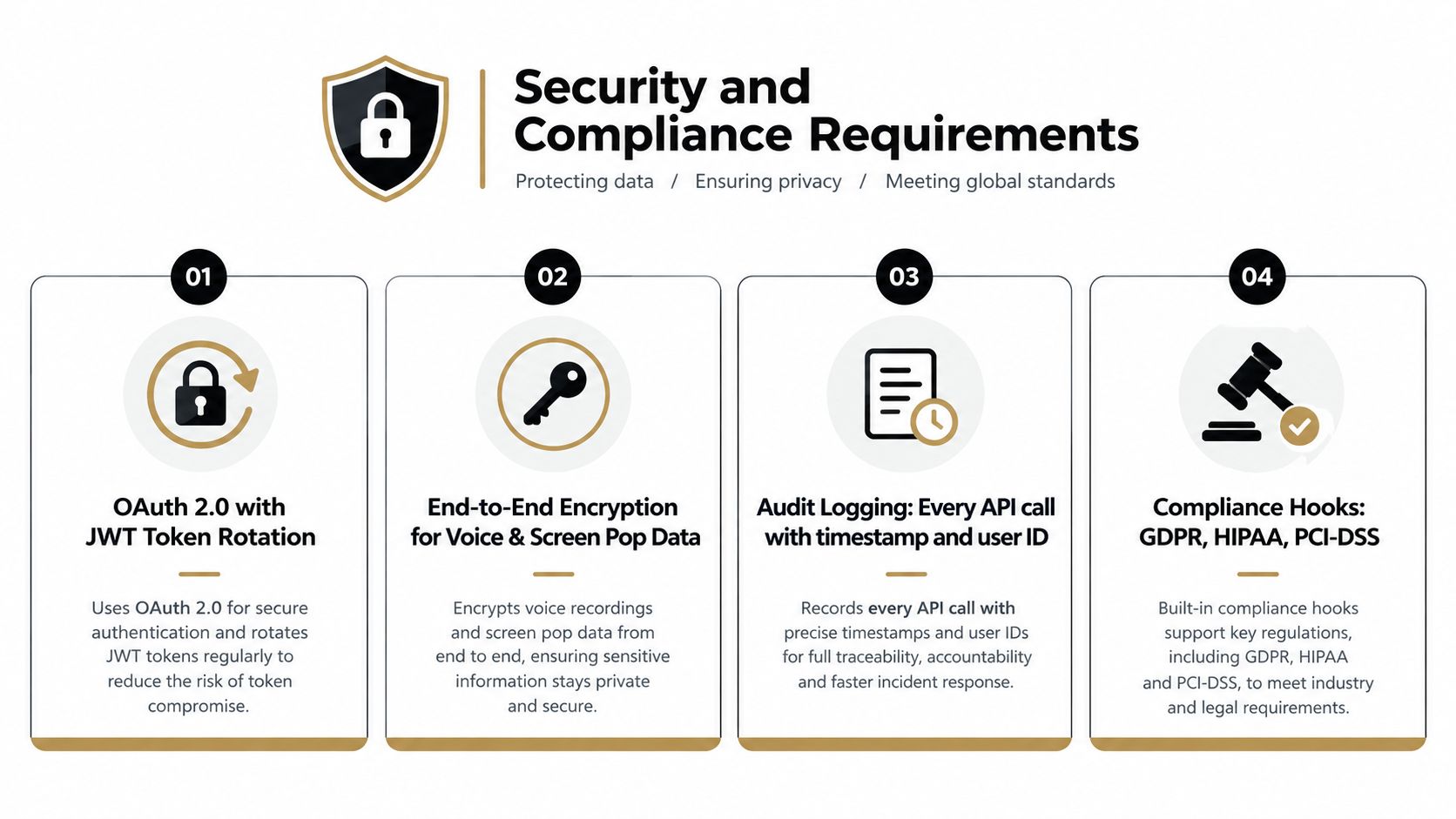
Salesforce sharing rules don't automatically solve telephony exposure. A screen pop can display a Contact or Case to an agent who shouldn't see all associated fields, while a recording link may bypass the intended access model if it points directly to an external object. Use least-privilege profiles, permission sets, field-level controls, short-lived access where supported, and authorization checks before returning customer context.
The enterprise-grade security approach should be evaluated alongside the security controls of the chosen CCaaS provider, not as a substitute for them. Teams need one view of identity, session termination, token rotation, encryption, retention, and incident response.
Treat recordings and consent as separate controls
Recording consent must propagate across the voice platform and Salesforce. If a customer withdraws consent, the integration should define whether future recording stops, whether existing metadata remains visible, and how retention requests are handled. PCI-DSS considerations also require careful treatment of payment data, including redaction, pause and resume behavior, and restrictions on exposing sensitive content in transcripts or notes.
Audit logs should answer who accessed a record, which integration changed it, when the change occurred, and whether the action succeeded. Keep operational logs detailed enough for diagnosis, but avoid copying full sensitive payloads into every log sink. A structured correlation ID can connect telephony events, middleware transactions, and Salesforce changes without duplicating customer data.
Screen-pop convenience doesn't justify broad access. Return only the fields an agent needs for the current interaction.
Session handling matters during shift changes and browser failures. The integration should revoke or expire stale sessions, reconcile agent presence, and prevent a disconnected browser from remaining available for routing. Security reviews should include failed authentication, replayed events, expired tokens, unauthorized recording access, and a validation rule that rejects a disposition after a CRM configuration change.
Testing and Deployment Strategy
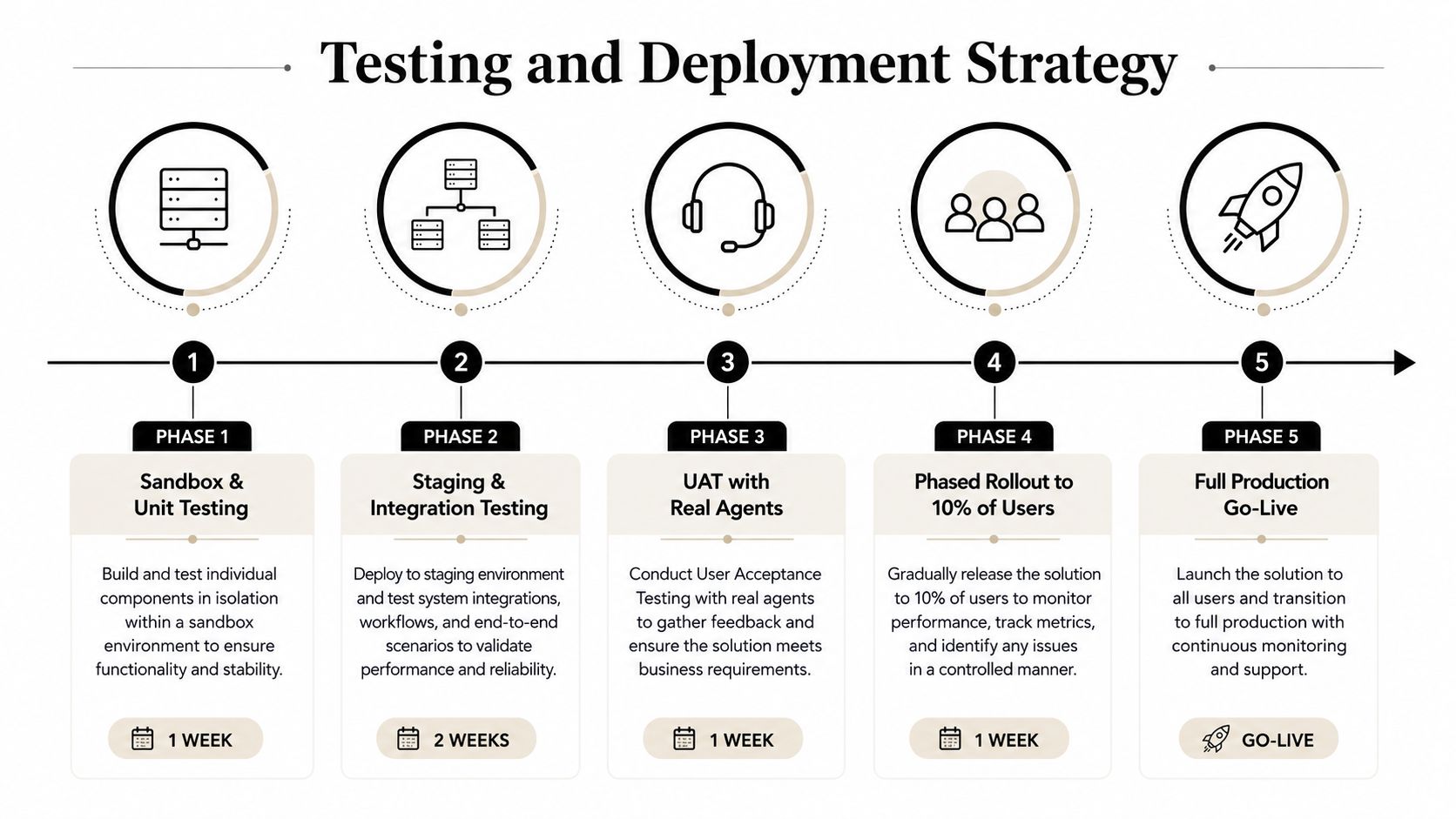
A call center integration is ready when it handles failure predictably, not when a test agent completes one successful call. Build the test plan around the interaction states that create operational damage: duplicate events, delayed responses, partial writes, invalid data, and platform outages.
Build the test environment around realistic behavior
Use a Salesforce sandbox with anonymized data that preserves the relationships agents depend on. A dataset with only clean Contacts and open Cases won't reveal duplicate matching or ambiguous ownership. Include transferred interactions, existing activities, closed Cases, multiple queues, different permission sets, and records with validation rules.
Unit tests should cover transformations and idempotency. Integration tests should verify event ordering, authentication, retries, and reconciliation. Load tests should exercise concurrent interaction events against Salesforce API limits and automation behavior. The test target isn't just whether the API responds. It's whether the system remains usable while Salesforce, telephony, and middleware process work at different speeds.
Test the bad paths deliberately
- Disconnected before wrap-up: Confirm that the interaction remains recoverable and that agents can complete disposition later without creating a duplicate.
- Telephony outage: Verify that Salesforce shows a clear degraded state, routing falls back safely, and queued events don't create misleading records.
- Salesforce maintenance or API failure: Confirm that the middleware queues events, applies bounded retries, and exposes failures to operations.
- Invalid disposition: Test a changed picklist, a missing required field, and a permission restriction. The agent needs an actionable message, not a silent failure.
- Time-zone mismatch: Compare call start, answer, disconnect, recording, and Case timestamps across systems.
UAT should include agents, supervisors, quality teams, reporting owners, and security administrators. Agents should perform realistic sequences rather than isolated clicks. Supervisors should validate queue views and performance reports. Reporting owners should trace a record from the external interaction ID through Contact, Case, disposition, and final dashboard output.
Release in controlled stages
Use a canary approach that preserves the existing workflow as a fallback. Route a defined user group or queue through the new integration, monitor error queues and agent feedback, then expand only after the operational signals remain stable. Keep rollback criteria explicit. A rollback plan that depends on manually rebuilding configurations during an incident isn't a plan.
Avoiding Platform Lock-In and Migration Risk
Lock-in isn't limited to a contract. It also lives in Salesforce schemas, automation, proprietary event formats, adapter-specific behavior, and undocumented assumptions inside agent workflows. A native design may reduce integration code while increasing dependence on one platform's routing, voice, AI, and data model.
The risk becomes sharper as Salesforce expands its contact center role. In 2025, Salesforce and AWS announced the newer Salesforce Contact Center with Amazon Connect model, which adds deeper digital-channel and unified-routing integration to the earlier partnership. Since Salesforce introduced Agentforce Contact Center in March 2026, industry analysis has raised questions about concentration across voice, digital channels, AI, and routing, including data residency, compliance, and contract dependency concerns. The analysis of Agentforce Contact Center and platform concentration is useful as a risk discussion, not as a substitute for your legal, procurement, or privacy review.
Preserve optionality in the design
Use standard Salesforce objects where their semantics fit. Keep external interaction IDs, canonical dispositions, and event schemas independent of a single adapter. Store recordings and transcripts through controlled references rather than embedding irreversible dependencies in every Case workflow. Document field ownership, deletion behavior, replay rules, and the relationship between call legs and parent interactions.
A migration assessment should answer four questions:
- Can historical interaction data be exported with its relationships intact?
- Can another telephony provider consume the same routing and disposition model?
- Can the business replace middleware without rewriting every Salesforce automation?
- Can privacy and residency requirements be enforced after a platform change?
A build-versus-buy assessment should include implementation, administration, release testing, monitoring, data extraction, retraining, contract transition, and archival costs. The customer service AI build-versus-buy blueprint offers a useful lens for separating immediate feature demand from the long-term operating model.
A connector is replaceable only when the data contract, ownership model, and operational procedures are replaceable too.
Building Your Operational Runbook
The runbook should let a CX operations team diagnose common failures without escalating every alert to engineering. Start with a dashboard that shows Salesforce API consumption, event backlog, synchronization failures, adapter latency, authentication errors, and records awaiting enrichment. Trend the queue, don't just display whether it's empty, because a growing backlog can signal a problem before agents report it.
Assign an owner and response path for each failure class. An orphaned interaction missing its Case needs a reconciliation process and a clear business rule for whether to attach it, hold it, or create an exception. A rejected disposition after a Salesforce picklist change needs configuration governance and a replay-safe correction. A screen-pop failure during peak volume needs a fallback search experience so the agent can continue serving the customer.
Weekly health review
Review these items with CX operations, Salesforce administration, telephony support, and integration engineering:
- Synchronization queue: Inspect failed records, retry counts, oldest event age, and dead-letter entries.
- Data relationships: Sample interactions and confirm their Contact, Account, Case, agent, queue, and disposition links.
- Configuration drift: Compare telephony queues, Salesforce routing, dispositions, validation rules, and permission sets.
- Storage and retention: Check custom object growth, recording-link validity, transcript retention, and archival behavior.
- Agent experience: Review screen-pop failures, manual logging, repeated searches, and wrap-up corrections.
- Reporting integrity: Trace operational metrics back to source events and identify records excluded by filters or broken lookups.
Decide between retry and intervention
Let retry logic handle transient authentication or network failures when the event remains idempotent and the queue is bounded. Trigger an emergency maintenance window when records are being duplicated, access controls are exposing data, routing sends interactions to the wrong team, or the backlog threatens to overwhelm Salesforce automation.
Keep a change log for Salesforce releases, telephony updates, disposition changes, and middleware deployments. Every change should have an owner, test evidence, rollback instructions, and a post-release validation check. This discipline prevents a small configuration update from breaking the interaction model that reporting and agent workflows depend on.
Yellow.ai can connect conversational bots with Salesforce objects through integration flows, support handoff to Salesforce live agents, and orchestrate customer interactions across channels. Visit Yellow.ai to evaluate how its automation and Salesforce connectivity could fit into your contact center data model, routing design, and operational runbook.



