













Your CRM says one thing, billing says another, and the support queue is already on fire. A customer submits a service request, the agent needs the billing status, the account team needs the ticket, and nobody trusts the data because each system moved at its own pace. That's the moment most enterprises discover that automation isn't enough, they need workflow orchestration.
Table of Contents
- Why Workflow Orchestration Matters Now
- What Workflow Orchestration Is
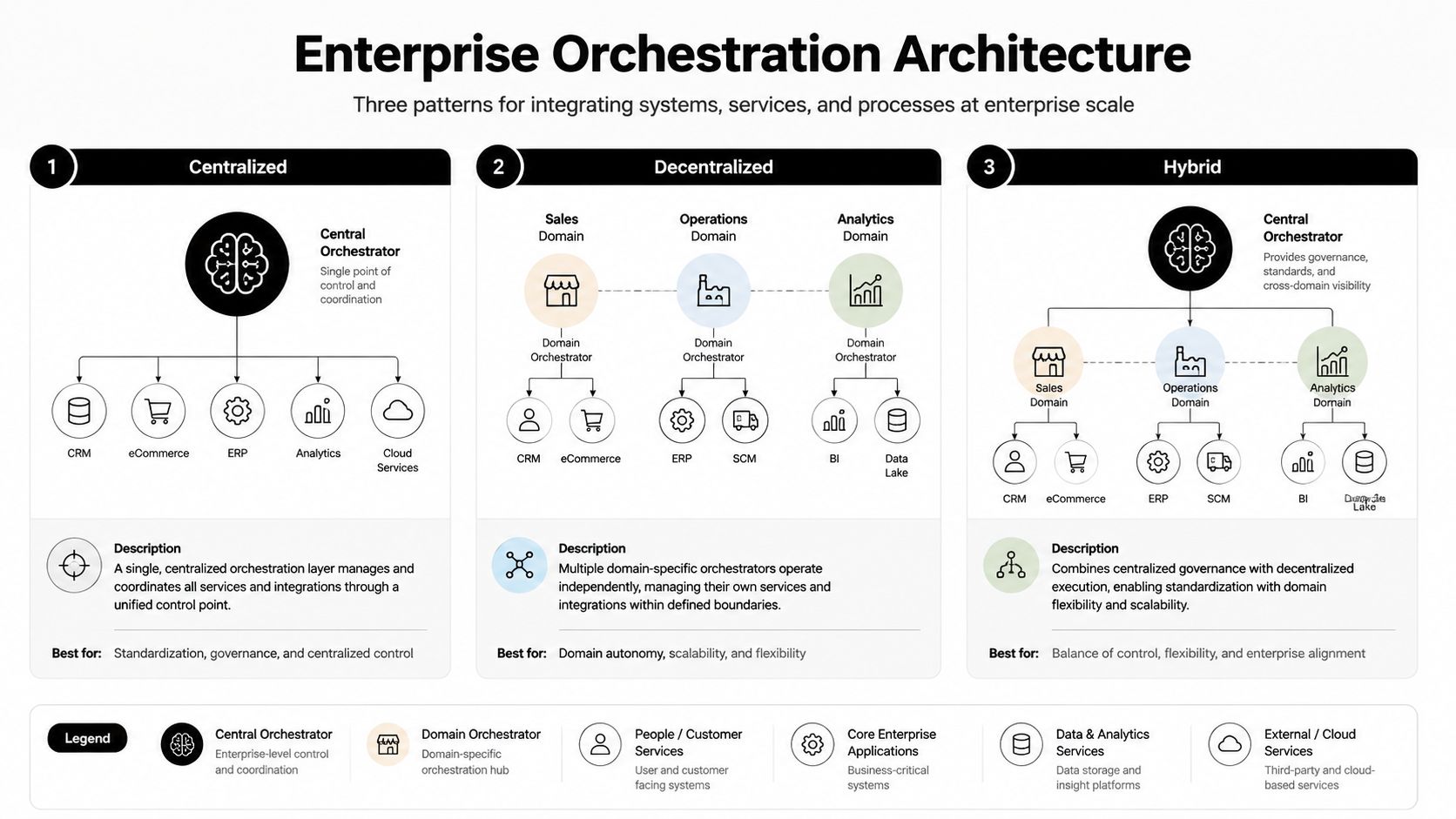
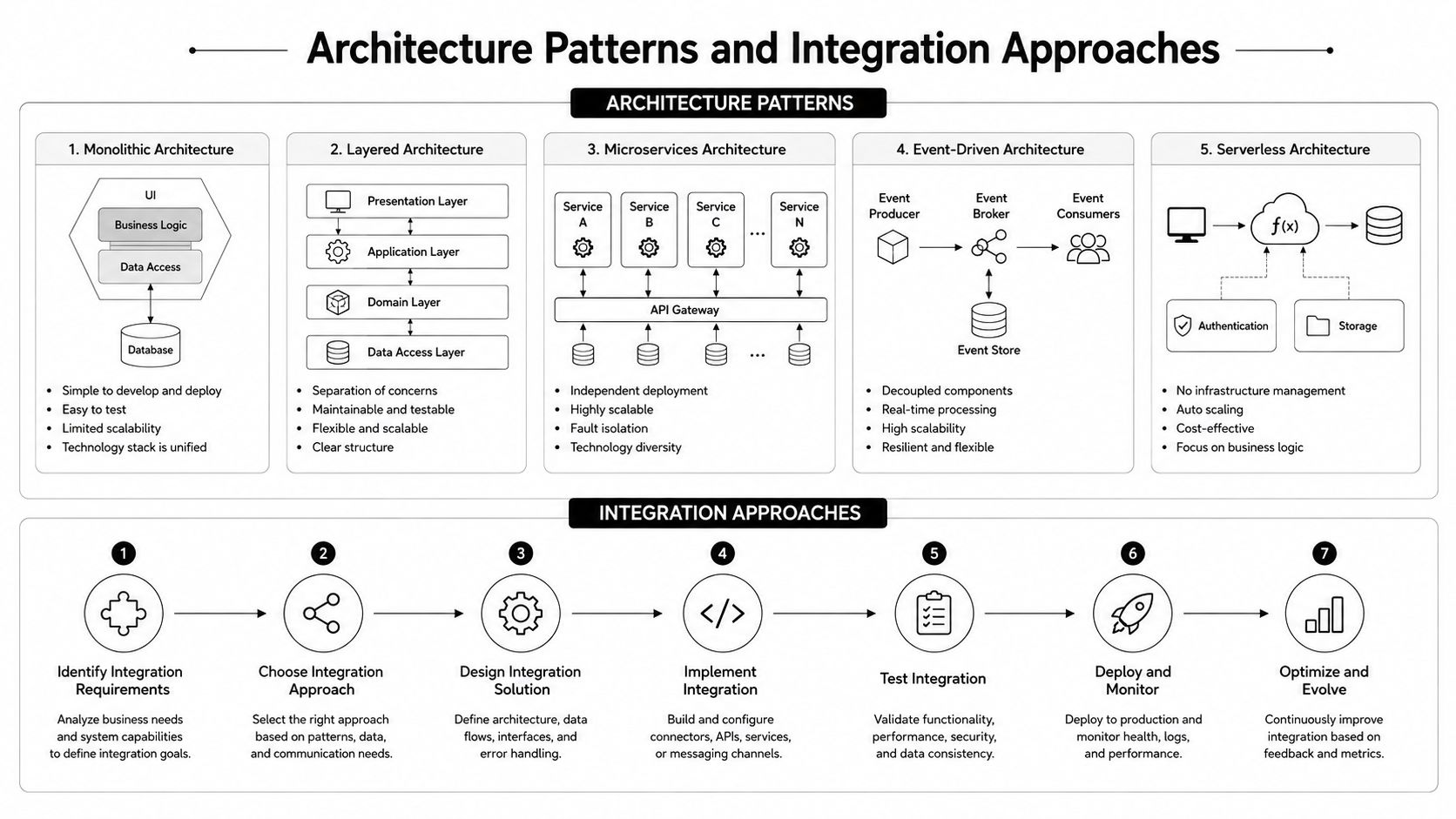
- Architecture Patterns and Integration Approaches
- Enterprise Use Cases and Real-World Applications
- Measuring Success with KPIs and ROI
- Security, Compliance, and Governance Requirements
- Choosing the Right Workflow Orchestration Platform
Why Workflow Orchestration Matters Now
A customer opens a support case because a shipment is late. The agent checks the CRM and sees an old address. Billing shows a recent change. The ticketing system has no note about the address update, so the agent escalates, the customer repeats the story, and the SLA clock keeps running while three teams argue about which record is current.
That kind of breakdown is no longer unusual. Enterprise adoption data shows that cross-departmental workflows now span multiple business units and large application footprints, and the research brief from Research and Markets describes process automation as a core requirement for managing complex value chains workflow orchestration market report. The same research also points to manual coordination as a persistent source of inefficiency, with orchestration adoption tied to faster project delivery cycles in the cited material.
What fails without coordination
The problem usually isn't the task itself. It's the handoff between tasks. One system updates, another doesn't, and a human ends up bridging the gap by copying data, revalidating state, or reopening a case that should have stayed closed.
That is why orchestration has moved from a niche automation capability to a major enterprise software category. One market estimate places the global market at US$60.1 billion in 2024, rising to US$368.9 billion by 2031 at a 29.6% CAGR, while another puts the sector at US$90.8 billion in 2024 and projects US$399.5 billion by 2030 at a 28.0% CAGR workflow orchestration market report. The signal is straightforward, enterprises are buying a way to coordinate work that spans cloud systems, data pipelines, and human approvals.
Practical rule: if a workflow needs more than one team to agree on state, it is already an orchestration problem.
What changes when orchestration is in place
With orchestration, the request does not bounce around as a series of disconnected updates. A control layer tracks the dependencies, waits for the right conditions, retries safely when something fails, and gives operators a place to see what happened.
That changes the failure mode. Instead of starting over when one system drifts, teams can recover from the point of failure, preserve state, and keep the customer from paying the price for internal fragmentation. In enterprise environments, that is the difference between a support process that feels coordinated and one that feels improvised.
What Workflow Orchestration Is
A support case is approved in one system, rejected in another, and a third system is still waiting for a human sign-off. The work is not failing because one task is broken. It is failing because no layer is coordinating the sequence, the state, and the exceptions across systems and people. Workflow orchestration is that coordination layer.
The technical core is a control layer. It evaluates a workflow definition, often a DAG or state machine, persists execution state, decides what can run next, and keeps the process moving as upstream steps complete. The engine also manages scheduling, dependencies, retries, parallel branches, and observability across the lifecycle, which is why a large distributed process can resume after failure instead of restarting from scratch workflow orchestration architecture guide.
Orchestration is not just automation
Automation executes a task. Orchestration coordinates many tasks that depend on one another.
A customer onboarding flow makes that distinction obvious. One step updates the CRM, another provisions access in a product system, another notifies the account team, and a fourth may wait for a human approval before moving forward. If the provisioning step fails, the orchestration layer can retry without duplicating a customer record or sending the same welcome message twice. It can also route a task to an AI agent or a legacy system without forcing every exception into custom glue code, which matters when workflows span tools that do not share the same failure model. For teams comparing platform options, see our data pipeline stack options, since orchestration usually sits next to data movement and transformation work.
The useful mental model is direct, automation does the work, orchestration decides what work happens next.
What the engine does
The orchestration layer typically performs four jobs that matter in production.
- Dependency management. It knows which tasks must finish before others begin, so teams don't accidentally launch downstream steps against incomplete data.
- Durable state. It stores where a workflow is, not just whether a single task succeeded.
- Retry and recovery. It can retry transient failures while preserving idempotency and avoiding duplicate side effects.
- Visibility. It gives operators a way to inspect the process, identify where it stalled, and recover safely.
That control-plane view is the part most vendor slides gloss over. If you don't have it, you don't really have orchestration, you have a set of scripts with nicer packaging. In practice, the difference shows up in how much state you can trust, how cleanly you can hand work between systems, and whether integration partners can connect through a managed interface such as Yellow.ai integrations instead of another one-off script.
Architecture Patterns and Integration Approaches
The right architecture depends on where the coordination burden should live. In enterprise deployments, I've seen three patterns repeat: centralized, decentralized, and hybrid. The mistake is treating the centralized model as the default, because a single control plane can become the very bottleneck it was supposed to eliminate.
Centralized, decentralized, and hybrid
A centralized orchestrator works well when governance matters more than local autonomy. Financial approvals, regulated onboarding, and support escalations often fit this model because one team needs a clear source of truth for state and auditability. The downside is rigidity, every extra dependency passes through the same control point.
A decentralized model pushes orchestration into domain teams. Each group owns its own workflows and exposes events or APIs to others. That's a better fit when business units need fast local changes and the workflow boundaries are naturally aligned to team ownership, but it can fragment oversight if governance is weak.
A hybrid model is usually the most survivable in large enterprises. Central governance defines policy, observability, and compliance, while individual domains keep execution close to their own systems. That structure lets the enterprise keep control without forcing every exception through one giant workflow engine.
Integration patterns that actually hold up
API-driven orchestration is the cleanest fit when each system already exposes stable interfaces. Event-driven orchestration works better when the enterprise needs loose coupling and near-real-time reactions, because events let systems publish state changes without hard dependency chains. Multi-system workflow engines sit between those two, coordinating state across several services when the flow is too complex for a single API call.
For teams designing a data-heavy stack, it helps to compare orchestration with the rest of the pipeline layer. see our data pipeline stack options is a useful reference point when you're deciding whether a workflow problem belongs in orchestration, ETL, or both.
Where centralization becomes too much
The hard question is not whether you can orchestrate a process. It's whether one control layer should own every step. In customer operations, healthcare, and logistics, local exception handling often needs to happen where the event occurs, not after it's routed through a central queue.
If sub-second response or local judgment is part of the workflow, keep that part loose and orchestrate only the handoff.
A conversational AI stack shows the hybrid pattern well. The contact center platform, CRM, knowledge base, and LLM endpoint all need coordination, but not every interaction should be serialized through one rigid path. The enterprise wants governed flow, not a bottleneck disguised as architecture. For integration examples, the Yellow.ai platform overview at https://yellow.ai/platform/integrations/ is a practical reference.
Enterprise Use Cases and Real-World Applications
The clearest orchestration wins show up in customer experience, especially voice and conversational workflows. A caller speaks to an AI agent, the system captures audio, resolves intent, retrieves knowledge, checks the CRM, and either closes the issue or escalates it with the full context intact. Yellow.ai's omnichannel approach is built around that kind of coordination, where voice, chat, email, and backend systems all need to move as one flow.
Voice and conversational CX
In voice CX, orchestration has to do more than route a conversation. It has to coordinate speech capture, intent detection, knowledge retrieval, CRM lookup, and agent handoff without making the customer repeat themselves. When orchestration is missing, the agent hears only fragments. When it's present, the conversation can carry state across systems and preserve context during escalation.
That pattern also matters for employee-facing service desks. HR, IT, and facilities workflows all benefit when the request, the policy, and the resolution path stay linked instead of drifting into separate queues.
Where the same pattern shows up elsewhere
- BFSI: compliance checks, loan processing, and exception review depend on controlled handoffs between KYC systems, decision engines, and human approvers.
- Healthcare: patient intake, appointment coordination, and follow-up workflows need to keep identity, scheduling, and clinical context aligned.
- Logistics: shipping status, exception handling, and delivery updates work better when warehouse, carrier, and customer systems stay synchronized.
The main difference across these sectors is not the workflow shape. It's the level of governance, delay tolerance, and exception handling required. In BFSI, a workflow without traceability is a liability. In healthcare, a workflow without context creates rework. In logistics, a workflow without current state becomes a support problem before the customer even calls.
What orchestration changes in practice
Without orchestration, every handoff becomes a manual check. With orchestration, the system can decide whether a request is ready, who should see it next, and when a human needs to intervene.
That matters most when AI agents enter the process. Agents are useful at interpretation and drafting, but they still need a governed way to trigger backend actions and recover when a downstream system rejects the request. Orchestration is the layer that keeps AI useful without letting it become unpredictable.
Measuring Success with KPIs and ROI
The wrong way to measure orchestration is to count only IT tickets closed or scripts automated. That misses the point. The true test is whether the business moves faster, makes fewer mistakes, and spends less time repairing broken handoffs.
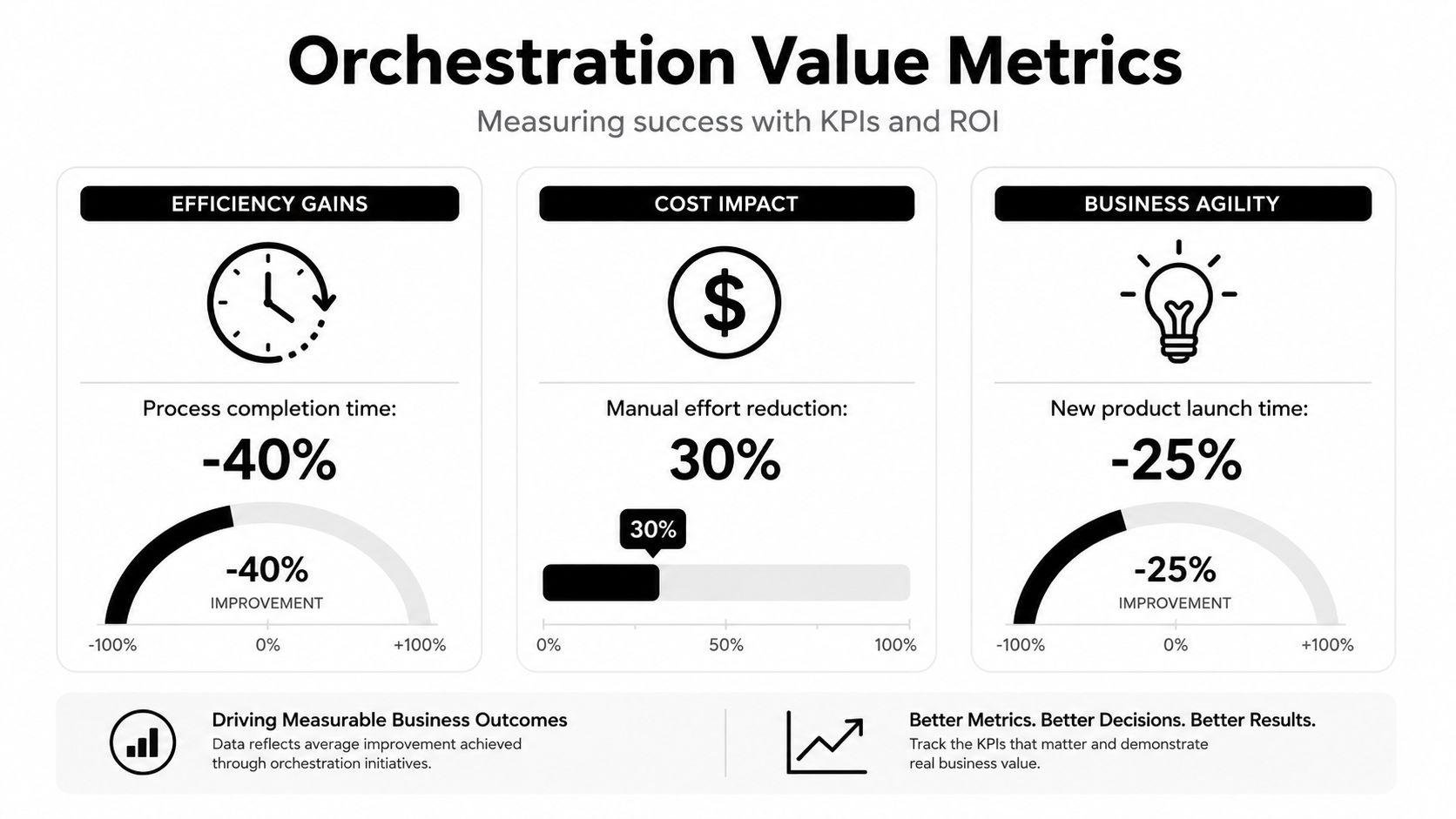
The research brief gives a strong benchmark for throughput. Enterprises adopting orchestration report 20–30% faster project delivery cycles, and that's the kind of operational gain leaders should expect to validate in their own environment workflow orchestration market report. A separate market estimate also shows the category scaling fast, which tells you this isn't a side project anymore global workflow orchestration market.
KPIs worth tracking
Operational metrics tell you whether the workflow is technically healthy. Business metrics tell you whether the workflow is worth the spend.
- Process cycle time. Measure how long it takes to move from request received to resolution.
- Error and retry rates. Track how often steps fail and whether retries succeed without side effects.
- SLA compliance. Watch whether handoffs complete within the agreed window.
- Resolution rate. Confirm that more cases close without human rework.
- Agent productivity. Measure how much time agents spend on actual resolution versus manual coordination.
How to calculate ROI without fooling yourself
Start with the current process. Count the minutes wasted on manual coordination, the number of failed handoffs, and the time agents spend chasing status across systems. Then compare that baseline against the post-orchestration flow, including faster completion, fewer errors, and lower workload on operations teams.
Practical rule: if your ROI model only includes infrastructure savings, it's too small.
You also need to account for what orchestration prevents. A missed SLA, a duplicate update, or a customer callback has business cost even when no line item says “orchestration failure.” The cleaner the handoffs, the fewer invisible costs accumulate.
For teams building the case internally, the Yellow.ai ROI calculator is a useful reference point for framing business impact around throughput, workload, and service outcomes rather than just platform cost.
Security, Compliance, and Governance Requirements
Workflow orchestration platforms sit on sensitive junctions. They touch identity data, customer records, payment flows, and internal approvals, often across multiple systems that were never designed to trust one another. That's why compliance has to be built into the selection process, not bolted on after the pilot goes live.
Healthcare buyers should verify HIPAA coverage. Security teams usually look for SOC 2 Type II, while global enterprises often require ISO 27001 and ISO 27701 for information security and privacy management. Payment workflows need PCI-DSS alignment because orchestration may pass through transaction data even when it doesn't store the card details itself. Yellow.ai's enterprise security page at https://yellow.ai/platform/enterprise-grade-security/ is a useful example of how a vendor can present those controls.
The governance questions that matter
A platform can be feature-rich and still fail procurement if governance is weak. Teams need to know who can design a workflow, who can edit it, who approves changes, and how the platform records those changes for audit.
Data residency matters too, especially when the workflow spans regions or business units with different regulatory requirements. If the platform can't answer where data lives, who can access it, and how long execution logs persist, the security review won't go far.
What to verify before the pilot expands
- Audit trail depth. Confirm that every design change, deployment, retry, and failure is traceable.
- Access control. Check whether permissions are granular enough to separate builders, reviewers, and operators.
- Data handling. Review how the platform treats PII, financial records, and payloads that flow through multiple systems.
- Environment boundaries. Make sure development, test, and production are isolated in a way your risk team accepts.
Compliance also isn't static. Regulations change, business units expand, and AI-driven workflows introduce new types of data movement. A platform that looks compliant on day one can still become a problem if it can't evolve with policy.
The safest orchestration stack is the one that lets security teams see, control, and reconstruct every important decision.
Choosing the Right Workflow Orchestration Platform
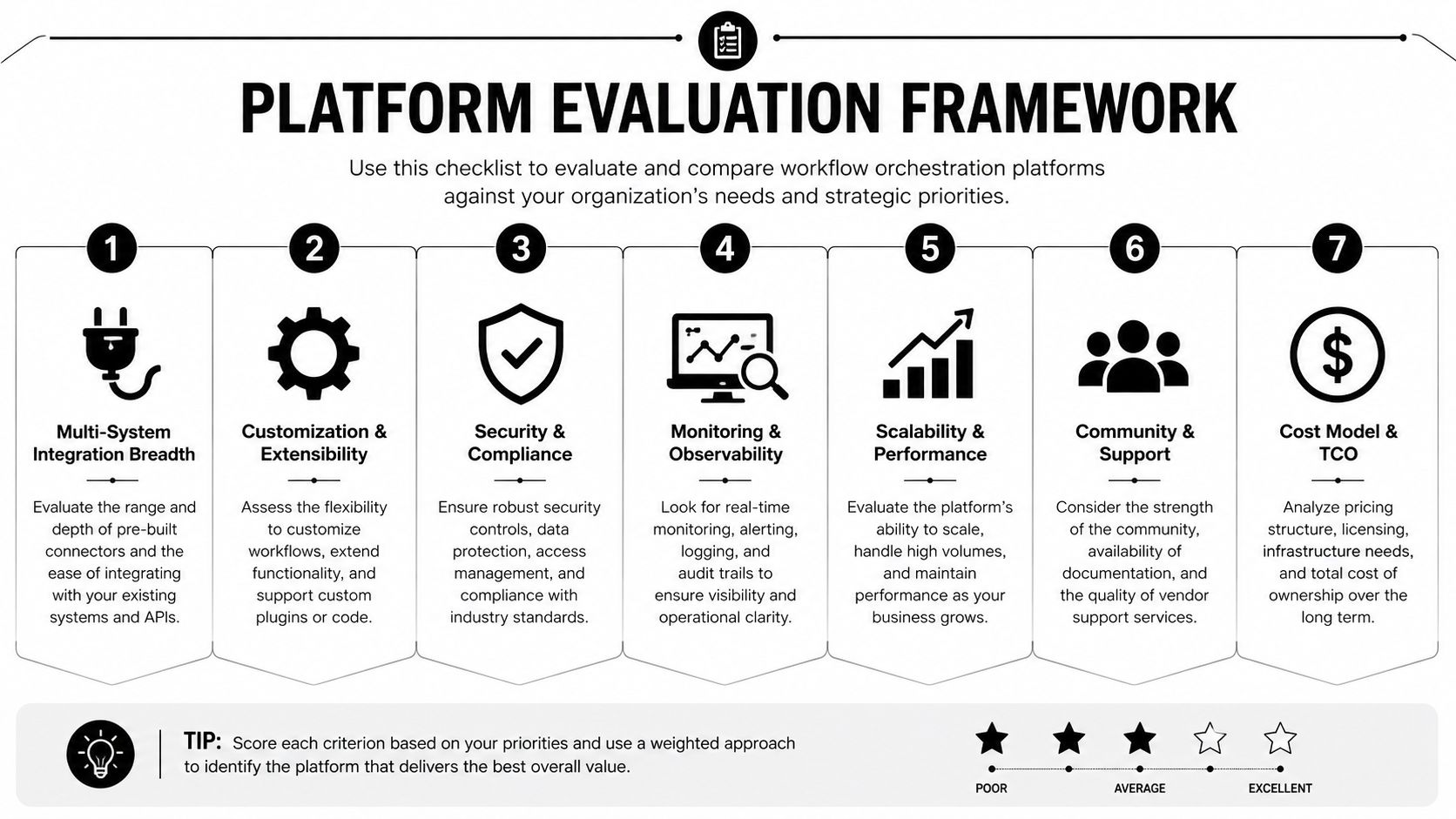
The best platform is the one that fits your workflow shape, your governance model, and your integration reality. That sounds obvious, but procurement often gets distracted by demos that only show the happy path. A serious evaluation should force the vendor to prove it can coordinate real enterprise work, not just run a polished sample flow.
Seven criteria that separate demos from deployments
First, check integration breadth. A real platform needs APIs, pre-built connectors, and support for legacy systems that don't fit a modern cloud-native story.
Second, look at AI and agent orchestration. If your workflows involve conversational AI, voice AI, or multi-model routing, the platform should coordinate those steps without turning every exception into custom code.
Third, verify governance and observability. You want versioning, audit trails, failure visibility, and recovery tools that operators can use under pressure.
Fourth, confirm compliance certifications. If the vendor can't meet your HIPAA, SOC, ISO, or PCI requirements, the feature list doesn't matter.
Fifth, inspect the deployment model. Cloud, on-premises, or hybrid support changes everything for regulated enterprises.
Sixth, ask how fast teams can get value. Templates, builders, testing tools, and preview environments matter because orchestration projects die in the gap between design and production.
Seventh, model total cost of ownership. Licensing is only part of the bill. Maintenance, training, integrations, and exception handling all add up.
What strong capability looks like in practice
One reference point is Yellow.ai, which describes 150+ pre-built integrations, a multi-LLM architecture, a Conversational Knowledge Base with agentic RAG, and enterprise compliance coverage including HIPAA, ISO 27001/27701, SOC 2 Type II, and PCI-DSS in its platform materials. That doesn't make it the answer for every enterprise, but it does show what a mature orchestration stack tends to include when CX, AI, and backend systems have to work together.
A practical procurement checklist should be simple enough to run in one review meeting:
- Can it coordinate both human and machine steps?
- Can operators see and recover failed workflows without developer help?
- Can it integrate with the systems we already run?
- Can security and compliance teams approve it?
- Can it scale without forcing every exception through one bottleneck?
The vendors worth trusting can answer those questions plainly. The ones that can't usually hide behind diagrams.
If you're evaluating orchestration for CX, EX, or enterprise operations, take a close look at how Yellow.ai handles voice, chat, integrations, and governed workflow execution. Visit Yellow.ai to review the platform and see whether it fits the systems and controls your team has to run in production.



