














CCaaS is a cloud-hosted contact center platform that delivers routing, voice, digital channels, and analytics through a subscription model. The category has been available in various forms for more than 20 years, but adoption only became widespread around 2010, reaching an estimated 27% adoption rate by the end of 2023 (WorldMetrics).
That history matters if you're responsible for a contact center that still depends on hardware, tightly coupled applications, or region-by-region operating models. Your team may be asking whether to replace the current telephony stack, add digital channels, introduce AI, or make the existing environment easier to manage. CCaaS can address all of those needs, but it doesn't make enterprise complexity disappear. It moves much of that complexity into integrations, governance, data architecture, and vendor management.
The most useful way to understand CCaaS today is to stop thinking of it as a cloud call center. Modern platforms increasingly coordinate human agents, bots, autonomous workflows, routing logic, knowledge, and analytics across the customer journey.
Table of Contents
- What CCaaS Means in Plain Language
- How CCaaS Works Under the Hood
- Why CCaaS Has Become an AI Orchestration Layer
- Enterprise Benefits and the KPIs They Move
- CCaaS Compared With On-Prem and Hybrid Contact Centers
- Integration, Security and Compliance Buyers Should Require
- Where Yellow.ai Fits in the CCaaS Picture
What CCaaS Means in Plain Language
A contact center leader enters a board meeting with several competing requests: replace aging telephony, add digital channels, introduce AI, and make the current environment easier to operate. The practical question is, what are we buying, and what problem does it replace?
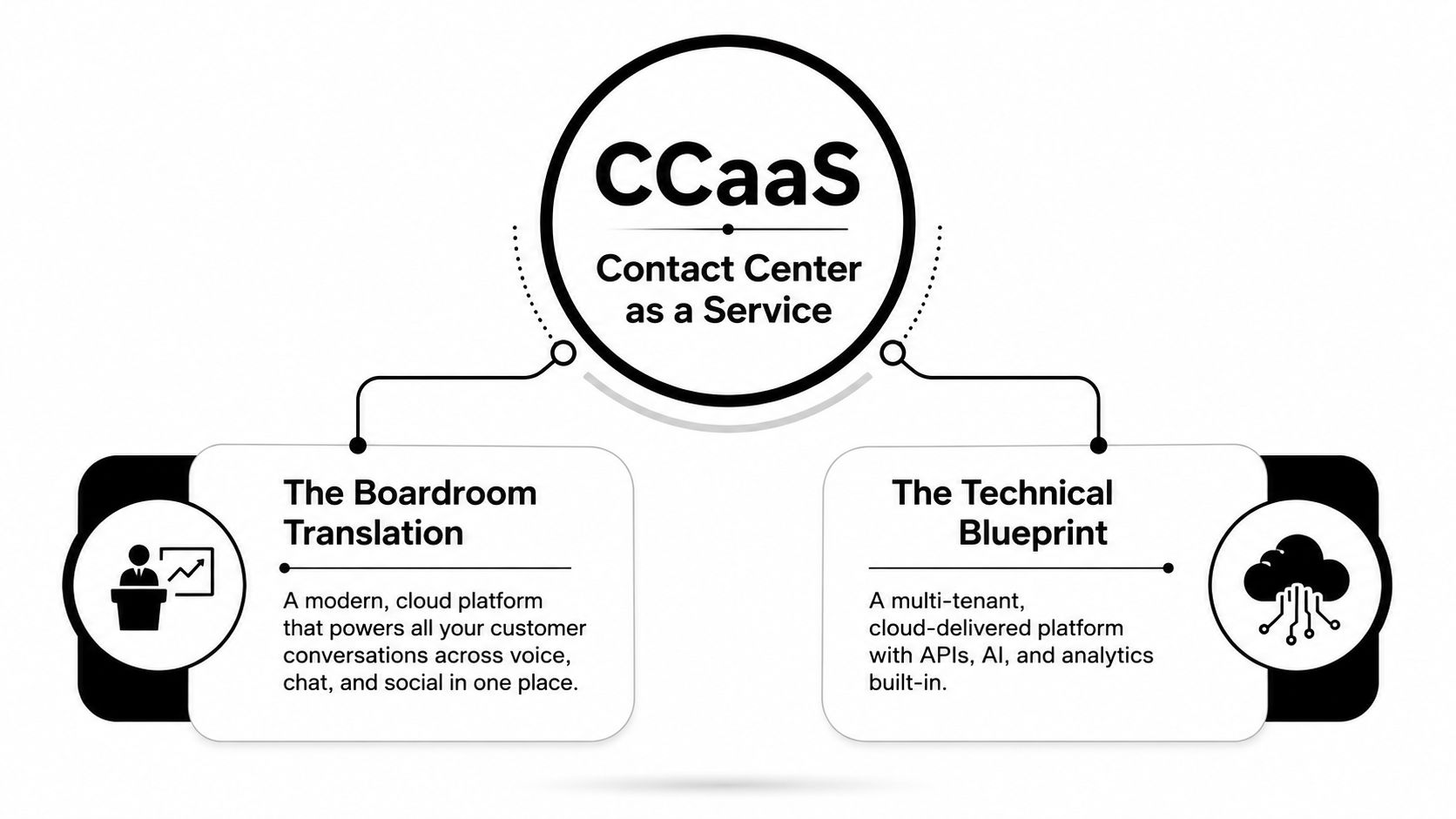
CCaaS means Contact Center as a Service. In plain English, it is a vendor-hosted platform for managing customer conversations across voice, chat, email, messaging, and other digital channels. Instead of owning the servers and contact center software, your organization subscribes to a service that the provider operates, maintains, updates, and exposes through configuration tools and APIs.
Technically, CCaaS is a SaaS-based, multi-tenant contact center architecture. It moves routing, agent desktops, IVR, recording, reporting, and analytics from on-premises hardware to a cloud platform (Gartner Magic Quadrant background). CCaaS is a market category, not one application with one fixed feature set. Products differ in channels, workflow controls, AI capabilities, integrations, deployment options, and administrative models.
The boardroom translation
A useful translation is: CCaaS replaces much of the infrastructure burden of a traditional contact center with a subscription service that can handle customer interactions across channels.
The operating goals remain familiar. Leaders still manage queues, service levels, staffing, quality, customer satisfaction, and resolution. The change is how the underlying capability reaches the business:
- Ownership shifts: The provider operates the core infrastructure, software, and platform maintenance.
- Capacity becomes more elastic: Teams can adjust access and workflows without purchasing matching contact center hardware.
- Updates become service-led: Vendors can introduce platform capabilities without requiring the enterprise to run every upgrade project itself.
- Connectivity improves: APIs connect the contact center with CRMs, ticketing systems, knowledge bases, and automation tools.
The market has substantial scale. MetriGy reports a global CCaaS market size of $8.4 billion in 2025, with 16.4% year-over-year growth (MetriGy market research). Those figures describe market activity, not a completed migration for every enterprise. Organizations with legacy estates still need to assess data, workflows, integrations, governance, and operating ownership before selecting a platform.
The modern distinction is broader than hosting telephony in someone else's data center. CCaaS increasingly serves as an AI-orchestration layer, coordinating self-service, AI assistance, human expertise, routing logic, and back-office automation. Buyers gain a managed platform and faster access to capabilities. The complexity does not vanish. It shifts into integration design, permission models, data handling, model oversight, and governance.
How CCaaS Works Under the Hood
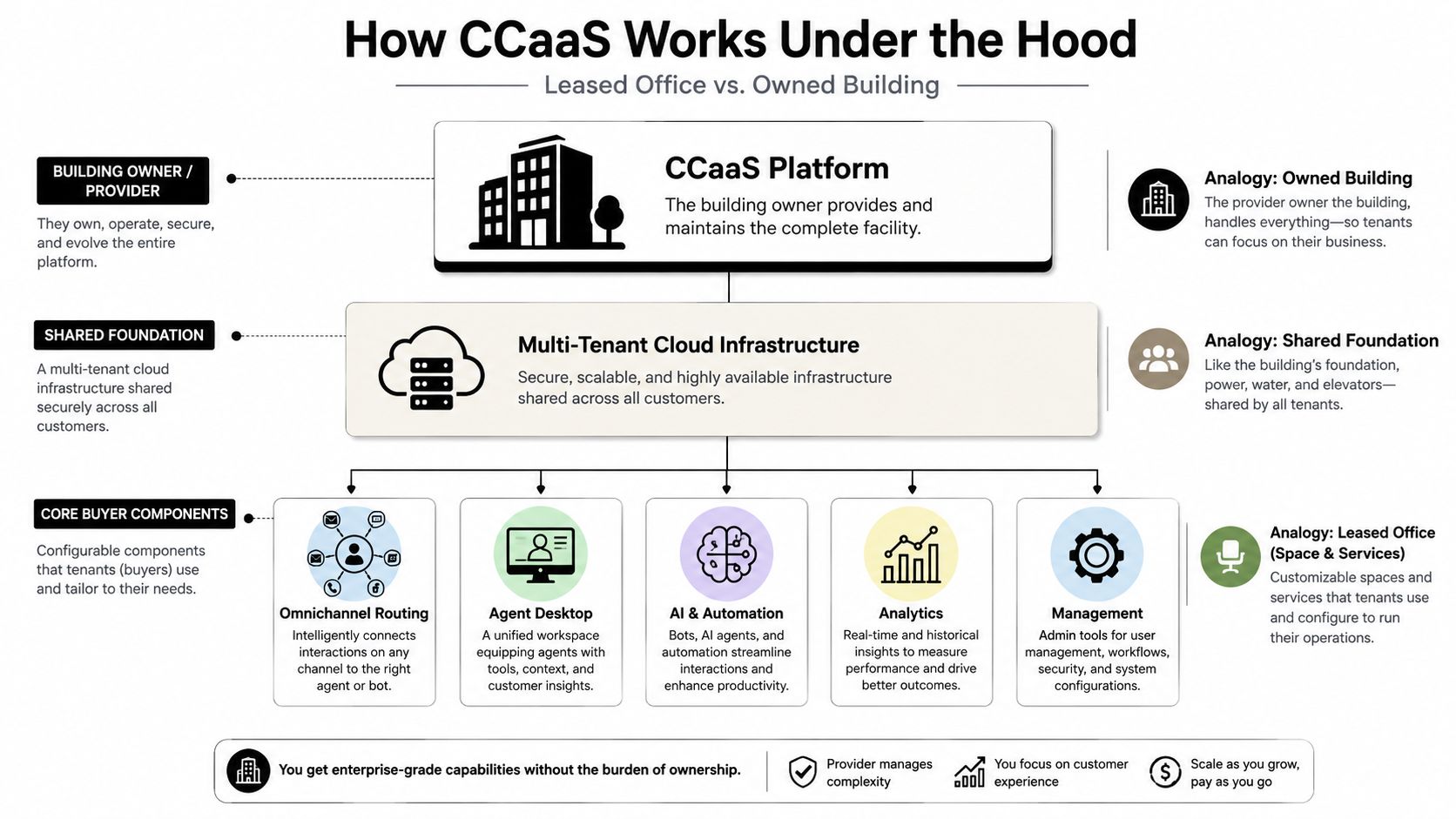
A useful analogy is the difference between owning an office building and leasing space in a managed building.
With an on-premises contact center, your organization owns or controls much of the building. Your IT team manages servers, software versions, telephony connections, capacity planning, maintenance, and recovery processes. With CCaaS, the provider operates the building and its shared foundation. You configure the rooms, workflows, access rules, and business processes your teams need.
That shared foundation is called multi-tenant cloud infrastructure. Multiple customers use the provider's platform, while logical separation, identity controls, data handling rules, and configuration boundaries keep each organization's environment distinct. The enterprise doesn't manage the underlying hardware, but it still owns important decisions about data, workflows, permissions, integrations, and customer outcomes.
The storefront and the back room
The customer sees the storefront: a phone number, chat window, messaging thread, or email address. Behind that storefront, CCaaS coordinates several services:
- Media handling manages voice, chat, email, messaging, and social interactions.
- Routing engines apply rules based on intent, customer context, skill, availability, priority, or business hours.
- IVR and self-service collect information, answer routine requests, and direct customers to the appropriate path.
- Agent desktops bring conversations, customer history, knowledge, controls, and recommendations into a working interface.
- Workforce engagement supports forecasting, scheduling, coaching, quality processes, and performance management.
- Recording and quality tools capture interactions and help supervisors review service delivery.
- Reporting and analytics turn contact activity into operational and customer insights.
- API layers connect the platform to CRMs, ticketing systems, order platforms, knowledge bases, and automation services.
The API layer is one of the biggest architectural differences. When capabilities are exposed as services, an enterprise can connect the contact center to a broader CX stack without replacing every adjacent system. Teams building conversational workflows may also evaluate an AI agent builder as part of that integration effort.
Why regions and latency matter
Cloud delivery doesn't remove architecture decisions. Buyers still need to understand where data is processed, which regions support their users, how voice traffic reaches the platform, and how the provider handles service disruption. A platform can be functionally impressive yet operationally unsuitable if latency affects voice conversations or if regional controls don't meet internal requirements.
The same principle applies to resiliency. Ask how the provider separates failures, supports continuity, manages platform dependencies, and communicates incidents. CCaaS reduces the amount of infrastructure your team operates, but it increases the importance of evaluating the provider's operating model.
Why CCaaS Has Become an AI Orchestration Layer
The old buying question was, “Which cloud telephony platform should we use?” The stronger question now is, “Which platform can coordinate the right combination of automation and human work for each interaction?”
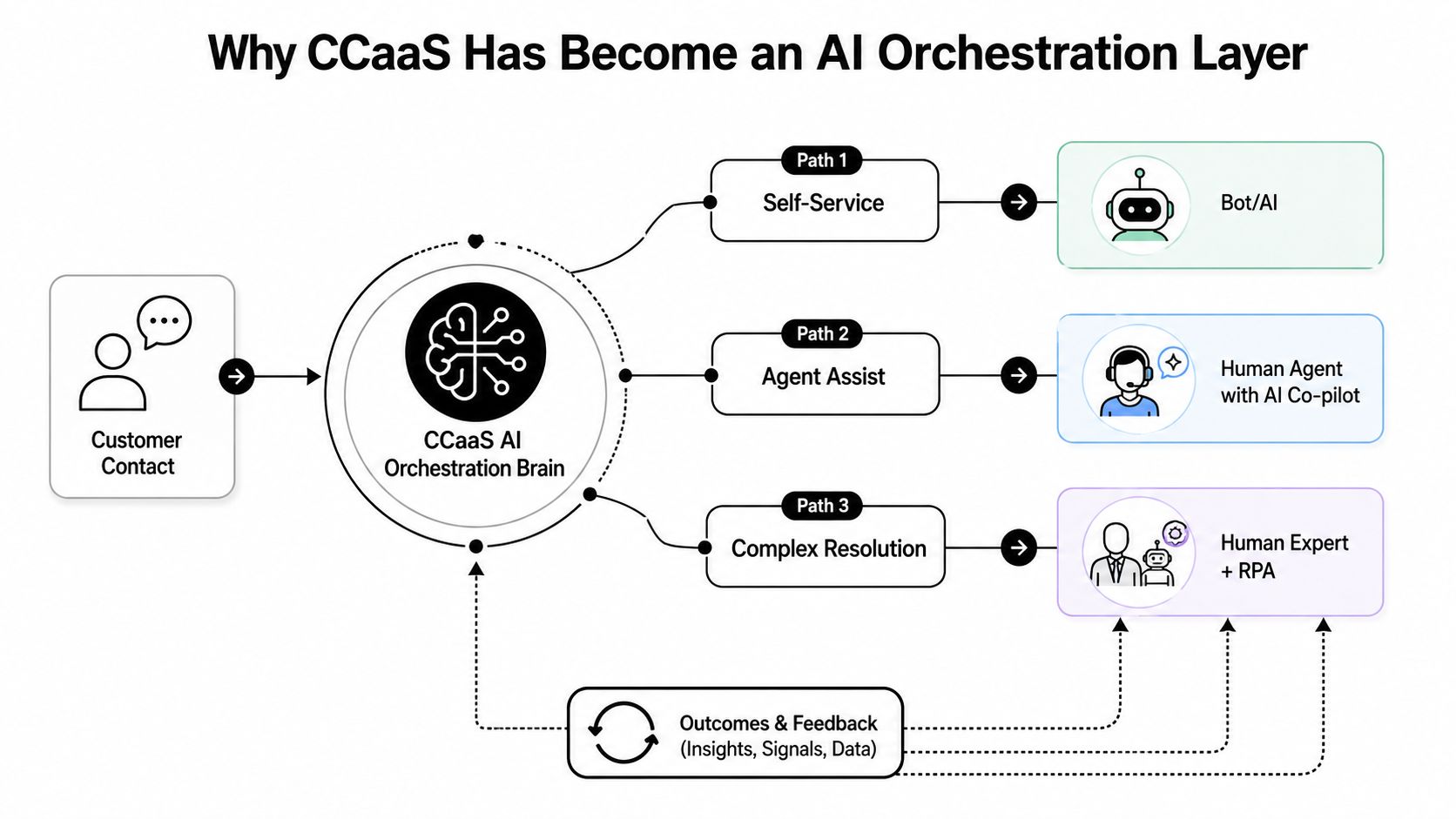
A customer may begin with a voice call, continue through messaging, and require a specialist to complete the resolution. In a modern CCaaS environment, the platform needs to preserve context, identify intent, select an appropriate path, invoke knowledge or business systems, and escalate when automation reaches its limits. That makes CCaaS an orchestration plane, not a collection of communication channels.
The three paths inside a contact
A practical orchestration model has three broad paths:
- Self-service: A bot or voice AI handles a routine request, such as account information, status checks, or a basic policy question.
- Agent assistance: A human agent owns the interaction while AI retrieves knowledge, summarizes context, recommends actions, or supports the next response.
- Complex resolution: A specialist handles the case, with AI and robotic process automation supporting research, data entry, and workflow execution.
The quality of this model depends on more than whether a vendor offers a chatbot. Buyers need to assess AI latency, language coverage, knowledge retrieval, escalation behavior, permissions, observability, and failure handling. A slow voice response can make an otherwise capable model feel unnatural. An outdated knowledge base can produce confident but unusable answers. A weak handoff can force customers to repeat information.
The scale of messaging also changes the architecture conversation. One market report projects mobile messages sent to CCaaS contact centers will rise from 40.5 billion in 2025 to 475.4 billion in 2029, a 1,074% increase (Grand View Research). This is a projection, not a current-volume measurement, but it illustrates why platforms must handle messaging surges and maintain a unified operational view across channels.
For a deeper explanation of what is AI orchestration, focus on the coordination problem rather than the label. The platform has to determine which system acts, what context it receives, what controls apply, and when a human must take ownership. Enterprises exploring this model may also consider an agentic AI platform as part of their broader automation architecture.
The buying decision has therefore moved beyond voice features. It now concerns whether the platform can coordinate human agents and AI agents without fragmenting the customer journey.
Enterprise Benefits and the KPIs They Move
A CCaaS business case becomes credible when each capability connects to an outcome that operations, finance, or customer experience leaders already track. Cloud is an operating model, not a KPI. Its value appears when the architecture changes staffing flexibility, resolution quality, channel performance, or the cost of serving demand.
Cost and capacity
A subscription model can reduce the need to purchase and maintain contact center infrastructure. The relevant measures include cost per contact, infrastructure spend, IT effort, seat utilization, and the cost of handling demand peaks. The financial result still depends on licensing, implementation, usage, integrations, and process redesign. Moving to CCaaS does not automatically lower total cost.
Capacity flexibility affects operations as much as finance. A cloud platform can support changing volumes, remote teams, new queues, or temporary workflows without rebuilding the physical environment. Track peak handling, time to onboard agents, schedule adherence, and service-level performance during demand changes.
Practical rule: Compare the cost of the complete operating model, not just the CCaaS subscription.
Customer experience and resolution
Routing, context, self-service, and agent assistance can influence CSAT, first-contact resolution, repeat contacts, average handle time, and NPS. The connection requires testing. A routing rule may reduce transfers while sending customers to the wrong team. Automation may reduce agent demand while creating repeat contacts if it cannot complete the underlying task.
Start with the journey. For each high-volume intent, ask whether CCaaS can identify the request, retrieve the correct customer context, complete the required action, and transfer the case without losing history. Measure the immediate interaction and the downstream result.
Omnichannel continuity
Customers experience a journey that may move between voice, chat, email, and messaging, rather than a collection of separate technology products. CCaaS can support channel containment, transfer quality, response time, repeat-contact rate, and journey continuity when identity, data, permissions, and workflow logic remain consistent across channels.
Messaging requires separate operational controls because asynchronous work does not behave like a traditional voice queue. Supervisors need visibility into backlog, response obligations, routing, automation, and escalation across regions and business units.
AI outcomes
AI adds a second measurement layer. Track deflection, automated resolution rate, containment, average handle time, agent-assist usage, escalation quality, and knowledge-answer accuracy. Pair these measures with customer outcomes so automation is not credited for work that just shifts to another channel.
The category's expanding adoption signals that modernization is becoming a broader enterprise priority, but adoption alone cannot prove value. Each organization still needs a baseline, an expected operating model, and a controlled rollout that tests the effect on service, cost, and resolution.
AI-native design can compound these benefits because routing, knowledge, automation, analytics, and human assistance share a common operating context. That context makes CCaaS more than a hosted call center. It acts as an orchestration layer that assigns work between human agents and AI agents, applies business rules, and preserves customer history.
The trade-off is hidden complexity. Buyers may gain flexible capacity and coordinated automation, while integration design, data quality, permissions, monitoring, and governance move into the operating model. AI added to disconnected tools can produce the opposite result, creating another console, integration, and control burden. Evaluate both sides before declaring a KPI improvement.
CCaaS Compared With On-Prem and Hybrid Contact Centers
The choice isn't a contest between modern and obsolete technology. On-premises contact centers still fit organizations with strict data residency constraints, unusual telephony dependencies, or legacy systems that can't be replaced safely. Hybrid models can preserve those dependencies while moving selected workloads, channels, or automation capabilities to the cloud.
The architectural distinction is ownership and coupling. On-premises environments concentrate infrastructure, software, upgrades, and recovery responsibilities inside the enterprise. CCaaS shifts core functions to a vendor-hosted platform, where services can be updated independently and connected through APIs (Gartner Magic Quadrant background).
CCaaS vs On-Prem at a Glance
| Criterion | On-Prem Contact Center | CCaaS Platform |
|---|---|---|
| Financial model | Larger infrastructure ownership burden and project-based upgrades | Subscription-based service with vendor-operated infrastructure |
| Capacity | Expansion depends on installed infrastructure and planning | Capacity and workflows can be adjusted through the platform |
| Updates | Enterprise schedules, tests, and deploys upgrades | Provider manages platform updates, subject to release controls |
| AI access | Often requires separate products and integration work | AI capabilities may be available within the platform or through connected services |
| Integration model | Frequently shaped by tightly coupled legacy systems | API-exposed services support connections to cloud applications |
| Control | Direct control over infrastructure and deployment timing | Less infrastructure control, with greater reliance on provider operations |
| Compliance posture | Enterprise operates more of the control environment | Enterprise evaluates provider controls, regions, contracts, and evidence |
| Geographic reach | Requires enterprise-owned regional architecture | Depends on provider regions, network design, and service availability |
| Long-term economics | Capital, maintenance, specialist skills, and upgrade costs | Subscription, implementation, usage, integration, and governance costs |
A three-to-five-year total-cost model should include migration, dual running, carrier charges, data storage, professional services, integration maintenance, training, and internal governance. The exact answer depends on the estate, not the label.
Choose CCaaS when elastic capacity, omnichannel delivery, and AI acceleration are priorities. Retain a hybrid model when regulatory or telephony constraints remain decisive.
Integration, Security and Compliance Buyers Should Require
Integration should be a gate, not a feature to review after the shortlist. A contact center sits between customer data, operational systems, workforce processes, payment flows, and increasingly autonomous AI services. If those connections are weak, agents lose context and automation becomes difficult to govern.
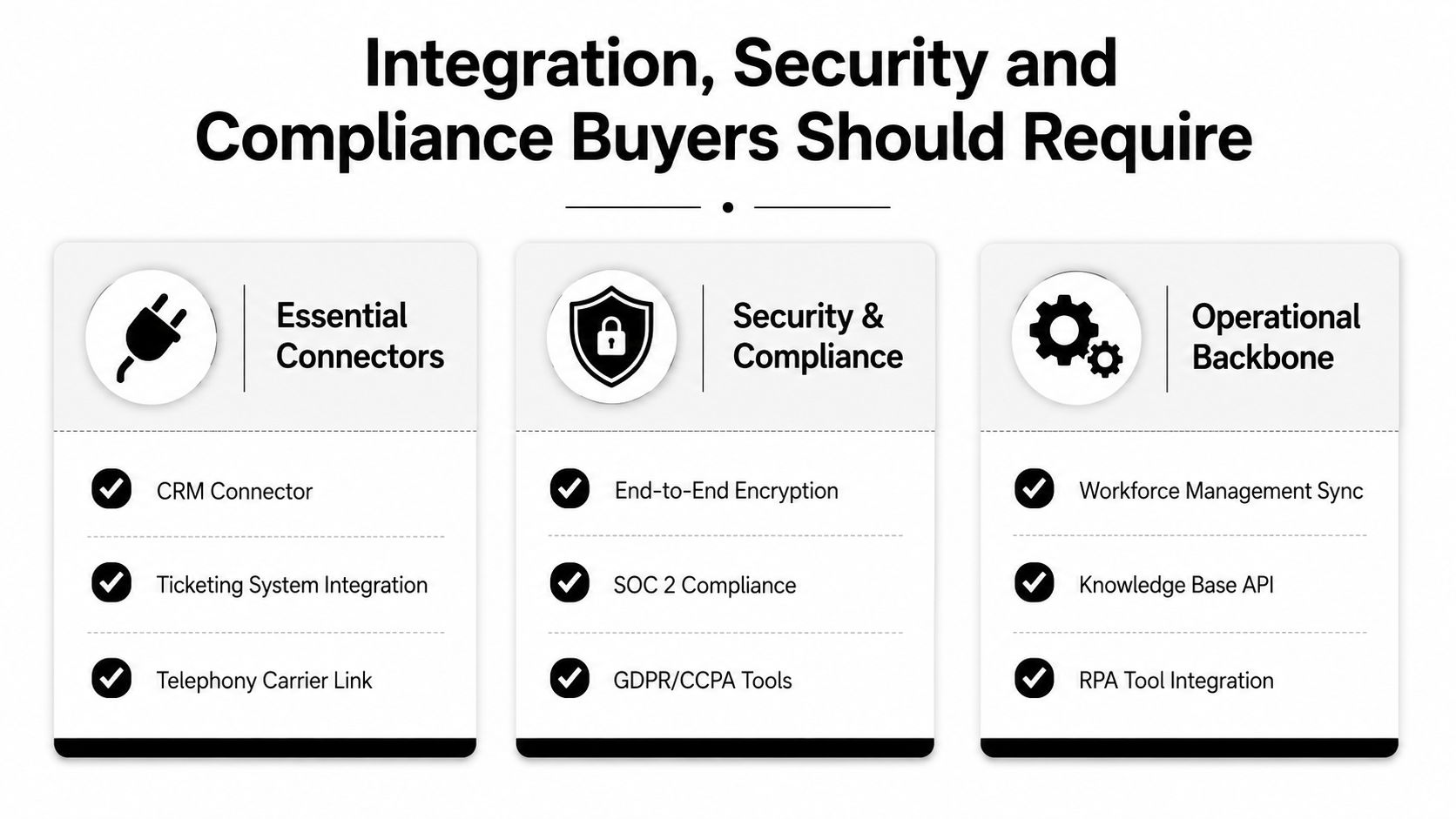
Start by mapping the systems that must exchange data and actions:
- Customer systems: CRM connectors for Salesforce, HubSpot, or equivalent customer records.
- Service systems: Ticketing and case-management integrations for tools such as Zendesk or Freshdesk.
- Communication systems: Telephony carrier links, identity services, email, messaging, and digital-channel infrastructure.
- Operational systems: Workforce management, order management, billing, knowledge bases, and RPA tools.
- AI systems: Interfaces for agent assist, AI agents, retrieval, model management, evaluation, and human escalation.
Ask whether a connector supports real workflows or only basic data synchronization. A useful integration should handle authentication, error recovery, field mapping, permissions, auditability, and changes in the source system.
Security is a shared responsibility
Cloud doesn't mean less secure. It means your organization must audit the provider's controls instead of operating every infrastructure control itself. Review regional data residency, encryption in transit and at rest, SSO, IAM, privileged access, tenant isolation, retention, deletion, logging, incident response, and disaster recovery.
Compliance requirements vary by industry and use case. Buyers may need evidence covering SOC 2 Type II, ISO 27001, ISO 27701, HIPAA, PCI-DSS, GDPR, or CCPA-related controls, particularly when the platform processes health information, payment data, or personal information. Certifications don't eliminate your responsibilities, but they provide an important basis for due diligence.
Enterprise teams can also review a provider's approach to enterprise-grade security when evaluating AI and contact-center capabilities together.
A practical buyer checklist
- Verify data handling: Identify processing regions, retention rules, deletion workflows, and subprocessors.
- Test identity controls: Confirm SSO, role-based access, provisioning, deprovisioning, and privileged-access monitoring.
- Review evidence: Request current audit reports, certifications, penetration-test summaries, and incident procedures.
- Inspect AI governance: Ask how prompts, retrieved content, model outputs, recordings, and human overrides are logged.
- Run integration tests: Validate CRM, ticketing, carrier, knowledge, workforce, and automation workflows before contract approval.
Where Yellow.ai Fits in the CCaaS Picture
Yellow.ai fits as an agentic AI layer that extends a CCaaS footprint, rather than as a replacement for every contact center function. Its platform supports customer interactions across voice, chat, email, and messaging, which maps to the media and orchestration capabilities enterprises expect from a modern contact center.
The practical fit is clearest where a CCaaS deployment needs more automation. Yellow.ai provides voice AI, multilingual conversational experiences, agentic retrieval over enterprise knowledge, and omnichannel orchestration. Its multi-LLM architecture is designed to give teams model choice rather than forcing every workflow onto one model provider. The platform also includes AI agent design, testing, analytics, and human escalation capabilities.
Mapping capabilities to an existing stack
An enterprise might keep its existing routing, telephony, CRM, workforce, and quality systems while connecting AI workflows to them. Yellow.ai lists pre-built integrations for Salesforce, Zendesk, Genesys, Freshdesk, HubSpot, and NICE, allowing teams to evaluate how automation could fit into current customer and service operations instead of assuming a full platform replacement.
The architectural question remains the same as with any AI extension: where does context live, who can invoke an action, how are outcomes measured, and what happens when the AI can't resolve the request? Those questions determine whether the addition simplifies work or creates another disconnected layer.
Yellow.ai also describes enterprise controls and compliance coverage including HIPAA, ISO 27001/27701, SOC 2 Type II, and PCI-DSS. Buyers should still validate the scope, region, configuration, and contractual responsibilities that apply to their own deployment.
Yellow.ai can help enterprise teams add voice, chat, email, messaging, agentic knowledge, and AI-driven orchestration to an existing CCaaS environment. Visit Yellow.ai to assess how its platform could support your migration, automation, and human-AI workflow strategy.



