














Your shared inbox already tells the story. A customer wants a refund, an HR manager needs leave guidance, and an IT alert is sitting somewhere between two teams that both assume someone else owns it. That's usually the moment leaders start asking what is a ticketing system, because the core problem isn't volume alone, it's the lack of a reliable way to make every request visible, owned, and measurable.
A ticketing system is the coordination layer that turns scattered requests into trackable work. It's also where customer support, IT service, employee service, and event ticketing start to look similar on the surface, even though the workflows underneath are very different. The teams that get this right stop treating requests like messages and start treating them like records that move through a controlled process.
Table of Contents
- The Moment a Ticket Becomes a Lifeline
- How a Ticket Travels From Request to Resolution
- Four Types of Ticketing Systems and When to Use Each
- The Core Components Every Ticketing System Shares
- Benefits and KPIs CX, EX, and IT Leaders Actually Track
- Where Ticketing Systems Break and What Comes Next
- Implementation Checklist for Enterprise Rollouts
- The Ticketing System as a Foundation for Agentic Service
The Moment a Ticket Becomes a Lifeline
A support leader does not need a theory lesson to feel the strain. One refund request is buried in a shared inbox, a phone call interrupts the queue, and an HR message about leave policy sits in a Slack thread no one checks consistently. At the same time, an IT alert lands in another channel, and the person who notices it first is not the person who should resolve it.
That disorder is why ticketing systems matter. A ticketing system is centralized software that creates and maintains a list of issues, often called tickets, and extends beyond logging into priority management, resource allocation, time accounting, and workflow oversight from a single record, as described by TOPdesk's history of the help desk. The core innovation is the move from ad hoc support to structured service operations, not the inbox itself.
A useful mental model is straightforward. The ticket is the atomic unit of service work. The system is the coordination layer above it, the place where ownership, context, and status live together.
Practical rule: if a request can be handled by memory and goodwill alone, you do not need a ticketing system yet. The moment accountability matters, you do.
The word “ticket” causes confusion because it shows up in many settings. A leave request in HR, a password reset in IT, a refund in customer service, and a seat reservation for a concert all follow a similar pattern, but they do not follow the same process. The logic behind what is leave management in HR shows how a request becomes a managed record rather than a loose conversation, which is useful when teams compare employee service, customer support, IT service, and event ticketing.
That distinction matters for CX and IT directors. Customer support ticketing organizes external requests, IT ticketing tracks incidents and changes inside the business, employee ticketing handles HR or workplace needs, and event ticketing manages admissions and attendance. Each one is a service layer around a different kind of demand, with different owners, queues, and service expectations.
A ticketing layer becomes a bottleneck when it only stores messages and forces people to copy details by hand. It becomes a foundation when every request has a clear owner, a traceable state, and enough structure for automation to work on top of it. That is also why teams looking at Zendesk integrations for service workflows often care less about the inbox itself and more about how the ticket becomes usable across systems.
The point is not to force every team into one tool. The point is to make sure every request has a verifiable journey from intake to resolution.
How a Ticket Travels From Request to Resolution
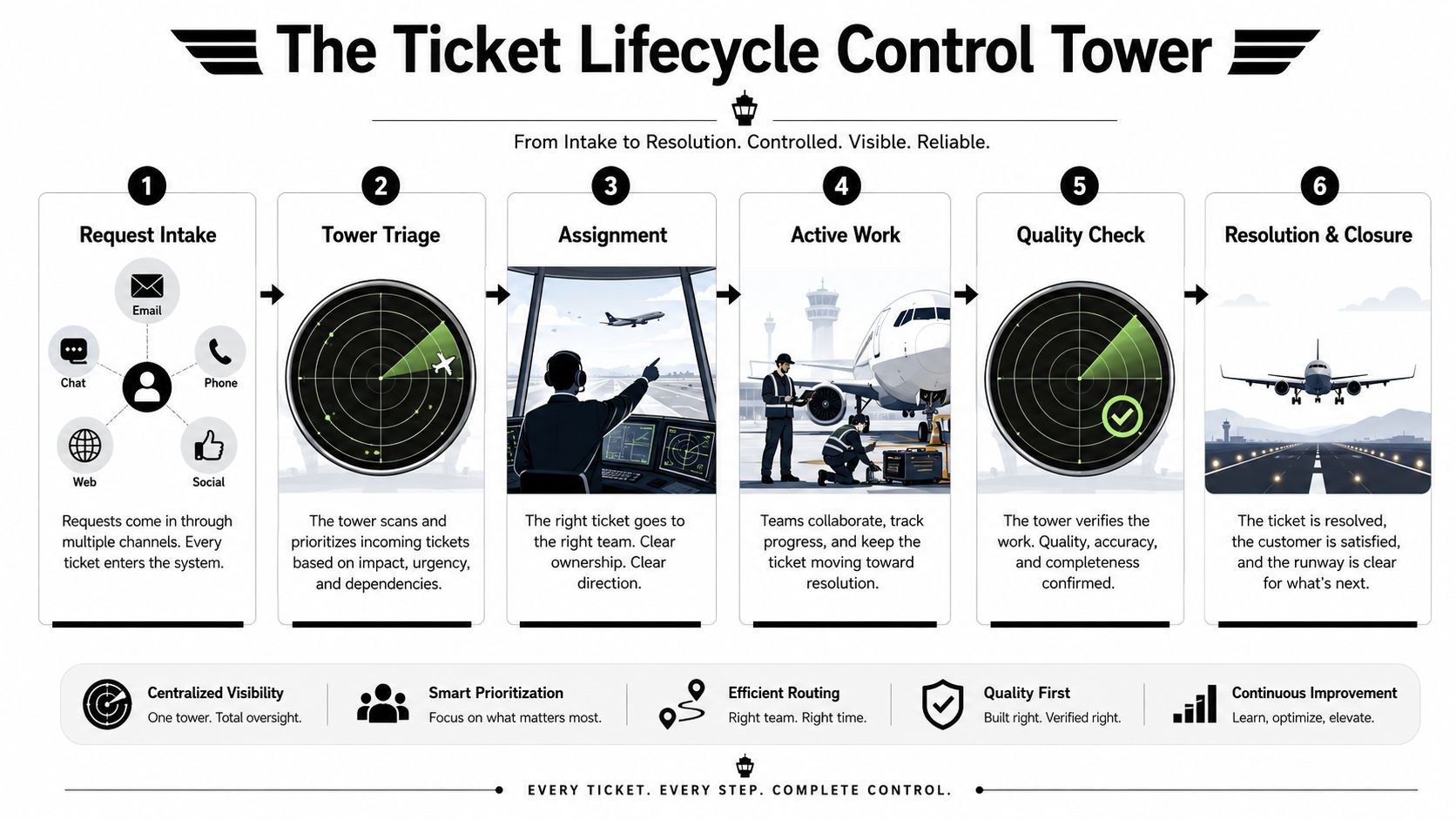
Think of a ticketing system like an airport control tower. Planes arrive from different directions, but nobody leaves the ground until the tower assigns a path, a runway, and a timing sequence. Tickets work the same way when the system is healthy.
From intake to assignment
The lifecycle begins when a request enters through email, chat, phone, a web form, or social messaging. The system captures the requester, summary, timestamp, and other context in one record, so the issue doesn't depend on a person remembering what was said. Modern ticketing systems also keep the communication attached to the ticket, which is what gives the team a searchable audit trail.
From there, the ticket gets triaged. Priority is set based on urgency and impact, then the request moves into a queue or team. That state change matters because it establishes ownership. It's the difference between “someone saw this” and “someone is responsible for this.”
Operational insight: once a support team handles more than roughly 50 requests per week, a shared inbox can start missing items, making a ticketing system necessary to preserve ownership and stabilize resolution times, according to Crisp's ticketing system guidance.
From active work to closure
After assignment, the agent works the ticket, updates the customer, and escalates if the issue needs another team. Each transition is a controlled state change, which is why a modern ticketing system is better described as a structured state machine than a glorified inbox. The system keeps status history, ownership history, and timestamps together, so nobody has to reconstruct the story later.
That history protects both sides. Customers can see progress. Support teams can explain what happened without digging through scattered messages.
For teams building connected service workflows, the ticket often sits inside a broader orchestration layer, which is where a platform such as Yellow.ai's Zendesk integration can connect conversations to structured service records without splitting context across tools.
Four Types of Ticketing Systems and When to Use Each
Many teams say “ticketing system” as if there's only one kind. There isn't. The best fit depends on who owns the request, what rules govern it, and what success looks like.
| Type | Primary Owner | Typical Ticket | Core Metric |
|---|---|---|---|
| Customer support ticketing | CX or support operations | Refund, complaint, order issue, account problem | Response quality and resolution consistency |
| IT service ticketing | IT or service desk | Incident, access request, alert, change request | Recovery speed and service stability |
| Employee service ticketing | HR, internal ops, or shared services | Leave request, onboarding task, policy question | Internal responsiveness and traceability |
| Event ticketing | Venue, transport, or access operations | Seat allocation, entry pass, reservation | Allocation accuracy and fulfillment flow |
Customer support, IT, and employee service
Customer support ticketing is what most buyers picture first. It's built for customer-facing teams handling disputes, account problems, and service questions across email, chat, and web. In regulated environments like BFSI, ownership and traceability matter just as much as speed, because the ticket may become part of an audit trail.
IT service ticketing is different. It tracks incidents, requests, events, and alerts that require IT action, often with stricter routing and escalation logic. Employee service ticketing sits inside the organization, usually in HR or shared services, where the requester is a colleague rather than a customer.
If you want a fast decision rule, ask two questions: who owns the request, and what compliance regime governs it? That answer usually tells you whether you need a customer help desk, an ITSM workflow, an internal service portal, or a platform that spans several of them.
Event ticketing and blurred boundaries
Event ticketing looks different because the ticket is often the product, not the support case. A venue or transport operator may care about seat assignment, access control, or capacity management more than conversational history. Still, the logic is similar. A request becomes a record, the record gets routed, and the outcome is tracked.
The blur appears in omnichannel case management. One platform can serve customers, employees, and internal teams if it can separate policies, queues, and reporting cleanly. The mistake is buying for the wrong use case, then forcing the tool to behave like something it wasn't designed to be.
The Core Components Every Ticketing System Shares
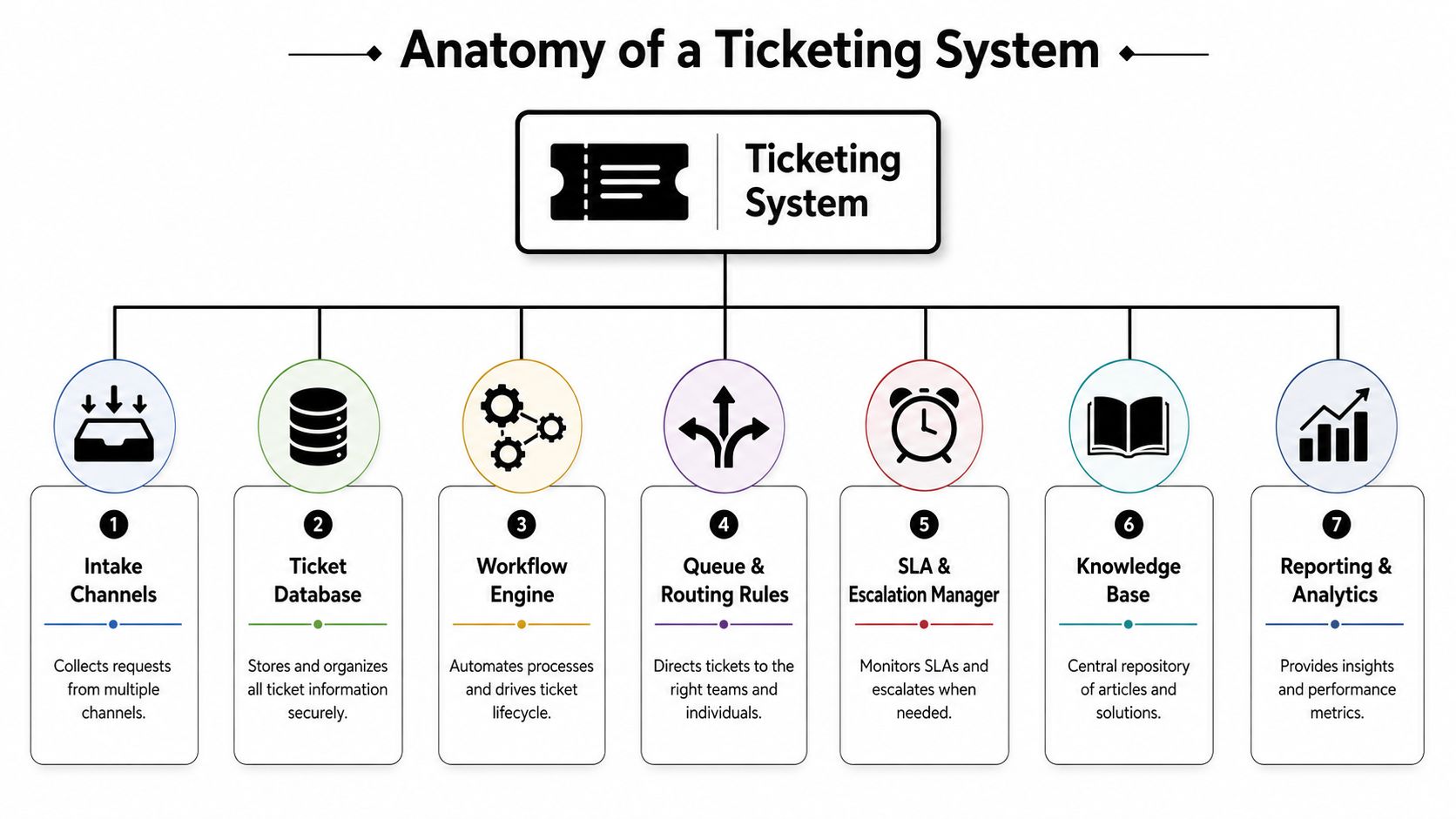
A ticketing system is a lot like an airport control tower. Planes arrive from different directions, but one view of the runway, one set of rules, and one control process keeps traffic from turning into confusion. The same idea applies to customer support, IT, employee service, and event ticketing. Each one handles different kinds of requests, but the core machine underneath is similar.
The value comes from the parts working together. If intake is scattered, routing is weak, or reporting is thin, the service layer starts to behave like a pile of inboxes instead of an operating system for service.
Intake, record, and workflow
The first component is intake channels. Email, chat, phone, web forms, and social messages all need a path into the same system, or teams end up with blind spots. If the intake layer is weak, requests get split across tools and nobody trusts the queue.
Next is the ticket database, which acts as the central ledger of the operation. Every issue lives here with its requester, status, history, and ownership. Without it, there is no durable record, and every handoff starts from memory instead of facts.
The workflow engine moves a ticket through states. It creates the handoffs, timestamps, approvals, and status changes that make service work accountable. Centralized issues, priority management, resource allocation, time accounting, and workflow oversight become practical in day-to-day operations.
Routing, escalation, knowledge, and reporting
Queue and routing rules decide who gets what. A VIP customer can go to a senior queue, a billing issue can route to finance, and a password reset can go to a self-service path. If routing is sloppy, skilled agents spend time on the wrong work.
The SLA and escalation manager tracks deadlines and pushes stalled tickets upward when needed. A ticket without escalation logic can sit unnoticed until a manager notices the delay, which is usually too late.
The knowledge base matters because not every issue needs human handling. A password reset article or policy answer can deflect common work and keep the queue from filling with repeat questions. For teams comparing platform anatomy with content strategy, Yellow.ai's conversational knowledge base is a useful example of how knowledge can sit inside the service flow instead of beside it.
Finally, reporting and analytics turn tickets into operational insight. Without it, managers can see volume, but they cannot see recurring causes, queue pressure, or where process design is failing. For a broader service-management overview, CallZent's complete help desk guide connects desk structure with day-to-day support operations.
Benefits and KPIs CX, EX, and IT Leaders Actually Track
A ticketing system only earns budget approval when it changes a metric someone owns. Different leaders care about different numbers, and that's a feature, not a problem.
CX leaders
Customer experience teams usually care about first-contact resolution, response quality, and satisfaction outcomes. A ticketing system helps when it keeps the customer's context attached to the ticket, routes requests correctly the first time, and prevents duplicate handling across channels.
The operational habit that moves these numbers is simple. Agents need to work from one record, not multiple inboxes. When the ticket carries history, handoffs become cleaner and customers repeat themselves less.
EX and IT leaders
Employee experience teams usually focus on internal response consistency, especially for HR and shared service requests. The important behavior is traceability. A ticketing system gives internal teams a record they can audit later, which matters when a request touches policy, access, or approval chains.
IT leaders usually care about mean time to resolution, escalation discipline, and the stability of service processes. A well-run system improves those numbers by making ownership visible, enforcing queue logic, and preserving the context needed for faster diagnosis.
A useful test: if a ticketing rollout doesn't change who owns a request, when the timer starts, and how escalation works, it's mostly a reporting project.
Self-service and automation also matter because they reduce repeat ticket volume, not just handling time. That's where cost-to-serve starts to move in the right direction. The best teams don't just answer faster, they answer less often by deflecting routine work into knowledge and automation.
Where Ticketing Systems Break and What Comes Next

A ticketing system breaks down when it stays purely reactive. Tickets pile up, triage becomes a job in itself, and agents spend too much time moving work around instead of resolving it. That's the bottleneck enterprise buyers eventually run into.
Industry guidance already frames ticketing systems as a way to handle high volumes and automate service tasks, but repeated human triage can still inflate cost and slow service across channels, as described by Zendesk's ticketing system overview. The problem isn't that tickets are bad. The problem is using tickets as the whole operating model.
The next layer is intelligence
The newer layer adds AI-assisted deflection, knowledge reuse, and omnichannel orchestration. In practice, that means the ticket becomes a unit of intelligence, not just a work item. The system can classify intent, surface answers, route to the right place, and hand off with full context when human help is still needed.
That's where customer service, HR, and IT converge. A customer question, an employee request, and an IT alert can all move through one service model if the platform can preserve context while the channel changes. The old model was “capture and close.” The newer model is “understand, resolve, and learn.”
The key question for leaders isn't whether they need ticketing. It's whether their ticketing layer is helping agents think, or just giving them more to sort through.
Implementation Checklist for Enterprise Rollouts
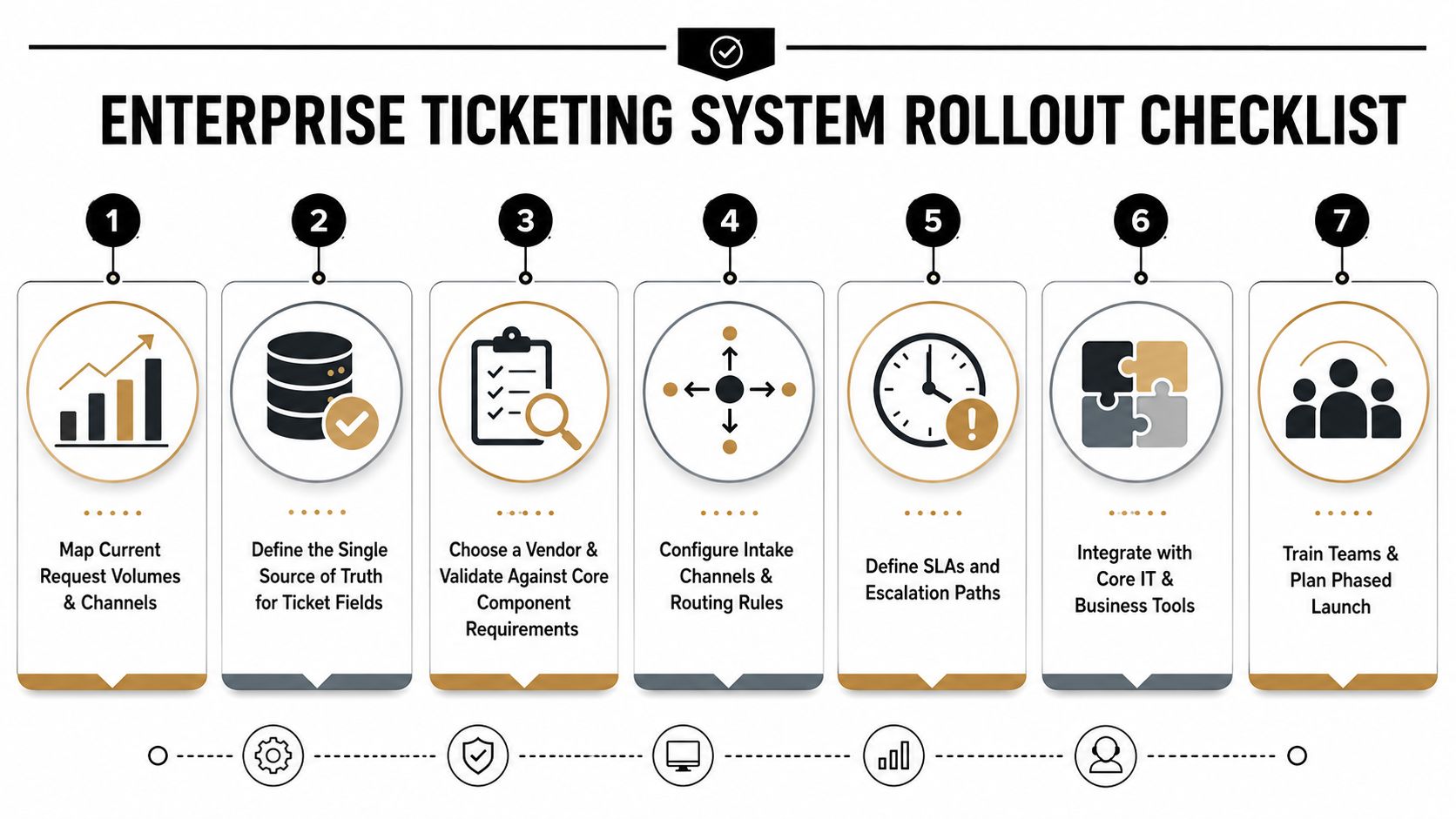
A rollout works best when leaders treat ticketing like a change in operating discipline, not a software install. A customer support queue, an IT help desk, an employee service desk, and an event ticketing flow all solve different problems, so the first job is to keep those use cases separate before you force them into one process.
A practical rollout sequence
- Map current request volumes and channels. Start with where requests enter, who sees them first, and where handoffs slow down.
- Define the single source of truth for ticket fields. Set which fields matter, who owns them, and which ones feed reporting and governance.
- Choose the integration spine. Connect CRM, identity, telephony, knowledge, and analytics before launch, because each system adds context the ticket alone cannot hold.
- Set SLAs by ticket type. A password reset, refund dispute, and policy request need different timing rules, just as they need different owners.
- Design escalation paths. Build clear routes for stalled work so tickets move to the right manager or specialist without manual chasing.
- Train agents and managers together. If only frontline staff learn the new process, reporting, oversight, and queue health will drift.
- Layer automation carefully. AI should sit on top of a clean workflow, not cover up a messy one.
A shared inbox starts to break down when request volume climbs, because it stops acting like a control system and starts acting like a pile of loose notes. That is often the point where a real ticketing rollout earns its place, Crisp's guidance explains.
Email can also be brought into a structured service flow without losing the request history. Yellow.ai's email support simplification shows how that setup can keep service work organized while still using the channel teams already rely on.
Security and governance should be part of the vendor review from the start. Access control, audit logging, and compliance expectations like SOC 2, ISO 27001, HIPAA, and PCI-DSS belong in the rollout plan before launch, not after the first problems appear.
The Ticketing System as a Foundation for Agentic Service
A ticketing system is not the destination. It's the record layer that makes modern agentic service operations possible. Even when an AI agent resolves the issue, the request still needs an owner, a priority, a status history, and an audit trail.
That's why the cleanest enterprise setups use ticketing as the system of record while voice, chat, email, and AI agents work on top of it. The ticket stays consistent, the knowledge stays reusable, and the service model doesn't fracture every time a request moves channels.
In 2026, the differentiator isn't whether you have a ticketing system. It's how cleanly your tickets, knowledge, and AI agents share one operational model. If those pieces don't line up, automation only makes the confusion faster.
A practical next step is to audit your current ticket taxonomy. Look at how requests are categorized today, where ownership gets unclear, and which ticket types repeat most often. That tells you whether your ticketing layer is ready to support agentic service, or whether it still needs basic cleanup first.
A CTA for Yellow.ai.



