













A customer calls your support line, asks a simple billing question, and your voice AI pauses just long enough to make the caller say “hello?” before it responds. Nothing is technically broken. The answer eventually arrives. But the interaction already feels off.
That gap is where many enterprise AI projects succeed or fail. Leaders often ask about accuracy, containment, automation, and cost. Those matter. But in live AI interactions, especially voice, latency often decides whether the experience feels natural, trustworthy, and worth using at scale.
For a VP of Customer Experience, this isn't a network metric buried in an operations dashboard. It's the difference between a conversation that flows and one that feels robotic. It affects customer patience, agent efficiency, and how much rework your teams inherit when an automated interaction stalls, repeats itself, or pushes a frustrated user into a live queue.
Table of Contents
- Understanding Latency Beyond the Buzzword
- The Four Key Types of Latency Explained
- How Latency Is Measured and What to Track
- The Real-World Impact on CX and EX
- Practical Strategies to Minimize Latency
- Achieving Ultra-Low Latency with an Agentic AI Platform
- Conclusion Moving Beyond Lag to Natural Conversation
Understanding Latency Beyond the Buzzword
Latency is often first encountered as a feeling, not a metric. It shows up as the awkward pause after a customer speaks. It shows up when an employee asks an internal helpdesk bot for leave policy details and waits long enough to wonder whether the system heard them. It shows up when a digital assistant interrupts because response timing is just slightly off.
That's why the simplest answer to what does latency mean is this. It's the delay between a user's action and the system's response. In networking, it's typically measured in milliseconds, and it can't ever be reduced to zero because data has to physically travel through infrastructure. The main drivers are distance, routing hops, congestion, and processing overhead, as explained in Fortinet's latency overview.
In enterprise AI, that definition becomes very concrete. A customer says, “I need to change my delivery address.” The audio has to be captured, transmitted, interpreted, routed through orchestration logic, matched to policy and account context, and turned into a response. Every stage adds delay. Customers don't care which layer caused it. They only experience the pause.
Why business leaders should care
When leaders hear “latency,” they sometimes file it under infrastructure hygiene. That's too narrow. In conversational AI, latency shapes perception before accuracy even gets a chance to matter.
A slow but correct answer can still feel like a bad answer.
Practical rule: If customers have to wonder whether the AI is still listening, latency is already undermining the experience.
There's another nuance that matters. Latency isn't one clean average number that describes your environment. Each request has its own latency profile. Some interactions complete quickly, while a smaller set of outliers run much slower. Those tail cases often define the lived experience because that's where customers repeat themselves, agents take over, and workflows spill into manual handling.
For CX and EX teams, that means latency is not just an engineering measure. It's a service quality measure. It influences trust, conversational flow, resolution effort, and whether employees or customers choose to use the system again.
The Four Key Types of Latency Explained
A customer asks a voice bot to reschedule a delivery. The request crosses the network, hits speech recognition, pulls order data, waits for an available model worker, and only then comes back as a reply. If any one of those steps slows down, the whole interaction feels hesitant. In enterprise AI, that hesitation is the difference between a conversation that feels natural and one that feels mechanical.
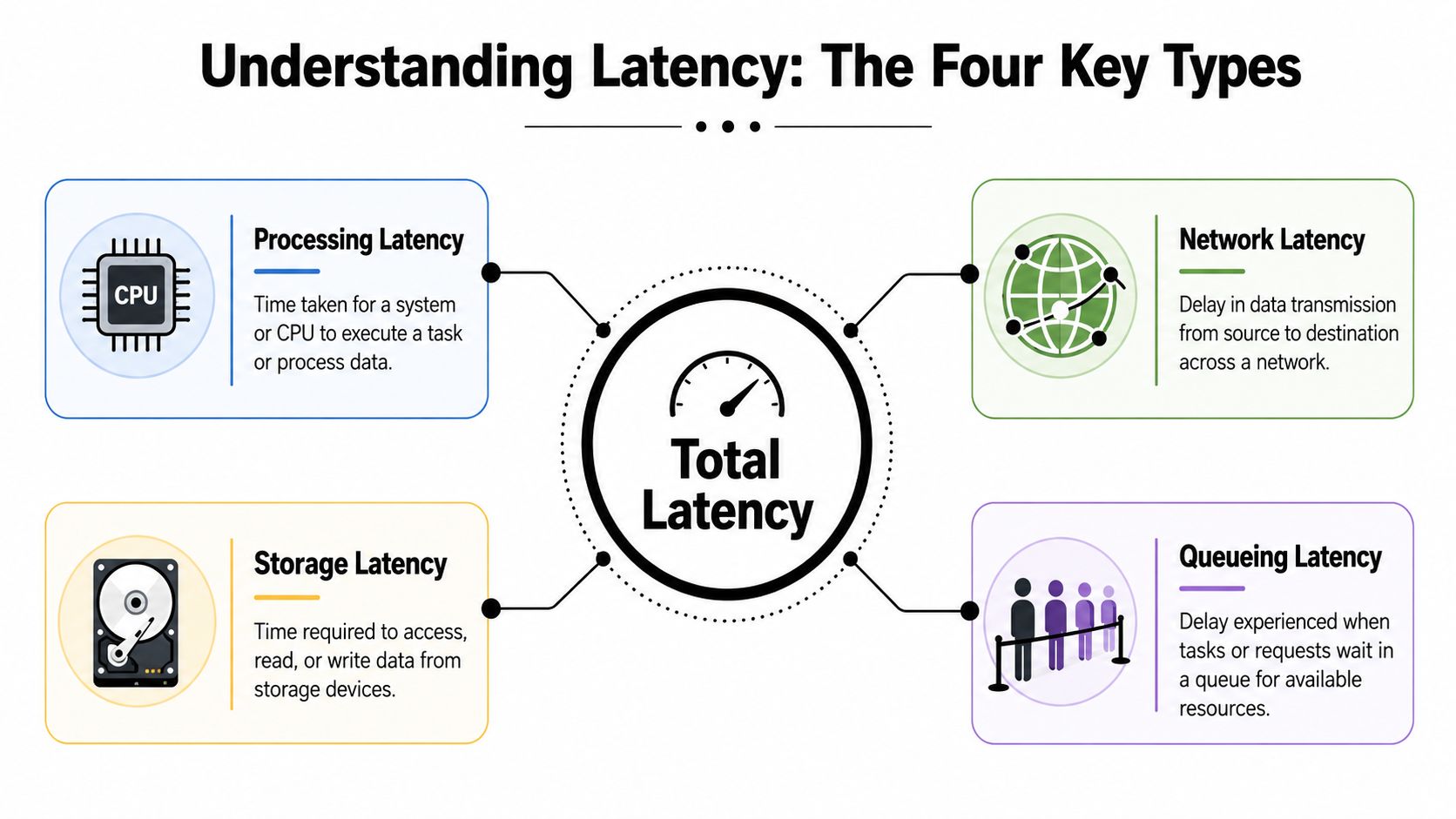
Total latency usually comes from four distinct sources. Separating them matters because each one creates a different customer symptom and requires a different operational fix.
- Network latency is the time spent moving data between the user, your application, and dependent services. Distance, routing paths, packet loss, and congestion all affect it.
- Processing latency is the time systems spend doing work. In AI interactions, that includes speech-to-text, orchestration, retrieval, model inference, guardrails, and response generation.
- Storage latency is the delay introduced when reading or writing data. Customer profiles, conversation history, policy documents, transcripts, and session state often sit behind databases, vector stores, or caches with different response times.
- Queueing latency is the wait before work even starts. It shows up when requests arrive faster than available compute, model endpoints, or downstream services can handle.
These categories are practical, not academic. In enterprise AI, a customer never experiences "inference latency" in isolation. They experience the sum of transport, system work, data access, and waiting under load.
Why the breakdown matters in enterprise AI
Teams often focus on the model first because that is the visible part of the stack. In production, that is only one part of the delay budget. A smaller model can still produce a poor experience if requests are sitting in a queue or waiting on a slow CRM lookup.
Latency directly affects CX and EX. If network latency is high, customers in certain regions hear awkward pauses. If processing latency is high, every answer feels slow, even at low volume. If storage latency is high, the system struggles most on the turns that require personalization or policy checks. If queueing latency spikes, service quality collapses exactly when demand is highest, which is usually when customers and agents have the least patience.
| Latency type | Typical business symptom | What often works |
|---|---|---|
| Network | Delays vary by region, channel, or device | Shorter paths, regional deployment, better routing |
| Processing | Every response feels consistently slow | Lighter model paths, fewer orchestration steps, faster inference |
| Storage | Personalized or context-heavy turns slow down | Caching, indexed retrieval, faster backing stores |
| Queueing | Performance degrades during peaks or campaigns | Capacity planning, autoscaling, concurrency limits |
A useful operating question is simple: where is the user waiting?
That question changes the response plan. Network teams may need regional edge coverage. Platform teams may need to redesign service calls between components. Data teams may need faster retrieval patterns. Operations teams may need to control concurrency before spikes create visible pauses. The right answer depends on the latency type, not on a generic mandate to "make the bot faster."
For leaders, this breakdown also improves measurement discipline. If one dashboard rolls every delay into a single number, teams can spend weeks optimizing the wrong layer. Detailed latency reporting through AI analytics for conversation and performance monitoring helps isolate whether the slowdown is coming from transport, compute, storage, or queues, and that makes remediation faster and cheaper.
From a customer experience perspective, the pattern matters as much as the average. Inconsistent lag usually points to congestion or waiting for resources. Stable but slow responses usually point to processing or architectural overhead. Once teams can tell those apart, they can fix the cause that customers feel.
How Latency Is Measured and What to Track
Why averages hide the real problem
Many executive dashboards still show average response time as the headline number. That's easy to read and easy to misunderstand.
Modern guidance on latency measurement moved away from simple averages because latency is a per-operation metric, not a single stable property of a service. Averages and even medians can conceal meaningful slowdowns, especially when a small set of requests take much longer than the rest. Equinix's explanation also notes that latency is commonly discussed as round-trip time, or RTT, which measures the time for a packet to go from source to destination and back. That framing became standard for how teams evaluate perceived responsiveness in web apps, APIs, and networked services, as outlined in Equinix's discussion of latency and RTT.
For CX leaders, the implication is straightforward. If the average looks fine but the slowest slice of interactions feels painful, customers will still rate the experience poorly. A dashboard that says “overall latency is acceptable” doesn't help if the worst interactions are the ones that trigger repeat questions, escalations, or abandonment.
The metrics that matter in practice
The more useful view is to track a mix of transport and experience metrics.
- RTT helps teams understand the end-to-end network round trip.
- Time to First Byte is useful when you care about how quickly a system starts responding, not just when it fully completes.
- Percentiles such as p95, p99, and p99.9 show the slow edge of the distribution, where many customer complaints live.
- Stage timing breaks the experience into speech input, orchestration, retrieval, inference, and response delivery.
A practical review cadence usually includes both channel-level and component-level visibility. If voice latency worsens, the team should be able to tell whether the delay came from carrier routing, speech recognition, backend lookup, model inference, or text-to-speech.
Don't ask only, “What was our average latency?” Ask, “What did our slowest meaningful slice of interactions look like?”
Analytics maturity is a critical factor. Teams need instrumentation that connects latency to journey outcomes, containment, transfers, and drop-offs. A reporting layer such as Yellow.ai AI analytics is useful when it helps operators move from raw timings to operational decisions, such as identifying which intents, channels, or handoff points are consistently causing visible lag.
The best latency conversations happen when CX, product, and engineering review the same evidence. That keeps the discussion grounded in customer experience instead of isolated infrastructure metrics.
The Real-World Impact on CX and EX
A customer calls about a failed payment. The bot has the right answer, but it pauses just long enough after each turn that the caller talks over it, stops trusting it, and asks for an agent. The problem is no longer model quality alone. Response timing has already changed the outcome.
What different latency bands feel like
Latency shows up first as a human reaction, not a dashboard metric. In enterprise AI, that reaction determines whether an interaction feels natural enough to continue or awkward enough to abandon.
| Channel | Excellent (<150ms) | Acceptable (150-300ms) | Poor (>300ms) |
|---|---|---|---|
| Real-time voice | Feels fluid and conversational | Noticeable pause, still workable | Feels unnatural and interruptive |
| IVR and guided voice flows | Responsive turn-taking | Slight hesitation between prompts | Caller starts speaking over prompts or repeats input |
| Web chat | Feels quick and attentive | Mild delay, usually tolerated | Feels sluggish and less trustworthy |
Voice exposes delay faster than chat because people expect near-instant turn-taking. A short pause in web chat may be acceptable if the answer is useful. The same pause in a voice interaction makes the system sound hesitant or disconnected. In customer service, that shift matters because confidence drops before accuracy is ever evaluated.
For AI teams building high-volume service flows, latency is what separates an assistant that feels conversational from one that feels like a slow form with speech added. That is one reason enterprise teams compare their design choices against modern conversational AI customer service deployments built for live dialogue, not delayed back-and-forth exchanges.
Why voice has the least tolerance
Voice interactions depend on rhythm. Once the rhythm breaks, customers start adapting to the machine instead of the machine supporting the customer.
That creates operational drag quickly:
- Customers repeat themselves because the delay makes them assume the system missed the utterance.
- Escalations rise because a shaky first exchange reduces trust in the rest of the flow.
- Agents receive harder handoffs because frustration is already present before the transfer begins.
- Employees abandon internal assistants if every step slows down live work such as ticket triage or policy lookup.
I have seen teams focus on recognition accuracy while callers were still dropping out because the bot felt slow. From a CX perspective, latency changes perceived competence. From an EX perspective, it changes whether staff treat automation as a useful tool or an obstacle.
Geography can intensify the problem. Cross-border routing and regional network constraints can add enough delay to make a capable assistant feel unreliable for users in China-facing operations. In those cases, infrastructure choices matter as much as prompt design, and Throughwire helps bypass China lag when teams need to reduce avoidable delay across that route.
A simple rule applies. If users have to wait long enough to wonder whether the AI is still working, latency is already hurting satisfaction, containment, and workforce efficiency.
Practical Strategies to Minimize Latency

Start with the biggest sources of delay
The fastest way to waste time is to optimize the wrong layer. Teams often spend weeks refining prompts or rewriting conversation flows when the major delay sits in geography, routing, or overloaded infrastructure.
Physics still matters. One reference point from network engineering is that fiber-optic backbone latency averages 145ms between New York and London, while edge computing can cut latency to around 5-15ms by placing compute near the data source, as summarized in Wikipedia's engineering overview of latency). That's why regional placement and edge architecture matter so much for AI interactions that need immediate turn-taking.
A practical priority order usually looks like this:
- Move compute closer to users: If your customers are regional, don't force every interaction through a distant central stack.
- Reduce unnecessary hops: Every intermediate proxy, gateway, or middleware step adds time.
- Stabilize the local network path: Wired connections often perform more consistently than wireless ones for operational environments.
That last point is often overlooked in contact centers and operations hubs. The same engineering overview notes that replacing WiFi with Ethernet can reduce jitter by 40%. Jitter isn't identical to latency, but unstable timing often makes live AI interactions feel worse even when the average response looks decent.
Fix architecture before tuning prompts
Once infrastructure is reasonably sound, architecture usually becomes the next constraint. The most common sources of preventable latency are integration-heavy designs with too many sequential calls.
Look for these patterns:
- Serial dependencies: Speech-to-text waits, then orchestration waits, then retrieval waits, then model inference waits, then text-to-speech waits. If every stage blocks the next, the customer feels the sum of all delays.
- Over-fetching context: Pulling large records or broad knowledge payloads on every turn creates unnecessary overhead.
- Single-model bottlenecks: Routing every interaction through the same heavy model path slows simple tasks that don't need that level of reasoning.
For teams operating in difficult geographies or cross-border environments, network routing can also be the hidden issue. Resources like Throughwire helps bypass China lag are useful when you need a concrete look at how route optimization affects performance in regions where standard paths can be inconsistent.
Here's a short explainer worth sharing with non-technical stakeholders before deep optimization work begins:
Operational habits that keep latency under control
Latency work doesn't end at deployment. Teams need operating discipline.
- Watch the tails, not just the center: Review the slow edge of interactions by region, intent, and time window.
- Patch and update infrastructure: Firmware and hardware optimizations can improve throughput and remove avoidable delays.
- Load test realistic journeys: Short synthetic tests won't expose queueing behavior during actual demand spikes.
- Design fallback behavior: If a backend dependency slows down, the AI should degrade gracefully instead of freezing the conversation.
The same latency reference also notes that latency below 100ms in voice channels correlates with a 25% increase in customer satisfaction for enterprise agentic AI scenarios. That makes latency reduction one of the few technical efforts that maps cleanly to a customer-facing outcome.
Achieving Ultra-Low Latency with an Agentic AI Platform
Why integrated systems respond faster
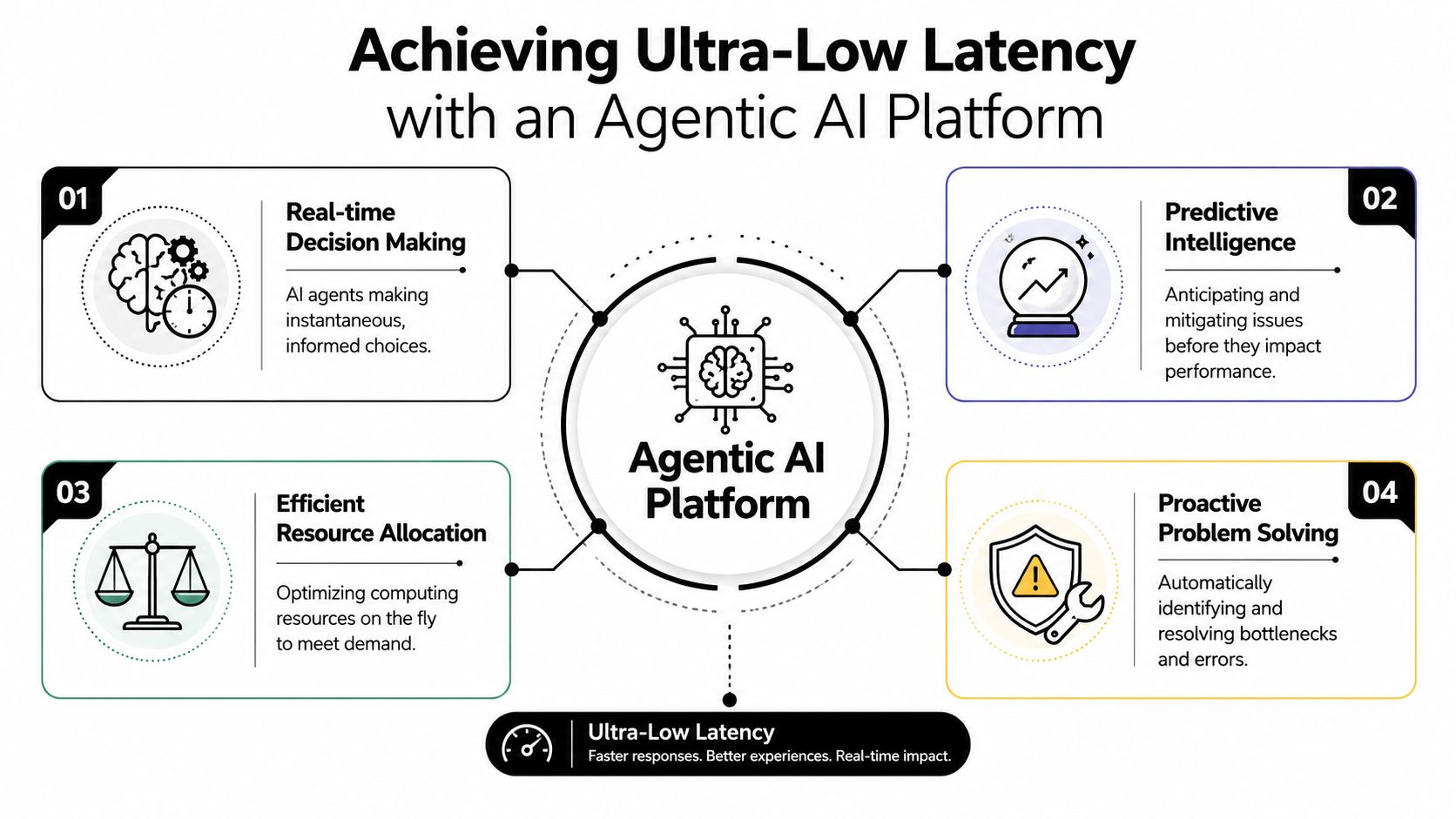
Most latency problems in enterprise AI don't come from one catastrophic failure. They come from accumulation. One handoff between speech services. Another between orchestration layers. Another between retrieval, policy logic, and response generation. Each integration adds overhead, retries, serialization, and operational complexity.
That's why purpose-built platforms often outperform stitched-together stacks for real-time interaction. When the system handles speech, orchestration, decisioning, and response delivery within a tightly coordinated architecture, it cuts the integration tax that slower designs impose on every turn.
This is especially relevant for agentic systems. They don't just answer prompts. They decide, retrieve, route, act, and adapt in the middle of live interactions. If every decision requires another round of external calls and heavyweight coordination, the experience degrades fast.
The goal isn't low latency in one component. The goal is low latency across the full conversational path.
What to look for in a platform
A practical evaluation should focus on architectural behavior, not just demos.
Look for a platform that supports:
- Integrated voice flow handling so speech input and output don't bounce across loosely connected services
- Model routing flexibility so simple tasks can take a faster path while complex ones use deeper reasoning only when needed
- Regional deployment options to keep interactions close to the user
- Built-in observability that ties timing to business outcomes, not just component health
One example in this category is Yellow.ai's agentic AI platform, which is relevant when teams need a single environment for autonomous conversational workflows across CX and EX. The practical advantage of that kind of platform isn't branding. It's architectural coherence. Fewer moving parts between user input and system action usually means more predictable conversational timing.
For enterprise buyers, that's the test that matters. Not whether a platform can produce an impressive answer in isolation, but whether it can keep a real interaction moving at the speed users expect.
Conclusion Moving Beyond Lag to Natural Conversation
Latency sounds technical because it is technical. But its business meaning is simple. It determines whether enterprise AI feels responsive enough to trust in a real conversation.
For CX leaders, that affects customer patience, containment, abandonment, and service quality. For EX leaders, it shapes whether employees treat AI as a dependable operational tool or a slow extra step. For CIOs and platform teams, it exposes whether the architecture is fit for live, high-volume, human-facing interaction.
The key shift is to stop treating latency as a background metric. It belongs in the same conversation as satisfaction, efficiency, and automation outcomes. Teams need to measure it the right way, diagnose it by source, and reduce it across the entire path from user input to system response.
As enterprise AI becomes more autonomous, latency matters even more. Agentic systems can only feel capable when they also feel immediate. Natural conversation doesn't come from intelligence alone. It comes from intelligence delivered on time.
If you're evaluating how to deliver faster, more natural AI interactions across customer and employee journeys, Yellow.ai is worth exploring as part of that assessment. The right platform should help your teams reduce conversational delay, monitor performance in production, and support AI experiences that feel responsive in real operational conditions.



