














A lot of CIOs are dealing with the same complaint right now. The voice bot is technically working, but it feels slow. Callers pause, the bot answers a beat late, and both sides start talking over each other.
That's usually where the conversation about ultra low latency mode starts. Unfortunately, that term gets used loosely. In graphics, it can mean a driver setting. In streaming, it can mean a transport profile. In conversational AI, it isn't a single switch at all. It's a system target that has to be designed, measured, and protected in production.
Table of Contents
- The Half-Second Pause That Kills a Conversation
- What Ultra Low Latency Mode Actually Means
- How Engineers Measure End-to-End Latency
- The Architecture Behind Sub-Second Voice AI
- When Lower Latency Makes Things Worse
- Choosing an Ultra-Low Latency Voice AI Platform
- Putting It All Together A Practical Decision Framework
The Half-Second Pause That Kills a Conversation
A customer calls support to change a delivery address. They speak naturally, stop, and wait. The voice agent takes just long enough that the customer starts talking again. The bot then begins its answer over the customer's second sentence. Both back off. The customer says “hello?” The bot says “I'm sorry, could you repeat that?”
Nothing failed in the classic sense. The speech recognizer may have captured the words. The language model may have chosen the right answer. The text-to-speech engine may have produced clean audio. But the timing broke the interaction.
Latency is felt before it is diagnosed
People don't experience latency as a benchmark chart. They experience it as awkward turn-taking.
A slow conversational system creates very specific symptoms:
- Interrupted turns: Users think the system is done listening when it isn't.
- False barge-ins: The agent starts speaking while the caller is still finishing a thought.
- Trust erosion: Users become less willing to say something once and expect it to work.
- Longer handling patterns: Agents and callers repeat, confirm, and repair more often.
That's why voice leaders who first adopted automation for containment are now looking much harder at timing. If you're deploying voice automation for customer conversations, responsiveness becomes part of product quality, not just infrastructure quality.
Slow voice AI sounds less intelligent than it is.
Why the term gets misused
Many articles talk about ultra low latency mode as if it were one toggle in a menu. That framing came from other industries where a setting can reduce queuing or buffering. In real-time voice AI, the delay comes from a chain of components. Microphone capture, packet transport, speech detection, transcription, model inference, synthesis, and playback all add time.
So the right question isn't, “Should we turn on ultra low latency mode?”
It's, “What end-to-end delay can this system hold under real traffic, and what trade-offs did it make to get there?”
That distinction matters because a conversational system can look fast in a lab and still feel slow on customer calls. It can also sound snappy at median latency and become unusable in the worst part of the distribution. For a CIO, that's the picture. The business problem isn't abstract latency. It's the moment when a customer decides the machine isn't keeping up.
What Ultra Low Latency Mode Actually Means
In plain English, ultra low latency mode means the response comes back quickly enough that the interaction still feels live. Not “faster than before.” Not “optimized.” Live.
The problem is that vendors often use the phrase without a shared threshold. Other industries already offer better anchors, and voice AI should borrow them.
The benchmark starts with sub-second interaction
In broadcast and streaming contexts, ultra-low latency has been defined as end-to-end delay of 1 second or less, while some practical industry usage stretches the label to delays of up to 3 seconds for live video delivery (arXiv comparison of low-latency streaming approaches). That's useful because it separates interactive delivery from conventional streaming, which can lag much longer.
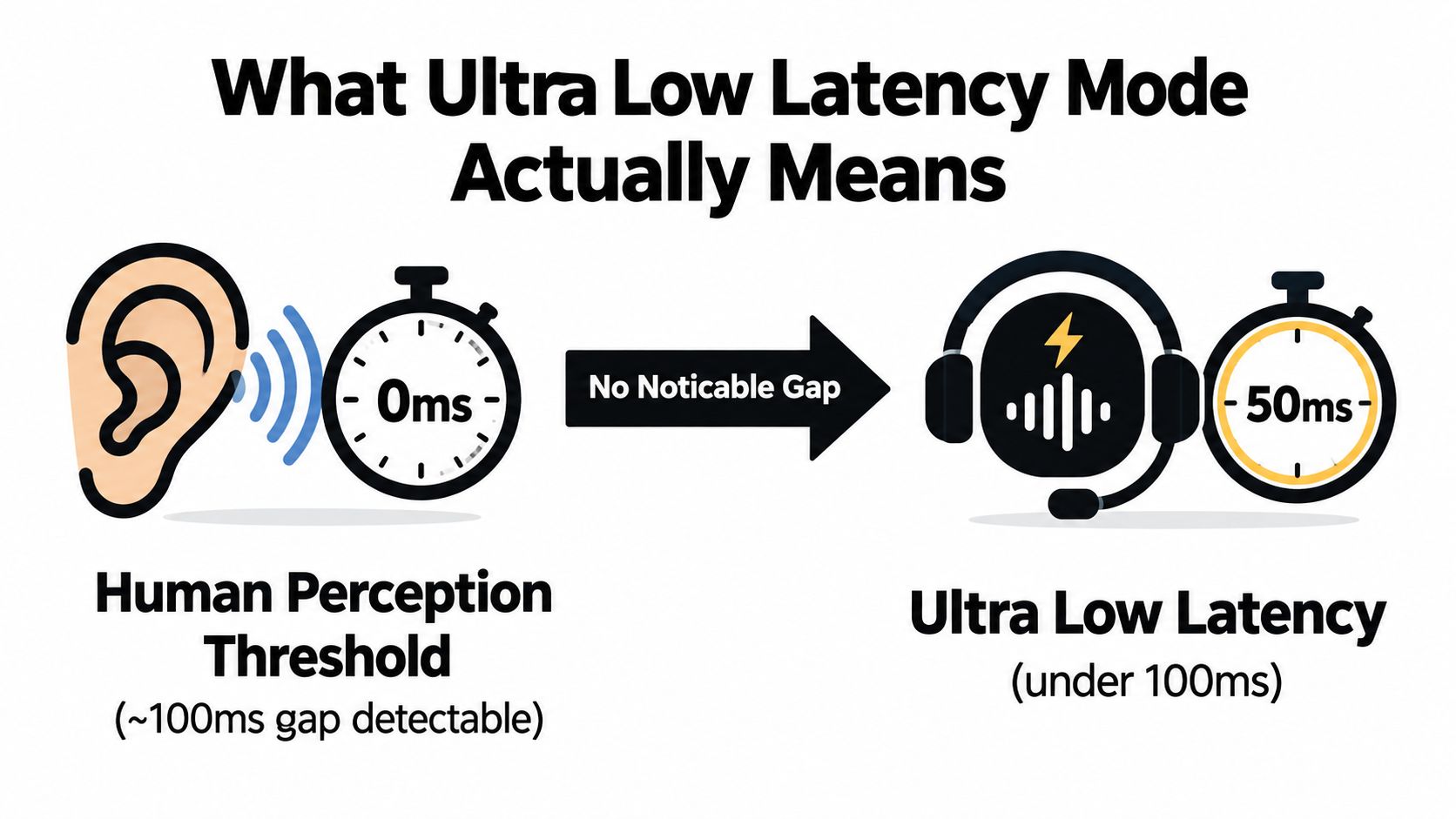
In the same comparative report, WebRTC systems measured about 1.30 to 1.52 seconds combined-network latency, while LL-HLS measured about 19.75 seconds in the same setup (arXiv comparison of low-latency streaming approaches). The lesson isn't that one number applies directly to voice AI. It's that the word “ultra-low” only means something when you tie it to a protocol, a path, and a measurement method.
The graphics world uses the term differently
On the graphics side, the phrase became mainstream in August 2019, when Nvidia introduced Ultra-Low Latency mode in its driver stack and described it as reducing the frame queue to zero so frames are produced just in time. Before that, drivers commonly pre-loaded 1 to 3 frames, which improved consistency but added delay between user input and screen response (technical summary of Nvidia Ultra-Low Latency mode).
That history matters because it explains the word mode. In graphics, a mode is a deliberate queue-control behavior. It changes how much work gets buffered before output. Voice AI has the same underlying issue, even though the pipeline is different. You are still deciding how much to buffer, how quickly to commit, and how aggressively to stream.
What it means for conversational AI
For a CIO, the practical translation is simple:
- Marketing use of the term: “We have an ultra low latency mode.”
- Engineering use of the term: “We can hold conversational delay under a defined threshold, under defined conditions, with known trade-offs.”
Practical rule: If a vendor can't define where the timer starts, where it stops, and what happens at the slow end of the distribution, “ultra low latency” is branding, not an operating property.
In conversational AI, the target is not just “sub-second” in the broad streaming sense. It's fast enough to preserve natural turn-taking. That requires measuring the full path, not just the model's first token.
How Engineers Measure End-to-End Latency
Voice AI teams often get misled by the cleanest number in the datasheet. It's usually the one that excludes the messy parts users feel.
If you want to know whether a system sounds natural, you need to separate three different timing concepts.
Three measurements that get confused
End-to-end latency is the big one. It starts when the user stops speaking, or when the system decides they have stopped, and ends when audio begins playing back to the user.
Network round-trip time is narrower. It measures transport delay between endpoints. Useful, but incomplete.
Time to first byte is narrower still. It tells you when the first chunk of response data arrives. That can matter for streaming, but a fast first byte doesn't guarantee a fast or coherent spoken reply.
Here's a practical way to think about them:
| Latency Metric Breakdown for Voice AI | What It Measures | Why It Matters | Typical Target |
|---|---|---|---|
| End-to-end latency | Full delay from user turn completion to audible system response | Best predictor of whether the exchange feels natural | As low as the workload allows while preserving stability |
| Network round-trip time | Transport time between client and service | Helps isolate whether delay is in the wire or in the stack | Minimize where possible |
| Time to first byte | First returned response chunk from a service | Useful for streaming systems and partial response strategies | Early enough to support progressive output |
Why averages hide the real problem
A voice stack can post a respectable average and still fail customers during peak traffic. Humans remember the awkward pauses, not the smooth middle.
That's why experienced teams care so much about tail latency. In production, the slowest slice of calls often causes the perception problem. A system that answers quickly most of the time but stalls unpredictably won't feel trustworthy.
Vendor demos often quote only one flattering number, usually around model output or token generation. That leaves out:
- Speech capture delay
- Voice activity detection
- Automatic speech recognition
- Language model inference
- Text-to-speech generation
- Playback startup
The discipline that works
Measure every hop separately, then measure the whole path again from the edge.
A practical instrumentation pattern looks like this:
- Timestamp at the client: Mark capture start, speech end, playback start, and playback end.
- Timestamp on the server: Mark receipt, ASR start and finish, model start and finish, TTS start and finish.
- Correlate by turn ID: Otherwise you're comparing unrelated events.
- Inspect the slowest calls first: Those usually reveal queuing, retries, or model contention.
If you can't break latency into stages, you can't improve it with confidence.
One more point matters for executives: never accept a single “response time” number without asking how it was measured. In voice systems, that number is often real and still irrelevant.
The Architecture Behind Sub-Second Voice AI
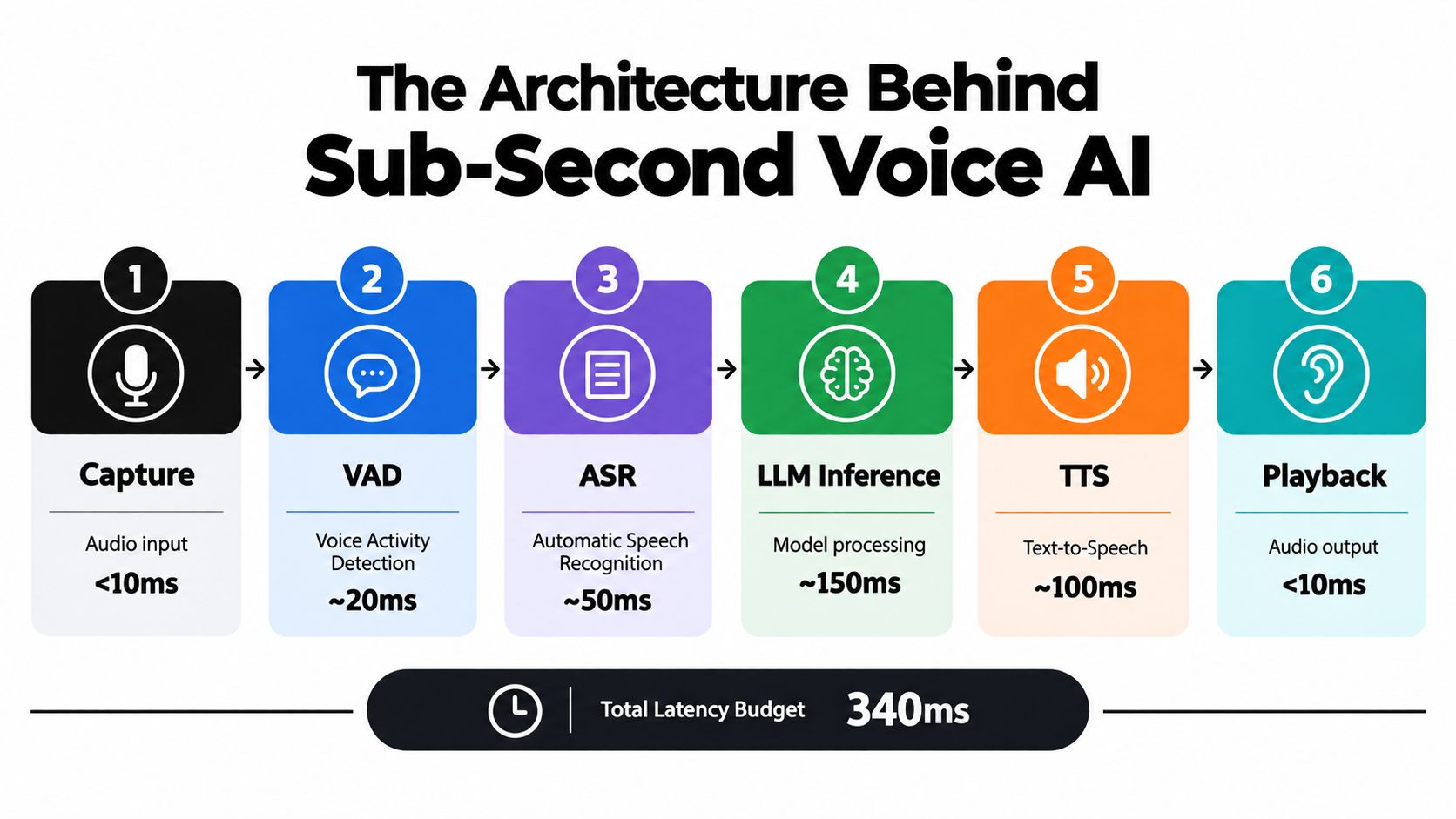
Sub-second conversational performance doesn't come from one fast model. It comes from a pipeline that streams early, buffers carefully, and avoids unnecessary handoffs.
A voice interaction typically passes through six stages: capture, voice activity detection, ASR, language generation, TTS, and playback. Every stage can help or hurt.
Streaming beats isolated optimization
The common mistake is to optimize one stage aggressively while the rest of the stack remains turn-based. That rarely changes user perception much.
What matters more is continuous streaming across the chain:
- ASR should stream partial hypotheses instead of waiting for a full utterance.
- The language model should begin reasoning from stable partial text when the use case allows it.
- TTS should emit audio in chunks rather than waiting for the complete sentence.
- The client should begin playback as soon as it has enough buffered audio to avoid audible breakup.
A helpful parallel comes from mobile product teams that build streaming conversational interfaces. This guide to React Native AI chat streaming is text-first rather than voice-first, but it captures the same product truth: users perceive progress sooner when the system streams, even before the final response is complete.
Protocol choices matter more than many teams expect
For real-time bidirectional audio, protocol overhead shapes experience. Systems built for live exchange generally do better with transports designed for continuous, low-jitter communication than with request-response patterns adapted from web APIs.
In practice, teams often find that:
- WebRTC fits live media well: It was built for interactive audio and video.
- gRPC works well for structured streaming services: Especially inside controlled service environments.
- HTTP-style request cycles add friction: Particularly if each turn waits for full payload completion.
- Legacy telephony layers can introduce jitter: Useful, but not free.
The key isn't protocol fashion. It's avoiding repeated setup, excess buffering, and transport behavior designed for non-interactive delivery.
A platform such as Nexus Vox for enterprise voice AI is relevant here because it treats voice as one integrated system rather than a stack of loosely connected parts. That's the architectural question buyers should care about. How many boundaries exist between speech in, reasoning, and speech out?
Edge and centralization each solve a different problem
Some teams push compute closer to the user to cut transport delay. Others centralize on larger GPU clusters to keep stronger models and simpler operations. Both choices are rational. They just optimize different bottlenecks.
Use edge deployment when the network path dominates. Use centralized inference when model quality, utilization, or governance dominates. Many enterprises end up with a hybrid pattern.
Later in the stack, encoding and synthesis settings matter too. Independent technical writeups on ultra-low-latency encoding show that aggressive low-latency modes can cut end-to-end delay to around 5 frames or 83 ms for H.265/HEVC and AV1, compared with higher delays in standard low-latency modes (arXiv technical writeup on ultra-low-latency tuning). Different medium, same engineering lesson. Smaller buffers reduce latency, but they leave less room for recovery, smoothing, and quality control.
A short video can help make that pipeline concrete:
When Lower Latency Makes Things Worse
Teams often assume the goal is simple. Drive latency as low as possible, then declare victory.
That instinct is understandable and often wrong.
Fast can become brittle
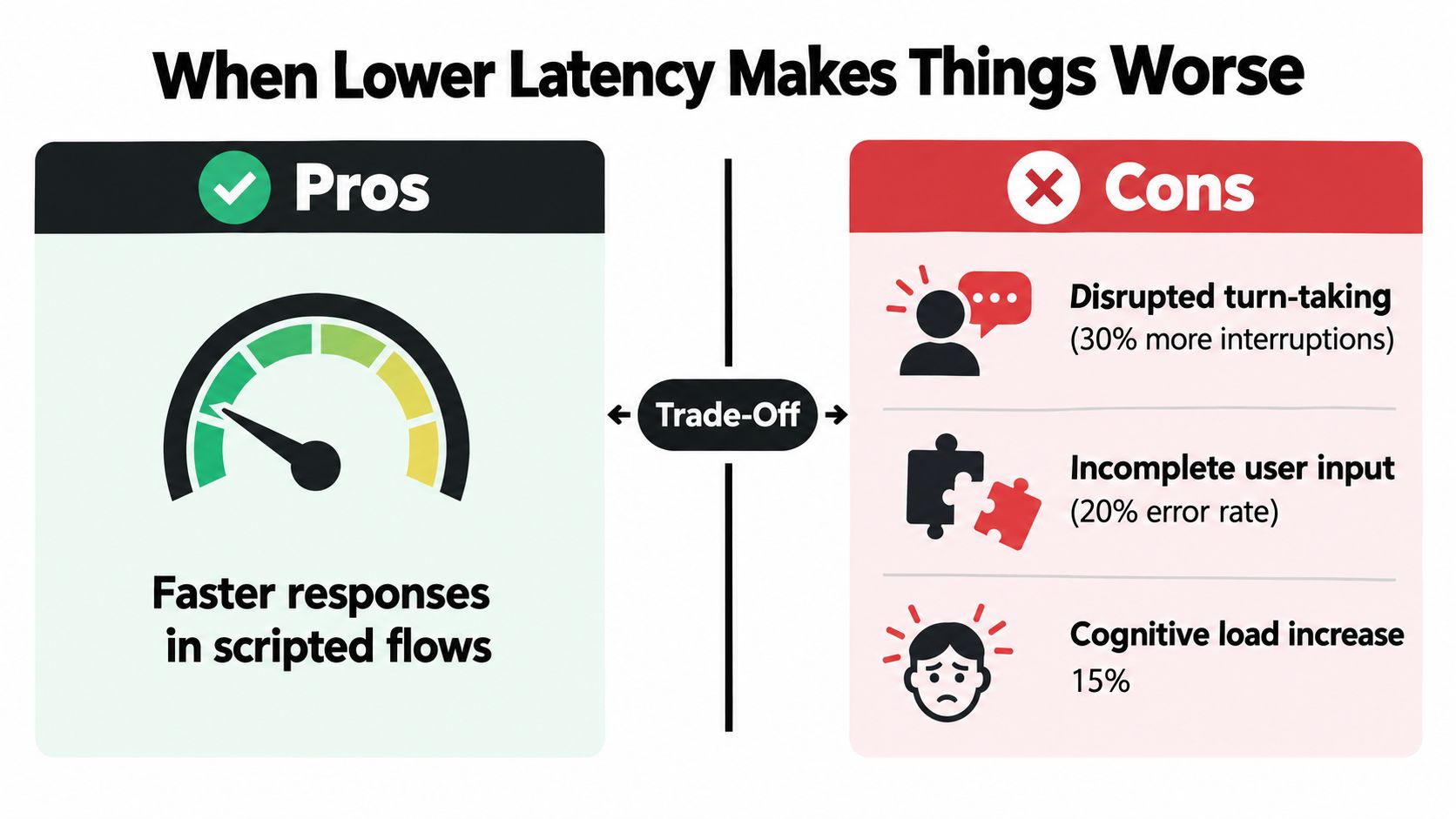
When you minimize buffering aggressively, the system has less time to decide whether the user is finished, less time to stabilize recognition, and less time to shape natural speech output. In a live conversation, that can create a strange result: the agent replies faster, but the interaction feels worse.
Common failure modes include:
- Premature end-of-turn detection: The system thinks the caller is done when they're only pausing.
- Over-eager generation: The model starts a response before enough meaning has arrived.
- Thin synthesis windows: TTS produces speech quickly but with flatter rhythm or awkward phrasing.
- Jitter under load: The system is technically low-latency, but timing varies enough to feel unstable.
This trade-off has a close parallel in graphics. Review-style explainers on Nvidia's setting note side effects such as lower 1% lows, stuttering, or reduced maximum frame rate when the frame queue is minimized too aggressively in GPU-bound scenarios (technical explainer on low-latency trade-offs). Again, different domain, same principle. Less queue can mean less delay, but also less smoothness.
The best experience is not always the smallest number
In voice AI, slight patience often beats instant interruption.
Consider barge-in handling. A system that cuts in too early feels rude and confused. A system that waits a moment longer but respects turn boundaries often feels more competent, even if its raw latency is slightly higher.
The right target is the lowest latency that still preserves stable turn-taking.
This is why the phrase ultra low latency mode needs context. If it means “we reduced every buffer to the floor,” that may not be what you want. If it means “we tuned the system for live interaction without breaking rhythm,” that's far more useful.
Where newer stacks changed the conversation
The graphics industry has already gone through this maturation. Nvidia's guidance now frames Reflex as more effective than Ultra Low Latency in relevant scenarios, and notes that in DirectX 12 and Vulkan the game controls queuing rather than the driver. When both are enabled, Reflex overrides Ultra Low Latency, which narrows the value of the older driver-level setting (NVIDIA system latency optimization guide).
That pattern should sound familiar to enterprise AI teams. As systems become more integrated, a single low-level toggle matters less than coordinated control across the whole stack. Voice platforms are heading the same way.
Choosing an Ultra-Low Latency Voice AI Platform
By the time you reach vendor evaluation, the conversation should be concrete. Not “is it fast?” but “where is the delay, how stable is it, and what trade-offs are hidden inside the benchmark?”
Questions that separate demos from production
Ask vendors for timing at the audio turn level, not just API response timing.
Use questions like these:
| Vendor Evaluation Criteria for Ultra-Low Latency Voice AI | What to Ask | Acceptable Threshold |
|---|---|---|
| End-to-end measurement | Where exactly does the timer start and stop? | Must include audible response timing, not just backend completion |
| Distribution visibility | Can you show median and tail behavior on real traffic? | Must expose both central and slow-end behavior |
| Streaming depth | Which stages stream continuously and which are still turn-based? | Prefer full-path streaming where the use case needs it |
| Network realism | Were results measured in lab conditions or realistic client paths? | Must match likely production topology |
| Scale behavior | What happens when concurrency rises or context grows? | Degradation should be understandable and testable |
| Compliance overhead | What latency is added by redaction, logging, or policy enforcement? | Must be explicit for regulated deployments |
What regulated enterprises should treat as non-negotiable
A fast system that breaks policy won't survive procurement. A compliant system that feels sluggish won't survive users. Enterprise buyers need both.
Focus on issues such as:
- Data residency: Can traffic stay where it must stay?
- Replay for QA: Can you reconstruct bad calls deterministically enough to debug them?
- PII controls: Does redaction happen without blowing up response time?
- Deployment options: Can the platform fit your operational boundary, whether that is cloud, private environment, or hybrid?
Buyers who want a broader procurement framework can use a buyer's guide to evaluating conversational AI solutions as a checklist, then add a latency-specific test plan on top.
Run the pilot like an engineering exercise
Most pilots fail because they are staged as demos. Real latency evaluation needs instrumentation.
A strong pilot does a few things:
- Logs timestamps on both client and server
- Captures per-stage timings for every turn
- Reviews the worst calls, not just the best
- Tests realistic network paths and escalation patterns
- Repeats tests under growing context and concurrent demand
Decision test: If the vendor can't help you inspect bad turns at stage level, you're buying opacity along with software.
Red flags are easy to spot once you know what to ask. Benchmarks with no measurement boundary. “Near real-time” language with no distribution details. Claims tied to ideal lab paths only. Missing commitments around tail behavior.
Putting It All Together A Practical Decision Framework
The most useful way to think about ultra low latency mode in voice AI is as a selection problem. Not every call flow needs the same timing profile, and not every architecture deserves the same operational complexity.
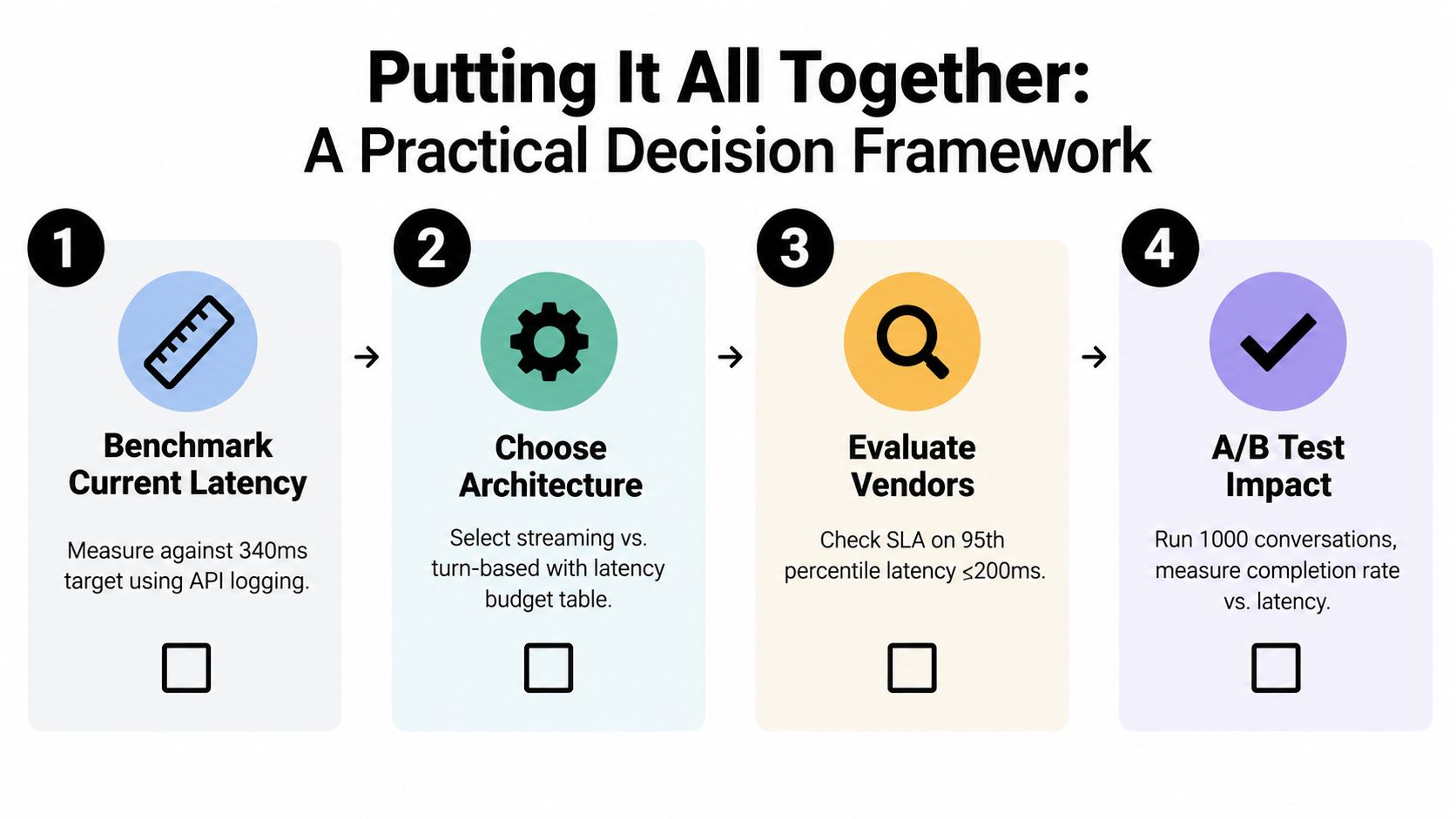
Four steps that make the decision practical
Step 1. Benchmark the current experience.
Measure real customer turns, not synthetic prompts. Capture end-to-end delay, transport timing, and first-response behavior separately.
Step 2. Segment the workload.
Some interactions need live conversational rhythm. Others can tolerate a slower, more deliberate exchange. Authentication, triage, guided troubleshooting, and collections calls may need different latency targets.
Step 3. Match architecture to constraints.
Choose transport, deployment model, and streaming depth based on business reality. Compliance, data locality, and telephony integration often decide more than raw model speed does.
Step 4. Validate impact, not just speed.
Compare latency changes against user outcomes. If the system answers faster but interrupts more often, you didn't improve the experience.
A simple prioritization matrix
Different teams usually care about different failure modes. Put them on one page.
Non-negotiable
- Stable turn-taking
- Clear measurement boundaries
- Compliance fit
- Debuggability of bad calls
Negotiable
- Absolute minimum delay if quality dips
- Largest model size if responsiveness degrades
- Full edge deployment if operations become too complex
Can wait
- Extra voice styling
- Secondary analytics layers
- Broader channel expansion before the voice path is stable
A final technical caution is worth carrying into every boardroom discussion. In networked media research, ultra-low-latency delivery has been tied to hard deadlines such as 100 ms for certain streaming tasks, and optimized systems have shown 50.6% to 70.3% reductions in 99th-percentile frame delivery latency under tested conditions (technical note on ultra-low-latency experiments). That sounds impressive, and it is. But those gains only matter if you know which part of your conversational stack is missing its deadline.
For most enterprises, the right conclusion is straightforward. Treat ultra low latency mode as a measurable engineering target, not a product checkbox. Measure the whole path. Tune the system, not just the model. Buy for stability under real traffic, not speed in a screenshot.
Yellow.ai offers enterprise voice and agentic AI capabilities built for real customer and employee conversations, including realtime voice experiences where latency and turn-taking matter. If you're evaluating how to make voice automation feel faster without making it brittle, visit Yellow.ai to see how the platform approaches integrated voice architecture, orchestration, and production-grade controls.



