













A healthcare provider has approved a new AI assistant, but its security committee won't allow patient information to leave the organization's controlled environment. A bank faces a similar constraint with customer records and an air-gapped network. The CX team wants faster, more natural conversations, while IT must prove where the software runs, how data moves, who operates each layer, and what happens during an upgrade.
That's the practical tension behind on-premise deployment. It isn't a rejection of cloud computing. It's a decision to place infrastructure, software, models, data pipelines, and operational responsibility inside the enterprise boundary, often because locality, customization, latency, or disconnected operations matter more than elastic capacity.
Table of Contents
- Introduction Why Deployment Choice Matters Now
- What On-Premise Deployment Means for Enterprise AI Platforms
- Comparing On-Premise Cloud and Hybrid Deployment Models
- Architecture and Security Considerations for On-Premise AI
- Prerequisites Compliance and Hidden Economics to Plan For
- Implementing Yellow.ai On-Premise From Checklist to Best Practices
- Choosing the Right Deployment Path for Your Enterprise
Introduction Why Deployment Choice Matters Now
Cloud platforms have made AI easier to start, but they haven't made every workload suitable for a public-cloud model. A government network may be fully isolated. A hospital may need to keep sensitive records within a defined jurisdiction. A financial-services organization may have internal policies that require direct control over infrastructure and audit evidence. In each case, deployment architecture affects the operating model, not just the hosting bill.
The market context reinforces that on-premise software hasn't disappeared. A 2025 market outlook reported that the global on-premise enterprise software segment generated USD 119,987.9 million in 2024 and is projected to reach USD 226,444.3 million by 2030, with historical data tracked from 2018 to 2023. That outlook provides a useful benchmark for understanding on-premise as a persistent enterprise segment rather than a purely legacy architecture. (Grand View Research on the global on-premise enterprise software market)
The decision is broader than data control
Data residency is often the first question, but it shouldn't be the last. Leaders also need to ask whether the platform can connect to decades-old systems, operate across subsidiaries with different policies, run on available hardware, and receive updates in a restricted or air-gapped environment.
AI adds further pressure. Models may need specialized compute, retrieval systems must remain aligned with internal knowledge, and voice, chat, email, and other channels can introduce different performance and security requirements. A deployment that looks compliant on paper can still become difficult to operate if the organization hasn't assigned ownership for monitoring, patching, model changes, integrations, and incident response.
This guide builds the decision progressively. It starts with what on-premise means, compares it with cloud and hybrid approaches, examines the architecture and security controls, surfaces readiness and lifecycle economics, and then translates those considerations into an implementation checklist for Yellow.ai environments. The aim is practical clarity for CX, CIO, CTO, and IT teams deciding how enterprise AI should run.
What On-Premise Deployment Means for Enterprise AI Platforms
Think of the difference as owning your building versus renting office space. With a cloud service, the vendor generally operates the building, maintains the utilities, and controls much of the underlying environment. With on-premise deployment, your organization provides the building, network, power, storage, and access controls. The platform runs on infrastructure that your enterprise owns or directly manages.
That distinction affects four layers:
- Software location: The application services, orchestration components, model-serving systems, and supporting databases run inside your data center or controlled infrastructure.
- Data location: Conversations, documents, prompts, retrieval indexes, logs, and other workload data remain within the environment you define.
- Infrastructure ownership: Your teams, or a contracted infrastructure partner, operate compute, storage, networking, backup, capacity, and maintenance.
- Change responsibility: Your organization must plan upgrades, validate releases, manage integrations, and maintain the environment over its lifecycle.
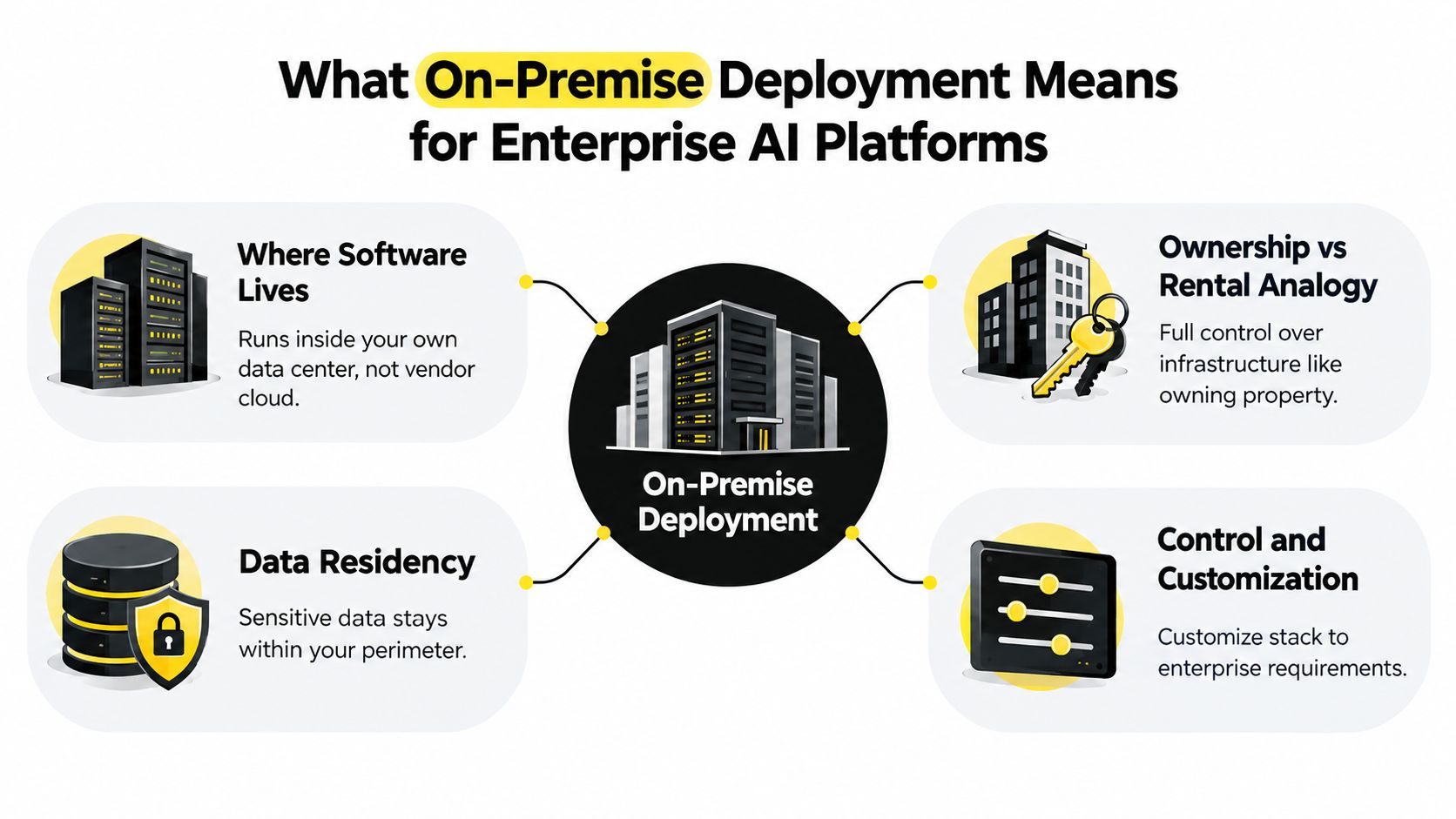
Core concept: On-premise deployment keeps the platform and its operational data inside the enterprise boundary, giving the customer direct control over infrastructure, locality, and customization.
How AI changes the hosting question
Traditional business software may rely mainly on application servers and databases. An AI platform adds model artifacts, GPU or CPU scheduling, retrieval pipelines, embedding services, prompt and policy controls, conversation histories, evaluation tools, and observability.
That's why “private cloud” and “on-premise” shouldn't be treated as interchangeable. A private cloud can provide dedicated infrastructure and strong access controls, but it may still be hosted or operated by another party. On-premise deployment places the operating environment in the customer's controlled infrastructure. The right choice depends on the compliance boundary and the amount of operational work the organization can absorb.
For an agentic AI platform such as Yellow.ai, the practical scope can include voice, chat, email, images, video, knowledge retrieval, business-system actions, and human handoffs. The enterprise must decide where each component runs and how it connects to systems such as Salesforce, Zendesk, Genesys, Freshdesk, HubSpot, and NICE. The architecture is successful only when the complete conversation path, not just the model, respects the enterprise's data and control requirements.
Comparing On-Premise Cloud and Hybrid Deployment Models
A global service team may need an air-gapped deployment for regulated conversations, while another business unit needs capacity for seasonal demand. A legacy contact-center system may also require local connectivity, even as newer services run in the cloud. The right comparison therefore starts with workload boundaries, regulatory obligations, and the operating capability available to support them.
On-premise keeps the platform within infrastructure controlled by the customer. Cloud places the operating environment with a provider. Hybrid divides workloads between the two, allowing an organization to keep constrained workloads local without applying the same operating model everywhere.
Survey data from a 2025 white paper found that 92% of companies said their on-premises software business had grown over the past five years, while 3% reported a decline. The same source reported that 54% said more than half of all software sales were deployed using on-premises solutions. (DreamFactory's on-premises deployment statistics)
| Criteria | On-Premise | Cloud | Hybrid |
|---|---|---|---|
| Data residency | Data stays on customer-controlled infrastructure within the chosen jurisdiction | Data resides in the provider's environment, subject to configuration, contracts, and routing | Sensitive workloads can remain local while other workloads use cloud services |
| Control | Highest control over hardware, network boundaries, configurations, and release timing | Less direct control over underlying infrastructure, with the provider managing most layers | Control is divided according to the workload boundary |
| Scalability | Capacity depends on purchased and provisioned infrastructure | Capacity can expand more flexibly through provider resources | Elasticity is available where cloud workloads are placed |
| Cost structure | Capital investment and continuing costs for power, cooling, staffing, maintenance, and upgrades | Subscription or usage costs, with more infrastructure operations absorbed by the provider | Two operating models must be coordinated, but capacity can be targeted |
| Latency | Local systems can support predictable internal connectivity | Performance depends on network paths and service configuration | Local calls can stay local, while cloud calls use external connectivity |
| Security responsibility | Customer owns more implementation and operational responsibility | Provider manages more infrastructure controls, while the customer remains responsible for configuration and use | Both teams must define ownership at the boundary |
| Upgrade velocity | Customer controls timing but must validate and deploy changes | Provider can deliver updates more quickly, subject to the service model | Different workloads may follow different release cycles |
Choose on-premise when physical locality, air-gapped operation, deep customization, or infrastructure control is required. It can also suit environments where legacy systems cannot tolerate external dependencies, or where scarce GPU capacity must be allocated carefully across a controlled estate. Cloud fits workloads that need rapid capacity changes and can satisfy obligations through the provider's controls, contracts, and architecture.
Hybrid suits enterprises with mixed sensitivity levels, legacy dependencies, or business units that operate under different constraints. For Yellow.ai, that choice should be made channel by channel and integration by integration. A customer may keep voice traffic, knowledge sources, or business-system actions local while placing less restricted services in the cloud, provided the full handoff and data path remain understood.
Hybrid requires a clear boundary design. Document which data may cross it, which services may call each other, where logs are stored, and who approves routing changes. For a practical discussion of controls and operating responsibilities in hybrid environments, see Finchum Fixes IT cloud security.
Architecture and Security Considerations for On-Premise AI
A production on-premise AI platform is a connected system, not an application copied onto a server. A CX leader may start with channels, response quality, and customer outcomes. The infrastructure team must also account for compute, identity, network paths, storage, releases, and logs. The architecture succeeds only when both views describe the same operating model.
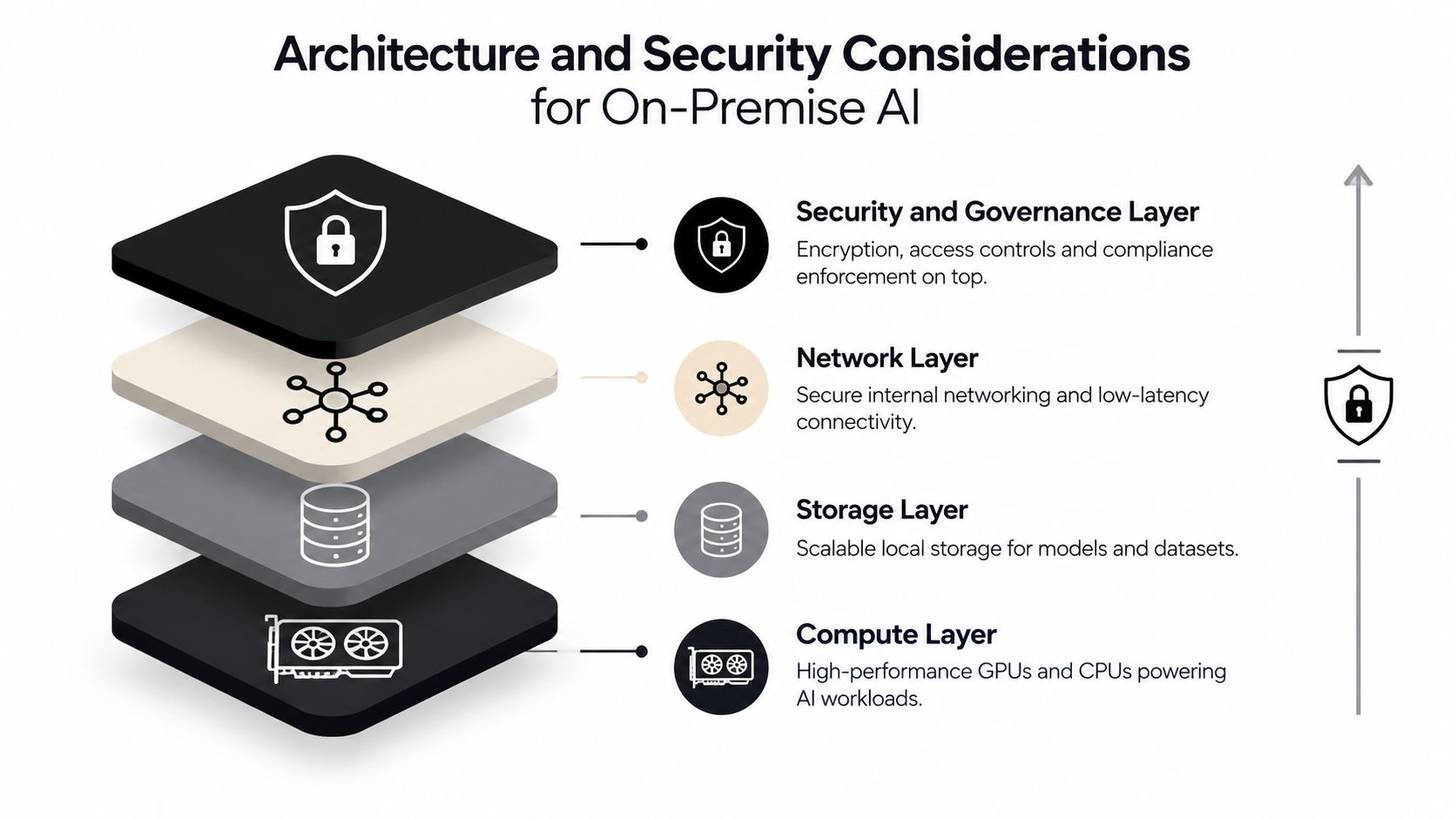
The four practical layers
Compute supplies processing capacity through CPUs, GPUs, inference nodes, and scheduling controls. GPU scarcity can change the design. A platform that assumes dedicated accelerators may not suit a business unit with limited access, so teams should match model and workload requirements to hardware that can be obtained and maintained.
Storage contains models, conversation data, knowledge sources, indexes, logs, backups, and evaluation assets. Separate customer and workload data from operational artifacts. Define retention, backup, and recovery rules before production, especially where legacy systems create unfamiliar data dependencies.
Networking connects the platform with identity services, business applications, contact-center systems, data sources, and monitoring tools. Local routing can reduce reliance on external paths, but it does not replace segmentation, access controls, traffic inspection, or carefully defined service permissions. Air-gapped environments also need a controlled process for importing approved software, models, and patches.
Security and governance span every layer. Encryption, identity federation, least-privilege access, secrets management, audit trails, policy enforcement, and Safe AI controls belong in the initial design. Adding them after launch often requires reworking interfaces, logs, and operational procedures. Yellow.ai's enterprise-grade security approach provides a reference for assessing the controls expected from an enterprise conversational AI platform.
Container operations and lifecycle control
Modern on-premise platforms commonly use containers. Kubernetes can package services consistently, schedule workloads, support controlled rollouts, and provide a repeatable operating pattern across environments. It does not remove the need for platform operations. Teams still need owners for cluster upgrades, image approval, capacity planning, model-serving changes, and recovery testing.
The choice also affects lifecycle economics. GPU nodes, storage, and networking equipment require planned capacity and replacement cycles. A design that works during a pilot may become difficult to operate when model versions, conversation volume, or integration requirements change. Standardized deployment helps reduce configuration drift, while governance determines which changes can enter a controlled environment.
Security must follow the data path
The strongest data-residency boundary keeps information on customer-owned infrastructure within the target jurisdiction, without vendor cloud routing or third-country transfer paths. That arrangement matters for EU operations and other compliance-heavy environments where legal and physical locality must be demonstrated. (Kiteworks' comparison of deployment models for sovereignty and compliance)
Voice, chat, and omnichannel workloads add recordings, transcripts, metadata, authentication events, and handoffs. Map each flow from collection through processing, storage, logging, and deletion. Then test whether the platform controls match the intended boundary, including how legacy applications and disconnected networks participate.
Observability belongs in the first architecture review. Monitor infrastructure health, service availability, queue behavior, model-serving performance, access events, retrieval behavior, and policy violations. Those signals help teams distinguish a network dependency from a model service, knowledge index, integration, or authorization failure. This operational visibility is the difference between having local infrastructure and being able to run it reliably.
Prerequisites Compliance and Hidden Economics to Plan For
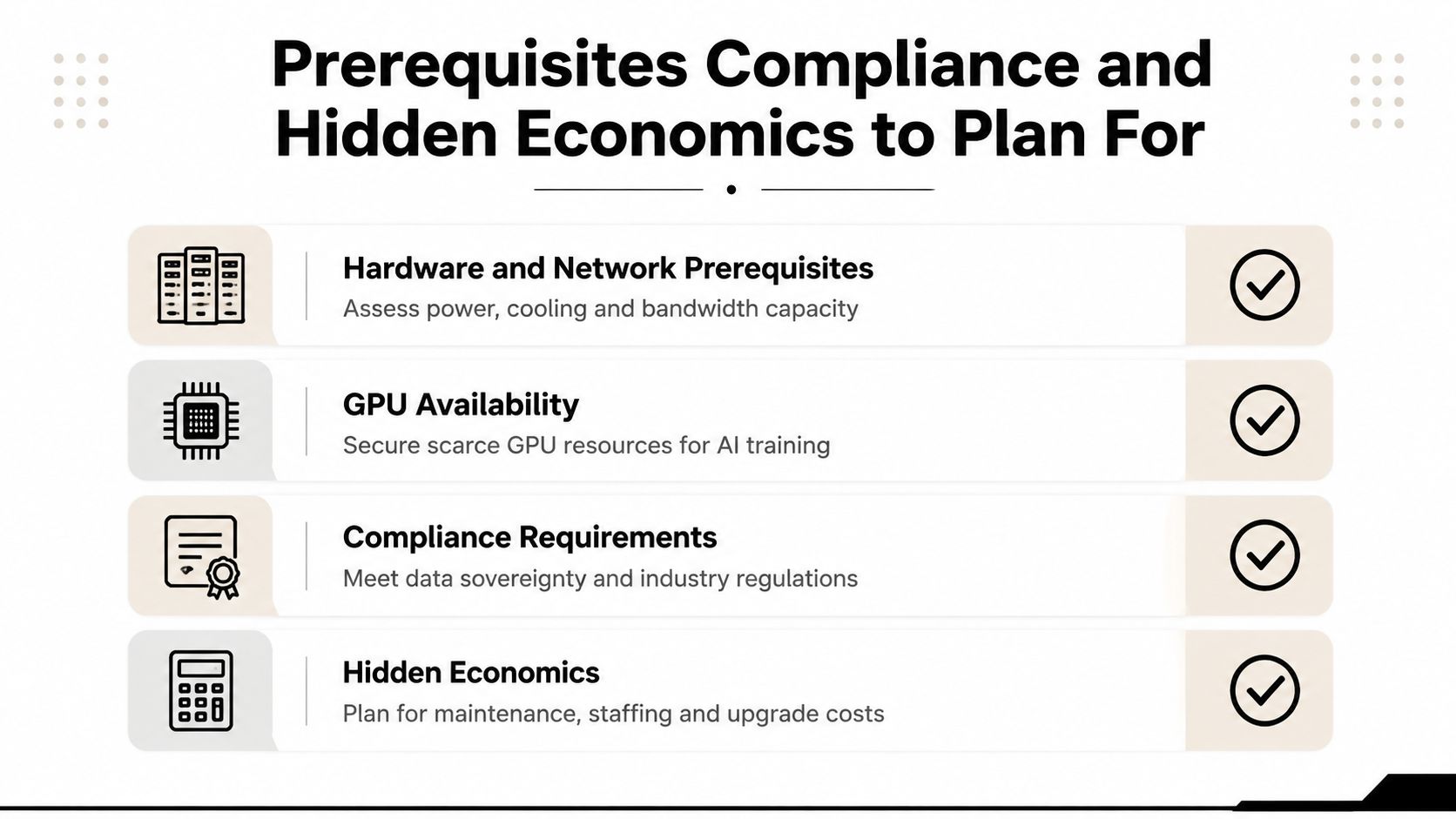
On-premise deployment works best when the organization treats readiness as a set of decision gates rather than a procurement checkbox. A platform can be technically installable and still be operationally unsuitable if the data center lacks capacity, the security team can't review releases promptly, or no team owns the platform after handoff.
Four readiness gates
- Hardware and network: Confirm compute capacity, storage performance, power, cooling, internal bandwidth, backup, segmentation, and connectivity to required enterprise systems.
- AI hardware availability: Check whether the target models can run on available CPUs or GPUs. Don't approve a design that depends on hardware the procurement team can't reliably obtain.
- People and ownership: Assign responsibility for Kubernetes, model serving, identity, monitoring, security reviews, integration maintenance, incident response, and release validation.
- Disconnected operation: For air-gapped networks, define how signed software, model packages, security patches, and configuration changes enter the environment and how teams verify them.
Compliance requirements should be translated into technical evidence. Depending on the workload, that evidence may involve HIPAA controls, ISO 27001 and ISO 27701 alignment, SOC 2 Type II expectations, PCI-DSS scope, data-retention rules, access records, and documented residency. PCI-DSS planning deserves particular care because conversational systems can encounter payment-related information through voice, chat, or agent handoffs. Yellow.ai's discussion of PCI DSS v4.0.1 compliance can support that review, but the organization still needs to validate its own scope and responsibilities.
Utilization changes the economics
On-premise economics depend heavily on how consistently the infrastructure is used. A 2026 TCO analysis found that when GPUs remain above roughly 80% sustained utilization, on-premises infrastructure can reduce three-year total cost by about 30% to 40% compared with equivalent cloud usage. The same analysis explains that low utilization makes fixed costs such as capital investment, power, cooling, staffing, and maintenance harder to justify. (SesameDisk's cloud versus on-prem GPU economics analysis)
That doesn't mean leaders should maximize utilization blindly. Reserve capacity may be necessary for peaks, failover, testing, and future workloads. The right model includes procurement lead times, hardware refreshes, patching, observability, security reviews, model qualification, and the time specialists spend keeping the environment reliable.
Planning rule: Compare three-year lifecycle costs, not just the purchase order. The operating team will pay for every environment that finance leaves out of the model.
Implementing Yellow.ai On-Premise From Checklist to Best Practices
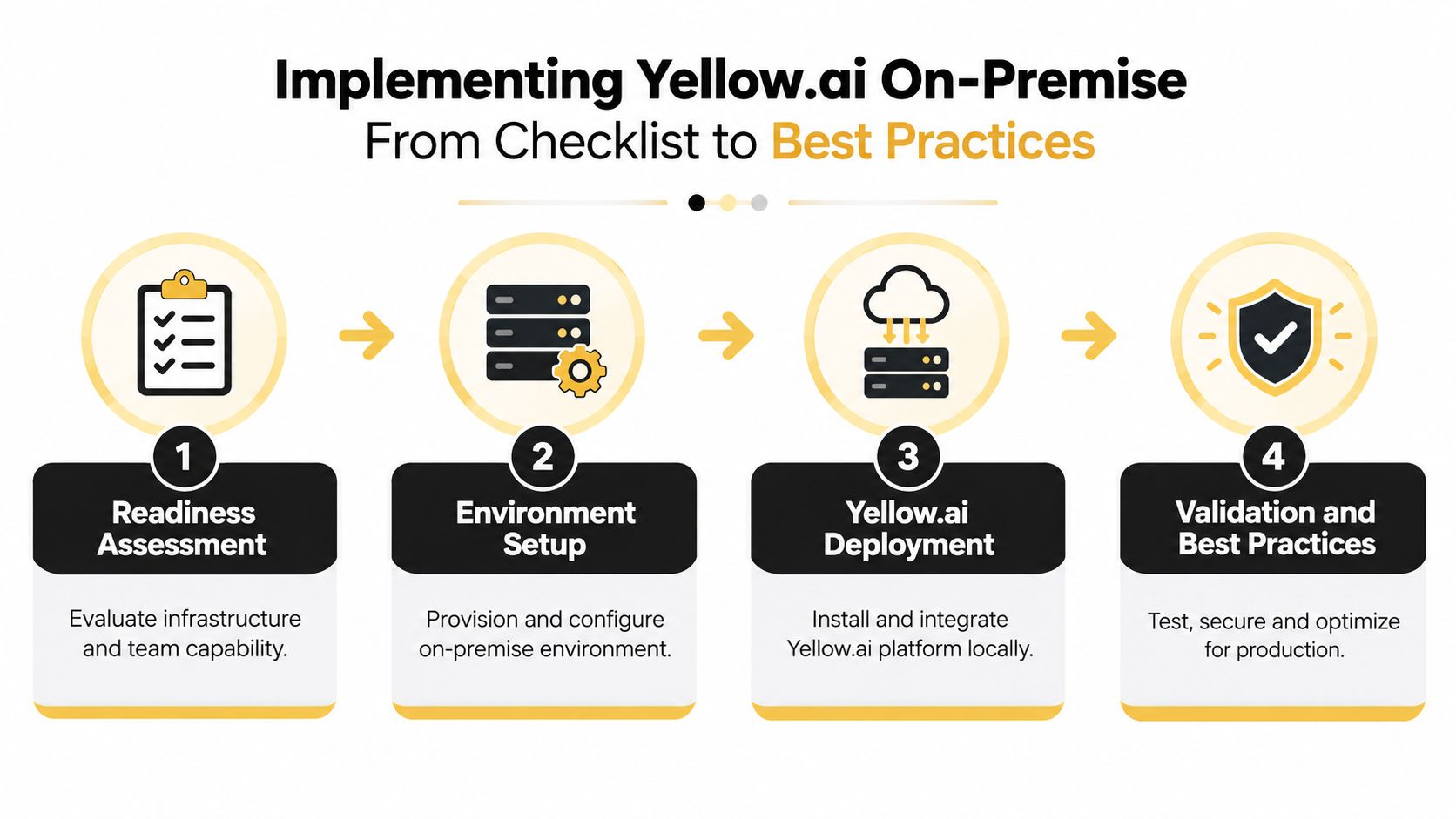
Implementation should begin with the business boundary, not the installation script. A contact center, HR service desk, and internal knowledge assistant may need different data permissions, integration paths, and release controls even when they use the same platform.
Start with an inventory
Document the systems the platform must reach, including customer relationship management, service management, workforce tools, contact-center technology, identity providers, knowledge repositories, and analytics platforms. For a complex enterprise, don't assume every subsidiary uses the same version or follows the same approval process. Treat acquired companies, regional environments, and legacy applications as separate integration conditions until testing proves otherwise.
Then define the data classes. Identify what can remain inside the local environment, what requires masking, what can move through an approved boundary, and what must never leave an air-gapped network. This classification should drive routing, permissions, logging, retrieval, and escalation behavior.
Provision and integrate in controlled stages
- Readiness assessment: Validate infrastructure, network paths, hardware, security requirements, operating ownership, and support procedures.
- Environment setup: Establish the container and Kubernetes foundation, storage, secrets management, identity integration, observability, backup, and release environments.
- Platform deployment: Install the platform locally, connect approved channels, and integrate business systems such as Salesforce, Zendesk, Genesys, Freshdesk, HubSpot, or NICE where required.
- Knowledge and agent configuration: Build the knowledge base, configure retrieval behavior, define agent actions, establish permissions, and confirm that responses use approved sources.
- Validation: Use automated testing, AI Copilot workflows, conversation review, security testing, load testing, and failure simulations before production access.
- Go-live hardening: Start with a controlled user or business-unit rollout, monitor outcomes and infrastructure signals, document incident procedures, and schedule release reviews.
For teams that need additional delivery structure, software deployment guidance can provide useful context around implementation support and operational handoff.
Design for messy enterprise conditions
Legacy systems may expose incomplete APIs. An acquired subsidiary may use a separate identity directory. An air-gapped environment may require an approved package-transfer process. A hardware-constrained site may need a lighter model or a different workload split. These aren't exceptions to the design. They're acceptance criteria.
Keep integrations loosely coupled, version configurations, separate development from production, and test upgrades against representative conversations and knowledge sources. Monitor failed actions, fallback rates, handoff reasons, retrieval quality, latency, resource use, and policy events. The team should also maintain a clear rollback path, because on-premise control over release timing is useful only when the organization can safely reverse a change.
Choosing the Right Deployment Path for Your Enterprise
The right deployment path begins with a constraint map.
Use on-premise deployment when the workload requires strong physical data locality, disconnected operation, deep infrastructure customization, or direct control over the complete processing environment. It's a strategic fit when the organization has the people, hardware, governance, and lifecycle discipline to operate that environment without weakening other priorities.
Use cloud when the workload benefits from elastic capacity, rapid service updates, and reduced infrastructure responsibility, and when the organization can satisfy its compliance obligations through documented provider controls and data-flow boundaries.
Use hybrid when sensitivity varies across workloads or business units. A bank might keep the most restricted conversations in a local environment while allowing lower-risk employee or customer-service use cases to run through an approved cloud architecture. A large healthcare group might isolate regulated records while sharing common experience design, analytics, or non-sensitive workflows across a broader platform.
The decision should also account for legacy applications, regional differences, air-gapped networks, available GPUs, procurement timelines, staffing, upgrade ownership, and the cost of keeping capacity active. Data control is necessary for some enterprises, but operational realism determines whether the deployment remains sustainable.
For a structured way to assess conversational AI platforms against business, integration, security, and deployment requirements, use Yellow.ai's buyers guide to evaluating conversational AI solutions. Bring your CX and IT teams into the same evaluation, document the boundary for each workload, and require vendors to explain exactly what they operate, what your team operates, and how changes are delivered.
Yellow.ai offers enterprise conversational and agentic AI capabilities across voice, chat, email, images, and video, with on-premise, cloud, and hybrid deployment options for different operating requirements. Visit Yellow.ai to discuss your infrastructure, compliance boundary, integrations, and rollout plan with a team that can help you choose a practical deployment path.



