














A customer starts with a chat question about a delayed payment. The chatbot asks for an account number, transfers the conversation to an agent, and then the customer calls because the issue still isn't resolved. The voice agent can't see the chat transcript, so the customer explains the problem again, repeats the account details, and waits while the agent searches through separate systems.
The company has plenty of channels. It may even describe its contact center as unified. Yet the customer experiences three disconnected conversations. That difference, between channel availability and context continuity, is the central issue in omnichannel contact center software.
True omnichannel design preserves identity, intent, history, and ownership as a conversation moves. It connects routing, agent workspaces, knowledge, automation, workforce operations, integrations, and measurement around the customer journey rather than around individual channels. The practical question isn't “How many channels do we support?” It's “How much information gets lost when the customer changes channels?”
Table of Contents
- Why Channel Switching Still Frustrates Customers
- What Omnichannel Contact Center Software Really Means
- Inside the Platform Architecture and Integrations
- How AI and Automation Power Modern Omnichannel Experiences
- Measuring Success With KPIs Security and Compliance
- How to Choose and Implement the Right Platform
- Enterprise Use Cases and How Yellow.ai Brings It All Together
Why Channel Switching Still Frustrates Customers
A customer reports a damaged product in web chat and uploads a photo. An email then requests more information, and the customer switches to voice because the issue is urgent. If each system stores a different identity or case reference, the handoff makes both the customer and the agent reconstruct the story.
The problem is context loss, not channel choice. Chat may respond quickly, email may be well managed, and voice may route calls efficiently. Those systems can perform well independently while still failing to carry forward the customer's intent, evidence, previous actions, and agreed next step.
Gartner reported that 62% of customer service channel shifts are “high effort,” a finding cited in this overview of omnichannel customer service statistics. A channel change becomes useful only when the conversation travels with the customer. Otherwise, it creates another task: repeating the explanation, confirming identity, and correcting the record.
Practical rule: Treat every transfer as a test of whether your organization remembers the customer.
The handoff failure behind the complaint
A business customer is trying to restore account access. During chat, the customer describes the symptoms and confirms the affected workspace. The chat agent escalates the issue to a specialist, but the specialist receives only a ticket number. When the customer calls, the voice agent can see the ticket but not the conversation, diagnostic steps, or promised follow-up.
The organization reports the chat, phone call, and ticket separately. The customer experiences one unresolved problem. That measurement gap conceals repeated explanations, unnecessary transfers, duplicated work, and declining confidence. It also makes continuity loss difficult to locate, because each system can show acceptable performance while the end-to-end journey deteriorates.
Market projections help explain why organizations are investing in this problem. One estimate placed omnichannel customer service software at USD 4.96 billion in 2024, projecting USD 15 billion by 2035 and a 10.6% CAGR from 2025 to 2035. A separate summary cited the broader global omnichannel customer service market at about USD 14.2 billion in 2023, forecasting USD 35.6 billion by 2032. These figures come from the same market statistics roundup, so they describe market projections, not guaranteed results for an individual buyer.
Leaders reviewing an omnichannel customer experience guide should begin with the journey rather than a feature catalogue. Map every channel change, record which identity and case details cross each boundary, and measure what disappears. The remedy starts when continuity loss becomes visible.
What Omnichannel Contact Center Software Really Means
Omnichannel contact center software is a unified operating system for customer conversations. It connects voice, email, chat, social messaging, SMS, video, and other interaction types while preserving the customer's identity, history, intent, and current status.
The easiest way to understand it is to compare a shared conversation thread with separate inboxes. In a shared thread, an agent receiving a voice escalation can see the chat transcript, the customer's authentication status, the issue category, previous actions, and any commitments already made. In separate inboxes, the voice agent may see only a new call, even though the customer sees it as a continuation.
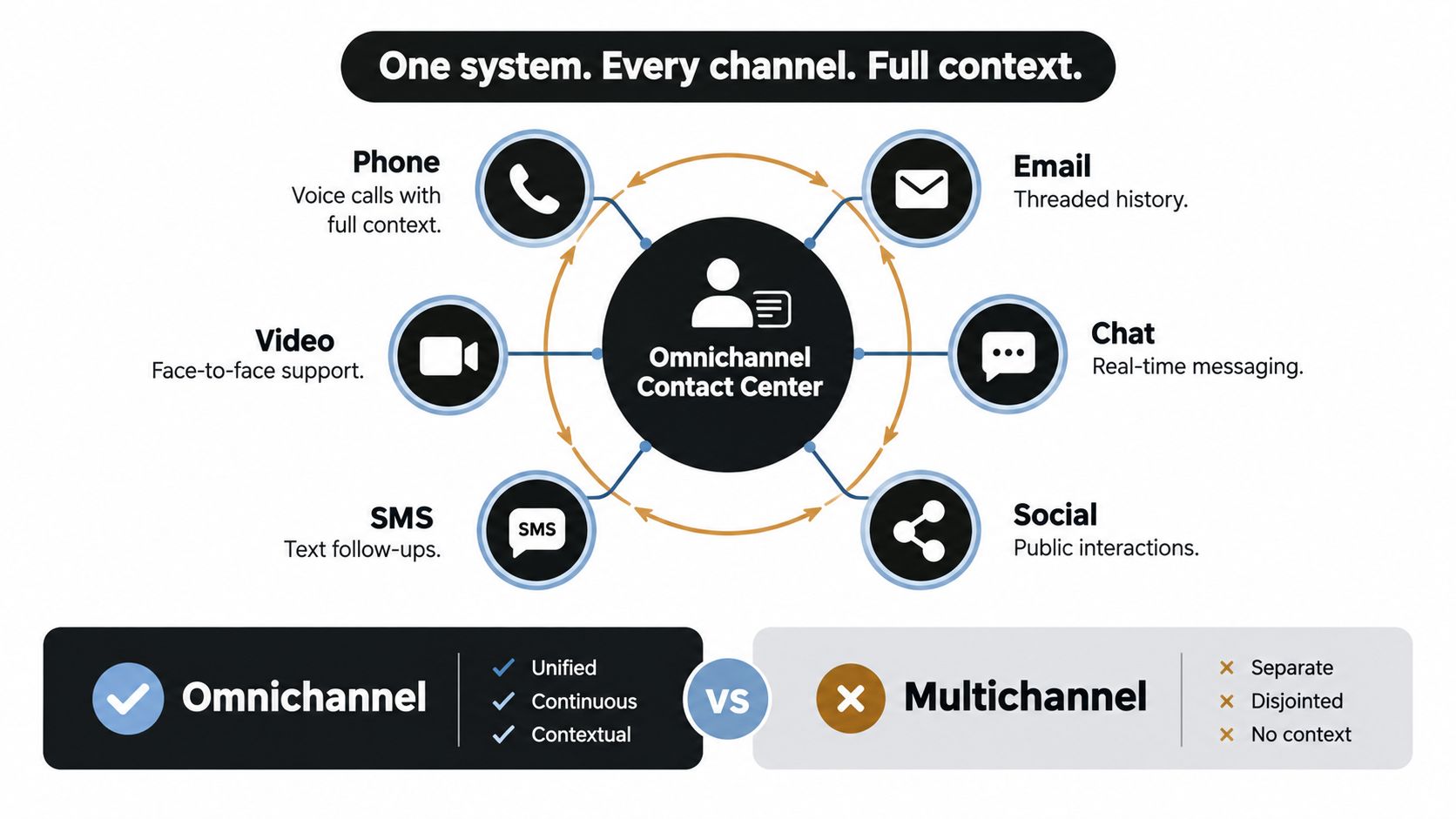
Multichannel adds doors, omnichannel connects rooms
A multichannel contact center offers multiple ways to make contact, but each channel can maintain its own queue, profile, transcript, and workflow. Customers may move between channels, yet the systems don't necessarily move the conversation with them.
An omnichannel model connects three operating capabilities:
- Unified routing sends the next interaction to the right queue or person using intent, skill, language, priority, availability, and customer context.
- A unified agent desktop gives the agent one view of the conversation, customer record, relevant case details, and recommended action.
- Workforce optimization plans staffing, schedules, quality processes, and capacity across channels instead of optimizing voice, chat, and email as unrelated operations.
The difference is architectural, not cosmetic. Adding a chat widget beside a phone system doesn't create continuity. The platform must recognize that the person in chat and the caller are the same customer, link both interactions to the correct case or journey, and pass the relevant state to the next employee or automation.
What the platform must preserve
A useful continuity model carries more than a transcript. It should preserve:
- Identity, so authentication and customer matching don't restart unnecessarily.
- Intent, so the next worker understands what the customer is trying to accomplish.
- Evidence, including files, images, forms, and prior responses.
- Ownership, so the customer doesn't enter an uncontrolled transfer loop.
- Commitments, such as promised callbacks, refunds, or escalation actions.
- Resolution state, so automation and agents know what remains unfinished.
An integration layer determines whether that information can move into the CRM, helpdesk, workforce tools, and reporting systems. Platforms such as Yellow.ai's integrations environment illustrate the importance of connecting conversation orchestration with the systems where customer and operational records already live.
Inside the Platform Architecture and Integrations
A reliable platform behaves like a chain of custody for context. Each layer receives information, enriches it, and passes it forward without forcing the next layer to reconstruct the customer's story.
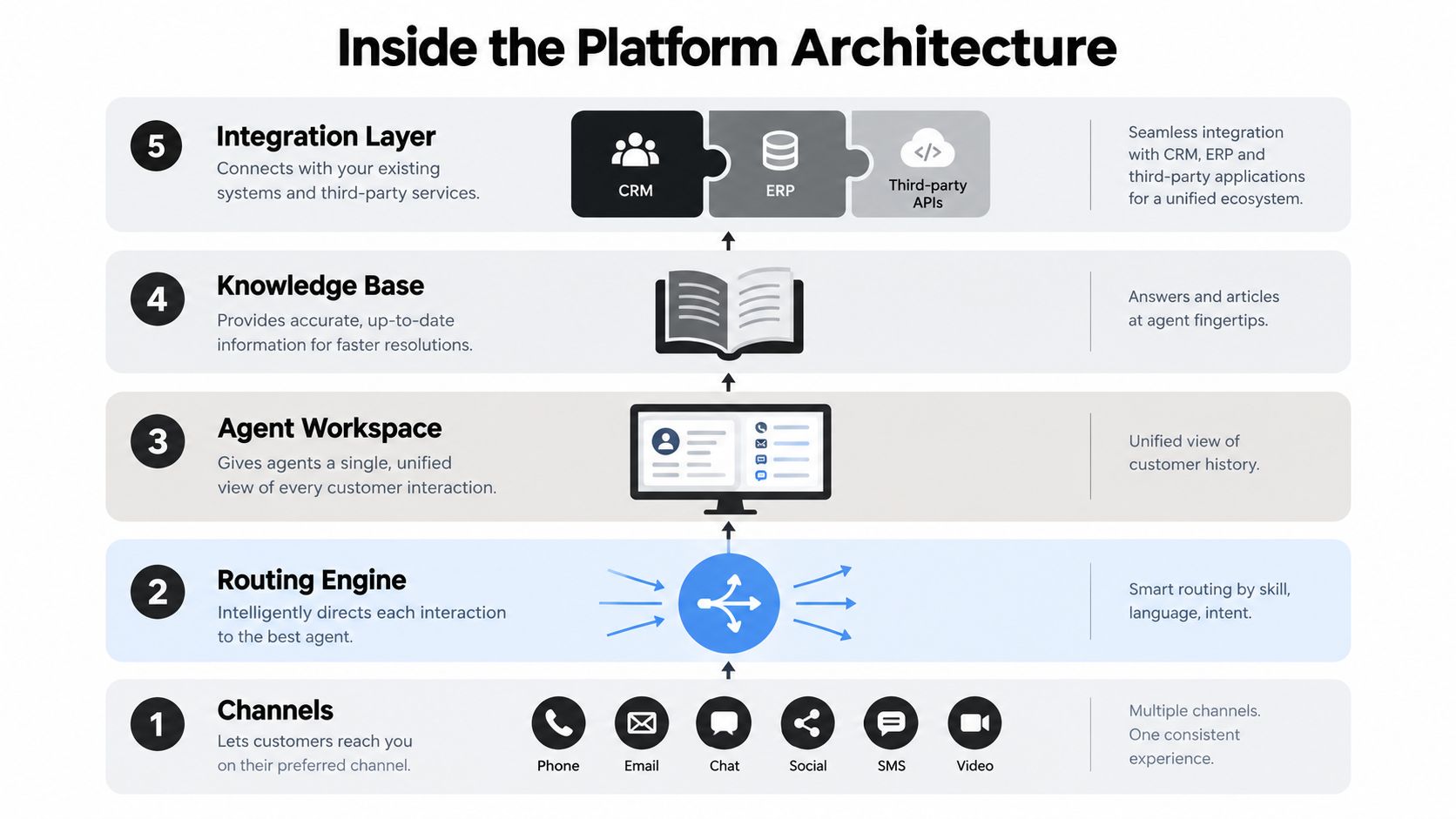
The five layers that carry continuity
Channels are the customer-facing entry points, including phone, email, chat, social, SMS, video, and image exchange. Channel coverage matters, but it only creates value when the platform attaches each interaction to a durable customer and case identity.
The routing engine decides what happens next. It can combine customer intent with agent skill, language, priority, availability, and business rules. A routing engine that sees only the current channel may send a voice escalation to an available agent rather than to the specialist who can resolve the underlying issue.
The agent workspace turns context into usable information. It should show the interaction timeline, customer profile, case status, authentication state, sentiment signals where appropriate, and actions already attempted. A transcript hidden in another application isn't a unified workspace.
The knowledge layer supplies approved answers and procedures. It should support both customer self-service and agent assistance, while showing the source and freshness of information used in a response. Poor knowledge creates inconsistent answers even when routing works correctly.
The integration layer connects CRM, ERP, billing, identity, ticketing, workforce, analytics, and third-party applications. Yellow.ai describes 150+ pre-built integrations across systems including Salesforce, Zendesk, Genesys, Freshdesk, HubSpot, and NICE in the supplied publisher information. Buyers should validate which integrations support bidirectional updates, real-time events, authentication, and the specific objects their workflows depend on.
Questions for the integration review
Ask vendors to demonstrate a real handoff, not a slide showing logos. Start in chat, authenticate the customer, attach an image, escalate to voice, update the CRM, and then inspect the analytics record.
Check whether the platform can:
- Match identities across guest, authenticated, and known customer states.
- Preserve transcripts, attachments, intent, and case status during transfers.
- Write outcomes back to the CRM or helpdesk without duplicate records.
- Expose APIs and webhooks for events such as transfer, escalation, authentication, and resolution.
- Report the full journey across channels rather than reporting isolated queue activity.
An agentic AI platform can add intelligence to this stack, but AI won't repair a broken identity model or incomplete integration. Architecture must come first.
How AI and Automation Power Modern Omnichannel Experiences
AI becomes useful when it acts on shared context. A bot that answers a question quickly but loses the conversation during escalation has automated one step while preserving the larger failure. A better design uses AI to recognize intent, retrieve trusted information, complete routine actions, summarize the journey, and involve a person when judgment or accountability matters.
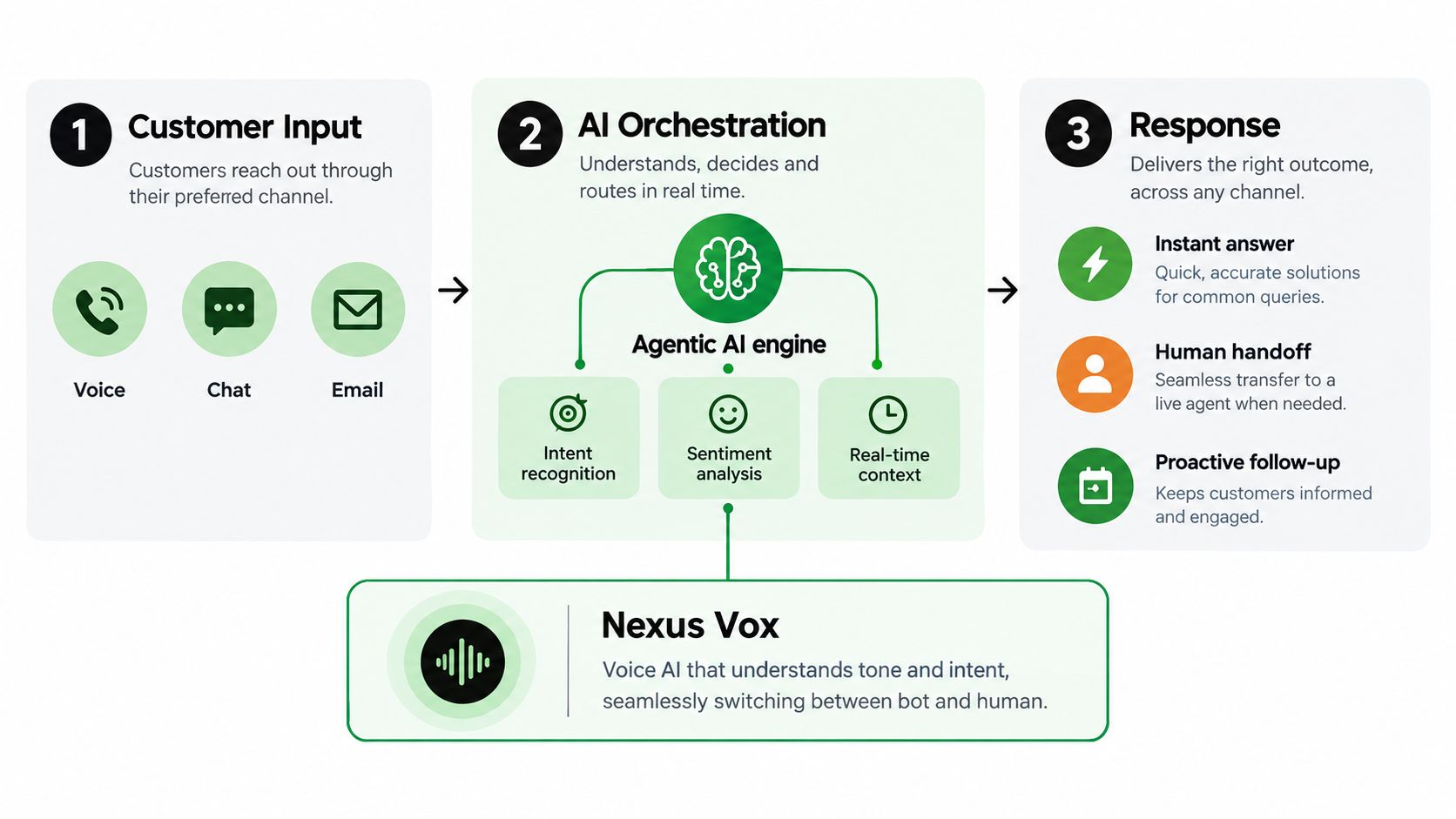
From customer input to coordinated action
A customer may speak through voice, type in chat, send an email, or attach an image. The orchestration layer interprets the request, identifies sentiment and urgency where configured, checks customer and case context, and selects an action. That action might be an immediate answer, a secure transaction, a specialist handoff, or a proactive follow-up.
Yellow.ai's supplied product information describes Nexus Vox as a voice AI system with voice cloning in seconds and support for 500+ languages. It also describes AI Agent Builder 2.0 for multi-modal agents, a Conversational Knowledge Base with agentic retrieval-augmented generation, AI Copilot, Automated Testing, and multi-LLM orchestration across 15+ models. These capabilities represent different parts of one operating model: build the agent, connect it to enterprise knowledge, test its behavior, assist human workers, and retain model flexibility.
Voice quality deserves separate attention because pauses change how callers perceive a conversation. Practitioner testing and benchmark-style reporting place the natural-feeling target around 600 milliseconds, with sub-800-millisecond latency considered necessary for fluid dialogue. Delays in the 1.5 to 2.5 second range are described as a point where callers begin disengaging or dropping calls in this call management benchmark discussion. Treat these as engineering targets and testing ranges, not promises that every deployment will achieve them.
Automation needs a human operating model
Routine requests are suitable for automation when the organization can define the outcome, permissions, exception rules, and audit trail. Complex or high-stakes requests need controlled escalation, clear summaries, and an agent who can see what the AI already did.
A practical rollout separates three decisions:
- Automate: Handle stable, repetitive intents with clear completion criteria.
- Assist: Give agents summaries, retrieved knowledge, suggested replies, and next actions.
- Escalate: Transfer when confidence is low, risk is high, the customer asks for a person, or policy requires human review.
Independent coverage cited in the supplied data reports that 88% of contact centers are deploying AI, but only 25% have successfully integrated it into daily workflows. The same source reports that 59% of leaders fail to provide ongoing coaching for AI-driven workflows, while nearly a third say agents don't trust AI. Those findings appear in this contact center statistics article.
The lesson is operational. Teams need new quality criteria for AI summaries, escalation decisions, retrieval accuracy, privacy handling, and agent override behavior. Without coaching and governance, AI adds another interface instead of reducing complexity.
Measuring Success With KPIs Security and Compliance
Channel volume is an incomplete measure of omnichannel performance. A contact center can answer many interactions and still lose customers during transfers, create duplicate work, or route complex requests to agents without the right expertise.
Measure the journey as a case, not as a collection of queue events. Microsoft's unified routing analytics documentation identifies measures such as routed conversations and session-transfer rate, while case-level first-contact resolution is commonly tracked across channels. A credible starting band for FCR is 70% to 79%, with a top-intent target of 80% to 85%, as described in Microsoft's unified routing analytics guidance.
The KPI framework
| KPI Category | What to Measure | Why It Matters |
|---|---|---|
| Continuity | Session-transfer rate, handoff loss, missing context fields | Shows whether the customer's history survives a channel or queue change |
| Resolution | Case-level FCR, repeat contact, unresolved intent | Connects routing and knowledge quality to completed outcomes |
| Routing | Routed conversations by intent, skill, language, and priority | Reveals whether the right work reaches the right team |
| Effort | Repeated authentication, repeated explanations, abandonment after transfer | Exposes friction that average handle time can hide |
| Operations | Queue health, occupancy, backlog, schedule alignment | Helps leaders staff around demand across channels |
| Financial impact | Cost to serve by intent, automation containment, rework | Builds an ROI narrative around resolved work rather than activity |
Security belongs in the scorecard
Performance doesn't excuse weak controls. Enterprise buyers should examine data access, encryption, retention, auditability, model isolation, prompt and response logging, human approval, and the treatment of sensitive attachments or voice recordings.
For healthcare and financial services, compliance review should cover HIPAA, ISO 27001/27701, SOC 2 Type II, and PCI-DSS where applicable. The platform should also support role-based access, consent handling, redaction policies, regional data requirements, and documented incident processes. Ask vendors to show how those controls work in a real workflow, such as an authenticated payment query that moves from bot to agent to back-office system.
The strongest business case combines fewer repeated contacts, better resolution, lower rework, and controlled automation. It doesn't rely on a dashboard full of channel counts.
How to Choose and Implement the Right Platform
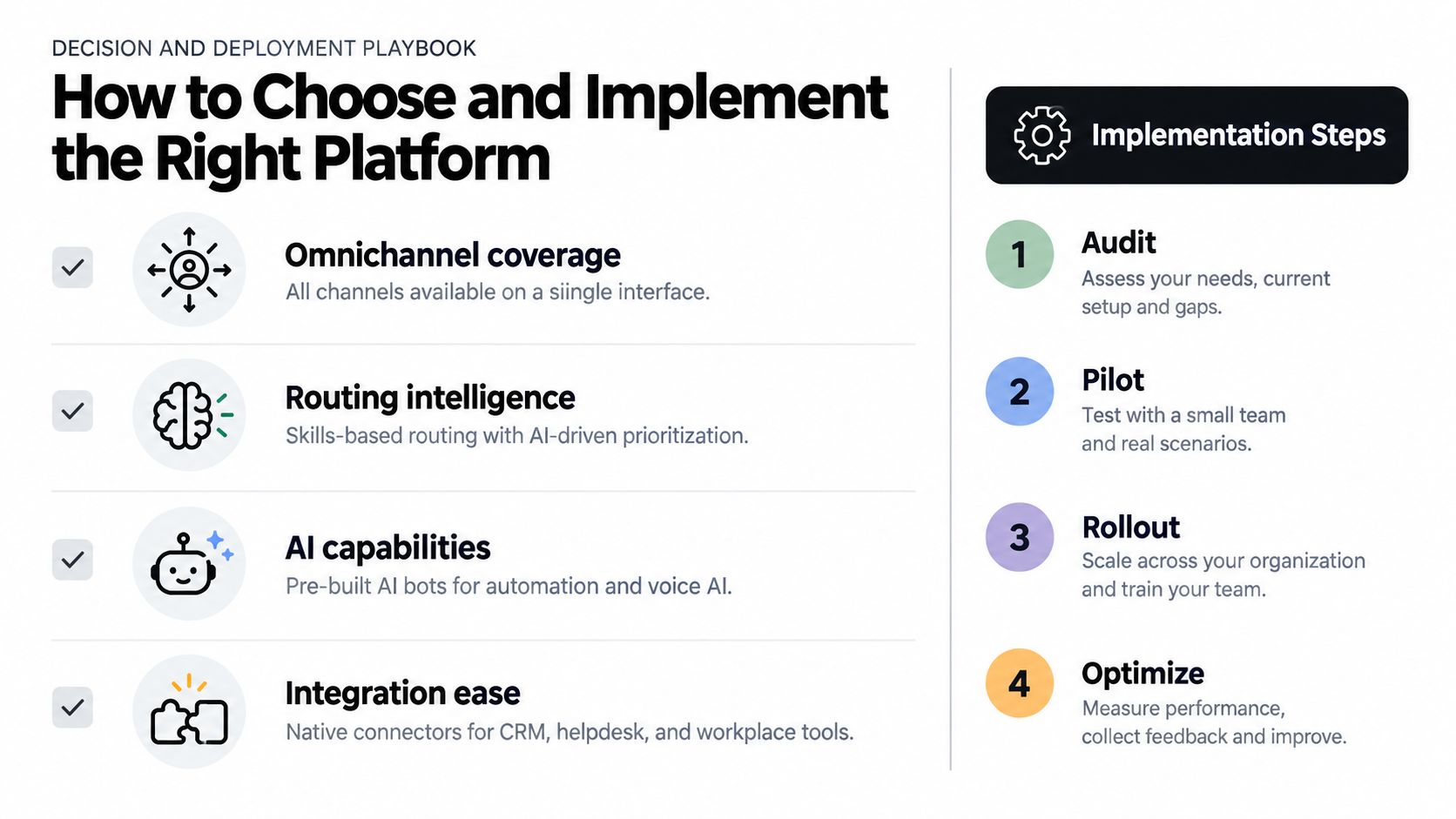
Select the platform against the journeys that matter most, not the longest feature list. A vendor may support every major channel while failing to preserve identity, attachments, ownership, or case state during a handoff.
Start with a proof-oriented shortlist
Use a weighted scorecard, then require each vendor to demonstrate the same journey. The following gates keep the evaluation practical:
- Omnichannel coverage: Confirm that voice, chat, email, social, SMS, video, and attachments can share a customer and case identity.
- Routing intelligence: Test intent-based and skills-based routing, including escalation from a digital channel to voice.
- Agent usability: Ask an agent to find the transcript, verify identity, review previous actions, and complete the next step from one workspace.
- AI maturity: Inspect intent recognition, knowledge retrieval, summaries, agent assistance, testing, fallback behavior, and human override.
- Integration depth: Validate CRM, helpdesk, identity, billing, workforce, and analytics connections with the objects and events your workflows need.
- Measurement: Confirm journey-level reporting for transfers, handoff loss, resolution, repeat contacts, and cost to serve.
- Trust controls: Review security architecture, compliance evidence, data governance, retention, and audit trails.
Deploy in controlled stages
Begin with journey mapping. Choose an intent that has meaningful volume, clear policy, manageable risk, and visible handoff points. Document every channel entry, authentication event, data lookup, transfer condition, agent action, and resolution outcome.
Then design the handoff before building the automation. Decide what the next agent must receive, what the customer must not repeat, and which system owns the authoritative record. Prepare the knowledge base with approved answers, escalation rules, and content owners.
Pilot with agents, not only with technical administrators. Their feedback will expose missing fields, confusing summaries, unsafe suggestions, and workflows that look efficient in a diagram but fail during live service. Track the continuity and resolution metrics from the previous section, compare journeys, and expand only after the operating model is stable.
Implementation discipline: A phased rollout is not a smaller launch. It's a way to test identity, context, governance, and adoption before complexity spreads.
The AI adoption gap reinforces this approach. The supplied research reports that 88% of contact centers are deploying AI, while 25% have successfully integrated it into daily workflows. Closing that gap requires coaching, quality review, escalation ownership, and agent trust, not just model access. Give supervisors a way to inspect AI behavior and give agents a reliable way to correct it.
Enterprise Use Cases and How Yellow.ai Brings It All Together
In banking, a customer may begin a dispute through chat, upload supporting evidence, and request a voice conversation when the issue becomes sensitive. The platform should preserve authentication, documents, intent, and previous actions while routing the case to a specialist who can make the correct decision.
Healthcare teams face a similar continuity challenge across appointment requests, eligibility questions, reminders, and escalation to staff. Utilities need to connect outage reports, account details, image evidence, and field-service updates. Retail and logistics organizations must coordinate order status, delivery changes, returns, and proactive notifications across digital and voice channels.
For employee experience, the same model applies to HR, IT, payroll, and facilities requests. An employee can start in a self-service channel, receive an answer from an approved knowledge source, and move to a specialist without losing the request history. BPOs can apply shared orchestration and reporting across clients while keeping tenant data and policies separated.
Yellow.ai's supplied company information describes omnichannel orchestration across voice, chat, email, images, and video, along with 1300+ brand deployments, Inbox for live-agent interaction management, agentic automation, integrations, Safe AI, and enterprise compliance controls. Evaluate those capabilities through your own journeys rather than accepting deployment claims as a substitute for a proof of concept.
If outbound prospecting or pipeline development sits beside the service transformation, teams may also review specialized support such as SDR for hire from LatHire. That work is separate from contact center architecture, but it can help organizations coordinate customer acquisition and service operations around consistent records and handoff practices.
The final test is simple: start a conversation in one channel, change channels, and ask whether the next person can act without making the customer start over. If the answer is no, adding another channel won't solve the underlying problem.
Yellow.ai provides enterprise omnichannel orchestration, agentic AI, voice and digital automation, agent assistance, knowledge retrieval, analytics, and integrations for customer and employee workflows. Visit Yellow.ai to evaluate how a context-preserving contact center design could fit your priority journeys and AI readiness.



