













Enterprise AI programs rarely fail because the demo looked weak. They fail after the demo, when the agent has to pass security review, connect to core systems, respect access controls, and produce an outcome worth funding.
That is the context for a no-code AI agent builder.
Used well, it gives business teams a faster way to design workflows and test agent behavior without turning every change request into an IT backlog ticket. Used badly, it creates another layer of shadow automation, disconnected prompts, and unmanaged risk. A CIO should evaluate these platforms the same way you would evaluate any enterprise system. Check identity and access controls, auditability, model governance, integration depth, data boundaries, and vendor flexibility before you care about how fast someone can drag boxes onto a canvas.
The market interest is real, as noted earlier. That matters less than the reason buyers are paying attention. Enterprises want a practical way to move from isolated experiments to controlled production systems without hiring a large specialist team for every workflow.
A no-code AI agent builder works like a workflow engine with an LLM orchestration layer on top. The visual interface is the easy part. The hard part is what sits behind it: policy enforcement, API connectivity, human handoffs, observability, fallback logic, and the ability to switch models when cost, latency, or data rules change. If a platform cannot handle those operational requirements, it is a prototype tool, not an enterprise platform.
The payoff is straightforward. Domain teams can define business logic closer to the problem, while IT keeps control of security standards, data access, and deployment guardrails. That is how AI agents stop being pilot theater and start acting like production software.
Table of Contents
- The End of the AI Pilot Trap
- What Is a No-Code AI Agent Builder
- Understanding the Core Architecture and Capabilities
- Transforming Enterprise CX and EX with AI Agents
- The Enterprise Evaluation Checklist
- Your Implementation Roadmap and Best Practices
- Measuring Success and Demonstrating ROI
The End of the AI Pilot Trap
Many AI programs fail for a predictable reason. The business funds a proof of concept, but no one funds the controls, integrations, and operating model required to run it in production.
The pattern is easy to spot. A small team builds an impressive demo. Then legal asks where sensitive data is stored. Security asks who can inspect prompts, outputs, and model behavior. Operations asks how the agent will authenticate into CRM, ticketing, knowledge bases, and identity systems. Procurement asks about vendor risk. The pilot slows down, then dies in committee.
That is the AI pilot trap. The problem is not imagination. The problem is treating AI as a novelty project instead of an enterprise capability.
Why the market is moving this way
As noted earlier, spending is shifting toward no-code AI platforms because enterprises want a faster path from idea to controlled deployment. The appeal is not convenience alone. It is operational discipline. A serious platform gives teams a place to build, test, approve, monitor, and update agents without turning every use case into a custom software project.
Production AI needs the same controls you expect from any enterprise system. Version history. Role-based access. Audit trails. Human review points. Model routing. Usage monitoring. Failure handling. If a builder cannot support those basics, it will produce more demos and more cleanup work.
Practical rule: If a platform helps you create an agent but does not help you govern data access, model use, approvals, and change control, it is extending the pilot trap.
The multi-LLM issue matters here too. Enterprises should not bet their operating model on one model provider. Costs change. model performance varies by task. Data residency rules differ by region. A credible no-code AI agent builder lets you choose the right model for each workflow and switch providers without rebuilding the business process from scratch.
What this means for CIOs
Treat a no-code AI agent builder as an enterprise delivery layer. It is the control tower between business demand and production reality.
Business teams should be able to define workflows, escalation paths, and knowledge sources in plain language. IT should control identity, data boundaries, model policy, logging, and integration standards. That split is what makes the model work. You give business units speed without giving up governance.
A CIO should expect three concrete outcomes:
- Faster conversion from use case to deployment: Teams can turn process knowledge into working agents without waiting for custom application development.
- Less wasted engineering effort: Developers focus on hard integration, security policy, and platform standards instead of rebuilding the same workflow logic for every department.
- Higher production success rates: The path from pilot to rollout becomes clearer because governance, observability, and model management are designed in from the start.
The right question is not whether AI agents look impressive in a demo. The right question is whether they can survive security review, integration testing, vendor assessment, and post-launch accountability. If they cannot, the project is still a pilot, no matter how polished the interface looks.
What Is a No-Code AI Agent Builder
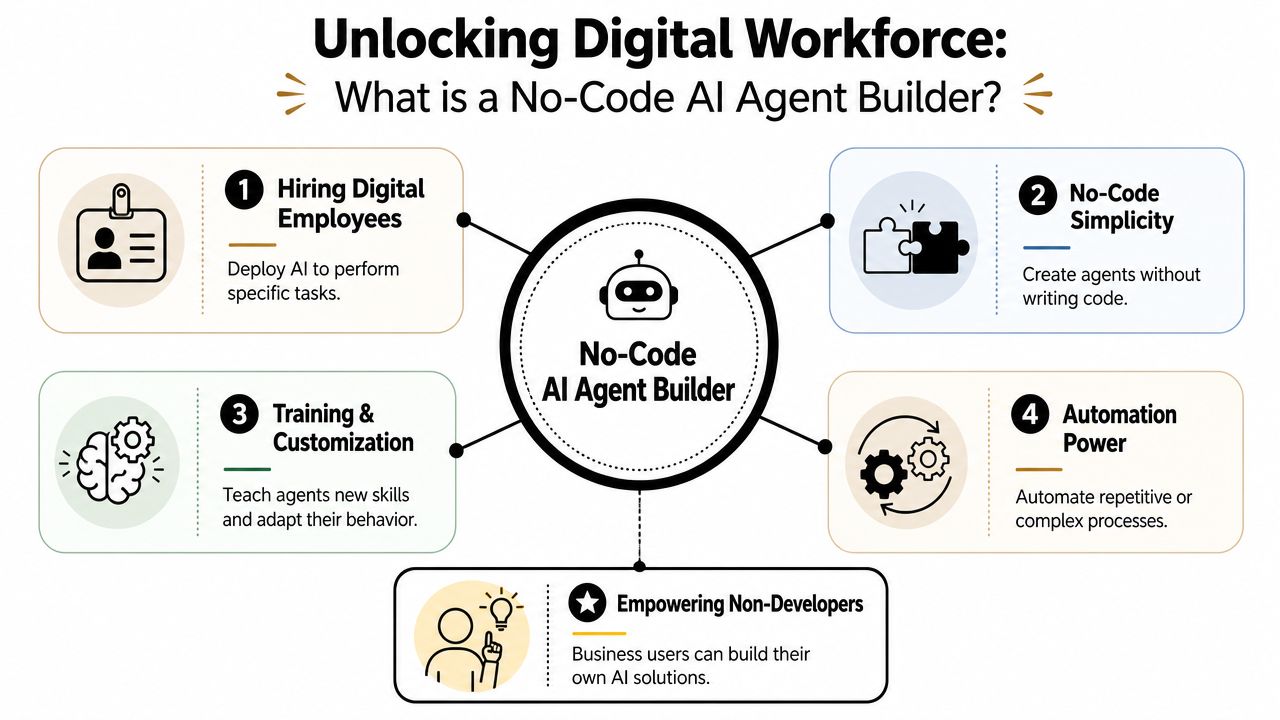
A no-code AI agent builder is not merely a basic chatbot. It lets a business team design an agent that can interpret requests, use approved tools, retrieve the right knowledge, and complete work across multiple steps without writing custom code for every action.
For an enterprise, that matters because software delivery bottlenecks rarely come from ideas. They come from integration queues, security reviews, and the cost of turning process knowledge into production systems. A no-code builder shortens that path if it includes the controls IT expects. See how that appears in a production platform with Yellow.ai's AI agent builder.
How it differs from a basic chatbot
A scripted bot follows a predefined path. It performs well only when the user stays inside that path.
An AI agent builder supports a different operating model. The agent can evaluate intent, pull context from approved sources, choose the right tool, and decide whether to answer, ask a clarifying question, trigger a workflow, or hand the case to a human. That makes it closer to a process operator than a decision tree.
The distinction is practical, not philosophical. A customer service bot that only answers FAQs reduces minor ticket volume. An agent that can authenticate the user, check order status, create a case, summarize the issue, and route it correctly starts to change operating cost and response time.
What business teams configure
In a serious enterprise deployment, teams use the builder to define four things:
- The objective: The job the agent is allowed to perform, such as resolving payroll questions based on approved HR policy.
- The sources and tools: The documents, systems, APIs, and applications the agent can access.
- The guardrails: Approval rules, escalation triggers, response boundaries, and data handling policies.
- The test process: Scenario-based validation before the agent is exposed to employees or customers.
That last point separates a production platform from a demo tool. If teams cannot test outputs against policy, inspect failures, and adjust behavior before launch, they are not building an enterprise agent. They are experimenting in public.
Why the term "no-code" can mislead buyers
The primary value is not the absence of code. The value is controlled abstraction.
Business owners should be able to define workflows and decision logic without waiting for a full software sprint. IT should still control identity, permissions, audit logs, model access, data boundaries, and system connections. That split is what keeps speed from turning into risk.
A good builder works like a control panel for AI operations. Business teams set the task. IT sets the rules of the road.
What CIOs should expect from the category
Do not buy these platforms as chatbot software with better marketing. Buy them only if they support enterprise execution.
That means role-based access, integration with existing systems, support for more than one model provider, logging, human handoff, and policy enforcement. Without those features, a no-code AI agent builder becomes another pilot environment that cannot survive procurement, security review, or post-launch accountability.
Understanding the Core Architecture and Capabilities
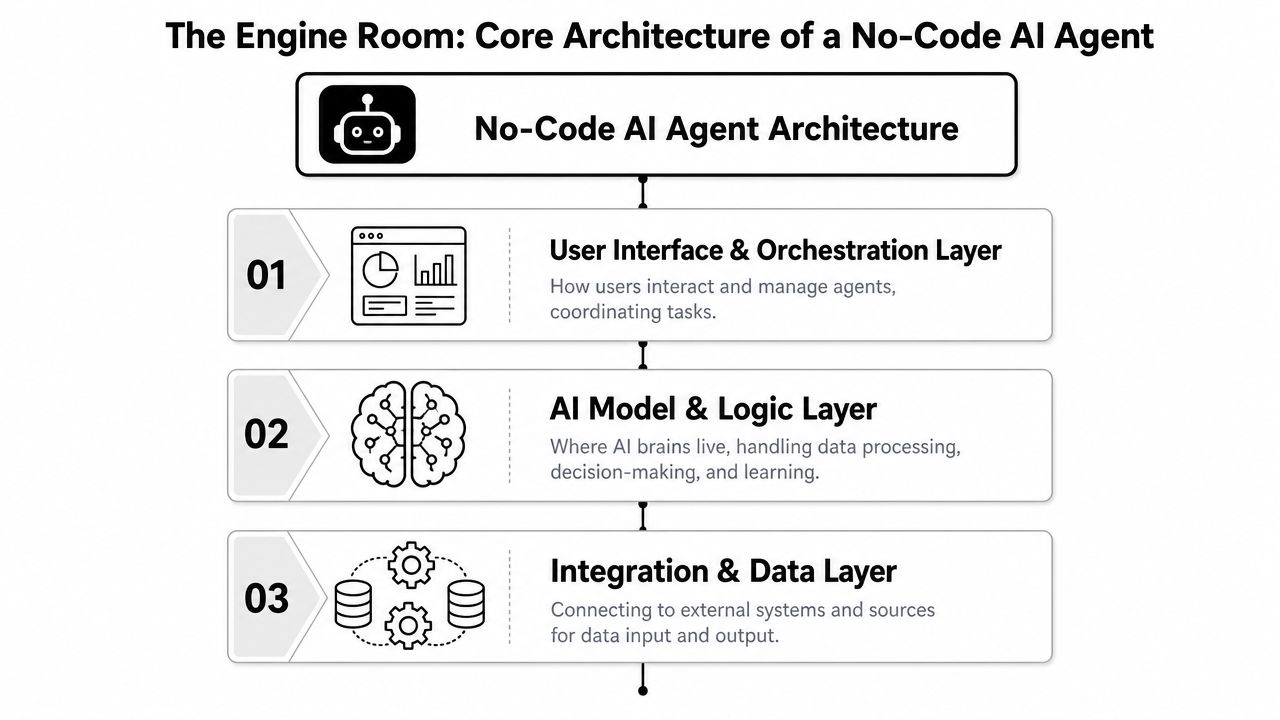
The smartest way to judge a no-code AI agent builder is to ignore the marketing screen and inspect the machine room. Most serious platforms follow a three-layer architecture: a visual builder layer, an integration layer, and an LLM layer. That structure is why business teams can build working agents quickly without owning infrastructure complexity.
The deployment advantage is material. Typical no-code AI agent builders use this architecture to deliver a 4-6x reduction in agent deployment time, with business teams able to build functional agents in 15-60 minutes (Dust on no-code AI agent builder architecture).
For a closer look at how an enterprise platform presents these components in practice, see Yellow.ai's AI Agent Builder.
The three layers that matter
The visual builder layer is where business logic lives. Users define instructions, orchestrate workflows, set handoff conditions, and shape the user experience. This is the dashboard your operations teams work in.
The integration layer connects the agent to enterprise systems. CRM, helpdesk, HRIS, knowledge bases, order systems, and internal tools all sit here. If this layer is weak, the “agent” is just a talking FAQ page.
The LLM layer provides reasoning. It interprets requests, breaks down tasks, drafts responses, and determines what tools or knowledge the agent should use next.
Those layers separate concerns cleanly. The business team can improve process logic. IT can secure and govern the integrations. AI teams can tune model behavior. That separation is what makes no-code viable in enterprise settings.
Capabilities that matter more than slick demos
The best platforms don't just expose visual blocks. They support serious orchestration. That includes multi-LLM selection, grounded knowledge retrieval, evaluation workflows, and permission-aware access to enterprise context.
Here's the more strategic way to think about capabilities:
- Grounded knowledge access: The agent should answer from approved enterprise sources, not improvise from thin air.
- Tool use: It should do work, not just talk about work. Creating a ticket, checking an order, updating a record, or triggering a workflow matters more than conversational polish.
- Flexible model strategy: Different tasks need different models. A summarization task and a regulated customer response shouldn't be forced through the same model choice.
- Testing and monitoring: If you can't inspect behavior before launch and track it after launch, you're flying blind.
A short walkthrough helps make the architecture easier to visualize.
Your agent stack should work like a well-run operations team. One layer plans, one layer connects, one layer reasons. When vendors blur those boundaries, governance gets messy fast.
Transforming Enterprise CX and EX with AI Agents
Enterprise value shows up in ugly workflows, not polished demos. If an agent can handle a customer who wants to check an order, change the delivery address, and correct an invoice name in one interaction, you are looking at a useful system. If it can only answer one question at a time, you bought a chatbot with better branding.
That distinction matters because CX and EX failures rarely come from conversation quality alone. They come from broken handoffs, missing permissions, weak system connectivity, and no control over what the model is allowed to do. An AI agent succeeds when it can follow policy, use the right tools, and stop safely when a human decision is required.
Customer experience that resolves work, not just inquiries
In customer service, the standard should be simple. The agent must complete the task or move it forward with full context attached.
For order support, that means verifying identity, checking shipment status, reviewing whether a change is still allowed, and updating the case record. For returns, it means gathering the missing details, applying policy correctly, and routing exceptions with the reason already documented. For billing disputes, it should pull the account history, summarize the discrepancy, and start the correction workflow instead of handing the customer a reference number and a delay.
Good CX agents work like a strong operations coordinator. They do not just answer. They check, decide, document, and act.
That is also where governance becomes visible. A customer-facing agent should not have broad write access across billing, CRM, and fulfillment systems by default. It should have scoped permissions, clear approval rules, and logs for every action. Without that control, a fast deployment becomes a security incident waiting to happen.
Employee experience that cuts internal drag
EX is often the better first use case because the environment is more controlled and the knowledge sources are easier to govern. You know who the users are. You can tie access to identity systems. You can restrict actions by role.
The practical wins are straightforward. An internal agent can guide a new hire through onboarding, answer policy questions from approved documents, locate the right form, trigger an IT request, and update the status in the service system. Another can help managers handle leave requests, payroll questions, procurement steps, or access approvals without sending employees across five portals and three inboxes.
That is not a minor convenience. It removes internal friction that slows work across the company.
The trap is building an HR or IT assistant that sounds helpful but cannot complete anything. If the agent cannot connect to identity, ticketing, document repositories, and workflow tools, employees still end up doing the same manual work themselves. The interface changes. The operating model does not.
Contact centers need autonomy and agent assist
The right design for contact centers is mixed. Use autonomous agents for repetitive, structured requests. Use agent assist for higher-stakes interactions where a human should stay in control.
That split keeps automation focused where it belongs. Password resets, order checks, appointment changes, policy lookups, and status updates fit well with autonomous handling. Complaints, retention conversations, disputed charges, and emotionally sensitive service issues need a person, with AI surfacing the right knowledge, drafting a response, and recommending the next action.
For CIOs, the point is operational, not philosophical. You are deciding where to place machine speed and where to preserve human judgment. A useful framework is this buyer's guide to evaluating conversational AI solutions, especially when contact center, security, and workflow owners all need to sign off.
No-code matters here because service operations change constantly. Policies change. Products change. Call drivers change. The business needs a controlled way to update workflows without waiting on a full development cycle, while still keeping security review, auditability, and model oversight in place.
The Enterprise Evaluation Checklist
Most vendor evaluations are too soft. Teams watch a polished demo, hear the words “multi-agent” and “enterprise-ready,” and assume the hard parts must be solved somewhere under the hood. That's how failed pilots get approved.
A CIO needs a tougher checklist. If a no-code AI agent builder can't survive security review, integration reality, model strategy shifts, and operational monitoring, it's not a platform. It's a prototype kit.
The questions that expose risk
The market itself is pointing to one critical concern. In 2025, 63% of enterprise AI buyers prioritized multi-LLM architecture, but only 22% of no-code builders support dynamic model switching with cost and latency optimization (FME on no-code builder evaluation and model strategy). If a vendor locks you into one model path, you inherit pricing risk, performance risk, and roadmap risk.
A rigorous evaluation should cover at least these areas:
| Evaluation Area | Key Questions to Ask | Why It Matters |
|---|---|---|
| Security and governance | Can you enforce permissions, log tool calls, review outputs, and control who publishes changes? | Without traceability, you can't satisfy enterprise risk requirements or investigate failures. |
| Integration and orchestration | Does the builder support complex workflows across CRM, ticketing, knowledge, identity, and internal systems? | Most business value depends on systems working together, not on chat alone. |
| LLM strategy | Can you choose different models by task and avoid hard dependency on one provider? | This protects cost control, resilience, and future flexibility. |
| Analytics and optimization | Can teams inspect failures, tune prompts and logic, and compare versions over time? | Agents improve through disciplined iteration, not one-time configuration. |
| Multimodality | Can the same agent operate across chat, voice, email, and other channels with consistent logic? | Enterprises don't serve customers in one channel anymore. |
A more detailed decision framework can help procurement and technology teams align on the same criteria. This buyer's guide to evaluating conversational AI solutions is one example of the kind of checklist worth using during vendor review.
Governance is not optional
The biggest blind spot in no-code buying is governance. Leaders get excited about business-user autonomy and forget that autonomy without auditability is just unmanaged risk.
What you need to see during evaluation:
- Traceability: Can you inspect what the agent did, what tool it called, and why the workflow ended the way it did?
- Versioning: Can your team compare changes and roll back safely?
- Approval controls: Can the platform separate builders, reviewers, and publishers?
- Knowledge grounding: Can you restrict high-stakes answers to verified sources?
Integration depth matters more than template count
A vendor can show you dozens of connectors and still fail the enterprise test. The essential question is whether those integrations support authentication, payload mapping, fallback handling, and durable workflow execution.
Ask the ugly questions. What happens when the downstream system times out? What happens when the data format changes? What happens when one integration succeeds and the next one fails halfway through a process? If the answer is “our professional services team can customize that,” assume complexity and delay.
Buy for exception handling, not for the happy-path demo. That's where enterprise value survives or dies.
How to score vendors without fooling yourself
Run a short, ugly proof of value. Pick one workflow with messy business rules, multiple systems, and a real compliance requirement. Let the business team try to build it. Let security inspect it. Let operations test edge cases.
If the vendor needs heavy custom engineering to pass that exercise, it's not giving you no-code advantage. It's just changing where the code gets written.
Your Implementation Roadmap and Best Practices
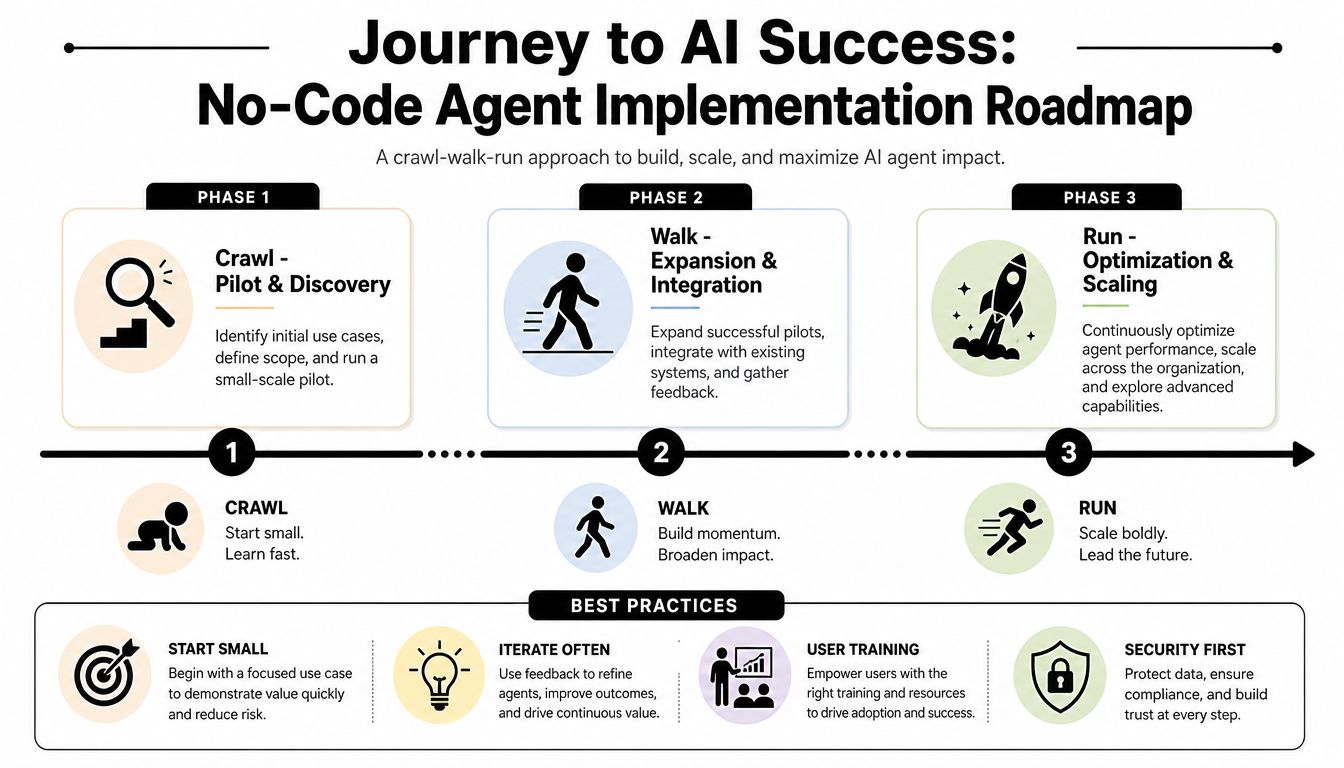
Rolling out a no-code AI agent builder across the enterprise should follow a crawl, walk, run pattern. Not because that sounds prudent, but because every failed AI rollout has the same root cause: teams try to automate broad complexity before they've proven operational discipline.
Start small. Then expand only after the controls, ownership model, and measurement system are working.
Crawl with one contained use case
Pick a use case with clear value, repetitive demand, and manageable risk. Internal IT helpdesk, HR policy support, or a narrow customer service flow usually works well. The objective is not to prove that AI is magical. The objective is to prove that your enterprise can build, govern, and improve an agent in production.
Focus on a tight operating loop:
- Define one problem clearly: Choose a workflow where the current process is slow, repetitive, or inconsistent.
- Assemble the right owners: Include the business process owner, IT, security, and whoever will maintain knowledge sources.
- Design for completion: Build the agent to finish a task or route it correctly, not merely to answer questions.
Walk by adding integrations and builders
Once the first agent is stable, expand to more connected workflows. This expansion will determine whether your builder program matures or creates chaos. Business users should be able to configure more logic, but only inside a governance model that controls publishing, access, and testing.
Train a small group of internal builders. Give them patterns, not blank canvases. Standard templates for escalation, permissions, grounding, and fallback behavior will save you from a lot of avoidable mistakes.
A platform such as Yellow.ai can fit into this phase when teams need a visual builder, multimodal orchestration, analytics, and enterprise controls in one environment. The key is to evaluate it the same way you'd evaluate any other platform: against your integration requirements, governance standards, and channel strategy.
Run with a formal operating model
At scale, you need more than projects. You need a governance function. Many enterprises call this a center of excellence, but the label matters less than the job.
That operating model should own:
- Platform standards for security, model selection, testing, and deployment.
- Reusable assets such as approved prompts, connectors, and workflow templates.
- Performance reviews so weak agents get fixed, retrained, or retired.
- Business intake so teams don't spin up overlapping agents with inconsistent logic.
The best practice most teams skip is simple: involve the business users from day one. They know the exceptions, the language, and the hidden friction in the process. Without them, your agent will sound polished and still fail in production.
Measuring Success and Demonstrating ROI
The final mistake enterprises make is measuring AI like a novelty launch. They count interactions, celebrate adoption, and ignore whether the system created durable business value. A no-code AI agent builder only earns its keep if it improves operational outcomes and does so under control.
Start with business metrics tied to the use case. For CX, look at resolution quality, containment where appropriate, speed to resolution, and cost per handled interaction. For EX, focus on time saved, ticket deflection where useful, employee satisfaction with internal support, and cycle-time improvement in repetitive service processes.
Measure trust, not just throughput
Governance plays a key role in the ROI story. Enterprise analysis shows over 60% of AI failures stem from hallucinated outputs, which means a high-volume agent can still be a bad investment if it spreads wrong answers at scale (Aisera on hallucination risk and governance controls).
Your scorecard should include:
- Outcome metrics: Did the agent complete the intended task or move it materially forward?
- Quality metrics: Were answers grounded, accurate, and policy-compliant?
- Escalation metrics: Did the agent escalate at the right time with enough context?
- Operational metrics: How much human effort did the system remove or redirect?
Build the ROI case simply
A clean business case doesn't need theatrics. It needs discipline. Compare the current cost and effort of a process against the post-deployment state. Then account for platform costs, implementation work, governance overhead, and the cost of ongoing optimization.
If you need a structured way to estimate returns, a tool like Yellow.ai's ROI calculator can help frame the inputs consistently.
The strongest ROI arguments usually combine three things: lower service cost, faster service delivery, and better consistency. If you can prove all three while maintaining auditability and control, the conversation changes. The agent is no longer an experiment. It becomes part of your enterprise operating model.
Yellow.ai is one option to evaluate if you need an enterprise-grade platform for autonomous CX and EX workflows, including no-code agent design, multimodal orchestration, analytics, and governance controls. If your priority is moving beyond pilots into secure, production-ready deployment, review how Yellow.ai aligns with your integration stack, compliance requirements, and model strategy.



