









79% of organizations already say they've adopted AI agents to some extent, and one 2026 industry summary projects that 40% of enterprise applications will embed AI-agent capabilities by 2026, up from under 5% in 2025 (industry summary on agentic AI statistics). That shift matters because the winning systems aren't just better chatbots. They're multimodal AI agents that can combine text, vision, audio, and other inputs in one workflow, which is why enterprise teams are moving them out of pilots and into production.
The practical question isn't whether multimodal systems are possible. It's whether adding another modality improves outcomes, or just adds latency, governance burden, and integration cost. The strongest deployments I've seen use multimodal input only where it changes the decision, not where it merely makes the demo look smarter.
Table of Contents
- The Rapid Rise of Multimodal AI Agents in Enterprise
- Core Architecture and Components
- Enterprise Use Cases Across Industries
- Design and Implementation Best Practices
- Evaluation Metrics and Performance Measurement
- Governance and Safety Controls
- Vendor Selection and Implementation Roadmap
The Rapid Rise of Multimodal AI Agents in Enterprise
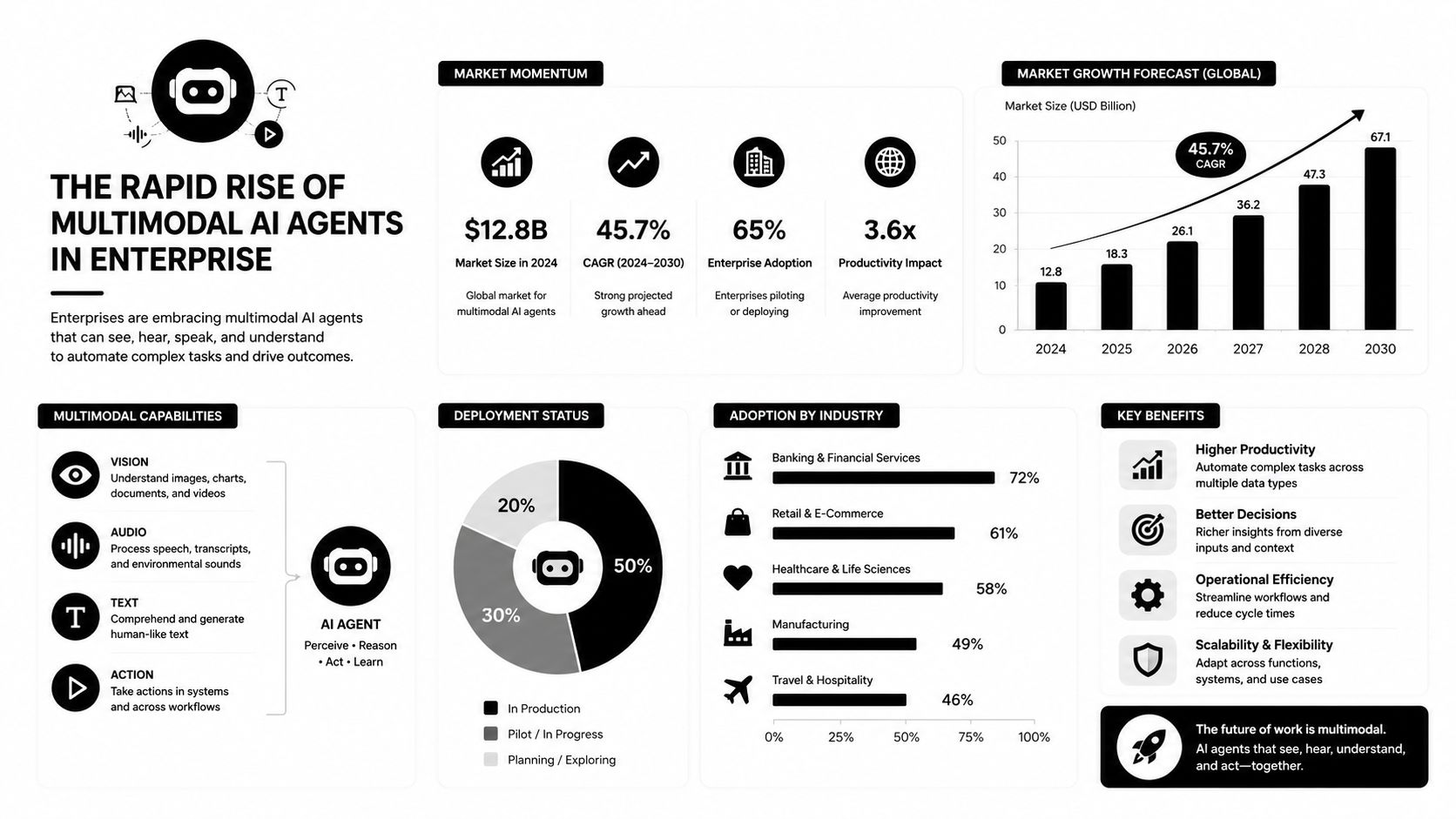
Enterprise adoption is now visible in the numbers. A 2026 industry overview places the global multimodal AI agent market at over $2.1 billion in 2024, projects it to exceed $10 billion by 2030, and tracks growth at over 32% CAGR through 2030. That is the profile of a category moving out of experimentation and into core enterprise infrastructure (market overview).
Why enterprise teams are adopting now
Workflow density is the main driver. Enterprise work rarely arrives as clean text alone. A support case may include a screenshot, a voice note, a policy PDF, and a live customer conversation. A single-modality bot can handle part of that flow, but humans still end up reconciling the rest.
Practical rule: add a modality only when it changes the decision, not when it only changes the interface.
A 2026 market summary says enterprise software accounts for roughly 48% of agent-related revenue, North America holds about 42% of global market share, and cloud-native AI agents represent 68% of deployments (enterprise adoption summary). Those patterns point to an enterprise-first category, not a consumer novelty wave. They also explain why contact centers, HR service desks, and back-office workflow teams are seeing budget first.
What separates multimodal agents from classic bots
Classic bots are usually built to handle one channel well. A voice assistant handles audio, a document tool handles text, and an OCR layer handles scanned pages. A multimodal agent ties those pieces together in one decision loop, so the same case does not have to be interpreted and reconciled by separate systems.
The difference shows up in the work the agent can do. A traditional assistant may summarize a customer issue. A multimodal agent can read the screenshot, listen to the call, pull the policy article, and draft the next step from the same context. That is why adoption tends to start in high-friction workflows, where the value of better context is easy to measure.
Yellow.ai describes this shift as a universal agentic interface for the autonomic enterprise, and the idea fits the operational reality. Enterprises are not buying “multimodal” for its own sake. They are buying a way to reduce handoffs, cut reconciliation work, and keep more of the case inside one controlled path.
Core Architecture and Components
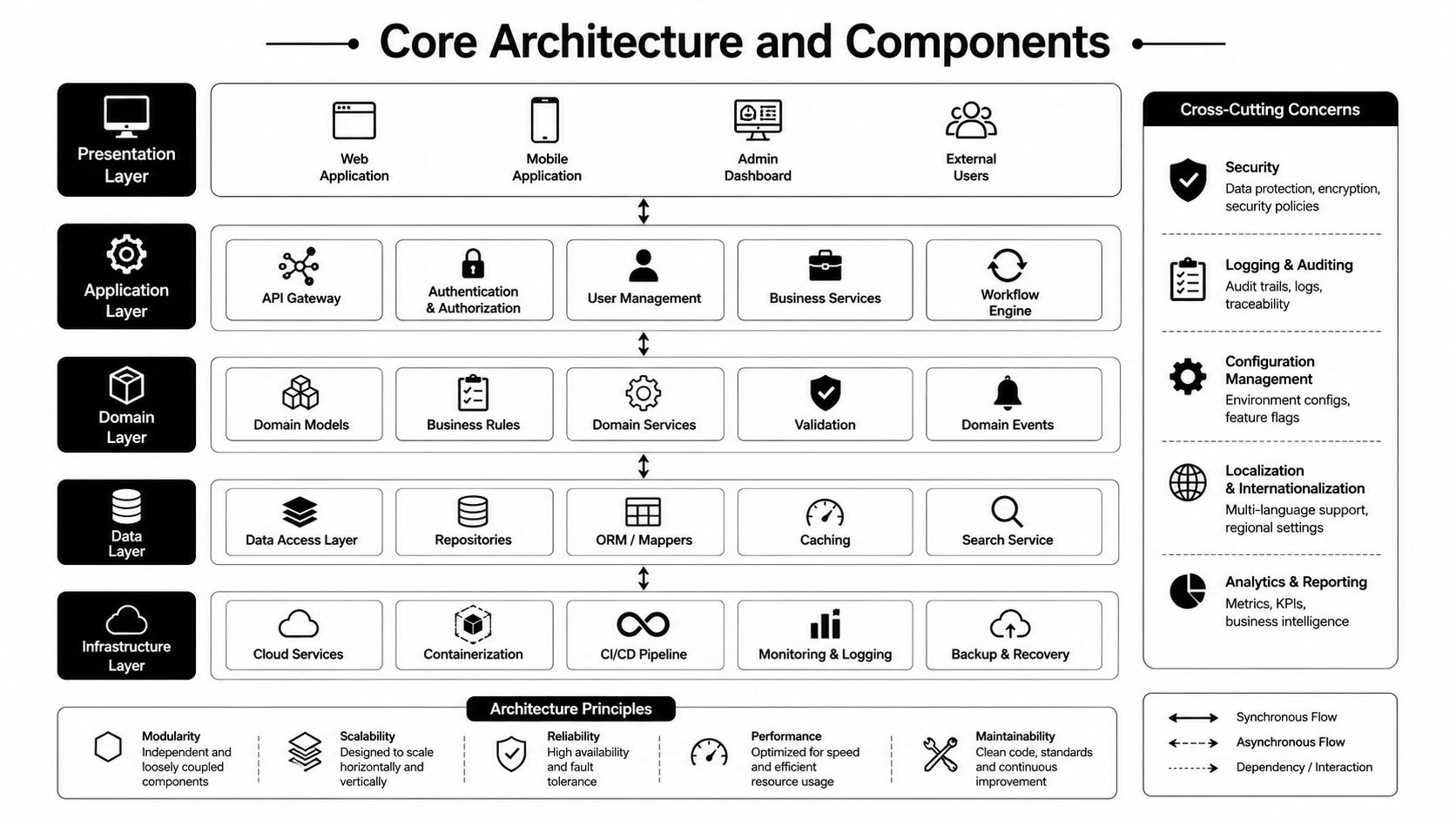
At the architecture level, multimodal systems work best when they stop acting like a chain of brittle translators. The better pattern is a shared model surface that can ingest different modalities, align them, reason over them, and produce an action. In production, that shift away from separate OCR, ASR, and TTS pipelines toward a single multimodal model call reduces handoffs and makes the control path easier to govern.
From separate encoders to a unified context
The first layer is still modality-specific. Text needs a language encoder, images need visual encoding, and audio often needs transcription or direct audio representation. On their own, those encoders do not solve the business problem. They only turn raw input into something the agent can reason about.
The critical step is cross-modal fusion. Survey literature on multimodal agentic systems emphasizes that large multimodal models, or LMMs, integrate different modalities so the agent can make decisions from one fused representation (survey on multimodal agentic systems). In practical terms, the screenshot, the transcript, and the attachment become one case, not three separate facts that need to be reconciled by hand.
Action is where enterprise value appears
A lot of vendors talk about multimodal input, but the more important capability is multimodal action. Independent analysis describes systems that can generate speech, typed text, images, or screen-control outputs from a unified context representation, not just parse inputs (computer.org analysis). Enterprise value shows up only when the agent can do something with what it learned.
Implementation note: if the model cannot decide, route, or act, you have built a perception layer, not an agent.
The orchestration layer decides whether the system stays maintainable. In weaker designs, orchestration lives in glue code between OCR, speech, and chat services, so every new edge case becomes another brittle branch. In stronger designs, orchestration sits above the model, where the agent chooses the relevant tool, maintains state, and decides whether to escalate. That is easier to govern and usually easier to debug.
If you are evaluating platform patterns, the AI Agent Builder is a useful reference point because it reflects the move toward unified design, where input handling, orchestration, and deployment live in one operational surface. The same architecture discipline matters in internal workflow automation, including cases like resume screening automation for HR, where the system has to read documents, compare them against policy, and keep the review path auditable.
Why fusion latency becomes a design constraint
Cross-modal systems only help if the model can align inputs fast enough to preserve interaction quality. A customer on a live call will not wait while your stack transcribes audio, analyzes a screenshot, fetches policy text, and then reassembles the result. That is why architecture choices around caching, tool routing, and context pruning matter as much as model selection.
The best systems keep the context small and relevant. They do not dump every available artifact into the prompt. They retain only the pieces that affect the next action, which lowers latency and reduces the chance that the model latches onto irrelevant detail.
Enterprise Use Cases Across Industries
A contact-center agent on a refund call doesn't need a novelty demo. It needs to understand the customer's words, the uploaded receipt, the device screenshot, and the policy state in the CRM, then produce an answer the human agent can trust. That's where multimodal design earns its keep. It removes the manual stitching that usually happens between channels.
Where multimodal capability changes the workflow
In customer experience, the strongest use cases are usually those with mixed evidence. A user sends a screenshot of an error, then follows up by voice because they're frustrated. A single-channel bot can summarize the complaint, but it can't reliably interpret the visual issue and the spoken context together. Multimodal handling shortens that loop because the same agent can inspect both artifacts in one pass.
In employee experience, the pattern is similar. HR teams field onboarding questions with forms, identity documents, benefit materials, and voice follow-ups. A multimodal agent can route the request and pull the right policy or form without making the employee repeat themselves across systems. That's a real operational gain, not a cosmetic one.
Use cases that justify the extra complexity
Healthcare, banking, and document-heavy operations often have the clearest fit because the workflows already depend on multiple evidence types. In healthcare research, a 2025 overview found that 62.2% of published multimodal studies used two modalities, while 32.4% used three modalities, which shows that multimodal design is already the dominant pattern in that research base (research overview). The takeaway isn't that every workflow needs three modalities. It's that mixed-input design is becoming normal wherever the task is evidence-rich.
For HR leaders looking at document intake, resume screening automation for HR is a good adjacent reference because it highlights the same logic, structured data plus unstructured context beats either one alone. That same principle applies to employee service desks, claims review, and loan intake.
In regulated workflows, the agent should narrow options, not improvise answers.
A useful way to think about enterprise fit is this. If the business issue is speed on a single repetitive channel, a simpler automation stack may be enough. If the issue is reconciling documents, images, voice, and policy in one decision, a multimodal agent is usually the more credible choice.
Design and Implementation Best Practices
The biggest implementation mistake is adding modalities because the platform can accept them. That's expensive engineering with weak business logic behind it. The better question is whether the extra modality removes ambiguity, cuts human review, or materially reduces back-and-forth.
Decide whether the modality earns its place
Use this trade-off lens:
- Text only: works when the task is already structured, such as policy lookup, basic triage, or templated communication.
- Text plus image: makes sense when screenshots, forms, damage photos, or diagrams change the outcome.
- Text plus audio: pays off when tone, live conversation, or voice evidence affects intent.
- Full multimodal: belongs in cases where the decision depends on combining all available artifacts before action.
That's the point where the model becomes a workflow engine, not just a conversational layer. If the modality doesn't improve the decision path, don't add it.
Manage context like a scarce resource
Context bloat is one of the fastest ways to damage latency and reliability. The agent should not carry every artifact forward just because it can. It should keep only the evidence needed for the current step, then drop stale material before the next action.
A good orchestration pattern is to separate perception, planning, and execution. Perception ingests the right artifacts. Planning determines whether the task is solvable automatically. Execution invokes the right system, then writes the outcome back to the record. This separation helps when a workflow spans CRM, ticketing, and knowledge base retrieval.
Operational rule: build for the next decision, not for perfect recall of everything the user has ever sent.
Avoid overbuilding the first release
Multi-agent orchestration can be useful, but it's easy to overdo it. If one agent can classify the issue, another can read the image, and a third can draft the response, you may still be slower and harder to govern than a single well-structured agent. Use multiple agents only when the workflow has different decision domains or approval boundaries.
The same restraint applies to tool use. Keep the first release focused on the highest-confidence tools. Add more only after you've verified that the agent uses them reliably and that the downstream systems can handle the action pattern. If the setup needs a dense maze of exception handling to survive, the design isn't ready.
Evaluation Metrics and Performance Measurement
A multimodal agent can look strong in a demo and still miss the mark in production. That usually happens when teams score model output quality but ignore workflow completion, handoff friction, and exception handling. Business teams do not care whether the agent sounded fluent. They care whether the case was resolved correctly and fast enough.
| Evaluation Dimension | Key Metrics | Business Impact |
|---|---|---|
| Cross-modal understanding | Correct interpretation of text, image, and audio together | Fewer misrouted cases and fewer agent escalations |
| Action quality | Successful tool use, correct routing, correct next step | Higher automation rate and cleaner operations |
| Latency | End-to-end response time, tool-call delay, context assembly delay | Better live-chat and voice experience |
| Consistency | Same input leading to stable outcomes across retries | Less rework and fewer compliance exceptions |
| Escalation behavior | Appropriate human handoff, clear summary, reason for escalation | Faster resolution on edge cases |
| Drift monitoring | Output quality over time, error pattern changes | Earlier detection of model or process degradation |
An operational analytics layer like AI analytics matters because multimodal systems need live visibility, not just offline testing. Teams should watch where the agent succeeds, where it hesitates, and where it hands off. That gives them a control loop for tuning prompts, tools, and escalation rules before small failures turn into workflow drag.
Measure the workflow, not just the model
Traditional deterministic tests break quickly with agentic behavior. The same prompt can produce slightly different but still valid answers. The test suite needs automated checks and human review. Automated checks should verify that the agent picked the right evidence and invoked the right tool. Human reviewers should sample whether the final action made sense in context.
The strongest measurement setups combine three views. Did the model understand the modalities correctly. Did it take the right action. Did the action help the business process move forward. If any one of those is weak, the deployment is not ready for production.
Governance and Safety Controls
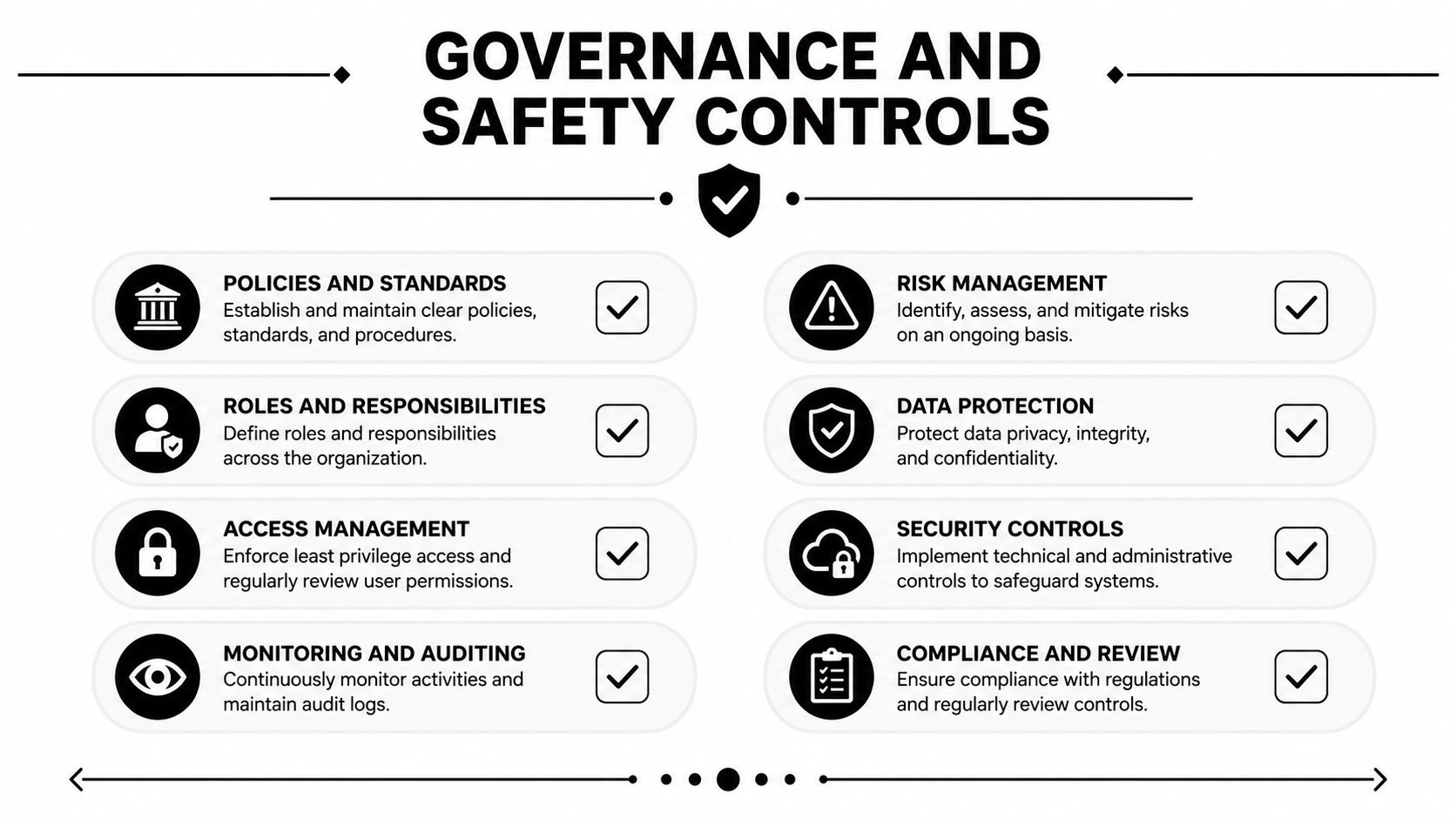
Governance can't be bolted on after launch. Multimodal agents widen the attack surface because they ingest more data types and can take more kinds of action. That means privacy, access control, and auditability have to sit in the design from day one.
Control the inputs before you trust the outputs
The first control is data scoping. Don't let the agent see more than it needs for the task. If a support case can be resolved from the screenshot and the ticket summary, don't attach the whole customer history by default. Smaller context reduces exposure and usually improves reliability.
The second control is auditability. Every action should be traceable to the input artifacts, tool calls, and decision path that produced it. That's essential in regulated environments, especially when the agent handles images, voice, or sensitive documents alongside text.
Put humans on the right side of the loop
Human oversight works best when it's targeted. Agents should auto-handle low-risk cases, then escalate exceptions with a concise summary and the evidence used. That keeps humans focused on judgment calls instead of re-reading the same artifacts the model already parsed.
Bias and hallucination need separate controls because they fail differently. Hallucination is about unsupported answers. Bias is about uneven treatment across inputs or channels. The fix isn't just a better prompt. It's policy, routing limits, validation rules, and review gates that match the risk of the workflow.
If the agent can act, it needs permission boundaries before it needs creativity.
That's the governance-first stance that holds up in enterprise deployments. It keeps the system useful without letting capability outrun control.
Vendor Selection and Implementation Roadmap
Vendor selection should start with the workflow, not the marketing language. Ask whether the platform can process the modalities you care about, whether it supports the actions you need, and whether it gives you enough visibility to debug failures. If those answers are vague, the implementation will be vague too.
Questions that separate a demo from a deployable platform
- Modality support: Can the system handle the actual inputs your teams receive, such as screenshots, voice, documents, or video clips?
- Action layer: Can it do more than summarize, meaning can it route, trigger, update, or escalate inside enterprise systems?
- Latency behavior: What happens to response quality and timing when the conversation becomes multi-turn or evidence-heavy?
- Governance tooling: Can you trace decisions, restrict data access, and review handoffs without custom plumbing?
- Model flexibility: Can you switch models or use more than one model without rebuilding the workflow from scratch?
A platform with a multi-LLM architecture can reduce lock-in, but only if orchestration and governance stay consistent across models. Otherwise, you just move complexity around. The right pilot keeps the scope narrow, proves one high-value workflow, and then expands only after the operational controls are stable.
A practical rollout sequence
Start with one process that already has clear evidence and clear exception paths. Run a controlled pilot, measure handoffs and manual corrections, then harden the weakest step before adding another channel. That sequence usually beats broad rollouts that try to prove too much at once.
For teams comparing options, Yellow.ai is one enterprise platform that supports multimodal agents across chat, voice, email, images, and video, with builder, orchestration, and analytics capabilities in one stack. It's worth evaluating alongside other platforms if your roadmap depends on unified CX or EX workflows.
If you're planning a multimodal rollout, start with the workflow that wastes the most human time on evidence reconciliation, then design the agent around that one job. Yellow.ai can help teams build, test, and operate these agents across voice and digital channels, so if that's the direction you're moving, visit Yellow.ai and compare the platform against your current stack.