













Labor cost reduction starts with operating model design, not blunt headcount cuts.
Executives often treat labor as a fixed expense to trim. In practice, labor cost is a throughput problem. The fundamental question is how much productive output the business gets from every paid hour, and how much of that time is consumed by avoidable work, duplicate handling, manual triage, and fragmented systems.
That distinction matters because the biggest labor drains in large enterprises rarely sit in one function. They show up across customer experience and employee experience at the same time. A contact center agent answers an order-status question that should have been resolved through automation. An HR team handles repetitive benefits inquiries because the employee portal is hard to use. IT support resets passwords manually because identity workflows are disconnected. Each task looks small in isolation. At enterprise scale, they create structural labor demand.
Strong cost programs address that demand at the source. They remove low-value work from the system, then redeploy people to exceptions, judgment-heavy decisions, and revenue-supporting activity. That is why the conversation has shifted from simple automation to the autonomous enterprise.
The difference is material. Basic automation reduces steps inside one team. An autonomous operating model connects workflows across front office and back office, uses AI to resolve routine interactions, routes exceptions with context, and improves both service quality and employee productivity. That is how labor cost reduction becomes durable. It comes from fewer handoffs, faster resolution, lower rework, and better use of skilled labor across the business.
This guide takes that enterprise view. It goes beyond familiar tactics like overtime controls and hiring freezes, and focuses on a more durable path: using a unified AI and automation platform to reduce labor demand systemically while improving CX and EX at the same time.
Table of Contents
- Beyond Headcount The New Rules of Labor Cost Reduction
- Establishing Your Labor Cost Baseline
- Pinpointing High-Impact Automation Opportunities
- Redesigning Workflows for an AI-First Future
- Optimizing Your Workforce and Mitigating Risk
- Measuring Success and Proving ROI
- Your Roadmap to Autonomous Operations
Beyond Headcount The New Rules of Labor Cost Reduction
Headcount cuts are the simplest form of labor cost reduction. They change the budget quickly, but they rarely fix the operating model that created the cost pressure.
A wage freeze can hold spend for a quarter. A hiring pause can slow growth. A reduction in force can improve a short-term margin story. None of those actions removes the manual handoffs, fragmented systems, duplicate approvals, poor forecasting, or avoidable service demand that keep labor costs high.
Labor is one of the largest cost pools in the enterprise. That is why blunt cuts usually spill into other metrics fast. Service levels drop. Supervisors approve more overtime to protect KPIs. Experienced employees get pulled into exception handling. Attrition risk rises, and customers often see the breakdown before finance captures it in the monthly close.
Practical rule: If a savings plan assumes people will work harder inside the same broken process, the savings will not hold.
The stronger approach is operational labor cost reduction. Remove effort from the system first. Then decide where capacity, staffing levels, and role design should change. That shift is what separates temporary cost pressure relief from durable margin improvement.
In practice, the pattern is consistent across large enterprises:
- Standardize core work so teams follow one operating method instead of local workarounds.
- Automate repetitive transactions such as data collection, triage, status checks, knowledge retrieval, and policy-based responses.
- Match staffing to real demand so the business reduces both overtime and idle time.
- Route exceptions to skilled employees and keep repetitive intake away from high-cost labor.
AI expands the value beyond classic workflow automation. Rules-based bots remove clicks. Autonomous AI systems can interpret intent, gather context from multiple systems, complete workflow steps, and decide whether to resolve, route, or escalate a case. At enterprise scale, labor cost reduction is not just about completing tasks faster. It is about reducing the number of human touches across the full customer and employee journey.
That is the point many cost programs miss. Customer experience and employee experience are tied to the same underlying work. If a contact center automates inquiry handling but HR, IT, and back-office teams still operate through email queues and swivel-chair processes, labor shifts from one function to another. Teams that use contact center analytics to identify repeat demand, routing failures, and avoidable handle time can see where labor is being consumed across the journey, not just inside one department.
Platform choice has real financial consequences. Separate CX and EX automation stacks usually mean duplicated knowledge bases, duplicated governance, separate analytics, and higher maintenance overhead. A unified automation layer creates one control plane for workflows, AI policies, reporting, and orchestration across customer-facing and employee-facing operations. That is how enterprises get systemic savings instead of isolated efficiency gains.
This also changes how operations leaders should think about budgeting for labor expenses. The goal is not solely to spend less on labor. The goal is to redesign work so the business needs fewer low-value touches, protects service quality, and gives skilled employees more time for judgment, recovery, sales, and relationship work. That is a better cost program, and a stronger operating model.
Establishing Your Labor Cost Baseline
Labor cost reduction programs fail early when the baseline is too narrow. Payroll alone does not explain what the business is paying to deliver service, absorb volatility, fix avoidable errors, and manage the human overhead created by broken workflows.
A useful baseline answers a harder question: what does it cost this company to get work done at the service level the business expects? That shifts the conversation from accounting totals to operating reality.
What belongs in the baseline
A commonly used benchmark in major markets is that labor cost percentage often falls around 20% to 35% of gross sales, and the standard calculation is labor cost divided by gross sales times 100, according to Truein's labor cost guide. Treat that as a reference point, not a target. In large enterprises, two companies can report a similar labor ratio while carrying very different levels of rework, turnover pressure, manual case handling, and supervisory burden.
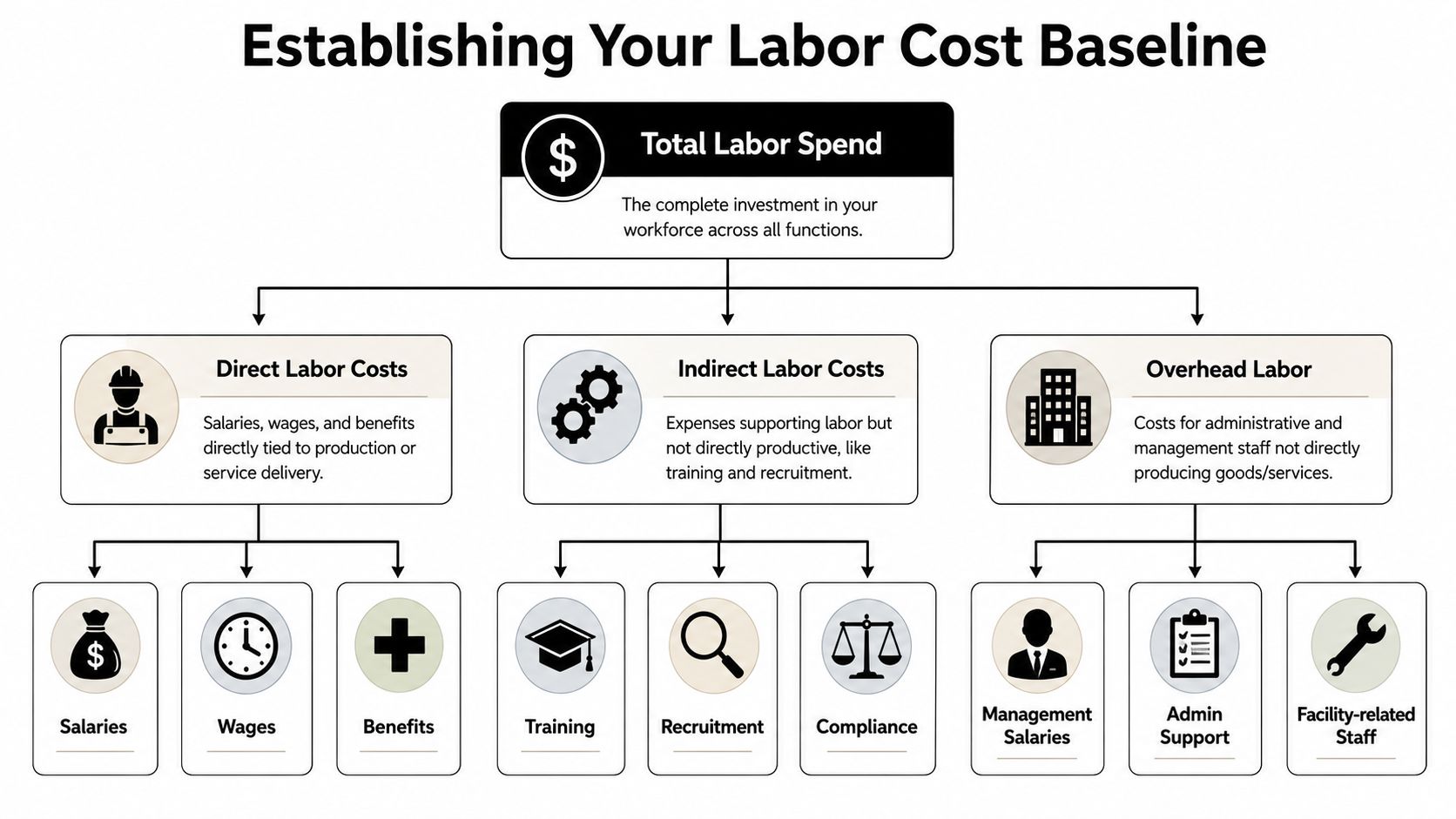
Build the baseline from the systems that record labor demand and labor waste:
- Finance inputs: payroll, bonuses, employer taxes, benefit allocations, contingent labor, overtime, shift differentials.
- HR inputs: recruiting effort, onboarding hours, training time, backfill lag, attrition by role.
- Operations inputs: schedule adherence, queue volume, service-level breaches, rework, exception handling, manual case transfers.
If you need a finance-oriented refresher on the mechanics of budgeting for labor expenses, that framework is useful because it forces discipline around direct labor assumptions before you add the less visible cost drivers.
One point gets missed often. Attrition is not just an HR metric. It raises labor cost through vacancy gaps, slower ramp times, extra supervisor load, quality drift, and higher dependence on overtime or temporary coverage.
How to build a usable operating view
A spreadsheet can total labor spend. It cannot show where labor is being created unnecessarily. Operations leaders need a baseline that connects cost, demand, and process friction in one view.
Use four lenses:
| Lens | What to capture | Why it matters |
|---|---|---|
| Direct spend | wages, salaries, taxes, benefits, overtime | Shows the visible labor bill |
| Demand mismatch | overstaffed periods, understaffed periods, queue spikes | Exposes schedule waste and service risk |
| Hidden friction | transfers, duplicate entry, repeat contacts, manual follow-up | Reveals where process design is creating labor demand |
| Workforce drag | attrition, training burden, supervisor intervention | Quantifies instability and avoidable management overhead |
Many enterprises discover the problem is not labor cost in isolation. It is labor cost caused by fragmented work. A customer contacts support, the issue moves to operations, then to finance, then back to the frontline. Each handoff adds minutes, delays resolution, and creates more internal work. The same pattern appears in employee operations when HR, IT, and managers rely on inboxes, spreadsheets, and manual approvals.
That is why the baseline should cover both customer-facing and employee-facing workflows. If the business measures only contact center staffing, it will miss labor shifted into back-office queues, supervisor escalations, and internal service teams. Sustainable cost reduction comes from seeing the full chain.
Use interaction and workflow data to tie effort to demand. In service operations, that usually means reviewing contact reasons, repeat contacts, transfer paths, average handling patterns, exception volumes, and after-call or after-case work. Teams that need a stronger instrumentation model should start with contact center analytics for demand, repeat contacts, and routing performance, then extend the same discipline into EX workflows and back-office operations.
A weak baseline understates labor cost because it ignores the work created by poor process design.
Once the baseline is built well, the pattern is usually clear. Labor is trapped in repetitive inquiries, preventable demand spikes, avoidable transfers, manual follow-up, and clerical tasks that do not require human judgment. That is the cost structure an AI-first operating model is designed to change.
Pinpointing High-Impact Automation Opportunities
Once the baseline is clear, the next move isn't “deploy a bot.” It's to locate the work that is expensive precisely because humans are doing it repeatedly, at scale, under predictable rules.
The most consistently recommended levers for reducing labor cost without cutting headcount are workflow standardization, automation, and cross-training, with a method that begins by auditing workflows for redundant steps and repetitive transactions, according to Field Nation's guidance on reducing labor costs responsibly.
What to automate first
The highest-value targets usually share four traits. They are frequent, repetitive, rules-based, and context-light.
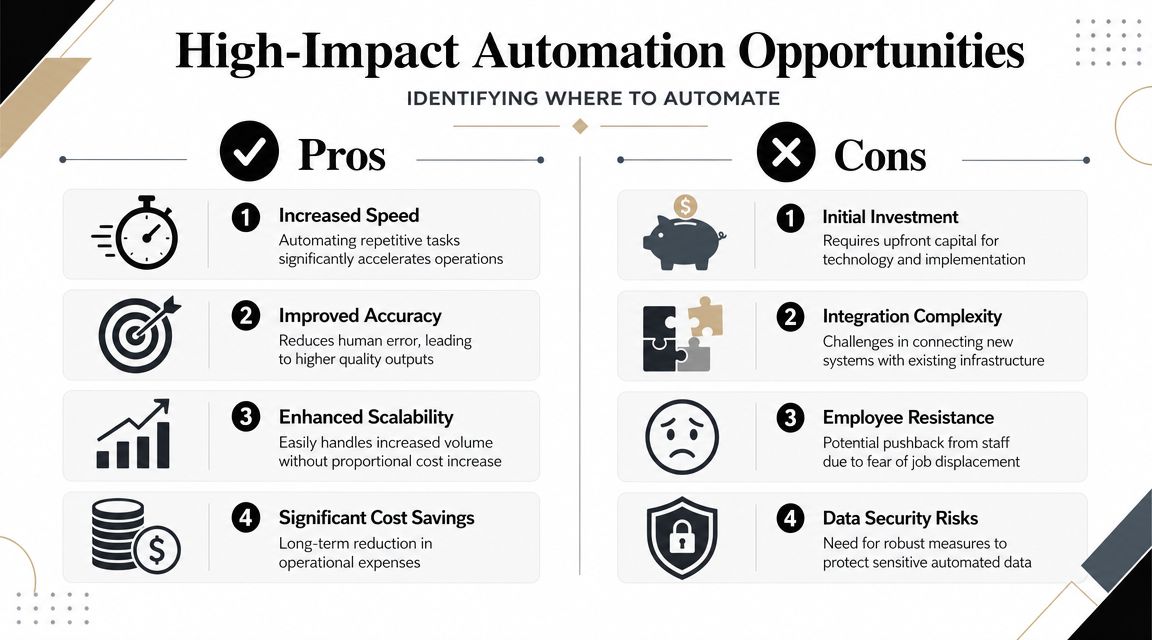
In enterprise CX, strong early candidates include:
- Status interactions: order tracking, claim status, appointment confirmation, payment reminders.
- Policy-bound service requests: returns, account updates, balance inquiries, document collection.
- High-volume FAQs: shipping windows, product eligibility, branch hours, plan details.
In EX, the same logic applies:
- IT support: password resets, access requests, device setup guidance.
- HR services: leave policies, payroll questions, benefits guidance, onboarding checklists.
- Operations support: shift information, SOP retrieval, field task instructions, internal approvals.
A useful external primer is this guide to B2B process automation, especially for leaders trying to spot cross-functional automation patterns outside the contact center.
A practical prioritization lens
Don't rank opportunities by hype. Rank them by impact versus effort.
Use a simple matrix:
| Opportunity type | Volume | Complexity | Automation fit | Human role after automation |
|---|---|---|---|---|
| Password reset | High | Low | Excellent | Only for failures or edge cases |
| Billing explanation | High | Medium | Strong if knowledge is standardized | Handle exceptions, disputes, escalations |
| Claims intake | Medium | Medium | Strong with guided collection | Review edge cases and approvals |
| Multi-party dispute | Low | High | Limited | Human-led with AI assistance |
This matrix forces discipline. If a workflow has low volume and high ambiguity, it probably belongs later. If it has high volume and low complexity, automate it early. If it sits in the middle, use AI to handle intake, data collection, authentication, and routing so employees only touch the judgment-heavy part.
Operator insight: The best automation targets are rarely glamorous. They are the repetitive tasks that nobody wants to defend but everybody keeps funding.
Platform choice matters here. Enterprises usually need voice, chat, orchestration, knowledge retrieval, analytics, and integration in one stack. Options vary by architecture and use case. For teams evaluating enterprise conversational automation across CX and EX, Yellow.ai is one example of a platform that supports voice and chat agents, workflow orchestration, analytics, and integrations in a single environment. The point isn't the brand. The point is avoiding fragmented tooling that creates new maintenance labor while trying to reduce old labor.
The biggest mistake at this stage is automating noise. If the process is inconsistent, the knowledge base is weak, or the exception path is unclear, AI won't rescue the economics. It will expose the underlying design flaws faster.
Redesigning Workflows for an AI-First Future
Labor cost reduction gets real when the operating model changes. Automating a few tasks inside a workflow built around human handoffs rarely changes the cost structure in a durable way.
The root problem is architectural. A customer or employee request enters one queue, gets reclassified in another, waits for someone to gather context from multiple systems, and then moves again because the first team did not have authority or information to finish the job. Every handoff adds labor, delay, and avoidable rework. In large enterprises, that inefficiency shows up in both CX and EX. Customers wait longer, employees spend more time chasing answers, and managers keep adding capacity to compensate for process design flaws.
An AI-first workflow starts from a different premise. Design the process so the system handles intake, context gathering, policy retrieval, routing, and straightforward resolution. Bring people in for exceptions, risk calls, negotiation, and empathy-heavy moments.
The before and after operating model
Billing disputes make the difference clear.
In the old model, a customer explains the issue to an IVR, repeats it to an agent, gets transferred to billing, waits again, answers verification questions again, and receives only a partial answer because another team owns the adjustment. The labor cost sits across multiple queues, multiple touches, and multiple teams, so it often escapes scrutiny.
The AI-first version compresses that work. An AI agent authenticates the customer, identifies the dispute type, retrieves billing history, checks the relevant policy, explains the charge, and either resolves the issue or escalates it with a complete case summary and recommended next step. The human agent joins only when judgment is required.
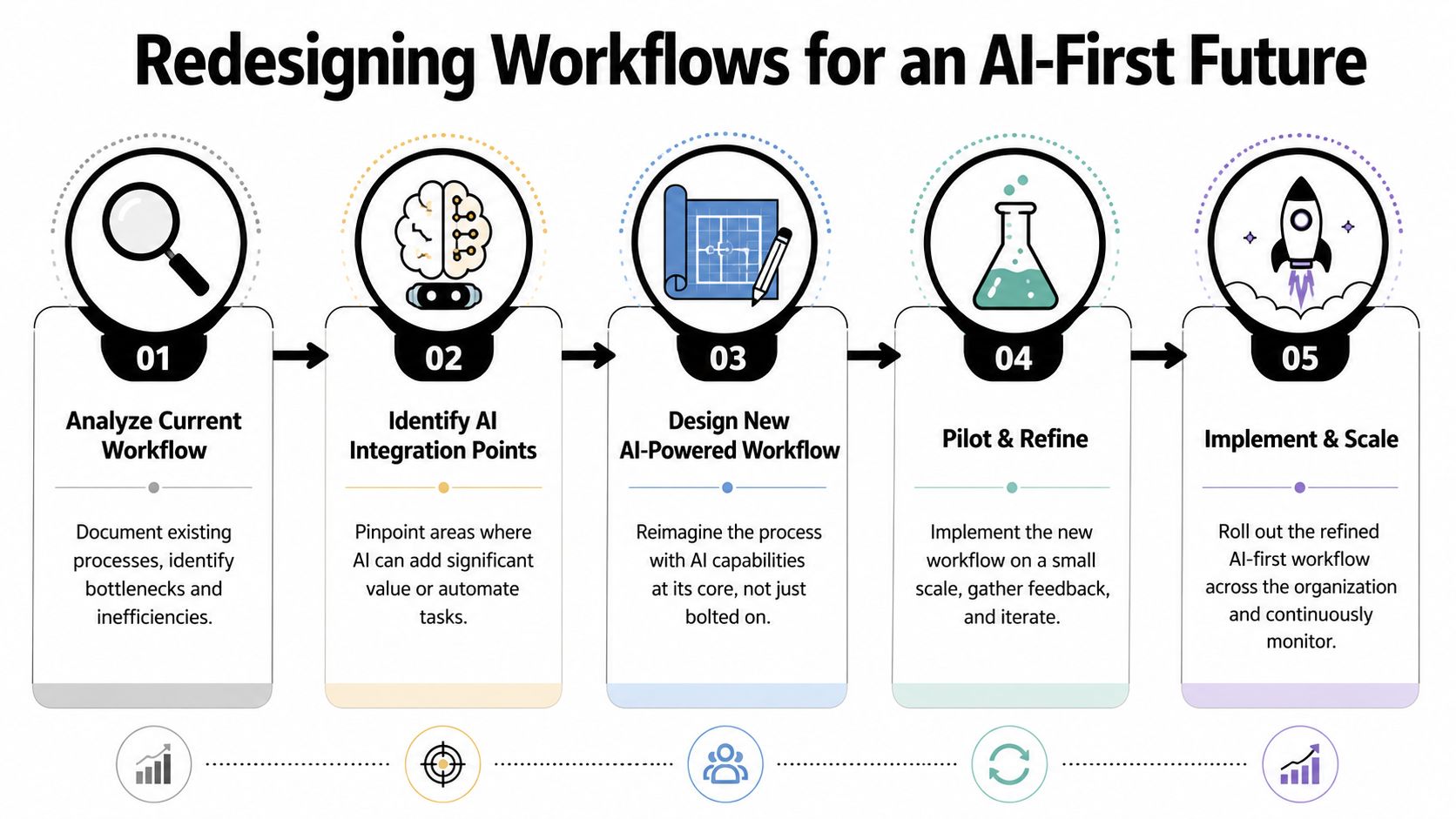
Effective labor cost reduction is not about across-the-board wage cuts. It is about matching labor to the work that requires human judgment, while removing the repetitive steps that inflate handle time, queue time, and overtime.
That redesign usually changes human work in three specific ways:
- Humans stop doing intake. AI collects the required information in a structured format at the start of the process.
- Humans stop doing navigation. AI selects the next step based on policy, customer history, and workflow rules.
- Humans focus on exception judgment. People handle ambiguity, negotiation, edge cases, and risk decisions.
For teams rebuilding these handoffs, examples of automated workflows for enterprise service operations are useful because they show how orchestration, not just conversation, drives labor outcomes.
Later in the redesign cycle, it helps to review a live demonstration of how AI-led service flows behave in production settings:
Design principles that prevent expensive mistakes
AI-first workflow design works best when operators follow a few disciplines.
- Simplify before automating. Remove duplicate approvals, duplicate data entry, and avoidable handoffs before adding AI.
- Create one source of truth. If the AI agent and the human agent rely on different policies or knowledge sources, rework returns immediately.
- Make escalation contextual. Pass the conversation summary, retrieved data, completed verification, and recommended action to the human who receives the case.
- Instrument the exception path. The unresolved cases show where policy is unclear, integrations are weak, or approval rules still create friction.
Don't ask whether AI can answer the question. Ask whether the workflow can finish the job.
That distinction separates local efficiency gains from structural labor cost reduction. A chatbot that handles FAQs may reduce some volume. A unified automation layer across CX and EX that verifies identity, retrieves records, applies policy, updates systems, and routes exceptions correctly changes the labor model itself. That is how enterprises move from manual operations to an autonomous enterprise, with lower service costs, better employee utilization, and fewer breakdowns between front-office and back-office teams.
Optimizing Your Workforce and Mitigating Risk
The worst way to run automation is to treat it as a labor extraction program. Employees see the threat immediately, managers resist, and the organization loses the very expertise it needs to make AI useful.
The better framing is workforce optimization. Aggressive cost-cutting can backfire by increasing churn and burnout, while AI-supported task routing and cross-training help move labor away from repetitive work without damaging service quality, as noted in Randstad's workforce optimization guidance.
Workforce optimization beats labor stripping
In practice, AI changes role design before it changes org design. Frontline employees stop spending most of their day on repetitive interactions. Team leads spend less time fire-fighting queues. Specialists receive cleaner escalations. Supervisors gain more capacity for coaching because the system absorbs routine volume and classifies work better.
That requires deliberate workforce moves:
- Cross-train for exception handling: When AI takes repetitive tasks, employees need broader coverage across adjacent workflows, not narrower specialization in declining work.
- Upgrade knowledge skills: Teams need to curate policy content, validate answers, and flag breakdowns in retrieval or routing.
- Train managers on operating cadence: Leaders should review automation performance, exception reasons, and service-quality impact as part of weekly operations, not as a separate innovation program.
One practical mistake shows up often. Companies launch automation in CX while leaving EX manual. That creates friction fast. If customers get AI-assisted service but employees still chase HR answers, IT approvals, and internal policy clarifications through email, the labor savings plateau. A unified CX and EX approach reduces internal drag and supports adoption because employees experience the same speed they're expected to deliver.
Automation succeeds when employees feel less burdened, not more monitored.
Transparent communication matters. Tell teams which work is being automated, which work is being made more strategic, and which skills will matter more in the new model. The wrong message is “AI will do more.” The right message is “AI will take repetitive load so people can handle higher-value work with better context.”
Build a Safe AI operating model
Cost reduction that creates compliance risk is false efficiency. Enterprise AI needs guardrails from day one.
A workable Safe AI framework should cover:
| Control area | What leadership should require |
|---|---|
| Access control | role-based permissions for data, workflows, prompts, and agent actions |
| Policy governance | reviewed source content, approval history, change management |
| Compliance alignment | deployment controls for regulated environments such as HIPAA, SOC 2, and PCI-DSS |
| Auditability | logs for conversations, actions taken, escalations, and knowledge use |
| Human override | clear thresholds for when AI must defer to a person |
This isn't just an IT checklist. It is part of labor strategy. If your AI agents are unreliable, your best employees become permanent backstops. If your governance model is weak, legal and compliance teams will slow every rollout. If your escalation logic is poor, frontline labor shifts from repetitive work to cleanup work.
The organizations that get this right usually treat AI rollout as an operating model change across four groups at once: operations, IT, risk, and HR. That's what keeps labor cost reduction from turning into a service or governance problem six months later.
Measuring Success and Proving ROI
Headcount is a lagging indicator. Enterprise leaders need to measure whether AI is reducing labor intensity across the operation while protecting service quality, compliance, and employee experience.
That requires a broader ROI model. Labor cost reduction shows up in throughput, workload mix, overtime, error rates, service levels, and retention. Replacement burden matters too. As noted earlier, turnover creates hiring, training, and ramp costs that can erase a narrow labor saving if the new operating model makes work harder for frontline teams.
Use a balanced scorecard
A finance-ready scorecard combines labor economics, operating performance, and quality control in one view. That matters because isolated metrics can hide failure. A lower cost per contact means little if transfers rise, rework increases, or experienced employees burn out handling exceptions the system should have resolved.
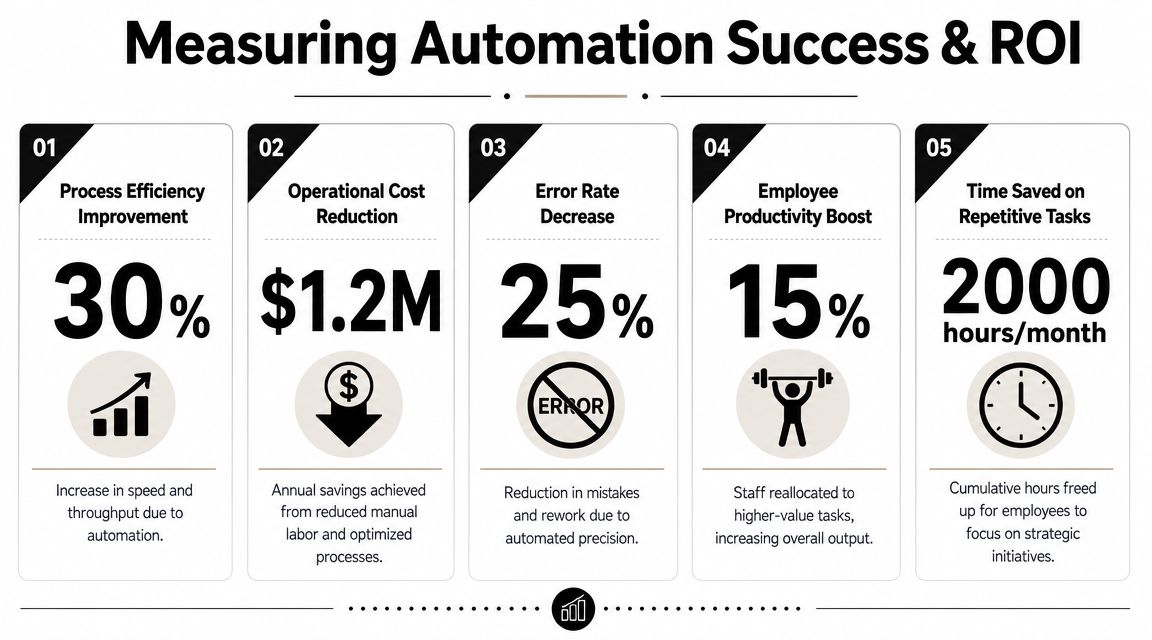
Track at least four categories:
- Cost metrics: overtime spend, cost per resolution, manual handling volume, supervisor intervention load
- Performance metrics: containment rate, first contact resolution, average workflow completion time, transfer rate
- Quality metrics: CSAT, QA scores, compliance adherence, escalation accuracy
- Workforce metrics: attrition trend, training burden, absenteeism patterns, employee effort spent on repetitive work
Review rhythm matters. Operations teams should review performance weekly so they can catch routing errors, knowledge gaps, and service drift before those issues spread across channels. Executive teams should review monthly to connect those operational signals to staffing demand, budget impact, and business outcomes.
Teams that want a sharper framework should study this approach to measuring AI agent performance in an AI-first world. It treats AI as part of the operating model, not as a standalone channel feature.
Build an ROI case finance will accept
The strongest ROI cases separate value into four pools and assign evidence to each one.
| Value pool | Typical source of impact | What to verify |
|---|---|---|
| Labor avoidance | fewer manual touches, less overtime, better staffing precision | before-and-after workflow effort |
| Productivity lift | agents handle higher-value cases with better context | throughput and case mix |
| Service protection | fewer delays, fewer transfers, more consistent execution | quality and customer outcomes |
| Retention effect | better EX reduces replacement burden | attrition and training cost trend |
Finance will challenge aggressive assumptions, and they should. Freed capacity does not automatically become a budget reduction. In large enterprises, first-year value often appears as overtime reduction, hiring avoidance, vendor deflection, and redeployment into higher-value work. Those gains count, but they need clean measurement and a clear baseline.
The primary value is in the combination. A unified automation platform can improve CX and EX at the same time because it reduces repetitive customer contacts, removes manual employee tasks, and gives agents better context when escalation is required. That is how labor cost reduction becomes systemic instead of temporary.
Use operating examples that mirror your environment. In retail, AI can absorb repetitive order-status and return-policy contacts while store and support teams handle exceptions, loyalty issues, and revenue-related interactions. In healthcare administration, AI can collect intake information and answer routine benefits or scheduling questions while staff focus on sensitive or clinically adjacent cases. In both cases, the ROI argument gets stronger when labor efficiency and employee friction improve together.
Board-level test: If the program lowers labor spend but increases churn, complaints, or compliance exposure, the economics are weak.
The best ROI stories show a cleaner operating model, better service consistency, and lower dependence on human effort for repetitive work.
Your Roadmap to Autonomous Operations
The old playbook for labor cost reduction asked, “How do we spend less on people?” The better question is, “How do we design work so people are only doing what requires human judgment?”
That shift changes everything. It moves labor strategy out of blunt cost control and into operating design. It also aligns finance, operations, CX, EX, and IT around the same outcome: a business that handles more demand with less friction.
The roadmap is straightforward:
Audit the real labor system
Look beyond payroll. Measure fully loaded labor, hidden rework, schedule mismatch, turnover drag, and manual exception handling. If you can't see the work, you can't remove the cost.
Identify the repetitive load
Find the interactions and tasks that are high-volume, rule-based, and costly because they consume skilled time. Prioritize where AI can reduce touches, not just answer questions.
Redesign workflows end to end
Don't bolt AI onto a broken journey. Rebuild the flow so AI can authenticate, retrieve context, execute steps, and escalate with intelligence. That's where structural labor cost reduction comes from.
Optimize the workforce around higher-value work
Cross-train teams, redefine roles, and make EX part of the operating model. People should spend less time on repetition and more time on exceptions, relationships, and judgment.
Measure what finance and operations both trust
Prove value through labor efficiency, service quality, retention effects, and risk control. The goal isn't a flashy pilot. It's a repeatable operating advantage.
Autonomous operations won't eliminate human work. They'll eliminate a large share of human busywork. That's the distinction leaders need to hold. The enterprise that gets this right won't just run leaner. It will respond faster, scale more cleanly, and use its people where they create the most value.
If you're evaluating how to turn labor cost reduction into a broader CX and EX transformation, Yellow.ai is worth considering as part of that assessment. Its platform supports agentic AI across voice and chat, workflow orchestration, knowledge-driven automation, analytics, and enterprise integrations, which makes it relevant for leaders trying to consolidate fragmented service automation into one operating layer.



