










You already know the pain. A customer asks for a policy clarification, an agent checks three places, the answer in Slack doesn't match the one in the help article, and the call drags on while everyone loses confidence in the system. That's usually the moment leaders realize the problem isn't just slow support, it's fragmented knowledge.
Knowledge base software is the fix for that fragmentation, but only if it's treated as governed enterprise infrastructure, not a prettier document library. The market signal is clear, too, with one projection putting the global knowledge base software market at about USD 2.02 billion in 2025, rising to USD 2.34 billion in 2026 and reaching nearly USD 7.68 billion by 2034, which implies a 16% CAGR over 2025 to 2034 Business Research Insights. That growth reflects a shift in how organizations think about self-service, agent assistance, and internal knowledge operations.
Table of Contents
- What Is Knowledge Base Software and Why Enterprises Need It Now
- How Knowledge Base Software Architecture Works
- Core Features That Define Enterprise-Grade Platforms
- Enterprise Use Cases Across Customer and Employee Experience
- Selection Criteria and Evaluation Framework for Buyers
- Implementation Best Practices and Success Metrics
- Common Pitfalls and How to Avoid Them
- The Conversational Knowledge Base Advantage with Agentic RAG
What Is Knowledge Base Software and Why Enterprises Need It Now
A billing dispute usually starts as one missed answer and turns into a bigger trust problem inside the organization. One agent is reading an updated policy in an email thread, another is relying on an older PDF, and a supervisor has to step in because nobody trusts the answer. Knowledge base software fixes that kind of breakdown by turning scattered institutional memory into one searchable system people can rely on.
From scattered files to a single source of truth
At enterprise scale, the value is not just storing content. It is making sure the right person can find the right answer at the right moment, without searching shared drives, inboxes, chat threads, and personal notes. Modern platforms are built to act as a single source of truth for FAQs, troubleshooting guides, product documentation, SOPs, and process know-how, which reduces dependence on fragments of information that drift out of sync over time Document360.
The market signal is just as clear. Knowledge base software sits inside the larger knowledge management software category, which Grand View Research identifies as a growing enterprise software segment. That growth reflects how the category has moved beyond support utilities and into the core operating stack for organizations that need governed, reusable knowledge.
Practical rule: if the answer lives in too many places, your organization does not have a content problem, it has a retrieval problem.
Why leaders are treating it as core infrastructure
The operational payoff is direct. Support teams spend less time re-answering routine questions, agents get more consistent guidance, and employees stop depending on whoever happens to know the policy. In mature environments, knowledge base software becomes the layer that connects customer service, HR, operations, and IT around the same governed content model, including teams that run helpdesk and support services.
That is why buyers now care about search quality, taxonomy, version control, and workflow integration as much as they care about page design. A help center that looks polished but cannot keep content current is just an expensive brochure. An enterprise knowledge base has to keep working after the launch team leaves, especially once AI starts surfacing answers from the same content store and governance becomes harder to ignore.
How Knowledge Base Software Architecture Works
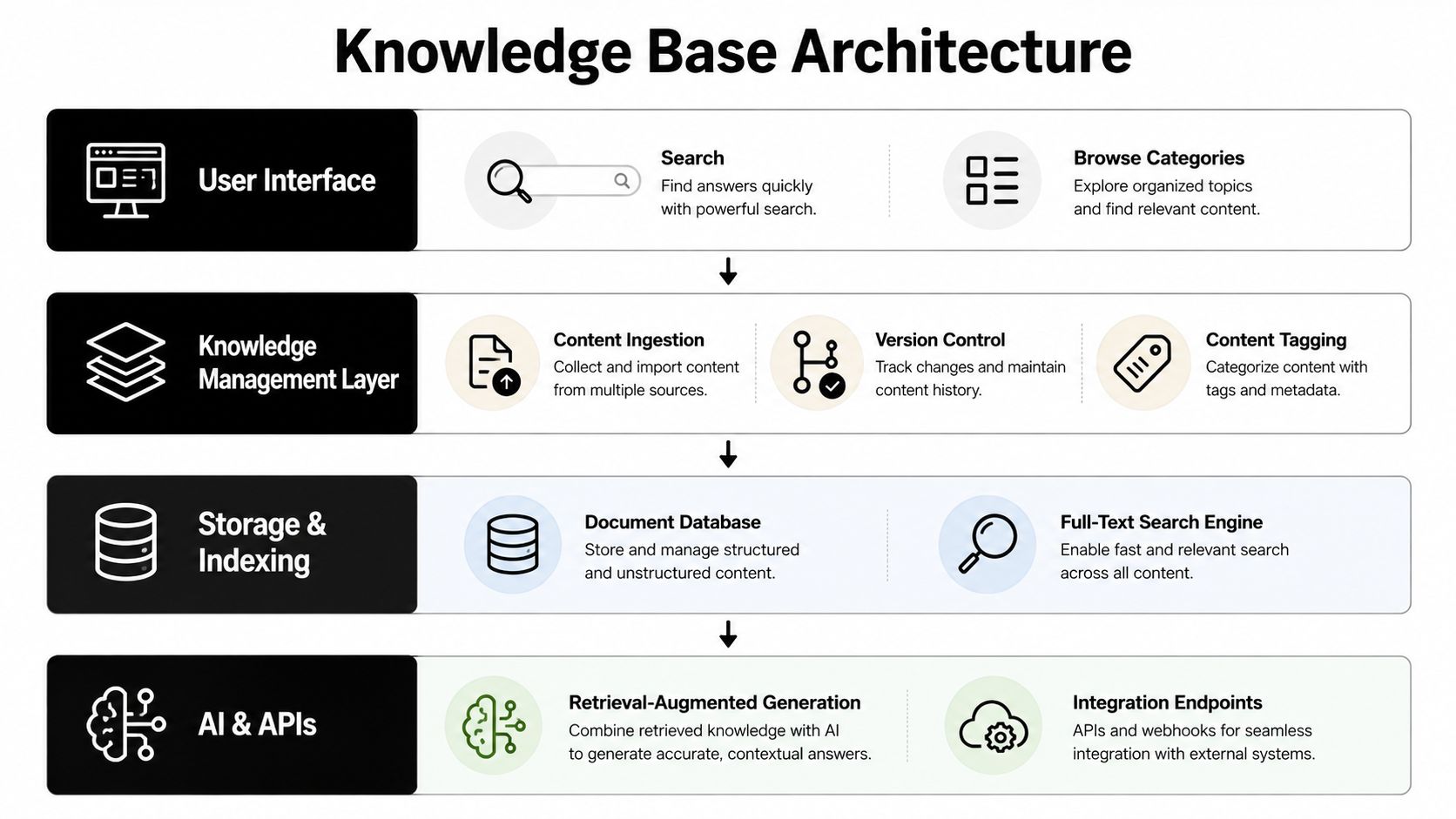
The interface matters, but the architecture underneath matters more. If the platform can't separate storage from retrieval, govern authorship, and integrate cleanly with the rest of your stack, it will eventually turn into a brittle content silo. A technical knowledge base usually works as a layered system, and that layering is what lets teams scale without losing control knowledge-base.software.
The content layer and the control layer
The first layer is the content management layer, where subject-matter experts draft, review, and update articles. Governance starts here, because the platform needs to know who can create content, who can approve it, and who owns each knowledge domain. Without that discipline, articles proliferate faster than anyone can maintain them.
The second layer is the searchable repository, which stores content with metadata, tags, and taxonomy controls. This is what lets a platform behave like a knowledge system instead of a folder dump. When content is structured properly, users can browse by category, search by topic, and find related material without relying on exact phrasing.
Retrieval, APIs, and security
A third layer is the search and indexing service. This component handles keyword matching, semantic retrieval, and ranking, which is what makes the system fast enough for live service work. If users need to open three pages before they get one answer, the design has already failed.
The final layer is the API and access-control layer. APIs connect the knowledge base to contact centers, HR systems, portals, and in-workflow experiences, while access controls determine who can author, view, or edit specific content. That separation is important because it lets organizations enforce governance without making content hard to find.
For teams evaluating help resources around customer operations, helpdesk and support services is a useful adjacent reference point because it shows how knowledge and service workflow often need to be designed together, not separately. The same architecture principle applies whether the audience is a support agent, an employee, or a partner user.
Core Features That Define Enterprise-Grade Platforms
A knowledge base that drifts out of date quickly turns into a liability. Enterprise-grade platforms are judged less by surface polish and more by whether they support governance, reuse, and delivery across channels. The strongest systems make content easier to find, easier to update, and easier to trust.
What the platform has to do well
The baseline is a centralized repository that brings FAQs, troubleshooting steps, product documentation, SOPs, and internal process knowledge into one structured place. That consolidation reduces the disorder of scattered files and helps users find answers without opening tickets or asking colleagues. Searchable organization, tagging, and taxonomy controls are what make that content usable at scale.
Beyond the basics, the features that matter most are the ones that protect freshness and usability.
- Version control: keeps old content from lingering in workflows after policies change.
- Analytics: shows which articles are helping, which search terms fail, and where knowledge gaps keep appearing.
- Multi-language support: matters when one policy has to serve distributed teams or global customers.
- AI-powered search: helps users find answers even when they don't know the exact wording.
Field insight: the strongest knowledge base is rarely the one with the most content, it's the one with the fewest unanswered questions after search.
How features translate into operations
For contact centers, the operational win comes from putting the answer inside the agent workflow instead of forcing a tab switch. When a platform can surface content in context, agents stop wasting time searching and start resolving. Integration with your help desk, CRM, or desktop environment often matters more than another layer of formatting options.
For employee experience teams, the same logic applies to onboarding, benefits, IT support, and policy lookup. People do not need a prettier handbook, they need fast access to the correct rule, form, or procedure.
Security belongs in the core feature set, not the procurement appendix. The security and governance controls described in Yellow.ai's enterprise-grade security overview are a useful benchmark for how vendors should frame access, compliance, and content control.
One more issue gets missed in many evaluations. AI-powered knowledge bases can widen governance gaps if authorship, approval, and source-of-truth rules are vague. Enterprise buyers should test whether the platform can show who changed what, route edits through review, restrict sensitive content by role, and keep AI responses tied to approved content rather than unsanctioned drafts. A strong feature list is useful, but the test is whether the platform helps teams keep answers controlled as usage grows.
Enterprise Use Cases Across Customer and Employee Experience
Knowledge base software behaves differently depending on who uses it, and that's exactly why single-lens evaluations fail. A contact center, a benefits team, a compliance group, and a field operations team all need governed knowledge, but they need different permissions, channels, and success metrics. The buyer mistake is assuming one use case tells the whole story.

Customer experience and contact centers
In customer service, knowledge base software supports both self-service and agent-assist. Customers need a searchable portal that helps them resolve routine issues without waiting for a rep, while agents need the same content embedded in the workspace they already use. When that's done well, consistency improves across voice, chat, email, and social channels.
The best contact center setups don't treat the knowledge base as a separate destination. They treat it as the answer layer behind the conversation. That is also where a platform's analytics become valuable, because search behavior, failed queries, and article performance tell you what customers are trying to do and what your content still misses.
Employee experience, regulated workflows, and AI access
HR and internal service teams use the same architecture for policy lookup, onboarding, IT support, and operational SOPs. In those environments, the most important issue is often not discovery, it's trust. Employees need to know they're reading the latest approved version, not an old draft someone forgot to retire.
The video below is a good reminder of how often knowledge management now sits beside live support workflows rather than outside them.
A useful way to compare vendors is to ask whether the platform supports governed access, contextual retrieval, and workflow integration across multiple departments, not just customer support. In healthcare or BFSI, the stakes are higher because the wrong answer can create compliance exposure, so auditability and approval controls matter as much as search quality.
For employee-facing automation, Yellow.ai's employee experience AI is a relevant example of how knowledge access can be built into HR and internal service journeys rather than left in a separate portal.
Selection Criteria and Evaluation Framework for Buyers
Buyers usually start with a feature checklist and end up with a platform that looks good in demos but struggles in production. That happens because the decision is architectural and operational, not cosmetic. A strong buying process asks whether the system fits your integrations, security requirements, scale, AI strategy, and measurement model.
The five dimensions that matter
Integration capability should be the first filter. If the platform can't connect to your CRM, help desk, HR system, or identity stack through prebuilt connectors or flexible APIs, adoption will stall. Knowledge has to live where work happens.
Security and compliance are next. Role-based access, audit logging, and support for the frameworks your organization requires should be nonnegotiable. If the platform can't give you governed control over who can author, publish, or view content, it doesn't belong in regulated workflows.
Scale is the third dimension. You're not just checking whether the platform works with a few dozen articles, you're testing whether it can support large content volumes, many users, and multiple business units without slowing down.
AI and retrieval quality determine whether the platform improves answer discovery or just produces confident noise. Retrieval-augmented generation should surface answers from your own content, not from generic model memory.
Analytics and reporting close the loop. Without visibility into search performance, article usage, and content gaps, you won't know where the system is failing.
Buyer rule: if a vendor talks a lot about AI but can't show governance, analytics, and access control in the same conversation, keep digging.
| Evaluation Dimension | Key Questions | Enterprise Requirement |
|---|---|---|
| Integration Capability | Does it connect to CRM, help desk, HR, and identity systems? | Prebuilt connectors or flexible APIs |
| Security and Compliance | Can access, editing, and publishing be controlled and audited? | Role-based access and audit logging |
| Scale | Will it hold up across teams, regions, and content growth? | High-volume, enterprise-ready architecture |
| AI and RAG | Does retrieval use our approved content sources? | Grounded answers from governed knowledge |
| Analytics and Reporting | Can we see search failures, article usage, and content gaps? | Actionable reporting for continuous improvement |
A practical shortlist usually gets sharper once you test these dimensions against real workflows, not demo scenarios. If a platform passes the checklist but frustrates agents in live use, it's the wrong system.
Implementation Best Practices and Success Metrics
Buying the platform is the easy part. The hard part is making sure the knowledge base stays accurate after launch, especially when teams expect AI to compensate for weak content discipline. That assumption creates messy systems fast.
Start with ownership and content cleanup
Begin with a content audit. Find duplicates, stale articles, conflicting instructions, and pages no one owns. Then assign a responsible owner to every knowledge domain so updates don't disappear into team ambiguity.
Publish through review workflows, not informal edits. Subject-matter expert review before publication is the difference between a useful knowledge base and a content graveyard. After launch, schedule periodic content health checks so articles don't drift out of date.
Measure the system as an operating discipline
The best rollout strategy is phased. Start with the highest-friction topics, usually the questions support teams hear every day or the policies employees ask about most often. That gives you a clear proof point without trying to reorganize the whole company at once.
Track a small set of outcomes that tie directly to behavior:
- Self-service deflection, to see whether users are resolving issues without escalation.
- Average handle time, to measure whether agents are finding answers faster.
- Search success rates, to reveal whether users are landing on useful content.
- Content freshness indicators, to show whether reviews are happening.
- Agent satisfaction, because a knowledge base that slows reps down won't survive in practice.
The important shift is mental, not technical. A knowledge base is not a one-time launch project. It's a living operational system that needs ownership, review, and measurement to stay credible.
Common Pitfalls and How to Avoid Them
Most knowledge base failures aren't caused by bad software. They're caused by organizations assuming the hard part is search, when the hard part is governance. AI has made that mistake more visible, because it can surface stale or weak content faster than older systems ever did.

Where teams usually go wrong
The first pitfall is building content without analytics. If you don't know what people search for, where they fail, or which articles get ignored, you're guessing at priorities. That usually leads to overbuilt content in low-value areas and neglect in the places that matter most.
The second pitfall is weak freshness governance. Current guidance around AI-powered knowledge systems emphasizes semantic search, AI answer surfacing, and freshness controls, but the deeper problem is still ownership and review cadence eGain. If stale content can still be retrieved, AI only amplifies the problem.
The third pitfall is treating multilingual support as a translation task instead of a governance task. Each language version needs the same approval discipline as the source content, or regional teams will end up with inconsistent guidance.
Avoiding the false comfort of AI search
A conversational layer can help users find answers faster, but it can't rescue bad content strategy. That's why conversational knowledge bases should be treated as an extension of governance, not a substitute for it. If the content is duplicated, outdated, or poorly owned, the AI layer will merely present those flaws more efficiently.
The strongest systems combine conversational retrieval with content review, approval workflows, and usage analytics. That combination gives organizations a realistic path toward trusted, conversational knowledge instead of a flashy search box that loses credibility.
The Conversational Knowledge Base Advantage with Agentic RAG
Static help centers make people translate their own question into the platform's language. Conversational knowledge bases do the opposite, they take the user's intent, retrieve the right material, and return an answer in natural language. That's a better fit for both customers and employees, especially when the answer has to come from governed enterprise content instead of generic model memory.
Why agentic retrieval changes the user experience
Agentic retrieval-augmented generation works best when the system can decompose a query, fetch relevant content from multiple approved sources, and synthesize a response that stays anchored to policy or procedure. Yellow.ai's Conversational Knowledge Base uses semantic search, automated metadata tagging, and context-aware retrieval to support that model. That matters because it keeps the knowledge layer tied to enterprise content rather than free-floating answers.
The practical result is lower cognitive load. A user doesn't have to know the title of the policy, the exact FAQ wording, or the name of the form. They ask a question the way a human would ask it, and the system does the retrieval work behind the scenes.
Where conversational knowledge fits best
This approach is especially useful in high-volume service environments and in internal support journeys where users need a quick answer inside chat, voice, email, or a portal. In healthcare, for example, an AI chat assistant for healthcare is a relevant illustration of how conversational access can be applied to sensitive, structured information without turning the experience into a manual search exercise.
Yellow.ai's broader knowledge base module also supports importing and organizing content from files, URLs, articles, and third-party systems such as ServiceNow. Used well, that kind of setup turns the knowledge layer into a conversational service plane rather than a static documentation site.
The market is moving in this direction because enterprises no longer want content that just exists. They want content that answers, routes, and learns. Conversational knowledge base software is what that looks like when governance and retrieval stay connected.
If you're evaluating how to turn knowledge into a governed, conversational service layer, Yellow.ai offers the kind of enterprise AI stack that connects knowledge base management, agentic retrieval, and omnichannel orchestration in one place. Visit the site to see how its conversational knowledge base and AI agent tools fit into CX and EX workflows, then compare that model against your current support and internal service stack.