









A customer can't complete payment. Your AI chatbot starts failing because the backend API it depends on is timing out. Within minutes, the contact center sees a surge in chats, the helpdesk gets flooded by employees asking whether the issue is local or systemic, and operations leaders want updates before anyone has a clear root cause. This is what incidents look like now. They rarely stay inside one system or one team.
That's why incident management software matters far beyond IT uptime. It has become the operating layer that helps enterprises protect customer experience, employee experience, revenue continuity, and compliance when something breaks. If your business runs on digital workflows, incidents are business events, not just technical defects.
Table of Contents
- Why Service Reliability Is Business Reliability
- The Incident Management Lifecycle Explained
- Core Capabilities of Modern Incident Management Software
- Calculating the Business Impact and ROI
- How to Evaluate and Choose the Right Software
- Implementation Best Practices and Creating Runbooks
- Use Cases for IT, CX, EX and the Future of Incidents
Why Service Reliability Is Business Reliability
When a customer-facing service fails, the damage spreads sideways fast. A payment outage can disable checkout, confuse customer support, and leave frontline employees manually handling exceptions with no shared view of status. An HR system disruption creates a similar pattern. Employees lose access, internal support queues spike, and managers lose confidence because updates arrive through scattered channels.
Incident management software functions as a command center, moving beyond its role as a backend tool. It gives teams one place to log the issue, coordinate responders, communicate status, and document what happened after service is restored. Without that structure, most organizations don't have an incident problem. They have a coordination problem.
One reason this category is getting more strategic is scale. The global incident management software market is projected to grow from USD 7,215 million in 2024 to USD 15,578.83 million by 2032, at a 10.1% CAGR, according to Credence Research's incident management software market projection. That matters because it reflects a shift in how enterprises buy. They're no longer treating incident response as a niche admin workflow. They're treating it as operational infrastructure.
What leaders are actually protecting
For CX leaders, incidents threaten trust. For EX leaders, they create friction, confusion, and wasted labor. For CIOs and operations teams, they expose whether the company can absorb disruption without losing control.
A useful way to think about it is this:
- Customer experience protection: Customers remember failed transactions, broken self-service, and inconsistent updates.
- Employee experience protection: Employees need clear ownership, accurate status, and fast support when core tools fail.
- Operational control: Leaders need one system of record when incidents cross IT, support, security, and operations.
Service reliability isn't separate from customer experience. In digital businesses, it is customer experience.
The teams that handle incidents well usually track them the same way they track experience health. That means tying operational workflows to customer-facing outcomes such as service availability, containment speed, and communication quality. If you already measure customer experience KPIs and metrics, incident response should sit directly beside them, not somewhere off in a technical silo.
The Incident Management Lifecycle Explained
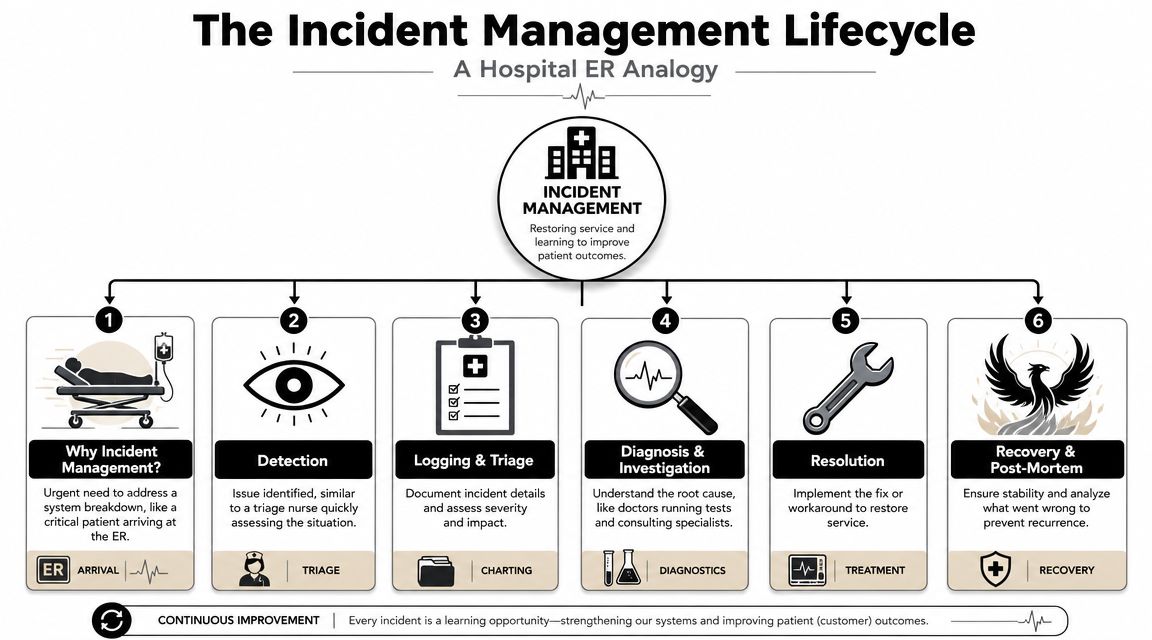
Incident response works best when it behaves less like improvisation and more like emergency medicine. A hospital doesn't treat every patient the same way, in the order they happen to arrive, with whoever is free. It identifies urgency, routes by skill, and follows a repeatable process under pressure. Good incident management software does the same thing for service disruptions.
IBM describes effective incident management systems as a full lifecycle that starts with ingesting events from automated alerts and human reports, then assigning severity to route work to the right skill level. That structure is designed to improve MTTA and MTTR by removing manual triage bottlenecks, as explained in IBM's overview of incident management.
Identify and log
Incidents can start anywhere. A monitoring alert fires. A customer reports a failure in chat. An employee opens a ticket because a payroll workflow won't load. Mature platforms take all of those signals seriously and normalize them into one workflow.
The first mistake many teams make is relying on informal reporting. Someone posts in Slack. Someone else emails engineering. A manager calls support. That creates duplicate work and weakens accountability. A structured intake path, whether through a ticketing system software platform or direct alert ingestion, gives the response a real starting point.
Classify and prioritize
This is triage. Not every incident deserves the same urgency, and not every issue needs your most senior responders. Classification separates a local inconvenience from a business-critical outage. Prioritization sets the order of response based on impact, urgency, and affected users or systems.
A team that skips this step usually creates two failures at once. Minor issues consume senior engineering attention, and major issues wait too long because nobody established clear severity.
Practical rule: If responders are debating severity in three different channels, your classification model is too vague.
Diagnose and resolve
Once the issue is categorized, responders investigate root cause, verify scope, and decide whether to restore via workaround or permanent fix. Knowledge bases, alert context, logs, previous incidents, and escalation rules are most important at this stage.
In practice, the strongest teams don't ask responders to invent their process in the middle of a disruption. They use documented runbooks, clear responder roles, and a record of what has already been tried.
Close and review
Closure is not “the alert stopped.” Closure means service is stable, stakeholders have the right update, and the organization has captured what it learned. The post-incident review is where teams convert one bad event into reusable institutional knowledge.
That feedback loop matters more than most buyers think. It turns incident management software from a reactive tool into a system that continuously improves future response quality.
Core Capabilities of Modern Incident Management Software
A lifecycle only works if the platform can support it at speed. Modern incident management software isn't just a queue with comments. It's a connected response layer that watches, routes, automates, communicates, and learns.
Atlassian emphasizes that modern tools ingest incidents from channels such as email, chat, and monitoring alerts, then use automation to trigger predefined actions. That orchestration matters because it reduces handoff delays and helps teams correlate noisy signals across complex environments, as described in Atlassian's guide to incident management tools.
Automated detection and alert intake
The software needs eyes and ears. In enterprise environments, incidents don't arrive neatly through one door. They appear through observability tools, service desks, contact centers, chat platforms, and user reports.
What works:
- Multichannel intake: Email, chat, phone, web forms, and monitoring alerts should feed the same operational record.
- Deduplication logic: The platform should reduce duplicate incidents when multiple tools report the same failure.
- Context capture: Alerts should include affected service, owner, severity cues, and related systems where possible.
What doesn't work is making humans stitch these fragments together manually. That's slow, and it guarantees inconsistent triage.
Intelligent triage and prioritization
This is the decision layer. Once incidents enter the system, the platform should help determine who responds, how fast, and with what urgency. Some organizations use rules-based classification. Others add machine learning for correlation and routing.
Either way, the practical requirement is the same. The tool should reduce ambiguity, not create more of it.
A few signs of mature triage:
- Severity frameworks are embedded in the workflow
- Escalation paths are tied to service ownership
- Assignments reflect responder skill and availability
- Noise reduction prevents alert fatigue
Automated workflows and runbooks
Automation is where incident management software starts paying back operationally. If a database alert triggers the same first-response sequence every time, that sequence should be executable, not buried in a wiki.
Useful automation includes:
- Opening the incident record automatically
- Paging the right team based on ownership
- Launching a runbook
- Applying SLA timers
- Triggering stakeholder updates or status workflows
This is also where AI is becoming relevant. Some teams now use AI-assisted guidance to summarize incident context, suggest next actions, or surface similar past cases. In customer-facing environments, tools such as agent assist software can also help support teams understand whether they're handling an isolated complaint or a broader service incident.
Communication and analytics
During an incident, communication is work. If status updates happen outside the workflow, leaders lose visibility and responders lose time repeating themselves. Strong platforms connect the response process to collaboration and stakeholder communication rather than treating updates as an afterthought.
After the incident, analytics become the memory layer. Teams need to know which services create repeat failures, which escalations are too slow, and which workflows repeatedly depend on heroics.
The best incident management software lowers cognitive load. Responders should spend their time deciding, not searching.
Calculating the Business Impact and ROI
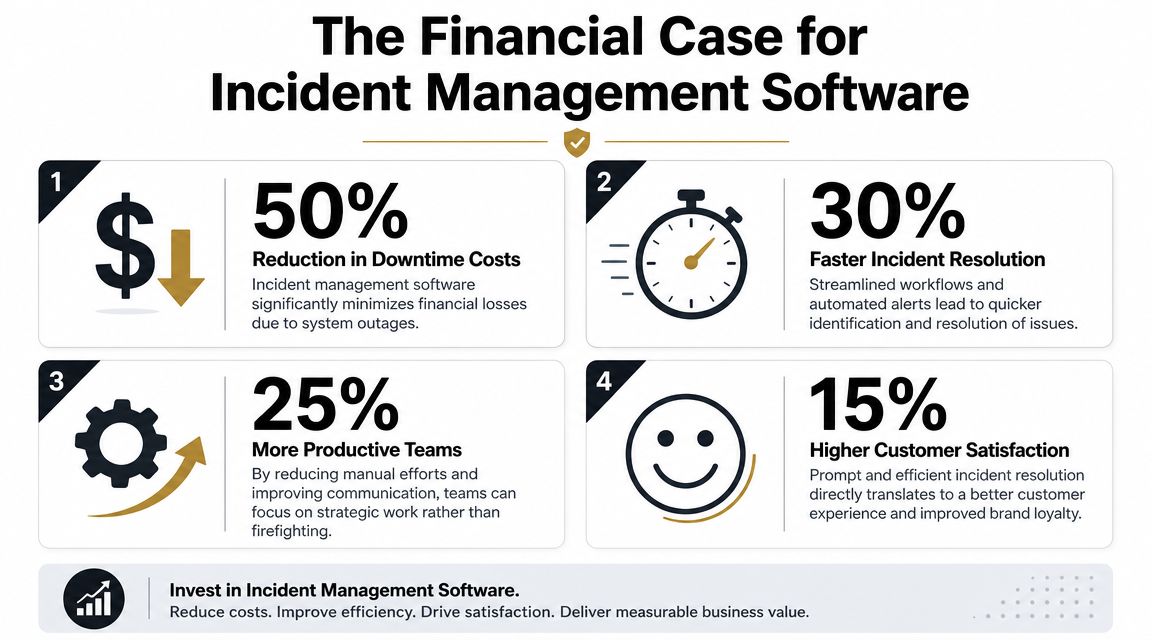
The ROI case for incident management software usually gets framed too narrowly. Buyers talk about uptime, alerting, or ticket volume. That misses the bigger return. Its primary value stems from reducing coordination failure during disruption.
Splunk identifies Mean Time to Detect (MTTD) and Mean Time to Resolve (MTTR) as core operational metrics for incident programs. Modern software aims to improve those benchmarks through centralized tracking, automated workflows, and SLA management, as outlined in Splunk's guide to incident response metrics.
A visual summary helps when you're socializing the business case with finance, operations, and service leaders.
Start with the metrics that matter
MTTD tells you how long it takes to recognize that something is wrong. MTTR tells you how long it takes to restore service. Both are operational metrics, but both also have business consequences.
If detection is slow, customers keep failing before your team even knows there's an issue. If resolution is slow, employee productivity drops, support costs rise, and communication becomes more chaotic. Incident management software improves these metrics when it removes manual handoffs, centralizes updates, and routes work correctly the first time.
A practical ROI model should include:
- Downtime exposure: Which services generate the highest business impact when unavailable
- Labor efficiency: How much responder time is lost to duplicate triage, manual updates, and ad hoc coordination
- Customer protection: Whether incidents create avoidable support contacts, failed transactions, or service complaints
- Risk reduction: Whether the company can produce a clear audit trail and review record after the event
This video is useful if you need a quick executive-level explainer during internal planning.
Build the case in business language
A strong business case doesn't say, “We need better incident tooling.” It says, “We need faster detection, lower coordination overhead, fewer service disruptions reaching customers, and a cleaner compliance trail when they do.”
That framing changes the conversation. Finance can understand avoided disruption. HR can understand lost employee productivity. CX leaders can understand what happens when support teams communicate inconsistently during outages.
For teams building a more disciplined operational baseline, these essential maintenance reliability resources from Forge Reliability are useful because they connect incident thinking to broader reliability metrics and service health practices.
What usually weakens the ROI story
Three things tend to undermine the business case:
| Weak argument | Better argument |
|---|---|
| “We need a new tool.” | “We need a controlled response system for business-critical disruptions.” |
| “It will help IT.” | “It protects customers, employees, and regulated operations when services fail.” |
| “It has good features.” | “It improves detection, coordination, escalation, and post-incident accountability.” |
Buyers get budget faster when they tie incidents to customer impact and employee disruption, not just technical inconvenience.
How to Evaluate and Choose the Right Software
Organizations typically don't struggle to find incident management software. They struggle to pick the right category. The biggest decision isn't vendor branding. It's architecture.
InvGate's guidance is clear on the trade-off. Organizations should choose a full ITSM platform when shared context across incident, problem, and change management matters, and choose specialized alerting or AIOps-oriented tools when speed, noise reduction, and on-call response are the priority, according to InvGate's incident management software buying guidance.
Full platform or specialized response tool
A full ITSM platform makes sense when your incident process is tightly linked to service management governance. ServiceNow, Jira Service Management, and similar platforms are often the right choice when incidents need to connect directly to change records, problem investigations, CMDB relationships, approvals, and enterprise reporting.
Specialized response tools make sense when operational urgency is the main issue. PagerDuty, incident.io, FireHydrant, and similar products are often stronger at on-call scheduling, escalation speed, responder workflows, and real-time coordination.
The wrong choice usually looks like this:
- A company buys a full suite when it really needed fast responder mobilization.
- A company buys a point tool when it needed enterprise process integration and auditability.
What a serious evaluation should include
Don't evaluate platforms only through demos. Evaluate them against your actual response model.
Incident Management Software Evaluation Checklist
| Evaluation Criterion | What to Look For | Why It Matters |
|---|---|---|
| Integration ecosystem | Native integrations with monitoring tools, collaboration platforms, ITSM systems, knowledge bases, and customer service platforms | Incidents rarely stay inside one tool. Integration reduces swivel-chair work and data loss |
| Intake and event ingestion | Support for alerts, email, chat, phone, portals, and human-reported incidents | A fragmented intake model creates blind spots and duplicate records |
| Triage and routing | Severity assignment, ownership mapping, responder tiers, escalation rules | Fast routing lowers acknowledgment delays and keeps senior teams focused on the right issues |
| Workflow automation | Executable runbooks, automated paging, SLA timers, task orchestration | Repetitive steps should be operationalized, not recreated during every incident |
| Communication model | Internal collaboration, stakeholder updates, status workflows, audit history | Communication quality affects both trust and response speed |
| Reporting and review | Timeline reconstruction, post-incident review support, trend analysis | You need operational learning, not just case closure |
| Security and compliance | Role-based access, audit trails, data controls, support for regulated environments | Many incidents involve sensitive operational or customer information |
| Scalability | Performance across distributed teams, services, and high alert volumes | The tool must still work cleanly under pressure |
| User experience | Clear responder interface, low admin friction, usable mobile workflows | If the system is hard to use during stress, adoption will collapse |
Questions worth asking vendors
Ask direct questions, and push for workflow proof:
- Show me how a monitoring alert becomes an assigned incident
- Show me how you prevent duplicates across channels
- Show me where responders see runbooks and prior incidents
- Show me the audit trail after closure
- Show me how the platform handles both IT and non-IT incidents
One more practical point. If your enterprise strategy includes AI-driven service operations, incident response should connect to the same ecosystem as support and workflow automation. That's why some buyers assess service desk suites, on-call tools, and conversational AI platforms together instead of in separate workstreams.
Implementation Best Practices and Creating Runbooks
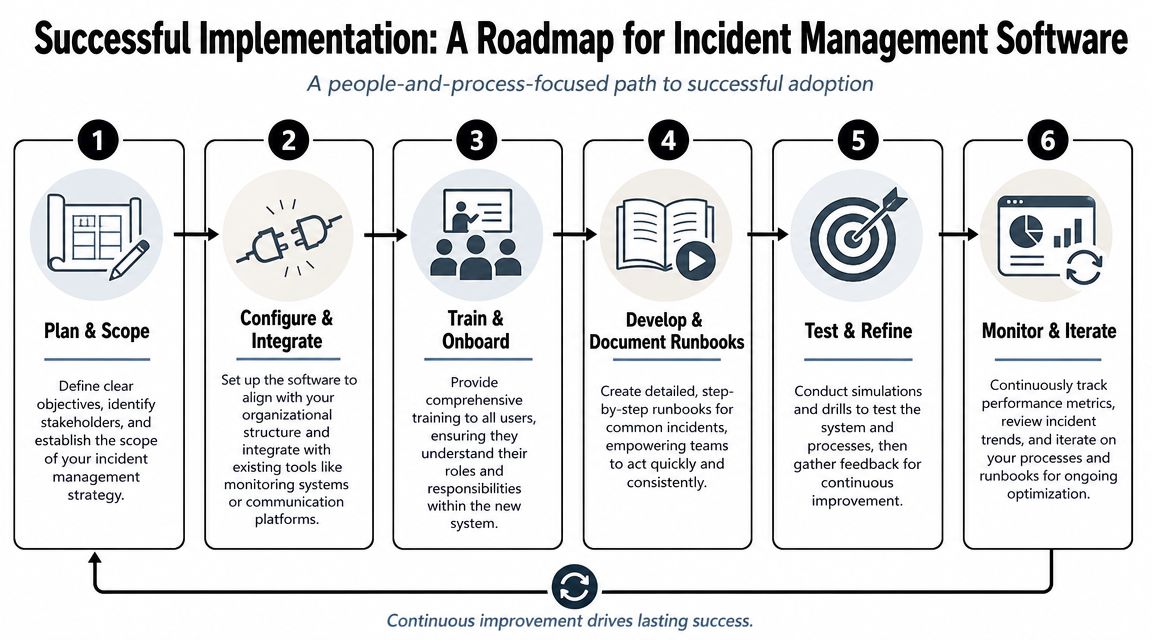
Buying the software is the easy part. Making it operational is where most projects succeed or stall. The teams that get value quickly usually define process first, then configure the platform to enforce it.
A rollout should be treated like an operating model change, not just a tooling project.
Start with ownership and severity
Before automating anything, define who owns what. Every critical service should have a named owner, a backup owner, and a clear escalation path. Severity levels should be plain enough that anyone opening an incident can apply them consistently.
Good severity models are based on business impact, not just technical symptoms. A minor infrastructure alert might be low priority. A small failure in a payroll workflow on processing day might be high priority because employee impact is immediate.
Build runbooks for repeatable incidents
Runbooks are where implementation becomes real. They turn tribal knowledge into executable response steps. A useful runbook doesn't try to explain everything. It tells responders what to do first, what to verify next, when to escalate, and how to communicate status.
Strong runbooks usually include:
- Trigger conditions: What kind of incident activates this playbook
- First actions: Immediate containment or validation steps
- Decision points: When to escalate, reroute, or declare broader impact
- Dependencies: Systems, teams, or vendors that may be involved
- Communication prompts: What stakeholders need to know and when
- Closure criteria: What “resolved” means
A runbook should remove uncertainty, not add reading material.
Train people on the workflow they'll actually use
Training often fails because teams get platform training instead of response training. Responders don't need a tour of every menu. They need to know how to acknowledge, collaborate, escalate, log actions, and close cleanly under pressure.
That's one reason internal administrators matter. If your rollout depends on platforms like ServiceNow, structured admin enablement helps. For teams building in-house expertise, this expert guide for ServiceNow CSA exam is a useful reference for understanding core administration concepts behind configuration and governance.
Test before the real incident tests you
Don't wait for a major outage to learn whether the routing rules work. Run simulations. Test a customer-facing failure, an internal employee systems issue, and a cross-functional incident that needs executive updates.
A simple implementation pattern works well:
- Launch with a small set of critical services
- Document runbooks for the most common high-impact incidents
- Validate routing, escalation, and communication paths
- Run drills and capture friction
- Refine the workflow before expanding coverage
Teams that skip simulations usually discover the same problems at the worst possible moment. Wrong owners, vague severities, incomplete runbooks, and too many manual updates.
Use Cases for IT, CX, EX and the Future of Incidents
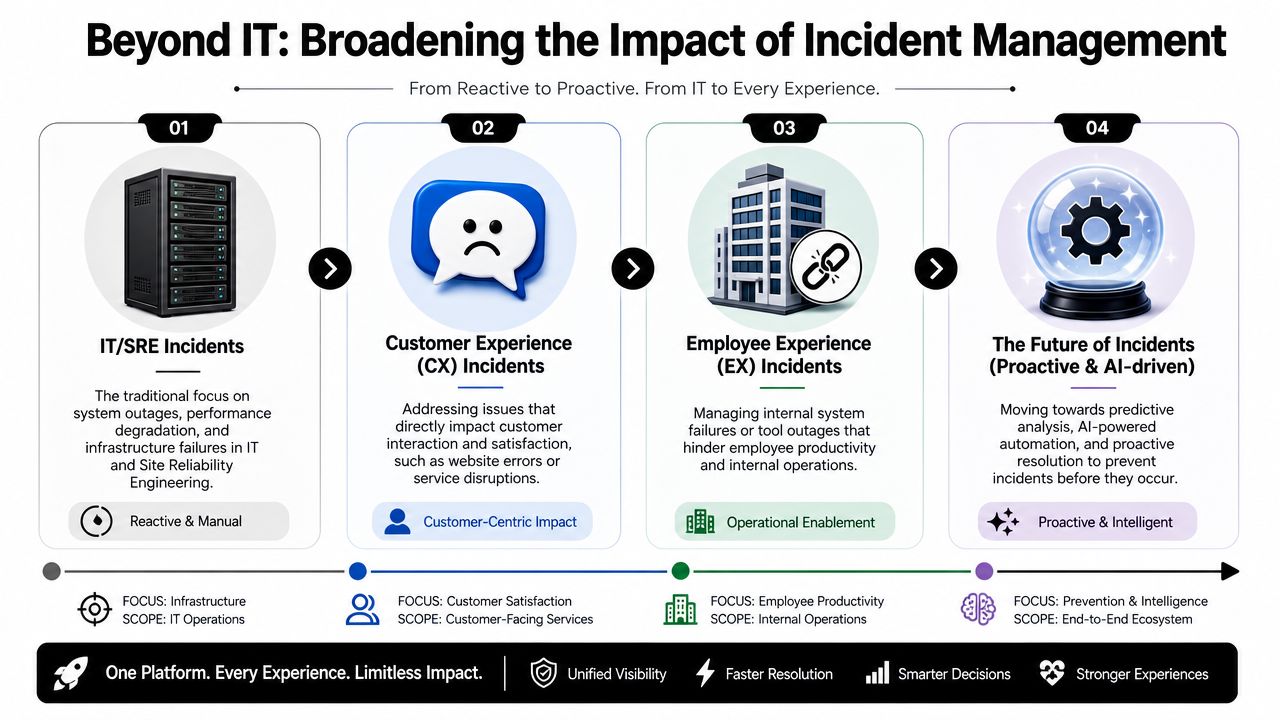
The most useful shift in this category is conceptual. Incident management software is no longer only for infrastructure teams trying to restore servers. It's a cross-enterprise response system for any disruption that affects service, safety, compliance, or productivity.
That broader view matters because many buyers searching for this category don't need classic IT ticketing. Sphera's framing of incident management reflects this wider demand in healthcare, public safety, EHS, and other compliance-heavy settings where documentation, investigation, and reporting are central requirements, as shown in Sphera's incident management software overview.
IT operations
The traditional use case still matters. A database cluster fails. Monitoring detects latency. The platform creates an incident, routes it to the right responder tier, opens the relevant runbook, and tracks actions until service is stable.
What separates mature teams from reactive ones isn't just technical skill. It's whether the response has structure. Clear ownership, coordinated updates, and a usable review trail are what keep one infrastructure incident from becoming a leadership crisis.
Customer experience
Now take a CX example. A customer-facing AI agent starts producing failed responses because a dependent service is unavailable. Customers experience delay or abandonment. Support volumes rise. The incident is no longer just “bot degradation.” It's a service interruption affecting customer trust.
In this kind of workflow, enterprises often connect incident operations with service channels so frontline teams can route issues correctly and maintain communication continuity. Platforms such as ServiceNow, Jira Service Management, PagerDuty, and conversational AI systems like Yellow.ai can each play a role depending on whether the need is workflow governance, on-call escalation, or automated customer and employee support orchestration.
Employee experience and what comes next
Employee incidents are often underrated because they don't always hit revenue first. But they slow the organization from the inside. A payroll system issue, identity outage, or broken HR workflow can affect thousands of employees at once, overwhelm internal support, and create avoidable distrust.
The future of incident management is getting interesting. The category is moving toward earlier detection, better signal correlation, and more automation in diagnosis and response. That doesn't mean humans disappear. It means humans spend less time gathering fragments and more time making decisions with context.
The future state isn't just faster recovery. It's fewer incidents reaching customers and employees in the first place.
If your enterprise is trying to protect both customer and employee experience with one operational model, Yellow.ai fits naturally into that conversation. It supports automated service interactions, ticket routing, and agent handoff across CX and EX workflows, which can help teams connect incident response with the channels where disruption is first felt.