









Most implementation timeline estimates fail before the project starts. Leaders often ask how quickly a team can configure a model, connect an interface, or launch a pilot. Those questions matter, but they rarely determine the delivery date. In enterprise AI, the schedule is usually set by data access, integration decisions, security approvals, legal review, and the number of people who must agree on how the system will operate.
That's why a promising pilot can go live quickly while enterprise adoption takes far longer. A disciplined implementation plan treats readiness and governance as delivery work, not administrative preparation. The result is a more credible forecast, fewer late surprises, and a faster path to value without weakening controls.
Table of Contents
- Why Most Implementation Timeline Estimates Fail
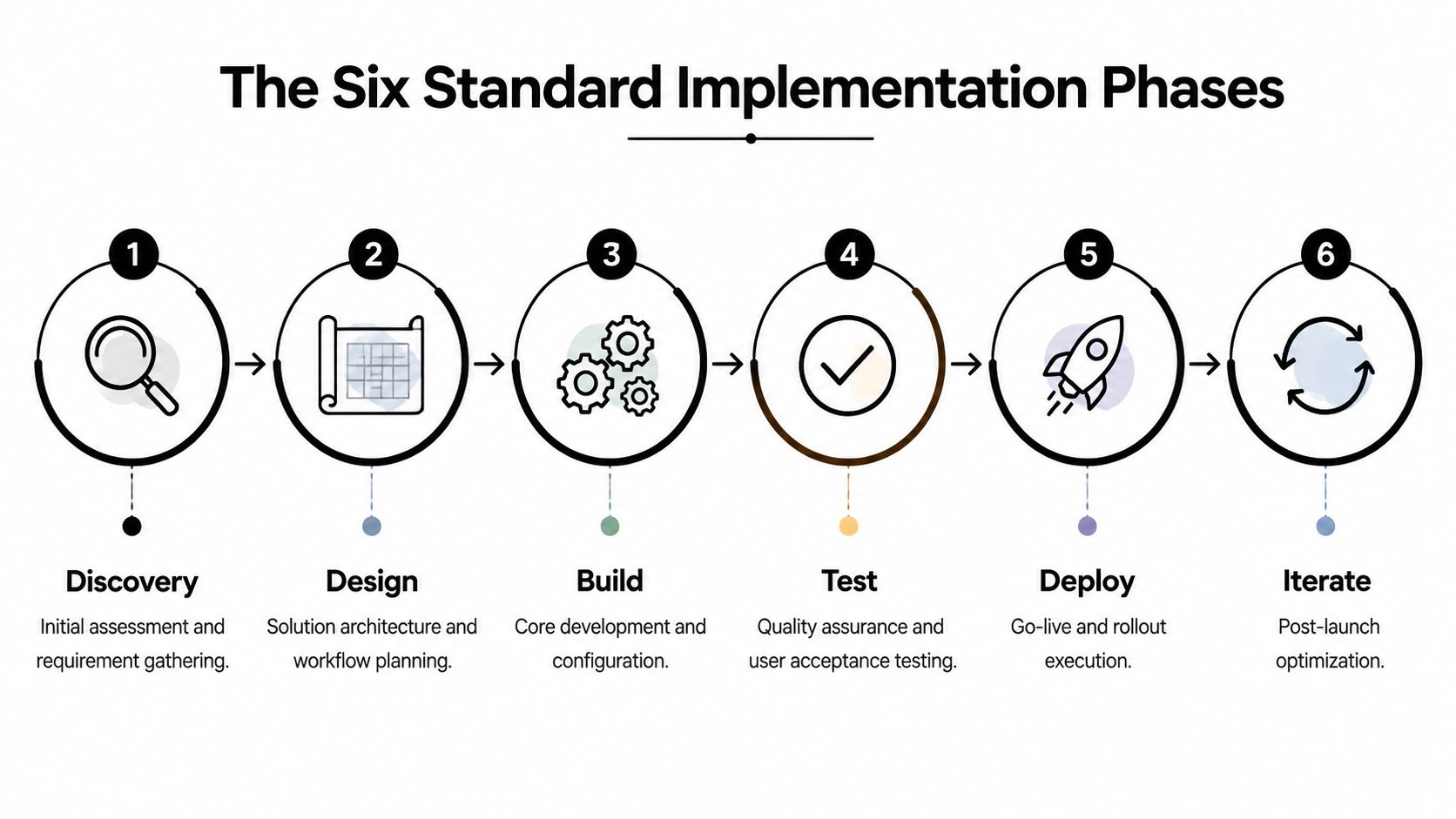
- The Six Standard Implementation Phases Explained
- Benchmark Timelines by Company Size and Use Case
- The Hidden Work That Extends Timelines
- Acceleration Strategies That Actually Work
- Sample Gantt Timelines for CX and EX Deployments
- Building Implementation Timelines as a Strategic Capability
Why Most Implementation Timeline Estimates Fail
Implementation estimates often fail at the starting line. Teams divide the work into discovery, build, testing, and launch, then assign time to each phase. That structure looks orderly, but it treats configuration as the main schedule driver. In enterprise AI, the critical path often runs through readiness checks and governance gates that must clear before meaningful build work can proceed.
One infrastructure-delay study found that 60% of delay drivers came from the preparation phase, rather than tendering or execution, as summarized in this analysis of enterprise AI adoption and implementation readiness. The implication is practical. An approved business case and capable engineering team do not resolve delays caused by data owners, identity administrators, legal counsel, security architects, and operational leaders still working through deployment decisions.

Readiness is a delivery phase
Before configuration starts, the team must confirm which systems hold the required information, whether that data is accessible, how records are matched, and how incomplete information will be handled. Ownership also needs a clear decision. A customer-service agent may work across CRM records, order data, knowledge articles, identity services, and escalation tools. Each dependency adds an owner, an access decision, and a condition that must be tested.
Governance introduces separate gates. Legal review may cover consent, retention, disclosure, and regulated workflows. Security review may require authentication, authorization, logging, and environment controls. Business owners must set the boundary between actions the AI can perform independently and cases that must transfer to a person.
Practical rule: If an approval or dependency can stop production access, place it on the project plan from the first week.
Why optimistic plans become long programs
A short pilot usually relies on a narrow data set, limited workflow, and small user group. Enterprise deployment brings in additional regions, channels, systems, policies, and operational handoffs. Each addition increases coordination across owners, reviewers, and support teams. The schedule grows through decisions and dependencies, not only through configuration tasks.
Current guidance places foundation work in the early months and pilots in the following months, while recognizing that full transformation commonly takes 12 to 18 months or more, as described in this enterprise AI implementation timeline guidance. Setting an ambitious target is fine, but calling a controlled pilot an enterprise rollout creates unrealistic expectations.
A credible estimate begins with five readiness questions:
- Data access: Who owns each source, and can the team use it in the intended environment?
- Governance: Which decisions require formal review, and which can follow an approved pattern?
- Integration: Are interfaces documented, stable, and available for testing?
- Operating model: Who monitors performance, handles exceptions, and updates knowledge?
- Adoption: Which teams must change their daily process before the system creates value?
Until those answers are specific, the implementation timeline remains a hypothesis rather than a delivery plan.
The Six Standard Implementation Phases Explained
The six-phase model remains useful, provided each phase has concrete exit criteria. It should describe decisions and deliverables, not just meetings on a calendar.
Discovery
Discovery identifies the business outcome, target users, source systems, failure conditions, and operational owner. Strong discovery produces a workflow map, a dependency register, a data inventory, a risk assessment, and a prioritized use-case backlog.
The key handoff is a signed scope boundary. The team should know which workflow enters the first release, which requests require human intervention, and which integrations are essential for a credible test. Stakeholder interviews alone aren't enough. The team needs sample conversations, real exception paths, escalation rules, and measurable acceptance conditions.
Design
Design turns requirements into an operating blueprint. Architects define the conversation or task flow, retrieval approach, identity model, integration pattern, observability requirements, and human handoff experience.
Teams decide whether to use an existing connector, an API, a batch process, or a controlled manual fallback. They also define what the AI must never do. Design is complete when business, security, legal, and technical owners agree on the target behavior and the interfaces required to test it.
Build
Build includes configuration, prompt and workflow construction, knowledge preparation, connector setup, role design, and environment deployment. The coding itself may be relatively contained when the preceding decisions are settled.
Teams lose time when they build around unverified assumptions. A field that appears available may lack the required permission. A knowledge article may be outdated. An escalation route may work in a diagram but fail under real identity conditions. Build should therefore include early integration checks, not wait for a late technical test.
Test
Effective testing covers more than happy-path accuracy. It examines ambiguous language, missing data, authentication failures, policy boundaries, handoffs, multilingual behavior where relevant, and the consequences of an incorrect action.
A useful test pack includes scenario definitions, expected outcomes, failure severity, traceability to requirements, and a retest process. User acceptance testing should validate operational fit, not just confirm that the interface opens. The handoff criterion is evidence that the agreed scenarios meet their acceptance conditions and that unresolved risks have named owners.
Deploy
Deployment is a controlled change to production operations. It includes release approval, monitoring, support coverage, rollback conditions, user communications, and a decision about whether to launch to one group or multiple groups.
A production-first design can expose operational blockers early, but it must still use safeguards. Teams should establish who watches the initial traffic, how incidents are triaged, and when the system transfers work to a person.
Iterate
Iteration begins immediately after launch. Owners review failure patterns, unanswered questions, escalation reasons, latency, and user feedback. They then improve content, routing, policies, integrations, or training.
The phase isn't an excuse to launch unfinished work. It's the mechanism for managing controlled learning after the release boundary. Parallel workstreams can compress the overall schedule, but only when dependencies and approval gates are explicit.
The following video provides additional context for structuring implementation work around clear phases and handoffs.
Benchmark Timelines by Company Size and Use Case
Company size establishes a baseline, but readiness work usually determines where a project lands within that range. Business units, markets, systems, approval bodies, data access, and customer risk all add coordination and governance gates before implementation can proceed.
A 2025 ERP benchmark summary reports that small and midsize businesses typically complete implementations in about 3 to 9 months, while large enterprises commonly need 6 to 18 months. Mid-sized multinational ERP rollouts can take 18 to 24 months end-to-end, as documented in this enterprise software implementation benchmark. ERP is not identical to AI, but the comparison shows how entities, controls, interfaces, and approval paths expand the calendar.
Planning and budgeting software provides another reference point. 80% of companies complete implementation within 1 to 12 months, while 96% of best-in-class companies finish within a year. Only 63% of laggards complete the work within that period, according to this planning software implementation timeline benchmark. Execution maturity and scope discipline affect delivery as much as the software category.
| Deployment Type | Company Size | Typical Timeline | Key Variables |
|---|---|---|---|
| Structured enterprise AI use case | Mid-complexity enterprise | 14 weeks | Defined methodology, production-first design, structured data, limited coordination complexity |
| Customer-facing AI | Enterprise | 16 to 26 weeks | Latency, accuracy, customer risk, escalation design, security and operational review |
| Multi-market AI deployment | Enterprise, multiple regions | 24 to 40 weeks | Governance harmonization, compliance reviews, regional processes, localization, sequential approvals |
| ERP-style enterprise rollout | Small or midsize business | About 3 to 9 months | Scope, data migration, integrations, process standardization |
| Major enterprise system rollout | Large enterprise | About 6 to 18 months | Business-unit alignment, legacy systems, access controls, testing scale |
| Mid-sized multinational ERP rollout | Multinational organization | About 18 to 24 months | Country processes, currencies, regulatory variation, deployment waves |
The AI ranges come from a neutral guide to enterprise AI implementation timelines. Customer-facing and multi-market deployments take longer because they require evidence for latency, accuracy, escalation behavior, governance, and compliance. Teams can run technical work in parallel, but approval gates should remain sequenced when one decision depends on another.
The lower end applies when the use case is narrow, data is accessible, the integration pattern is known, and the approval path is established. The upper end becomes more realistic when the project spans markets, regulated workflows, multiple systems, or a new operating model. Before committing to a date, confirm those conditions rather than treating the table as a promise.
The Hidden Work That Extends Timelines
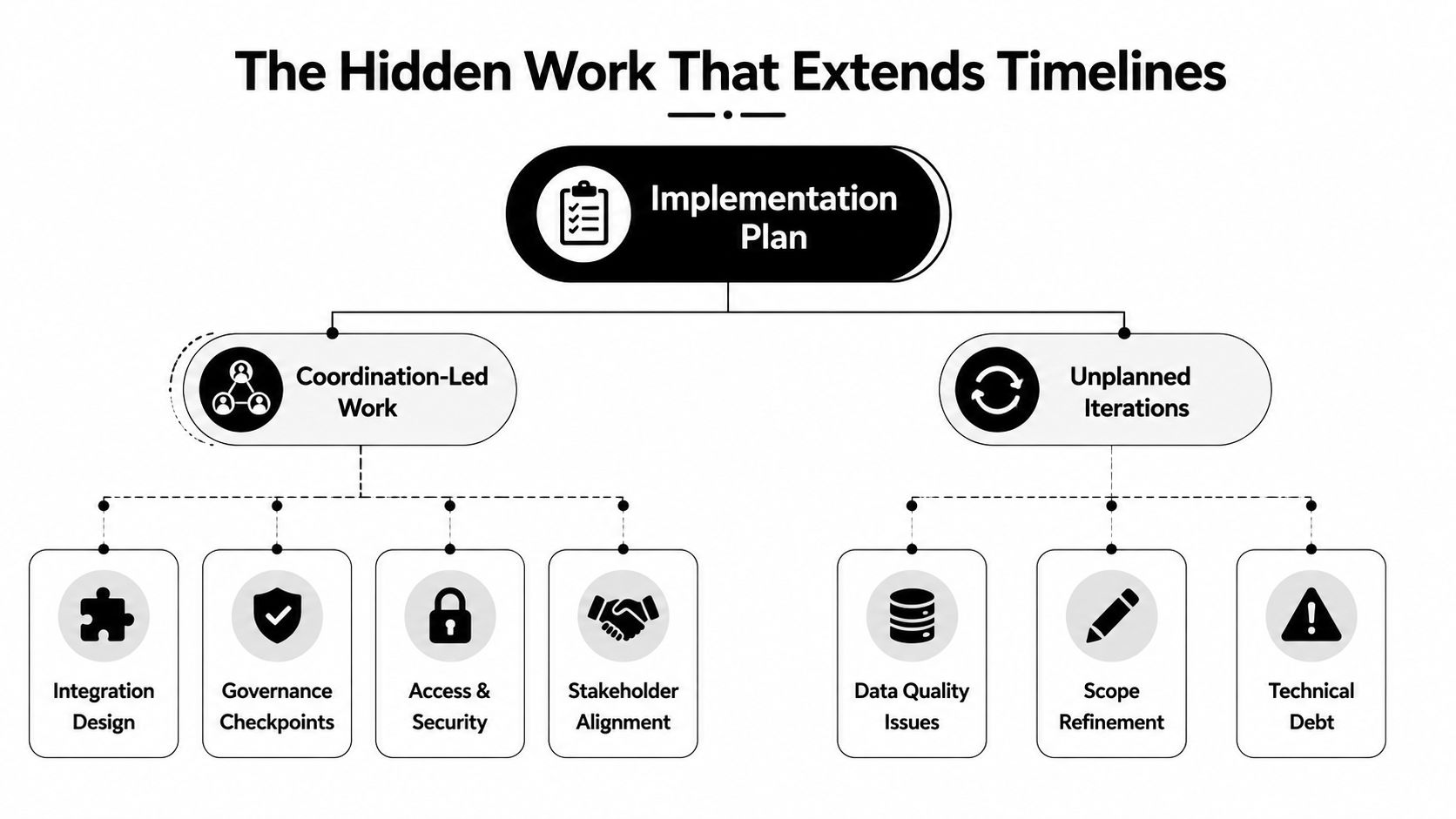
The most expensive schedule surprises rarely come from model training. They come from work that wasn't represented in the original plan.
Integration design is one example. Teams must determine which system is authoritative, how the AI identifies a user, what permissions it inherits, how errors return, and what gets logged. A pre-built connection may simplify the technical path, but the business still has to agree on data ownership and action boundaries. An enterprise integrations platform can reduce connector work, but it doesn't remove the need for architecture and security decisions.
Governance gates create sequential work
Legal review, security controls, and system authorization often happen in sequence because each group needs evidence from the previous decision. Legal may need the final data flow. Security may need the proposed identity model. Operations may need proof that the escalation behavior works. Trying to skip those gates can create deployment risk rather than speed.
The more systems, markets, and approval groups a project involves, the more the schedule shifts from development-led work to coordination-led work. The project manager's job is to expose that shift early.
- Integration design: Document systems, permissions, actions, fallbacks, and error handling before build completion.
- Governance checkpoints: Define the evidence each review requires and book review windows early.
- Access and security: Request environments, service accounts, roles, and logging permissions before testing begins.
- Stakeholder alignment: Give business owners authority to resolve scope and policy questions without reopening settled decisions.
The pilot-to-scale gap
Early results can appear in 4 to 8 weeks or 3 to 6 months, while full organizational adoption commonly takes 12 to 18 months or longer, according to this enterprise AI adoption strategy analysis. These are different milestones. A pilot proves that a workflow can function. Scale requires training, support processes, cross-functional integration, governance routines, and user trust.
A pilot stalls when its team optimizes the experience for a contained environment but doesn't prepare the surrounding operation. The production owner may not have a monitoring routine. HR may not have a training plan. The contact center may lack a clear escalation policy. Each omission becomes a new workstream after the pilot succeeds.
A live pilot is evidence of technical possibility. It isn't evidence of organizational readiness.
Acceleration Strategies That Actually Work
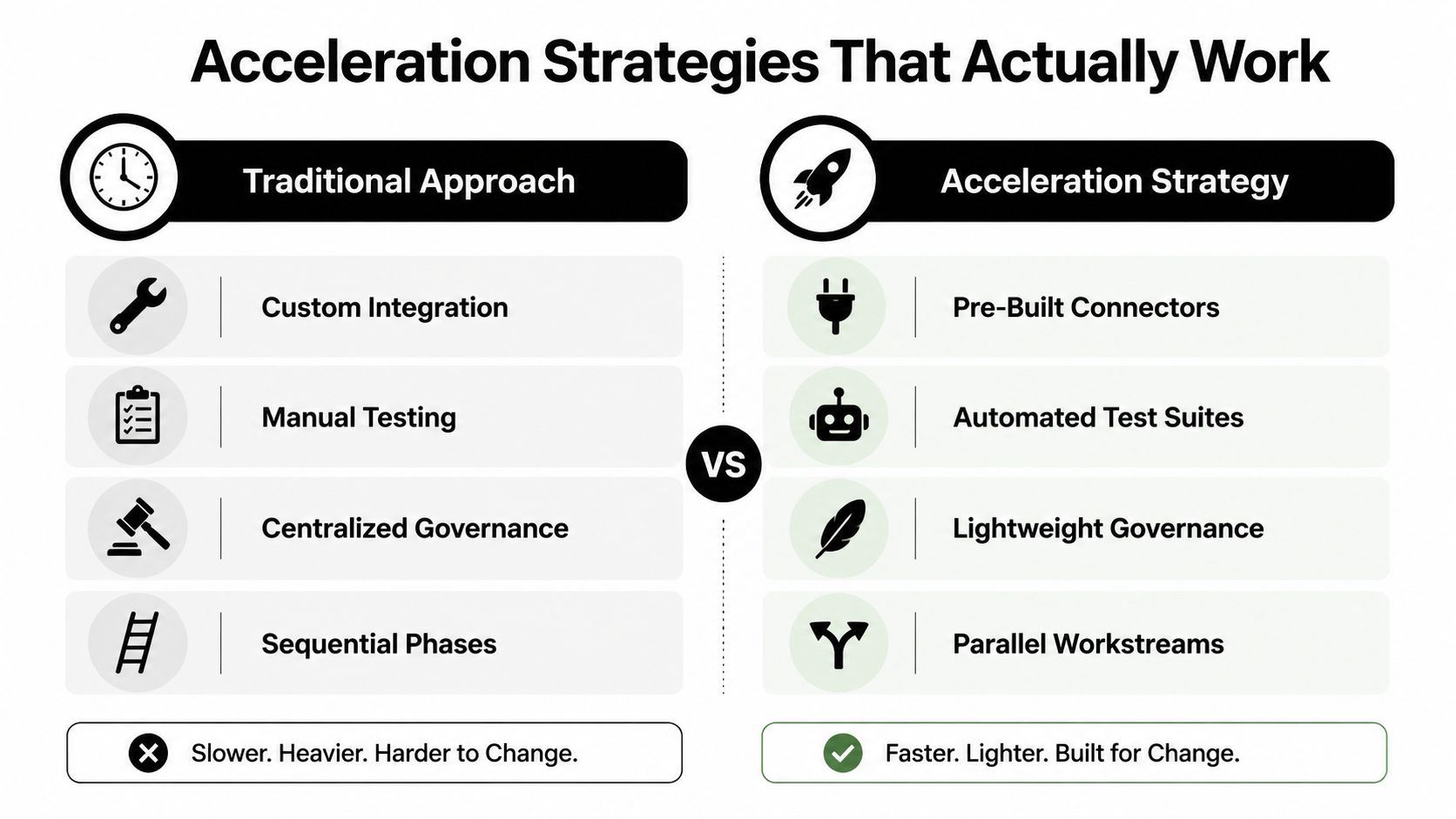
Speed comes from removing avoidable waiting and rework, not from cutting testing or governance. The strongest acceleration investments reduce repeated engineering effort while preserving decision quality.
Start with reusable building blocks
Pre-built connectors for systems such as Salesforce, Zendesk, and HubSpot can avoid custom connector development, provided the integration meets the required permissions and action model. Agent templates can also shorten design work by giving teams proven workflow patterns to adapt rather than starting with a blank canvas.
That doesn't mean teams should accept a template without review. They still need to inspect data handling, escalation logic, authentication, auditability, and failure behavior.
Automate the test loop
Manual testing is slow and incomplete when an agent has many intents, channels, integrations, and exception paths. Automated test suites can run repeatable scenarios after each change, compare outcomes against expected behavior, and identify regressions before user acceptance testing.
A platform's automated testing capability is useful when it connects test cases to release decisions rather than producing an isolated quality report. The test owner should define which failures block deployment and which enter the improvement backlog.
Run workstreams in parallel, not blindly
Design, data preparation, integration validation, security review, and change planning can overlap when their inputs are stable. A team can prepare knowledge content while an integration owner validates permissions. Security can review the architecture while business users define acceptance scenarios.
Multi-LLM architectures can also reduce delays caused by dependence on one model provider. Omnichannel orchestration lets teams plan voice, chat, email, images, and video as coordinated channels rather than rebuilding each experience separately. Yellow.ai is one example of an enterprise platform that combines multi-LLM architecture, omnichannel orchestration, pre-built integrations, agent building, and automated testing.
The trade-off is governance complexity. More models and channels require a clear routing policy, consistent evaluation criteria, and centralized observability. Speed gains disappear if the architecture becomes difficult to explain or support.
A practical priority order is:
- Remove waiting: secure access, review slots, data owners, and decision rights first.
- Reduce custom work: reuse connectors, templates, workflow patterns, and test assets.
- Automate repetition: run regression tests and deployment checks consistently.
- Parallelize safely: overlap tasks only after defining their inputs and exit conditions.
- Protect the critical path: don't compress legal, security, or production-readiness checks by removing evidence.
Sample Gantt Timelines for CX and EX Deployments
A useful Gantt chart shows approval gates and handoffs, not merely colored blocks. For a mid-complexity customer experience deployment, readiness work begins before configuration, and several workstreams overlap once their inputs are stable.
| Workstream | Weeks | Milestone or dependency |
|---|---|---|
| Discovery and readiness | 1 to 3 | Use case, data inventory, owners, risk boundaries |
| Solution design | 2 to 4 | Architecture, workflow, escalation, acceptance criteria |
| Integration validation | 3 to 6 | Permissions, system responses, error paths |
| Agent build and knowledge setup | 4 to 8 | Core flows, content, actions, fallback behavior |
| Security and governance review | 5 to 9 | Evidence review, controls, approval conditions |
| Test automation and QA | 7 to 11 | Scenario coverage, regression checks, defect resolution |
| User acceptance testing | 10 to 12 | Business sign-off against agreed outcomes |
| Deployment preparation | 11 to 13 | Training, monitoring, support, rollback plan |
| Controlled launch and iteration | 14 onward | Production observation and prioritized improvements |
Integration validation can start while the build is underway, provided permissions and system responses are available. Governance review should examine the emerging design before testing closes, so unresolved control questions do not become a launch blocker. Production approval depends on evidence from integration, governance, and business testing.
Multi-market deployments follow a different pattern. Governance harmonization, regional latency and accuracy requirements, and compliance reviews add sequential gates. A 24-week planning template might look like this:
| Workstream | Weeks | Critical dependency |
|---|---|---|
| Global discovery and regional comparison | 1 to 4 | Confirm shared workflow and local variation |
| Data and integration architecture | 2 to 7 | Regional systems and permission models |
| Governance framework | 3 to 9 | Common policy with market-specific controls |
| Build and localization | 6 to 13 | Approved architecture and content ownership |
| Regional validation | 10 to 16 | Local scenarios, language, and escalation |
| Compliance reviews | 12 to 19 | Final data flows and operational evidence |
| Cross-market testing | 16 to 21 | Regional sign-offs and defect closure |
| Wave deployment preparation | 19 to 23 | Training, support, monitoring, rollback |
| Initial rollout and iteration | 24 onward | Controlled launch with regional oversight |
The schedule should show decision ownership as clearly as technical work. If a regional data owner, security reviewer, or business approver has no confirmed availability, the displayed build dates are only provisional.
For an experience deployment, the operating model also needs validation. The InteleTravel CX support case study provides a reference for structuring chat and voice support workflows, but an external example cannot replace internal checks on content, escalation, permissions, and production support.
Building Implementation Timelines as a Strategic Capability
Implementation timelines are a measure of organizational capability, not just project administration. Teams that repeatedly clarify data ownership, standardize governance evidence, maintain reusable integrations, and automate testing can move from one deployment to the next with less reinvention.
The strategic advantage comes from making readiness repeatable. Create a pre-implementation checklist, maintain approved architecture patterns, define standard risk gates, assign permanent product and operations owners, and keep a reusable test library. Track not only launch dates, but also the causes of waiting and rework.
Pilot success won't automatically produce adoption. Change management, cross-functional integration, and operational governance decide whether users trust the system and whether the business can support it at scale. Treat those capabilities as part of the platform strategy, then plan every new use case against the same readiness standards.
Start your next estimate by mapping dependencies and approval gates before assigning build dates. For CX and EX teams evaluating an enterprise AI platform, Yellow.ai offers agent building, omnichannel orchestration, multi-LLM support, pre-built integrations, and automated testing to help structure safer, more repeatable deployments. Visit Yellow.ai to assess how its platform fits your implementation roadmap.