













Your team probably already has a working demo.
It can answer policy questions, draft replies, summarize tickets, and maybe even call an API in a sandbox environment. Then critical questions emerge. Which use case goes live first? Who owns risk? How does the agent access Salesforce without overreaching? What happens when the model is wrong, slow, or unavailable? How do you deploy across chat, voice, and support operations without creating a second support problem?
That's where most enterprise AI agent initiatives either mature or stall. Learning how to deploy AI agents in a large organization isn't about picking a model and exposing an endpoint. It's about turning an interesting capability into a controlled operating system for service delivery, employee support, and workflow automation.
Table of Contents
- The Deployment Blueprint From Strategy to Requirements
- Designing Your Enterprise Agentic Architecture
- Integrating Data and Enterprise Knowledge
- Ensuring Security Compliance and Production Readiness
- Executing a Phased Go-Live and Rollout Strategy
- Mastering Operations and Continuous Optimization
The Deployment Blueprint From Strategy to Requirements
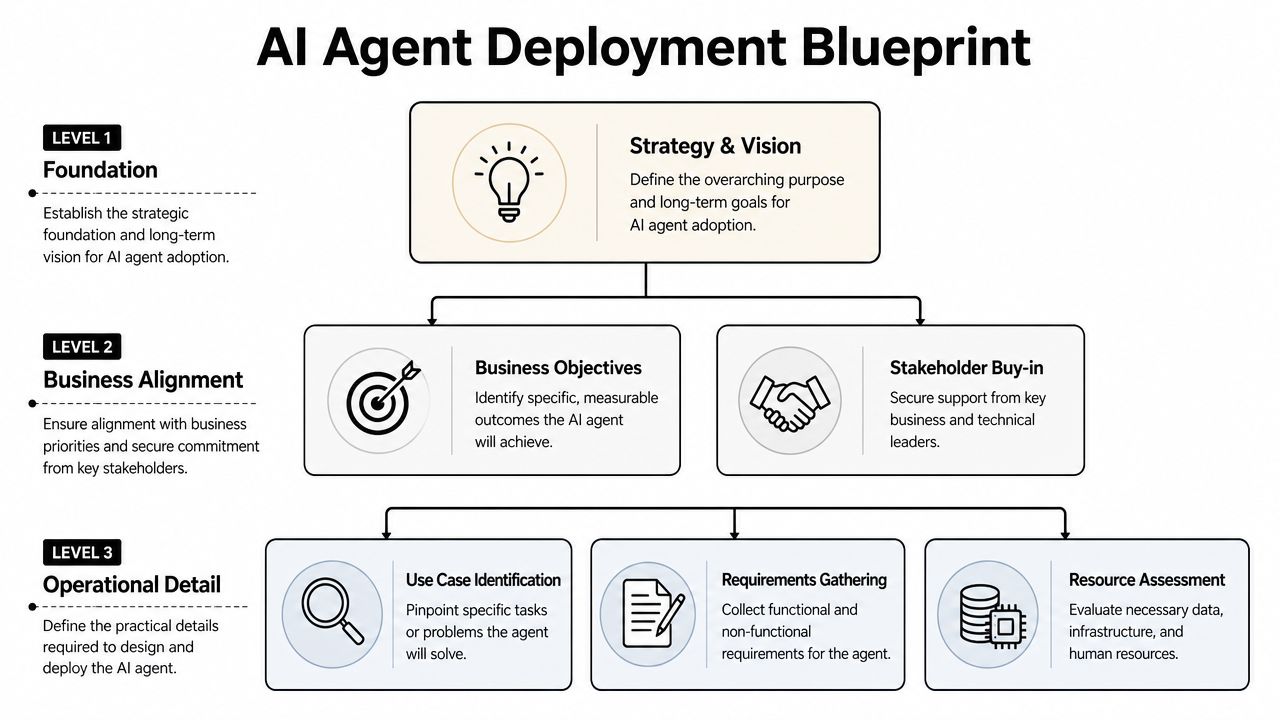
Enterprise agent deployment starts as a business initiative. If it starts as a model experiment, you usually get a polished prototype with no agreement on outcomes, ownership, or acceptable risk.
That's why the first decision isn't which LLM to use. It's which business KPI the agent must move, who owns that KPI, and where the current operating process is breaking. Enterprises that align AI initiatives with specific business KPIs before development are 3.5x more likely to report significant ROI within the first 12 months of deployment according to this AI ROI study.
Start with a business owner, not a model choice
The strongest AI agent programs usually begin in one of two places. Either a CX leader wants to reduce pressure on support operations, or an EX owner wants to remove repetitive internal service work from HR, IT, or shared services. Both are valid. What matters is that one accountable leader owns the outcome.
A practical selection filter looks like this:
- High-volume repeatability: The agent should start with work that happens often and follows recognizable patterns, such as order status, password reset guidance, policy lookup, benefits questions, appointment handling, or return initiation.
- Clear system of record: The answer must come from somewhere authoritative, such as Salesforce, Zendesk, Genesys, an HRIS, or an internal knowledge repository.
- Tolerable first-step scope: Good pilots don't require full autonomy on day one. They often begin with answer generation, triage, summarization, or guided action before moving to end-to-end execution.
- Escalation path: If the agent can't complete the task, a human team must be able to take over with context preserved.
Practical rule: Don't deploy your most politically visible use case first. Deploy the one with clean ownership, strong data, and a manageable failure radius.
Pilot selection is where many teams overcomplicate the work. They choose a broad ambition like “transform customer support” instead of a bounded operational problem. A better brief is narrower: authenticate users, resolve common policy queries, fetch account context, and route edge cases with structured handoff.
If your evaluation process is still loose, a buyer's guide to evaluating conversational AI solutions can help frame the right questions around ownership, integration depth, governance, and deployment fit.
Define requirements that survive contact with production
Once the use case is selected, requirements need to move beyond “the agent should answer correctly.” Enterprise deployment needs two categories defined early.
Functional requirements describe what the agent must do. That includes channels, languages, authentication steps, supported intents, handoff conditions, CRM lookups, ticket creation, return workflows, summaries, and supervisor visibility.
Non-functional requirements decide whether the agent is deployable at all. These include security controls, auditability, response consistency, latency tolerance, uptime expectations, observability, role-based permissions, and data residency constraints.
A simple requirement matrix helps:
| Requirement area | What to define early |
|---|---|
| User scope | Which customer or employee segments the agent serves first |
| Data access | Which systems it can read, write to, or trigger |
| Decision rights | When the agent can act, recommend, or escalate |
| Governance | Who approves prompts, tools, releases, and policy changes |
| Success criteria | Which business and operational outcomes determine expansion |
One more point matters. Requirements should describe acceptable behavior under uncertainty. Enterprise agents won't know everything, and pretending otherwise creates risk. Define what the agent should do when knowledge is incomplete, when systems time out, or when user intent is ambiguous. Refuse, clarify, or escalate. Those are product decisions, not just technical safeguards.
Designing Your Enterprise Agentic Architecture
Architecture decisions shape cost, resilience, and risk long after the pilot is approved. Enterprise teams therefore need discipline, as the easy path in a demo often becomes the expensive path in production.
Choose architecture by constraint, not fashion
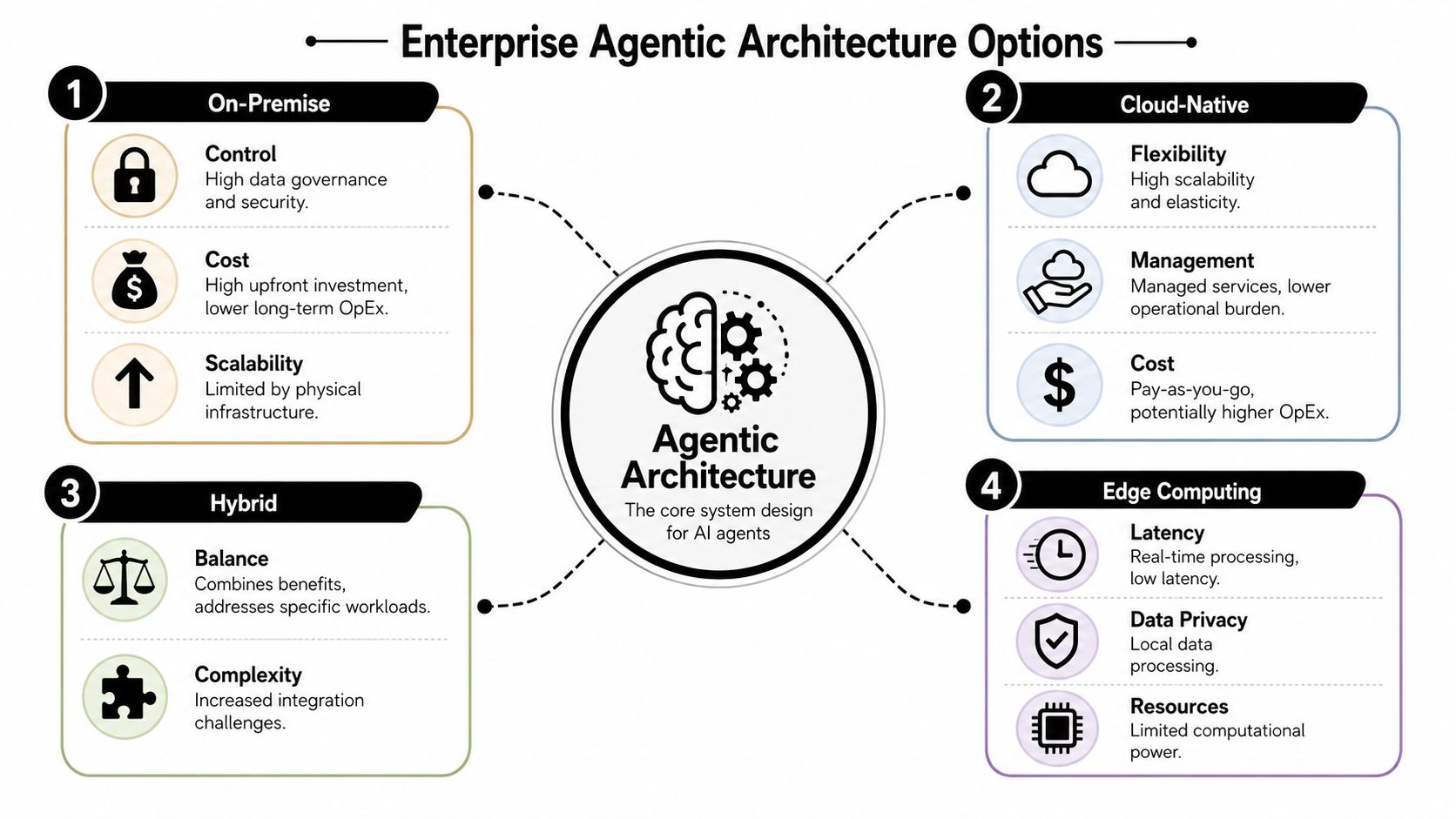
On-premise, cloud-native, hybrid, and edge deployments all have legitimate use cases. None is automatically “enterprise grade.” The right choice depends on what you're optimizing for.
| Model | Where it fits | Main trade-off |
|---|---|---|
| On-premise | Strict governance, internal network dependence, sensitive workloads | More control, more operational burden |
| Cloud-native | Faster rollout, elasticity, managed services, distributed teams | Easier scale, less direct infrastructure control |
| Hybrid | Regulated environments with mixed workloads and legacy estates | Better balance, more integration complexity |
| Edge | Low-latency local interactions and constrained environments | Better responsiveness, tighter compute limits |
Most large organizations end up hybrid, even if they planned otherwise. Customer-facing orchestration may sit in cloud infrastructure, while identity, records, and protected data remain behind tighter enterprise controls. That's common in healthcare, BFSI, utilities, and logistics.
Teams in transport and field operations often face similar design trade-offs. If you want a useful comparison from an adjacent domain, this breakdown of modern logistics architecture is worth reading because it shows how system design changes when latency, control, and integration all matter at once.
Later in the design cycle, many teams use an AI agent builder platform to standardize orchestration, tooling, and deployment workflows rather than stitching separate components together for every use case.
A short architecture walk-through helps clarify the trade-offs in practice:
Why multi-LLM design matters in production
Single-model architecture is simple at first and restrictive later. It assumes one model can satisfy every requirement: low latency, strong reasoning, safe summarization, extraction accuracy, multilingual support, and acceptable cost. In real deployments, that rarely holds.
A multi-LLM architecture gives the orchestration layer freedom to route tasks by need. One model may handle fast classification. Another may perform grounded answer generation. A different model may be better for voice interactions, structured extraction, or difficult reasoning steps.
A resilient enterprise agent shouldn't depend on one model provider's strengths, pricing, availability pattern, or roadmap.
This is also the practical answer to vendor lock-in. The lock-in risk isn't only contractual. It's operational. If your prompts, workflows, evaluation methods, and guardrails are all tied to one model behavior, switching becomes expensive even when procurement wants optionality.
The stack that actually needs design attention
The stack for enterprise agents has a few components that deserve executive-level scrutiny:
- Orchestration layer: This decides routing, tool use, handoffs, fallback logic, and policy enforcement.
- Knowledge layer: This grounds responses in approved enterprise content and live records.
- Tool integration framework: This connects systems like Salesforce, Zendesk, ServiceNow, Genesys, and internal APIs.
- Identity and access controls: These determine what the agent can do on behalf of a customer, employee, or service account.
- Monitoring layer: This captures traces, failures, bottlenecks, and business outcomes.
What usually fails isn't the model call. It's weak orchestration between these layers. The agent can answer a refund policy question, but can't authenticate the user, verify the order, apply the policy correctly, and hand the case to a human when the exception path appears. Architecture is what closes that gap.
Integrating Data and Enterprise Knowledge
An agent is only useful if it can ground its answer in your enterprise reality. Public model knowledge isn't enough for order histories, claims status, HR policy exceptions, inventory availability, or current account context.
That's why enterprise deployment depends on building a knowledge layer that does more than retrieve text. It needs to combine content, records, permissions, and actions.
Build a knowledge layer that can answer and act
The most practical way to think about agentic RAG is this: the agent doesn't just fetch a document snippet. It uses approved knowledge and live system data to reason through the next step, then performs the right action if policy allows it.
A customer asks, “Where's my order, and can I return it?” A basic chatbot searches articles and returns a policy summary. An enterprise agent should do more. It can identify the customer, check order status in Salesforce, read return rules from the knowledge base, determine eligibility, and then trigger the return workflow through an API or create a case in Zendesk if the scenario needs review.

That only works if the knowledge layer is organized for conversation, not just storage. A Conversational Knowledge Base should prioritize approved source hierarchy, version control, metadata, permissions, and refresh discipline. If two systems disagree, the agent needs a rule for which source wins.
Connect systems in the order of trust
Don't connect everything at once. Connect systems in this sequence:
- Approved static knowledge first. Policies, FAQs, process docs, support articles, and controlled internal documentation.
- Read-only live systems next. CRM records, case histories, order status, employee profiles, and entitlements.
- Write actions later. Ticket creation, returns, schedule changes, refund initiation, password workflows, and downstream automation.
That sequencing reduces risk and improves debugging. Teams can validate whether the agent is grounding correctly before they allow it to change records or trigger workflows.
For operators in distributed service environments, this pattern has a close parallel in data unification projects. This comprehensive guide for HGV operators is useful because it explains why integration quality matters before automation quality does.
The fastest way to lose trust in an AI agent is to let it sound confident while using stale, conflicting, or unauthorized data.
A good integration design also separates knowledge retrieval from system action. The same agent may be allowed to read order status but not approve a refund. It may summarize a Zendesk thread but not close the ticket. Those distinctions should be explicit in the tool layer, not left to prompt instructions alone.
One practical note on platforms: some teams use Yellow.ai when they want a combined environment for conversational knowledge, enterprise integrations, orchestration, and multimodal deployment across support and employee service use cases.
Ensuring Security Compliance and Production Readiness
Enterprise leaders often ask when to address security and compliance. The answer is immediate. If the agent touches customer records, employee data, financial workflows, or regulated interactions, trust controls need to be built into the deployment plan from the first architecture review.
Treat trust as a design requirement
Production-ready agents need the same rigor you'd expect from any system that accesses sensitive workflows. That includes PII redaction, role-based access control, session isolation, approval logic for high-risk actions, audit trails, retention rules, and clear separation between read and write permissions.
Compliance labels such as HIPAA, SOC 2, and PCI-DSS don't secure the deployment on their own. Teams still need to decide where regulated data can flow, which logs can store prompts or outputs, and how to restrict tool access by user role, geography, and process step. If the agent works across channels, those controls have to be consistent in chat, email, and voice.
For organizations reviewing deployment controls in detail, this overview of enterprise-grade security for AI agents is a useful reference point for what to evaluate in a platform or internal build.
Test conversations like a live system, not a demo
Traditional software testing doesn't cover enough surface area for agent behavior. Enterprise agents don't fail only because code breaks. They fail because instructions conflict, retrieval quality slips, tools respond unpredictably, users go off-script, or escalation logic misfires.
That's why automated, scenario-based testing matters before broad release. A 2026 study found that AI systems without automated, scenario-based testing experienced a 60% higher rate of in-production failures and escalations to human agents according to this AI testing failure rate study.
A useful enterprise test suite should include:
- Known journey validation: Common intents, expected tool paths, and approved response patterns.
- Adversarial prompts: Attempts to override policy, expose restricted data, or force unsupported actions.
- Integration failure modes: CRM timeout, missing record, stale knowledge article, broken API response.
- Escalation quality: Whether the human agent receives context, transcript, customer identity state, and action history.
Operational warning: If you only test the happy path, your first real users become the QA team.
Operational readiness is part of governance
Production readiness also means the release process is disciplined. AI agents need versioning, pre-production environments, rollback plans, and release approvals tied to both technical and business owners. Treat prompts, retrieval rules, and tool permissions as governed assets.
Observability matters just as much. Teams should be able to inspect conversation traces, tool calls, handoff reasons, latency patterns, and failure clusters. Without that visibility, security and compliance reviews degrade into assumptions.
A reliable production framework combines three threads that are too often separated: governance policy, release engineering, and live monitoring. Mature teams run them as one operating model.
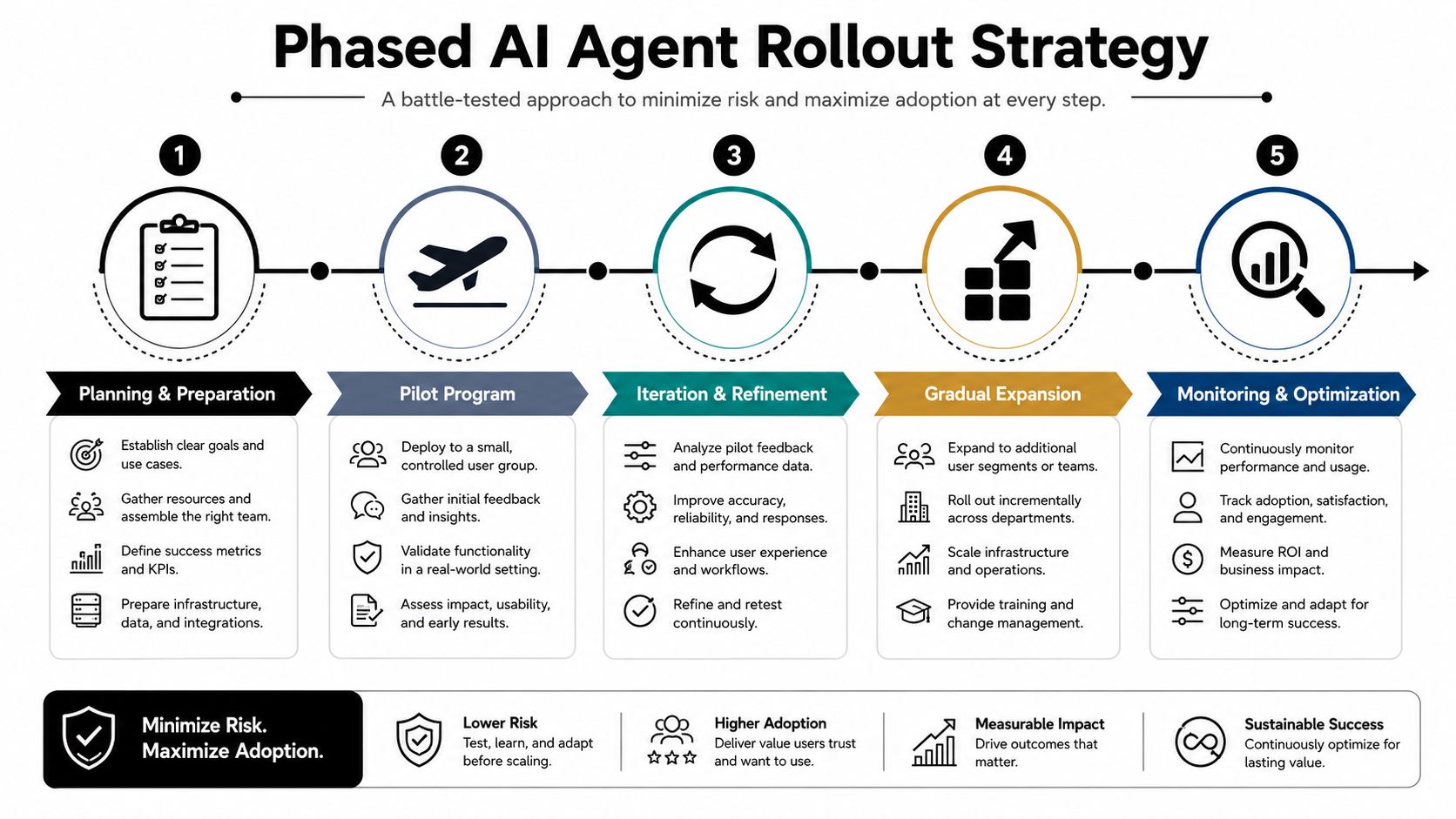
Executing a Phased Go-Live and Rollout Strategy
Go-live shouldn't feel like a launch announcement. It should feel like a controlled expansion of confidence.
The strongest enterprise rollouts move in phases because each phase answers a different question. First, does the agent behave correctly in a safe environment? Then, does it hold up with a limited real audience? Only after that do you test whether it scales operationally across segments, channels, and service teams.
Start with internal exposure
Day 1 usually belongs to internal teams. Support staff, operations leads, QA, and process owners should use the agent before customers do. That internal pilot reveals friction that doesn't show up in test scripts.
A typical pattern looks like this:
- Internal support pilot: Team members submit realistic queries, edge cases, and policy exceptions.
- Controlled workflow exposure: The agent is allowed to answer, summarize, suggest, or retrieve, but high-impact actions still require review.
- Triage loop: Product, operations, and AI teams review failures daily and decide whether the issue is prompt logic, retrieval quality, permissions, or process design.
This stage is also where channel behavior becomes visible. A web chat interaction may tolerate a clarifying question. A voice interaction may need shorter turns, faster tool resolution, and tighter guardrails around interruption handling.
Expand by segment, not by enthusiasm
Week 2 is often the right moment for a narrow customer beta, not a broad release. Choose a segment with clear service patterns and manageable complexity. Existing authenticated users are often easier than anonymous traffic. A narrow geography or one product line is easier than all support categories at once.
Here's the rollout lens I recommend:
| Phase | Audience | What you're validating |
|---|---|---|
| Internal pilot | Employees and operations teams | Correctness, policy fit, escalation quality |
| Limited beta | Small customer segment | Real-world behavior, clarity, trust, containment |
| Segmented rollout | Additional queues, channels, or regions | Operational consistency and integration stability |
| Broad launch | Larger population | Scale, governance discipline, business impact |
A phased rollout also protects agent reputation. If users encounter inconsistent answers in the first release wave, skepticism hardens quickly. It's easier to expand an agent people already trust than to recover one they learned to avoid.
A good rollout plan limits blast radius by design. It doesn't rely on confidence alone.
Omnichannel deployment needs the same restraint. Don't assume a good chat agent is ready for voice or email. The orchestration may be shared, but the interaction design isn't. Voice needs lower latency and stronger interruption handling. Email may need more structured summarization, approvals, and case metadata. Roll out channels as distinct operating environments.
Mastering Operations and Continuous Optimization
Most of the value from an enterprise agent program shows up after deployment, not at deployment. Launch proves the system can work. Operations determine whether it keeps improving, earns trust, and expands into new workflows.
The operating model after launch
Once the agent is live, someone needs to own it as a product. Not just as infrastructure, and not just as automation. That owner should sit with a cross-functional rhythm that includes operations, platform engineering, analytics, compliance, and front-line service stakeholders.
The operating loop is straightforward:
- Review failures weekly: Look at unresolved conversations, fallback triggers, and repeated escalation reasons.
- Tune the knowledge layer: Retire stale content, improve article structure, and close gaps where the agent reaches unsupported answers.
- Refine tool permissions: Reduce risky access where the agent doesn't need it. Expand action authority only when evidence supports it.
- Promote successful patterns: If a workflow works in one queue or region, operationalize it as a repeatable deployment pattern.
This is also where an AI copilot model can increase effectiveness. In many environments, the highest-value first move isn't full autonomy. It's assisting human agents with summaries, reply drafts, next-best actions, and knowledge retrieval while the enterprise learns where automation should and shouldn't take over.
Use analytics to improve the agent and the business process
Conversation analytics should do more than score the bot. They should show where the underlying service process is confusing, fragmented, or dependency-heavy.
If users repeatedly abandon the same step, the issue may be workflow design, not agent quality. If escalations cluster around one policy topic, the content may be outdated or the policy itself may be too hard to explain. If support agents routinely rewrite the AI's draft in a certain queue, that's a signal to adjust tone, retrieval logic, or action sequencing.
Good optimization teams study at least four patterns over time:
- Failure clusters: Where the same issue appears across intents, channels, or geographies.
- Human override patterns: Where staff intervene because the agent's judgment isn't trusted yet.
- Knowledge gaps: Where approved content exists but isn't structured for retrieval and grounded response generation.
- Emerging use cases: Repetitive requests that weren't in scope originally but now justify their own workflow.
The goal isn't to chase perfect automation. It's to create a system that gets smarter through real interactions, while preserving trust and governance. Enterprises that treat deployment as the finish line usually end up with a static agent that slowly drifts out of relevance. Enterprises that build a disciplined optimization loop end up with an adaptive service layer.
If you're evaluating how to deploy AI agents across customer support, employee service, chat, and voice with enterprise controls in place, Yellow.ai is one option to review for orchestration, knowledge integration, testing, security, and omnichannel rollout in a single platform.



