









Popular advice says to buy more automation tools, connect them, and let the savings compound. That advice sounds sensible until you look at production reality. Most enterprises don't fail because they lack software, they fail because they collect tools faster than they build an operating model that can carry work end to end.
That's the true test of an enterprise automation platform. It isn't a prettier script runner or a point solution with a few integrations bolted on. It's the layer that coordinates workflows, AI, systems, permissions, and exceptions across teams that were never designed to move in sync.
The buying trend is real. Stonebranch's 2026 Global State of IT Automation Report says cloud automation is used by 64% of organizations, up 21 percentage points since 2024, while workload automation and SOAP sit at 50%, infrastructure automation at 49%, and DevOps automation at 49%. Workato's enterprise automation statistics add that 94% of professionals in enterprise organizations prefer a unified platform over multiple systems, and more than 30% already run automation in five or more departments, which shows how quickly the category is becoming an operating model rather than a departmental tool (Stonebranch).
Table of Contents
- Why Most Enterprise Automation Investments Fall Short
- Core Capabilities That Define Enterprise Automation Platforms
- Industry Use Cases and Real-World Applications
- Selection Criteria for Evaluating Enterprise Automation Platforms
- Implementation Roadmap and Phased Deployment Strategy
- Measuring ROI and Business Impact Beyond Cost Savings
- Best Practices for Sustainable Automation at Scale
Why Most Enterprise Automation Investments Fall Short
The most common mistake is treating automation like software procurement. Teams buy a workflow tool for HR, a bot runner for finance, an integration layer for IT, then wonder why handoffs still break and exceptions still pile up. A stack of tools can automate isolated tasks, but it will not fix fragmented ownership or inconsistent process design.
A real enterprise automation platform solves a different problem. It orchestrates work across systems, channels, and teams so one request can trigger multiple actions under policy and with auditability. That gap explains why many organizations keep investing in automation without seeing full operational use. The issue is not a lack of intent. It is an operating model that never catches up with the tools.
Task automation and enterprise automation are not the same thing
Task automation is narrow by design. It copies data, moves files, triggers a notification, or fills out a form. Those wins are useful, but they stop where context, dependency management, and governance begin.
Enterprise automation connects the whole path. It routes work across departments, handles exceptions, and respects enterprise controls, which is why the category keeps absorbing workload scheduling, cloud service automation, DevOps automation, and process orchestration into one control layer. The business case is also clearer now, because automation adoption is already broad, and the market has moved beyond experimentation into repeatable operating practice. Gitnux cites a market report showing 78% of organizations had implemented some form of business process automation in 2023, and 65% of enterprises had adopted RPA by the end of 2023, up from 45% in 2021 (Gitnux).
Practical rule: if the platform can only complete one task well, you do not have an enterprise automation platform yet, you have a point tool with ambition.
The buying decision should start with operating outcomes, not feature checklists. If the platform cannot unify workflows across major functions, support governance, and absorb change without collapsing into custom work, it will not scale in production.
Core Capabilities That Define Enterprise Automation Platforms
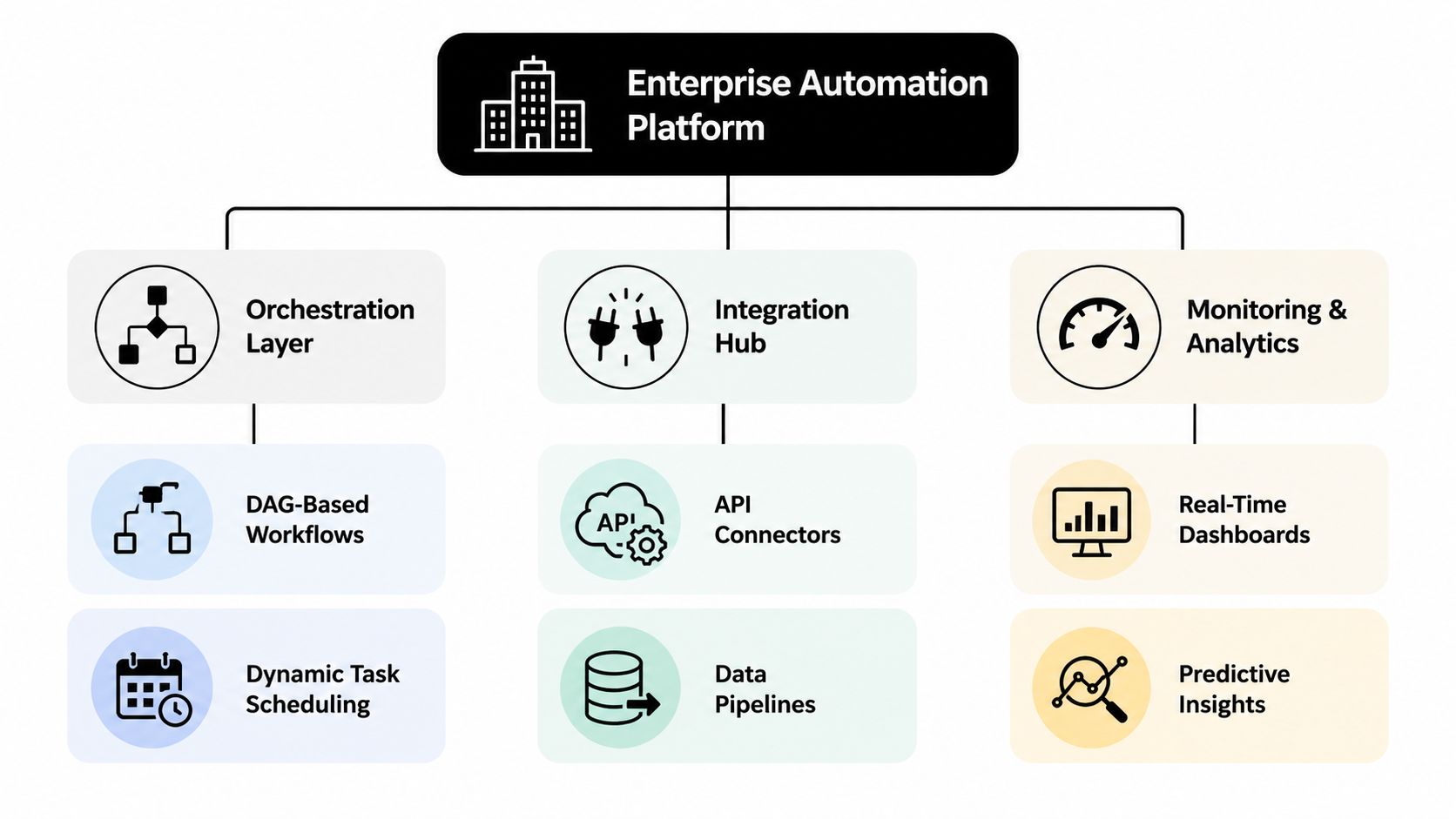
The technical separator is the orchestration layer. Mature platforms don't just trigger steps in sequence, they manage dependencies, parallel execution, and exception routing across heterogeneous systems. Veritone describes AI model orchestration with dynamic cognitive queuing and DAG-based workflows, which matters because dependency-aware graphs let teams run independent steps in parallel while keeping ordered steps locked to the right sequence (Veritone).
Orchestration is the control plane, not a feature
Orchestration is where most vendors blur the line between marketing and architecture. A real orchestration layer can decide what happens first, what can happen in parallel, what needs approval, and what should happen when a step fails. Without that, even a well-connected platform turns into a brittle sequence of API calls.
That's also why a useful enterprise automation platform needs more than connectors. It needs workflow orchestration, AI model routing, and a clean way to absorb legacy systems without turning every integration into a one-off engineering project. If you want a mental model for how this works in another operational domain, the haulage transport system explained piece is a useful analogy, because transport management also depends on coordinated execution rather than isolated task completion.
AI becomes practical only when it sits inside governed execution
AI in enterprise automation only matters when it can act inside a controlled workflow. Moveworks describes platforms that combine intent understanding, enterprise search, cross-system execution, and workflow orchestration so a single request can retrieve context from disconnected systems and then trigger actions under existing IAM controls (Moveworks). That pattern is what turns AI from a chat layer into an operational system.
A multi-model design helps here. Yellow.ai's AI Agent Builder 2.0 sits in the same conversation because enterprise teams need a way to design, test, and deploy agents that don't just talk, they act. The practical point is simple, conversational AI should not sit outside the workflow engine, it should feed the workflow engine. When AI can retrieve context, classify intent, and hand off to governed automation, the platform becomes useful in production instead of merely impressive in demos.
Cross-system execution needs permissions and auditability
The hard part isn't calling APIs. The hard part is doing it while respecting role-based access, approval boundaries, and audit requirements. Cross-system execution with permission-aware retrieval keeps the platform from becoming a shadow IT path around enterprise controls. That's the difference between “it works in a pilot” and “it can survive procurement, security review, and audit.”
The best platforms also make observability part of the runtime. If the platform can't show what happened, why it happened, and which system made the change, operations teams will eventually stop trusting it. At that point, adoption stalls even if the underlying automation logic is technically sound.
Industry Use Cases and Real-World Applications
In BFSI, the strongest use cases usually start with onboarding and compliance, because those workflows cross identity checks, document handling, approvals, and downstream account setup. A platform that can orchestrate those steps reduces the odds that one missing field or delayed handoff stalls the entire process. That's where orchestration plus permission-aware execution matters more than a narrow bot layer.
Healthcare teams tend to get faster value from patient communications and claims-related coordination. The challenge isn't just sending messages, it's moving information between scheduling, records, and billing systems without exposing sensitive data. A platform with governed integrations works better than disconnected automations because healthcare processes depend on traceability, not just speed.
Customer, employee, and contact center workflows all benefit differently
Retail and logistics usually focus on supply chain coordination and exception handling. Inventory issues, shipment delays, and order changes rarely stay inside one system, so automation has to span the request, the check, and the response. That's why platforms built for point actions tend to fail once exceptions start arriving in volume.
Employee experience workflows are often the quickest place to prove value. IT access requests, onboarding tasks, and HR case handling are repetitive enough to automate, but they still need policy checks and escalation paths. When done well, the platform becomes a service layer for employees instead of a queue of tickets.
A good automation program doesn't start with the most complex process. It starts with the process that crosses enough systems to prove the platform can really coordinate work.
Customer experience automation and contact center modernization follow the same rule. The platform has to move from intent to resolution without forcing agents to swivel through multiple tools. In that context, the right metric isn't how many interactions the system touches, it's how consistently it reaches a correct outcome across channels.
For teams evaluating AI-led service workflows, the implement AI automation in 2026 discussion is useful because it forces the same operational question, can the platform execute across systems, or does it only generate responses. The latter is not enough in production.
Selection Criteria for Evaluating Enterprise Automation Platforms
Buying an enterprise automation platform is the easy part. Getting it to run across teams, systems, and controls after the pilot ends is where most programs stall. Vendors often look similar in a demo, but the differences appear in integration depth, governance, and how much custom engineering is required to keep workflows reliable in production.
| Criteria | Importance | Key Questions to Ask |
|---|---|---|
| Integration breadth and depth | Determines whether the platform can connect core systems without brittle custom work | Does it support the systems you already run, and can it handle both API-based and legacy flows? |
| Security and compliance posture | Required for regulated workflows and audit readiness | Does it align with standards such as HIPAA, SOC 2, ISO 27001, and PCI-DSS, and how are controls enforced in runtime? |
| Orchestration capability | Separates simple automation from end-to-end execution | Can it manage dependencies, retries, approvals, and exception routing across systems? |
| Multi-channel support | Matters when work starts in chat, email, voice, or forms | Can one workflow start in one channel and finish in another without losing context? |
| Vendor lock-in risk | Affects long-term flexibility and negotiation power | Are workflows portable, and how dependent are you on proprietary logic or closed connectors? |
| Total cost of ownership | Goes beyond licensing to include implementation and maintenance | What will operations, governance, and change management cost after go-live? |
The strongest buying test is whether the platform can scale across departments without forcing a re-architecture each time a new workflow is added. That matters because a Jitterbit benchmark cited a wide gap between investment and execution, with many organizations still lacking end-to-end automation and much of the demand falling to IT teams, while security, legacy integration, and process complexity remained the main blockers. The buying question is not whether the tool can start a workflow, it is whether it can carry that workflow through handoffs, exceptions, approvals, and audit checks without creating a new maintenance burden.
Security deserves its own review. If the platform cannot explain how it enforces controls for sensitive workflows, the rest of the evaluation does not matter. For a practical reference point, review enterprise-grade security and then test those claims against your own governance checklist. Teams that are planning to implement AI automation in 2026 should be especially strict here, because AI-assisted steps still need the same identity, audit, and access controls as any other production workflow.
Implementation Roadmap and Phased Deployment Strategy
The safest way to deploy an enterprise automation platform is to start with a use case that is visible, bounded, and boring enough to survive real operations. That usually means a process with clear inputs, clear ownership, and enough volume to matter without becoming a science project. The mistake is trying to automate an ugly cross-functional process before governance has been built.
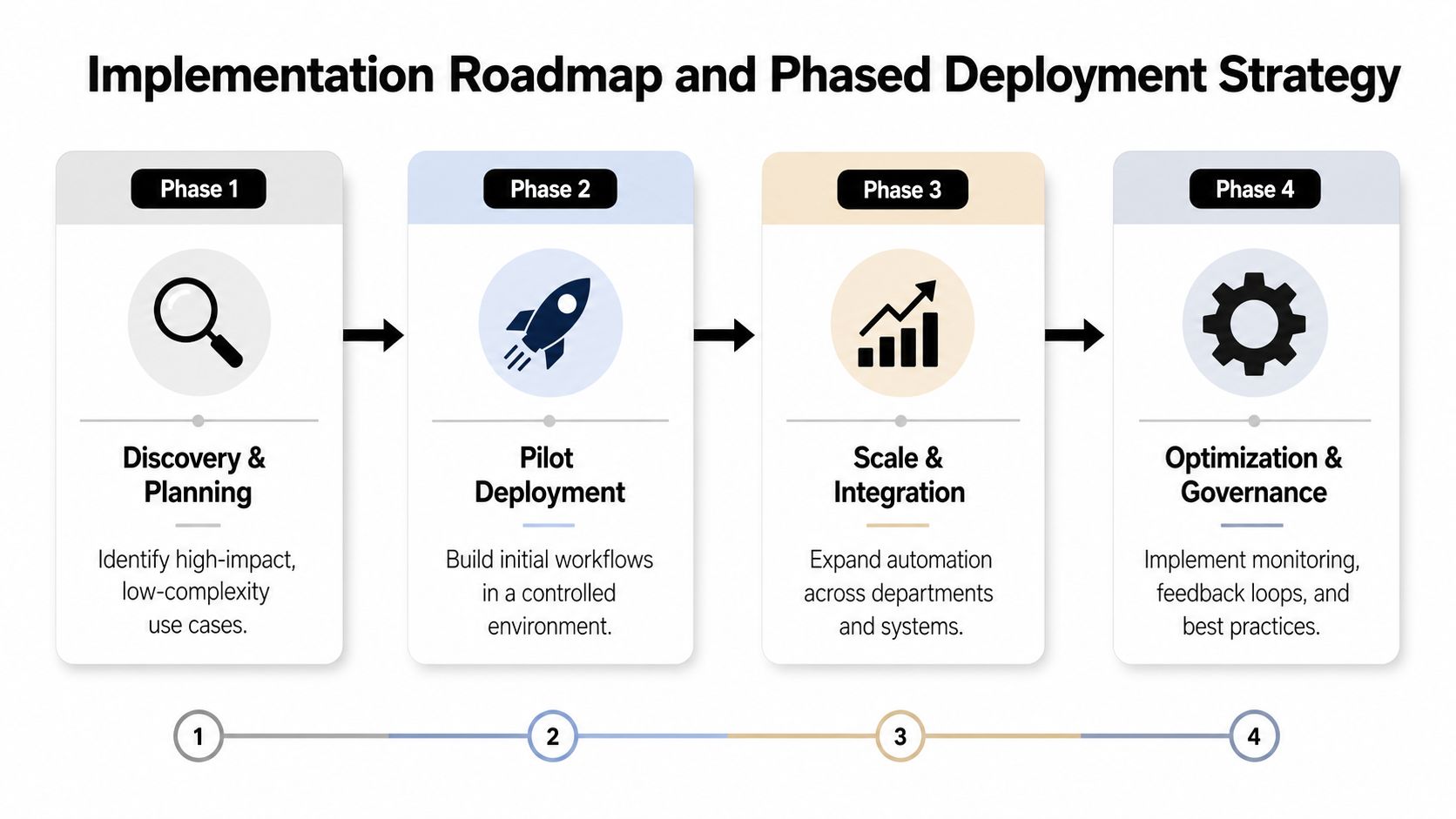
Phase one is process selection and control design
Start by picking a workflow that has obvious friction and low ambiguity. Then define the owner, the fallback path, the audit trail, and the escalation logic before any build work begins. If those basics are missing, the pilot will only prove that the process was already broken.
Phase two is a contained pilot with real users
A pilot should run in a controlled environment, but it shouldn't be a toy. Use actual requests, actual exceptions, and actual handoffs, then watch where humans still need to intervene. That's where your change backlog comes from, and it's usually more valuable than the initial success story.
Phase three is controlled expansion
Scale only after the first workflow can operate with predictable governance. Add adjacent processes, then adjacent systems, and keep a tight limit on how many teams can change shared logic at once. The platform should absorb complexity gradually, not all at once.
Phase four is operating discipline
Once the platform is live, treat it like a production service. Establish review cadence, performance monitoring, and ownership for workflow changes, because automation drifts just like any other operational system. The goal is not just to launch automation, but to make it durable enough that people still trust it six months later.
Measuring ROI and Business Impact Beyond Cost Savings
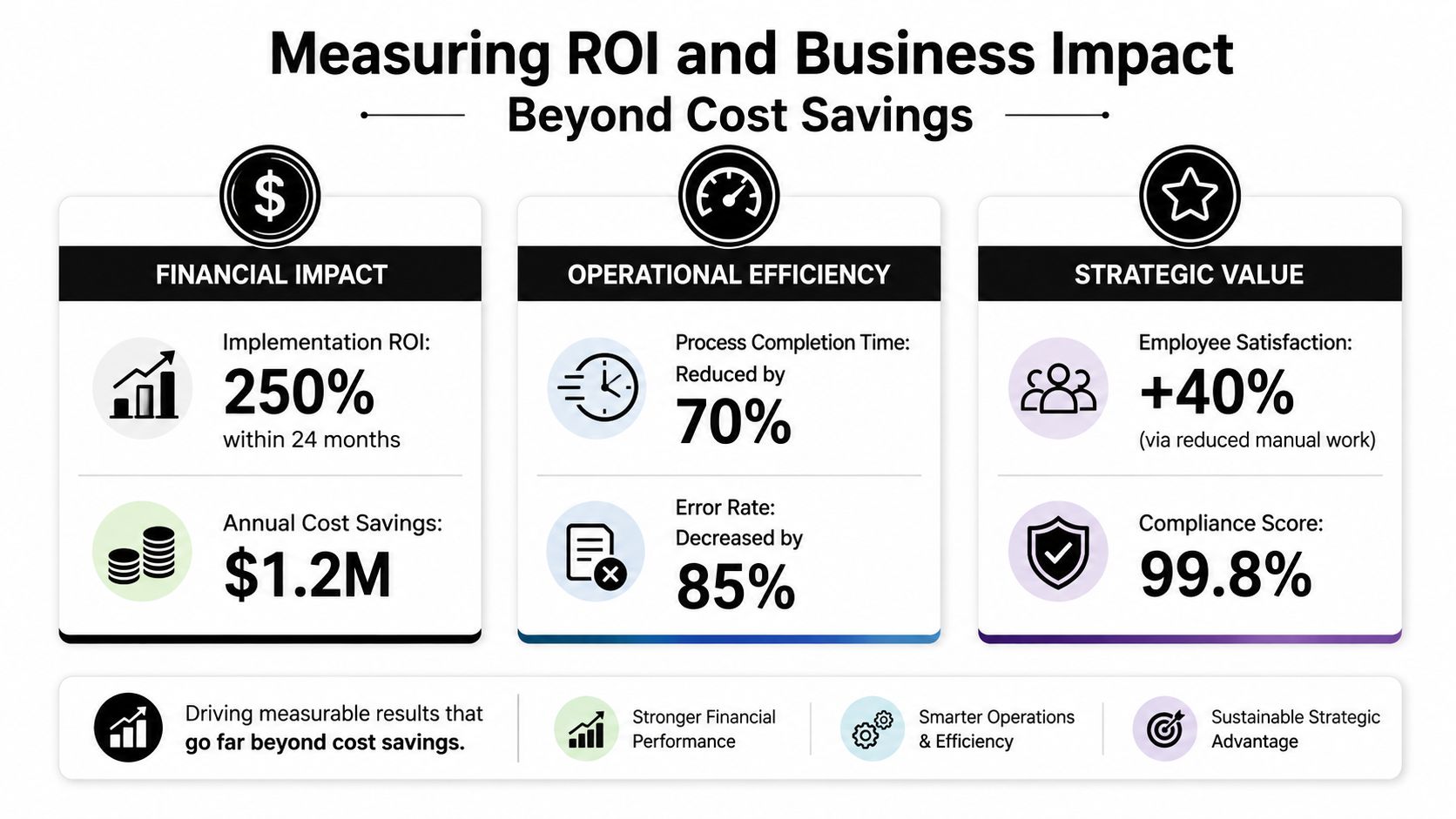
The narrowest way to measure automation is to count labor hours avoided. That matters, but it misses the larger effect when a workflow stops leaking time across teams, systems, and approvals. Executives fund these programs because they want cleaner execution, faster response, and lower operational risk, not just cheaper tickets.
The business case is stronger when you look beyond one metric. Industry reporting has linked automation adoption with meaningful cost reductions and strong returns, but the true test is whether the platform changes how work moves through the organization. In production, that usually shows up as fewer handoffs, fewer delays, and less manual escalation.
Measure by stakeholder, not by one universal dashboard
CFOs care about cost avoidance, rework reduction, and payback. Operations leaders care about throughput, exception handling, and service consistency. CX and EX leaders care about faster resolution, fewer handoffs, and less manual effort for customers or employees.
A useful business case ties each automation initiative to one primary metric and one secondary metric. If a workflow is meant to speed onboarding, do not bury the result inside a broader transformation story. If it reduces compliance risk, show how it changes control execution and audit readiness. That gives each stakeholder a clear line of sight to the outcome they own.
Avoid the measurement traps that weaken trust
One common mistake is measuring only the first month after go-live. Another is claiming credit for gains that came from process redesign rather than automation itself. Teams also lose credibility when they track activity volume but ignore exception rates, because a high-volume workflow that fails often is still a bad workflow.
The right economics are usually visible in both hard and soft measures. Hard measures include cycle time, labor reduction, and exception handling effort. Soft measures include fewer escalations, better service consistency, and less dependence on individual operators. If you need a structured way to frame those trade-offs, a practical ROI calculator can help translate workflow changes into finance and operations terms.
The true value is what the platform changes in the operating model. If the workflow is faster, safer, and less dependent on manual intervention, that is the value worth defending.
Best Practices for Sustainable Automation at Scale
Governance-first automation is slower at the start and cheaper later. That trade-off is worth it because most failure modes are predictable, fragmented ownership, weak auditability, missing change control, and overconfidence after the first successful deployment. If the platform grows faster than the controls around it, the organization ends up with more automation and less reliability.
A useful operating model keeps security, compliance, and observability inside the delivery process instead of bolted on afterward. That means every workflow should have a clear owner, an audit trail, and a documented fallback when the automation can't complete a step safely. It also means the platform should support human override without making the override path a hidden back door.
The most sustainable teams build reusable components. They standardize approval patterns, integration patterns, and exception handling so every new workflow doesn't become a custom one-off. That's how a platform stops being a project and starts behaving like infrastructure.
Treat automation as a managed production capability. If no one owns its health after launch, the platform will drift into partial adoption and quiet workarounds.
A center of excellence helps, but only if it's practical. The best versions don't centralize every decision, they publish standards, review high-risk workflows, and help business teams reuse tested patterns without blocking delivery. That's the balance that keeps scale from turning into bureaucracy.
Another underappreciated discipline is maintenance. Workflows change when systems change, policies change, or business rules change. Teams that plan for ongoing tuning usually keep their automations alive longer than teams that treat deployment as the finish line.
Yellow.ai helps enterprises design and run agentic workflows across customer and employee operations, with orchestration, integrations, and governed execution in one platform. If you're evaluating how to move from disconnected tools to end-to-end automation that holds up in production, visit Yellow.ai and compare how its platform handles CX, EX, and back-office automation under real enterprise constraints.