








Automated emails can be a tiny share of total email volume and still produce a disproportionate share of revenue. A 2026 industry summary reported that automated emails represented 2% of total email volume yet generated 37% of email-generated sales in 2024, with 16 times more revenue per send than broadcast campaigns (industry summary). The implication is uncomfortable for enterprise teams: the next gain probably won't come from launching another newsletter. It will come from finding the broken step inside a small number of high-intent journeys.
That shift changes how leaders should manage email automation workflows. Treat each workflow as an operating system for a customer or employee journey, not as a sequence of attractive templates. A trigger identifies intent, conditions determine the path, actions move the recipient forward, and timing controls pressure on both conversion and deliverability.
The strongest programs connect email with product data, CRM records, support events, employee systems, and other channels. They also make failure visible. A workflow that sends quickly but can't explain why recipients stop clicking, why messages keep firing after resolution, or why unsubscribes rise isn't mature automation. It's unattended campaign volume.
Table of Contents
- Why Most Email Automation Programs Underperform
- Defining Triggers and Segmenting by Behavioral Intent
- Designing Templates and Orchestrating Multi-Channel Agents
- Error Handling Throttling and Deliverability Safeguards
- Testing and Optimizing Beyond Open Rates
- Compliance Security and Enterprise Governance
- Sample Workflow Templates for CX and EX Use Cases
Why Most Email Automation Programs Underperform
More automated email doesn't automatically produce more commercial value. Omnisend's 2025 benchmark recorded $3.41 per automated email sent versus $0.155 for campaign emails, about a 22 times lift, while automated emails converted at 1.49% versus 0.08%, about a 19 times lift (Omnisend's email marketing benchmarks). Those figures support prioritizing behavior-triggered journeys, but they don't justify increasing send frequency without control.
The central mistake is portfolio thinking without workflow diagnosis. Teams count how many flows they have, how quickly they can publish them, and how many contacts they enroll. They don't always inspect the exact transition where a recipient loses momentum. A welcome sequence may attract clicks on its opening message but fail when the second email presents generic content. A cart recovery flow may fire after the purchase event because systems sync out of order. A renewal journey may continue after a contract has already been extended.
The failure usually sits inside the sequence
Start by auditing the journey, not brainstorming another use case. For every active workflow, document:
- Enrollment accuracy: Does the trigger represent a meaningful action, or merely a stale list condition?
- Step conversion: How many recipients reach the intended action after each message?
- Exit logic: Does the workflow stop after purchase, resolution, reply, unsubscribe, or employee completion?
- Audience fit: Does each branch match the recipient's current product, role, lifecycle stage, and intent?
- Commercial value: Does the flow create revenue, reduce service effort, improve adoption, or complete an employee task?
A useful dashboard should reveal where the journey breaks, not just whether the final campaign conversion looks acceptable. The top workflow may be profitable overall while losing most qualified recipients at one poorly timed handoff.
Prioritize concentration, then repair
One benchmark summary reports top workflows at $16.96 revenue per recipient versus $1.94 for average flows, while another summary places top-tier workflows at about $21.43 versus $1.94 (Email Vendor Selection's marketing automation statistics). The exact benchmark values differ, but the operational lesson is consistent. Performance varies widely, so sequence quality and testing matter more than adding an undifferentiated catalog of flows.
| Workflow Type | Revenue Contribution | Typical Conversion Rate | Optimization Priority |
|---|---|---|---|
| Welcome and onboarding | High leverage when intent is fresh | Measure by milestone completion | Trigger accuracy and first-value path |
| Cart or browse recovery | High commercial intent | Measure by placed order | Event ordering and suppression after purchase |
| Post-purchase | Retention and adoption value | Measure by usage or repeat action | Product relevance and timing |
| Renewal or re-engagement | Recovery of at-risk relationships | Measure by renewal or reactivation | Risk segmentation and escalation logic |
The higher unsubscribe rate for automated emails, 0.59% compared with 0.20% for campaign emails, also appears in the Omnisend benchmark. Automation's efficiency can hide fatigue. Put frequency caps, suppression rules, and resolution exits around every high-volume journey before expanding its reach.
Defining Triggers and Segmenting by Behavioral Intent
A static demographic segment tells you who someone is. A behavioral trigger tells you what they may need next. That distinction is the foundation of useful email automation workflows, especially in enterprise environments where a single account can contain buyers, administrators, daily users, managers, and support contacts.
Begin with the desired outcome. A CX workflow might aim to help a customer complete setup, resolve an issue, adopt a feature, or renew. An EX workflow might help an employee complete onboarding, acknowledge a policy, finish training, or request support. The outcome determines which signals deserve attention.
Build the trigger around intent
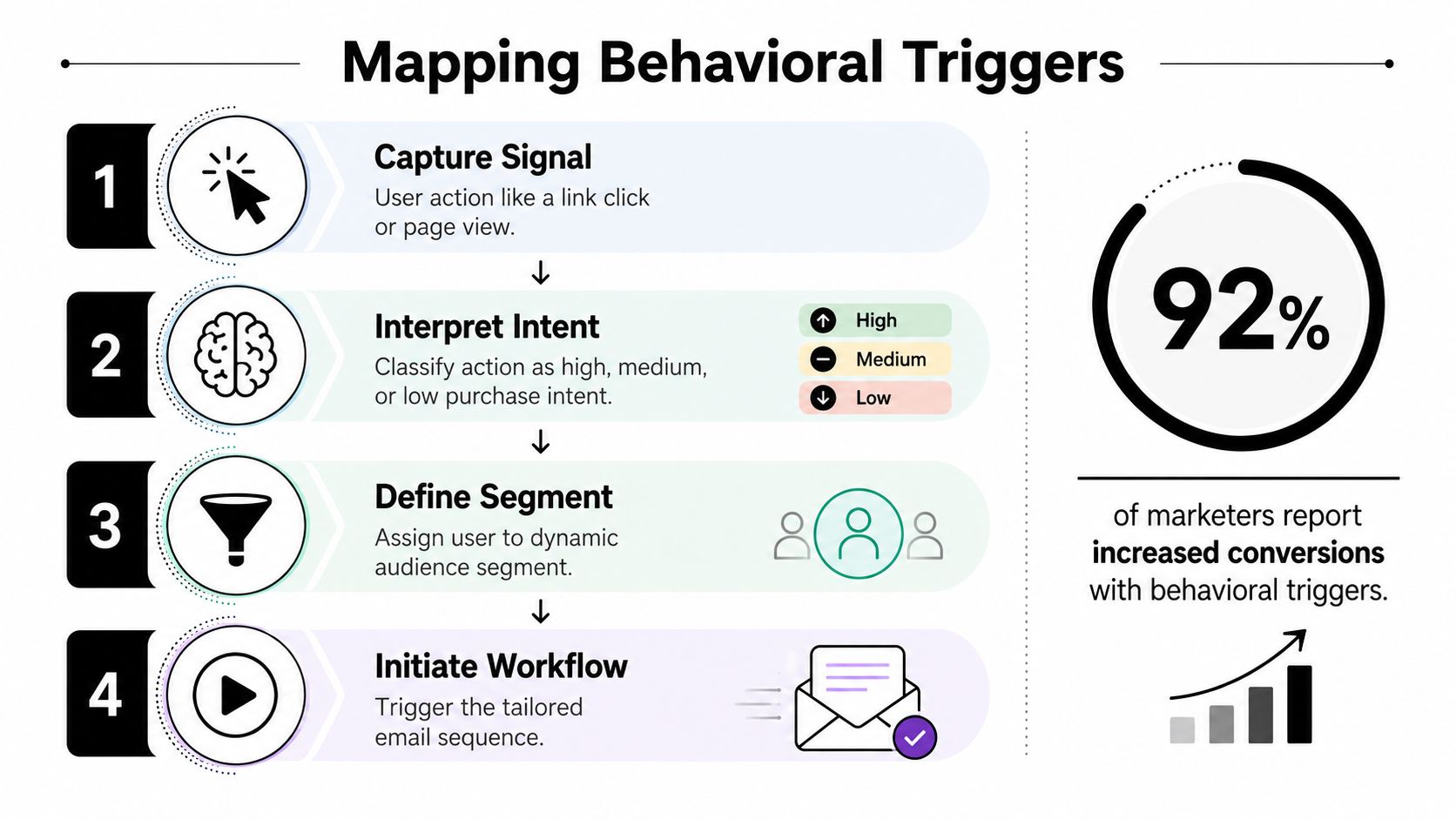
Use a four-part design process:
- Capture a reliable signal. Examples include a product page view, a feature activation, a support ticket escalation, a failed login, a usage decline, or a completed onboarding milestone.
- Interpret the signal in context. A product view from an anonymous visitor means something different from repeated views by an identified account administrator. A login failure may indicate friction, not purchase intent.
- Define a dynamic segment. Combine behavior with role, account status, product tier, geography, consent state, or employee population. Avoid treating all inactive users as one audience.
- Initiate a focused workflow. Set the first action, branch conditions, wait rules, and exit criteria before writing the message.
For example, a re-engagement flow could enroll a subscriber who hasn't logged in for 14 days while maintaining an active subscription. The message should reinforce the value of the subscribed product, not offer a generic discount. If the user logs in, opens a support case, or cancels, the workflow should pause or exit.
An EX example works similarly. If an employee hasn't completed mandatory compliance training 7 days before the deadline, the system can notify the employee, then route a manager nudge if the task remains incomplete. The manager branch should close when the training record updates, otherwise the same reminder may continue after completion.
Segment for the next decision
Avoid building a dozen segments that never change a workflow path. A useful segment should alter content, timing, channel, escalation, or exit behavior. Power users may need advanced feature education, while dormant users need a reminder of core value. A support contact with an unresolved case may need service communication instead of promotional content.
For enterprise integration planning, map the systems that own each signal before implementation. Customer data platforms, CRM records, product analytics, HRIS data, learning systems, and service platforms must agree on event names and state changes. Teams evaluating those connections can review Yellow.ai's platform integrations as one reference point for connecting workflow actions across enterprise systems.
A trigger is only trustworthy when its data owner, freshness, consent requirements, and failure behavior are explicit.
Designing Templates and Orchestrating Multi-Channel Agents
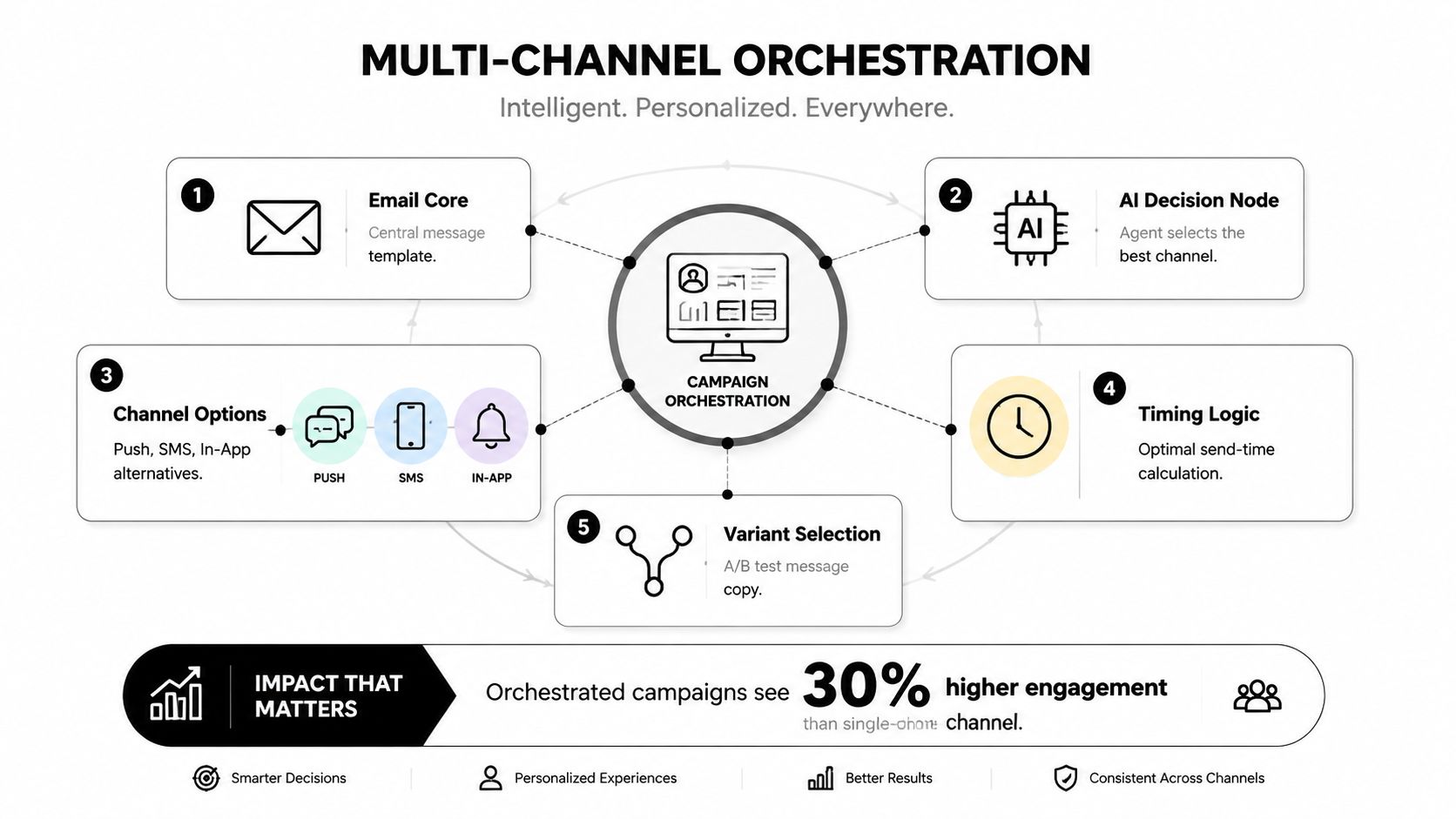
An enterprise email template shouldn't be a finished poster. It should be a decision-ready component that can accept context, expose a clear next action, and hand state back to the orchestration layer.
That starts with modular content. Keep the structural elements stable, then make selected blocks adaptable: product guidance, account status, employee task details, support context, recommended action, and escalation language. Each variable needs a defined fallback. If the CRM doesn't return a renewal date, the template should use approved neutral copy, not display an empty field or invent urgency.
Let the agent choose the next useful action
A multi-channel agent can evaluate context before selecting email, SMS, push, in-app messaging, chat, or human escalation. The decision shouldn't be based only on channel engagement. It should account for urgency, consent, message purpose, service state, and whether the recipient already resolved the underlying issue.
Consider a CX ticket workflow:
- An email acknowledges the request and provides a relevant knowledge-base action.
- If the customer replies with a complex intent, the agent routes the case to the right team.
- If self-service resolves the issue, the agent suppresses the next reminder.
- If email delivery fails, an approved alternative channel or service task handles the next step.
An EX onboarding workflow follows the same logic, but the data sources differ. The agent might read the employee's role, location, manager, start date, completed tasks, and policy requirements. It can send a concise email for a routine task, place an in-app reminder for an active user, or notify a manager when a required action remains open.
Design the feedback loop
Every CTA should produce an interpretable event. “Complete setup,” “view renewal options,” “upload a document,” and “contact support” are stronger than a vague “Learn more” when the orchestration system needs to choose what happens next.
Templates also need:
- Stable variables: Use consistent names for customer, account, task, product, deadline, and support case data.
- Fallback content: Define safe copy for missing, delayed, or conflicting data.
- Suppression events: Purchase, resolution, cancellation, completion, and unsubscribe should stop irrelevant messages.
- Handoff triggers: Specify when an AI agent continues, when a workflow changes channel, and when a human takes ownership.
Teams designing this layer can use Yellow.ai's omnichannel AI automation as one example of how email can sit inside broader conversational orchestration. The technology matters, but the operating rule matters more: don't let the agent optimize engagement while ignoring resolution.
Error Handling Throttling and Deliverability Safeguards
A workflow can be logically correct and still fail in production. Enterprise integrations time out, APIs return rate-limit errors, event payloads arrive late, and deletion requests appear while a recipient is waiting inside a sequence. The operational design must assume those conditions.
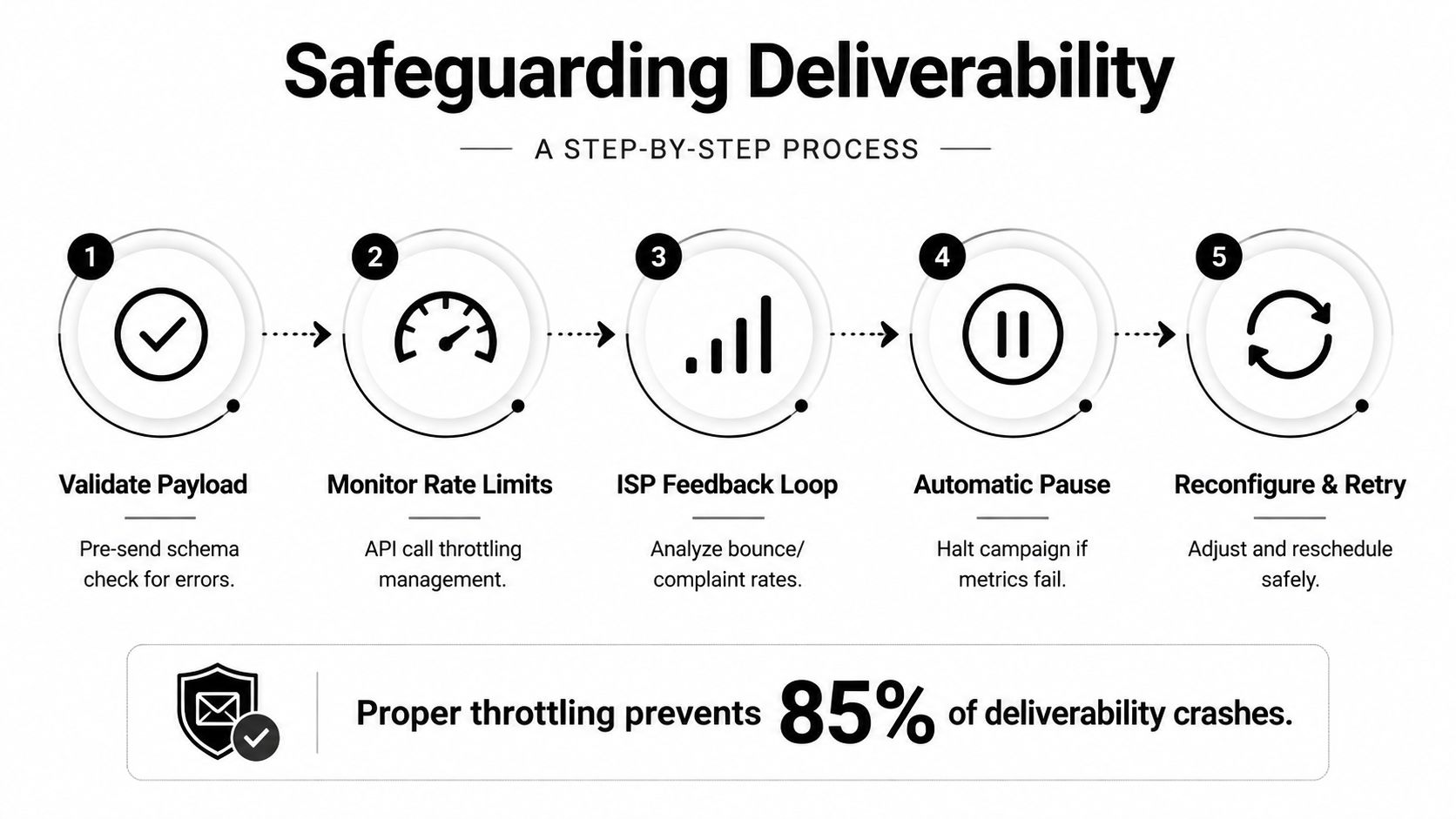
Start with the send path. Validate every payload against a schema before it enters the queue. Check recipient identity, consent state, template variables, locale, suppression status, and required event timestamps. A malformed message should move to an observable failure path, not disappear.
Protect the system during failure
Use a queue between event ingestion and message delivery. It gives operations teams control over pacing and lets the workflow absorb temporary provider or connector failures.
- Retry transient failures: Apply exponential backoff for temporary API errors, with a maximum retry policy and visible status.
- Isolate permanent failures: Send malformed payloads, invalid recipients, and rejected consent states to a dead-letter queue for investigation.
- Use circuit breakers: Pause a workflow or connector when failures cross an agreed operational threshold, preventing a retry storm.
- Separate priority lanes: Transactional or service-critical messages shouldn't compete with low-priority nurture traffic.
- Record idempotency: A repeated event shouldn't create duplicate enrollment or duplicate sends.
A Salesforce connector timeout during a peak event, a SendGrid rate-limit response during a product launch, or a GDPR deletion request mid-sequence each requires a different response. The common requirement is state visibility. Operators need to know whether the message is queued, retried, suppressed, delivered, bounced, or awaiting human review.
Treat reputation as a workflow dependency
Deliverability isn't a final checklist item. It affects whether every later step can execute. Watch bounce, complaint, unsubscribe, and delivery patterns by domain, workflow, audience, and template. Configure automatic pauses for abnormal changes, then require an operator review before resuming.
The benchmark evidence also shows why frequency controls matter. Automated messages converted efficiently, but their 0.59% unsubscribe rate exceeded the 0.20% campaign rate in Omnisend's data (same benchmark source). Build suppression after resolution and cap overlapping journeys.
For a practical review of best practices for inbox placement, assess authentication, list hygiene, complaint handling, content quality, and sending consistency alongside workflow logic. Those safeguards won't repair a broken trigger, but they can stop a good journey from damaging the sender reputation.
Operational rule: Every automated send needs a pause condition, a retry policy, and an owner who receives the failure alert.
Testing and Optimizing Beyond Open Rates
Open rates can show a change in attention, but they are not a reliable health metric for an enterprise workflow on their own. Privacy protections and inconsistent tracking weaken their value as an intent signal. The practical question is whether each sequence moves the right cohort from trigger to outcome without creating fatigue.
Measure the journey as a funnel. In a welcome flow, track enrollment, the first useful action, milestone completion, conversion, time-to-conversion, and exit reason. For an EX sequence, review task completion, manager escalation, remaining time at completion, and unresolved exceptions. A support journey should be judged by resolution and repeat contact, not by clicks alone.
Use a diagnostic metric set
| Metric Category | Primary KPI | Diagnostic Use Case | Target Benchmark |
|---|---|---|---|
| Enrollment quality | Valid trigger rate | Detects false positives and stale data | Establish a baseline by workflow |
| Step performance | Conversion by step | Locates the message or branch where momentum drops | Improve the weakest step first |
| Journey health | Completion rate | Shows whether recipients reach the intended outcome | Compare cohorts and workflow versions |
| Commercial impact | Revenue per email or recipient | Prioritizes high-impact journeys | Use the relevant benchmark and internal baseline |
| Recipient cost | Unsubscribe rate | Exposes fatigue or poor targeting | Keep within a controlled internal range |
| Operational timing | Time-to-conversion | Reveals delay, friction, or excessive wait rules | Compare against the journey objective |
Track revenue per email, placed-order rate, and unsubscribe rate at the flow level, rather than relying only on campaign summaries, as recommended in Omnisend benchmark methodology. Flow-level reporting also improves channel attribution. If email is followed by SMS and an in-app prompt, define holdout and credit rules before interpreting performance.
Test the sequence, not just the subject line
A disciplined test plan can compare trigger timing, wait duration, branch rules, message content, CTA wording, channel order, and suppression behavior. Assign one primary outcome to each experiment, document the audience and exposure window, and avoid changing several variables without a clear reason.
Use holdout groups to estimate incremental impact. Use cohort comparisons when seasonality, product changes, or overlapping campaigns could distort results. Sequential testing reduces the pressure to declare a winner after an early fluctuation. Bandit approaches may allocate traffic dynamically when the decision environment supports them.
One benchmark summary reported that top-decile workflows exceeded 60% open rates and 10% click rates, while concerning performance began below 30% open rate, 2% click rate, and $1.00 revenue per recipient (Email Vendor Selection benchmark summary). Treat those figures as diagnostic context, not universal targets. Before launch, teams should Test, validate, and improve your HTML email across clients, rendering modes, accessibility requirements, and fallback content.
When a sequence underperforms, isolate the failing step before rebuilding the entire flow. Check whether the trigger is valid, the wait rule is excessive, the branch receives the wrong cohort, or the channel handoff loses context. For automated regression checks across workflow states, templates, and branches, evaluate Yellow.ai's automated testing platform alongside existing QA tooling.
Compliance Security and Enterprise Governance
Compliance isn't a review gate added after the workflow is built. It changes the workflow's data model, permissions, branching, retention, and audit behavior from the beginning.
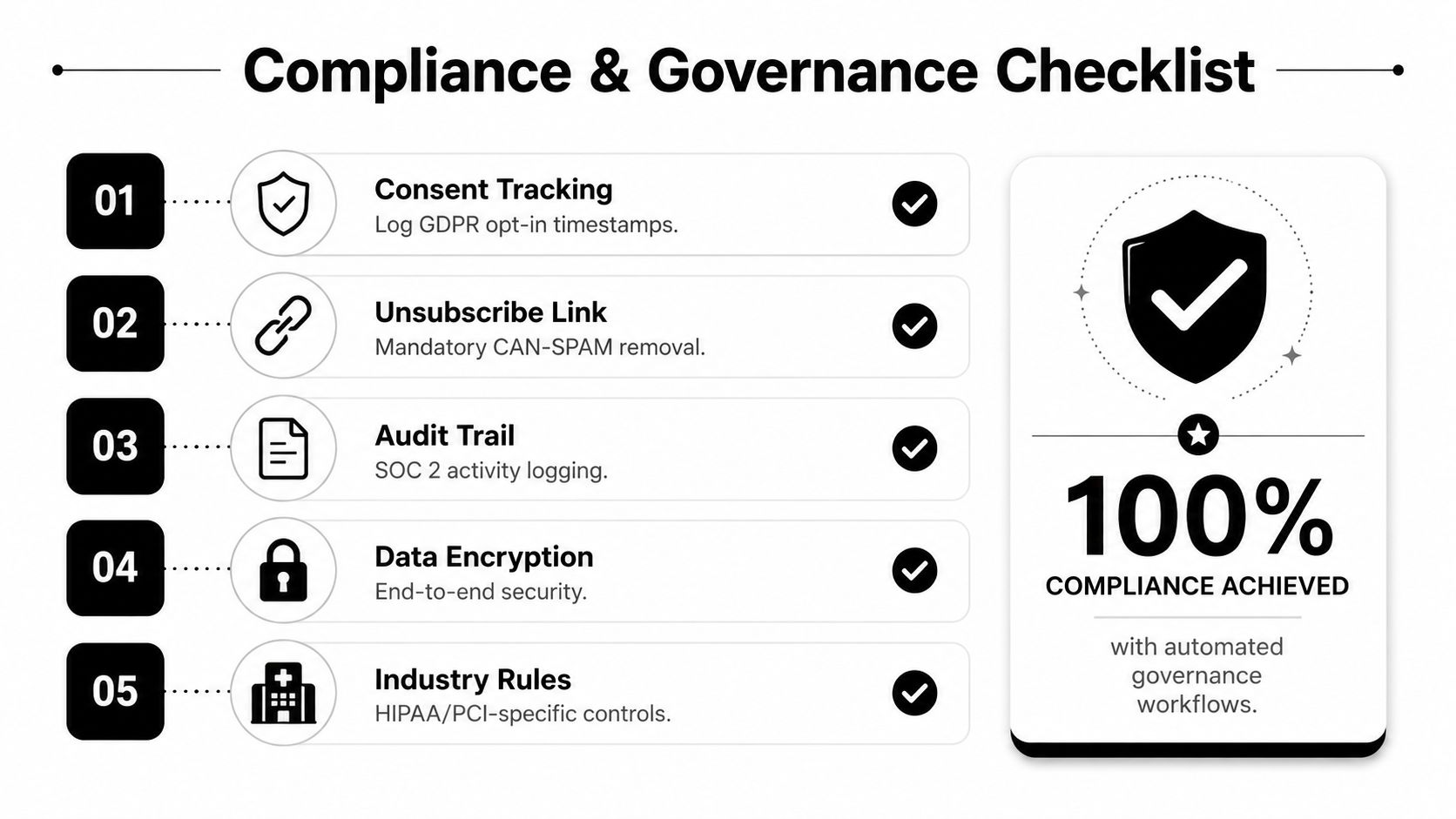
A compliant design stores consent as a state with provenance, not as a checkbox that a marketer can overwrite. Each enrollment should evaluate subscription purpose, jurisdiction, channel permission, suppression status, and the lawful basis required by the organization. An unsubscribe or preference change must propagate across active journeys quickly enough to prevent the next scheduled action.
Build governance into every state change
For GDPR-sensitive operations, deletion requests must remove or suppress data used by future workflow decisions. For CAN-SPAM obligations, every applicable marketing message needs a functional unsubscribe path. Healthcare, financial services, and other regulated environments may require additional controls for sensitive content, access, retention, and human review.
A production governance model should include:
- Role-based access: Separate workflow authors, approvers, publishers, and operators.
- Approval gates: Require review for sensitive audiences, regulated content, incentives, and cross-border changes.
- Immutable logs: Record who changed a trigger, template, segment, condition, or send rule.
- Version control: Preserve prior versions and document the reason for each release.
- Vendor oversight: Review data processing terms, subprocessors, security controls, and transfer mechanisms.
- Retention rules: Purge or anonymize records according to documented policy.
Security also applies to template variables. Minimize personally identifiable information, encrypt data in transit and at rest, and avoid placing sensitive details in subject lines or preview text. A workflow should expose only the information needed for the next action.
Governance becomes especially important when AI agents select content or channels. Define the actions an agent may take autonomously, the data it may access, the conditions that require approval, and the exact point where a human owns the case. Fast automation without bounded authority creates audit risk and inconsistent customer treatment.
Sample Workflow Templates for CX and EX Use Cases
The following patterns are useful because each has a clear trigger, decision path, fallback, and exit. They aren't campaigns to copy blindly. They are operating blueprints that make the failure points visible before a team writes the first email.
Post-purchase onboarding for CX
Trigger: An order confirmation event enters the customer profile.
Decision path: Classify the purchase by product complexity, installation requirement, and customer type. A simple product receives concise usage guidance. A complex product receives setup content, service options, and an in-app checklist.
Sequence: Send the initial email with the next action and a support route. If the customer engages with the setup content, continue with education. If engagement drops, offer an in-app prompt or SMS reminder where consent permits. If the customer opens a support case, suppress promotional education and let the service workflow take ownership.
Exit criteria: Product activation, completed setup, cancellation, unresolved escalation to a human, or a change in consent state.
The common misconfiguration is sending the next educational message on a fixed schedule even after the customer has completed setup. The repair is event-based progression. A completed milestone should advance or end the journey immediately.
Churn-risk re-engagement
Trigger: Product usage falls below the customer's established activity pattern, combined with an active account and no open resolution path.
Decision path: Segment by decay velocity, account value, role, plan, and recent support sentiment. A light decline may receive feature education. A sharper decline may route an account owner or service agent into the journey. Don't make an incentive the default response when the underlying issue is unresolved friction.
Sequence: Start with a value reminder tied to the customer's prior behavior. If the user returns, move into adoption guidance. If the user ignores the message, use an approved secondary channel or internal task. If the customer reports a problem, stop the re-engagement branch and route the case for resolution.
Exit criteria: Meaningful product activity, renewal, cancellation, support ownership, or consent withdrawal.
The weak design sends the same “we miss you” copy to every dormant account. The stronger design treats inactivity as a symptom and asks which product capability, service issue, or business change explains it.
Employee lifecycle workflow
Trigger: An HRIS event creates a new hire, role transition, leave event, or offboarding record.
Decision path: Apply role, location, manager, employment type, and compliance requirements. A new employee may need equipment, identity access, training, and policy acknowledgments. A role transition may require a different learning path and manager approval. Offboarding requires controlled access removal and documented handoffs.
Sequence: Send the employee the next task, update the relevant system of record, and notify the manager when an action remains incomplete. Use in-app or service-desk interactions for tasks requiring authenticated completion. Escalate exceptions to HR or IT rather than continuing reminders indefinitely.
Exit criteria: Required tasks complete, employee status changes, a human owner accepts the exception, or retention and deletion rules apply.
The biggest EX failure is treating a workflow as a reminder series instead of a state machine. Every task needs an owner, deadline logic, completion event, and fallback path. That discipline also makes audits and employee support far easier.
Yellow.ai can help enterprise teams connect email automation with AI-led CX and EX journeys by processing incoming email, identifying intent and entities, executing predefined flows, retrieving knowledge, escalating cases, and transferring complex interactions to human agents. If your priority is to diagnose broken sequence steps and coordinate email with other channels, visit Yellow.ai to evaluate how its agentic platform fits your workflow architecture.