









A customer relations database is the structured, shared store of customer identities, contacts, orders, service cases, interactions and consent status that CRM apps and AI agents read from and write to.
You're checking a support escalation. Billing says the refund has been issued, the chat agent says it's pending, and the customer has already explained the problem over email. The immediate problem looks like poor communication, but the architectural question is more specific: which record should each system trust, and what is each system allowed to do with it?
Table of Contents
- What a Customer Relations Database Is
- How It Differs From a CRM
- Architecture Layers of a Customer Relations Database
- The Data Model Behind Customer Records
- How Conversational AI Reads and Writes Customer Data
- Privacy, Access and Compliance Controls
- Keeping Data Trustworthy Enough to Automate
- Audit One Customer Record Before You Automate
What a Customer Relations Database Is
Think of a library catalogue. A member's record points to their loans, reservations and fines, so the librarian, desk clerk and self-service screen work with the same membership history. They don't maintain unrelated versions of the same person.
A customer relations database does the equivalent for customer operations. Its core parts are:
- Records: Separate entries for people, accounts, purchases, cases and other business entities.
- Identifiers: Stable keys that connect those entries without relying on a person's name.
- Rules: Instructions defining who may read or change a field and which updates are accepted.
The diagram shows how these connected records surround a shared customer identity.
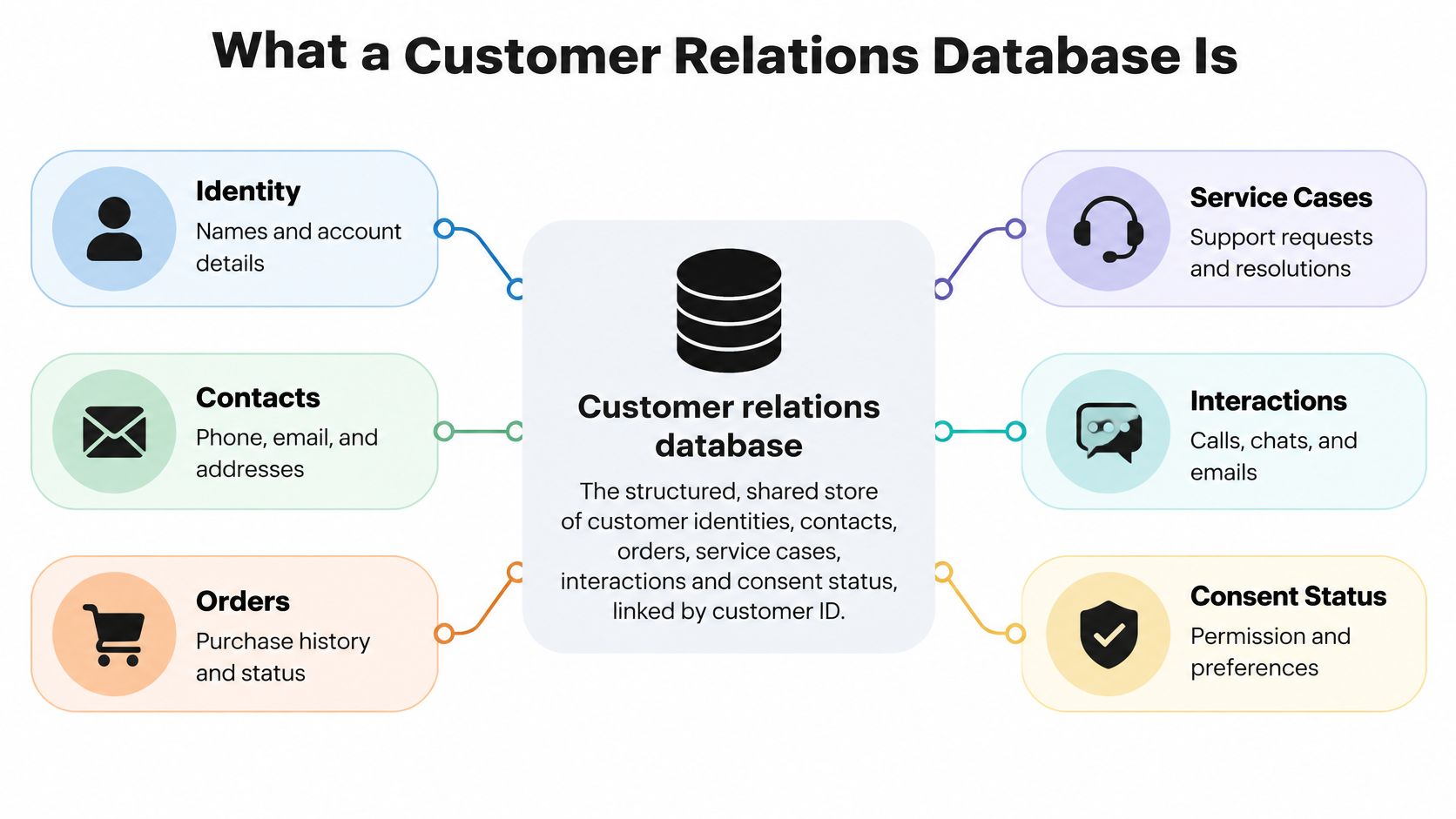
Say Maria Lopez calls support, emails billing and starts a website chat. Without shared identifiers, employees may see unrelated files. With a linked customer ID, they can retrieve the relevant conversations and transactions as a connected history.
That operational role matters. In 2025, 90% of surveyed organizations identified CRM data as a cornerstone of their operations, according to Validity's survey of CRM users and administrators in the United States, United Kingdom and Australia, reported by MediaPost.
Test whether your records are genuinely connected
Ask your team:
- Case retrieval: Can you find every case for a customer in a single query?
- Shared details: Do support and billing see the same current address?
- Permission ownership: Can you identify the system that holds the authoritative consent record?
A dashboard that displays information from several tools doesn't necessarily solve these problems. It may show conflicting records side by side without establishing which is authoritative. A usable shared database needs connections and decision rules, not just a consolidated screen.
How It Differs From a CRM
A CRM is an application people use to run sales, service and marketing work. A customer relations database is the underlying record layer that stores and connects the information those workflows use.
A CRM can contain its own database. The distinction concerns architectural responsibility, not whether you need to buy another product.
CRM application versus customer relations database
| Dimension | CRM application | Customer relations database |
|---|---|---|
| Primary job | Runs sales, service and marketing workflows | Stores and links customer records for every system |
| Main users | Sales, service and marketing staff | Integrations, AI agents, analytics and data teams |
| Interface | Screens, pipelines and workflow rules | Schemas, queries and APIs |
| Typical owner | Revenue or CX operations | Data, IT or architecture teams |
| Failure impact | A broken view for one team | Wrong answers across every connected channel |
| Governance focus | User permissions and workflow rules | Field-level access, consent, retention and lineage |
Screens and records serve different purposes
A service representative needs a case screen, an assignment queue and a way to record a resolution. An integration needs predictable field definitions, reliable identifiers and an interface for retrieving or updating those records. Those are related needs, but they aren't interchangeable.
The relational foundation makes it possible to query connected business information rather than work only within separate application files. The ACM history of relational query systems describes how relational systems expanded into both query-oriented and transaction-processing applications.
Failure diagnosis follows the same distinction. A misconfigured CRM view might hide an otherwise correct field from a service team. An incorrect underlying customer record can instead feed the same wrong answer into email, chat and voice, even when each application is functioning correctly.
Design rule: If several systems write customer information, assign the shared record layer its own owner.
A small business using a single CRM may reasonably keep everything inside that application. Creating a separate database layer could add synchronization work without solving a real problem.
An enterprise with a CRM, ticketing tool, billing platform and voice bot faces a different decision. It needs an explicit shared-record design, though that design doesn't require moving every record into a single physical database. Document the responsibilities first, then decide where the records should live.
Architecture Layers of a Customer Relations Database
Map the architecture as a path from a customer event to an authorized business action. Each layer needs a named owner and a clear handoff.
From incoming events to usable records
- Source systems produce events. Salesforce might record an account change, Zendesk a support case, and a billing platform a payment update. Web, chat and voice systems contribute interaction events.
- Ingestion and identity resolution normalize incoming values and evaluate which customer they belong to. Store the evidence and confidence behind each identity link rather than treating every match as equally reliable.
- The core store holds customers, contacts, cases, orders, interactions and consent records. Database constraints prevent broken references, such as a case pointing to a nonexistent customer.
- The policy and access layer evaluates permissions, purpose, retention and regional placement before a read or write proceeds.
- Delivery interfaces provide approved information to CRM screens, analytics tools and conversational agents through queries and APIs.
For attribute-level provenance, retain the source system, collection timestamp, confidence and permitted use. This approach aligns with the identity-resolution and privacy architecture described in the MDPI paper on enterprise customer-data governance.
Make write ownership explicit
Designate an authoritative system for each field. Billing can own refund status while the customer profile service owns a verified contact address. Other applications should submit changes through the designated interface rather than overwrite replicated values directly.
Analytics copies belong downstream of operational records. Their owners must implement deletion and permission-change propagation, or removed information may remain available in reports and extracts.
Start small with ingestion and a dependable core store, but don't give an AI agent write access before the policy layer exists.
The trade-off is straightforward: extra coordination makes initial integration slower, but it gives engineers somewhere to resolve conflicting updates instead of leaving each application to improvise.
The Data Model Behind Customer Records
The foundation is the relational model introduced by Edgar F. Codd in 1970, which organized information into related tables rather than making applications depend on physical storage structures, as explained by IBM's relational database overview.
For customer operations, that means you don't squeeze everything into a giant customer row. You store different business entities separately and connect them.
A primary key uniquely identifies a row. A foreign key points to a related row in another table. Maria's customer ID, for example, can appear on each of her orders without copying her entire profile into every order record.
Core entities in a customer relations database
| Entity | Key identifier | Links to |
|---|---|---|
| Customer | customer_id | Contacts, cases, orders, consent records |
| Contact | contact_id | Customer, with many contacts per customer |
| Interaction | interaction_id | Contact, channel, case |
| Service case | case_id | Customer, agent, interactions |
| Order | order_id | Customer, product lines |
| Consent record | consent_id | Contact, purpose, source |
Build relationships around business meaning
A customer account can have many contacts. That's a one-to-many relationship: an organization's purchasing manager and service administrator can belong to the same account while retaining separate contact details.
In business-to-business operations, a consultant might work with several customer accounts. Represent that many-to-many relationship through a junction table, with a separate entry for each contact-account association. Otherwise, staff may duplicate the consultant's profile or overwrite their previous account connection.
An interaction also needs context beyond the customer. A chat message should reference its contact and channel, and link to a service case when it concerns an existing issue. That lets employees distinguish a new sales inquiry from another conversation about an unresolved complaint.
Two edge cases need deliberate modeling:
- Anonymous sessions: Keep website activity separate until authentication or another justified matching event establishes a link. Don't attach browsing history merely because a name looks similar.
- Shared households: Several people can use the same telephone number. Model the household relationship explicitly rather than merging individual profiles without clear indication.
The model should preserve meaningful distinctions. A database that makes every relationship look like a single person with a single email address will misrepresent customers before any automation begins.
How Conversational AI Reads and Writes Customer Data
A customer asks, “Where's my refund?” The agent should follow a narrow, verifiable path through the records, like a staff member checking the right case file rather than opening every drawer.
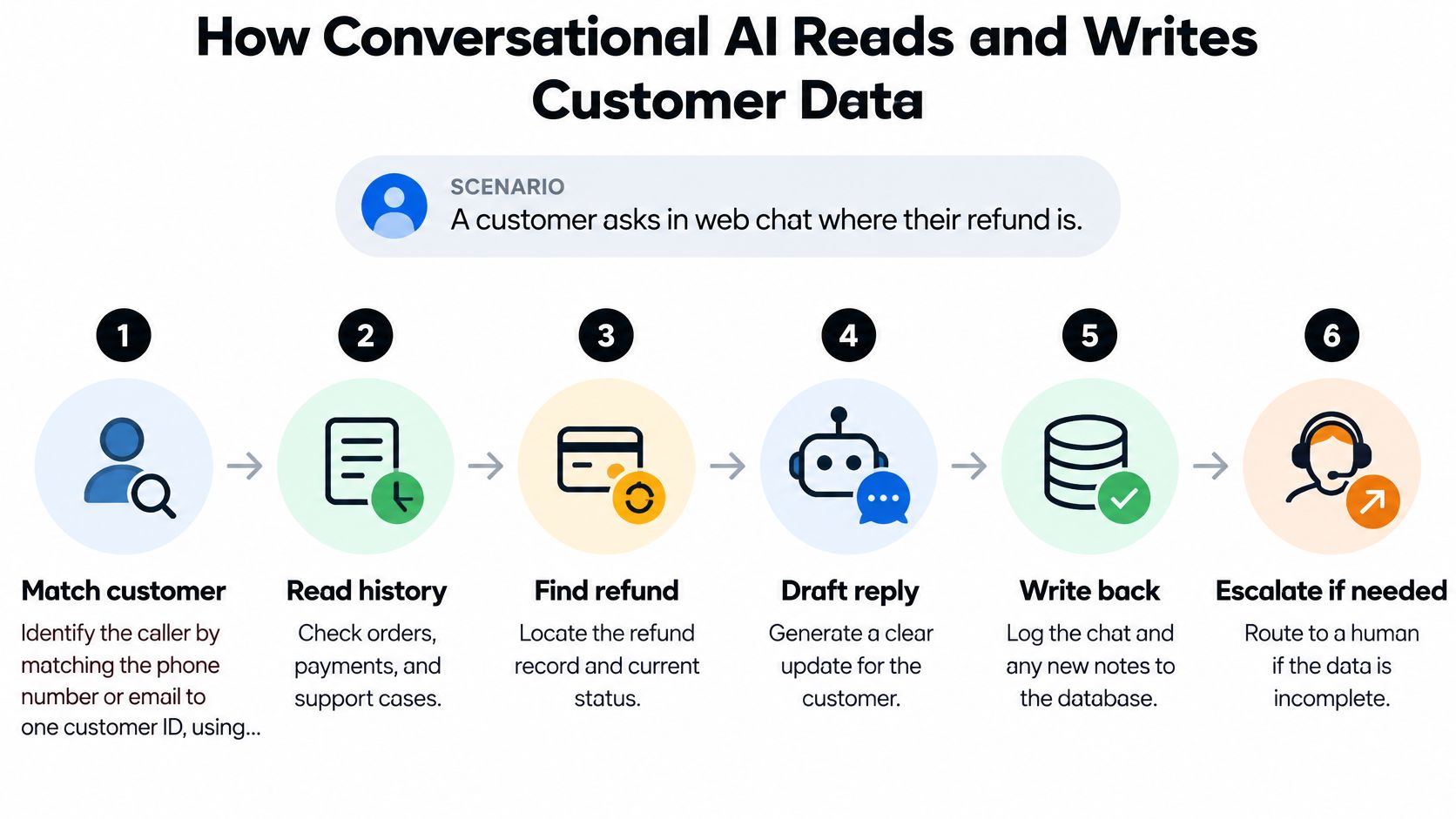
- Establish identity. Use an authenticated session when available. An email address or phone number can help find a candidate record, but possession of that information alone doesn't authorize access to refund details.
- Retrieve relevant context. Read the order status, refund record and open case. A refund-status question does not require unrestricted access to payment history.
- Check the permitted purpose. Confirm that the request fits the customer's permissions and applicable service rules. Permission to handle a service inquiry does not automatically permit promotional messages.
- Answer or act. Base the response on the authoritative refund record and its update time. If the record says the refund was initiated, don't say the customer has received it.
- Record the interaction. Save the channel, outcome and time, and link the exchange to the relevant order and case. Keep customer statements distinct from verified transaction facts.
- Escalate uncertainty. Send the request to a person if identity evidence is insufficient, records conflict or the task falls outside the agent's permitted scope.
Prevent a plausible but incorrect answer
Suppose a record contains an old billing address and a newer shipping address. The agent needs to know what each field means, where it came from and when it was updated. Without that context, it could choose the wrong address and direct the customer through an inappropriate verification step.
For teams evaluating how agents move from answering questions to taking actions, Yellow.ai's agentic AI research provides architectural context.
Use approved APIs to retrieve operational data. Set tighter limits on writes: the refund service updates refund status, while the conversation system records the exchange. Request identifiers can prevent retries from duplicating actions; reject updates if the underlying record has changed unexpectedly.
The goal is justified action based on sufficient evidence, with a record that lets staff review what happened.
Privacy, Access and Compliance Controls
A conversational agent can expose more context than a customer should see when the database has no field-level rules. A successful identity match doesn't authorize every possible disclosure, and an internal service account shouldn't inherit unlimited access merely because integration is easier that way.
In Cisco's 2025 Data Privacy Benchmark Study, 64% of respondents were concerned about accidentally sharing sensitive information with generative AI, according to Cisco's study announcement. Apply enforceable controls rather than relying only on instructions in an agent prompt.
Access and compliance controls for a customer relations database
| Control | What it governs | Example |
|---|---|---|
| Field-level permissions | Which attributes each agent or channel may read | Chat agent sees order status, not card details |
| Redaction | Sensitive values in transcripts and logs | Card digits masked in saved chat history |
| Consent provenance | Where, when and for what purpose consent was given | Email consent from web form, dated and versioned |
| Regional storage | Where customer data is physically held | EU customer records stored in an EU region |
| Retention and deletion | How long data lives and how removal propagates | Deletion request reaches CRM, ticketing and analytics copies |
| Human escalation | When an automated action must go to a person | Request outside the agent's permitted fields |
Translate obligations into integration rules
We process customer data on the customer's behalf and act as the Data Processor/Business Associate under the agreement. We can store customer data in India, the Middle East, Asia, Indonesia, Singapore, the USA and the European Union according to the customer's legal, regulatory and contractual requirements.
Customers must keep their user database updated in line with the National Do Not Call Register. Under our agreement, unsolicited commercial communications to subscribers on that register aren't permitted unless the customer has irrevocable consent from the subscriber. Treat these as contractual responsibilities to implement in outbound workflows, not as a substitute for jurisdiction-specific legal review.
A human handoff is also a privacy control when automation lacks authority to continue. Our discussion of why customers choose human support offers context for designing that exit without forcing customers to restart their request.
Keeping Data Trustworthy Enough to Automate
In Validity's 2025 survey of 602 CRM users and stakeholders, 37% said their organizations lost revenue directly because of poor data quality, according to Validity's CRM data-management presentation. More context won't help an AI agent if that context directs it toward the wrong customer or action.
A quality review should expose operational defects, not just empty fields.
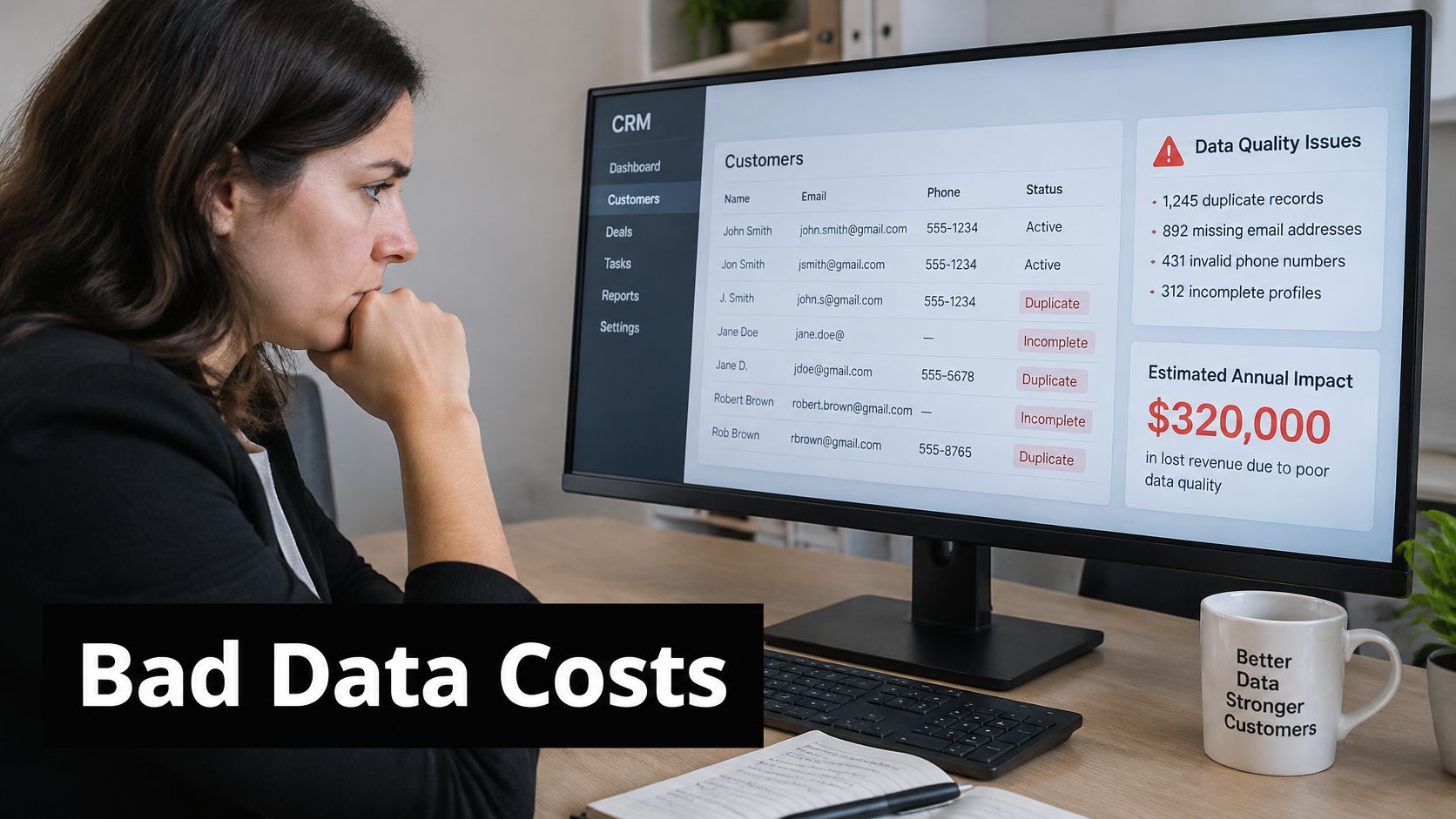
Distinguish intrinsic quality, whether values are correct and usable, from contextual quality, whether defects undermine a particular task. The ACM paper on data quality in CRM supports assessing both defects and their business-context impact. A stale telephone number can pass a format check while remaining unsuitable for contact, especially when marketing permission is absent.
Set an evidence threshold for automation
Track field-level completeness, validity, uniqueness, timeliness and consistency, weighted by business impact. A false identity merge can contaminate service history and permissions; a missing optional demographic field may have no bearing on resolving a refund.
More populated fields don't justify more automated authority.
Document match thresholds, identifiers used and procedures for correcting false merges and false splits. Send ambiguous matches to review rather than allowing an agent to resolve identity uncertainty through guesswork.
For retrieval workflows, our analysis of RAG's ingestion problem provides a useful companion to source-quality checks.
Use this video alongside a practical review of what enters the automation workflow.
Before widening automation, compare outcomes with a human-handled control group. Measure resolution or conversion and inspect incorrect actions, not just message volume or apparent personalization.
Audit One Customer Record Before You Automate
Choose a customer who has contacted you through different channels. Trace the underlying records rather than relying on the summary displayed in a CRM screen.
- Inventory the systems holding their name, telephone number or email.
- Check whether each system maps to the same customer ID.
- Name the authoritative owner for address, consent and order status.
- Flag attributes with no source date.
- Count conflicts and prioritize fixes by the channels they affect.
Apply a go or no-go decision
If the records agree, extend agent read access gradually by field group. If they conflict, fix identifiers and ownership before allowing automated action.
Repeat the exercise with other customers, including someone who shares a household telephone number. Log the review date, systems checked, conflicts, owners and decision so subsequent audits can demonstrate whether problems are being resolved.
Our email automation integrates with existing ticketing and CRM tools, and our support-channel integrations make customer history and preferences consistently available across channels. That makes cross-system audit coverage more important, not less.
Yellow.ai offers conversational AI connected to existing customer-service systems, helping teams use customer context across support channels. Bring your record audit and field-ownership map to a discussion about controlled automation, and visit Yellow.ai to explore how your CRM and ticketing workflows could connect.