










Most customer experience automation programs are sold as a clean win, then judged by the wrong metric. A bot that deflects contacts looks efficient on a dashboard, but if customers still wait, repeat themselves, and get bounced across channels, the enterprise has only moved the cost around. The question isn't how much volume automation can absorb, it's whether the customer leaves with less effort, better context, and a workable path to a human when the system misses.
That's the gap in most advice. The strongest programs treat customer experience automation as operational infrastructure, not a chatbot project, and they measure whether orchestration, escalation, and continuity improved the journey. The economics matter, the architecture matters, and governance matters even more when the interaction is regulated, emotionally loaded, or tied to revenue retention.
Table of Contents
- Why Most CX Automation Programs Quietly Fail
- What Customer Experience Automation Really Means in 2026
- The Business Case and ROI of CX Automation
- The Architecture Behind Enterprise CX Automation
- Enterprise Use Cases and the KPIs That Prove They Work
- A Phased Implementation Roadmap for Large Organizations
- Governance, Compliance, and the Human Fallback Layer
- Vendor Evaluation Criteria for Enterprise CX Automation
Why Most CX Automation Programs Quietly Fail
The quiet failure mode is easy to miss. Leaders approve automation because support queues are expensive, then teams optimize for containment and call it progress. Customers still run into the same pain points, long wait times, repeated explanations, and conversations that do not transfer cleanly across channels, which makes the experience feel fragmented even when the bot is busy.
Cost savings can hide experience debt
A program can lower handle pressure and still damage trust. That happens when the automation layer solves simple requests but creates more work for anything unusual, especially in regulated environments where the customer needs an answer, not just a response. If the system pushes people into a loop of retries, the organization has traded agent cost for customer frustration.
Practical rule: if a workflow reduces agent load but increases repeat contact, it's not automation maturity, it's experience debt.
The problem is rarely the idea of automation itself. It's the tendency to judge it with a single operational metric, usually deflection, while ignoring whether the customer had to restate the issue, whether context survived the handoff, and whether the escalation path resolved the case. That is why the better programs treat the automation stack as a service design problem first, and a tooling decision second.
The pain points are still human pain points
The common failures are not abstract. Customers still struggle with waiting, repeating their issue to multiple agents, and losing context when they switch from chat to voice to email. Those failures are especially costly in BFSI, healthcare, utilities, and any environment where the first automated answer is not enough.
The enterprise lesson is simple. Don't ask whether automation can absorb more volume. Ask whether it removes friction at the moments customers remember. If the answer is no, the program is probably producing cheaper friction, not better service.
What Customer Experience Automation Really Means in 2026
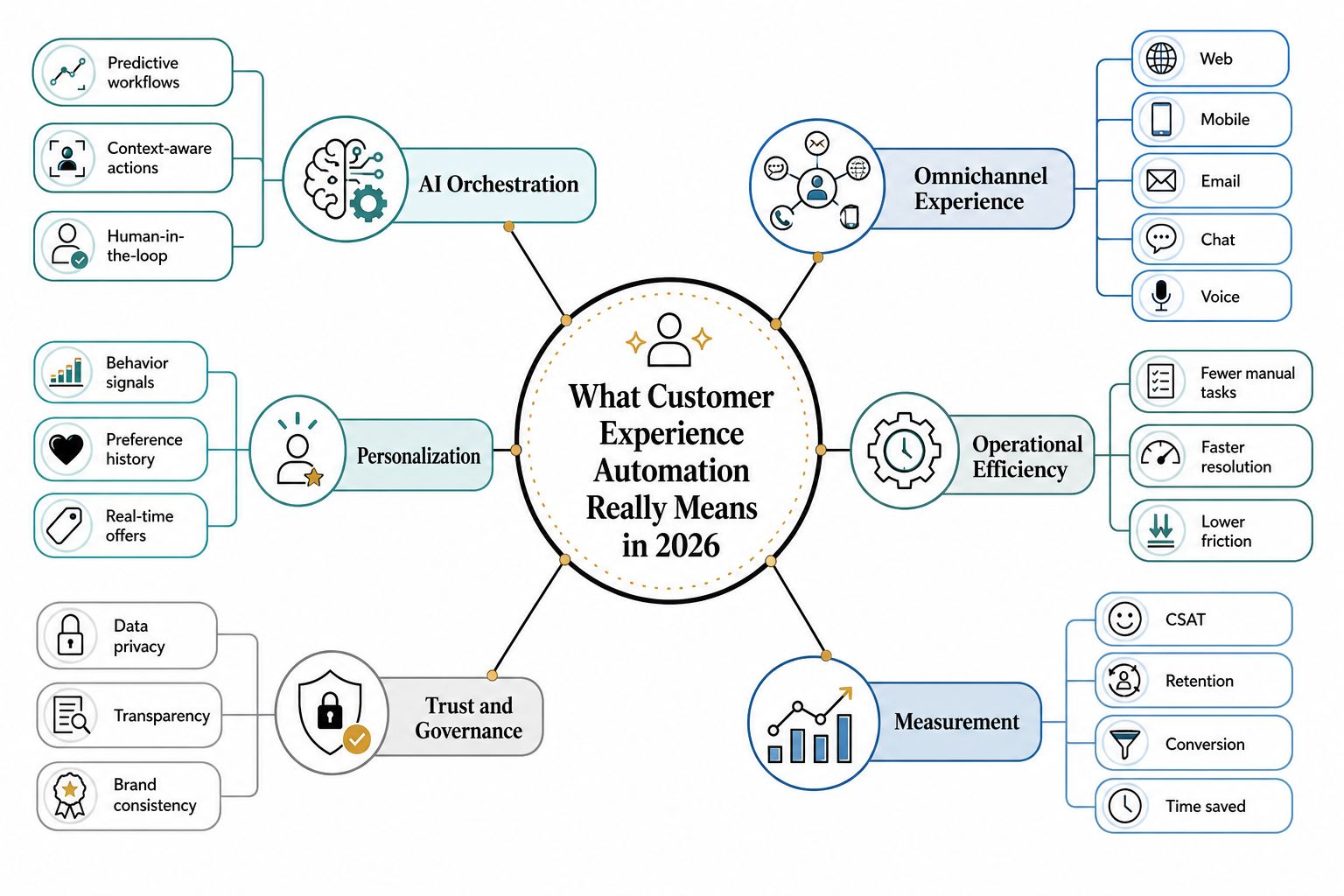
Customer experience automation combines intent sensing, decisioning, execution, and learning into one service layer. The system has to understand what the customer wants, choose the next action, carry it out across systems, and then improve from the result. In practice, that is closer to an operating layer for service than a single-purpose tool.
A napkin-level model that actually works
The easiest way to describe it is by function. Intent sensing acts as the ears, it picks up what the customer is trying to do through voice, text, email, or another channel. Decisioning acts as the brain, it uses context to decide whether to solve, route, or escalate. Execution is the hands, it updates records, opens tickets, triggers workflows, or responds to the customer.
Learning is the memory. It records what worked, what failed, and where the handoff broke down so the next interaction improves.
The stack has to work across channels, not just inside a single chat window. A customer may begin in self-service, move to a live agent, and continue later in another channel, and the system should preserve the thread instead of forcing a restart. In enterprise terms, orchestration, personalization, and workflow automation have to sit on top of accurate customer data, not beside it.
A useful test is simple. If the platform can identify intent, pull the right context, choose a next-best action, and carry that state across channels, it is doing CX automation. If it only answers FAQs, it is a bot.
The trade-off shows up in the action path. The more the system can explain why it chose a route, the easier it is to defend in procurement, architecture review, and audit. That matters in regulated environments, where a fast answer that cannot be traced creates more risk than a slower answer with a clear decision trail.
A system that cannot explain its action path is not ready for enterprise use. That is the standard that separates real automation from a polished front end.
For teams trying to translate that standard into a build-vs-buy decision, a practical CX automation ROI calculator can help frame the conversation around service quality, operating cost, and escalation load.
The Business Case and ROI of CX Automation
The strongest business case starts with unit economics, but the story is broader than cost takeout. In a 2025 Salesforce-linked summary, 85% of companies use AI or automation in customer service, tier-1 support automation sits around 40% to 70% of volume depending on industry and maturity, automated interactions are cited at $0.25 to $0.50 each versus $6 to $12 for human-handled tickets, and mature programs can reduce total support operating costs by 25% to 40% within 18 months. Those numbers come from customer support automation statistics, and they explain why leaders keep funding this category.
Build the ROI model in layers
The mistake is to stop at deflection. Deflection only tells you how much traffic stayed out of the queue. It does not tell you whether the customer resolved the issue faster, whether the agent handled the hard cases better, or whether the automation reduced avoidable repeat contacts.
A better model stacks four layers.
| Layer | What It Measures | Signal It Produces |
|---|---|---|
| Deflection | Requests resolved before an agent touch | Queue pressure falls |
| Containment | Conversations completed inside automation | The workflow can finish a task |
| AHT reduction | Less time spent on assisted cases | Agent capacity improves |
| Effort and retention | Fewer repeats, smoother recovery, better loyalty | Experience quality improves |
The reason to use layered ROI is that the business impact is not just cost. Faster resolution can reduce friction in renewal, claims, service recovery, and order support, which affects retention and downstream revenue. Automation functions as both a cost initiative and a quality-of-service lever, with the payoff showing up in operations metrics and customer loyalty outcomes.
For teams building the internal case, a calculator such as Yellow.ai's ROI calculator can help structure the assumptions, but the numbers still need to come from your own contact mix, escalation rate, and channel behavior. That matters in regulated environments, where a cheap first response is not the same as a resolved one.
The Architecture Behind Enterprise CX Automation
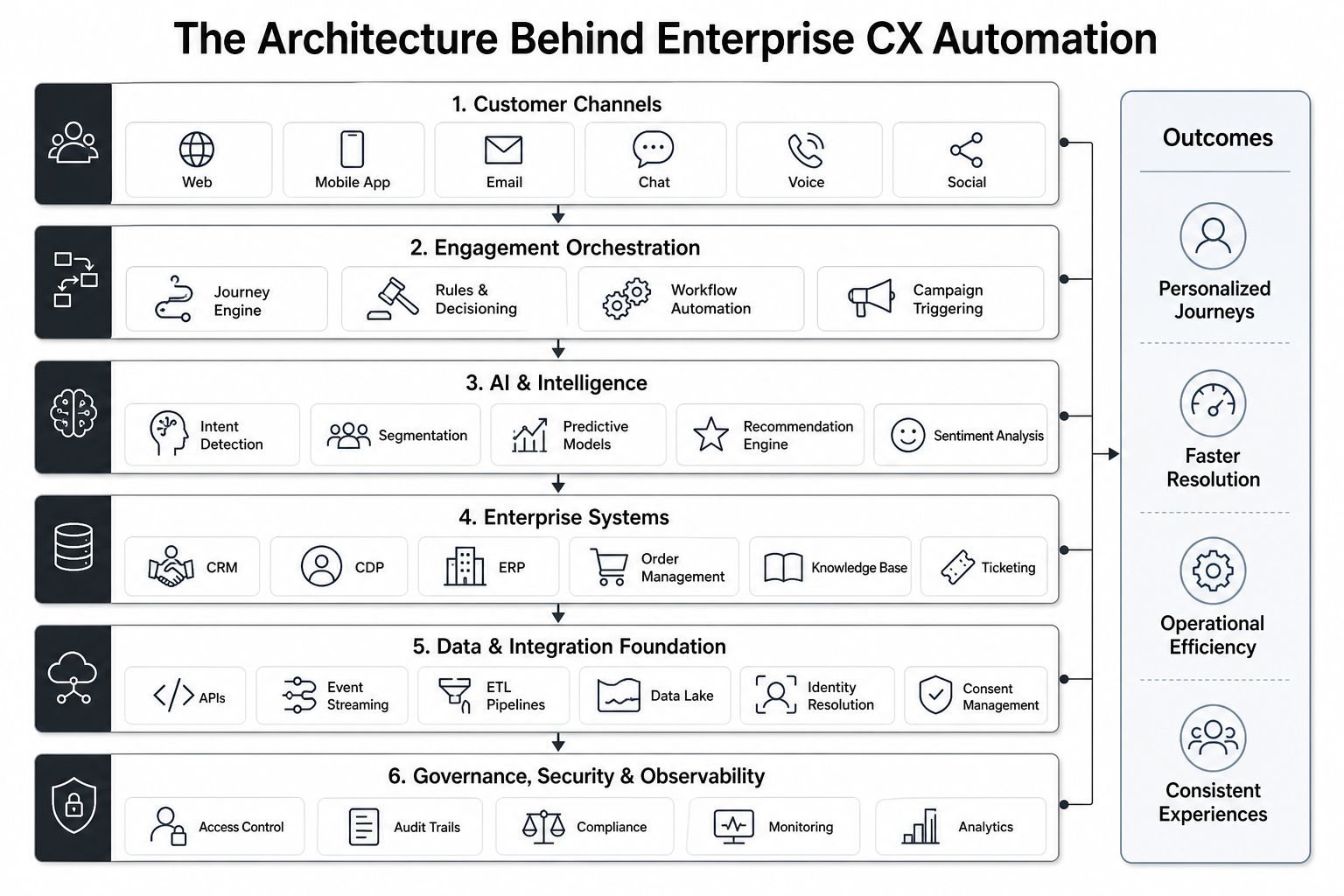
Enterprise CX automation works only when context, decisioning, orchestration, and optimization are separated cleanly. In production, the stack usually has four layers, and each one fails in a different way when it is poorly designed. Identity and data form the first layer, pulling together CRM records, conversation history, and customer profile signals. Decisioning is the second layer, where intent, sentiment, and rules determine whether the system should solve, personalize, or escalate.
The layers that matter in production
The third layer is orchestration and integration. It moves work into systems of record, opens or updates tickets, routes cases, and passes context into contact center workflows without forcing the customer or agent to restart the interaction. The fourth layer is continuous optimization, where outcomes feed back into prompts, policies, routing rules, and knowledge retrieval so the system improves instead of hardening around old assumptions.
That structure is why platform diagrams matter. A vendor can claim “agentic” capability, but if the architecture does not show retrieval against a governed knowledge base, reliable integration with CRM and ticketing systems, and a clear loop for performance tuning, the system will stall at demo stage. In enterprise deployments, knowledge retrieval, workflow orchestration, and continuous improvement are not extras, they are the difference between a contained pilot and a service layer that can survive real volume, exceptions, and audits.
The goal is execution inside the systems the business already trusts, not a pile of tools with nice demos. A stack may include agentic AI for task execution, retrieval-augmented knowledge access for factual grounding, and pre-built connectors for Salesforce, Zendesk, Genesys, or other systems already in use. In regulated environments, that also means the AI can hand off to the right workflow without losing state, which is where many programs break down.
The integration test is simple. If the platform cannot move context cleanly into and out of the systems of record, it is not ready for enterprise use. For a quick review of connector breadth and system touchpoints, see Yellow.ai's integrations overview. If you also need a practical example of connected operations in a partner workflow, the pattern shows up in customer success finance workflows.
Enterprise Use Cases and the KPIs That Prove They Work
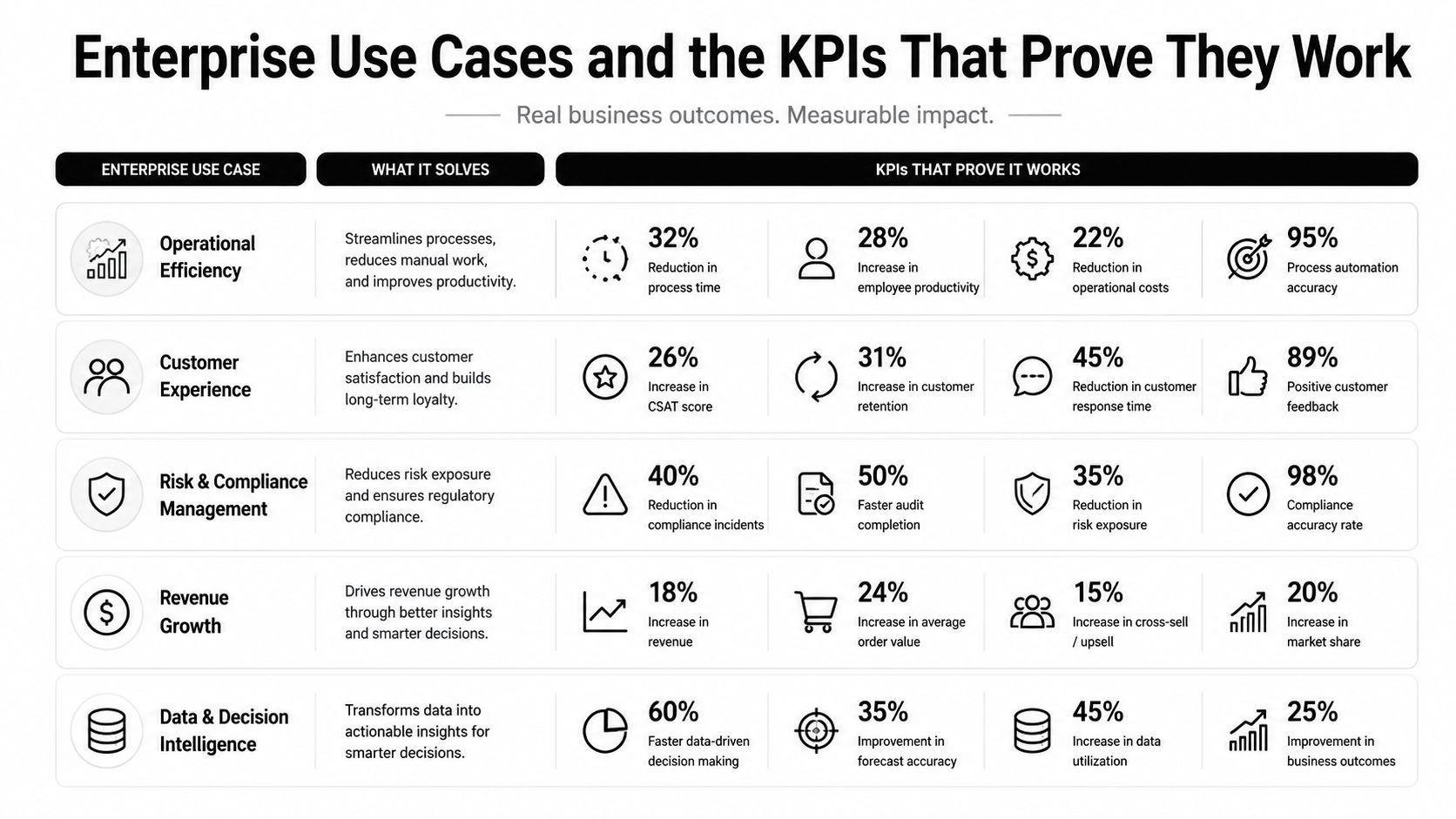
The best use cases are the ones where automation removes repetitive friction without breaking trust. In BFSI, that often means tier-1 service deflection for balance, card, or policy questions. In healthcare, it's claims status, benefits triage, and scheduling support. Retail usually needs post-purchase help, returns, and order tracking. Utilities care most about outage triage, status updates, and service restoration communication.
BFSI and healthcare need clean handoffs
In BFSI, the automation pattern should favor identity verification, intent detection, and controlled escalation. The KPI ladder starts with containment, then checks AHT for assisted cases, then looks at repeat-contact rate and compliance quality. A low-cost bot that mishandles a sensitive request is a liability, not an asset.
Healthcare raises the bar further because context loss can create real operational and patient frustration. Claims and benefits triage need the system to answer routine status questions, then hand off smoothly when a case needs review. The right KPI there is not just volume handled, it's whether the patient avoids re-explaining the issue and whether the channel transfer preserves history.
Retail and utilities are continuity tests
Retail automation lives or dies on post-purchase continuity. If a customer starts with an order tracking question and then needs a return or replacement, the system should not reset the conversation. The useful KPI is repeat-contact rate, because a customer who comes back for the same issue is telling you the first interaction wasn't enough.
Utilities are different. Outage triage often requires high-volume updates, clear routing, and accurate service status communication. In that setting, response quality and continuity matter more than clever language. A practical resource on structured operations workflows is customer success finance workflows, because the same discipline of routing, escalation, and record integrity shows up when service teams need to keep financial and support processes aligned.
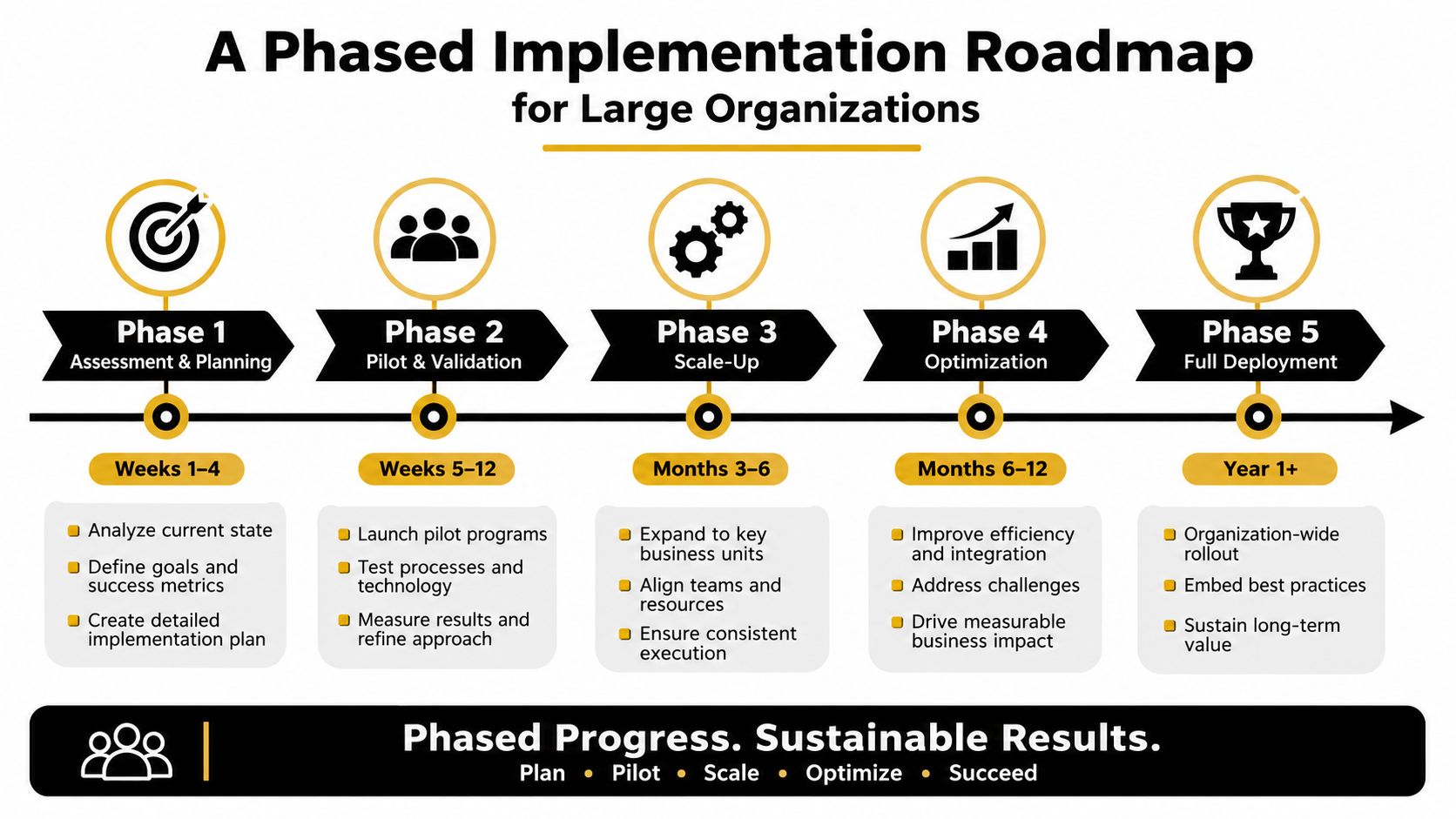
A Phased Implementation Roadmap for Large Organizations
Big programs fail when they skip the boring work. The first phase is journey mapping and use case selection, and the exit criterion should be obvious, a limited set of workflows with enough repeat volume and enough customer pain to justify automation. If a use case can't be defined clearly, it's too early to automate.
Pilot narrow, then harden the controls
The second phase is a contained pilot. Keep the scope tight, define hard success metrics, and include a live fallback path from day one. If the pilot cannot prove that it reduces effort without increasing churn, complaints, or repeat contacts, it should be revised or killed.
The third phase is where most programs stall. That's the governance and integration stage, where the automation is connected to systems of record, monitored for policy compliance, and reviewed for failure modes. This is also where teams discover whether the organization has clean data, clear ownership, and a workable escalation design. If those pieces are missing, the pilot may have looked good only because humans were cleaning up behind it.
Scale only after the system survives real traffic
The fourth phase is enterprise rollout with continuous optimization. By then, the program should have evidence that it can absorb more volume without degrading handoff quality or context continuity. The rollout should include a change management process for intents, knowledge, and routing rules, because customer behavior shifts and the automation has to adapt.
If the rollout plan doesn't define what happens when the model is uncertain, the plan isn't finished.
The kill criteria matter as much as the milestones. Stop or redesign the program if human escalations have no ownership, if the automation cannot pass context to live agents, or if the business cannot prove that the customer experience improved along with the operating cost.
Governance, Compliance, and the Human Fallback Layer
Governance is not a brake on CX automation, it's what makes the automation credible in high-stakes environments. The controls that matter are audit trails, PII handling, model change management, and explicit escalation rules by segment or intent. Without those, the system may be fast, but it won't be trustworthy.
Human fallback is part of the product
The strongest programs assume failure will happen. They design a human fallback layer that can take over with full context, not a cold transfer that forces the customer to start over. That's especially important in voice and omnichannel deployments, where background noise, misunderstood commands, and missing customer history can still break the flow.
The practical rule is that a customer should never pay the price for model uncertainty. If the system can't resolve the case confidently, it should route with context, preserve the transcript, and make the handoff easy to accept. That requires escalation design, not just a bigger model.
For teams building agent support and recovery flows, agent assist is a useful pattern to study because it shows how automation can support live staff rather than replace them. In enterprise practice, the best fallback paths give agents the same customer context the bot had, plus the reason the system escalated.
Governance is what protects trust
Compliance teams care about more than accuracy. They care about who changed the workflow, what data the model saw, how the system handled restricted information, and whether the escalation behavior was tested before release. In regulated sectors, that review process should be built into the deployment cadence, not added later.
Many vendors oversell speed and undersell recovery. A customer will forgive a short delay more readily than they'll forgive a dead end. Good governance prevents those dead ends from becoming the default.
Vendor Evaluation Criteria for Enterprise CX Automation
Vendor demos are easy to like and hard to trust. A serious evaluation should score the platform on architecture openness, multi-model flexibility, omnichannel coverage, compliance posture, integration depth, analytics maturity, and safe AI practices. If the platform can't work with the systems you already run, it's a risk, not a solution.
Seven questions that separate enterprise tools from wrappers
First, ask whether the architecture is open enough to avoid lock-in. The vendor should be able to support your preferred model strategy, not force a single path. Second, check whether omnichannel coverage is real across voice, chat, email, and other customer entry points, because context continuity breaks when the channel surface is fragmented.
Third, inspect the compliance story. That includes certifications, data handling controls, and how the platform supports audit and governance needs. Fourth, look at integration depth with systems such as Salesforce, Zendesk, and Genesys. Native connectivity is good, but the issue is whether the workflow can execute inside your operational stack without brittle workarounds.
Fifth, review analytics and optimization. If the platform can't show what happened, where the handoff failed, and how the workflow improved over time, it will be hard to defend after launch. Sixth, test the knowledge and retrieval layer, because hallucination risk and stale content are operational problems, not theoretical ones.
Seventh, evaluate safe AI practices. That includes policy controls, content filtering, prompt governance, and human override. In a procurement review, the most useful red flags are a demo that hides the handoff logic, a roadmap that assumes perfect data, and a vendor who treats governance as a later phase instead of a launch requirement.
The final test is plain. If the platform can't improve continuity, context, and escalation quality, it doesn't matter how polished the bot looks in the demo.
If you're building or repairing a CX automation program, Yellow.ai provides enterprise agentic AI for voice and digital service, with orchestration, knowledge retrieval, integrations, and human fallback patterns that fit real contact center operations. Visit Yellow.ai to see how the platform can support automation without sacrificing context, compliance, or recoverability.