














98% of contact centres use AI in some form, but only 25% have fully integrated AI automation into their daily operations. The gap shows that buying an AI capability isn't the same as embedding automation into routing, knowledge, customer data, and back-office workflows.
Contact centre automation succeeds when it changes how work moves through the operation, not when it merely adds a chatbot or voice assistant to an existing stack. The difficult work sits underneath the interface: connecting systems, selecting suitable processes, preserving context, designing safe escalation, and proving that a customer's issue was fully resolved.
That distinction matters because automation can create new friction when it's layered onto fragmented technology. A virtual agent that can answer a question but can't update the CRM, authenticate the customer, or hand over usable context hasn't automated the journey. It has added another interaction point.
Table of Contents
- The Implementation Gap in Contact Centre Automation
- Evolution From Call Routing to Agentic Orchestration
- Core Technologies Driving Modern Automation
- Orchestrating Across Channels and Systems
- The Human Cost and Governance Layer
- Measuring Success and Vendor Selection Criteria
The Implementation Gap in Contact Centre Automation
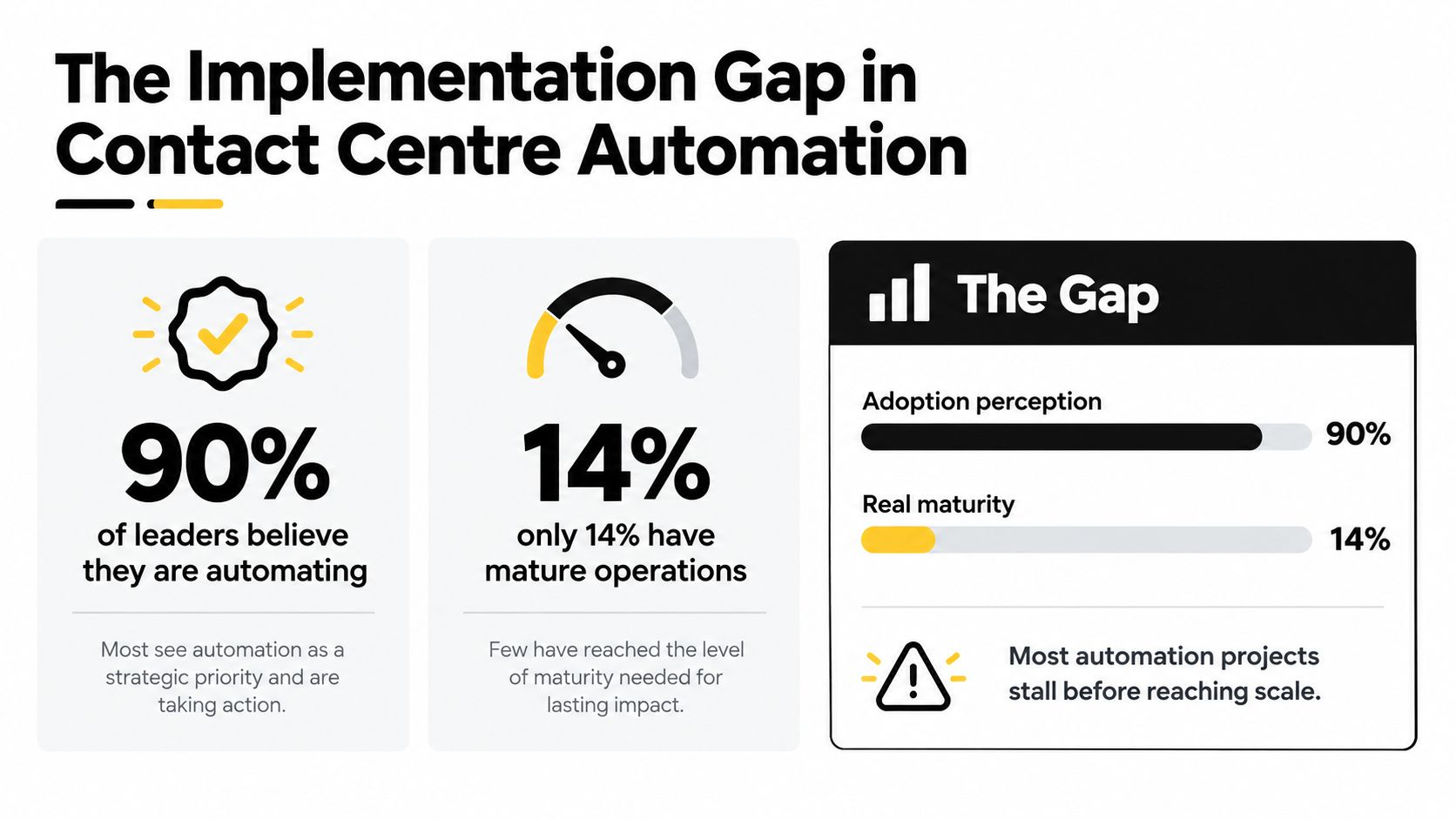
The adoption figures are striking, but they describe two different realities. A 2025 survey found that 98% of contact centres were using AI in some form, while only 25% had fully integrated AI automation into daily operations. The same evidence found that 66% of businesses took more than six months to begin seeing a return on investment from recent AI implementations (Puzzel's State of Contact Centres report).
The first number usually reflects experimentation, pilots, agent-assist features, automated summaries, or a customer-facing bot. The second points to something more demanding: automation embedded in routing, knowledge access, authentication, quality management, CRM updates, workforce processes, and escalation. A contact centre has integrated automation only when the technology participates reliably in the work that determines an outcome.
Deployment is not integration
Deployment means a tool is available. Integration means the tool can act on the right data, trigger the right workflow, and pass the right context to the next participant.
That difference becomes visible during a failed handoff. A customer explains a problem to a conversational agent, reaches a human, and has to repeat everything because the transcript, intent, authentication status, and attempted actions didn't transfer. The organisation may report a successful transfer. The customer experiences a broken process.
Platform fragmentation makes that outcome common. The evidence cited in the Puzzel report indicates that only 3% of contact centres operate on a single unified platform, while the average organisation manages 3.9 different contact-centre technologies (Puzzel's State of Contact Centres report). Those systems may each perform well in isolation, yet still leave the operation without a dependable orchestration layer.
Practical rule: Treat every automation initiative as a workflow and data project with an AI component, not as an AI product launch.
Why projects stall
Legacy systems create more than technical inconvenience. They determine which customer fields are available, which actions can be authorised, how quickly data can be retrieved, and whether an automated decision can be audited. If a platform can read a knowledge base but can't safely write to billing or case-management systems, it can provide information without completing the job.
Leaders should therefore ask four questions before approving a use case:
- Process suitability: Is the journey structured enough to automate, or does it depend on discretion, negotiation, or emotional judgement?
- Data dependency: Which CRM, billing, identity, inventory, or knowledge systems must the workflow access?
- Action authority: What may the automation read, change, approve, or refuse?
- Fallback design: What happens when confidence is low, data is missing, a system is unavailable, or the customer asks for a person?
This reframes the buying decision. The most useful platform isn't necessarily the one with the broadest feature list. It's the one that can operate inside the constraints of the enterprise without forcing agents or customers to compensate for missing integration.
Evolution From Call Routing to Agentic Orchestration
The history of contact centre automation starts with traffic management. In 1965, Birmingham Press and Mail became the first reported company to use an Automatic Call Distributor, allowing incoming calls to be distributed among available agents rather than handled manually (contact-centres.com's history of contact-centre automation).
The underlying model remains recognisable. Technology manages queues, routing, availability, and repetitive work. People handle exceptions, judgement, sensitive conversations, and cases that don't fit predefined rules. Modern platforms have expanded the range of tasks, but they haven't removed the need for that division of labour.
During the 1980s, the term “call center” became widely used as businesses organised telephone support into dedicated operational units. Those centres relied on telephony infrastructure and increasingly refined rules. Today's systems extend the same logic across voice, chat, email, messaging, self-service, agent assistance, workflow engines, and conversational AI.
What changed with the cloud
Cloud delivery changed the operating model by making channels and capabilities easier to configure without treating the contact centre as a fixed telephony installation. Conversational AI adds another layer, allowing systems to interpret natural-language intent rather than forcing every customer through rigid menu trees.
Agentic orchestration goes further. It connects intent recognition to retrieval, decision logic, system actions, and escalation. A useful agent doesn't just identify that a customer wants to change an appointment. It checks the account, verifies eligibility, presents available options, records the change, and confirms the result. If any step requires human judgement, it should transfer the case with evidence of what has already happened.
The commercial direction reflects this transition. The global Contact Center as a Service market is projected to grow from USD 9.50 billion in 2026 to USD 23.60 billion by 2032, an approximate 148% increase over the period (contact-centres.com's CCaaS analysis). That projection describes market expansion, not guaranteed operational value. Buyers still need to decide which journeys deserve automation and whether their architecture can support them.
For leaders assessing agentic AI platforms, the important question isn't whether a system can generate a fluent response. It's whether the system can coordinate data, policy, tools, and people consistently enough to complete a customer outcome.
Core Technologies Driving Modern Automation
No single technology solves every contact-centre problem. The right architecture combines deterministic controls for predictable tasks with conversational capabilities for varied language, plus integration tools that connect the customer interaction to enterprise systems.
| Technology | Best For | Complexity Level |
|---|---|---|
| IVR and intelligent routing | Menu navigation, authentication prompts, queue selection, and predictable routing | Low to medium |
| Voice AI | Spoken intent capture, natural-language navigation, and voice-based self-service | Medium |
| Conversational agents | Multi-turn questions, knowledge retrieval, guided workflows, and escalation | Medium to high |
| Robotic Process Automation | Repetitive actions across CRM, billing, case, and legacy systems | Medium to high |
IVR remains useful when the rules are clear
Traditional IVR works well when the customer's path is deterministic. Authentication prompts, language selection, emergency routing, and simple queue choices don't need a free-form conversation. A well-designed IVR can also provide a stable fallback when a conversational service is unavailable.
The problem starts when organisations use menus to represent complex intent. Customers may choose the closest option, enter the wrong queue, and explain the same issue again to an agent. Static routing also struggles to use live customer context, previous interactions, or agent capability.
Voice AI can improve the front door by allowing customers to describe their need naturally. It still needs clear boundaries. A voice system should know when it lacks confidence, when the customer is distressed, and when a transaction requires secure authentication or a human decision.
Conversational agents need tools, not just language
A conversational agent becomes operationally valuable when it can retrieve trusted information and execute approved actions. Without those connections, it may explain a returns policy but fail to create a return, or describe an account balance without confirming that the data is current.
Design each agent around a controlled set of intents and actions. For every action, define the required inputs, validation rules, permissions, confirmation message, and failure path. This keeps the automation auditable and makes it easier to identify where human intervention belongs.
RPA can help where direct integration with older systems isn't available. It can move data between interfaces and trigger repetitive steps, but it shouldn't become a permanent excuse for weak architecture. Screen-based automation can break when an interface changes, so critical workflows need monitoring, ownership, and a plan for replacement.
Match technology to the work
A practical selection sequence looks like this:
- Use rules for predictable decisions. Authentication, queue eligibility, and standard routing benefit from explicit logic.
- Use conversation for varied intent. Customers shouldn't have to translate a complex need into menu options.
- Use retrieval for information. Ground responses in approved, current knowledge rather than free-form generation.
- Use tools for execution. The system must update the source of truth, not merely describe what an agent should do.
- Use people for discretion. Sensitive, disputed, high-risk, or ambiguous cases need a deliberate escalation path.
The technology is only as reliable as the workflow surrounding it. A complex model connected to incomplete data can produce a less dependable experience than a simple rule connected to the right system.
Orchestrating Across Channels and Systems
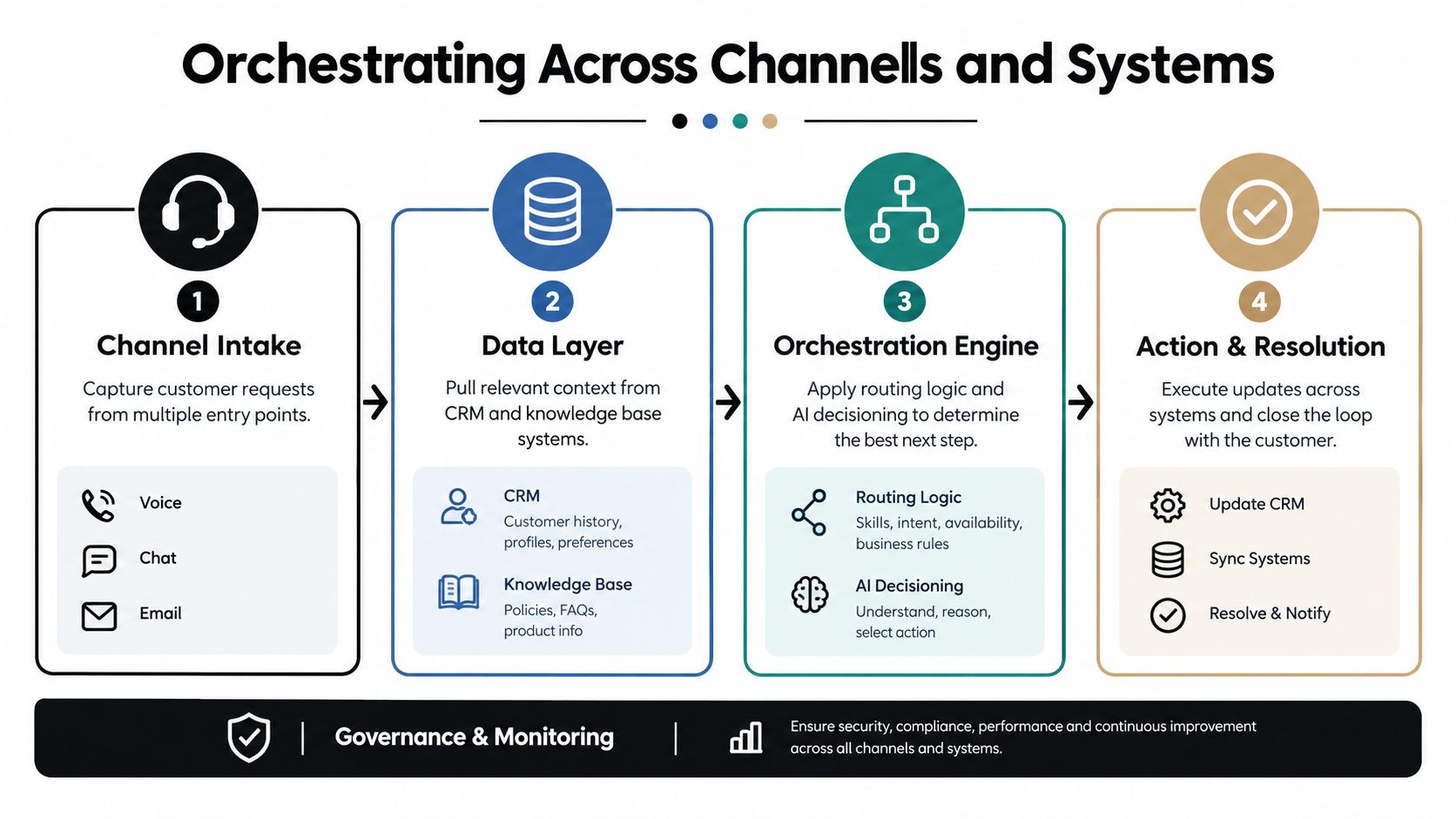
Orchestration begins before a customer reaches an agent. The system should capture intent, establish identity and context, retrieve relevant records, select the right route, and preserve the interaction history across every transfer.
A large analysis of telephony records demonstrates why this matters. Across 58.2 million calls, replacing static IVR routing with CRM-native and conversational-AI routing reduced average hunting time from 5.15 minutes in 2024 to 2.37 minutes in 2025, a 54% year-over-year reduction. Average ringing time fell from 0.90 to 0.81 minutes, a 12% reduction (Natterbox's contact-centre benchmark report).
These figures concern routing latency, not complete resolution. That distinction is important. Automation can create value before self-service begins by reducing menu navigation, identifying the customer's intent, passing context to the queue, and connecting the interaction to an agent with the appropriate skill.
Build the workflow around intent
Start with the customer's reason for contact rather than the channel. A billing dispute that begins in chat and continues by voice should remain one case with one history, not two disconnected interactions.
A reliable orchestration flow contains four stages:
- Channel intake: Capture the request from voice, chat, email, or messaging, while recording the customer's stated intent.
- Data enrichment: Retrieve relevant CRM, account, order, authentication, and knowledge context.
- Decision and routing: Apply policy, skill, availability, urgency, and confidence rules to determine the next step.
- Action and resolution: Complete the transaction, provide an answer, or transfer the case with a usable summary and supporting context.
An omnichannel AI automation approach should preserve context as the customer moves between those stages. Otherwise, the organisation may automate each channel independently while leaving the customer journey fragmented.
A video can help teams visualise how the orchestration layer fits between customer entry points, enterprise data, decision logic, and operational action:
Measure routing separately from resolution
Routing latency deserves its own dashboard. If it's combined with handle time, a team can miss the fact that customers are spending too long navigating before an agent ever receives the interaction.
Track routing performance by channel, intent, geography, authentication path, and escalation reason. Then connect those measures to first-contact resolution, repeat contact, transfers, customer satisfaction, and fallback frequency. A shorter path to an agent is useful, but it isn't proof that the customer's problem was solved.
The data layer also needs ownership. Someone must maintain knowledge content, define which CRM fields are authoritative, approve workflow actions, monitor failed integrations, and investigate cases where the automation claimed success but the customer returned. Without that operating model, orchestration becomes a diagram rather than a production capability.
The Human Cost and Governance Layer
Automation changes the work agents receive. It tends to remove straightforward requests first, leaving people with emotionally difficult, ambiguous, multilingual, or exception-heavy cases. That can raise the skill requirement for every human interaction even when overall contact volume falls.
A global 2025 survey of 437 contact-centre managers across 13 countries found that 61% said customer conversations had become more challenging after introducing AI. The same survey reported that 64% lacked emotional-intelligence and social-interaction training, while 32% reported agent distrust of AI (TelcoNews' coverage of the survey).
Those findings challenge the assumption that automation automatically reduces pressure. If leaders remove routine work without redesigning coaching, quality assurance, and escalation, agents may inherit a narrower but more intense workload.

Redesign the human role
A human-in-the-loop model should define more than the point of transfer. It should specify how people supervise, correct, coach, and improve the automation.
Agents need to see what the system understood, which data it used, which actions it attempted, and why it escalated. That information helps them recover the conversation without forcing the customer to start again. It also gives supervisors evidence when a workflow fails repeatedly.
Coaching should focus on the cases automation cannot handle well. Emotional regulation, negotiation, accessibility, safeguarding, and complex policy interpretation become more important when agents receive fewer routine contacts. Quality teams should review automated interactions too, especially those involving vulnerable customers, complaints, disputed transactions, or failed authentication.
Govern the exceptions
The operating model needs explicit ownership for:
- Escalation policy: Define confidence thresholds, prohibited actions, customer-requested transfers, and mandatory human review.
- Agent feedback: Give agents a direct way to flag inaccurate knowledge, missing context, unsafe suggestions, and unnecessary transfers.
- Workforce planning: Reforecast demand based on the complexity and timing of escalated contacts, not only on the number of contacts removed.
- Outcome audits: Check whether automation works consistently across languages, customer groups, accessibility needs, and high-risk journeys.
- Change control: Test prompts, knowledge updates, integrations, and policy changes before releasing them into production.
The goal isn't to keep humans involved everywhere. It's to place them where judgement matters and give them the support needed to handle those moments well. Automation should reduce avoidable effort without hiding failure, transferring risk to agents, or making it harder for customers to reach a person.
Measuring Success and Vendor Selection Criteria
A contact centre can report impressive containment while customers continue to repeat their problem. That's why independent benchmark guidance recommends measuring containment and confirmed resolution separately. Containment means the conversation ended without escalation. Resolution verifies that the customer didn't reopen or repeat the same issue within a defined window, commonly 24 to 48 hours (Rasa's contact-centre automation guidance).
Performance varies by intent. Routine, structured requests such as order-status checks may reach about 90% containment, while billing disputes may be closer to 40% (Rasa's contact-centre automation guidance). Those figures are a reminder to set targets by journey, not to apply one automation benchmark to every queue.
Build an outcome-based scorecard
Use a balanced scorecard that includes:
- Containment: Did the interaction avoid escalation?
- Confirmed resolution: Did the customer avoid repeating the issue within the chosen follow-up window?
- Transfer quality: Did the receiving agent get the transcript, intent, authentication state, and attempted actions?
- Task completion: Did the system complete the authorised update in the source system?
- Customer experience: Did satisfaction, effort, and complaint signals improve?
- Operational health: Did latency, fallback frequency, repeat contact, and cost per interaction move in the right direction?
- Human impact: Did agent confidence, coaching quality, and case complexity remain manageable?
For workforce and service organisations, buyers comparing operational platforms may also find a practical overview of best staffing agency software useful when assessing how automation connects customer workflows with staffing and service processes.
Test the architecture, not the demo
Ask vendors to demonstrate a complete journey using your systems and failure conditions. The evaluation should include CRM retrieval, authentication, knowledge grounding, a transactional update, a system timeout, a low-confidence utterance, and a human handoff.
Assess whether the platform supports multiple language models, tested CRM and helpdesk integrations, role-based access, auditability, data controls, monitoring, and clear ownership of prompts and knowledge. A vendor's feature catalogue matters less than the evidence that the workflow can survive real operating conditions.
A structured buyer's guide to evaluating conversational AI solutions can help teams turn those questions into a repeatable selection process. The final choice should reflect integration depth, governance, fallback quality, and measurable business outcomes, not just the fluency of a live demonstration.
For enterprises addressing the implementation gap, Yellow.ai offers agentic automation across voice and digital channels, with workflow orchestration, enterprise integrations, human handoffs, and analytics designed to connect AI interactions with operational systems. Visit Yellow.ai to assess how its platform could support a measured contact centre automation programme built around verified resolution rather than adoption alone.



