














A queue starts climbing just after lunch. Customers hear hold music, agents rush through wrap-up work, and a supervisor moves people from email to voice without knowing whether those agents have the right skills. By the time the dashboard shows a service-level problem, the damage has already reached customer trust, agent morale, and the rest of the day's workload.
That's the contact center operations reality. It isn't just call handling, scheduling, or software administration. It's a living control loop in which demand, capacity, routing, people, processes, and automation affect one another continuously. A strong operating model makes those relationships visible, then gives managers practical ways to act before a small mismatch becomes a queue crisis.
Table of Contents
- Why Contact Center Operations Matter More Than Ever
- Understanding How a Modern Contact Center Really Works
- Key Performance Indicators That Define Operational Health
- Workforce Optimization and the Four Stage Control Loop
- Orchestrating Channels and Automating With AI
- Overcoming Common Operational Challenges and Modernizing Effectively
- Measuring Success and Building Future Ready Operations
Why Contact Center Operations Matter More Than Ever
At peak hour, a contact center can look like a collection of separate problems. A customer waits for support, an agent searches several systems for an answer, a team leader watches the queue, and a workforce manager checks whether the roster still matches demand. In reality, those events form one chain. A routing choice changes workload, workload changes wait time, and wait time changes whether customers stay long enough to reach an agent.
That chain makes operations a direct driver of experience. Customers don't see the staffing plan or the CRM configuration. They experience whether they reach the right person, receive a reliable answer, avoid repeating their story, and get a resolution without unnecessary effort.

From cost control to experience orchestration
Traditional management often treats the contact center as a cost center. That view encourages leaders to focus on utilization, handle time, and headcount in isolation. Those measures matter, but they don't describe whether the operation is resolving demand cleanly.
A modern leader has to coordinate several outcomes at once:
- Customer access: People can enter through voice, chat, email, or messaging and still find a coherent path to help.
- Resolution quality: Agents and automation have the context needed to solve the issue rather than move it elsewhere.
- Capacity discipline: Staffing follows demand patterns without creating avoidable idle time or exhausting the team.
- Operational visibility: Managers can see queue behavior, adherence, escalations, and recurring failure points while there's still time to respond.
Legacy approaches break when channels operate as separate islands. An email backlog can grow while voice staffing looks healthy. A chatbot can answer common questions but send complex cases to agents without enough context. A workforce schedule can appear accurate at a daily level while missing the short intervals when customers arrive.
Practical rule: Treat every customer interaction as part of one operating system, even when different teams or channels own individual steps.
The most effective operations leaders therefore manage the contact center as an experience orchestration function. They connect planning decisions to live customer behavior, then use automation where it reduces friction without removing human judgment from situations that need it.
Understanding How a Modern Contact Center Really Works
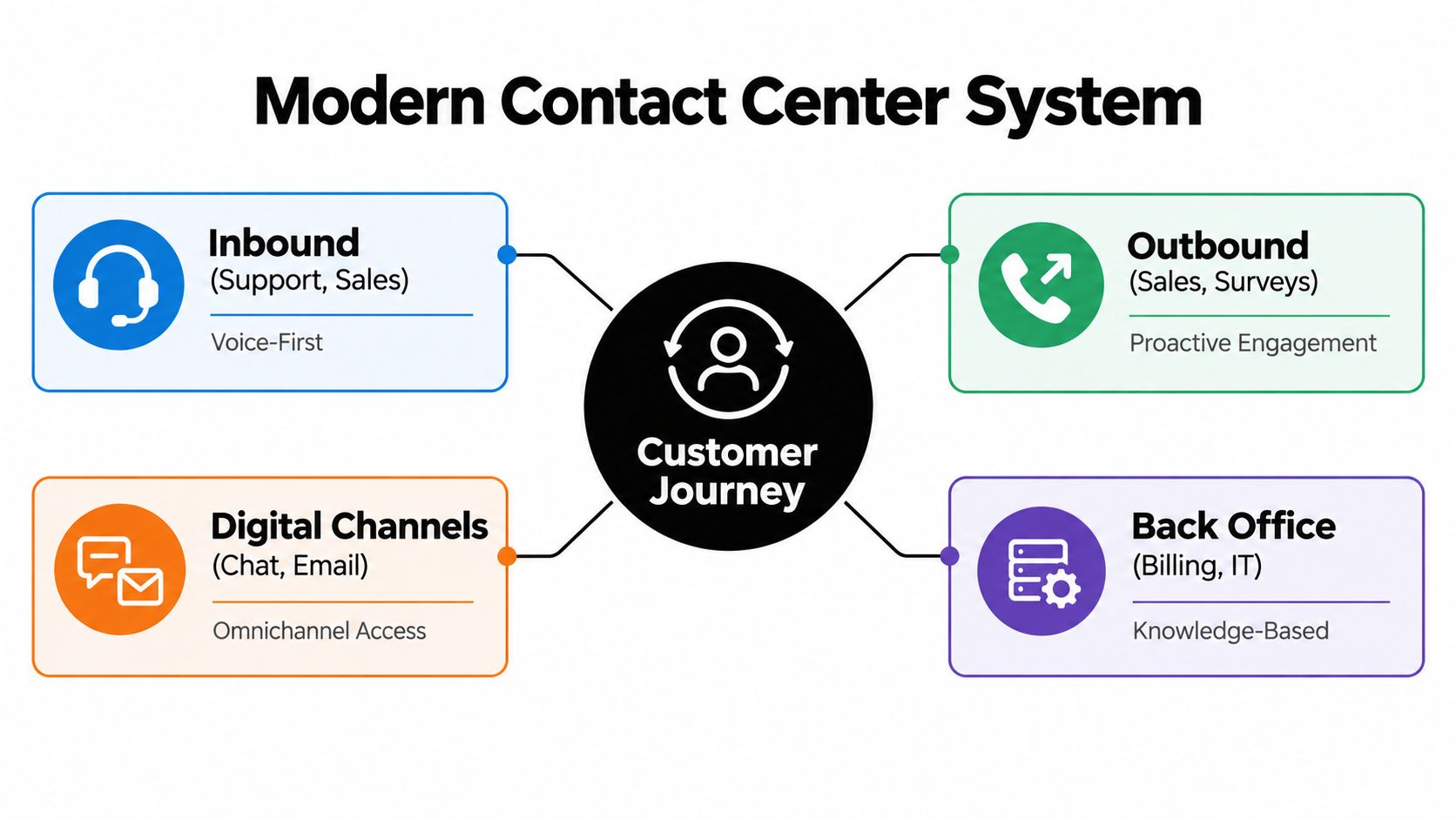
A useful analogy is air traffic control. An airport doesn't count planes for the day and assign pilots at random. Controllers track arrivals, destinations, runway capacity, weather, and aircraft priorities. Contact center operations work in much the same way. Managers coordinate incoming demand, available capacity, specialist skills, routing rules, and exceptions.
Start with the interaction path
A customer journey usually follows a practical sequence:
- Arrival: A customer contacts the business through a supported channel, or the business initiates an outbound interaction.
- Identification: The platform captures customer details, intent, authentication status, and relevant history.
- Routing: Rules direct the interaction to self-service, a bot, a general queue, a specialist, or a back-office team.
- Resolution: The person or system handles the request using policies, knowledge, tools, and approvals.
- Closure: The interaction is documented, the customer receives next steps, and any follow-up work enters a tracked workflow.
- Learning: Quality reviews, feedback, and analytics reveal what should change in routing, training, knowledge, or process design.
Inbound work includes support and sales requests. Outbound work can include sales activity, surveys, reminders, or service notifications. Blended operations allow the same workforce to handle different types of demand, but only when managers understand skill coverage and protect the queue from conflicting priorities.
People, process, and platform
People provide judgment, empathy, and accountability. Processes define what should happen, including escalation paths, approvals, authentication, and documentation. Platforms connect the work by managing routing, customer context, knowledge, reporting, and integrations.
A knowledge system is only useful when its answers are controlled and traceable. Teams evaluating retrieval-based assistance can use this resource on an AI knowledge base with evidence validation to understand why evidence checking matters when agents or customers receive generated answers.
A manager should ask three questions whenever a workflow underperforms:
- People: Do agents have the skills, authority, and context to complete the task?
- Process: Does the procedure remove friction, or does it create transfers and repeat contacts?
- Platform: Do the tools expose the right information at the moment of work?
This short video offers another visual explanation of how contact center systems connect channels and operational activity.
If one layer fails, adding technology to the other layers often increases complexity rather than improving service. A well-designed operation keeps the customer journey understandable from entry to resolution.
Key Performance Indicators That Define Operational Health
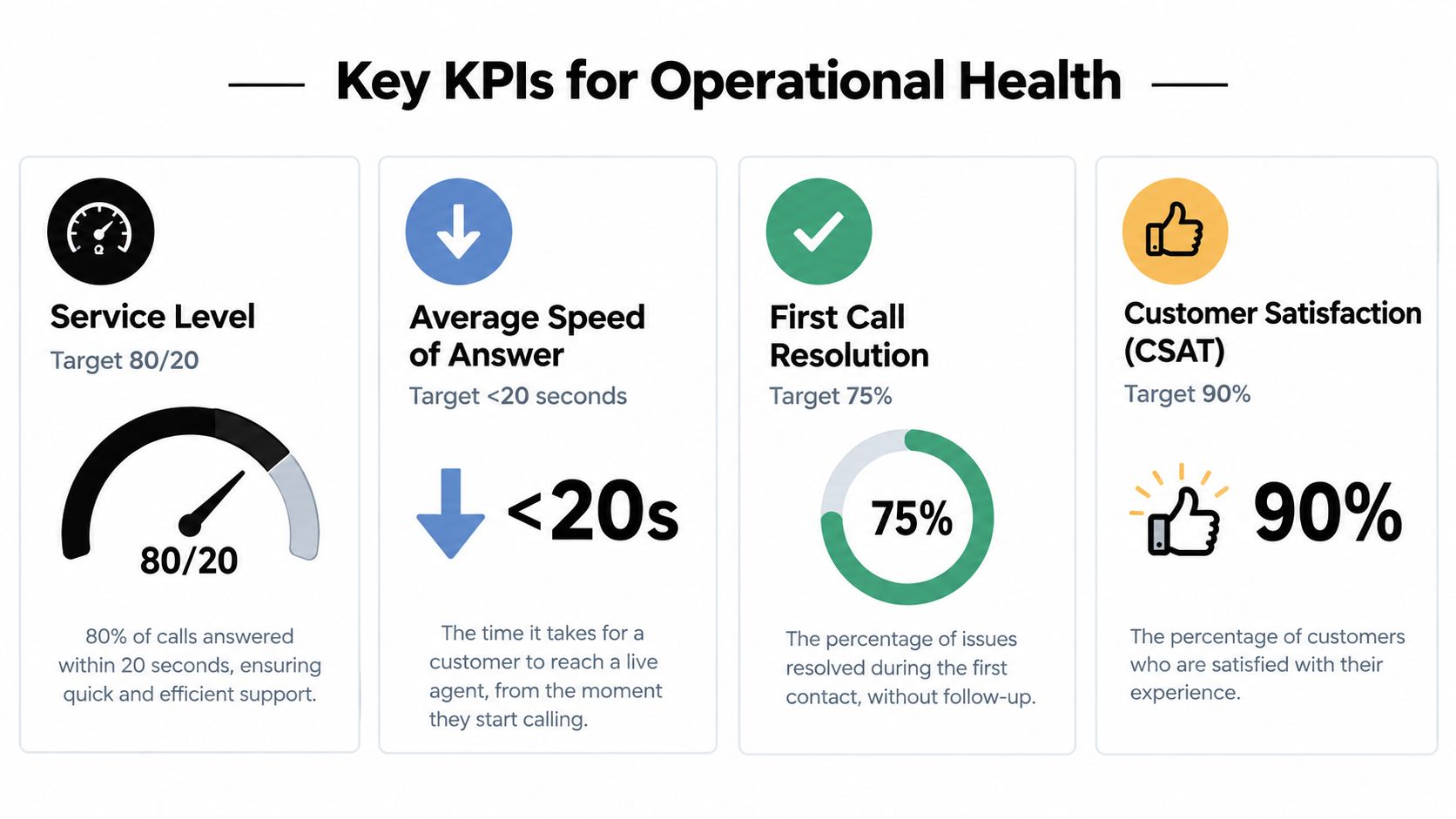
A KPI is valuable only when it helps a manager choose an action. Service level tells you whether customers are reaching an agent quickly enough. Average speed of answer shows the delay experienced by answered callers. Abandonment shows how many customers leave before connection. First contact resolution reveals whether the operation solves the issue without another contact.
Read the metrics as a group
Benchmark data places average call abandonment around 5.91% to 6.4%, with a common target band of 2% to 5% and top performers under 3%. Rates above roughly 8% to 10% are commonly treated as a warning sign for understaffing or excessive hold times, as described in contact center abandonment and service-level benchmark data.
The same benchmark source identifies 80/20 as the industry-standard service-level target, meaning 80% of calls answered within 20 seconds. It also cites evidence that roughly half of callers abandon after about 52 seconds on hold. These figures illustrate the operating relationship clearly: even a modest increase in queue delay can change customer behavior quickly.
Use the metrics diagnostically:
| KPI | What it tells you | What to investigate |
|---|---|---|
| Service level | Whether the queue is meeting its response commitment | Interval staffing, routing, and demand accuracy |
| Average speed of answer | How long answered callers wait | Queue buildup and available capacity |
| Abandonment | Whether customers leave before connection | Hold time, callback design, and queue messaging |
| First contact resolution | Whether the issue is solved in one interaction | Knowledge, permissions, training, and process friction |
| Occupancy | How continuously agents are engaged | Workload balance, breaks, and burnout risk |
| Customer satisfaction | How customers judge the interaction | Resolution quality, effort, tone, and expectations |
Avoid false wins
A center can lower average handle time by rushing agents, yet see repeat contacts rise. It can improve occupancy by keeping agents continuously busy, yet weaken quality and increase fatigue. It can protect service level by moving skilled agents into a general queue, yet leave specialist work unresolved.
That's why leaders should review speed, resolution, customer sentiment, and agent workload together. Yellow.ai AI analytics can be considered as part of an analytics layer that brings interaction patterns and operational signals into a more connected view.
Start with the customer problem, then trace backward. If abandonment rises, inspect interval demand and capacity before blaming agent performance. If resolution falls, examine knowledge access and process rules before imposing speed targets. The KPI is a symptom. The operating decision is the treatment.
Workforce Optimization and the Four Stage Control Loop
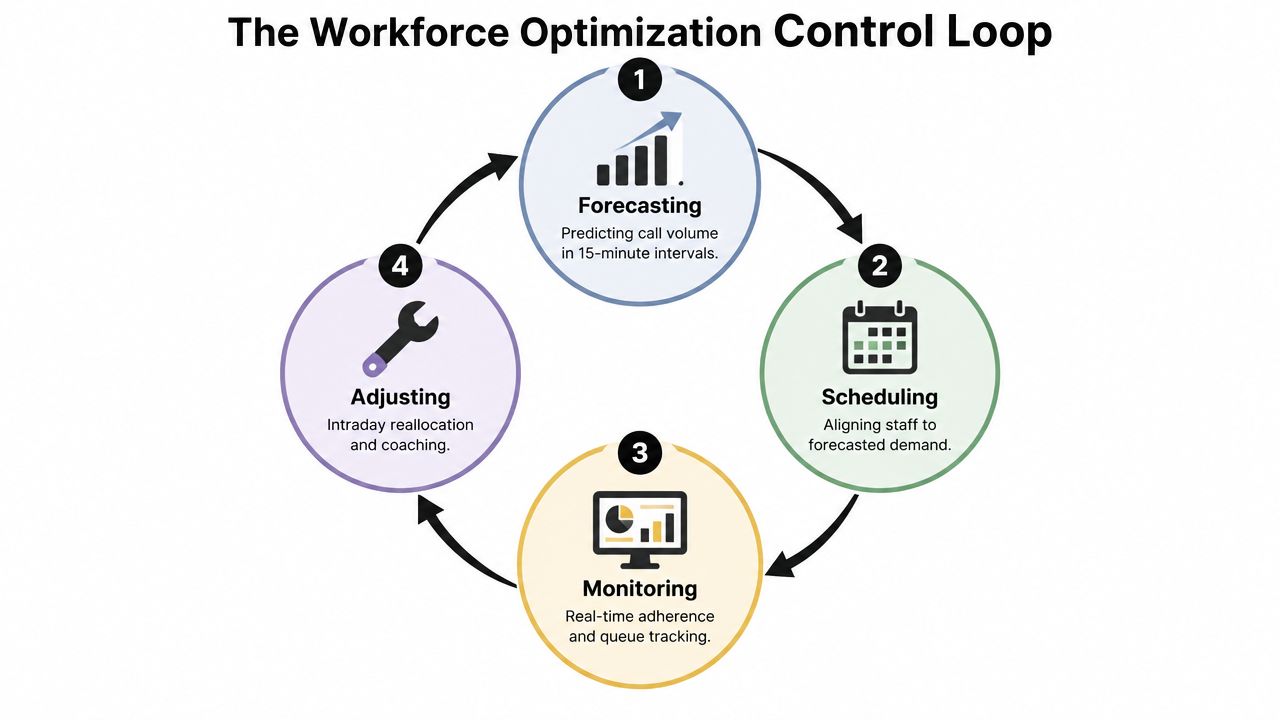
Workforce planning is easiest to understand as a causal loop rather than a group of separate tasks. The four stages are forecasting, staffing, scheduling or rostering, and intraday traffic management. Each stage changes the conditions for the next one.
Follow demand from forecast to roster
Research on call-center workforce planning describes forecasting call volume at interval granularity, usually every 15 minutes, by queue or skill several weeks ahead. That resolution lets a WFM system translate expected demand into staffing requirements rather than relying on a broad daily average. See the research on interval-level workforce planning for the underlying planning model.
The loop works like this:
- Forecasting: Estimate demand for each interval, queue, and skill group.
- Staffing: Convert demand into the number and type of agents required.
- Scheduling: Place breaks, shifts, training, meetings, and other activities against that requirement.
- Intraday management: Compare actual traffic and adherence with the plan, then re-balance capacity as conditions change.
The critical point is error propagation. If the interval forecast is wrong, the staffing requirement is wrong. If staffing is wrong, the roster creates a capacity mismatch. That mismatch increases answer speed, queue time, and abandonment unless managers intervene in near real time.
Manage the day, not just the schedule
Intraday control can include moving available agents between queues, delaying non-urgent offline work, offering voluntary overtime, opening callbacks, adjusting routing, or escalating a service-risk alert. These actions should follow clear guardrails. A manager shouldn't repeatedly pull agents from one queue to rescue another without checking the downstream effect.
Good practice also separates forecast accuracy from agent accountability. A team can follow its roster precisely and still miss service level because demand exceeded the plan. Conversely, poor adherence can create a queue crisis even when the forecast was sound.
Manager's test: At each interval, ask whether the problem is demand, capacity, adherence, routing, or process time. Don't treat every queue increase as a staffing problem.
Agent tools also affect the loop. Contextual guidance can reduce search time, improve consistency, and help agents complete work without unnecessary escalation. An agent-assist platform can support that layer, but it won't replace accurate planning or disciplined intraday decisions.
Orchestrating Channels and Automating With AI
A customer may check an order through a bot, ask a follow-up question in chat, then request a person when a delivery exception needs judgment. Each handoff should carry the customer's intent, identity, conversation history, and completed actions. Otherwise, the customer starts over and the queue receives avoidable repeat work.
Omnichannel operations therefore mean more than placing voice, chat, email, messaging, and human support on one dashboard. They preserve context across channels and route each case to the right operating path. A practical guide to omnichannel AI automation can help teams evaluate how these connections should work.
Decide what to automate
Automation fits work with clear rules, repeatable inputs, and a safe completion path. Augmentation fits work that needs human judgment, while AI can retrieve information, suggest next steps, or prepare documentation.
| Use case | Suitable operating pattern |
|---|---|
| Routine status request | Self-service through voice or digital automation |
| Policy lookup | Retrieval from an approved knowledge source |
| Complex complaint | Human ownership with AI-provided context |
| Authentication and data capture | Automated intake followed by controlled handoff |
| After-contact documentation | Assisted or automated summary and workflow creation |
| Sensitive decision | Human review with clear approval controls |
Voice bots can handle natural-language requests when speech recognition, response speed, routing, and escalation work together. Agent assist can surface approved knowledge during the interaction, so agents do not need to search separate systems. Retrieval-augmented generation, or RAG, can ground responses in enterprise content. Governance still needs to define permitted sources, confidence thresholds, and the point at which a person takes over.
Connect the operating stack
Automation becomes part of operations only when it can act in the systems where work already happens. Integrations with Salesforce, Zendesk, Genesys, Freshdesk, HubSpot, NICE, and similar platforms can connect customer records, routing, tickets, knowledge, and outcomes. The test is practical: can the bot authenticate the customer, update the correct record, trigger the next workflow, and transfer useful context?
Yellow.ai is one option for this model. Its platform includes voice and digital automation, AI Agent Builder 2.0, agent support, a conversational knowledge base, analytics, and integrations with enterprise systems. Its published product information also describes Nexus Vox for voice interactions and support for 500+ languages. Leaders should verify language coverage, response speed, compliance, and escalation behavior against their own requirements.
Teams assessing a conversational experience can try chat tool before connecting an AI interaction to production workflows. Tests should cover ambiguous requests, corrections, interruptions, authentication failures, and cases that require a person.
The operating goal is controlled coordination. Automation handles predictable work, while human specialists receive cases where judgment adds the most value.
Overcoming Common Operational Challenges and Modernizing Effectively
The main modernization problem isn't a shortage of AI tools. It's the gap between deploying a tool and changing the daily workflow around it.
Independent coverage reports that only 25% of call centers have successfully integrated AI automation into day-to-day operations, while 67% still rely on manual processes or limited workflow automation. The coverage of call center AI adoption and operational barriers points to technology integration, legacy systems, and compliance as major obstacles.
Find the real bottleneck
A center may have a chatbot, a knowledge portal, and an analytics dashboard, yet agents still copy information between systems. That isn't an AI capability problem alone. It's a workflow design problem.
Common blockers include:
- Fragmented data: Customer identity, interaction history, and case status sit in disconnected applications.
- Legacy dependencies: New automation can't complete the transaction because an older system lacks a usable integration.
- Unclear ownership: No team owns the bot's knowledge, escalation rules, or failed intents.
- Compliance uncertainty: Leaders restrict deployment because they can't explain data handling, access controls, or auditability.
- Change resistance: Agents see automation as a threat or an extra screen instead of a way to remove repetitive work.
Use a controlled modernization path
Begin with one workflow that has a clear customer outcome and measurable failure points. Map the current journey, identify handoffs, document approved knowledge, define when a human must intervene, and create test cases before production release.
Then roll out in stages:
- Observe: Use historical interactions and live monitoring to identify repeatable demand.
- Assist: Give agents recommendations, summaries, or knowledge retrieval while humans retain control.
- Automate: Let the system complete narrow tasks with explicit safeguards.
- Optimize: Review containment, escalation, resolution, quality, and customer feedback continuously.
Governance should include content ownership, access permissions, evaluation criteria, audit trails, and a rollback process. A multi-LLM architecture can help teams choose models for different latency, accuracy, or modality needs, but model choice doesn't remove the need for clean processes and accountable owners.
Measuring Success and Building Future Ready Operations
Operational maturity shows up in outcomes, not in the number of tools installed. Track whether customers wait less, receive complete resolutions, and move through fewer unnecessary handoffs. Review cost to serve alongside customer satisfaction, first contact resolution, repeat contacts, quality, and agent effort.
Build a feedback loop that connects four views:
- Customer: Satisfaction, effort, abandonment, and recurring complaints.
- Agent: Search friction, difficult workflows, confidence, and AI feedback.
- Operation: Forecast variance, staffing coverage, adherence, queue behavior, and escalation.
- Business: Cost, retention signals, compliance, and time to value.
A future-ready contact center doesn't remove people from every interaction. It assigns predictable work to automation, gives agents better context, and lets managers adjust the control loop using evidence. Start with one queue or workflow this month, baseline its operational health, define the intervention rules, and review the results with frontline agents before expanding.
Yellow.ai connects voice, chat, email, automation, agent assistance, knowledge retrieval, integrations, and analytics for enterprise contact center workflows. Visit Yellow.ai to explore how its platform can help you redesign staffing, routing, resolution, and human handoffs around a more responsive operating loop.



