










Compliance automation is no longer a back-office efficiency play. One market estimate projects the global compliance automation market will reach $18.7 billion by 2027, while organizations using it report an average 28% decrease in labor costs, a 2.1x ROI within 18 months, and a 30% reduction in regulatory violations after implementation Worldmetrics compliance automation statistics. For CIOs, that changes the conversation from “How do we pass audits?” to “How do we build always-on controls into the systems that shape customer and employee experience?”
The most interesting shift is happening outside classic GRC teams. Contact centers, HR operations, and employee service desks now create many of the compliance risks that used to be discovered later in audit reviews. If those workflows are automated with the right guardrails, compliance stops being a periodic scramble and becomes part of how the enterprise operates every day.
Table of Contents
- What Is Compliance Automation
- Why Automation Is a Business Imperative
- Top Use Cases for CX and EX Automation
- Core Components of a Modern Platform
- An Enterprise Roadmap to Implementation
- Mitigating Risks in AI-Powered Compliance
What Is Compliance Automation
Compliance automation is the move from manual, periodic review to continuous control monitoring. Instead of waiting for a quarterly check or a year-end audit, the organization connects live systems, collects evidence as work happens, and maps that evidence to the controls and frameworks that matter. That's why it's more useful to think of it as a control system than as an auditor's assistant.
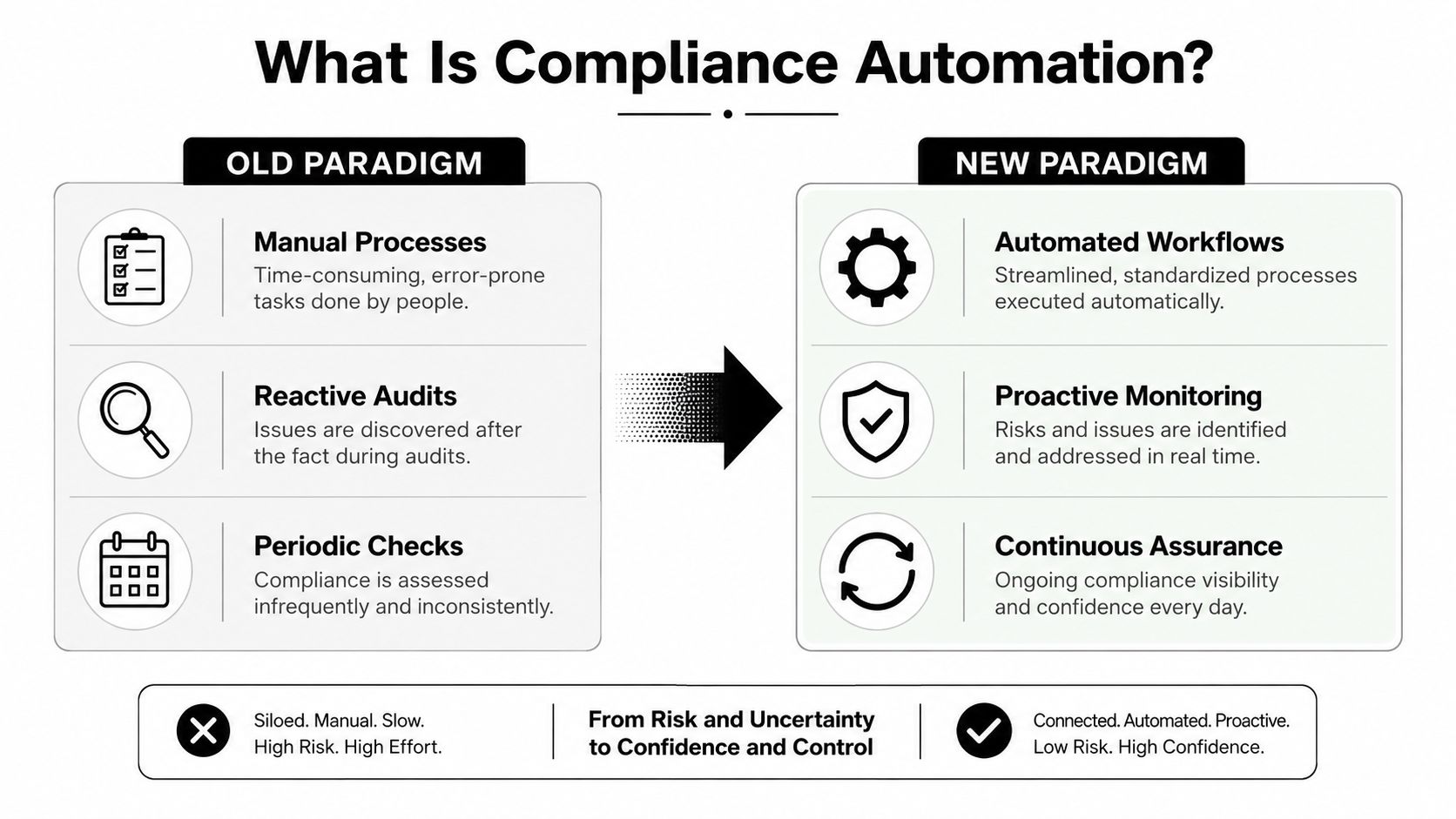
The old model looks like a financial audit at the end of the year. Teams chase screenshots, export spreadsheets, reconcile logs, and hope the sample they pulled still reflects reality. The newer model looks like a live dashboard, where the system can show current control status, evidence freshness, and exceptions before they turn into findings.
The three moving parts
A practical compliance automation setup usually has three functions working together. First, it continuously collects evidence from cloud, identity, HR, and infrastructure systems. Second, it maps that telemetry to controls and regulatory frameworks so evidence isn't trapped in one-off spreadsheets. Third, it orchestrates workflows that assign tasks, escalate exceptions, and keep remediation moving when drift appears CyberSaint glossary on compliance automation.
That matters because the underlying problem is not a missing policy document, it's control drift. A password policy, an access review, or a training requirement can all exist on paper and still fail in execution if nobody is watching the operational signals.
Practical rule: if a control can only be proven once a quarter, it's probably too fragile for a modern enterprise.
A strong definition also has to include reuse. One control often serves more than one framework, which is why modern platforms need a central control library and evidence normalization rather than isolated checklists for each audit regime Comply features in compliance software. For teams evaluating regulated workflow programs, a useful reference point is financial compliance for Church Extension Funds, which sits in the broader conversation around compliance discipline in financial operations.
Why Automation Is a Business Imperative
The business case is direct. Compliance automation changes cost structure, lowers exposure to violations, and makes regulated operations easier to scale. That matters because compliance is no longer confined to audit teams, it now affects customer conversations, employee workflows, and the speed at which the enterprise can act without adding risk.
Cost control and risk reduction
The strongest case for a CIO is economics tied to operational control. Manual compliance work adds repeated handoffs, review cycles, and exception handling, which drives cost up as the business grows. Automation reduces the amount of time people spend chasing evidence, reconciling records, and checking whether a step was completed.
That shift also lowers risk. When controls are monitored in the flow of work, the organization spots drift earlier, documents actions more consistently, and reduces the chance that a policy exists on paper while execution slips in practice. In customer and employee workflows, that means fewer missed disclosures, fewer incomplete approvals, and fewer cases that have to be cleaned up after the fact.
Compliance should not depend on whether one specialist remembers to send one reminder.
Why leaders should fund it
The investment case gets stronger when compliance sits inside customer-facing and employee-facing processes. In those workflows, manual handling shows up as delays, inconsistent outcomes, and avoidable escalations. In a contact center, for example, a missed disclosure can create rework for the agent, frustrate the customer, and expose the business to unnecessary review.
That is why the highest-value programs often sit in the operational paths where work already happens. A modern contact center automation stack can validate disclosures, check that required language was used, and surface exceptions while the interaction is still active, as shown in customer service automation workflows. HR teams see a similar pattern, since onboarding, policy acknowledgments, access changes, and case handling all benefit when evidence is captured as part of the workflow instead of after someone notices a gap.
For regulated businesses, the payoff is agility. Teams can launch or adjust processes with more confidence when controls, evidence, and escalation paths are already embedded in the workflow. That reduces last-minute remediation when legal, security, or audit teams ask for proof that the process was followed.
The leadership takeaway is simple. Compliance automation is not just a control function. It gives the business a faster operating model without sacrificing discipline, and it improves the experience for customers and employees at the same time.
Top Use Cases for CX and EX Automation
The most overlooked use cases live where people directly interact with the enterprise. In contact centers and HR workflows, compliance automation isn't abstract, it's the layer that keeps scripts consistent, data protected, and employee actions documented when volume is high and attention is split.

Customer experience workflows
In a contact center, compliance automation can monitor script adherence as calls happen, flag missing disclosures, and detect moments where sensitive payment data appears in the conversation. It can also trigger redaction workflows so payment information doesn't sit unmasked in a transcript or knowledge article. That's especially relevant for PCI-oriented operations, where the issue is usually not intent, it's speed and consistency.
Quality assurance becomes more useful when it shifts from retrospective sampling to live checks. A supervisor can review the exception rather than manually auditing every interaction. That makes the review process narrower, faster, and easier to act on.
The same pattern applies in digital support channels. If a policy requires a specific disclosure before a refund or account change, the automation can validate whether that step occurred before the case closes. That reduces the risk of a policy breach being created and only discovered weeks later.
Employee experience workflows
HR and EX workflows are just as important. Onboarding can automatically route background checks, policy attestations, and required training reminders, while offboarding can enforce access reviews and closure steps before a former employee leaves the environment open. Such employee lifecycle tasks, being repetitive and distributed across systems, frequently lead to many compliance gaps.
The pressure is increasing. The 2024 Thomson Reuters cost-of-compliance research found firms spent about 25.8% more time on compliance than in the prior year, and over half of organizations said compliance had become more complex Sprinto compliance automation guide. That's why the highest ROI often comes from automating the workflows where breaches are created, not just where they're audited after the fact.
For teams modernizing service operations, Yellow.ai customer service automation is one example of how workflow automation can sit closer to the work itself. Used carefully, that kind of platform can help enforce policy steps without forcing employees or customers through a clunky compliance layer.
Core Components of a Modern Platform
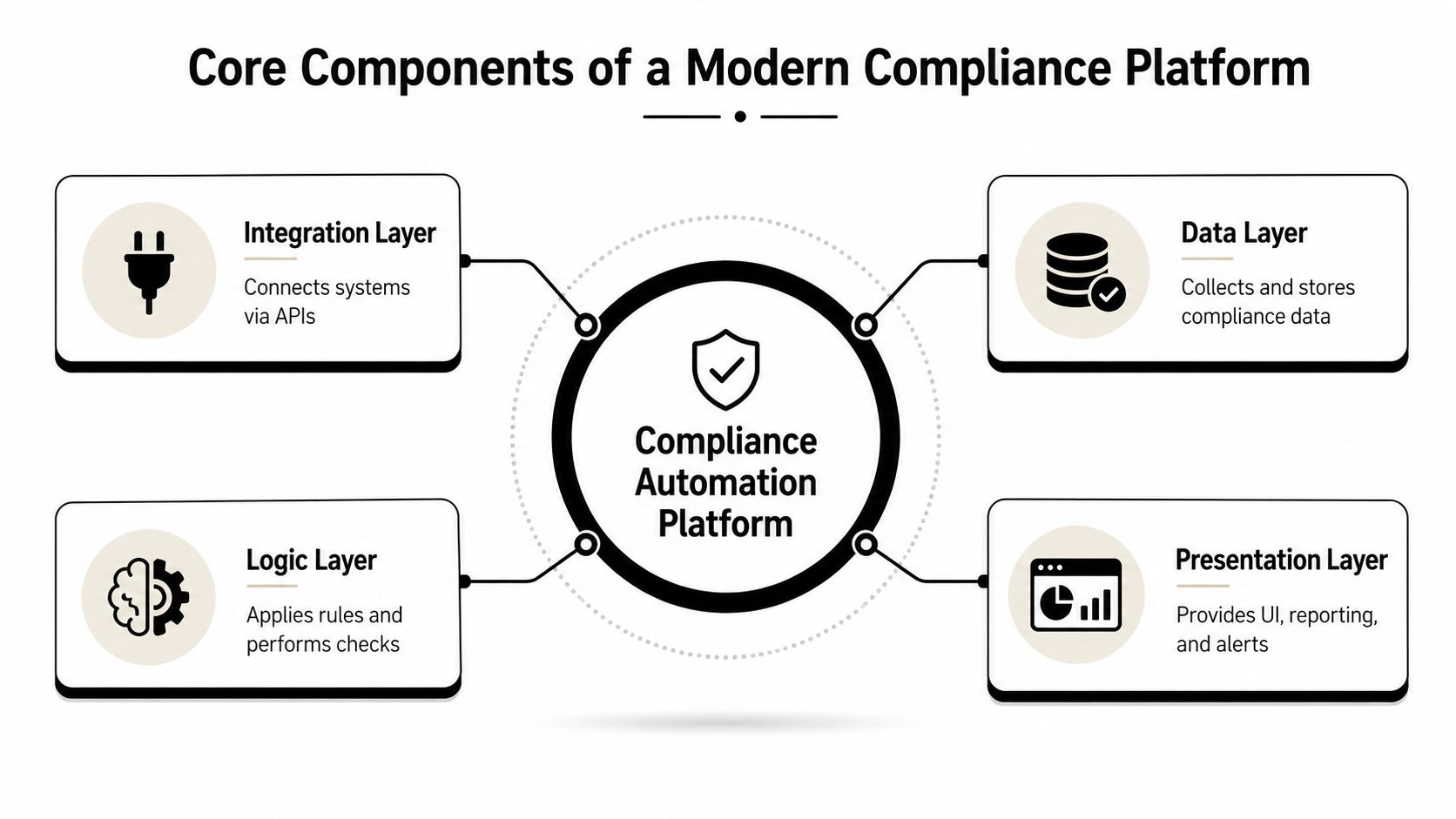
A compliance automation platform has to do more than log tickets. It needs a structure that can collect signals, interpret them against rules, and surface what matters to operations, CX, EX, and audit teams. Without that architecture, the system becomes another reporting layer instead of an operational control layer.
The four layers that matter
The integration layer connects systems like CRM, service desk, HR, cloud, and identity tools through APIs. If the platform cannot pull data from the actual stack, it cannot tell you what is really happening in a contact center case, an onboarding flow, or an access review. Integration depth is not a checkbox, it is the difference between useful telemetry and cosmetic dashboards.
The data layer normalizes evidence so one control can be evaluated consistently across different systems. That matters because compliance evidence arrives in inconsistent formats, from logs to tickets to transcripts and employee acknowledgements. A platform that normalizes those inputs makes it easier to defend what happened and when, and it reduces the work of reconciling the same control across CX and EX workflows.
The logic layer applies the rules. It evaluates events, checks thresholds, routes exceptions, and updates the status of the control library. At this stage, automation stops being storage and starts becoming decision support, which is what makes it useful in live service and HR operations.
The presentation layer gives compliance, operations, and audit teams a shared view of posture, exceptions, and remediation progress. Without clear reporting, the automation can work in the background and still fail to change behavior on the front line where agents and managers need guidance.
What to look for in practice
A strong architecture supports multi-framework mapping from a central control library, automated workflow orchestration, and evidence normalization across regimes like SOC 2, ISO 27001, HIPAA, and PCI DSS. Comply features in compliance software describes these kinds of capabilities in practical terms, and the underlying point is simple, one control should not need to be maintained in several places. That design avoids duplicate control maintenance and lets the same evidence support multiple obligations.
Good platforms reduce duplicate work. Weak ones just create a prettier spreadsheet.
Security still has to hold up under enterprise scrutiny. Yellow.ai's enterprise-grade security matters here because compliance automation in CX and EX environments has to operate inside the same security expectations as the rest of the stack. The right platform should fit into the operational systems people already use, not force them into a separate compliance ritual.
An Enterprise Roadmap to Implementation
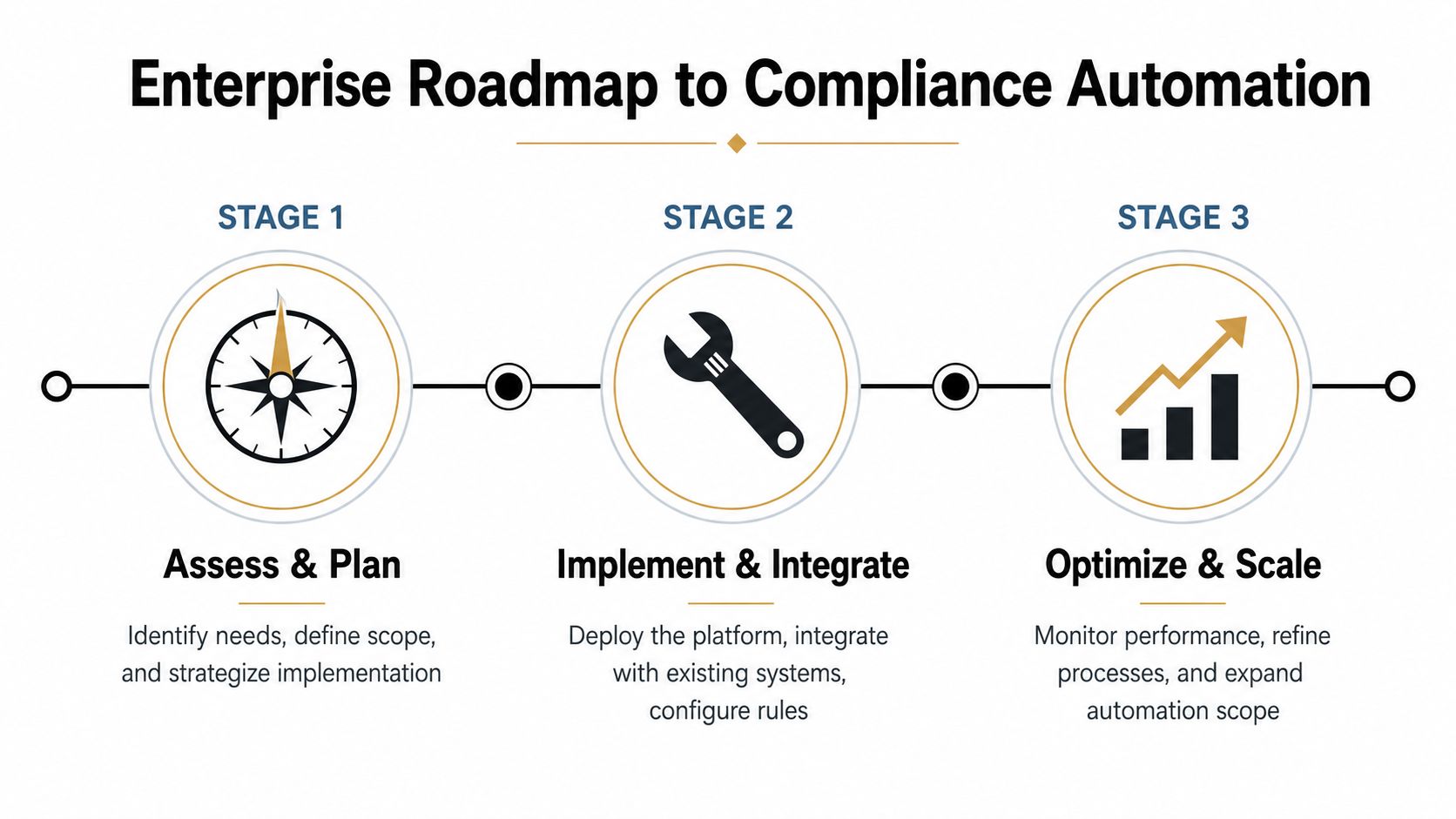
The fastest way to fail is to try to automate everything at once. The practical path is to start where the work is repetitive, the risk is visible, and the systems are already connected enough to support automation. That makes the program manageable, and it gives leaders proof before they ask for broader rollout.
Stage 1 Assess and plan
Start by mapping the compliance processes that consume the most manual time and create the most operational friction. In practice, those are usually the workflows that cross systems, rely on reminders, or require repeated evidence gathering. Rank them by business impact, not just by who complains the loudest.
A useful filter is whether the workflow already has an owner, a system of record, and a clear success condition. If those are missing, the process needs redesign before automation. If they exist, the case for a pilot is much stronger.
Stage 2 Implement and integrate
Pick one bounded workflow and connect it to the actual systems where the evidence lives. That could mean a contact-center disclosure check, an HR attestation flow, or an access review sequence. Keep the pilot narrow enough to validate accuracy, routing, and exception handling without creating a tangled rollout.
Vendor selection should prioritize integration depth, control mapping, and auditability. If the platform can't show who changed what, when, and why, the pilot won't be trusted later.
Stage 3 Optimize and scale
Once the workflow is stable, add adjacent processes and reuse the same control logic where possible. This is how the program compounds value instead of multiplying administration. The goal is not just more automation, it's cleaner operational memory.
A practical rollout checklist looks like this:
- Identify the repeatable pain point. Choose a workflow where delay, rework, or missed attestation already creates measurable friction.
- Test the evidence path. Make sure the platform can pull the actual data you need, not an approximation.
- Prove exception handling. Validate what happens when a control fails or a user skips a required step.
- Expand by control family. Reuse what worked instead of rebuilding the logic for every new team.
Mitigating Risks in AI-Powered Compliance
AI makes compliance automation more capable, but it also creates a new question. The issue is no longer only whether the system can process the work. It's whether the organization can trust the judgment it produces when the evidence is incomplete, ambiguous, or changing.
A recent paper on legal compliance automation makes the point clearly, LLM-based systems can infer compliance from regulations and artifacts, but they still need careful prompt design, evidence grounding, and verification arXiv paper on compliance automation. That's the right lens for enterprise adoption. AI can help with review and triage, but it can't be treated as an ungoverned decision engine.
Controls that make AI usable
Start with human-in-the-loop review for critical exceptions. If the AI flags a policy breach, a person should confirm the action before it affects a customer, employee, or regulatory response. That's especially important in workflows where false confidence creates more harm than slow review.
Next, require traceable audit trails for both the input and the output. The organization should be able to explain what evidence the model saw, what rule it applied, and who approved the final outcome. If that chain isn't visible, the automation can't be defended.
Finally, audit the automation itself. Models drift, prompts change, regulations evolve, and process owners forget why a rule exists. A mature program periodically checks whether the logic still matches the policy and whether the exception handling still reflects how the business operates.
Yellow.ai's PCI DSS v4.0.1 compliance resource is useful here because contact center and transaction workflows are exactly where AI-driven automation needs guardrails, not just speed. The same principle applies across HR and service operations. Trust comes from verification, not from the presence of automation.
If you're evaluating compliance automation for customer service, HR, or enterprise operations, Yellow.ai can help you design workflows that connect policy enforcement to real conversations and employee journeys. Visit Yellow.ai to see how agentic automation can support compliance-aware CX and EX processes without turning every interaction into a manual checklist.