














A green API status doesn't mean your call center CRM integration works. It means two systems exchanged a valid technical signal. The agent may still wait for a screen pop, search across multiple tabs, re-enter the customer's details, and reconcile a call record after the conversation has ended. From the customer's perspective, the platforms are “integrated,” yet the interaction still feels disconnected.
That gap is where most integration ROI disappears. A useful design asks whether customer context arrives quickly enough, whether routing can use the right CRM attributes, and whether after-call work preserves what happened. The objective isn't data transfer by itself. It's a continuous agent workflow with reliable context.
Table of Contents
- The Connectivity Illusion in Modern CX
- Evaluating Integration Architecture Patterns
- Data Mapping and Security Configuration
- Diagnosing Workflow Friction and Failure Thresholds
- Simplifying Orchestration with Agentic AI
- Executing a Phased Rollout and Testing Strategy
The Connectivity Illusion in Modern CX
The popular advice is simple: connect the telephony platform to the CRM, configure screen pops, enable automatic call logging, and declare success. That checklist is incomplete. A connector can synchronize records while leaving agents to switch screens, interpret incomplete context, and repair failed updates manually.
The first widely used milestone in contact-center CRM integration was the move from isolated telephony and CRM records to system-linked screen pops and automatic call logging. Vendors began building software for this purpose in the mid-1990s, and one industry provider traces its founding to 1995 for connecting siloed voice and CRM platforms, as described in this history of contact-center transformation. The important change wasn't the API. Agents could finally see customer context as a call arrived instead of searching for it manually.
Modern environments are harder. A voice interaction may involve customer identity, account tier, open cases, entitlement, routing attributes, consent status, transcript data, and a follow-up task. If each element arrives through a different process, the agent still becomes the integration layer.
The desktop is the real integration surface
A technical diagram usually places telephony, middleware, CRM, identity, analytics, and knowledge systems in neat boxes. Agents experience none of those boxes. They experience a desktop, a headset, a sequence of events, and the pressure to respond while the customer is listening.
Native guidance commonly treats one to two seconds as the practical target for surfacing customer context after connection. If context takes longer, agents greet customers without the information they need or fill the silence by searching. Middleware can also create synchronization delays measured in five to sixty minutes, while expired tokens and API limits can cause failures that aren't obvious until an agent notices missing data. These implementation risks are documented in this practical guide to call-center CRM integration.
Practical rule: Measure the time from call connection to usable context, not the time from deployment to a successful API test.
The same principle applies to automation claims. Discussions about autonomous systems often confuse a convincing interface with a functioning operational capability. The AI Frontiers analysis of sentient automation is useful context because it questions whether labels describe real system behavior. In contact centers, the equivalent test is concrete: can the workflow preserve context through routing, conversation, transfer, wrap-up, and exception handling?
What success should mean
A successful integration lets the CRM serve as the agent's primary workspace. The call event should identify the customer, open the right record, expose the relevant history, and write the interaction back without forcing the agent to duplicate work.
That operating model is becoming more common. A 2025 CXO study cited by No Jitter found that 59.1% of companies had contact-center and CRM platforms integrated, while CRM-first workspaces represented 43.2% in 2025 and were projected to reach 53.4% by 2027, according to this analysis of CRM's rise in the contact center. The implication is practical, not cosmetic. Leaders are moving the interaction into the system where customer context already lives.
A green API check should be the start of operational testing. Ask agents what they see, when they see it, what they still type twice, and what happens when the customer has multiple records. Those answers expose the connectivity illusion quickly.
Evaluating Integration Architecture Patterns
Architecture determines whether integration remains manageable when vendors change APIs, queues expand, and customer journeys become more complex. The common choices are a native connector, third-party middleware, or an orchestration layer that coordinates systems and agent actions.
A native connector usually has the cleanest path. The contact-center vendor and CRM vendor have already defined authentication, events, field mappings, and supported workflows. That reduces custom code, but native doesn't mean complete. Verify whether it supports bidirectional updates, custom objects, transfers, digital channels, routing attributes, and your CRM's permission model.
Third-party middleware offers flexibility across systems. It can translate events, transform data, and connect platforms that lack a native relationship. The trade-off is an additional dependency chain. Entry tiers may impose task caps of roughly 1,000 to 10,000 tasks per month, with ongoing subscription fees of about $50 to $500 per month, as outlined in this contact-center CRM integration cost analysis. Those constraints matter when every call creates several events, such as lookup, case creation, activity logging, disposition, and follow-up.
Agentic orchestration is different from conventional middleware. It can interpret conversational context, retrieve information, and invoke CRM actions through governed tools. That can reduce screen switching, but it introduces its own design obligations: permissions, confidence handling, audit trails, fallback behavior, and clear boundaries around what automation can change.
Comparison at the decision point
| Architecture Type | Latency Profile | Maintenance Burden | Best Use Case |
|---|---|---|---|
| Native vendor integration | Usually the shortest path, subject to connector behavior and API limits | Lower, but dependent on vendor release management | Standard screen pops, call logging, click-to-dial, and CRM-first agent work |
| Third-party middleware | Variable, with extra hops and possible queueing or delayed synchronization | High, because teams manage mappings, credentials, task limits, and vendor changes | Heterogeneous estates requiring transformations across several platforms |
| Agentic orchestration | Can be fast when tools and context retrieval are designed around the agent workflow | Moderate to high, requiring governance, testing, monitoring, and model controls | Context-rich routing, automated record actions, and multi-modal journeys |
A banking organization assessing integration should also account for data ownership, transaction integrity, auditability, and failure recovery. This core banking system integration guide provides useful domain context for thinking beyond simple connectivity.
Choose by workflow, not fashion
Use a native connector when the required journey is standard and the vendor supports the fields and events your agents actually use. Use middleware when you need broad cross-platform translation and can actively monitor its operational limits. Consider orchestration when the main problem is not a missing API, but the need to interpret context and coordinate several actions without making the agent perform them manually.
Before selecting a platform, inspect its integration capabilities against real interaction paths. Test identity resolution, routing, transfer, wrap-up, retries, and permissions. A beautiful demo of an inbound screen pop says very little about what happens when the CRM has duplicate customers or the authentication token expires during a peak period.
Data Mapping and Security Configuration
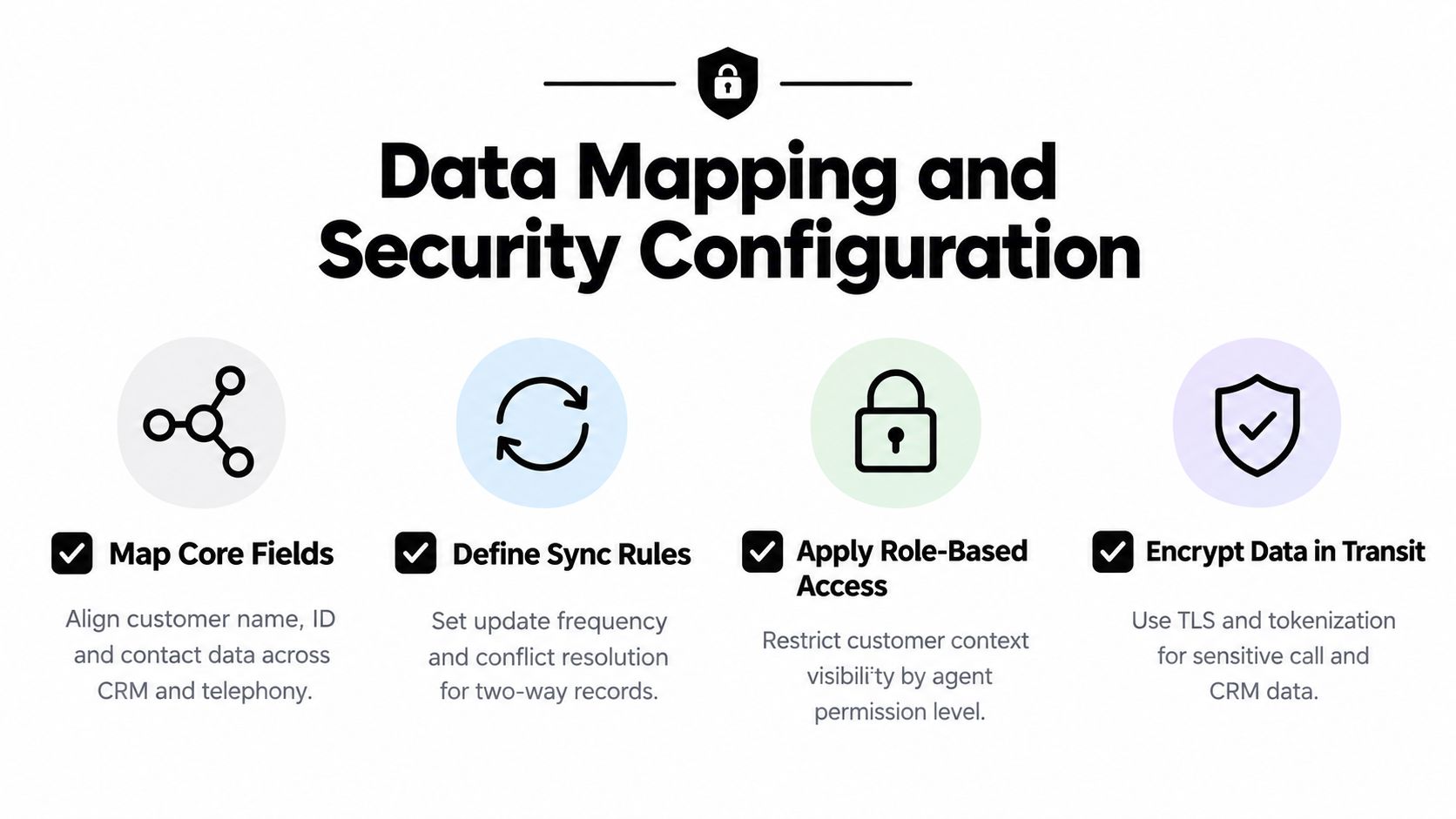
A fast screen pop starts with a disciplined data model. If telephony sends only a phone number while the CRM expects a contact ID, the system may need several searches before it can identify the caller. Those extra lookups increase latency and create ambiguity when households, shared lines, or duplicate records exist.
Start with the minimum context an agent needs to act. Map the calling number, customer or account identifier, name, queue, language, service tier, open case identifiers, and interaction ID. Keep the first response small. Load the immediate record and defer secondary history until the agent requests it or the call state permits it.
Build the mapping in both directions
A one-way screen pop is useful, but it doesn't preserve the full interaction. Configure outbound mappings so the CRM writes back the interaction ID, queue, direction, disposition, duration, notes, and follow-up status. Define which system owns each field. Without ownership rules, a late update from telephony can overwrite a more accurate CRM value, or two systems can create duplicate activities.
Custom CRM objects require special attention. Don't map a field merely because it exists. Confirm that the object is searchable by the incoming identifier, visible to the agent's role, and available to the routing logic. Test multiple matches, no-match behavior, transferred calls, and records with missing values.
The integration should expose failures rather than silently dropping them. Monitor webhook delivery, response codes, retry queues, token expiry, and rate-limit responses. A successful authentication flow at launch doesn't prove that refresh behavior will work after credentials rotate.
Protect sensitive context without slowing the agent
Security design must follow the data through every stage, including voice metadata, transcripts, notes, and CRM records. Use encrypted transport, short-lived credentials where appropriate, role-based access, and field-level restrictions for sensitive information. Mask or tokenize payment and personally identifiable data before it reaches systems that don't need the raw value.
Your security review should answer four questions:
- Who can see the record: Match CRM permissions with contact-center roles, supervisor access, quality teams, and automation accounts.
- What gets retained: Define retention for recordings, transcripts, notes, and event logs before enabling automatic write-back.
- How actions are authorized: Separate read access from write access, and require stronger controls for high-impact changes.
- How failures are audited: Record the caller match, object updated, automation decision, and fallback path without exposing unnecessary content.
For enterprise deployments, document the compliance requirements that apply to your sector and data flows. A platform's enterprise-grade security controls should be assessed against your own identity, encryption, retention, and audit requirements, not accepted as a substitute for architecture review.
Diagnosing Workflow Friction and Failure Thresholds
Integration failure appears in interaction metrics before it appears in an architecture diagram. Agents compensate for missing context by searching, copying, pasting, and writing notes in multiple places. Supervisors then see longer conversations, inconsistent records, and avoidable repeat contacts.
One industry analysis identifies clear warning thresholds: manual data entry exceeding two to three minutes per call, screen pops failing more than 5% of the time, or routing rules being unable to access CRM tier data. Those conditions indicate that the integration is adding friction rather than removing it, according to this contact-center CRM performance analysis.
Read the interaction, not just the dashboard
Break handle time into states. Measure time to connect, time until usable context appears, hold time caused by lookup or transfer, talk time, after-call work, and the number of CRM interactions required. A stable average can conceal a severe problem for one queue, language, product, or customer segment.
Review failed screen pops by cause:
- Identity failure: The incoming identifier doesn't match a unique CRM record.
- Permission failure: The record exists, but the agent cannot access it.
- Latency failure: The record is available, but not within the agent's working window.
- Mapping failure: The wrong object or field is displayed.
- State failure: Context disappears during transfer, consultation, or wrap-up.
After-call work deserves its own audit. Compare the event payload with the final CRM record. If agents routinely add information that the telephony platform already captured, the mapping is incomplete. If they correct automated notes, the data model or transcription workflow may be misaligned with operational language.
Set outcome measures before changing architecture
Mature omnichannel operations often target 70% to 75% first-contact resolution, an average handle time around 6:20, and CSAT above 85%, as reported in the same industry benchmarking analysis. Treat these as reference points, not universal targets. A regulated service queue may intentionally accept longer handling for stronger verification, while a simple support queue may need a different balance.
Track the integration's contribution to those outcomes. If interactions requiring several CRM touchpoints take longer or generate more rework, investigate field mapping, object selection, and routing logic before blaming agent performance.
A technically available field has no operational value if the agent can't use it at the moment of decision.
Create alerts for screen-pop failure, delayed context, duplicate activity creation, token errors, and rising after-call work. Review a sample of recordings and CRM records together. That combination shows whether the system preserved the conversation's meaning, not merely whether it wrote an event.
Simplifying Orchestration with Agentic AI
Traditional integration asks the agent to bridge systems. The agent reads the CRM, interprets the customer's request, chooses the next action, updates a record, and remembers what still needs to be logged. Agentic orchestration moves some of that coordination into governed software actions.
Consider a returning customer whose account contains an unresolved case and a recent delivery issue. A voice or chat agent can identify the customer, retrieve the relevant case, summarize the recent interaction, and present the next approved action. During the conversation, it can create or update a CRM record, capture the outcome, and hand the interaction to a human when confidence or policy requires escalation.

Orchestration needs boundaries
An AI layer shouldn't become an unreviewed superuser. Define the actions it can take, the fields it can write, and the conditions that require confirmation. A request to update a shipping preference may be routine. A request to change account ownership, issue a credit, or expose sensitive data may require a human or an additional verification step.
The useful architecture has distinct capabilities:
- Context retrieval: Pull relevant customer history, knowledge, and case details instead of presenting an unfiltered record dump.
- Action execution: Create leads, opportunities, cases, and other CRM records through approved connectors or APIs.
- Routing support: Use account attributes and conversation intent to select the appropriate queue or specialist.
- Agent assistance: Present summaries, suggested responses, and next actions inside the working interface.
- Audit and fallback: Store what the system retrieved, changed, and escalated, then route uncertainty to a human.
Yellow.ai is one example of this approach. Its agentic AI platform combines conversational automation with CRM and enterprise integrations, allowing teams to coordinate customer interactions and record updates across channels. Its product materials describe multi-LLM orchestration, agent assist, knowledge retrieval, and pre-built integrations with systems including Salesforce and Zendesk.
Preserve the human workflow
The measure of agentic AI isn't how many actions it can perform. It's whether the agent sees the right context without moving between applications and whether the customer receives a coherent response. An orchestration layer that adds another console can recreate the same fragmentation under a new label.
Test the handoff carefully. The human agent should receive the conversation summary, customer identity, reason for escalation, attempted actions, and any policy constraints. If the handoff loses those details, the automation has merely moved the repetitive work to the next person.
Use staged permissions and observable tool calls. Start with read and recommendation capabilities, then introduce bounded write actions after the system demonstrates reliable identity resolution and record mapping. Keep a clear rollback path for incorrect updates, and ensure supervisors can inspect the source events behind an automated action.
Executing a Phased Rollout and Testing Strategy
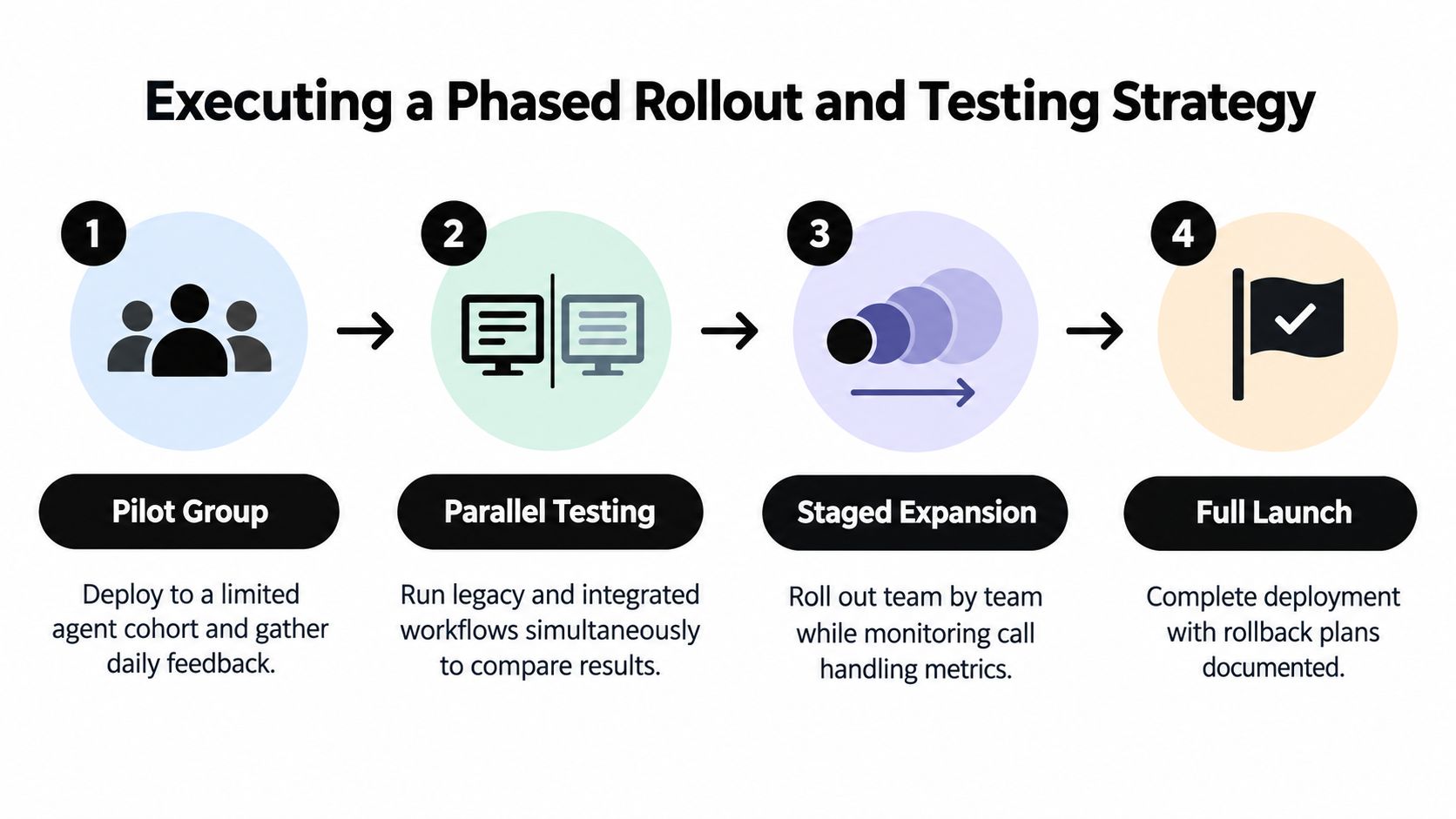
A large deployment should begin with a narrow workflow, not a broad promise. Select one team with representative call types, a manageable data model, and supervisors who can review interactions daily. Define the baseline before changing the desktop, including screen-pop success, handle-time components, after-call work, first-contact resolution, transfer behavior, and agent feedback.
A practical integration methodology is to start with a pilot group or single team, define clear success metrics, collect feedback continuously, and adjust the workflow before scaling. That approach reduces rollout risk because the team validates real operational KPIs rather than relying on an installation checklist, as explained in this contact-center integration implementation guide.
Use production-shaped tests
A sandbox proves configuration. It doesn't prove resilience. Test duplicate customers, missing identifiers, permission mismatches, expired tokens, API throttling, delayed webhooks, transferred calls, abandoned calls, consultation, conference, wrap-up, and CRM outages.
For conversational automation, vary intent, language, interruptions, silence, corrections, and escalation requests. Run the legacy and integrated workflows in parallel where operationally safe, then compare the same interaction types. The goal is to expose edge cases before they reach every queue.
Release gate: Scale only when agents can complete representative interactions with less searching, less duplicate entry, and no loss of context at transfer or wrap-up.
Expand team by team, monitoring the same measures throughout. Keep rollback instructions current, including how to disable a connector, restore the prior workspace, replay failed events, and reconcile records created during an outage. Treat feedback as a recurring input to mapping and workflow design, not as a one-time training survey.
The contact-center CRM software segment itself is described as a durable growth category. One market report estimates the global market at about USD 235 million in 2025 and projects an 8.4% compound annual growth rate through 2033, as reported in this call center CRM software market analysis. That market momentum doesn't validate every implementation. It makes disciplined evaluation more important, because organizations will keep adding connectors, channels, and automation to the same underlying workflow.
If your current integration passes technical tests but still forces agents to search, switch screens, or repair records, map one representative journey from routing through wrap-up and measure each delay. Yellow.ai offers conversational agents, CRM connectivity, agent assistance, and multi-modal orchestration for teams working to preserve that context at scale. Visit Yellow.ai to assess whether its approach fits your contact-center workflow and rollout plan.



