













The surprising part of the AI agent vs chatbot debate is that chatbots still matter, even as the market moves past them. One market summary says chatbots can handle up to 80% of routine questions, and that adoption grew roughly 4.7x between 2020 and 2025. The same summary says over 987 million people worldwide already use AI chatbots, values the market at more than $9 billion, and projects it will surpass $27 billion by 2030. Yet that same analysis also projects that 33% of enterprise software applications will include agentic AI by 2028, which tells you where enterprise automation is heading: from answering requests to completing work across systems (chatbot market analysis).
That shift changes the strategic question. Organizations often used chatbots to reduce contact volume, deflect simple requests, and create a digital front door. Now leaders are asking for more. They want systems that don't just contain conversations, but resolve them. In practice, that means the difference between “Your ticket has been created” and “Your issue has been fixed, your access has been restored, and your manager has been notified.”
Table of Contents
- From Conversation to Action Why the Chatbot Debate Is Over
- Defining the Landscape Chatbots and AI Agents
- Core Architectural and Capability Differences
- From Containment to Resolution Business Use Cases
- Measuring Success Comparing Key Performance Metrics
- A Decision Framework for Choosing Your Path
- Deploying Your First AI Agent Safely and Effectively
From Conversation to Action Why the Chatbot Debate Is Over
The old chatbot playbook was built around conversational containment. A customer asks a common question, the bot recognizes intent, returns an answer, and avoids a live-agent handoff. That model still works for FAQs, order status, password guidance, policy retrieval, and routing. It's efficient, scalable, and often the right first layer.
But it breaks down when the interaction spans multiple steps, systems, or decisions.
A billing dispute, a benefits enrollment issue, or an IT access request rarely ends with information alone. Someone has to verify context, query records, update systems, trigger workflows, and confirm completion. If the automation layer can only talk, humans still do the expensive part of the work.
Practical rule: If the user still needs a human after the answer, you've automated conversation. If the system completes the task, you've automated operations.
That's why the AI agent vs chatbot question is no longer a feature checklist. It's a business model question for service organizations. Chatbots help reduce volume at the front door. Agents target the higher-value problem of end-to-end resolution, where the system interprets the request, reasons over context, and takes action across systems.
The strategic shift leaders should care about
For CX teams, the move is from deflection to resolution quality. For EX and IT teams, it's from ticket intake to workflow completion. For finance leaders, it's from cost avoidance to a broader operating model that can change cost-to-serve, service speed, and compliance posture.
Three shifts usually signal that a team is ready to think beyond chatbots:
- The request crosses systems: The workflow needs CRM, ticketing, identity, billing, ERP, or HRIS access.
- The conversation isn't the work: The core effort is in approvals, updates, lookups, and orchestration.
- The business outcome matters more than the reply: Leaders care about resolved cases, completed tasks, and cleaner handoffs.
The winning architecture in most enterprises won't be chatbot or agent. It will be both, with clear role separation.
Defining the Landscape Chatbots and AI Agents
A useful way to frame AI agent vs chatbot is this: chatbots are the scale layer, while AI agents are the workflow layer.
Chatbots are built for structured interactions. They answer questions, guide users through known flows, collect inputs, and route issues. That's why they became the default front line for high-volume support. Teams that want a grounded primer on implementation patterns often start with resources on Developing AI chatbots, because the design discipline is still relevant even when the end goal is more autonomous systems.
This visual captures the mental model well:
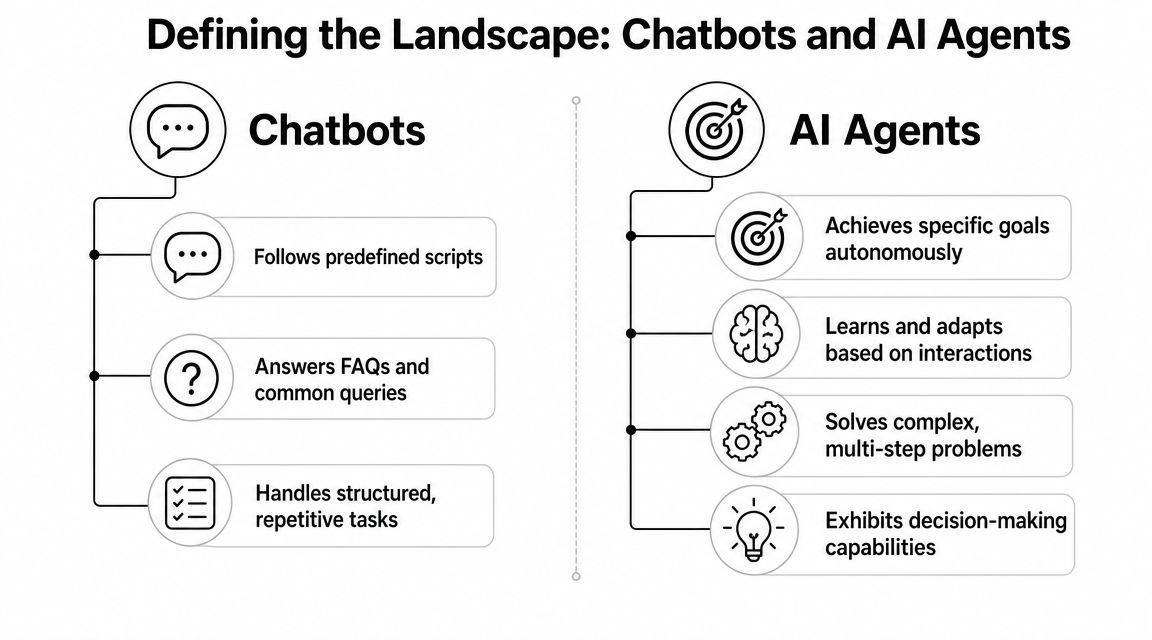
AI agents start from a different premise. They're designed around goals, not just utterances. They can interpret a request, pull context from connected systems, decide which step comes next, and execute actions to complete the job. If you want a concise enterprise-oriented explainer, this breakdown of what AI agents are is a helpful companion to the broader strategy discussion.
Chatbots talk
Most chatbots are optimized for predictable interaction patterns:
- FAQ handling: Return policy answers, appointment reminders, policy lookups.
- Structured intake: Collect issue details before routing.
- Status retrieval: Surface order status, claim status, or ticket updates.
- Guided self-service: Walk users through a decision tree.
This is why chatbots became so widespread. They fit a clear operating problem: lots of repetitive requests, limited variability, strong need for consistency.
A short explainer is useful here as well:
AI agents do
Agents are built for workflows with moving parts. They can coordinate steps across systems, preserve context, and keep working toward an outcome. In enterprise settings, that often means resolving a customer issue, completing an employee request, or driving an operational process that used to require several handoffs.
A chatbot is often the right tool when the enterprise needs a scalable answer layer. An agent is the right tool when the enterprise needs a scalable action layer.
The distinction sounds simple, but it changes platform design, integration strategy, governance, and ROI expectations.
Core Architectural and Capability Differences
A key difference in AI agent vs chatbot isn't that one feels smarter in a demo. It's in the underlying system design. A chatbot can be highly polished, multilingual, and accurate, while still being limited to response generation. An agent changes what the system is allowed and designed to do.
The simplest distinction
One comparison puts it plainly: chatbots are usually optimized for constrained dialogue and scripted or retrieval-based responses, while AI agents are designed to reason over context and execute actions across systems. In that comparison, agents are described as handling read/write workflows, persistent memory, and multi-step logic, while chatbots are limited to pattern matching, blank-slate sessions, and conversational outputs only (technical comparison of chatbots and agents).
That's the dividing line enterprise teams should keep in mind.
Technical comparison table
| Capability | Chatbot (Conversational Automation) | AI Agent (Autonomous Action) |
|---|---|---|
| Primary purpose | Answer questions and guide conversations | Complete tasks and drive outcomes |
| Interaction model | Reactive. Waits for user input | Can be reactive or goal-driven |
| Logic | Scripted flows, retrieval, constrained intent handling | Multi-step reasoning and orchestration |
| Memory | Often session-bound | Can use persistent context across tasks |
| System access | Commonly read-focused | Read and write across connected tools |
| Output | Conversational response | Action, update, decision, and response |
| Failure mode | Escalates when the path breaks | Attempts alternate steps, then escalates with context |
| Best fit | High-volume, repetitive interactions | Complex, cross-system workflows |
What architecture changes in practice
The first change is orchestration. A chatbot usually follows a designed flow. If the user says X, fetch Y, return Z. An agent can break a goal into steps, choose tools, and adapt if one step fails or requires another decision.
The second change is memory. Traditional bots often treat each session as a fresh interaction. Agents benefit from persistent state. That matters when an onboarding request, a claims issue, or an internal IT task unfolds across multiple turns, approvals, or days.
The third change is system interaction. Many vendors often blur the line on this capability. If the system can only retrieve information, summarize it, and suggest next steps, it's still functioning like a chatbot or copilot. If it can update the CRM, reset access, create records, schedule follow-up, or trigger approvals, it's operating like an agent.
A fourth change is modality and control surface. Enterprises increasingly want the same automation layer to work across chat, voice, email, and service channels. In practice, that pushes teams toward platforms with stronger orchestration, testing, and model-routing capabilities. For teams evaluating the stack itself, this explainer on agentic AI and how it differs from AI agents is useful because it clarifies where orchestration logic sits versus where the user-facing agent sits.
The mistake I see most often is calling any LLM interface an agent. If it can't take bounded action in enterprise systems, it's still mainly a conversation layer.
From Containment to Resolution Business Use Cases
The easiest way to understand AI agent vs chatbot is to look at what happens after the first user message. A chatbot usually handles the opening move well. An agent can own the rest of the sequence.

One market roundup reports that organizations using AI agents have seen 7% to 25% revenue increases, up to 30% cost reductions, and customer satisfaction scores reaching 90% to 94% in some implementations. The same discussion ties those outcomes to autonomy, because agents can reason, make decisions, and execute actions across systems rather than staying inside predefined conversational paths (business impact of AI agents versus chatbots).
Customer support example
Take a billing dispute.
A chatbot can authenticate the user, pull policy text, explain likely causes, and collect the issue details. That's useful. It reduces handle time for the human who eventually takes over.
An AI agent can go much further. It can verify account history, inspect invoices, check whether a discount failed to apply, compare the charge against contract terms, create or update a case, trigger an adjustment within policy, notify the customer, and escalate only when the exception requires human approval.
The operational difference is significant:
- Chatbot outcome: the case is contained, classified, and handed off.
- Agent outcome: the case is resolved or escalated with the work already done.
Employee service example
Now look at employee onboarding.
A chatbot can answer questions about start dates, documents, equipment policy, or leave balances. It can route requests to HR or IT and help a new hire find the right forms.
An agent can coordinate onboarding across HR, IT, finance, and facilities. It can create accounts, trigger device provisioning, assign mandatory training, schedule orientation tasks, track completion, and alert managers when a dependency stalls. That's not better conversation. It's a different operating model.
Where each model works best
The practical split usually looks like this:
- Use chatbots for: repetitive questions, policy retrieval, status lookups, intake, lead capture, and simple triage.
- Use agents for: exception handling, cross-system updates, multi-step service recovery, onboarding, IT remediation, and workflow completion.
- Use both together: let the chatbot absorb simple demand and route qualified cases into an agentic workflow when action is required.
This is the point where many AI programs either scale or stall. If the bot can answer but not resolve, human queues remain the bottleneck.
Measuring Success Comparing Key Performance Metrics
Many teams fail at AI economics because they use the wrong scorecard. Chatbot programs are usually measured like a traffic-control system. Agent programs should be measured like an operations engine.
Why chatbot metrics fall short
Chatbot metrics tend to focus on efficiency:
- Containment rate: How many interactions stayed with the bot.
- Deflection rate: How much demand avoided a human queue.
- Average response time: How quickly the bot replied.
- Cost per conversation: How cheaply the system handled volume.
Those are valid metrics when the goal is front-door automation. They tell you whether the chatbot absorbed repetitive demand at scale.
This infographic shows the contrast clearly:
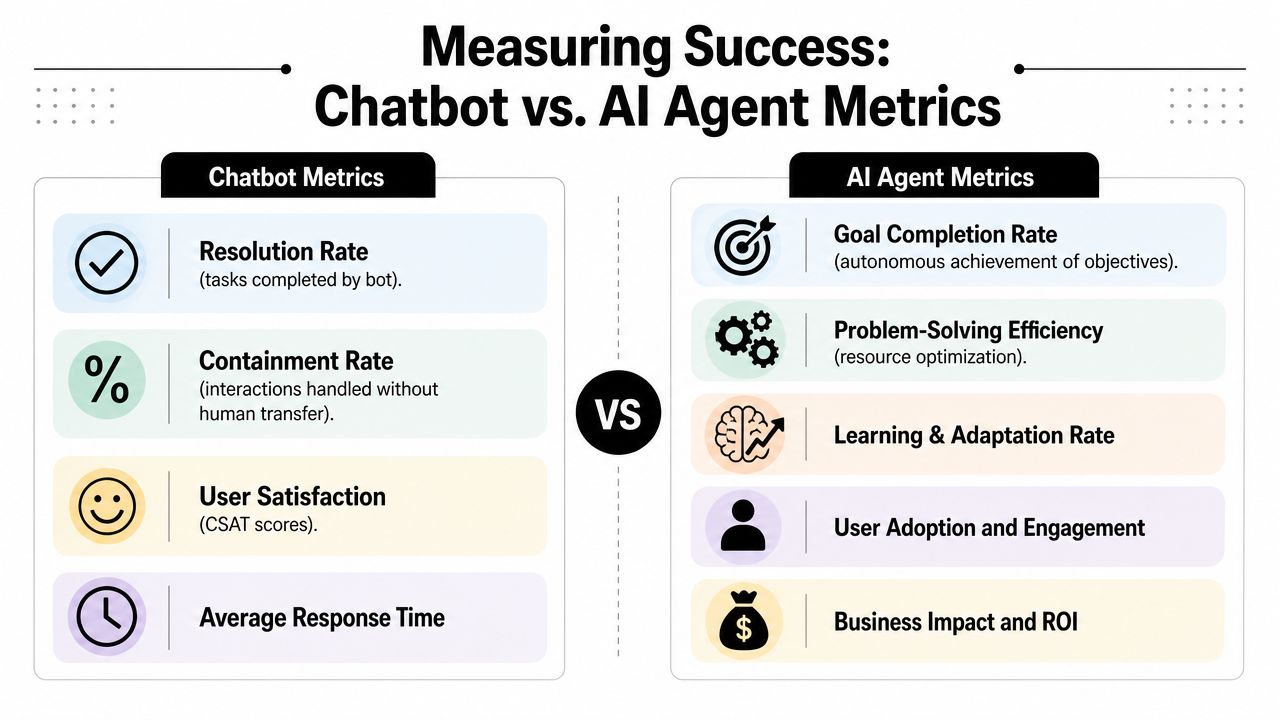
The problem is that these measures can look healthy while customers or employees still experience poor outcomes. A bot can contain a conversation and still fail to resolve the issue. That creates hidden work in follow-up channels, escalations, and repeat contacts.
What to measure for agents
Agent programs should be measured against resolved outcomes and business impact:
- First-contact resolution: Did the system finish the job without a second interaction?
- Resolution time: How long did it take from request to completion?
- Cost per resolved case: What did the enterprise spend to finish the work?
- Customer effort or employee effort: How much friction did the user experience?
- Business impact: Did the workflow improve revenue protection, service quality, or workforce productivity?
A modern analytics model needs to evolve with the automation model. Teams that are rethinking dashboards for agentic systems can use frameworks like this guide to measuring AI agent performance, especially when they need to separate activity metrics from outcome metrics.
If your KPI stops at “the bot responded,” you're measuring software behavior, not service performance.
For executive reviews, I'd keep the distinction simple. Chatbot dashboards answer, “How much volume did we absorb?” Agent dashboards answer, “How much work did we complete?”
A Decision Framework for Choosing Your Path
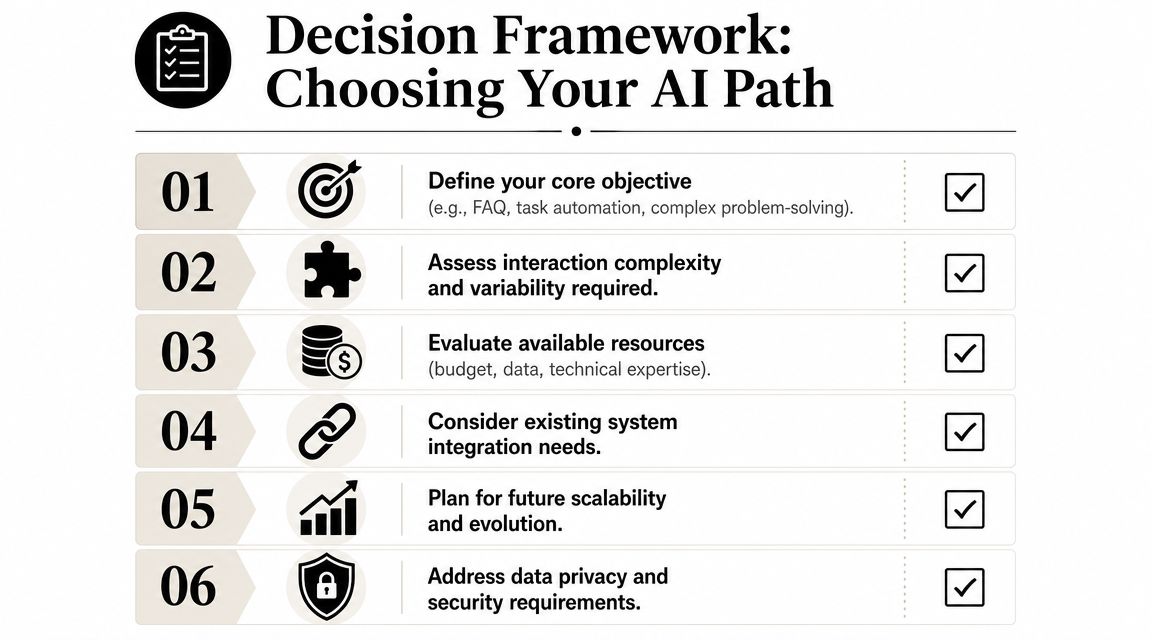
The most useful answer to AI agent vs chatbot is often, “What problem are you trying to solve?” The market has made the line blurrier as chatbots become more conversational and agents become more chat-based. A better framing is which capabilities justify the added complexity of an agent. Recent explainers emphasize memory, multi-step execution, and cross-system action as the meaningful differentiators (why the line between agents and chatbots is getting blurry).
When a chatbot is enough
Choose a chatbot if the job is mostly about information access and controlled interaction.
That's usually true when:
- The task is narrow: FAQs, appointment details, policy guidance, routing.
- The workflow is predictable: The paths are known and exceptions are limited.
- The system only needs to read: It can look up information without changing records.
- The business goal is volume efficiency: You want lower cost for repetitive demand.
A well-built chatbot is often the smarter decision than an over-engineered agent. Simpler systems are faster to deploy, easier to govern, and easier to maintain when the use case is stable.
When an agent is worth it
Choose an agent when the workflow spans systems, requires judgment within policy, or needs write-back actions.
That's usually true when:
- The issue needs completion, not explanation.
- The path varies based on context.
- The system must create, update, approve, or trigger something.
- The user would otherwise bounce across teams or tools.
- The business case depends on better resolution, not just lower volume.
A practical checklist
Use this checklist before you invest:
- Start with the outcome: Are you trying to answer questions or complete a business process?
- Map the steps: Count the systems, approvals, handoffs, and exception branches.
- Check the permissions model: If write access is required, define boundaries early.
- Assess volatility: If policies or workflows change often, you need stronger orchestration and testing.
- Price the failure mode: A weak answer bot creates frustration. A poorly governed agent can create operational risk.
The trap is buying agent complexity for a conversational problem. The opposite trap is forcing a chatbot to handle work that needs orchestration.
Deploying Your First AI Agent Safely and Effectively
The first agent should earn its place on the P&L.
Pick a workflow where completion matters, the rules are already defined, and delays create measurable operational drag. Good candidates include account changes that stay within policy, employee service requests with fixed approval logic, IT remediation for common incidents, and claims or case handling with known exception paths. These are not flashy demos. They are controlled environments where an agent can prove autonomous resolution, raise completion rates, and reduce cost-to-serve without introducing unnecessary risk.
For teams building retrieval-backed action flows, practical implementation references like MTechZilla's AI agents expertise help clarify how RAG, tool use, and production controls fit together.
The operating model changes as soon as software can do more than answer. An agent that reads records, writes updates, triggers workflows, or acts across applications needs a defined identity, scoped permissions, approval thresholds, and full execution logging. The Cloud Security Alliance's security guidance on AI agents versus chatbots explains why these controls matter more for agents than for read-only chatbot deployments, especially in regulated environments.
A practical rollout model looks like this:
- Set hard tool boundaries: Define the exact systems the agent can read, write, or trigger.
- Require approval for high-risk actions: Keep humans in the loop for exceptions, financial impact, customer commitments, and policy-sensitive changes.
- Log the full chain of execution: Capture prompts, retrieved context, tool calls, decisions, failures, and escalations.
- Test failure paths before launch: Simulate bad inputs, policy conflicts, missing data, and broken integrations.
- Measure resolution, not chat volume: Track task completion, clean handoff quality, rework avoided, and operational effort reduced.
Platform selection comes after that design work. Yellow.ai is one example. It offers an enterprise agent builder, orchestration across channels, testing, analytics, and compliance controls. Those capabilities matter because autonomous resolution fails in production when orchestration, observability, and governance are weak.
If your chatbot contains demand but still leaves customers or employees to finish the job somewhere else, the next move is to pilot an agent on one bounded workflow. Yellow.ai is one option for teams that need enterprise-grade AI agents across CX and EX, with orchestration, multimodal deployment, and governance designed for production use.



