














By 2028, Gartner projects that 33% of enterprise software applications will include agentic AI, up from less than 1% in 2024 according to DataGrid's summary of Gartner projections. That forecast changes the integration conversation completely. Enterprises aren't just connecting systems anymore. They're wiring autonomous software into customer journeys, employee workflows, approval paths, knowledge systems, and operational controls.
That shift is where many AI programs get stuck. Teams can usually get a demo working. The harder problem is integrating an agent so it can act safely inside real systems, then proving the economics of that decision when costs vary by prompt depth, tool usage, and workflow complexity. In practice, the technical architecture and the financial model have to be designed together.
Table of Contents
- The New Integration Imperative in the Age of Agents
- Laying the Foundation for Seamless AI Integration
- Enterprise AI Agent Architecture Patterns
- Your Phased Integration and Deployment Workflow
- Hardening Your Agent for Enterprise-Grade Reliability
- Monitoring Performance and Calculating ROI
The New Integration Imperative in the Age of Agents
Traditional integration assumed predictable software. A CRM updated a record. An ETL job moved data overnight. A workflow engine followed a fixed path. AI agents don't behave like that. They retrieve context, choose tools, reason across ambiguous inputs, and sometimes collaborate with other systems before they act.
That changes what AI agent integration means. The job isn't to connect two applications. The job is to orchestrate a bounded, observable decision loop across systems that were never designed for probabilistic behavior.
Why legacy integration habits break down
Point-to-point scripts fail quickly in agentic environments because they assume stable inputs and linear execution. An agent might call a knowledge base, then a ticketing platform, then an identity system, then ask for clarification before deciding whether to escalate. If one tool returns malformed output or stale permissions, the whole interaction can drift.
The design center shifts from data transfer to controlled action. That means API contracts matter more. Permission scopes matter more. Traceability matters more. Teams also have to think about channels differently. If you're building customer-facing agents, conversational design and input modality affect integration behavior too. Voice introduces turn timing, interruption handling, and context carryover that text-only bots don't face. This is why a resource like how voice control improves AI chatbot interaction is useful for architects working on multimodal agent flows.
Practical rule: If an agent can take action in a system, treat that integration like an operational control surface, not a convenience feature.
A second shift is conceptual. Many teams still use "agentic AI" and "AI agents" interchangeably, but they aren't always operating at the same level of autonomy or orchestration. Yellow.ai's overview of what agentic AI is and how it differs from AI agents is a useful framing reference when you're deciding whether you need a single-purpose tool caller or a broader multi-step orchestration pattern.
Integration now has two owners
In enterprise deployments, engineering can't own integration alone. Finance and operations need a seat at the table because runtime behavior affects cost in ways static software didn't. A workflow that resolves cleanly in one turn is cheap. The same workflow becomes more expensive when the agent has to reason longer, retry tools, retrieve extra context, or hand off.
That's why the strongest integration programs start with a business question. Which decisions should the agent make, under what guardrails, against which systems, and with what proof of value? If those answers aren't defined early, teams usually end up with a technically connected agent that nobody wants to scale.
Laying the Foundation for Seamless AI Integration
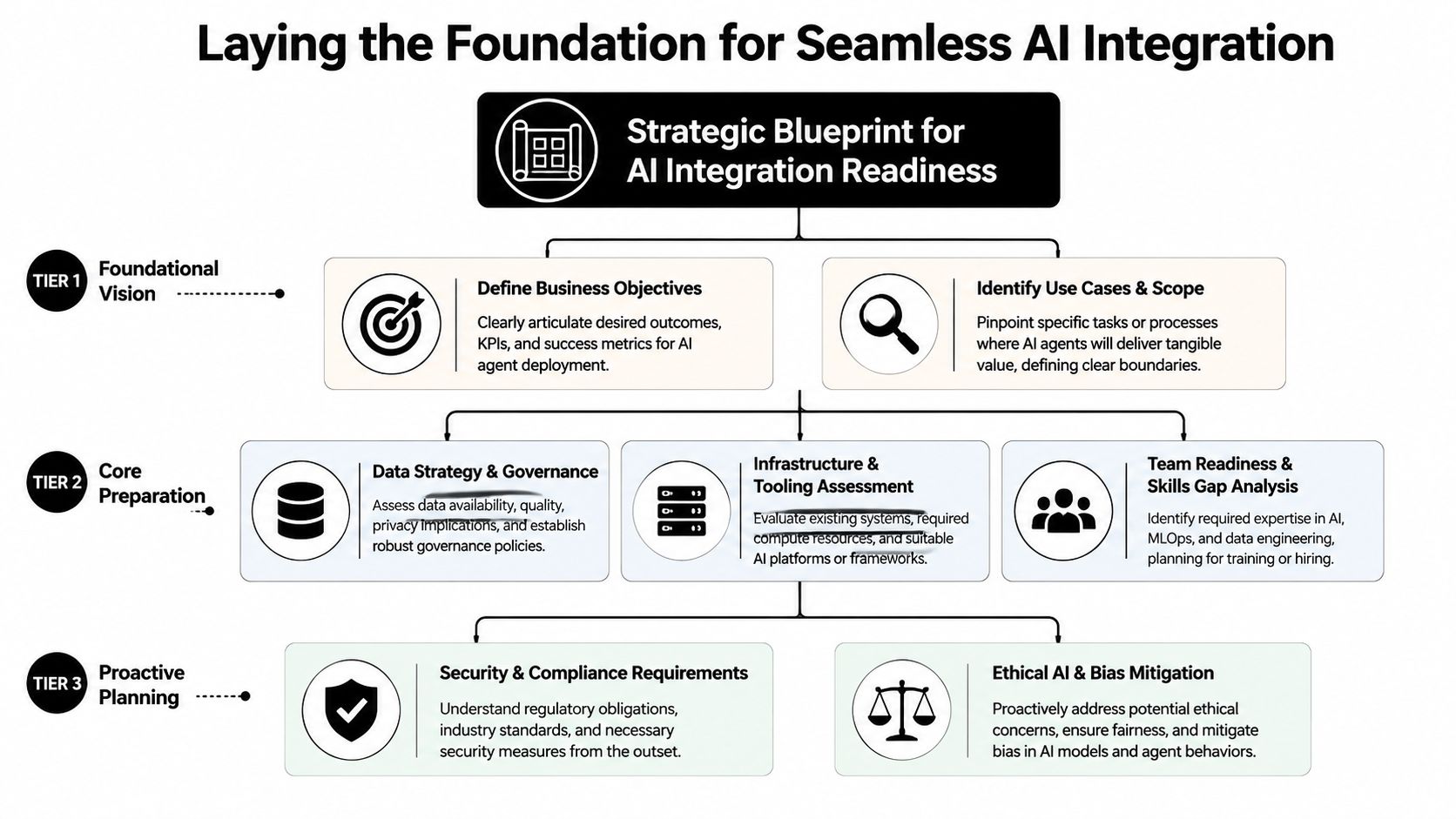
Projects usually fail during scoping, not deployment. Enterprise teams get into trouble when they connect an agent to systems before they define business boundaries, cost controls, and ownership.
Readiness starts before the first connector
The first design task is not API mapping. It is deciding what the agent is allowed to do, what outcome it is expected to improve, and what level of cost variability the business will tolerate. That last point gets missed often. Agentic workflows do not have fixed execution paths, so total cost of ownership is shaped by retries, tool calls, retrieval depth, human review, and exception handling.
A CX agent that checks order status, edits shipping details, and issues refunds carries a different operating model than an EX agent that answers policy questions and opens tickets. One touches transactions and revenue protection. The other mainly affects productivity, service desk load, and employee experience. If those differences are not defined early, ROI analysis turns into guesswork after launch.
Three decisions set the boundary:
- Choose the business outcome first: Reduce handle time, increase containment, improve triage quality, cut manual lookup, or speed up employee self-service.
- Name the system of record for each decision: Define where customer truth, employee truth, policy truth, and transaction truth live.
- Define where human approval stays required: High-risk actions need explicit review rules, not inferred model confidence.
An integration catalog helps, but it is only the starting point. A directory of prebuilt enterprise AI integrations can show what connectors already exist. The harder question is operational. Is the connection read-only, write-capable, event-driven, rate-limited, or approval-gated? That distinction matters more to ROI than connector count because it determines how much orchestration, exception handling, and support overhead the workflow will carry.
Three foundations that prevent rework
A useful readiness review comes down to three pillars.
| Foundation | What to assess | What goes wrong if you skip it |
|---|---|---|
| Data readiness | Knowledge quality, document freshness, permissions, taxonomy | The agent answers confidently from outdated or conflicting sources |
| System readiness | API accessibility, auth method, rate limits, write permissions, event support | The agent can understand intent but cannot complete the action reliably |
| Strategic readiness | KPI definition, scope boundaries, escalation rules, owners | Teams debate value after launch because success was never defined in operational terms |
Data readiness is not just a content issue. It is a retrieval and governance issue. If the HR policy library contains duplicate versions, inconsistent naming, and weak access controls, the agent will return inconsistent answers faster than a human would. That increases audit risk and lowers trust, which directly hurts adoption and pushes cost per successful resolution up.
System readiness is where enterprise friction shows up fast. CRMs, ERPs, ticketing platforms, telephony systems, and internal tools rarely offer the same API maturity or permission model. Some support clean event streams and granular write controls. Others rely on brittle middleware, shared credentials, or workflows that break under load. An agent that reads Salesforce, opens a Zendesk ticket, and checks a policy repository only works in production if every step has clear timeout behavior, fallback logic, and ownership.
Clean AI integration starts with decisions about authority, access, and acceptable failure.
Strategic readiness is the piece that determines whether the program can be justified and scaled. A vague KPI such as "improve support" creates reporting noise. A defined target such as "deflect low-complexity IT requests while preserving service desk quality and keeping cost per resolved case below the assisted baseline" gives both finance and engineering something concrete to measure. It also creates the right frame for TCO. Teams can track not just deployment cost, but ongoing spend from orchestration complexity, human escalation, vendor usage, monitoring, and support effort.
That discipline saves money later. Teams that set scope, authority, and value thresholds early make better architecture choices because they know which workflows deserve automation depth and which ones should stop at assisted resolution.
Enterprise AI Agent Architecture Patterns
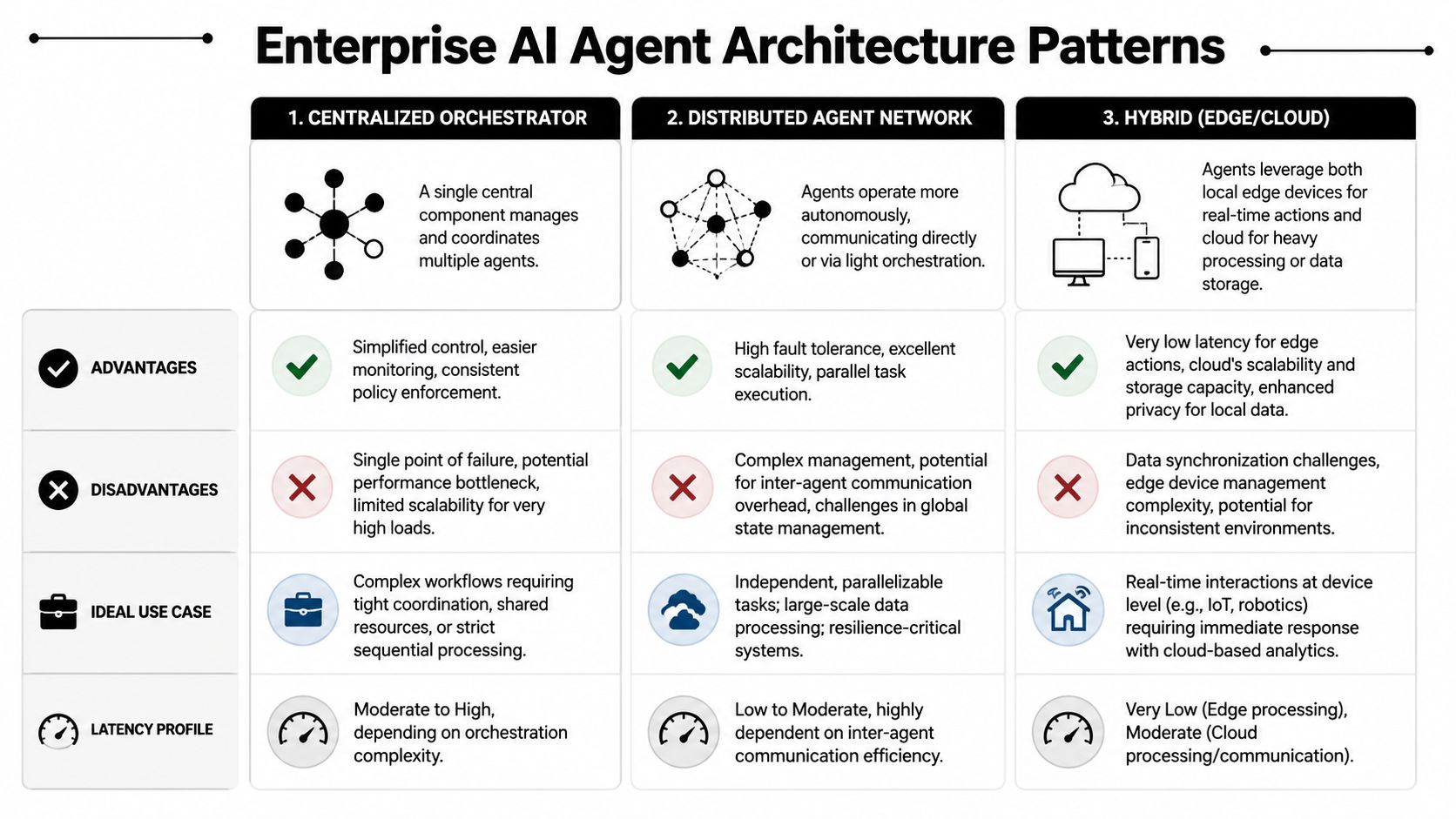
There isn't one correct architecture for AI agent integration. The right pattern depends on the kind of work the agent performs, how quickly it must respond, and how much coordination you need across systems.
A customer support agent that checks shipment status on demand has different needs than an employee onboarding assistant that reacts to provisioning events across HRIS, identity, and ticketing systems.
For a quick visual comparison, this framework captures the main trade-offs.
Three patterns that solve different problems
The first useful lens is operational behavior, not vendor category. In practice, most enterprise designs fall into three integration patterns.
API-driven agents
These agents pull data or trigger actions when the conversation requires it. The request is initiated by the user or by the agent's reasoning path. This is the most common pattern for customer service use cases such as checking account status, updating profile details, or opening a case.
Where it works well
- Request-response workflows: "What's my order status?" or "Reset my access."
- Bounded tool usage: A small set of trusted systems with clear schemas.
- Auditable actions: Each tool call can be logged against a user request.
Trade-offs
- Pros: Easy to reason about, easier to secure, clean for synchronous interactions.
- Cons: Latency stacks up if the agent needs multiple systems. Error handling becomes critical when one dependency is slow or unavailable.
Webhook-triggered agents
These agents react to events generated by external platforms. A case changes status. A new employee record is created. A payment exception is raised. The workflow starts from the event, not the conversation.
This model fits operational automations well because the agent can prepare context before the user even asks. In EX, that might mean triggering onboarding tasks when a start date is confirmed. In CX, it could mean preparing an escalation summary when a sentiment threshold is crossed.
RAG-centric agents
These agents are closely tied to a knowledge layer. Their main job is to retrieve, synthesize, and explain information with enough grounding to answer complex questions. They can still call tools, but knowledge retrieval is the center of the design.
This pattern is often right for policy-heavy use cases, regulated support content, and internal service desks where answer quality depends on current documentation.
Choose the pattern that matches the dominant job. Don't force a real-time workflow into a knowledge architecture, and don't use a pure API pattern when the problem is mostly retrieval quality.
Later in the build cycle, teams often evaluate build environments and orchestration tools. A product such as Yellow.ai AI Agent Builder can support design and deployment workflows for enterprise agents, but the architecture decision should come first.
After the design choice is made, this walkthrough is useful for stakeholder alignment and demos.
How to choose without overengineering
Use a simple decision screen:
- If the user asks and the agent responds with live system data, start with API-driven.
- If the business event should trigger the workflow, start with webhook-triggered.
- If answer quality depends on governed enterprise knowledge, start with RAG-centric.
Then layer selectively. Mature systems often combine them. For example, a support agent might retrieve return policy via RAG, call an order API to validate eligibility, then react to a warehouse event through a webhook. The mistake isn't mixing patterns. The mistake is mixing them without clear ownership for tracing, fallback behavior, and cost controls.
Your Phased Integration and Deployment Workflow
The cleanest implementation model is still a phased one. OneReach's implementation guidance describes a five-step methodology for AI agent integration: Strategic Assessment, Technology Architecture, Development, Deployment, and Monitoring. That sequence works because it forces technical choices to stay tied to business outcomes.
Phase one through phase three
Strategic Assessment is where teams define the exact use case and the KPI that justifies it. For CX, that might be a returns workflow, payment support flow, or post-interaction summarization path. For EX, it could be leave requests, IT troubleshooting, or onboarding guidance. The key is to choose one operational lane first, not a broad department mandate.
A useful assessment artifact is a decision matrix with four columns: user intent, required systems, risk level, and approval rule. That matrix quickly exposes which actions are safe for autonomous execution and which require confirmation or handoff.
Technology Architecture turns that matrix into actual integration design. During this phase, API-first thinking matters. Teams define connectors, event sources, retrieval paths, permissions, and fallback logic. You're also deciding where state lives. Some teams keep conversational state in the agent platform while business state remains in systems like Salesforce, ServiceNow, Workday, or Zendesk. That split is usually healthier than trying to centralize everything.
Development should focus less on "making the flow work" and more on failure behavior. What happens if the CRM is unavailable? What happens if the identity system returns incomplete profile data? What happens if the model suggests an action the policy engine should block? Resilient development means building explicit tool wrappers, schema validation, error classes, retry rules, and transparent user messaging.
A strong implementation team usually builds these components early:
- Tool contracts: Strict inputs and outputs for every system call.
- Fallback responses: User-safe language when actions can't complete.
- Escalation hooks: Fast transfer to human agents for ambiguous or high-risk cases.
- Audit events: Structured logs tied to user, session, intent, and action.
Phase four and phase five
Deployment should begin with a narrow pilot. That's not just risk management. It's how you collect clean operational data before the workflow expands. Start with a constrained population, a constrained use case, and human review on actions that affect money, compliance, or entitlements.
For example, a customer service team might begin with read-only order lookup before enabling order modification. An HR service team might start with policy Q&A before allowing the agent to trigger workflows in an HRIS. This sequencing builds trust because users see the agent perform useful work before it gains broader permissions.
Run pilots in production-like conditions. Lab success doesn't tell you how the agent behaves against messy identity records, stale knowledge articles, or conflicting permissions.
Monitoring isn't a post-launch clean-up task. It closes the loop back to the original KPI. The team should review task completion quality, failure modes, escalation patterns, tool success, and user-visible friction. The point isn't only to find bugs. The point is to decide whether the integration is creating business value at a sustainable operating cost.
When teams skip phases, the failure pattern is predictable. They build too much too early, grant broad permissions, then discover the cost model and reliability profile only after rollout. The phased workflow prevents that by making architecture, governance, and economics visible before scale.
Hardening Your Agent for Enterprise-Grade Reliability
A working agent isn't a production-ready agent. Enterprise reliability comes from the integration layer, not just the model layer.
That's why the failure data matters. GetKnit's reliability guidance notes that 78% of failed deployments stem from poor error handling and lack of observability. The same guidance says successful agents use structured output and modularity to reduce latency by up to 40%. It also calls out OAuth for secure access, blue-green deployment for rollback, and improved tool-use accuracy when tracing and evaluation gates are in place.
Reliability is built into the integration layer
The most common production issue isn't "the model was wrong." It's "the surrounding system let a small issue cascade." A malformed payload, expired token, missing field, or silent timeout can turn a good conversation into a failed workflow.
Hardening starts with design choices that feel boring but matter more than prompt tweaks:
- Structured output: Make the model produce fields your systems can validate. Freeform text is difficult to route safely.
- Modular tools: Separate lookup, validation, write action, and escalation into distinct operations.
- Tracing: Log each tool call, decision branch, and handoff so operators can reconstruct failures.
- Evaluation gates: Block high-risk actions unless required signals are present.
A useful pattern is to treat every tool call as if it were an external dependency in a payments system. Validate inputs. Validate outputs. Time-box the call. Return recoverable errors. Surface user-safe messaging. Record the attempt.
Security and compliance are design inputs
In enterprise environments, access control can't sit off to the side. If the agent interacts with systems like ticketing platforms, contact center tools, identity providers, or medical and financial records, the permission model has to be explicit. OAuth is often the right fit because it makes delegated access more manageable and auditable.
For regulated industries, compliance also affects the integration blueprint. BFSI and healthcare teams often need stronger controls over what the agent can retrieve, what it can write back, and when it must defer to a human. That means policy checks before actions, sensitive-data redaction in logs, scoped credentials, and rollback plans that operations teams can use without engineering intervention.
A short hardening checklist helps:
| Control area | Enterprise-ready practice |
|---|---|
| Authentication | Use OAuth or similarly governed delegated access |
| Deployment safety | Use staged rollout and rollback strategies such as blue-green deployment |
| Observability | Capture logs, metrics, traces, and failure reasons per tool call |
| Action safety | Require approval gates or policy checks for sensitive operations |
| Retrieval quality | Keep knowledge sources governed, current, and access-aware |
Reliability isn't only about uptime. It's about whether the agent behaves predictably when the enterprise stack is imperfect, which it always is.
Teams that harden early ship more calmly. Teams that postpone it usually spend their pilot trying to explain avoidable errors to stakeholders.
Monitoring Performance and Calculating ROI
While most enterprises can monitor uptime, few have a clear model for the economics of an agentic workflow.
That gap shows up fast in production. MIT Sloan's discussion of deploying AI agents notes that 88% of organizations deploying agents in production lack a framework to empirically establish cost ranges upfront or implement adaptive monitoring to track dynamic metrics. The result is familiar. Teams can report availability and response time, but they still cannot explain why one workflow is profitable, another breaks even, and a third drives up support cost.
Why ROI is harder for agentic workflows
Static software usually has stable transaction economics. Agentic workflows do not. A simple password reset may need one retrieval and one system action. A billing dispute may trigger multiple reasoning passes, tool calls across systems, a policy check, a human handoff, and audit logging.
That variability changes how leaders should measure value.
The useful question is not "What does one conversation cost?" The useful question is "What does each workflow class cost under normal, high-complexity, and exception conditions?" That framing gives finance, operations, and product teams a shared basis for decisions on rollout, staffing, and platform spend.
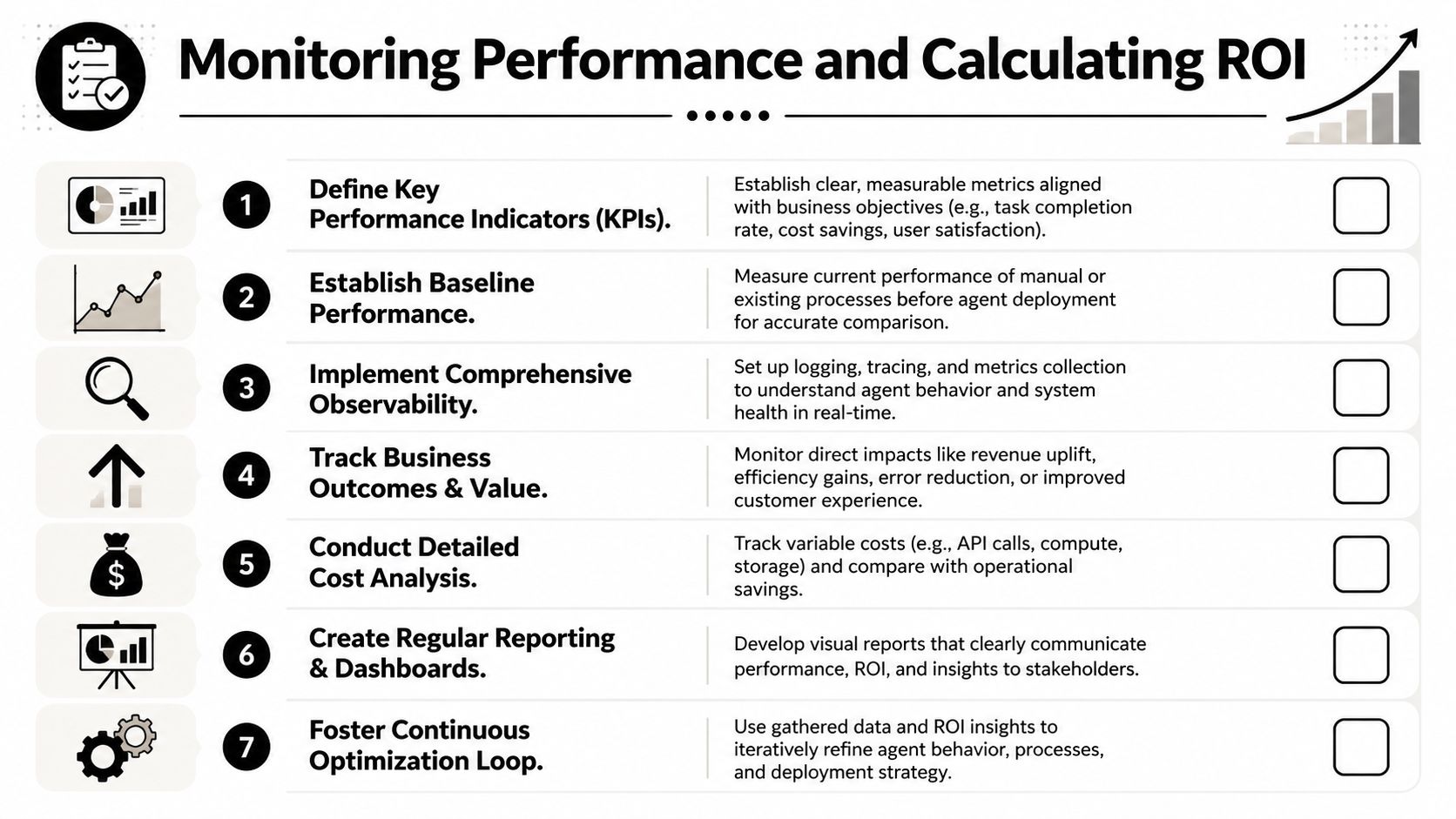
I recommend monitoring at three levels:
Interaction metrics
Track completion, abandonment, escalation, retries, and time to resolution. These indicate whether the agent is helping users finish work.Tooling metrics
Track tool-call success rate, failure types, timeout patterns, fallback frequency, and latency by dependency. This is often where avoidable cost appears first.Economic metrics
Track model usage, external service consumption, support labor impact, exception handling effort, and rework created by failed runs.
Many dashboards stop at the technical layer. That is not enough. A failed tool call is not just an error counter. It can trigger another model pass, a user rephrase, a transfer to an agent, and a longer handle time in the contact center. Each of those steps adds cost, and those costs rarely show up in a single system unless someone designs for it.
A practical model for TCO and ROI
A useful enterprise model does not need false precision. It needs cost categories that stay stable over time and reviews that force teams to compare expected value with observed value.
Start with TCO buckets:
- Build costs: Integration engineering, testing, governance setup, workflow design, and change management.
- Run costs: Model usage, tool execution, storage, observability, support operations, retraining or prompt updates, and maintenance.
- Risk costs: Compliance review, incident remediation, manual oversight, exception processing, and rollback events.
Then define value buckets:
- Operational efficiency: Work completed by the agent or completed faster with fewer human touches.
- Experience improvement: Faster answers, cleaner routing, lower wait time, and better continuity across channels.
- Quality lift: More consistent summaries, fewer missed process steps, and stronger adherence to policy.
Next, classify each production workflow. Low-complexity FAQ, mid-complexity transactional service, and high-complexity exception handling are usually enough to start. That classification prevents a common reporting mistake. Teams average every interaction together, hide the expensive edge cases, and overstate returns.
A reporting cadence should match how agent costs move:
- Weekly operational review: Failures, tool issues, knowledge gaps, policy conflicts, and escalation reasons.
- Monthly economic review: Runtime cost ranges by workflow class, exception cost drivers, and handoff burden.
- Quarterly investment review: Which workflows should expand, pause, redesign, or return to human-led handling.
Adaptive monitoring becomes critical in this context. If costs rise because the agent is taking longer reasoning paths or calling tools more often, teams need to know whether that behavior improves outcomes or only increases spend. Without that visibility, ROI conversations turn into opinion battles between IT, operations, and finance.
Measure agents like service systems, not just like models. Boards care about cost, risk, and throughput. Operations teams care about failure paths and recovery effort. A good operating model connects both views.
Strong AI agent integration programs do not promise perfect predictability. They make uncertainty visible, set cost guardrails by workflow class, and give business and IT leaders a way to track whether the system is earning the right to scale.
If you're evaluating platforms for CX or EX automation, Yellow.ai is one option to review for enterprise agent deployment, especially if you need multimodal agents, governed integrations, testing workflows, and analytics in the same operating environment. The practical test is simple: can the platform connect cleanly to your systems, enforce the right guardrails, and give your team enough observability to justify both ROI and long-term TCO.



