













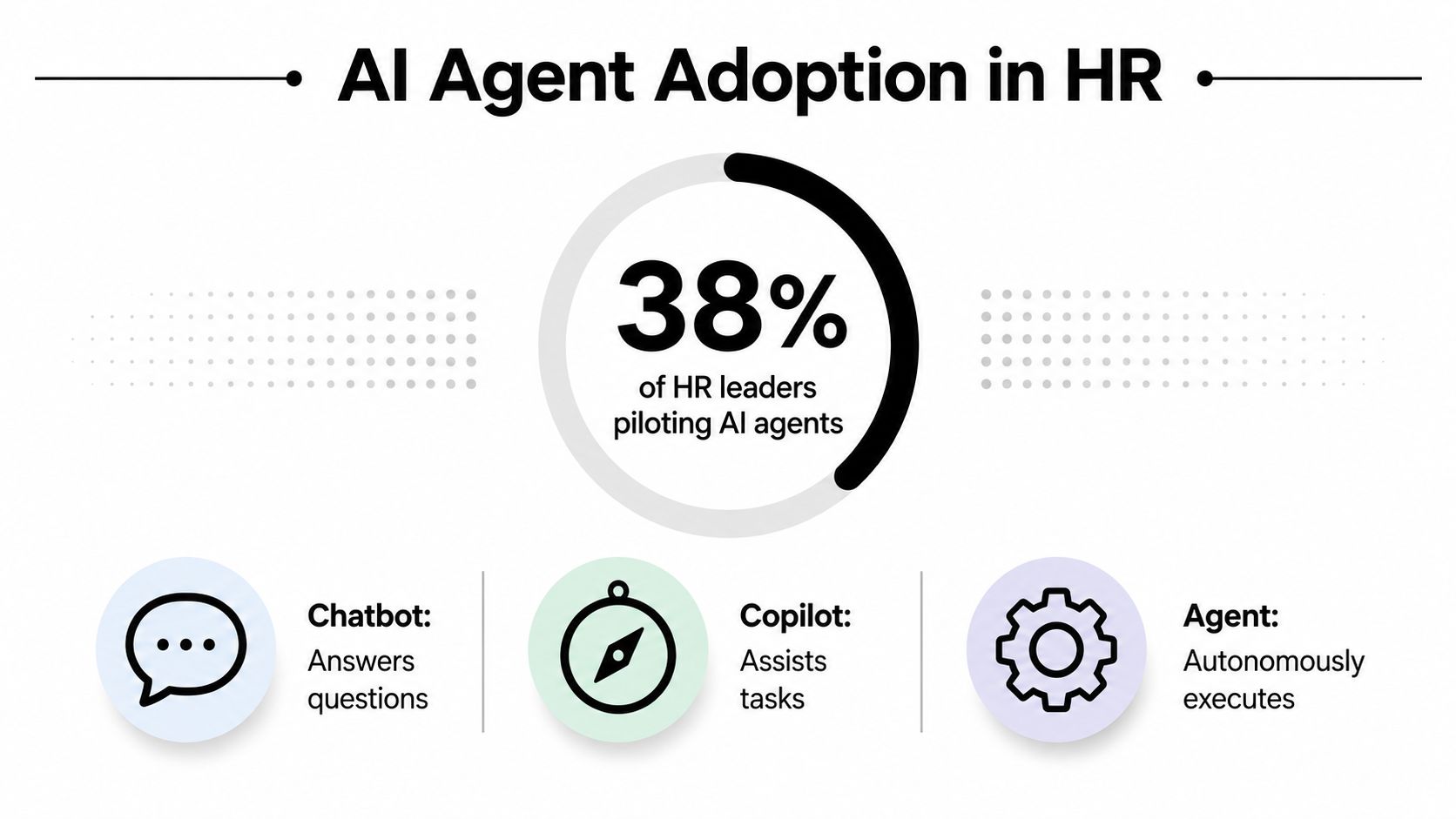
A 2024 Gartner survey of 179 HR leaders found that 38% were already piloting, planning, or had implemented generative AI in HR, up from 19% in June 2023. HR service delivery led the use cases, with employee-facing chatbots at 43%, followed by HR operations at 42% and recruiting tasks at 41%, according to PwC's analysis of agentic AI in HR.
That changes the question. HR leaders no longer need another presentation explaining why AI might matter someday. They need to decide which workflows an AI agent for HR can execute without supervision, which workflows require approval, and which decisions must remain human-owned.
The distinction matters because a fluent answer isn't the same as a safe action. An agent that retrieves a leave policy is operating in a very different risk category from one that changes a benefits record, recommends a performance outcome, or handles a grievance. The enterprises that deploy successfully will phase authority deliberately, connect agents to controlled systems of record, and measure outcomes beyond chatbot containment.
Table of Contents
- Why Every HR Leader Is Suddenly Talking About AI Agents
- What an AI Agent for HR Actually Is
- Five Core Use Cases That Already Work at Enterprise Scale
- The Architecture and Integrations Behind a Production HR Agent
- The Hard Part Is Governance, Not the Model
- Implementation Checklist, KPIs, and the ROI Math That Survives a Steering Committee
- How to Evaluate HR AI Agent Vendors Without Buying a Demo Theater
- Your 90-Day Plan and the Three Decisions That Matter Most
Why Every HR Leader Is Suddenly Talking About AI Agents
HR has become a practical proving ground for agentic AI because much of its service workload is repetitive, policy-driven, and distributed across systems. Employees ask similar questions about leave, payroll, benefits, onboarding, and internal policies. HR teams then search handbooks, verify records, create tickets, update systems, and follow up with employees.
That workflow is ideal for automation when the request is clear and the underlying policy is stable. It becomes risky when the agent must interpret intent, weigh competing rights, or make a judgment about a person.
The adoption shift is already visible. Gartner's survey found that HR leaders' involvement with generative AI rose from 19% in June 2023 to 38% in 2024, while HR service delivery and employee-facing chatbots led at 43%. PwC's coverage links that demand to employee support, policy lookup, and repetitive administrative work.
The maturity boundary is the real buying decision
A chatbot can reduce repetitive questions. An agent can go further by retrieving information, deciding which workflow applies, taking approved actions, and escalating exceptions. That added authority creates value, but it also creates exposure.
Use a simple test before approving a workflow:
- Clear input: Can the agent reliably identify what the employee wants?
- Stable policy: Does one documented rule govern the outcome?
- Reversible action: Can a human correct the result without lasting harm?
- Limited data scope: Does the task require only the minimum employee information?
- Defined escalation: Does the agent know when to stop and involve a specialist?
If the answer is yes across the board, autonomous execution may be appropriate. If the workflow involves grievances, appraisals, discipline, termination, or sensitive employee relations, the agent should assist rather than decide.
This maturity-boundary lens produces a better deployment plan than a generic “AI transformation” program. Start with employee service and administrative transactions, then expand only when audit evidence, employee feedback, and exception handling justify greater authority.
What an AI Agent for HR Actually Is
Most HR technology discussions blur three different products.
A chatbot answers questions from a conversation flow or knowledge base. A copilot helps a human draft, summarize, search, or recommend, but the human performs the final action. An AI agent for HR receives a goal, plans the required steps, retrieves relevant information, uses approved tools, executes actions across connected systems, and escalates when the request falls outside its authority.

Consider onboarding. A chatbot might explain where a new hire can find the handbook. A copilot might draft a welcome email. An agent can check the employee record, identify the required onboarding tasks, request missing documents, trigger approved access workflows, schedule orientation, and report incomplete steps to an HR coordinator.
The useful mental model is a junior HR generalist with a narrow delegation limit. The agent can perform routine work quickly, but it shouldn't invent policy, override a system of record, or make a judgment reserved for an HR specialist.
The three capability layers
Retrieve means finding the right policy, employee record, ticket, or transaction status. Retrieval must be grounded in approved sources, with access controls that prevent an employee from seeing another person's confidential data.
Reason means interpreting the request and selecting the correct workflow. Ambiguity appears here. “I need help with my pay” could mean a payslip question, a payroll correction, a tax issue, or a sensitive concern about compensation. The agent should classify the request and ask clarifying questions rather than guess.
Act means calling a tool or system integration to complete a step. Actions should be constrained by role, policy, approval state, and audit requirements. A real agent leaves a trace of what it read, what it decided, what it changed, and why it escalated.
Practical rule: If the system only produces an answer, it's conversational AI. If it completes a controlled workflow and records its decisions, it's agentic automation.
Before comparing platforms, buyers can use an executive search AI toolkit to clarify where AI supports recruiting research and where human evaluation remains essential. That same distinction should guide HR service automation.
Five Core Use Cases That Already Work at Enterprise Scale
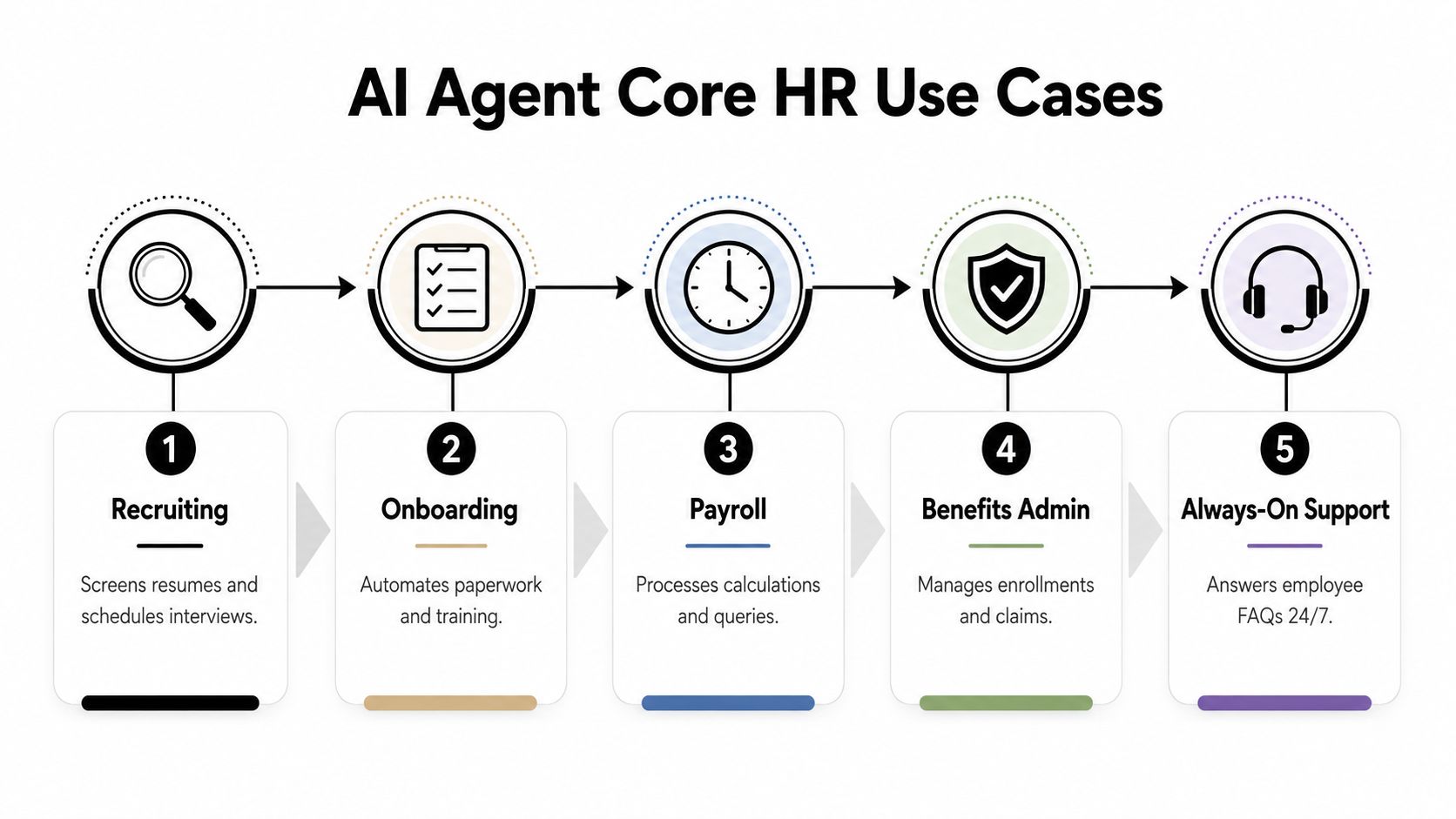
Start with workflows where high volume, low ambiguity, clear data ownership, and a reversible outcome keep autonomous authority within safe limits. The goal is not to automate every HR decision. It is to give agents control over repeatable steps while reserving judgment, exceptions, and employee-impacting decisions for people.
Recruiting coordination
A recruiting agent can screen applications against a defined competency model, answer candidate questions, request missing information, coordinate interview availability, and update recruiting records. Keep its authority focused on scheduling, communication, and evidence organization. Structured evaluation is appropriate. Unconstrained judgments about candidate quality are not.
Recruiters should own selection decisions, accommodation questions, sensitive disclosures, and assessments that may create unfair treatment. The agent can prepare evidence, but a qualified person must decide how that evidence affects a candidate.
Onboarding orchestration
Onboarding suits agentic automation because it links many dependent tasks. An agent can check onboarding status, collect required documents, initiate approved access requests, send reminders, and coordinate orientation activities.
Set a regional policy boundary and an explicit exception route. Missing documentation, unusual employment arrangements, and requests for privileged-system access should move to a human owner before the workflow continues.
Payroll assistance
Payroll agents can answer questions about payslips, payment schedules, deductions, tax documentation, and existing ticket status. They can also collect the information a payroll specialist needs to review a correction.
Do not grant unsupervised authority to change pay, approve adjustments, or resolve disputed calculations. The agent may prepare the case. A payroll specialist must approve the outcome.
Benefits administration
Benefits questions often follow documented rules and enrollment windows. An agent can explain eligibility, guide employees through available options, check submission status, and open a case when the situation falls outside standard policy.
Show the governing policy and separate general guidance from a confirmed enrollment action. Give employees a confirmation record and a human escalation route for claims disputes or eligibility exceptions. That separation protects trust when the policy does not fit the employee's circumstances.
Always-on employee support
Employee support offers the widest starting point because policy questions recur across regions and business units. A literature review identifies onboarding, leave management, benefits administration, and learning support as effective areas for routine inquiry handling and digital employee experience improvement. The review also connects routine automation with lower queue pressure, allowing specialists to focus on complex cases.
The strongest deployment pattern is phased authority. Let the agent answer from approved policy, complete low-risk status checks, and create or route cases. Require human review for exceptions, disputed outcomes, sensitive employee concerns, and actions that alter records or pay.
For implementation examples across employee experience workflows, see this conversational AI guide for employee experience. It is useful for comparing inquiry handling with workflows that require escalation and human ownership.
The Architecture and Integrations Behind a Production HR Agent
A production agent isn't a language model placed in front of an HR handbook. It's a controlled system that combines knowledge, reasoning, integrations, identity, observability, and escalation.
Start with the five-layer stack
The experience layer gives employees a consistent interface through chat, email, collaboration tools, or voice. The channel matters less than whether the agent can preserve context and identify the employee securely.
The knowledge layer stores approved policies, handbooks, process instructions, and regional variations. It needs ownership, version control, expiration rules, and retrieval permissions. An outdated policy can produce a polished but incorrect answer.
The orchestration layer plans multi-step work. It determines which tools to call, in what order, and under which conditions. This layer should enforce workflow states rather than let the model improvise business logic.
The integration layer connects the agent to systems of record. Common requirements include Workday, SAP SuccessFactors, ADP, ServiceNow, identity providers, ticketing systems, Microsoft Teams, and Slack. Read access and write access should be separated, with approval gates for consequential actions.
The governance layer manages authentication, authorization, privacy, audit trails, testing, monitoring, and human escalation. Without it, the organization has a conversational interface with uncontrolled access to sensitive HR data.
Reviewing an integration catalog for enterprise conversational platforms can help technical teams compare connector coverage before committing to custom development.
Integration depth determines time to value
Pre-built connectors reduce the work required to authenticate, map fields, handle errors, and maintain API changes. A vendor claiming broad integration coverage still needs to demonstrate the actual operations available for each system. “Connected to Workday” could mean read-only policy lookup, or it could mean a controlled workflow that updates an approved employee transaction.
The architecture should also support independent testing. Run simulated employee requests, inspect every tool call, verify access boundaries, and test failure recovery before exposing the agent to the workforce. For teams assessing employee feedback infrastructure, open source experience management provides useful context on collecting structured experience signals without treating conversation logs as the only measure of employee sentiment.
The Hard Part Is Governance, Not the Model
Model quality gets attention because it's easy to demonstrate. Governance is harder to show in a demo and more important in production.
A 2026 multi-region survey of 264 HR professionals found that 77% were bought into AI, but only 24% were comfortable letting it act autonomously. The same source reported that 39% had moved AI into HR operations automation and 34% used agentic workflow support, according to Culture Amp's AI in HR study.
That gap is rational. Employees may use AI for assistance before the enterprise has approved autonomous authority. HR leaders should respond by defining boundaries task by task, not by switching on a universal autonomy setting.
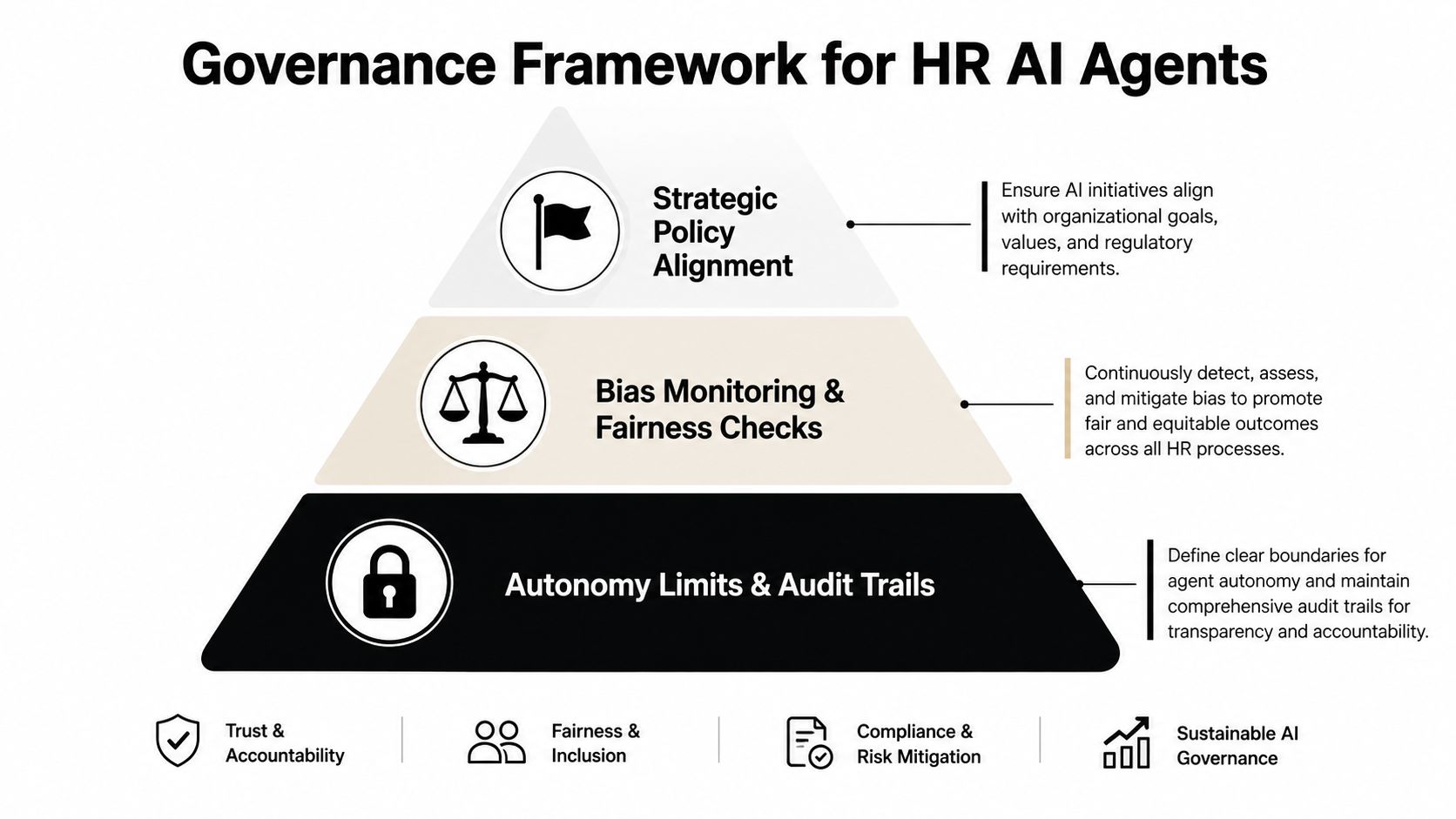
Use a three-tier authority model
Autonomous execution fits routine requests with stable rules and reversible outcomes. Examples include checking leave balances, explaining benefits enrollment windows, confirming onboarding checklist status, and creating a standard HR service ticket.
Assistive execution fits workflows where the agent can gather facts, draft content, or recommend next steps, but a human must approve the outcome. Examples include drafting a performance review summary, triaging a grievance to the right specialist, or preparing a payroll correction for review.
Human-only decisions include formal disciplinary action, termination, grievance findings, promotion decisions, and sensitive equal-pay analysis. An agent may organize evidence or surface patterns, but it must not become the decision-maker.
An independent review of AI agents in HR recommends beginning with transaction-based work before expanding into complex decision support. It emphasizes system integration, traceable multi-step execution, privacy, ethics, and data quality, with human review remaining critical for grievances and appraisals. The review's findings support a conservative authority model.
Build trust into every interaction
Employees should know when an agent is handling a request, what information it used, and how to reach a person. The agent should minimize data collection, mask unnecessary fields, enforce regional access rules, and retain an auditable record of actions.
Security isn't a product checkbox. It's an operating process that includes role-based access, policy testing, incident response, retention rules, and periodic review. Enterprise buyers evaluating those controls can examine enterprise-grade security capabilities for conversational AI as part of a broader vendor assessment.
Implementation Checklist, KPIs, and the ROI Math That Survives a Steering Committee
Build the business case from workload, control, and cost. Start with a narrow deployment that produces evidence before the agent receives authority to act independently.
- Select two workflows: Choose high-volume requests with clear policies, predictable inputs, and limited ambiguity.
- Assign owners: Name the HR process owner, data owner, security owner, and escalation team. Give each owner a decision right, not just a meeting invite.
- Connect one system of record: Verify identity, permissions, retrieval, and write-back behavior before adding more systems.
- Run shadow operations: Let the agent classify requests and draft responses while humans review every outcome before release.
- Set exit criteria: Define the evidence required to expand autonomy, including accuracy review, exception handling, employee feedback, and compliance sign-off.
Keep authority phased. Routine answers and routing can move first. Actions that change pay, employment records, access, or case status should require explicit approval until the agent demonstrates reliable handling of exceptions.
Track operational and employee outcomes
| KPI | What it measures | Why it matters |
|---|---|---|
| Deflection rate | Requests resolved without specialist intervention | Shows whether routine demand is moving away from the HR queue |
| First-contact resolution | Requests completed in the initial interaction | Exposes broken handoffs and incomplete answers |
| Average handle time | Time spent on each HR request | Links automation to specialist capacity |
| Employee satisfaction | Employee reaction to the interaction | Prevents efficiency from masking a poor experience |
| HR cost per ticket | Operating cost of service delivery | Creates a defensible financial baseline |
| Compliance incidents | Policy, privacy, or access failures | Shows whether scale is creating unacceptable risk |
Set a baseline before launch. Compare the same workflow, employee population, service channel, and measurement period before and after deployment. Separate agent performance from changes caused by policy updates, seasonal demand, staffing, or system outages.
Calculate the case from verified internal data: eligible interactions multiplied by the validated cost of handling each interaction, minus platform, integration, monitoring, and change-management costs. Add soft benefits separately, including faster onboarding, more consistent policy answers, and fewer shadow processes. Do not present them as hard savings.
IBM's AskHR result shows the level of operational detail a mature business case can contain. Its reported USD 5 million annual savings and 50,000 hours saved are documented in the cited AskHR benchmark. Use that example to define the fields in your own model, not to copy its outcome.
Only 25% of companies measure AI impact with clear KPIs, and only 24% have a company-wide AI usage policy, according to a 2026 survey reported by Business Insider on Liferay's study. Measurement discipline lets HR stop weak workflows before they consume more budget.
How to Evaluate HR AI Agent Vendors Without Buying a Demo Theater
A polished conversation proves almost nothing. Ask vendors to execute a real workflow using your policy structure, permissions, exception rules, and systems of record.
Score the shortlist against these criteria:
- Agentic depth: Can the platform plan and complete multi-step workflows, or does it only generate text?
- Autonomy controls: Can administrators restrict tools, actions, data fields, and approval states by workflow?
- Integration depth: Does it support meaningful operations across Workday, SAP SuccessFactors, ADP, ServiceNow, Teams, Slack, and ticketing systems?
- Knowledge grounding: Can the agent retrieve from versioned HR policies and show the source context behind an answer?
- Compliance posture: Can the vendor document controls for privacy, auditability, regional data handling, and relevant certifications?
- Model flexibility: Can the organization select among models without rebuilding every workflow?
- Observability: Can technical and HR owners trace tool calls, inspect failures, replay tests, and monitor escalations?
- Omnichannel reach: Can employees use the approved channel for the task, whether chat, email, voice, or collaboration software?
A serious proof of concept should include an incorrect or ambiguous request. Ask the agent to handle a missing record, conflicting policy, unauthorized employee, and request for a human. Watch whether it stops safely or fabricates confidence.
Yellow.ai is one platform option to place against this rubric. Its stated capabilities include Agent Builder 2.0, a conversational knowledge base with agentic retrieval, multi-model architecture, omnichannel orchestration, and pre-built integrations. Treat those as evaluation inputs, then validate each capability against your own security, HRIS, audit, and procurement requirements.
The vendor that wins isn't the one with the most impressive demo. It's the one that can show controlled execution under failure conditions and explain exactly who remains accountable.
Your 90-Day Plan and the Three Decisions That Matter Most
A focused rollout can move from design to controlled production without granting the agent broad authority.
Days one through thirty
Define two use cases, their owners, data boundaries, escalation rules, and KPIs. Inventory the policies and system records the agent will use. Write the prohibited-action list before configuring the agent.
Days thirty-one through sixty
Connect the source systems, build the knowledge layer, establish identity controls, and test routine and exceptional requests. Keep the agent in shadow mode while HR specialists review classifications, answers, tool calls, and handoffs.
Days sixty-one through ninety
Launch in one region or business unit with autonomous authority limited to approved transactions. Publish the human escalation route, monitor the KPI baseline, review incidents weekly, and expand only when the evidence supports it.
Three decisions belong to the HR leadership team.
- How much authority will the agent receive on day one? Start narrower than the vendor recommends.
- What will happen when the agent fails publicly? Define correction, employee notification, investigation, and remediation before launch.
- Who owns the platform? Centralize standards, security, and reusable components, while allowing regional teams to control local policy and escalation requirements.
HR teams won't win by chasing the newest model. They'll win by selecting workflows with clean boundaries, proving value with credible measures, and treating employee trust as an operating requirement.
Yellow.ai offers enterprise agentic AI for employee service, including policy questions, self-service workflows, and integrations that connect conversations to business systems. Visit Yellow.ai to evaluate how its agent-building, knowledge, orchestration, and governance capabilities fit your HR automation roadmap.



