









Monday morning, your queue is already backing up. The contact center is fully staffed, the same password-reset and order-status requests are flooding in, and the only thing getting faster is the rate at which managers ask why containment slipped again. That's the moment most enterprises stop treating an AI agent for customer support like a clever experiment and start treating it like operating infrastructure.
The hard truth is that customer support is where the enterprise proves whether agentic AI can do real work. It's high-volume, repetitive, measurable in seconds and dollars, and it has a human fallback path if the agent gets stuck. That makes it the safest place to modernize service delivery, but also the quickest place to expose weak retrieval, sloppy escalation rules, and brittle integrations.
Table of Contents
- Why Customer Support Is the Front Door for Enterprise AI Agents
- What an AI Agent for Customer Support Actually Is
- The Business Case Leaders Actually Defend
- An Enterprise Implementation Roadmap That Actually Ships
- Evaluation Checklist and the KPIs That Matter
- Compliance and Security as Architecture, Not Afterthought
- Vendor Selection Criteria for Enterprise-Grade Platforms
- The First 90 Days and What Comes Next
Why Customer Support Is the Front Door for Enterprise AI Agents
A CX leader doesn't need a pitch deck to see the problem. She sees the queue length, the repeat contacts, the softening CSAT, and the fact that her team is still spending most of the day on issues a machine should already know how to handle. That's why customer support has become the enterprise's first serious proving ground for agentic AI, not because it's flashy, but because it's operationally unforgiving.
The category has moved past novelty. In 2026, 66% of customer service organizations report using AI agents, up from 39% in 2025, a jump of about 1.7×. That shift says executives aren't asking whether this belongs in the stack anymore, they're deciding how much of the stack it should own.
What makes support different is the traffic pattern. The work is repetitive, rules-based, and tied to visible business pain, so even a small improvement can change queue health, staffing pressure, and customer patience. It's also politically easier to automate because the human team is still there for exceptions, complaints, and edge cases that need judgment.
Practical rule: start with the line of business that already lives in metrics every hour, not the one that sounds most futuristic.
The strategic mistake is to buy a bot and call it transformation. The key decision is whether you're redesigning service operations around a system that can resolve, route, and escalate with context. Once you view customer support that way, the vendor conversation changes fast, because the question stops being “Can it chat?” and becomes “What part of the operating model can it safely own?”
What an AI Agent for Customer Support Actually Is
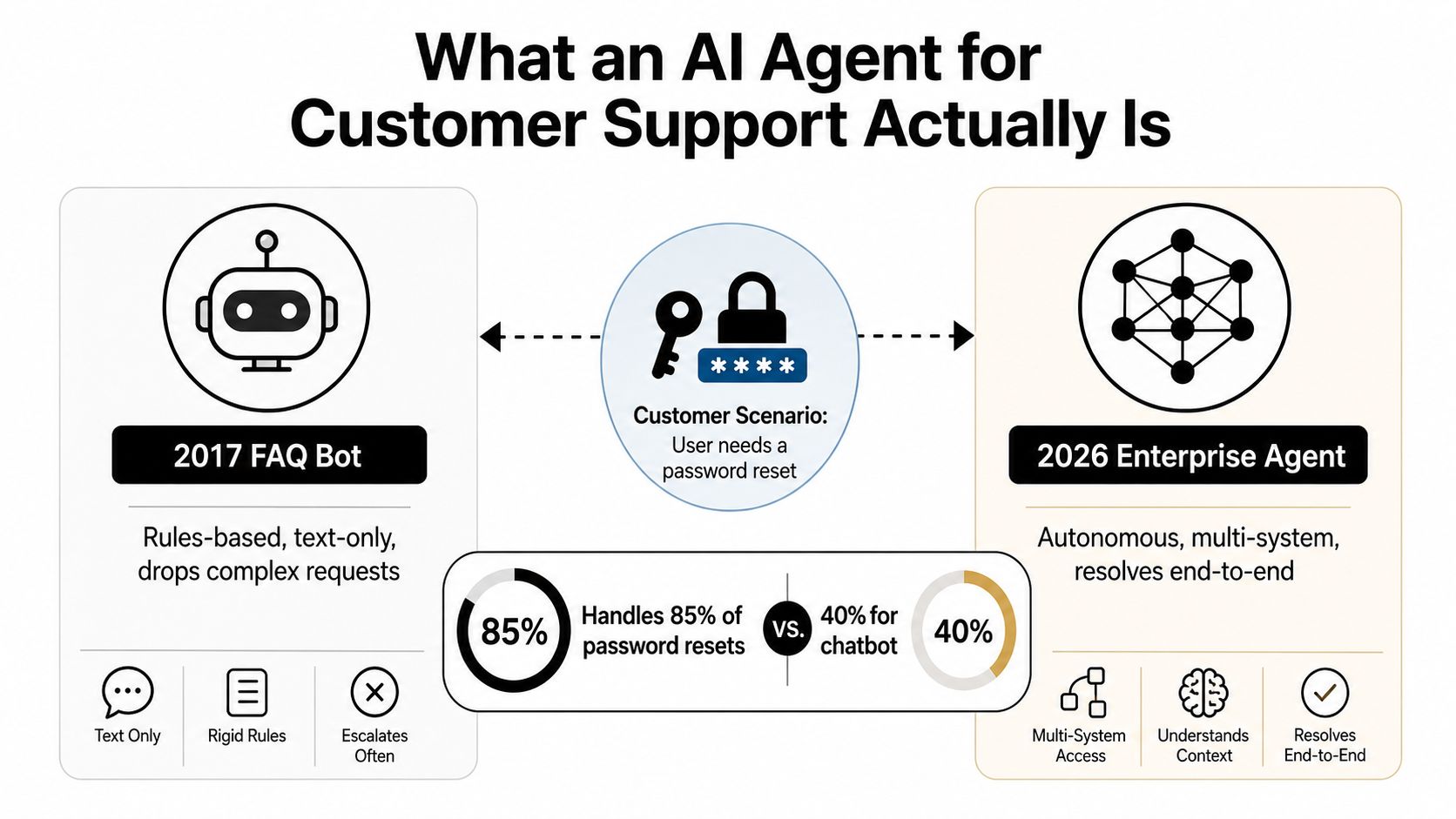
A 2017 FAQ bot can answer a password-reset question until the customer asks a follow-up that doesn't fit the script. A 2026 enterprise agent keeps going, checks identity, queries the right system, and finishes the task without forcing the customer to repeat themselves. That difference is the entire game.
The four parts that matter
IBM describes AI agents as systems that autonomously design workflows and interact with external environments, and Kore.ai's definition adds the essential enterprise detail, reasoning and planning, API-based actionability, and autonomous multi-turn orchestration (IBM). In plain terms, a real agent doesn't just generate text. It decides what to do, reaches into connected systems, and keeps the conversation coherent while the work happens.
The first building block is the reasoning layer. That's where the model interprets intent, context, and constraints before it speaks.
The second is tool use. The agent must be able to call APIs, update records, and trigger workflows, not just suggest what a human should do.
The third is retrieval-grounded generation. Support answers have to come from current company documents, tickets, and policies, not from the model's memory.
The fourth is persistent memory across turns and channels. A customer shouldn't have to restart the story because the interaction moved from chat to email or from one question to another.
An AI agent is useful only when it can finish the job, not when it can describe the job.
The cleanest vendor test is simple. Ask whether the system can verify identity, look up account data, execute a backend action, and preserve the conversation state if the issue gets transferred. If the answer is no, you're buying a smarter chatbot, not an enterprise support agent.
The Business Case Leaders Actually Defend
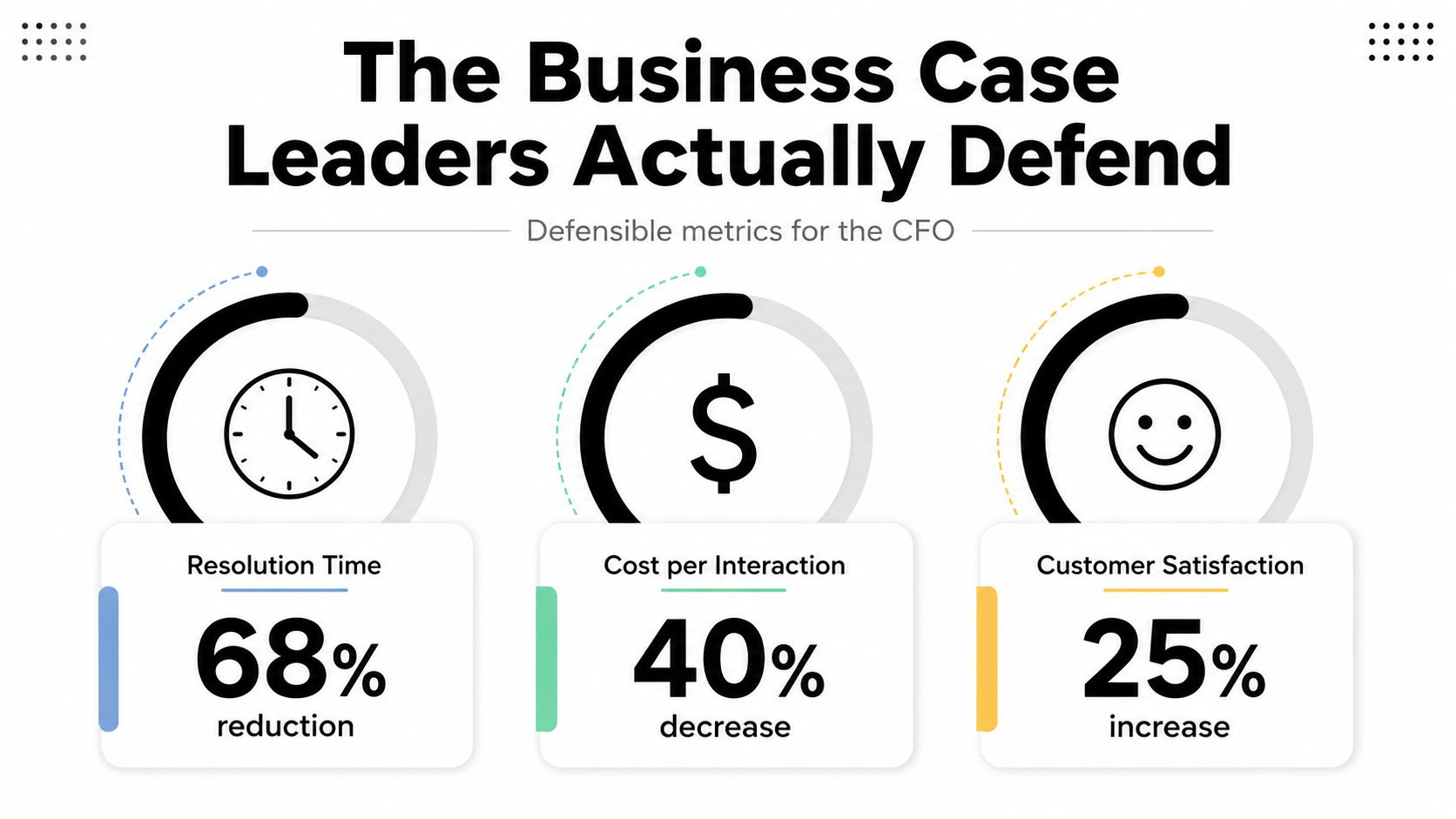
The CFO doesn't care that the demo was elegant. The CFO cares whether the investment lands in the budget as a control point on cost, throughput, and service quality. That's why the market trajectory matters first, because it shows this is now a planned enterprise category, not a lab toy. One major estimate values the global AI-for-customer-service market at $12.06 billion in 2024 and projects $47.82 billion by 2030, a 25.8% CAGR (Freshworks).
A second signal is more useful for operators. Median tier-1 deflection across enterprise CX programs is 41.2%, the top quartile reaches 58.7%, and intent-level deflection hits 78% for password resets and 69% for order tracking (Digital Applied). Those are the kinds of tasks that create support inflation when a company scales, so the economics improve first where the traffic is predictable.
How to translate the numbers into an operating case
The payback story isn't “AI saves money.” It's narrower and more defensible.
- Deflection on repetitive work lowers the number of contacts that reach human agents.
- Resolution on first pass reduces transfers, reopens, and follow-up tickets.
- Faster triage improves queue health during spikes, especially in retail, BFSI, utilities, and logistics.
- Better escalation logic protects the complex cases that need a person.
That's why the strongest case usually starts in one queue with a lot of known-answer traffic, then expands after the retrieval and handoff logic is proven. The yellow.ai case study on preserving human touch while achieving high automation is a useful reference point for what a controlled rollout can look like, especially when leaders want automation without damaging the handoff experience (Yellow.ai case study).
If the finance team can't trace the value to fewer contacts, lower handle time, or fewer escalations, the case isn't ready. The right standard is simple. If you can't explain the payoff in the language of operating budgets, don't bring it to the steering committee yet.
An Enterprise Implementation Roadmap That Actually Ships
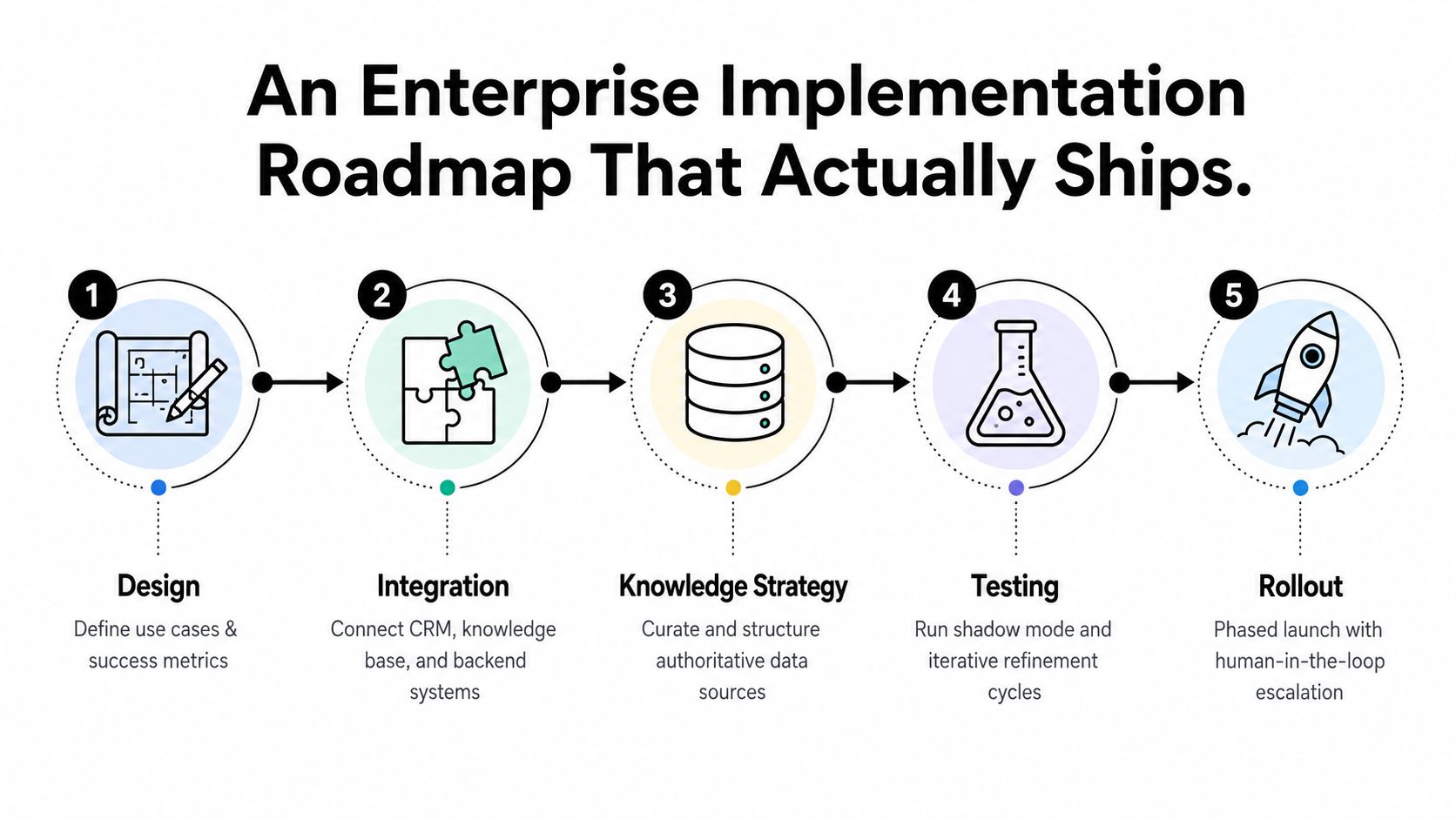
The fastest way to fail is to treat implementation like a software install. In practice, the program succeeds or stalls based on the order in which you make decisions. A support agent needs a clear task boundary, clean integrations, authoritative knowledge, and escalation rules before it ever touches a live customer.
Start with one queue and one decision boundary
Pick a use case that has volume, repetition, and a clean success definition. Password resets, order tracking, billing status, and simple account updates are usually better starting points than broad “support automation” ambitions. The reason is simple, those tasks let you prove the operating pattern without forcing the agent to reason across too many exceptions.
Then define the persona and the fallback. If the agent is allowed to answer, route, or execute, say exactly which of those actions it can take and which ones require human review. Ambiguity here becomes production risk later.
Integrate the systems, not the stickers
The agent has to work across CRM, ticketing, telephony, identity, and back-office systems without brittle point-to-point logic. That's where tool design matters more than model selection. Enterprise support agents connect an LLM reasoning layer to a knowledge base and vector retrieval layer, then use a perceive-reason-act loop to resolve, route, or escalate (Jeeva.ai).
That architecture only works if the backend is stable enough to trust. If the agent can't read current case data and write back the result, the workflow collapses into a fancy suggestion engine.
Curate knowledge like production data
Most teams get sloppy. Split content into machine-readable chunks, maintain a log of unanswered questions, and treat conflicting sources as an escalation trigger, not a prompt for improvisation. SignalFire's implementation guidance is blunt on this point, and it's the right stance for enterprise support where policy and product details shift constantly (SignalFire).
If the knowledge base is stale, the agent will sound confident and still be wrong.
Testing should reflect that reality. Shadow mode, replay of historical tickets, and iterative prompt and retrieval tuning matter more than one-off demo success. A proper rollout starts with a contained pilot, then expands only after the handoff path, retrieval confidence, and operational logging hold up under real traffic.
Yellow.ai's enterprise security posture is relevant here because the rollout doesn't end at accuracy, it ends at control, access management, and governance (Yellow.ai enterprise security). If you're writing a project plan, sequence the work in that order, design first, integrations second, knowledge third, testing fourth, rollout fifth. Anything else is just optimism with a budget code.
Evaluation Checklist and the KPIs That Matter
The most common rollout failure is a reporting failure. Teams launch something, but nobody agreed on what “good” means beyond a vague containment goal. That's why the scorecard has to be built before scale, not after complaints start.
The metrics that matter fall into four buckets. Deflection and resolution show whether the agent reduces load. Quality and trust show whether the answers are right. Customer experience shows whether the interaction feels usable. Operational efficiency shows whether the program is sustainable.
| Enterprise AI Agent Scorecard for Customer Support | |
|---|---|
| Outcome Area | KPI, Realistic Target Band, Data Source |
| Deflection and resolution | Tier-1 deflection, use the enterprise baseline and track movement against it, support platform analytics and ticket tags |
| Deflection and resolution | Intent-level containment for repetitive tasks, compare against password-reset and order-tracking flows, conversation logs and workflow audit trail |
| Quality and trust | Retrieval hit rate, measure how often the agent cites the right source set, retrieval logs and document access traces |
| Quality and trust | Escalation appropriateness, review whether the agent handed off at the right time, QA sampling and supervisor review |
| Customer experience | Repeat-contact rate, watch for customers coming back because the answer was incomplete, CRM and case history |
| Customer experience | Handoff satisfaction, check whether the transfer preserved context, post-interaction surveys and agent notes |
| Operational efficiency | Average handle time on escalated cases, compare human-only vs assisted workflows, contact center workforce data |
| Operational efficiency | Unanswered-question log growth, monitor gaps that should become new knowledge articles, knowledge base backlog and content ops queue |
The hidden KPI is escalation quality. A good agent doesn't try to solve everything. It knows when the source material is weak, the policy is unclear, or the customer issue needs a human with authority. That's why the unanswered-question log matters so much. It tells you where the retrieval system is thin and where the knowledge architecture needs repair.
A second hidden KPI is source conflict handling. If the agent sees contradictory documents, it should stop and escalate. Letting it synthesize through the conflict is how support teams end up with confident but inconsistent answers.
The scorecard should be reviewed weekly in pilot, then monthly after rollout. If a metric can't be traced to a concrete data source, it's not a KPI. It's a talking point.
Compliance and Security as Architecture, Not Afterthought
Compliance isn't the last slide in the vendor deck. It shapes the architecture from the start. If your support workflows touch healthcare, payments, or regulated customer data, the platform choice has to support HIPAA, PCI-DSS, ISO 27001, ISO 27701, and SOC 2 Type II as design inputs, not marketing badges.
The practical requirements are easy to state and hard to fake. Data residency needs to be configurable where jurisdiction demands it. Access control has to exist at the tool and prompt level. Audit logging has to capture every significant agent action. PII handling needs redaction and secure session management so the agent doesn't expose sensitive content while retrieving or responding.
That's also why the risk isn't just a “bad model.” It's a stale knowledge base, a missing escalation path, or an agent that can see more than it should. A system that answers confidently from outdated policy can create more exposure than a system that escalates early.
SignalFire's guidance is useful because it focuses on operational discipline, not compliance theater. Build a log of unanswered questions, split documents into machine-readable chunks, and escalate when sources conflict rather than letting the agent improvise (SignalFire). That is how you reduce risk in a live support environment.
Yellow.ai's enterprise-grade security posture is one example of how teams are packaging those controls into the platform rather than bolting them on later (Yellow.ai security). If the security team can't explain how the agent reads, writes, logs, and escalates, don't approve the rollout.
Rule of thumb: in regulated support, the safest agent is the one with narrow permissions and a strong handoff design.
Vendor Selection Criteria for Enterprise-Grade Platforms
The shortlist should be short for a reason. Most platforms can demo a decent conversation. Far fewer can survive enterprise scrutiny once you ask about model flexibility, retrieval quality, governance, and integration depth. Those four are essential.
What to weight highest
Multi-LLM flexibility matters because you don't want one model choice to decide cost, latency, and quality forever. The platform should let you switch models as requirements change.
Retrieval depth matters more than raw model size. A smaller model grounded in current tickets and policy content will beat a bigger model wandering through stale documents.
Governance and auditability need to be native. You want logs, controls, approvals, and role-based permissions you can defend to risk and compliance teams.
Pre-built integrations save time only if they reach the systems you run. Salesforce, Zendesk, Genesys, Freshdesk, and HubSpot are table stakes, not differentiators.
What to treat as secondary
Voice latency, language coverage, omnichannel orchestration, and agent-building UX matter, but they don't compensate for weak retrieval or missing governance. A polished demo can hide a platform that's fragile in production. A less flashy platform with better control will usually win over time.
Yellow.ai is one platform in this category that combines multi-LLM architecture, omnichannel orchestration, and pre-built integrations, so it belongs on a shortlist when those requirements are real (Yellow.ai buying guide). Still, the vendor comparison should revolve around your architecture standards, not the vendor's storyline.
Demand three demos before you sign. First, a known-answer workflow with live retrieval. Second, a confused customer scenario that requires escalation. Third, a backend action that writes data back to a core system. If a platform can't show all three cleanly, it's not ready for enterprise support.
The First 90 Days and What Comes Next
The first month should be about focus, not breadth. Choose one queue, map the top intent types, inventory the authoritative data sources, and launch a contained pilot with strict escalation. Days 31 to 60 should harden retrieval, connect the core systems, and stand up the scorecard so the program has a real operating rhythm.
By days 61 to 90, expand only if the handoff quality and audit trail hold up. Formalize governance, train supervisors on exception handling, and decide which adjacent queue is next. From there, the next wave usually moves into proactive outreach, voice, and employee-service use cases where the same architecture can do more than one job.
The key insight is simple. Don't plan the second use case until the first one has a reliable knowledge loop and an accountable escalation model.
If you're building an ai agent for customer support, Yellow.ai can give your team the agentic AI stack, omnichannel orchestration, and enterprise controls needed to move from pilot to production without losing governance. Visit Yellow.ai to evaluate how its customer service automation, retrieval-grounded knowledge, and multi-LLM architecture fit your support operating model.