













Most companies still buy employee experience software as if employees want another destination to visit. They don't. They want work to move without friction. That's why the category has expanded so quickly: MarketsandMarkets estimated the employee experience management market at USD 6.8 billion in 2023 and projects it will reach USD 11.1 billion by 2028, a 10.2% CAGR over 2023 to 2028, which points to a broader shift from isolated HR tools to unified workplace infrastructure (MarketsandMarkets employee experience management market forecast).
The surprise is that the most important change isn't visual design. It's interaction design. The old model gave employees portals, policy pages, and search bars. The new model gives them conversational systems that can understand intent, complete tasks, and orchestrate work across HR, IT, learning, and internal services. In practice, the modern employee experience platform is becoming the operating layer between the employee and the enterprise stack.
Table of Contents
- The End of Apps and the Rise of Agentic EX
- What Is a Modern Employee Experience Platform
- The 5 Core Capabilities of an Agentic EXP
- Measuring the Business Impact and ROI of Your EXP
- Common Enterprise Use Cases in Action
- How to Evaluate and Select Your EXP Vendor
- Your Implementation Roadmap for Success
The End of Apps and the Rise of Agentic EX
The old enterprise pattern was simple. Every team bought its own system, every system had its own interface, and employees were expected to stitch the experience together themselves. That model breaks down in hybrid organizations, global workforces, and service-heavy environments where a routine request often crosses HR, IT, identity, knowledge, and communications.
An employee experience platform matters because it changes the unit of design. Instead of organizing work around applications, it organizes work around employee intent. “I need to change my address.” “I can't access payroll.” “What training should I take for this role?” A strong platform routes those intents to the right system, content, workflow, or agent without making the employee understand the internal structure.
That shift also changes how leaders should think about digital workplace spend. The platform is no longer just a nicer intranet or engagement layer. It becomes part of enterprise execution. Teams that care about rollout quality should also pressure-test the journeys, not just the interface. A useful reference is Uxia's synthetic user guide, which shows why simulated user behavior can expose friction in workflows long before employees encounter it in production.
The most expensive friction in enterprise software is the friction employees repeat every day.
Agentic EX is the natural next step. A conversational layer can search, summarize, recommend, trigger actions, and follow up. That's a different proposition from a content repository. It turns the platform from a place employees must visit into a system that actively works on their behalf.
What Is a Modern Employee Experience Platform
A modern employee experience platform isn't a better homepage. It's a system of engagement that sits across systems of record and turns fragmented enterprise software into one coherent employee interface.
From destination to front door
Think of a traditional intranet as a public library with no librarian. The documents may be there, but the employee has to know what to search, where to search, and which version to trust. A modern employee experience platform behaves more like a team of digital research assistants. It knows who the employee is, what tools they use, what workflow they're in, and what action usually comes next.
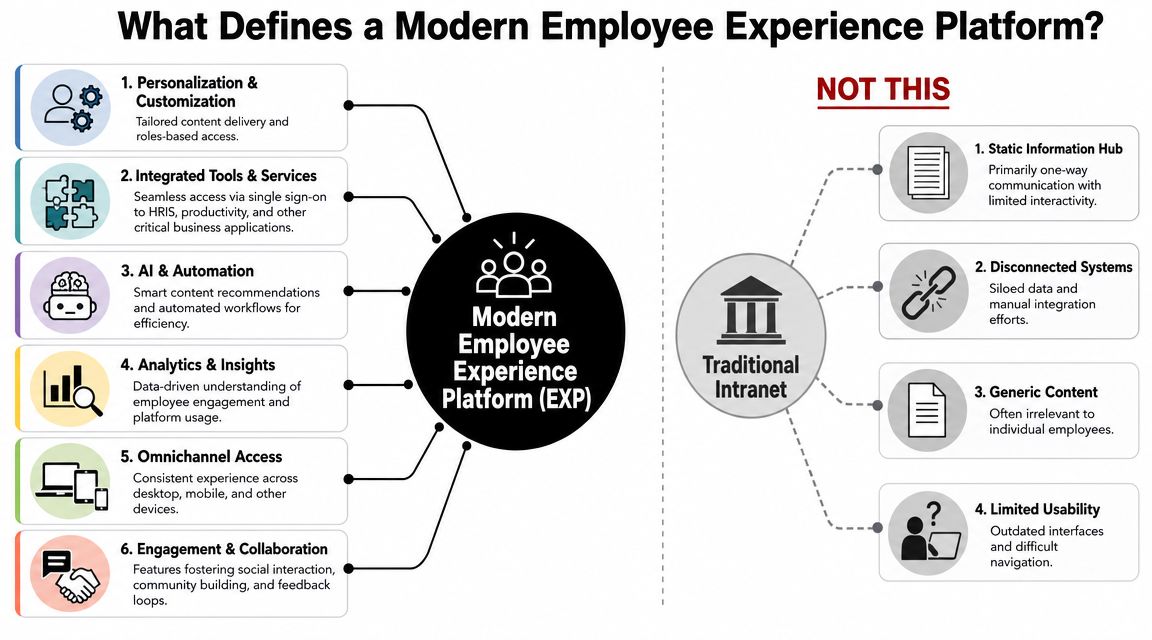
That's why the category now overlaps with service automation, enterprise search, internal communications, learning delivery, and workflow orchestration. A useful way to frame it is this:
- Traditional intranet: publishes information
- Basic portal: aggregates links
- Modern EXP: understands context, retrieves knowledge, and helps complete work
For teams exploring conversational service models, employee experience AI is a helpful example of how EX is moving beyond static self-service into HR and IT automation.
What sits underneath the experience
The visible layer is usually a chat, search bar, mobile app, employee hub, or collaboration extension inside tools like Microsoft Teams or Slack. The core platform sits underneath. It connects to HRIS, identity, ticketing, knowledge systems, learning platforms, and workflow tools.
The best implementations usually share a few traits:
- Role awareness: the experience changes for a new hire, manager, frontline worker, or regional employee.
- Workflow awareness: the system knows when a question should trigger an action instead of showing a document.
- Content discipline: search only works when ownership, freshness, permissions, and versioning are governed.
- Cross-channel continuity: employees can start on mobile, continue in chat, and finish in a service workflow without restarting.
Practical rule: If a vendor demo shows polished pages but avoids a live handoff into HRIS, identity, or workflow execution, you're probably looking at a prettier portal, not a modern employee experience platform.
This is also where many buyers get confused. They ask whether the EXP replaces the HRIS. It doesn't. The HRIS remains the system of record. The EXP becomes the employee-facing coordination layer that makes those record systems usable at speed.
The 5 Core Capabilities of an Agentic EXP
A vendor can call almost anything an employee experience platform. In enterprise practice, five capabilities separate a real platform from a branded intranet refresh.
Conversational interaction that reduces work
Employees shouldn't need to learn your internal architecture to get help. Natural language should be the default interface. That includes chat, search, guided prompts, and increasingly voice for support-heavy or frontline scenarios.
Good conversational design does more than answer questions. It clarifies intent, disambiguates policy, and moves the user to the next step. Weak designs dump search results. Strong ones resolve the issue.
Agents that take action
An agentic EXP doesn't stop at information retrieval. It executes. That might mean initiating access requests, checking leave balance, routing manager approvals, suggesting next learning steps, or opening and updating a ticket with context already attached.
Many vendors blur the difference between scripted bots and agentic systems. The distinction matters. If you need a clearer technical baseline, agentic AI 101 and how it differs from AI agents is useful because it clarifies autonomy, orchestration, and action depth.
Integrations that hold the model together
Most EXP projects succeed or fail, for a polished front end won't matter if the platform can't read from and write to the systems employees depend on. Enterprise deployments need working connections across HRIS, identity providers, collaboration suites, workflow engines, service management tools, and knowledge repositories.
The failure mode is common. A platform launches with shallow integrations, employees hit a dead end at the moment of action, and adoption drops because the “front door” still requires side doors.
Analytics that explain friction
A mature platform should help leaders understand why work feels hard, not just whether employees clicked a button. Medallia's guidance is useful here: a mature employee experience platform should consolidate at least five data classes: lifecycle, operational, direct feedback, indirect feedback, and organizational data, so leaders can connect experience changes to business outcomes rather than relying only on sentiment (Medallia on the five data types for measuring employee experience).
In practical terms, that means combining signals such as:
- Lifecycle data: onboarding stage, tenure, role change, manager change
- Operational data: ticket volumes, resolution paths, access issues, workplace services
- Direct feedback: surveys, comments, pulse responses
- Indirect feedback: search behavior, content abandonment, repeated queries
- Organizational signals: team structure, reporting changes, location, function
If your analytics only show visits, clicks, and survey averages, you won't know where work actually breaks.
Security and governance built for enterprise reality
The final capability isn't flashy, but it decides whether the platform can scale. Employee data touches sensitive domains such as payroll, benefits, identity, health-related information, performance, and access entitlements. The platform needs role-based access, permission-aware retrieval, workflow controls, auditability, multilingual governance, and region-specific operating models.
This matters even more when AI agents are taking action. Leaders need to know which actions can be automated, which require confirmation, which require approval, and how exceptions are logged. Without that discipline, “helpful automation” quickly becomes a governance problem.
Measuring the Business Impact and ROI of Your EXP
The business case for an employee experience platform gets weak when teams talk only about culture, engagement, or modernization. The board and the CFO usually want a simpler answer: what operational friction does this remove, and how will we know?
A credible ROI model starts with work, not sentiment.
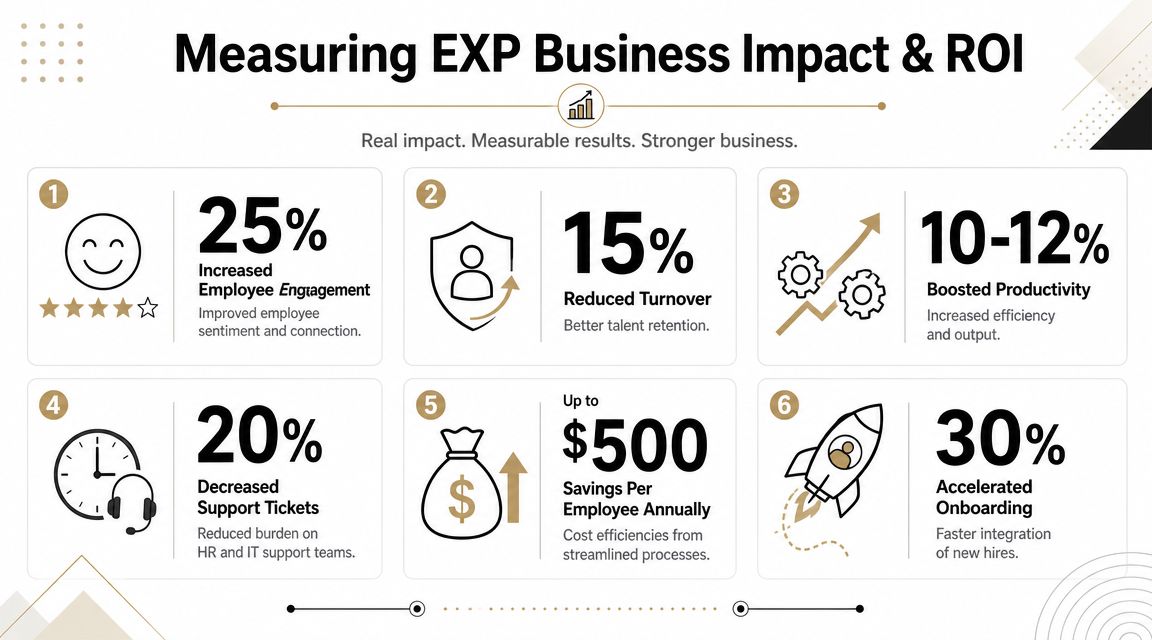
Moveworks cites two figures that explain why the category has become strategic. Organizations that prioritize employee experience see an 18% lift in productivity, and Microsoft reports that 94% of employees would stay longer at a company that invests in their development (Moveworks on what an employee experience platform is). Those numbers matter because modern platforms increasingly combine support, learning access, communications, and analytics in one environment.
What to measure instead of vanity adoption
The wrong metrics make every launch look successful. Logins, page views, and announcement reach can be useful, but they don't prove the platform changed daily work.
A better operating scorecard includes measures like these:
- Self-service completion: Can employees finish common HR and IT tasks without a handoff?
- Search effectiveness: Are people finding the right answer on the first attempt, or reformulating queries?
- Workflow friction: Where do requests stall, bounce, or revert to manual intervention?
- Administrative effort: Which transactions still require HR or IT to step in?
- Content effectiveness: Which policies are repeatedly accessed but still generate support demand?
Typically, many programs improve after the first year. The platform team stops acting like publishers and starts acting like service operators.
The video below is useful if you're framing EX in operational terms rather than as a soft initiative.
How leaders should frame the ROI case
A persuasive case usually links the platform to four business outcomes:
| Outcome area | What to look for |
|---|---|
| Productivity | Less time spent searching, switching tools, and chasing approvals |
| Retention | Better support, clearer development paths, and lower daily friction |
| Service efficiency | More successful self-service, fewer unnecessary handoffs |
| Decision quality | Better visibility into recurring employee obstacles |
“Measure the platform where work happens. If the only win you can show is a survey score, you haven't built an operating system. You've built a campaign.”
There's also a procurement lesson here. Buyers increasingly ask for proof tied to search behavior, workflow completion, and content performance, not just engagement uplift. That's the right move. ROI is strongest when the platform changes how work gets done.
Common Enterprise Use Cases in Action
The simplest way to judge an employee experience platform is to follow a few employee journeys and ask a hard question: does the platform merely point people somewhere, or does it help them finish the task?
A new hire journey without the usual delays
A new employee joins on Monday. In most enterprises, Day 1 still depends on a patchwork of welcome emails, policy PDFs, manual provisioning, manager reminders, and ticket queues. The employee doesn't experience that as “process.” They experience it as confusion.
A capable EXP handles this as one connected flow. The platform can surface the right onboarding checklist by role and location, guide benefits enrollment, answer policy questions, route equipment or access tasks, and remind the manager when their step is due. If the employee asks a question in plain language, the system should know whether to show content, launch a workflow, or escalate.
The difference is subtle but important. The platform isn't just hosting onboarding content. It is coordinating onboarding work.
Daily support that feels like assistance, not ticketing
Now take a common midweek request. An employee needs to reset access, check leave policy, update personal information, or understand an expense rule. Most companies still force a channel decision first: HR portal, IT portal, knowledge base, service desk, email, or manager.
A good EXP collapses that decision. The employee starts with the question, not the department. The platform determines the domain, authenticates context, and responds with an answer or action path.
Common patterns include:
- HR service requests: policy guidance, leave questions, employee letters, benefits navigation
- IT support flows: password resets, software access, VPN help, device support
- Internal communications: role-based announcements, policy acknowledgments, localized updates
- Manager support: team actions, approvals, reminders, and policy interpretation
Employees don't care whether a problem belongs to HR, IT, facilities, or internal communications. They care whether someone, or something, resolves it.
Internal mobility and development inside the flow of work
Development is where many employee experience programs become passive again. They host learning catalogs, career pages, and competency frameworks, then expect employees to assemble a path on their own.
An agentic model is more useful. It can suggest relevant learning based on role, recent tasks, skill gaps, or manager input. It can surface internal opportunities, explain prerequisites, and guide the employee to the next action.
That matters because development is one of the clearest ways EX connects to retention. When learning, support, and internal mobility live inside the same employee-facing layer, career growth stops feeling like a separate HR program and starts feeling like part of everyday work.
How to Evaluate and Select Your EXP Vendor
The easiest way to buy the wrong employee experience platform is to reward the best demo. Demos are controlled environments. Enterprise rollouts aren't. Vendor evaluation should focus less on how polished the home screen looks and more on how the platform behaves when it has to integrate, govern, and automate across messy systems.
LumApps' enterprise guidance gets one point exactly right: for large deployments, the critical requirement is deep integration across HRIS, collaboration suites, identity providers, and workflow systems, and weak integrations create friction after launch even when the demo looks strong (LumApps on employee experience platform features and requirements).
The questions that expose shallow platforms
Ask vendors to show real workflows, not mockups. If possible, insist on a live walkthrough of a request that moves across search, identity, knowledge, and action.
The most useful questions are usually these:
- AI maturity: Can the system reason across tools and take action, or is it still a scripted chatbot with retrieval?
- Integration depth: Are integrations bi-directional, permission-aware, and production-ready?
- Governance model: Can you support regional policies, role-based access, language variants, and approval controls?
- Analytics maturity: Can the platform show friction patterns, search behavior, and completion outcomes?
- Operating model fit: Who will own content, workflows, taxonomies, access, and prompt or agent governance?
For risk-sensitive environments, it also helps to review adjacent guidance on managing HR system risks, especially when employee data, approvals, and audit expectations cross multiple systems.
Selection advice: If a vendor can't clearly explain failure handling, permission boundaries, and fallback logic, they aren't ready for enterprise automation.
EXP Vendor Evaluation Checklist
| Evaluation Area | Key Questions to Ask | Red Flags to Watch For |
|---|---|---|
| Integration architecture | Which HRIS, collaboration, identity, and workflow systems are natively supported? Can the platform both read and write? | “We can build that later,” heavy reliance on custom work, one-way integrations |
| Conversational capability | Can employees ask open-ended questions and complete actions in the same flow? | Search dressed up as chat, rigid intents, no clarification handling |
| Agentic execution | What tasks can agents perform autonomously, and what requires approval? | No distinction between answers and actions, unclear orchestration logic |
| Search and knowledge | How does the platform handle permissions, versioning, stale content, and multilingual knowledge? | Generic search results, weak content governance, no freshness controls |
| Analytics | Can it track search reformulation, handoffs, abandonment, and self-service completion? | Dashboard limited to views, clicks, and logins |
| Security and compliance | How are access controls, audit trails, data boundaries, and admin roles managed? | Vague answers, no operational detail, unclear separation of duties |
| Change management | What rollout support, admin training, and adoption tooling are included? | Vendor treats launch as a technical deployment only |
| Total cost of ownership | What ongoing work will require services, custom development, or internal admins? | Attractive entry price but expensive dependency on services |
The right vendor usually isn't the one with the broadest slide deck. It's the one whose operating model matches your enterprise reality.
Your Implementation Roadmap for Success
Most employee experience platform failures don't come from bad intent. They come from trying to launch everything at once. The better pattern is narrower and more disciplined: pick a painful employee journey, fix it visibly, and build operating confidence before you expand.
Phase the rollout around one painful journey
Start with a high-friction use case that crosses teams and creates repeated support load. Onboarding is common. Leave and policy support is another. IT access and password-related journeys also work well because employees feel the improvement immediately.
The rollout usually works best when a small cross-functional team owns it:
- IT handles integrations, identity, environments, and security controls
- HR owns policy logic, lifecycle workflows, and service design
- Internal communications shapes content, campaigns, and targeted messaging
- Operations or service teams track handoffs, exceptions, and completion paths
A practical planning reference for the organizational side of rollout is this guide to creating an employee experience strategy. It's useful because technology adoption usually follows service design, not the other way around.
Build governance before you scale automation
After the pilot, the temptation is to add more agents, more content, and more channels immediately. Resist that. First define ownership. Who approves knowledge updates? Who monitors failed workflows? Who decides whether an agent can complete an action without confirmation? Who audits regional differences?
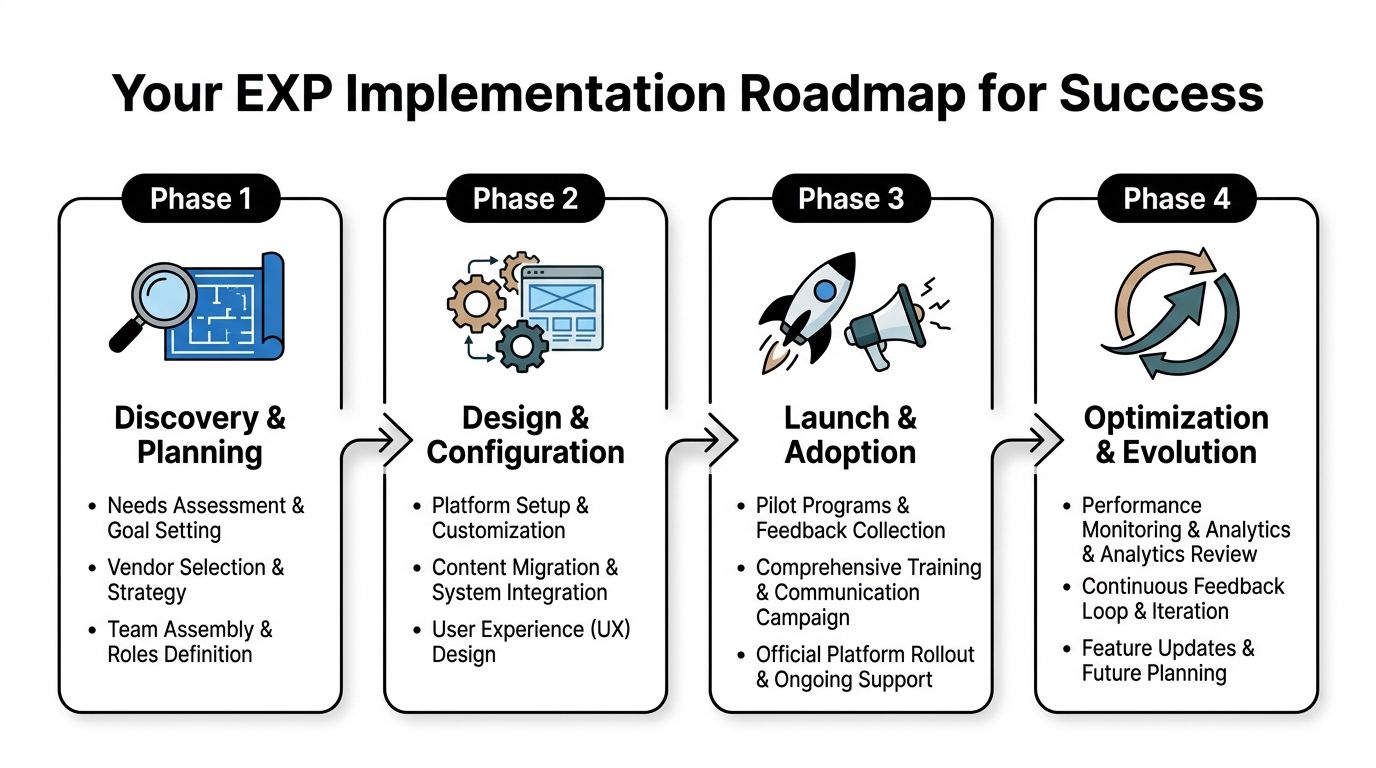
A durable roadmap usually follows four stages:
- Discovery and planning around pain points, systems, owners, and success measures
- Design and configuration for workflows, permissions, knowledge, and channels
- Launch and adoption through a pilot, targeted communications, and manager enablement
- Optimization and evolution using search behavior, completion data, and friction analysis
The long-term value of an employee experience platform is bigger than convenience. It gives the enterprise a usable surface for autonomy. Routine work becomes easier to automate because the employee-facing layer is already connected to systems, knowledge, and policy. That's the foundation for a more autonomic operating model where employees spend less time navigating the company and more time doing actual work.
Yellow.ai is one option for enterprises that want to operationalize this shift with agentic AI for employee services. Its platform is used for automating HR, IT, and service desk interactions through conversational interfaces across chat and voice, which makes it relevant when the goal is to move from static self-service to action-oriented employee support.



